Day 8: StorageClass and the First Database
Goal: The StorageClass
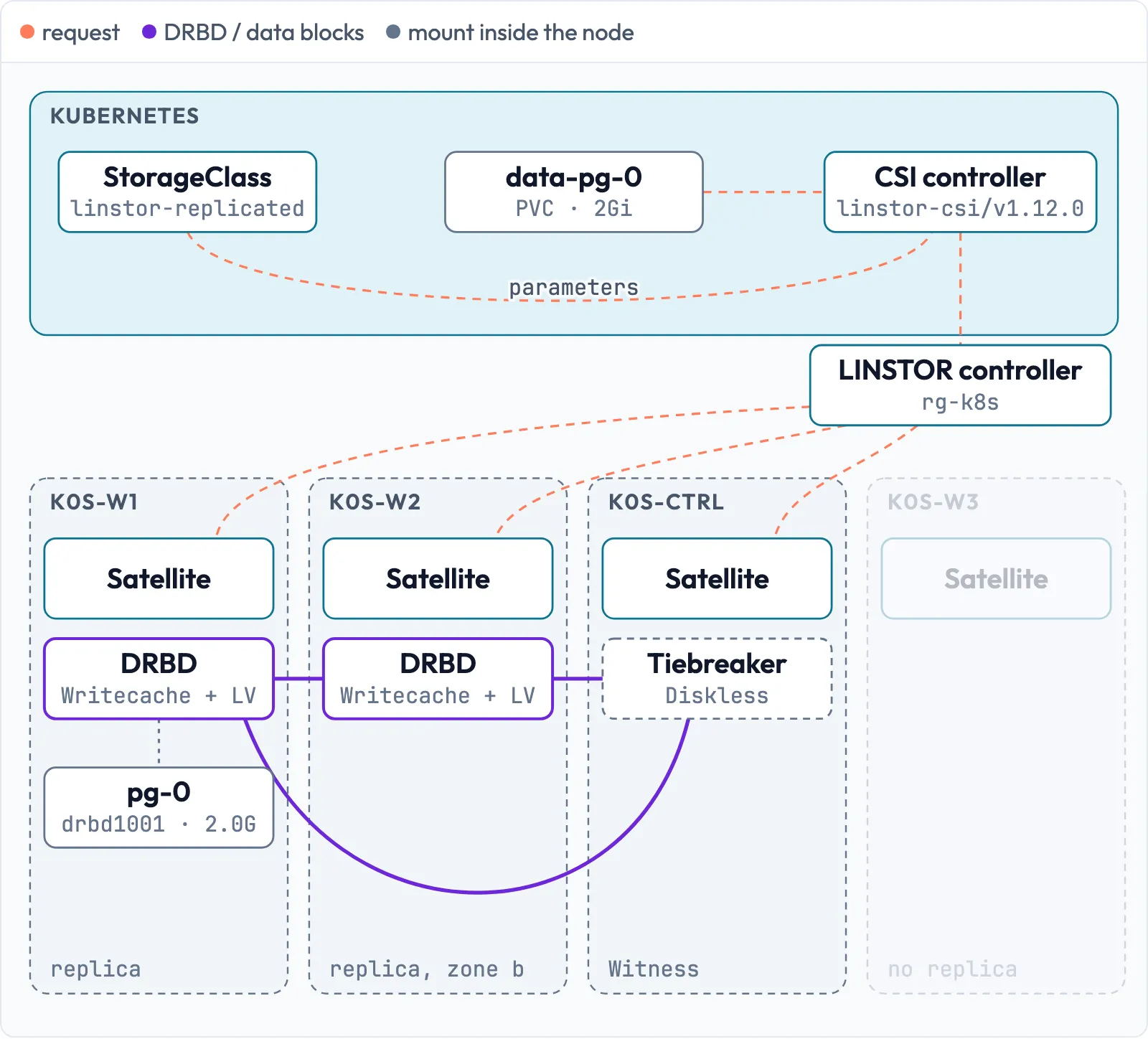
linstor-replicatedcreates volumes with two replicas in two zones plus writecache, PostgreSQL 18 runs on it with a writing client as the measuring instrument, and the Pod moves to other nodes without data loss. · Duration: approx. 45 min · Prerequisite: Day 7
Briefing
- The CSI driver translates a PVC into a LINSTOR resource. What it looks like is defined by the parameters of the StorageClass – not by the resource group.
WaitForFirstConsumeronly creates the volume once the Pod has a node.- The Pod may run on any worker: on a node with a replica, it reads and writes locally; on a node without a replica, LINSTOR attaches the volume diskless over the network.
- The writing client
pg-clientwrites one row per second and logsokorFEHLER(error). From today on, you measure every write pause with it.
Drill 1: The trap – only the resource group
The obvious idea: rg-k8s from Day 5 can already do
everything, the StorageClass only points to it.
# on k0s-ctrl
mkdir -p ~/k0s-lab/tag08 && cd ~/k0s-lab/tag08
cat > sc-nur-rg.yaml <<'EOF'
apiVersion: storage.k8s.io/v1
kind: StorageClass
metadata:
  name: nur-rg
provisioner: linstor.csi.linbit.com
parameters:
  linstor.csi.linbit.com/resourceGroup: rg-k8s
volumeBindingMode: WaitForFirstConsumer
EOF
cat > test-nur-rg.yaml <<'EOF'
apiVersion: v1
kind: PersistentVolumeClaim
metadata: {name: tag08-test}
spec:
  storageClassName: nur-rg
  accessModes: [ReadWriteOnce]
  resources: {requests: {storage: 100Mi}}
---
apiVersion: v1
kind: Pod
metadata: {name: tag08-test}
spec:
  containers:
    - name: c
      image: busybox:1.37
      command: [sleep, infinity]
      volumeMounts: [{name: d, mountPath: /d}]
  volumes:
    - name: d
      persistentVolumeClaim: {claimName: tag08-test}
EOF
kubectl apply -f sc-nur-rg.yaml -f test-nur-rg.yaml
kubectl wait --for=condition=Ready pod/tag08-test --timeout=120s
linstor --no-utf8 --no-color resource list | grep pvc- | cut -c1-88
linstor --no-utf8 --no-color resource-group list -r rg-k8s | cut -c1-55
Expected (abridged):
pod/tag08-test condition met
| pvc-ab04a399-... | k0s-w3   | DRBD,STORAGE | InUse  | Ok    |
+-------------------------------------------------------
| ResourceGroup | SelectFilter                      | V
|=======================================================
| rg-k8s        | PlaceCount: 1                     | 0
|               | StoragePool(s): pool_data         |
|               | ReplicasOnDifferent: ['Aux/zone'] |
|               | LayerStack: ['DRBD', 'STORAGE']   |
A single replica without writecache – and rg-k8s has
been rewritten: PlaceCount: 1, LayerStack
without WRITECACHE. For every volume, the CSI driver writes
the parameters of the StorageClass into the resource group; whatever is
missing, it sets to its defaults. The StorageClass is the source of
truth. Get rid of it:
# on k0s-ctrl
kubectl delete -f test-nur-rg.yaml -f sc-nur-rg.yaml
Save your progress? Sign up for free
Drill 2: The right StorageClass
Everything that defines a volume goes into the StorageClass:
# on k0s-ctrl
cat > storageclass.yaml <<'EOF'
apiVersion: storage.k8s.io/v1
kind: StorageClass
metadata:
  name: linstor-replicated
  annotations:
    storageclass.kubernetes.io/is-default-class: "true"
provisioner: linstor.csi.linbit.com
parameters:
  linstor.csi.linbit.com/resourceGroup: rg-k8s
  linstor.csi.linbit.com/storagePool: pool_data
  linstor.csi.linbit.com/placementCount: "2"
  linstor.csi.linbit.com/replicasOnDifferent: Aux/zone
  linstor.csi.linbit.com/layerList: drbd writecache storage
  property.linstor.csi.linbit.com/Writecache/PoolName: pool_nvme
  property.linstor.csi.linbit.com/Writecache/Size: "5%"
  property.linstor.csi.linbit.com/DrbdOptions/Resource/quorum: majority
  property.linstor.csi.linbit.com/DrbdOptions/Resource/on-no-quorum: suspend-io
  ? property.linstor.csi.linbit.com/DrbdOptions/Resource/on-suspended-primary-outdated
  : force-secondary
  csi.storage.k8s.io/fstype: ext4
allowVolumeExpansion: true
volumeBindingMode: WaitForFirstConsumer
reclaimPolicy: Delete
EOF
kubectl apply -f storageclass.yaml
kubectl get sc
Expected:
storageclass.storage.k8s.io/linstor-replicated created
NAME                           PROVISIONER              RECLAIMPOLICY   VOLUMEBINDING...
linstor-replicated (default)   linstor.csi.linbit.com   Delete          WaitForFirstC...
The ?/: is YAML for a long key on its own
line – only so that the line fits in the book.
property.linstor.csi.linbit.com/ sets arbitrary LINSTOR
properties on the resource. You need allowVolumeExpansion
on Day 12.
Save your progress? Sign up for free
Drill 3: PostgreSQL 18
The image postgres:18 expects the volume under
/var/lib/postgresql and stores the data itself in
18/docker below it – no longer under
/var/lib/postgresql/data as up to version 17.
# on k0s-ctrl
cat > postgres.yaml <<'EOF'
apiVersion: v1
kind: Namespace
metadata: {name: demo}
---
apiVersion: v1
kind: Service
metadata: {name: pg, namespace: demo}
spec:
  selector: {app: pg}
  ports: [{port: 5432}]
---
apiVersion: apps/v1
kind: StatefulSet
metadata: {name: pg, namespace: demo}
spec:
  serviceName: pg
  replicas: 1
  selector: {matchLabels: {app: pg}}
  template:
    metadata: {labels: {app: pg}}
    spec:
      containers:
        - name: postgres
          image: postgres:18.7
          env:
            - {name: POSTGRES_PASSWORD, value: lab-pg-123}
          volumeMounts: [{name: data, mountPath: /var/lib/postgresql}]
  volumeClaimTemplates:
    - metadata: {name: data}
      spec:
        accessModes: [ReadWriteOnce]
        resources: {requests: {storage: 2Gi}}
EOF
kubectl apply -f postgres.yaml
kubectl -n demo rollout status sts/pg --timeout=300s
kubectl -n demo get pvc,pod -o wide | cut -c1-88
kubectl -n demo exec pg-0 -- sh -c 'df -h /var/lib/postgresql; ls /var/lib/postgresql'
Expected (abridged):
partitioned roll out complete: 1 new pods have been updated...
NAME                              STATUS   VOLUME...
persistentvolumeclaim/data-pg-0   Bound    pvc-395c4ec0-...
NAME       READY   STATUS    RESTARTS   AGE   IP           NODE     NOMINATED NODE...
pod/pg-0   1/1     Running   0          45s   10.244.2.6   k0s-w1   <none>...
Filesystem      Size  Used Avail Use% Mounted on
/dev/drbd1001   2.0G   40M  1.8G   3% /var/lib/postgresql
18
lost+found
The password is in plain text in the manifest only for the lab.
lost+found is no longer in the way, because PostgreSQL 18
uses a subdirectory.
Save your progress? Sign up for free
Drill 4: What LINSTOR made of it
# on k0s-ctrl
R=$(kubectl -n demo get pvc data-pg-0 -o jsonpath='{.spec.volumeName}')
linstor --no-utf8 --no-color resource list -r $R | cut -c44-100
linstor --no-utf8 --no-color resource-group list -r rg-k8s | cut -c1-70
linstor --no-utf8 --no-color resource-definition list-properties $R
Expected (abridged):
---------------------------------------------------------
| Node     | Layers                  | Usage  | Conns |
=========================================================
| k0s-ctrl | DRBD,STORAGE            | Unused | Ok    | D
| k0s-w1   | DRBD,WRITECACHE,STORAGE | InUse  | Ok    | U
| k0s-w2   | DRBD,WRITECACHE,STORAGE | Unused | Ok    | U
...
| rg-k8s        | PlaceCount: 2                                 |
|               | StoragePool(s): pool_data                     |
|               | ReplicasOnDifferent: ['Aux/zone']             |
|               | LayerStack: ['DRBD', 'WRITECACHE', 'STORAGE'] |
...
| Aux/csi-provisioning-completed-by    | linstor-csi/v1.12.0 |
| Aux/csi.storage.k8s.io/pvc/name      | data-pg-0           |
| Aux/csi.storage.k8s.io/pvc/namespace | demo                |
| DrbdOptions/Resource/quorum          | majority            |
...
Two zones, writecache, tiebreaker on the witness, and
rg-k8s is repaired again. This also proves that CSI v1.12.0
creates volumes against LINSTOR 1.34.2. Via
Aux/csi.storage.k8s.io/pvc/name, you find the PVC for every
resource without asking Kubernetes.
Tip: The driver also removed the volume group of
rg-k8s(linstor volume-group list rg-k8sis empty). A manualspawn-resourcesfromrg-k8sthen creates resources without a volume. For manual tests, use a group of your own.
Save your progress? Sign up for free
Drill 5: The measuring instrument
# on k0s-ctrl
cat > pg-client.yaml <<'EOF'
apiVersion: apps/v1
kind: Deployment
metadata: {name: pg-client, namespace: demo}
spec:
  replicas: 1
  selector: {matchLabels: {app: pg-client}}
  template:
    metadata: {labels: {app: pg-client}}
    spec:
      containers:
        - name: client
          image: postgres:18.7
          env: [{name: PGPASSWORD, value: lab-pg-123}]
          command: [bash, -c]
          args:
            - |
              until timeout 3 psql -h pg -U postgres -qc "create table if not exists
                puls (zeit timestamptz default now())"; do sleep 2; done
              while true; do
                if timeout 3 psql -h pg -U postgres -qc \
                  "insert into puls default values" 2>/dev/null; then
                  echo "$(date +%T) ok"
                else
                  echo "$(date +%T) FEHLER"
                fi
                sleep 1
              done
EOF
kubectl apply -f pg-client.yaml
kubectl -n demo rollout status deploy/pg-client
kubectl -n demo logs deploy/pg-client --tail=3
Expected:
deployment.apps/pg-client created
deployment "pg-client" successfully rolled out
01:24:04 ok
01:24:06 ok
01:24:07 ok
timeout 3 makes sure that a hanging write counts as
FEHLER after three seconds instead of stalling the
measuring instrument as well. In the until loop, it keeps
the client from hanging forever at startup on a server that is not ready
yet – which would otherwise happen, for example, during the restore on
Day 13.
Save your progress? Sign up for free
Drill 6: Moving to the other replica
# on k0s-ctrl
kubectl -n demo exec pg-0 -- psql -U postgres \
  -c "create table notizen(id serial primary key, text text,
      zeit timestamptz default now())" \
  -c "insert into notizen(text) values ('geschrieben auf k0s-w1')"
kubectl cordon k0s-w1
kubectl -n demo delete pod pg-0
kubectl -n demo wait --for=condition=Ready pod/pg-0 --timeout=180s
kubectl -n demo get pod pg-0 -o wide | cut -c1-80
kubectl -n demo exec pg-0 -- psql -U postgres -c "select * from notizen"
kubectl uncordon k0s-w1
kubectl -n demo logs deploy/pg-client | uniq -c -f1
Expected (abridged):
CREATE TABLE
INSERT 0 1
node/k0s-w1 cordoned
pod "pg-0" deleted from demo namespace
pod/pg-0 condition met
NAME   READY   STATUS    RESTARTS   AGE   IP           NODE     NOMINATED NODE   READINE
pg-0   1/1     Running   0          9s    10.244.1.9   k0s-w2   <none>           <none>
 id |          text          |             zeit
----+------------------------+-------------------------------
  1 | geschrieben auf k0s-w1 | 2026-11-20 01:24:21.405699+00
(1 row)

node/k0s-w1 uncordoned
     17 01:24:02 ok
      3 01:24:25 FEHLER
      9 01:24:35 ok
The Pod runs on k0s-w2, the replica in zone b, and the
row is there. Three failed attempts, a good ten seconds of pause – that
is the PostgreSQL restart, not the storage. In LINSTOR,
k0s-w2 is now InUse.
Save your progress? Sign up for free
Drill 7: Moving to a node without a replica
k0s-w3 has no replica. Cordon the two other workers,
then only it remains:
# on k0s-ctrl
kubectl cordon k0s-w1 k0s-w2
kubectl -n demo delete pod pg-0
kubectl -n demo wait --for=condition=Ready pod/pg-0 --timeout=180s
kubectl uncordon k0s-w1 k0s-w2
linstor --no-utf8 --no-color resource list -r $R | cut -c44-100
ssh k0s-w3 "sudo drbdadm status $R"
Expected (abridged):
...
| k0s-ctrl | DRBD,STORAGE            | Unused | Ok    | D
| k0s-w1   | DRBD,WRITECACHE,STORAGE | Unused | Ok    | U
| k0s-w2   | DRBD,WRITECACHE,STORAGE | Unused | Ok    | U
| k0s-w3   | DRBD,STORAGE            | InUse  | Ok    | D
...
pvc-395c4ec0-... role:Primary
  disk:Diskless client:yes open:yes
  k0s-w1 role:Secondary
    peer-disk:UpToDate
  k0s-w2 role:Secondary
    peer-disk:UpToDate
LINSTOR created a diskless resource on k0s-w3: every
write goes over the storage network to both replicas, every read to one
of them. There is no connection to the witness – two diskless
participants have nothing to say to each other. This time the pause was
longer:
# on k0s-ctrl
kubectl -n demo describe pod pg-0 | grep -E 'Attach|Pulled' | cut -c1-88
Expected (abridged):
  Warning  FailedAttachVolume      56s   attachdetach-controller  Waiting for detach...
  Normal   SuccessfulAttachVolume  51s   attachdetach-controller  AttachVolume.Attach...
  Normal   Pulled                  17s   kubelet                  spec.containers{pos...
The storage was there after five seconds; 29 seconds went to the
image, which was not yet on k0s-w3. In production, images
belong on all nodes in advance.
Save your progress? Sign up for free
Exercise: Speed Drills
- Show the name of the LINSTOR resource behind
data-pg-0. Target time: 20 s - Show the default StorageClass. Target time: 10 s
- Show the last three lines of the measuring instrument. Target time: 10 s
- Show whether
pg-0currently writes locally or diskless. Target time: 30 s
Solution
# on k0s-ctrl
kubectl -n demo get pvc data-pg-0 -o jsonpath='{.spec.volumeName}{"\n"}'
kubectl get sc
kubectl -n demo logs deploy/pg-client --tail=3
kubectl -n demo get pod pg-0 -o jsonpath='{.spec.nodeName}{"\n"}'
linstor --no-utf8 --no-color resource list -r $R | grep InUse | cut -c44-100
Expected (abridged):
pvc-395c4ec0-...
linstor-replicated (default)   linstor.csi.linbit.com   Delete          WaitForFirstC...
01:27:20 ok
01:27:21 ok
01:27:22 ok
k0s-w3
| k0s-w3   | DRBD,STORAGE            | InUse  | Ok    | D
DRBD,STORAGE without WRITECACHE and a
State starting with D… means diskless.
Save your progress? Sign up for free
Checkpoint
# on k0s-ctrl
kubectl -n demo get pvc,pod
Expected: data-pg-0 Bound
2Gi on linstor-replicated, pg-0 and
pg-client Running.
# on k0s-ctrl
kubectl -n demo logs deploy/pg-client --tail=5
Expected: only ok lines with
consecutive timestamps.
# on k0s-ctrl
linstor --no-utf8 --no-color resource-group list -r rg-k8s | cut -c1-70
Expected: PlaceCount: 2,
ReplicasOnDifferent: ['Aux/zone'],
LayerStack: ['DRBD', 'WRITECACHE', 'STORAGE'].
Challenge
pg-0 runs diskless on k0s-w3. Bring the
data to the Pod without stopping it: k0s-w3 should get a
replica with data, and the replica on k0s-w1 (same zone)
should go away. At the end, there are two replicas in two zones again,
and the measuring instrument shows no error.
Hint: linstor resource toggle-disk
turns a diskless resource into one with data.
Solution
# on k0s-ctrl
linstor resource toggle-disk k0s-w3 $R --storage-pool pool_data
linstor --no-utf8 --no-color resource list -r $R | cut -c44-100
Expected (abridged):
SUCCESS:
    Addition of disk to resource 'pvc-395c4ec0-...' on node 'k0s-w3' registered
...
INFO:
    Tie breaker marked for deletion
...
| k0s-w1 | DRBD,WRITECACHE,STORAGE | Unused | Ok    |
| k0s-w2 | DRBD,WRITECACHE,STORAGE | Unused | Ok    |
| k0s-w3 | DRBD,WRITECACHE,STORAGE | InUse  | Ok    | Syn
With three replicas, no tiebreaker is needed anymore. Wait until
k0s-w3 is UpToDate, then delete the surplus
replica:
# on k0s-ctrl
linstor resource delete k0s-w1 $R
linstor --no-utf8 --no-color resource list -r $R | cut -c44-100
kubectl -n demo logs deploy/pg-client --since=5m | uniq -c -f1 | tail -1
Expected (abridged):
INFO:
    Tie breaker resource 'pvc-395c4ec0-...' created on k0s-ctrl
...
| k0s-ctrl | DRBD,STORAGE            | Unused | Ok    | D
| k0s-w2   | DRBD,WRITECACHE,STORAGE | Unused | Ok    | U
| k0s-w3   | DRBD,WRITECACHE,STORAGE | InUse  | Ok    | U
     81 01:25:30 ok
The resync ran underneath the running database without a single error. Check where the writecache of the new replica ended up:
# on k0s-ctrl
ssh k0s-w3 "sudo lvs --noheadings -o lv_name,vg_name,lv_size | grep ${R:0:12}"
Expected (abridged):
  pvc-395c4ec0-....cache_00000 data  104.00m
  pvc-395c4ec0-..._00000       data    2.00g
The cache LV lives in VG data, not in
cache: toggle-disk uses the same pool for the
cache as for the data and ignores Writecache/PoolName.
Checked in the lab with LINSTOR 1.34.2 and 1.35.3 – with and without
--storage-pool, also with the property on the resource
definition or volume definition. A fresh
linstor resource create on a node without the resource, by
contrast, puts the cache correctly into pool_nvme. The
writecache works this way but speeds up nothing. In your lab, the
restore on Day 13 fixes this at the latest, because it creates the
volume anew. Without a restore: as soon as pg-0 runs
elsewhere, delete the replica on k0s-w3 with
linstor resource delete and create it again with
linstor resource create.
Save your progress? Sign up for free
Cleanup
Nothing. demo/pg and pg-client stay as test
load for the following days.
Interview Note
- Where do the replicas and layers of a CSI volume come from? From the parameters of the StorageClass. The driver writes them into the resource group for every volume.
- Can a Pod run on a node without a replica? Yes, diskless: DRBD reads and writes over the network. Slower, but without data loss.
- How do you measure the impact of maintenance on a database? With a client that writes every second and logs success or failure with a timestamp.
Enterprise Note
- One StorageClass per class (e.g.,
linstor-fastwith writecache,linstor-bulkwithout), each with its own resource group, so the classes do not rewrite each other. allowRemoteVolumeAccessin the StorageClass limits where diskless mounts are allowed – for example only within the zone, if the network between zones is expensive.- Passwords as a Secret (better: External Secrets/Vault), databases with an operator such as CloudNativePG instead of your own StatefulSet.
- Distribute images in advance or run a registry nearby – otherwise the image pull determines the downtime.