Day 10: When a Node Fails
Goal: You take a node down for maintenance without data loss, read the timeline of a crash and bring back a database whose node does not return. · Duration: approx. 75 min · Prerequisite: Day 9
Briefing
- Planned maintenance: Pods away
(
drain), hand over the controller (evict), reboot, wait until--faultyis empty, release the node (uncordon). - Crash with a quick reboot: heals itself. Most of the time is spent waiting for the CSI driver.
- Node stays gone: Kubernetes does not start
pg-0elsewhere as long as nobody confirms that the old node is dead. This confirmation is the out-of-service taint. - The measuring instrument from Day 8 (
pg-client) shows every write pause to the second.
 Maintenance: drain -> evict -> reboot -> --faulty empty -> uncordon
 Crash:       gone -> boot -> CSI registered -> mount -> PostgreSQL starts
 Stays gone:  NotReady -> 5 min -> Terminating (hangs) -> taint -> new Pod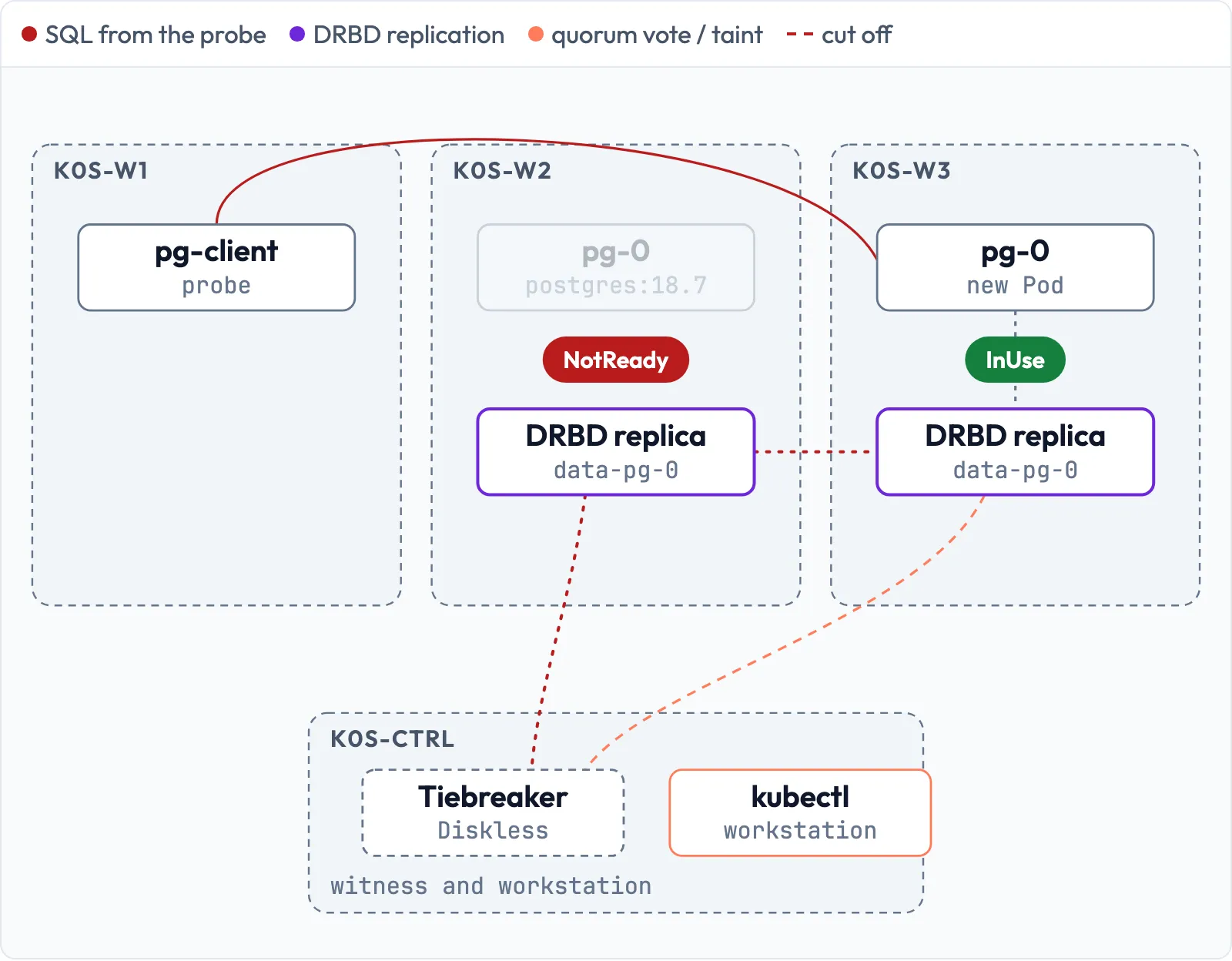
Drill 1: The situation picture
Before every intervention, you answer three questions: Where does the database run, where are its replicas, where does the LINSTOR controller run? Fixed assumptions do not help – the controller moves with every failover.
# on k0s-ctrl
mkdir -p ~/k0s-lab/tag10 && cd ~/k0s-lab/tag10
R=$(kubectl -n demo get pvc data-pg-0 -o jsonpath='{.spec.volumeName}')
kubectl -n demo get pod -o wide | cut -c1-90
linstor --no-utf8 --no-color resource list -r $R | cut -c44-110
for h in k0s-w1 k0s-w2 k0s-w3; do
  echo "$h: $(ssh $h sudo drbd-reactorctl status linstor_db | sed -n 2p)"
done
Expected (abridged):
NAME                         READY   STATUS    RESTARTS   AGE   IP            NODE
pg-0                         1/1     Running   0          14m   10.244.0.12   k0s-w3
pg-client-5b5b6d6bfd-98zm6   1/1     Running   0          15m   10.244.1.8    k0s-w2
...
| k0s-ctrl | DRBD,STORAGE            | Unused | Ok    | Diskless |
| k0s-w2   | DRBD,WRITECACHE,STORAGE | Unused | Ok    | UpToDate |
| k0s-w3   | DRBD,WRITECACHE,STORAGE | InUse  | Ok    | UpToDate |
k0s-w1: Promoter: Resource linstor_db currently active on this node
k0s-w2: Promoter: Resource linstor_db currently active on node 'k0s-w1'
k0s-w3: Promoter: Resource linstor_db currently active on node 'k0s-w1'
In your cluster, the nodes may be distributed differently. In the
following drills, replace the names with yours: “the node with
pg-0”, “the node with the controller”.
Save your progress? Sign up for free
Drill 2: Planned maintenance
The node with pg-0 is to be rebooted. Record the
measuring instrument, in a second terminal or in the background. Cordon
k0s-w1 first: otherwise the scheduler may also start
pg-0 there, on a node without a replica (diskless, Day 8) –
exactly that happened in the lab. This way, the database moves to
k0s-w2, the node with the second replica:
# on k0s-ctrl
kubectl -n demo logs -f deploy/pg-client --since=1s > puls-wartung.log &
kubectl cordon k0s-w1
kubectl drain k0s-w3 --ignore-daemonsets --delete-emptydir-data
ssh k0s-w3 'sudo drbd-reactorctl status linstor_db | sed -n 2p'
Expected (abridged):
node/k0s-w1 cordoned
...
evicting pod demo/pg-0
pod/pg-0 evicted
...
node/k0s-w3 drained
Promoter: Resource linstor_db currently active on node 'k0s-w1'
The controller does not run here, so evict is not
needed. If it did run here, you would now hand it over with
sudo drbd-reactorctl evict linstor_db (Day 6) and wait
until linstor node list responds again. Now the reboot:
# on k0s-ctrl
ssh k0s-w3 'sudo systemctl reboot'
linstor --no-utf8 --no-color node list | grep k0s-w3
linstor --no-utf8 --no-color resource list --faulty | grep -c '| k0s'
Expected (about 30 s after the reboot):
| k0s-w3   | LINUX    | SATELLITE | 10.10.0.13:3366 (PLAIN)   | OFFLINE |
7
All seven lines of both resources (linstor_db and
data-pg-0) count as faulty as long as one peer is
missing.
Repeat the two linstor commands until
k0s-w3 is Online and 0 comes
back. In the lab, this took a good two minutes from the
reboot (2:11), measured in a later run with the monitoring
Pods from Day 17 – on Day 10, the shutdown is faster:
| Phase | Duration |
|---|---|
| Shutdown: the kubelet stops the Pods in an orderly way (Day 2), then systemd | 43 s |
Boot until k0sworker and linstor-satellite
are running |
46 s |
Node Ready again in Kubernetes |
22 s |
Satellite Online (Java start, reconciliation with the
controller) |
17 s |
Resync until --faulty is empty |
3 s |
You read the individual times afterwards on the node itself:
journalctl -b -1 -n1 (last line before the reboot) and
systemctl show -p ActiveEnterTimestamp linstor-satellite.
Warning: Right after
reboot, LINSTOR still showsOnlineand an empty--faultyfor up to a good minute – the node first shuts down in an orderly way. Check withssh k0s-w3 uptime -sthat it has really rebooted before you touch the next node.
# on k0s-ctrl
kubectl uncordon k0s-w1 k0s-w3
grep -c FEHLER puls-wartung.log
Expected:
node/k0s-w1 uncordoned
node/k0s-w3 uncordoned
5
The five errors (FEHLER, just under 15 s) come from
moving pg-0 to k0s-w2 during the
drain, not from the reboot: the Pod waits until the volume
has been released on the old node. A database with a single instance has
a short pause on every drain.
Save your progress? Sign up for free
Drill 3: Getting the measuring instrument to safety
For the next experiments, pg-client must not run on the
node that gets hit. Check where the two Pods are now:
# on k0s-ctrl
kill %1
kubectl -n demo get pod -o wide | cut -c1-90
Expected (abridged):
pg-0                         1/1     Running   0          3m39s   10.244.1.11   k0s-w2
pg-client-5b5b6d6bfd-98zm6   1/1     Running   0          19m     10.244.1.8    k0s-w2
Both on k0s-w2. Briefly cordon the other nodes and let
the client be rescheduled:
# on k0s-ctrl
kubectl cordon k0s-w2 k0s-w3
kubectl -n demo delete pod -l app=pg-client
kubectl -n demo rollout status deploy/pg-client
kubectl uncordon k0s-w2 k0s-w3
kubectl -n demo get pod -l app=pg-client -o wide | cut -c1-90
Expected (abridged):
deployment "pg-client" successfully rolled out
...
pg-client-5b5b6d6bfd-r2ck8   1/1     Running   0          32s     10.244.2.8    k0s-w1
Save your progress? Sign up for free
Drill 4: A crash
Now the node with pg-0 crashes, without shutting
down:
Warning:
bin/proc/sysrq-triggerreboots the host immediately, without syncing and without asking. Only in the lab and only on the node you mean.
# on k0s-ctrl
kubectl -n demo logs -f deploy/pg-client --since=1s > puls-absturz.log &
ssh k0s-w2 'date +%T; echo b | sudo tee /proc/sysrq-trigger'
The SSH session hangs afterwards – end it with Ctrl+C. After about three minutes:
# on k0s-ctrl
kubectl -n demo get events --field-selector involvedObject.name=pg-0 \
  --sort-by=.lastTimestamp \
  -o custom-columns=ZEIT:.lastTimestamp,GRUND:.reason,MELDUNG:.message \
  | tail -8 | cut -c12-88
kubectl -n demo get events \
  --field-selector involvedObject.name=pg-0,reason=FailedMount \
  -o jsonpath='{.items[-1:].count} {.items[-1:].message}' | fold -w 80
The column names ZEIT, GRUND and
MELDUNG mean time, reason and message.
Expected (abridged):
07:36:00Z   NodeNotReady             Node is not ready
07:36:15Z   TaintManagerEviction     Cancelling deletion of Pod demo/pg-0
07:36:46Z   FailedMount              MountVolume.MountDevice failed for volum
07:37:21Z   SandboxChanged           Pod sandbox changed, it will be killed a
07:37:23Z   Pulled                   Container image "postgres:18.7" already
07:37:23Z   Created                  Container created
07:37:24Z   Started                  Container started
7 MountVolume.MountDevice failed for volume "pvc-11dccaf7-..." : kubernetes.io/c
si: attacher.MountDevice failed to create newCsiDriverClient: driver name linsto
r.csi.linbit.com not found in the list of registered CSI drivers
TaintManagerEviction with
Cancelling deletion means: Kubernetes had already scheduled
the Pod for eviction (taint not-ready) and cancels it
because the node is back. The mount fails seven times because the CSI
driver is not yet registered on k0s-w2. Its init container
linstor-wait-node-online waits until the satellite is
Online in LINSTOR – so the satellite slows down the mount
as well:
# on k0s-ctrl
P=$(kubectl -n piraeus-datastore get pod -o wide | awk '/csi-node.*k0s-w2/{print $1}')
kubectl -n piraeus-datastore get pod $P -o custom-columns=\
INIT:.status.initContainerStatuses[0].name,\
FERTIG:.status.initContainerStatuses[0].state.terminated.finishedAt
Expected:
INIT                       FERTIG
linstor-wait-node-online   2026-11-20T07:36:40Z
FERTIG means finished. The timeline from the lab:
| Time | Event |
|---|---|
| 07:35:12 | crash, from 07:35:16 the measuring instrument reports
FEHLER |
| 07:35:53 | k0s-w2 has booted, k0sworker and satellite
start |
| 07:36:00 | only now does Kubernetes notice: NodeNotReady |
| 07:36:34 | satellite Online, 07:36:47 CSI driver registered |
| 07:37:18 | next mount attempt after the kubelet’s backoff, succeeds |
| 07:37:24 | PostgreSQL starts, from 07:37:30 ok again |
A good two minutes of downtime (138 s), no manual work, no data loss.
The backoff alone costs 31 seconds of it (07:36:47 to 07:37:18): after
every failed mount, the kubelet waits longer. Kubernetes did not move
the Pod because the node was back before the five minutes had passed.
Meanwhile, DRBD brought the replica on k0s-w2 up to
date:
# on k0s-ctrl
kill %1
ssh k0s-w2 "sudo journalctl -k -b | grep -E 'resync-finished' | head -1 | cut -c1-110"
linstor --no-utf8 --no-color resource list --faulty | cut -c1-70
Expected (abridged):
Nov 20 07:36:37 k0s-w2 kernel: drbd pvc-11dccaf7-.../0 drbd1001: disk( Inconsistent ->
+-------------------------------------------------------------+
| ResourceName | Node | Layers | Usage | Conns | State | Vote |
|=============================================================|
+-------------------------------------------------------------+
Save your progress? Sign up for free
Drill 5: A node that does not come back
The hardest case: the node with pg-0 is gone and stays
gone, for example because of a broken power supply. Without access to
the hypervisor, you simulate this with a firewall: the node loses all
networking, only SSH from your workstation remains. For the cluster,
this is the same as a node that has been switched off. A timer reliably
brings the network back after 30 minutes. Beforehand, start the
recording on k0s-ctrl again
(… > puls-weg.log &).
Warning: The two
ACCEPTrules for SSH from172.16.0.176must come before theDROPrules. If they are missing or the address is wrong, you lock yourself out until the timer brings the network back after 30 minutes.
# on k0s-w2
sudo systemd-run --unit=netz-zurueck --on-active=30min iptables -t raw -F
sudo iptables -t raw -A PREROUTING -s 172.16.0.176 -p tcp --dport 22 -j ACCEPT
sudo iptables -t raw -A PREROUTING ! -i lo -j DROP
sudo iptables -t raw -A OUTPUT -d 172.16.0.176 -p tcp --sport 22 -j ACCEPT
sudo iptables -t raw -A OUTPUT ! -o lo -j DROP
The raw table takes effect before the kube-router rules.
The unit name netz-zurueck means “network back”. After 30
seconds:
# on k0s-ctrl
ssh k0s-w2 "sudo drbdsetup status --verbose $R | head -1"
ssh k0s-w3 "sudo drbdadm status $R"
Expected:
pvc-11dccaf7-... node-id:1 role:Primary suspended:quorum
pvc-11dccaf7-... role:Secondary
  disk:UpToDate open:no
  k0s-ctrl role:Secondary
    peer-disk:Diskless peer-client:yes
  k0s-w2 connection:Connecting
The isolated Primary no longer has quorum and suspends all writes.
Together with the witness, k0s-w3 would have the majority –
but nobody uses the volume there. After six minutes:
# on k0s-ctrl
kubectl get node k0s-w2 | cut -c1-19
kubectl -n demo get pod pg-0 -o wide | cut -c1-90
Expected (abridged):
NAME     STATUS
k0s-w2   NotReady
NAME   READY   STATUS        RESTARTS      AGE   IP            NODE
pg-0   1/1     Terminating   1 (10m ago)   15m   10.244.1.82   k0s-w2
After five minutes (tolerationSeconds: 300), Kubernetes
marks the Pod for deletion. Only the kubelet on k0s-w2 can
delete it – and that kubelet is unreachable. The StatefulSet does not
start a replacement: there must never be two pg-0, and
Kubernetes does not know whether the old instance is still writing.
Save your progress? Sign up for free
Drill 6: The out-of-service taint
You give the confirmation “this node is dead” with a taint:
Warning: Only set the taint when the node is definitely off (hypervisor, IPMI, data center). If it is still alive, DRBD quorum protects you from double writes, but the application there gets I/O errors (Day 11).
# on k0s-ctrl
kubectl taint node k0s-w2 node.kubernetes.io/out-of-service=nodeshutdown:NoExecute
kubectl -n demo wait --for=condition=Ready pod/pg-0 --timeout=180s
kubectl -n demo get pod pg-0 -o wide | cut -c1-90
linstor --no-utf8 --no-color resource list -r $R | cut -c44-120
Expected (abridged):
node/k0s-w2 tainted
pod/pg-0 condition met
pg-0   1/1     Running   0          6s    10.244.0.77   k0s-w3
...
| k0s-ctrl | DRBD,STORAGE            | Unused | Connecting(k0s-w2) | Diskless
| k0s-w2   | DRBD,WRITECACHE,STORAGE |        |                    |  Unknown
| k0s-w3   | DRBD,WRITECACHE,STORAGE | InUse  | Connecting(k0s-w2) | UpToDate
15 seconds after the taint, the database was running on
k0s-w3, with all its data. Here, it landed on the node with
the second replica. If the scheduler picks a node without a replica,
LINSTOR attaches the volume there diskless (Day 8) – it works, but every
access goes over the network.
# on k0s-ctrl
kubectl get pods -A --field-selector spec.nodeName=k0s-w2 | cut -c1-60
Expected:
NAMESPACE     NAME                       READY   STATUS    R
kube-system   konnectivity-agent-zwktx   1/1     Running   3
kube-system   kube-proxy-tww5p           1/1     Running   1
kube-system   kube-router-8rxll          1/1     Running   1
The taint has evicted everything without a matching toleration –
including linstor-csi-node. That becomes important when the
node returns.
Save your progress? Sign up for free
Drill 7: The node comes back
The node has been repaired:
# on k0s-w2
sudo systemctl stop netz-zurueck.timer
sudo iptables -t raw -F
# on k0s-ctrl
ssh k0s-w2 "sudo drbdadm status $R | head -2; mount | grep -c drbd1001"Expected (five seconds after the release):
pvc-11dccaf7-... role:Secondary suspended:quorum
force-io-failures:yes
1force-secondary (Day 5) has demoted the old Primary;
every access by the old file system fails
(force-io-failures:yes). suspended:quorum
shows: this soon after the release, the node has not regained its quorum
yet. No split brain, the data from k0s-w3 counts. But the
device is still mounted: the kubelet wants to unmount it and fails
because the CSI driver is missing there:
# on k0s-ctrl
ssh k0s-w2 "sudo journalctl -u k0sworker --since -1min" \
| grep -o 'UnmountVolume.TearDown failed' | head -1Expected:
UnmountVolume.TearDown failedRemove the taint:
# on k0s-ctrl
kubectl taint node k0s-w2 node.kubernetes.io/out-of-service=nodeshutdown:NoExecute-
kubectl -n piraeus-datastore rollout status ds/linstor-csi-node
kubectl get csinode k0s-w2 -o jsonpath='{.spec.drivers[*].name}{"\n"}'Expected:
node/k0s-w2 untainted
daemon set "linstor-csi-node" successfully rolled out
linstor.csi.linbit.comIf the last line stays empty, the driver has not registered with the kubelet yet – in the lab, that happened one second after the rollout. Then repeat the last command.
The kubelet retries the unmount at growing intervals. After about a minute:
# on k0s-ctrl
ssh k0s-w2 "sudo drbdadm status $R | head -2; mount | grep -c drbd1001"
linstor --no-utf8 --no-color resource list --faulty | cut -c1-70Expected:
pvc-11dccaf7-... role:Secondary
  disk:UpToDate open:no
0
+-------------------------------------------------------------+
| ResourceName | Node | Layers | Usage | Conns | State | Vote |
|=============================================================|
+-------------------------------------------------------------+
Everything is clean, the replica on k0s-w2 is up to date
again. Total downtime of the database: just under seven minutes (6:47),
of which five minutes were spent waiting for the toleration and 21
seconds after the taint until pg-client reported
ok again.
Tip: LINSTOR does not create new replicas for a dead node.
linstor controller list-properties | grep AutoEvictshowsDrbdOptions/AutoEvictAllowEviction false– set by the Piraeus Operator (Day 7). A failed node stays failed until you repair it (disk replacement: Day 14) or deliberately move its replicas.
Save your progress? Sign up for free
Exercise: Speed Drills
- Show on which node the LINSTOR controller is currently running. Target time: 20 s
- Show all taints of all nodes. Target time: 20 s
- Count the Pods running on
k0s-w3. Target time: 15 s - Show after how long Kubernetes deletes Pods of an unreachable node. Target time: 20 s
Solution
# on k0s-ctrl
for h in k0s-w1 k0s-w2 k0s-w3; do
  echo "$h $(ssh $h sudo drbd-reactorctl status linstor_db | sed -n 2p)"
done | grep 'this node'
kubectl get nodes -o custom-columns=NAME:.metadata.name,TAINTS:.spec.taints[*].key
kubectl get pods -A --field-selector spec.nodeName=k0s-w3 --no-headers | wc -l
kubectl -n demo get pod pg-0 -o jsonpath='{.spec.tolerations}' | tr '{' '\n' \
  | grep -o 'unreachable.*'
Expected (abridged):
k0s-w1 Promoter: Resource linstor_db currently active on this node
NAME     TAINTS
k0s-w1   <none>
k0s-w2   <none>
k0s-w3   <none>
8
unreachable","operator":"Exists","tolerationSeconds":300}]
Save your progress? Sign up for free
Checkpoint
# on k0s-ctrl
kubectl get nodes -o custom-columns=NAME:.metadata.name,TAINTS:.spec.taints[*].key
Expected: three nodes, all <none>
– no forgotten out-of-service taint.
# on k0s-ctrl
linstor --no-utf8 --no-color resource list --faulty
Expected: an empty table.
# on k0s-ctrl
ssh k0s-w2 'sudo iptables -t raw -S | grep -c DROP'
Expected: 0.
# on k0s-ctrl
kubectl -n demo logs deploy/pg-client --tail=3
Expected: only ok lines.
Challenge
Take down for maintenance the node on which the LINSTOR controller is currently running: Pods away, hand over the controller, reboot, bring it back cleanly. Measure how long the LINSTOR API does not respond.
Hint: evict before the reboot turns a
timeout into a handover within seconds.
Solution
# on k0s-ctrl
kubectl drain k0s-w1 --ignore-daemonsets --delete-emptydir-data
ssh k0s-w1 'sudo drbd-reactorctl evict linstor_db'
date +%T; until linstor node list >/dev/null 2>&1; do sleep 1; done; date +%T
Expected (abridged):
node/k0s-w1 drained
Node 'k0s-w2' took over
Re-enabling linstor_db
07:50:36
07:51:03
After evict finished, another 27 seconds without an API
(plus the handover itself); DRBD and the database kept running. Then the
reboot:
# on k0s-ctrl
ssh k0s-w1 'sudo systemctl reboot'
ssh k0s-w1 uptime -s
linstor --no-utf8 --no-color node list | grep k0s-w1
linstor --no-utf8 --no-color resource list --faulty | grep -c '| k0s'
Repeat the three commands until uptime -s shows a new
time, k0s-w1 is Online and 0
comes back. In the lab, the shutdown took 48 seconds this time (orderly
termination of the Pods, up to 60 s), and the node was
Online again after a good two minutes (2:11). Meanwhile,
linstor node list hung for a good minute until the
controller listed the satellite as OFFLINE.
# on k0s-ctrl
kubectl uncordon k0s-w1
The controller stays on k0s-w2. If you want it back on
k0s-w1, you block the third candidate and hand over (Day
6):
# on k0s-w3
sudo systemctl mask --runtime drbd-services@linstor_db.target
# on k0s-w2
sudo drbd-reactorctl evict linstor_db# on k0s-w3
sudo systemctl unmask --runtime drbd-services@linstor_db.target
sudo drbd-reactorctl status linstor_db | sed -n 2pExpected (abridged):
Node 'k0s-w1' took over
...
Promoter: Resource linstor_db currently active on node 'k0s-w1'
Save your progress? Sign up for free
Cleanup
# on k0s-ctrl
kill %1 2>/dev/null
The recordings puls-*.log may stay.
Interview Note
- A node is gone and the StatefulSet does not start a replacement – why? Kubernetes cannot tell whether the node is dead or merely unreachable. A second Pod with the same volume would be dangerous, so it waits for a confirmation.
- What does the out-of-service taint do? It confirms that the node is off. Kubernetes force-deletes its Pods, detaches the volumes and reschedules.
- What does a crash with a quick reboot cost? A good two minutes, mostly waiting for the satellite, the registration of the CSI driver and the kubelet’s backoff.
Enterprise Note
- The taint belongs in a runbook with fencing: first switch the node off reliably via IPMI or the hypervisor, then taint. The Piraeus HA Controller (deliberately off here) automates part of this: it moves Pods as soon as the old node loses DRBD quorum.
- Define maintenance windows as a fixed procedure (drain, evict,
reboot,
--faulty, uncordon) and work through them node by node – never two storage nodes at the same time. - The five minutes of
tolerationSecondsare a default; shorter values on the StatefulSet speed up the Terminating phase but do not change the need for a confirmation. - Decide on
AutoEvictAllowEvictiondeliberately: automatic re-placement costs space and network, manual re-placement costs time with only one replica. - Monitor taints and NotReady nodes (
KubeNodeNotReadyships with kube-prometheus-stack, taints need a custom rule onkube_node_spec_taint; routing as on Day 18) – a forgotten out-of-service taint blocks the node for every volume.