Day 7: User Federation with LDAP
Goal: Connect OpenLDAP to Keycloak as a user source, synchronize users, have passwords checked against the directory, map attributes and experience the difference between READ_ONLY and WRITABLE. · Duration: approx. 75 min · Prerequisite: Day 6
Briefing
- A user storage provider of type
ldapturns the directory into a source of users. On import, Keycloak creates a copy, linked viafederationLink. - Keycloak always checks the password with a bind against LDAP; it is not stored in Keycloak.
- Edit mode:
READ_ONLY(write nothing back),WRITABLE(changes go to LDAP),UNSYNCED(changes stay in Keycloak only). - LDAP mappers map attributes:
mailtoemail,departmentNumbertoabteilung. - Sync: full or only changed entries, by hand or at fixed intervals.
 Login carla ─► Keycloak ─► Bind uid=carla,ou=people,… ─► OpenLDAP
 Sync ─────────► search (objectClass=inetOrgPerson) as cn=keycloak ─► copy in Keycloak
Drill 1: The Provider
source ~/kc-lab/setup/env.sh
mkdir -p ~/kc-lab/tag07 && cd ~/kc-lab/tag07
kclogin
RID=$(kcadm get realms/lab --fields id --format csv --noquotes)
kcadm create components -r lab -s name=openldap -s providerId=ldap \
  -s providerType=org.keycloak.storage.UserStorageProvider -s parentId=$RID \
  -s 'config.enabled=["true"]' -s 'config.vendor=["other"]' \
  -s 'config.connectionUrl=["ldap://ldap:389"]' \
  -s 'config.bindDn=["cn=keycloak,ou=system,dc=notes,dc=lab"]' \
  -s 'config.bindCredential=["lab-bind-pw-123"]' -s 'config.authType=["simple"]' \
  -s 'config.usersDn=["ou=people,dc=notes,dc=lab"]' \
  -s 'config.usernameLDAPAttribute=["uid"]' -s 'config.rdnLDAPAttribute=["uid"]' \
  -s 'config.uuidLDAPAttribute=["entryUUID"]' \
  -s 'config.userObjectClasses=["inetOrgPerson"]' -s 'config.searchScope=["1"]' \
  -s 'config.editMode=["READ_ONLY"]' -s 'config.importEnabled=["true"]' \
  -s 'config.syncRegistrations=["false"]' -s 'config.pagination=["true"]'
LID=$(kcadm get components -r lab -q name=openldap --fields id --format csv --noquotes)
kcadm get components -r lab -q parent=$LID --fields name --format csv --noquotes | sort
Expected (abridged):
Logging into http://localhost:8080 as user kcadmin of realm master
Created new component with id 'mVv_0J97TouzvyDU6h4uCQ'
Kerberos principal attribute mapper
creation date
email
first name
last name
modify date
username
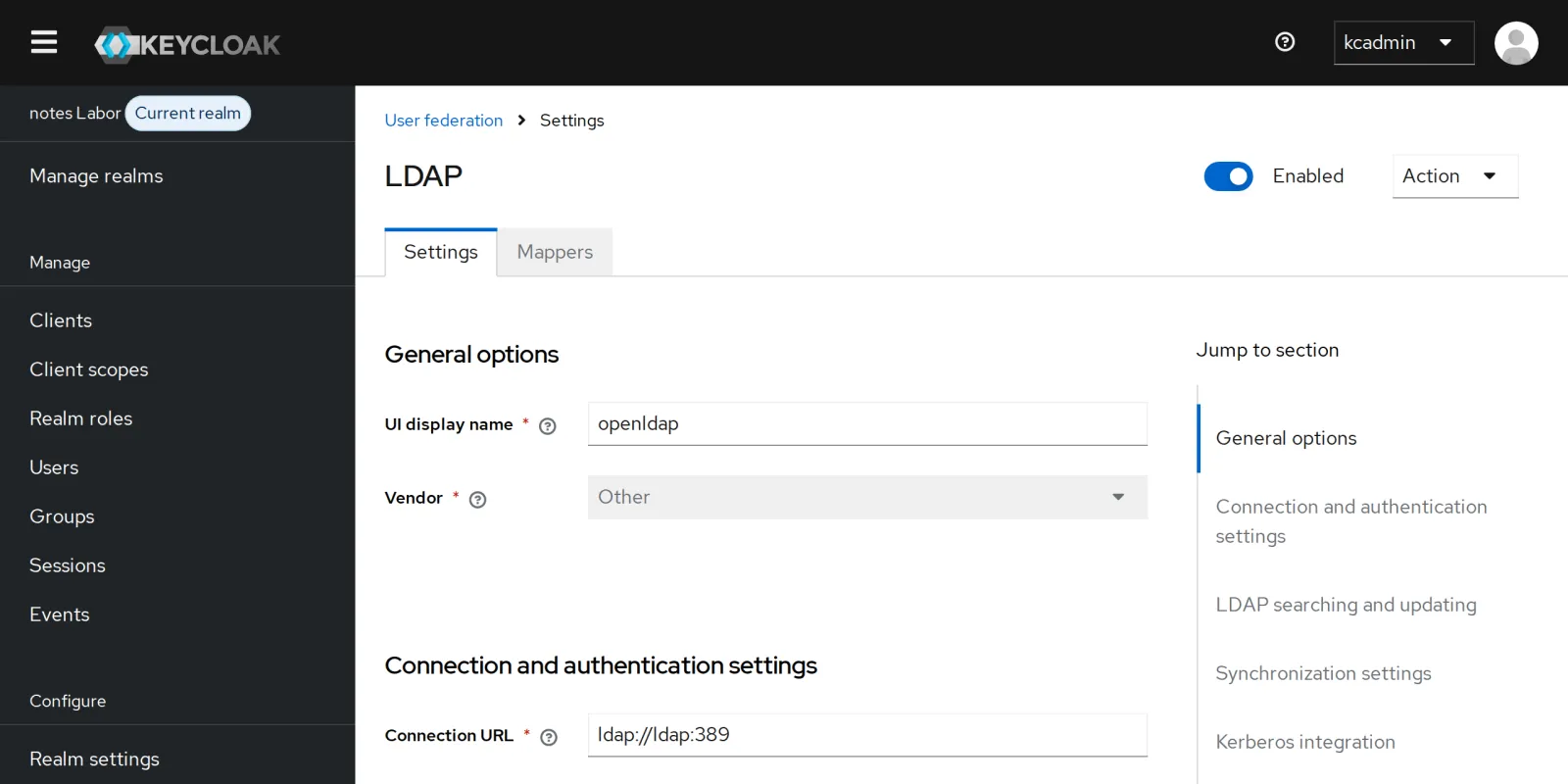
ldap://ldap:389 is the name of the container in the
network lab. For vendor=other, Keycloak
creates suitable mappers right away: uid becomes the
username, mail the email, cn and
sn become first and last name.
In the console under User federation:
Save your progress? Sign up for free
Drill 2: Testing the Connection and Synchronizing
kcadm create testLDAPConnection -r lab -s action=testAuthentication \
  -s connectionUrl=ldap://ldap:389 -s bindDn=cn=keycloak,ou=system,dc=notes,dc=lab \
  -s bindCredential=lab-bind-pw-123 -s authType=simple && echo "Bind ok"
kcadm create user-storage/$LID/sync -r lab -q action=triggerFullSync -o \
  | jq -c '{added, updated, failed, status}'
kcadm get users -r lab --fields username,federationLink --format csv --noquotes | sort
Expected (abridged):
Bind ok
{"added":4,"updated":0,"failed":0,"status":"4 imported users, 0 updated users"}
anna,
ben,
carla,mVv_0J97TouzvyDU6h4uCQ
dirk,mVv_0J97TouzvyDU6h4uCQ
emil,mVv_0J97TouzvyDU6h4uCQ
frida,mVv_0J97TouzvyDU6h4uCQ
anna and ben come from Keycloak, the other four from the directory. In the console, Users now lists something only when you search:
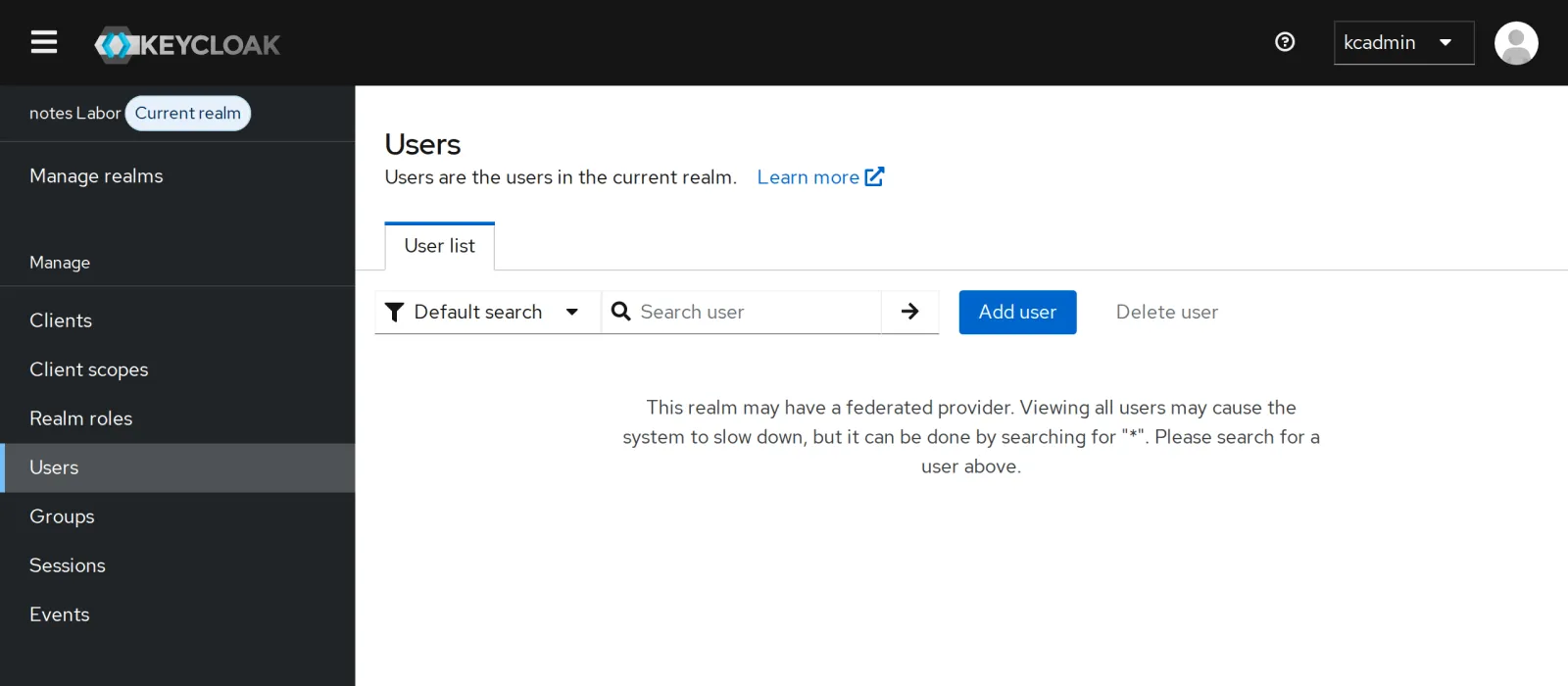
With thousands of entries in the directory, a full list would be
expensive. Search for * or for a name.
Save your progress? Sign up for free
Drill 3: Logging In Against the Directory
jwt "$(token carla lab-user-pw-123)" | jq -c '{preferred_username, email,
  roles: .realm_access.roles}'
curl -s -d grant_type=password -d client_id=notes-cli \
  -d client_secret=lab-client-secret-123 -d username=carla -d password=falsch \
  $KC_URL/realms/lab/protocol/openid-connect/token | jq -c .
L="-x -H ldap://localhost -D cn=admin,dc=notes,dc=lab -w lab-ldap-pw-123"
ldappasswd $L -s lab-user-pw-789 uid=carla,ou=people,dc=notes,dc=lab
jwt "$(token carla lab-user-pw-789)" | jq -r .preferred_username
Expected:
{"preferred_username":"carla","email":"[email protected]","roles":["offline_access",
"default-roles-lab","uma_authorization"]}
{"error":"invalid_grant","error_description":"Invalid user credentials"}
carla
A password changed in the directory takes effect immediately, without any sync: Keycloak asks LDAP at every login. carla has no roles for notes yet; they come from her groups in the directory on Day 8.
Save your progress? Sign up for free
Drill 4: An Attribute from the Directory
kcadm create components -r lab -s name=abteilung \
  -s providerId=user-attribute-ldap-mapper \
  -s providerType=org.keycloak.storage.ldap.mappers.LDAPStorageMapper -s parentId=$LID \
  -s 'config."ldap.attribute"=["departmentNumber"]' \
  -s 'config."user.model.attribute"=["abteilung"]' -s 'config."read.only"=["true"]' \
  -s 'config."always.read.value.from.ldap"=["true"]' \
  -s 'config."is.mandatory.in.ldap"=["false"]'
jwt "$(token carla lab-user-pw-789)" | jq -c '{preferred_username, abteilung}'
Expected (abridged):
Created new component with id '20bce8d5-…'
{"preferred_username":"carla","abteilung":"Vertrieb"}
abteilung has been in the user profile and in the scope
notes-api since Day 5. Now the directory fills it, fresh at
every login thanks to always.read.value.from.ldap.
Save your progress? Sign up for free
Drill 5: Reconciling Changes
dirk gets a new email address in the directory:
ldapmodify $L <<'EOF'
dn: uid=dirk,ou=people,dc=notes,dc=lab
changetype: modify
replace: mail
mail: [email protected]
EOF
kcadm get users -r lab -q username=dirk -q exact=true --fields email --format csv \
  --noquotes
kcadm create user-storage/$LID/sync -r lab -q action=triggerChangedUsersSync -o \
  | jq -c '{updated, status}'
kcadm get users -r lab -q username=dirk -q exact=true --fields email --format csv \
  --noquotes
Expected:
modifying entry "uid=dirk,ou=people,dc=notes,dc=lab"

[email protected]
{"updated":2,"status":"0 imported users, 2 updated users"}
[email protected]
The copy in Keycloak stays old until a sync runs. Two users count as
changed: dirk and carla, whose password you set in the directory in
Drill 3. triggerChangedUsersSync only fetches entries whose
modifyTimestamp is newer than the last sync. In production,
you set changedSyncPeriod (seconds) on the provider for
that.
Save your progress? Sign up for free
Drill 6: READ_ONLY versus WRITABLE
uid() { kcadm get users -r lab -q username=$1 -q exact=true --fields id \
  --format csv --noquotes; }
kcadm set-password -r lab --username carla --new-password lab-user-pw-123
kcadm update users/$(uid carla) -r lab -s firstName=Karla
Expected:
Can't reset password as account is read only
error-user-attribute-read-only
READ_ONLY protects the directory: Keycloak changes nothing there. Now WRITABLE:
kcadm update components/$LID -r lab -s 'config.editMode=["WRITABLE"]'
kcadm set-password -r lab --username carla --new-password lab-user-pw-123 \
  && echo gesetzt
ldapwhoami -x -H ldap://localhost -D uid=carla,ou=people,dc=notes,dc=lab \
  -w lab-user-pw-123
ldapwhoami -x -H ldap://localhost -D uid=carla,ou=people,dc=notes,dc=lab \
  -w lab-user-pw-789
Expected:
gesetzt
dn:uid=carla,ou=people,dc=notes,dc=lab
ldap_bind: Invalid credentials (49)
The new password is in LDAP, the old one no longer works. Keycloak
writes as cn=keycloak; the ACL from Day 6 grants the write
access for that. From now on, carla can also change her password in the
account console.
Save your progress? Sign up for free
Checkpoint
kcadm get components/$LID -r lab | jq -r '.config.editMode[0]'Expected: Keycloak may write to the directory.
WRITABLEkcadm get users -r lab --fields federationLink --format csv --noquotes | grep -c .Expected: four users with a link (the empty lines of anna and ben do not count).
4jwt "$(token carla lab-user-pw-123)" | jq -r .abteilungExpected: the department from the directory.
VertriebChallenge
emil leaves the company and is deleted from the directory. What happens to his group, what happens to his account in Keycloak, and when does it disappear there?
Hint: After deleting, look into the group, then try a full sync and afterwards a login.
Solution
ldapdelete $L uid=emil,ou=people,dc=notes,dc=lab && echo gelöscht
ldapsearch $L -b ou=groups,dc=notes,dc=lab -LLL '(cn=notes-leser)' member
kcadm create user-storage/$LID/sync -r lab -q action=triggerFullSync -o \
  | jq -c '{removed, status}'
kcadm get users -r lab --fields username --format csv --noquotes | sort | tr '\n' ' '
echo
curl -s -d grant_type=password -d client_id=notes-cli \
  -d client_secret=lab-client-secret-123 -d username=emil -d password=lab-user-pw-123 \
  $KC_URL/realms/lab/protocol/openid-connect/token | jq -c .
kcadm get users -r lab --fields username --format csv --noquotes | sort | tr '\n' ' '
echo
Expected:
gelöscht
dn: cn=notes-leser,ou=groups,dc=notes,dc=lab
member: uid=dirk,ou=people,dc=notes,dc=lab

{"removed":0,"status":"0 imported users, 3 updated users"}
anna ben carla dirk emil frida
{"error":"invalid_grant","error_description":"Invalid user credentials"}
anna ben carla dirk frida
Three things happen separately. The memberOf overlay removes emil
from the group (memberOfRefInt, Day 6). He can no longer
log in immediately, because the bind against LDAP fails. His copy in
Keycloak even survives the full sync; only when Keycloak looks him up,
for example at a login attempt, does it notice that the entry is
missing, and deletes the copy.
Save your progress? Sign up for free
Enterprise Note
- Periodic sync:
fullSyncPeriodandchangedSyncPeriodon the provider. For large directories, run the full sync rarely and the changed sync often. - Without import (
importEnabled=false), Keycloak stores nothing locally and asks LDAP on every access. Fewer copies, more load on the directory. - Connections: connection pooling, timeouts and
several LDAP URLs for failover; StartTLS or
ldaps://for the passwords. - WRITABLE with care: Give Keycloak write access only if self-service (changing passwords) is wanted; otherwise READ_ONLY.