Day 1: First Start Without a Database
Goal: Start Kong without a database, tell Admin API, proxy and status apart, publish a first route and understand why the configuration belongs in a file. · Duration: approx. 60 min · Prerequisite: Day 0
Briefing
- Kong is nginx with Lua (OpenResty). It listens on several ports with separate jobs: proxy 8000/8443 for clients, Admin API 8001 for you, Kong Manager 8002 as the UI, status 8100 for monitoring.
- DB-less: Kong reads its entire configuration from a YAML file and keeps it in memory. The Admin API is then read-only.
- A service describes a backend, a route says which requests go there.
 Client ──► :8000 Proxy ──► Route /echo ──► Service echo ──► echo:8080
 you    ──► :8001 Admin API (127.0.0.1 only)
 Browser ─► :8002 Kong Manager (via SSH tunnel)
Drill 1: Start Kong
source ~/kong-lab/setup/env.sh
cp -R ~/kong-lab/code/kong ~/kong-lab/kong && cd ~/kong-lab/kong
cat kong.yaml
docker compose up -d --wait
docker compose ps --format "table {{.Name}}\t{{.Image}}\t{{.Status}}"
Expected (shortened):
# kong/kong.yaml – deklarative Konfiguration, Stand Tag 1 (leer)
_format_version: "3.0"
 Container kong-kong-1 Healthy
NAME          IMAGE        STATUS
kong-kong-1   kong:3.9.4   Up 12 seconds (healthy)
From today on, ~/kong-lab/kong is your Kong. Take a look
at compose.yaml: KONG_DATABASE: "off" turns
off the database, KONG_DECLARATIVE_CONFIG points to the
mounted kong.yaml. Admin API and Kong Manager are published
only on 127.0.0.1.
Save your progress? Sign up for free
Drill 2: The Admin API
curl -s $ADMIN | jq '{version, hostname, database: .configuration.database,
  plugins: (.plugins.available_on_server | length)}'
curl -s $ADMIN/services | jq -c .
curl -s $ADMIN/endpoints | jq '.data | length'
Expected (shortened, your IDs and times will differ):
{
  "version": "3.9.4",
  "hostname": "982ef110d770",
  "database": "off",
  "plugins": 45
}
{"data":[],"next":null}
141
Kong 3.9.4 without a database, 45 bundled plugins, no service yet.
The Admin API has 141 endpoints; every Kong object is a resource with
GET, POST, PATCH,
DELETE.
Save your progress? Sign up for free
Drill 3: The Proxy Without a Route
curl -si $PROXY/echo/getExpected (shortened):
HTTP/1.1 404 Not Found
…
X-Kong-Response-Latency: 1
Server: kong/3.9.4
X-Kong-Request-Id: b2125431af0d135323c16d3c1cad392f

{
  "message":"no Route matched with those values",
  "request_id":"b2125431af0d135323c16d3c1cad392f"
}
The 404 comes from Kong itself, not from a backend:
X-Kong-Response-Latency appears only on responses that Kong
generates itself. The request_id also shows up in the log
and connects client and gateway when troubleshooting.
Save your progress? Sign up for free
Drill 4: DB-less Means Read-Only
Try to create a service through the Admin API:
curl -s -X POST $ADMIN/services -d name=echo -d url=http://echo:8080 | jq .Expected:
{
  "name": "operation unsupported",
  "message": "cannot create 'services' entities when not using a database",
  "code": 12
}
Without a database there is nowhere Kong could write individual
objects. There is only one way: replace the entire
configuration at once, with POST /config.
Save your progress? Sign up for free
Drill 5: Configuration in Memory
mkdir -p ~/kong-lab/tag01 && cd ~/kong-lab/tag01
cat > echo.yaml <<'EOF'
_format_version: "3.0"
services:
  - name: echo
    url: http://echo:8080
    routes:
      - name: echo
        paths:
          - /echo
EOF
curl -s -X POST $ADMIN/config -F [email protected] | jq -c keys
curl -s $PROXY/echo/get | jq -c '{url, via: .headers.Via}'
Expected:
["routes","services"]
{"url":"http://echo:8080/get","via":["1.1 kong/3.9.4"]}
The first route is alive. Kong stripped /echo
(strip_path, Day 2) and passed /get on to
echo. Now restart Kong:
cd ~/kong-lab/kong
docker compose restart
sleep 5
curl -s -o /dev/null -w '%{http_code}\n' $PROXY/echo/get
Expected:
 Container kong-kong-1 Started
404
Gone. POST /config loads only into memory; on startup
Kong reads the empty kong.yaml again. The file is the
truth, not the Admin API.
Save your progress? Sign up for free
Drill 6: The File Is the Truth
Write the route into kong.yaml, check the file and load
it without a restart:
cd ~/kong-lab/kong
cat > kong.yaml <<'EOF'
# kong.yaml – state at the end of Day 1
_format_version: "3.0"
services:
  - name: echo
    url: http://echo:8080
    routes:
      - name: echo
        paths:
          - /echo
EOF
docker compose exec kong kong config parse /kong/kong.yaml
docker compose exec kong kong reload
sleep 5
curl -s -o /dev/null -w '%{http_code}\n' $PROXY/echo/get
curl -s $ADMIN/status | jq -r .configuration_hash
Expected (shortened):
parse successful
Kong reloaded
200
06468d6efe65ef19809b539c729c6487
kong config parse finds typos before Kong loads them.
kong reload gracefully restarts the nginx workers; open
connections stay. The configuration_hash was
0000… before; after a restart the same hash shows up, and
the route stays.
The command returns before the new workers have taken over; for a
moment the old configuration still answers. That is why there is the
sleep 5. From Day 2 on, the kreload function
from setup/env.sh does this for you:
kong reload, then wait five seconds.
Save your progress? Sign up for free
Drill 7: Kong Manager
Kong Manager is the UI of the free edition. It talks to the Admin API from the browser, so you need both ports. On the laptop, in a second terminal:
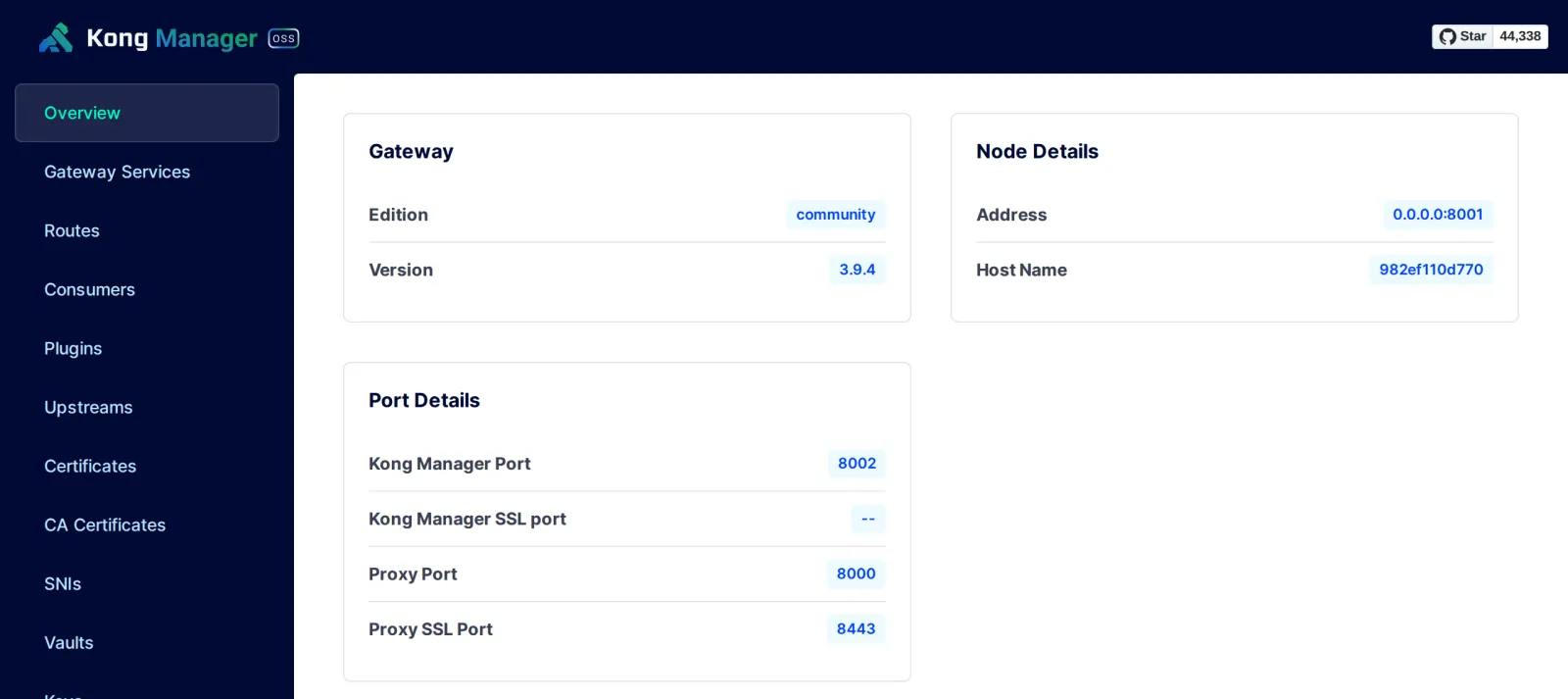
ssh -N -L 8001:localhost:8001 -L 8002:localhost:8002 ubuntu@$KONG_IPOpen http://localhost:8002 in your browser. Expected:
the overview with edition community, version 3.9.4 and the
ports as in the figure.
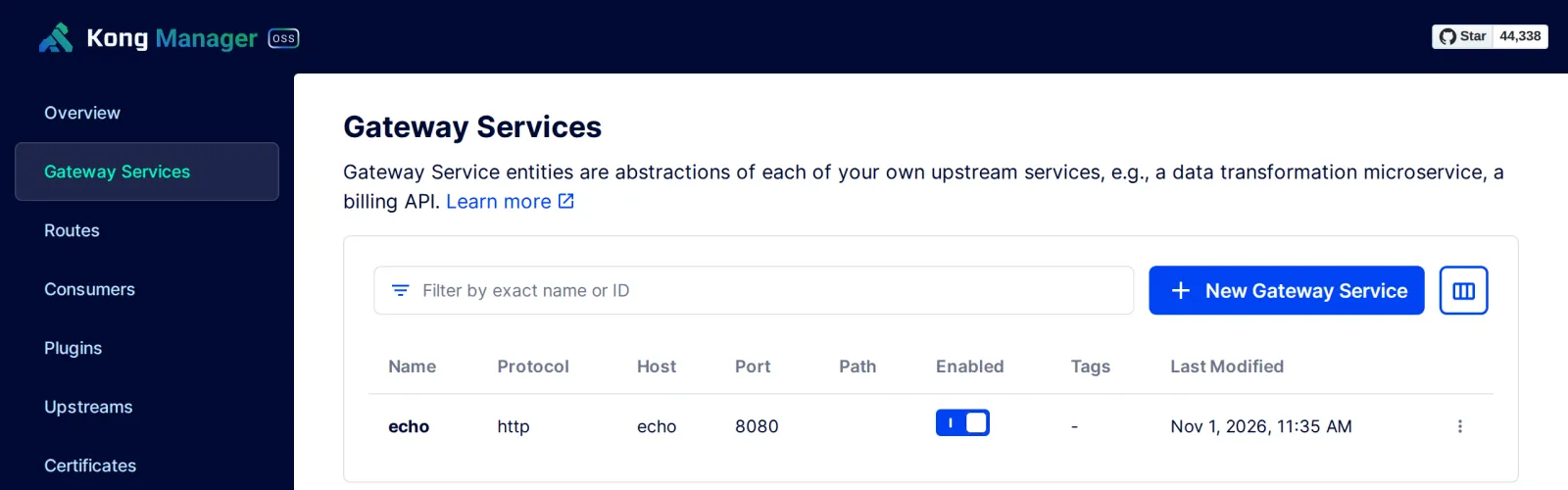
Under Gateway Services you see the service
echo from your file.
In DB-less mode you can look around here, but not change anything
permanently. Stop the tunnel with Ctrl+C.
Save your progress? Sign up for free
Checkpoint
curl -s $ADMIN | jq -r .configuration.databaseExpected: Kong runs without a database.
offcurl -s $ADMIN/routes | jq -r '.data[] | [.name, .paths[0]] | @tsv'Expected: the route from kong.yaml.
echo /echocurl -si $PROXY/echo/get | grep -i '^via'Expected: the response came through Kong.
Via: 1.1 kong/3.9.4Challenge
A colleague claims Kong “stored its configuration somewhere”. Prove
with a single curl against the Admin API that Kong knows
exactly the contents of your kong.yaml, and find the spot
in the logs where Kong reads the file at startup.
Note: GET /config exists too;
docker compose logs reads the logs.
Solution
curl -s $ADMIN/config | jq -r .config | head -6
docker compose logs kong 2>&1 | grep -i declarative | tail -1
Expected (shortened):
_format_version: '3.0'
_transform: false
services:
- write_timeout: 60000
  name: echo
  connect_timeout: 60000
kong-1  | … [notice] … init.lua:590 declarative config loaded from /kong/kong.yaml,
context: init_worker_by_lua*
GET /config shows the configuration with all the
defaults Kong has added. It is stored only in memory; it is read from
the file.
Save your progress? Sign up for free
Enterprise Note
- Protect the Admin API: Never open to the network.
The free edition has no login for the Admin API; protect it at the
network level (only
127.0.0.1, tunnel) or through Kong itself as a route with authentication (Day 10). - DB-less in production: Popular with Kubernetes and GitOps: no database that can fail, every instance reads the same file. In exchange, no changes at runtime.
- Kong Manager Enterprise has login, roles and workspaces. The OSS variant is a pure view without user management.
- Workers: Kong starts one nginx worker per CPU.
KONG_NGINX_WORKER_PROCESSESsets the number, for example in containers with a CPU limit.