Day 2: k9s
Goal: With k9s you find the broken Pod, its events and its last log in seconds – and you know when
kubectlis the better choice. · Duration: approx. 45 min · Prerequisite: Day 1
Briefing
- k9s is a terminal UI on top of the same API and kubeconfig as
kubectl. It knows nothing thatkubectldoes not know – it is just faster to look at. :opens a resource,/filters,Escgoes back,?shows the keys of the current view.- Key sequences in this book appear as text blocks:
⏎is Enter,Ctrl-zmeans Ctrl+Z, capital letters likeDmean Shift+D.
| Question | Key | kubectl counterpart |
|---|---|---|
| What is broken? | Ctrl-z |
get pods -A + eyes |
| Why? | d, p |
describe, logs --previous |
| What belongs to what? | :xray, J |
get -o yaml (ownerReferences) |
Drill 1: Practice Objects and the Context Name
web answers HTTP with its Pod name, wackel
crashes every 15 seconds.
# on cp1
mkdir -p ~/debug/tag02 && cd ~/debug/tag02
cat > demo.yaml <<'EOF'
apiVersion: apps/v1
kind: Deployment
metadata: {name: web, namespace: tag02}
spec:
  replicas: 2
  selector: {matchLabels: {app: web}}
  template:
    metadata: {labels: {app: web}}
    spec:
      containers:
      - name: web
        image: busybox:1.37
        command:
        - sh
        - -c
        - |
          mkdir -p /tmp/www
          echo "hallo aus $HOSTNAME" > /tmp/www/index.html
          exec httpd -f -v -p 8080 -h /tmp/www
        ports: [{name: http, containerPort: 8080}]
---
apiVersion: v1
kind: Service
metadata: {name: web, namespace: tag02}
spec:
  selector: {app: web}
  ports: [{name: http, port: 80, targetPort: http}]
---
apiVersion: apps/v1
kind: Deployment
metadata: {name: wackel, namespace: tag02}
spec:
  replicas: 1
  selector: {matchLabels: {app: wackel}}
  template:
    metadata: {labels: {app: wackel}}
    spec:
      containers:
      - name: wackel
        image: busybox:1.37
        command:
        - sh
        - -c
        - |
          echo "start"
          sleep 15
          echo "FEHLER: Cache voll, gebe auf" >&2
          exit 3
EOF
kubectl create namespace tag02
kubectl apply -f demo.yaml
kubectl config rename-context default debug
Expected:
namespace/tag02 created
deployment.apps/web created
service/web created
deployment.apps/wackel created
Context "default" renamed to "debug".
Why? RKE2 names the context, cluster and user default.
k9s shows the context in the top left; a meaningful name protects you
from deleting things in the wrong cluster.
Save your progress? Sign up for free
Drill 2: Configuration and Startup
# on cp1
k9s info | grep -E 'Config|Plugins|Logs'
Expected (abridged):
Config:            /home/ubuntu/.config/k9s/config.yaml
Plugins:           /home/ubuntu/.config/k9s/plugins.yaml
Logs:              /home/ubuntu/.local/state/k9s/k9s.log
In an 88-column terminal the logo pushes out the key help. While you are at it, turn off the icons for clean output:
# on cp1
mkdir -p ~/.config/k9s
cat > ~/.config/k9s/config.yaml <<'EOF'
k9s:
  ui:
    noIcons: true
    logoless: true
EOF
k9s -n tag02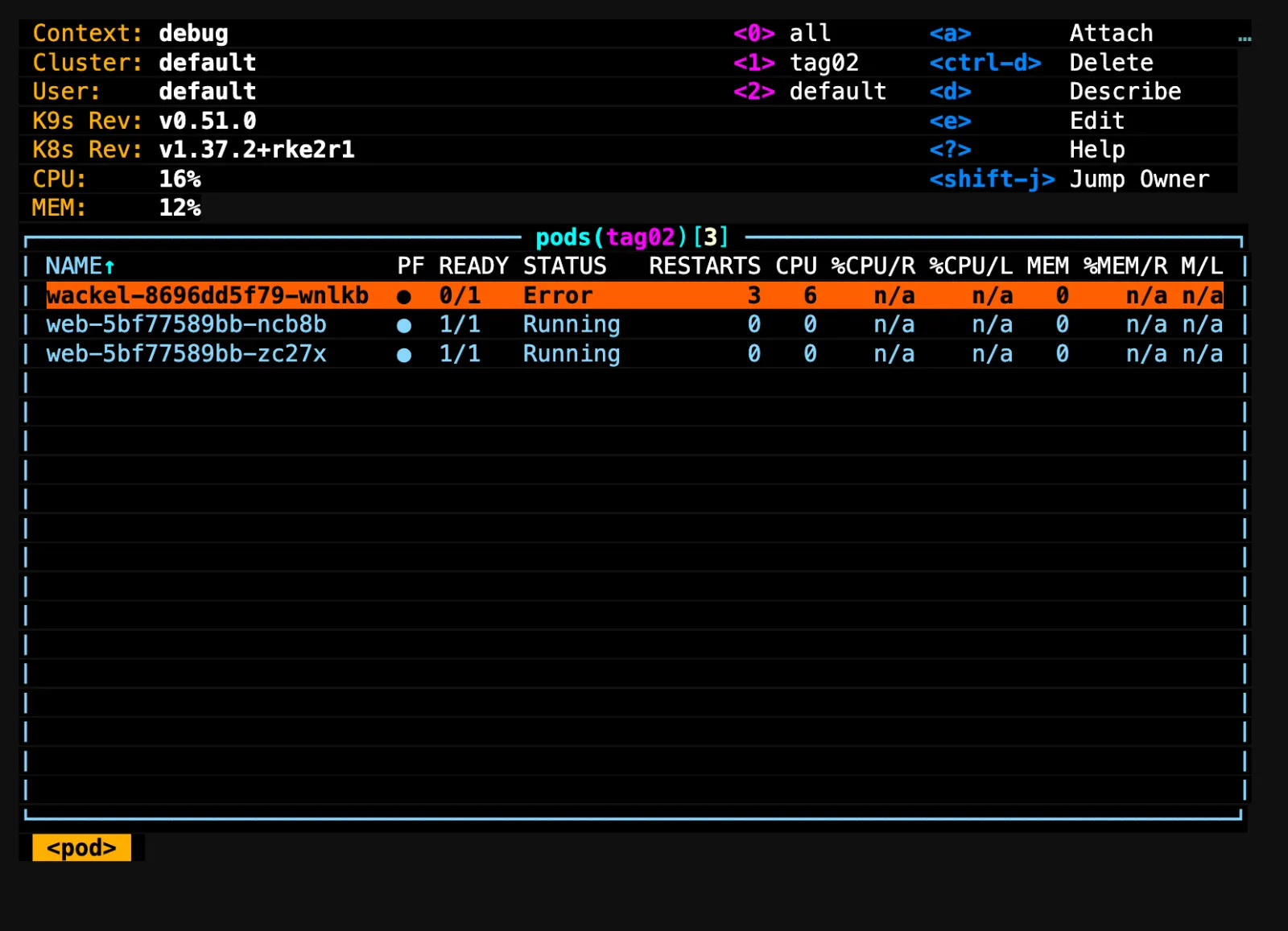
The top left shows context, cluster and versions, next to it the
recently used namespaces (0 = all) and the keys of this
view. Red means this Pod has a problem. :q⏎ or
Ctrl-c quits k9s.
Save your progress? Sign up for free
Drill 3: Filter and Find Faults
:pods⏎
0
/!Running|Completed⏎
Expected:
┌───────────────────────── pods(all)[1] </!Running|Completed> ─────────────────────────┐
│ NAMESPACE NAME↑                    PF READY STATUS            RESTARTS CPU %CPU/R /L │
│ tag02     wackel-8696dd5f79-wnlkb  ●  0/1   CrashLoopBackOff         5   0    n/a /a │
/ filters with regular expressions, !
inverts. This is your first round in an unfamiliar cluster: everything
that is neither running nor completed. Ctrl-z is faster: it
shows only objects with errors, and a second Ctrl-z
switches back. Esc clears the filter.
Warning: Check the context in the top left before every key that changes something.
Ctrl-dasks for confirmation,Ctrl-kdeletes without asking.
Save your progress? Sign up for free
Drill 4: A Pod in Detail
:pods tag02⏎
/wackel⏎
d
/Last State⏎
Expected (abridged):
┌───────────── Describe(tag02/wackel-8696dd5f79-wnlkb) </Last State[1:1]> ─────────────┐
│     State:          Terminated                                                       │
│       Reason:       Error                                                            │
│       Exit Code:    3                                                                │
│     Last State:     Terminated                                                       │
│       Reason:       Error                                                            │
│       Exit Code:    3                                                                │
│     Restart Count:  3                                                                │
d is describe, / searches the
text. The view is a snapshot; Esc and d again
fetch the current state. More keys on a highlighted row: y
YAML, e edit, s shell, J jumps to
the owner (here the ReplicaSet), Enter opens the Pod’s
containers.
Save your progress? Sign up for free
Drill 5: Logs, Including the Previous Run
Esc
p
Expected (abridged):
┌───────────── Previous Logs(tag02/wackel-8696dd5f79-wnlkb:wackel)[tail] ──────────────┐
│ Autoscroll:On      ColumnLock:Off     FullScreen:Off     Timestamps:Off     Wrap:Off │
│ start                                                                                │
│ FEHLER: Cache voll, gebe auf                                                         │
│ stream closed: EOF for tag02/wackel-8696dd5f79-wnlkb (wackel)                        │
p corresponds to logs --previous,
l to the current logs. The log view has its own keys:
0 tail, 1 head, 2 to
6 time windows from 1 min to 1 h, t
timestamps, w wrap, f full screen,
Ctrl-s saves to a file. As on Day 1: if the container is
currently terminated, use l instead of
p. (The message reads ‘ERROR: cache full, giving up’.)
Save your progress? Sign up for free
Drill 6: XRay
Esc
:xray deploy tag02⏎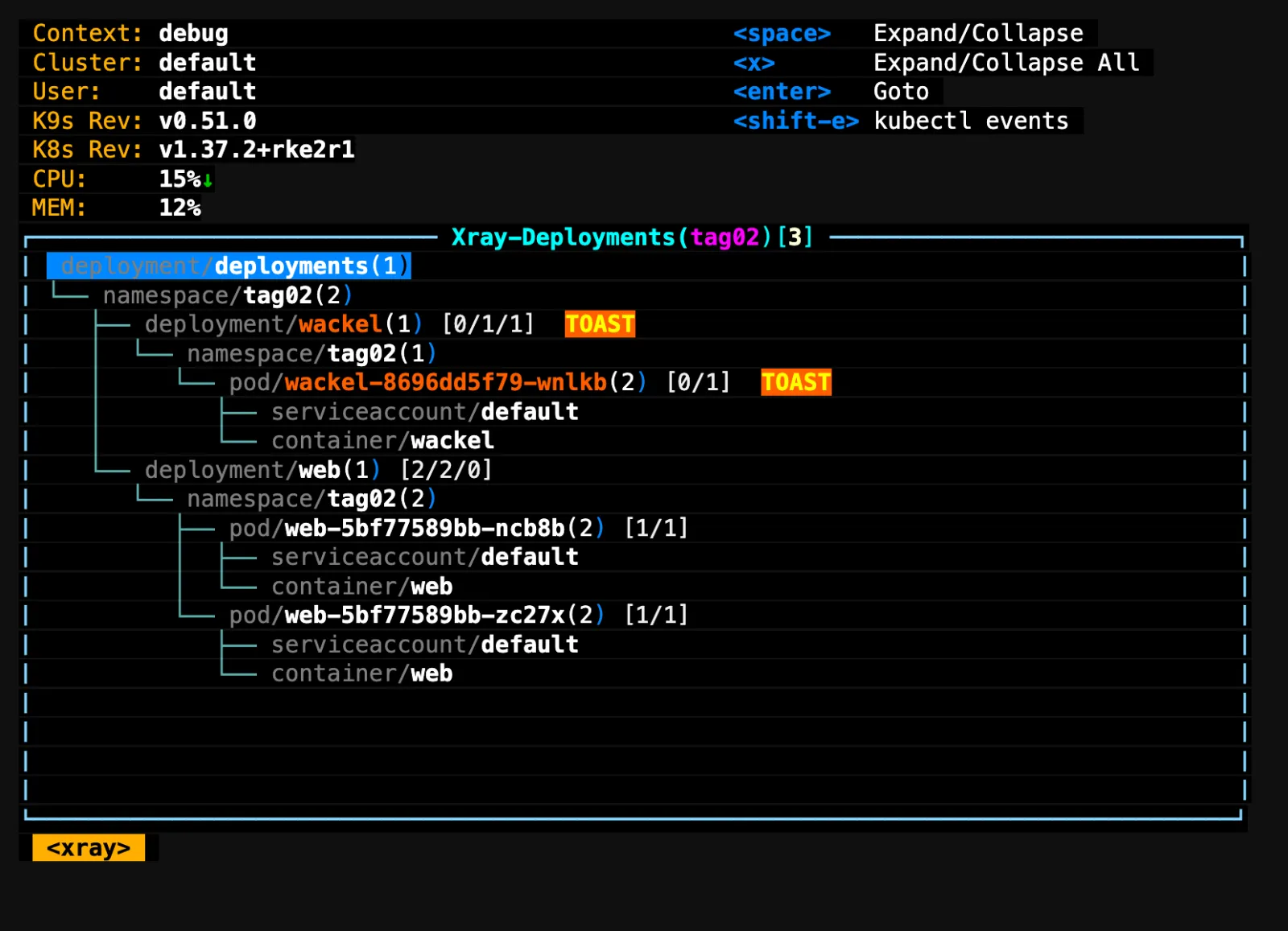
Expected (abridged):
│  deployment/deployments(1)                                                           │
│ └── namespace/tag02(2)                                                               │
│    ├── deployment/wackel(1) [0/1/1]  TOAST                                           │
│    │  └── namespace/tag02(1)                                                         │
│    │     └── pod/wackel-8696dd5f79-wnlkb(2) [0/1]  TOAST                             │
│    │        ├── serviceaccount/default                                               │
│    │        └── container/wackel                                                     │
│    └── deployment/web(1) [2/2/0]                                                     │
XRay shows the tree from the Deployment down to the container,
including ConfigMaps, Secrets and the ServiceAccount. TOAST
(a skull when icons are on) marks the broken branch. If an expected
Secret is missing from the tree, you have found the cause of a
CreateContainerConfigError (Day 4). :pulses⏎
shows trend graphs but needs a wide terminal.
Save your progress? Sign up for free
Drill 7: Port Forward
:svc tag02⏎
F
Expected (abridged):
│ web       ClusterIP      ┌─────────<PortForward>─────────┐ http:80►0     3m37s       │
│                          │  tag02/web-5bf77589bb-ncb8b   │                           │
│                          │ Container Port: web::8080     │                           │
│                          │ Local Port:     8080          │                           │
│                          │ Address:        localhost     │                           │
│                          │         OK     Cancel         │                           │
Use Tab to move to OK and confirm with
⏎. In a second terminal:
# on cp1
curl -s localhost:8080
curl -s localhost:8080
Expected:
hallo aus web-5bf77589bb-ncb8b
hallo aus web-5bf77589bb-ncb8b
Why? Even a port forward to a Service ends up at one
Pod, which k9s (like kubectl port-forward) picks at startup
– no load balancing. To test the Service itself you need a client inside
the cluster (Day 7). :pf⏎ lists active forwards,
Ctrl-d stops one.
Save your progress? Sign up for free
Drill 8: Plugins
Plugins bind your own commands to a key. k9s substitutes
$NAME, $NAMESPACE, $CONTEXT,
$RESOURCE_NAME (the resource kind, such as
pods) and, in the container view, $POD.
# on cp1
cat > ~/.config/k9s/plugins.yaml <<'EOF'
plugins:
  netshoot:
    shortCut: Shift-D
    description: netshoot debug
    scopes: [pods]
    dangerous: true
    confirm: true
    background: false
    command: kubectl
    args: [debug, -it, --context, $CONTEXT, -n, $NAMESPACE, $NAME,
           --image=nicolaka/netshoot:v0.15, --profile=baseline]
  netshoot-target:
    shortCut: Shift-D
    description: netshoot --target
    scopes: [containers]
    dangerous: true
    confirm: true
    background: false
    command: kubectl
    args: [debug, -it, --context, $CONTEXT, -n, $NAMESPACE, $POD,
           --target=$NAME, --image=nicolaka/netshoot:v0.15, --profile=baseline]
  events:
    shortCut: Shift-E
    description: kubectl events
    scopes: [pods, deployments, replicasets, statefulsets, daemonsets, jobs,
             services, persistentvolumeclaims]
    background: false
    command: sh
    args:
    - -c
    - kubectl events --context "$CONTEXT" -n "$NAMESPACE"
      --for "$RESOURCE_NAME/$NAME" | less -S
EOF
k9s reads the file at startup. In k9s:
:pods tag02⏎
/web⏎
D
Tab ⏎
ss -ltn⏎
exit⏎
Expected (abridged):
Defaulting debug container name to debugger-mg4qv.
All commands and output from this session will be recorded in container logs, including
credentials and sensitive information passed through the command prompt.
If you don't see a command prompt, try pressing enter.
 web-5bf77589bb-ncb8b  ~  ss -ltn
State      Recv-Q     Send-Q         Local Address:Port           Peer Address:Port
LISTEN     0          9                          *:8080                      *:*
The ephemeral container shares the Pod’s network: you see port 8080
of httpd, even though netshoot is a separate image. The
first start takes until netshoot has been pulled. The notice about
recorded input comes from kubectl debug 1.37: everything
you type ends up in the debug container’s log. Shift+E on a Deployment
shows its events in less (q quits).
Save your progress? Sign up for free
Exercise: Speed Drills
- Show the DaemonSets in
kube-system. Target time: 10 s - Show the log of the previous run of
wackel. Target time: 15 s - Jump from the
wackelPod to its ReplicaSet. Target time: 15 s - Show only broken Pods in all namespaces. Target time: 10 s
Solution
:ds kube-system⏎
:pods tag02⏎  /wackel⏎  p
Esc  J
:pods⏎  0  Ctrl-z
Expected (tasks 1 and 3, abridged):
┌───────────────────────────── daemonsets(kube-system)[2] ─────────────────────────────┐
│ NAME↑               DESIRED    CURRENT    READY    UP-TO-DATE    AVAILABLE AGE       │
│ rke2-canal                3          3        3             3            3 25m       │
│ rke2-traefik              3          3        3             3            3 23m       │
┌─────────────────────────────── replicasets(tag02)[1] ────────────────────────────────┐
│ NAME↑                            DESIRED        CURRENT         READY AGE            │
│ wackel-8696dd5f79                      1              1             1 7m1s           │
In RKE2, Traefik runs as a DaemonSet on every node, not as a Deployment.
Save your progress? Sign up for free
Checkpoint
# on cp1
kubectl config current-context
Expected:
debug# on cp1
grep -c shortCut ~/.config/k9s/plugins.yamlExpected:
3# on cp1
kubectl -n tag02 get pod -l app=web \
-o jsonpath='{range .items[*]}{.spec.ephemeralContainers[*].name}{"\n"}{end}'Expected: debugger-… on one line,
nothing on the other – the ephemeral container stays in the Pod until
the Pod is deleted.
Challenge
Start k9s with --readonly and find out, using only k9s:
which node does the wackel Pod run on, how often has it
restarted, and which line does it write before crashing? Then try to
delete the Pod with Ctrl-d.
Hint: The NODE column does not fit into
88 columns – describe has it too.
Solution
# on cp1
k9s -n tag02 --readonly
/wackel⏎
d /Node:⏎
Esc p
Esc Ctrl-dExpected: Node: names the node (here
cp1/172.16.0.126), the RESTARTS column shows
the restarts, p shows the line
FEHLER: Cache voll, gebe auf. Ctrl-d does
nothing: in read-only mode, delete, edit, attach and all plugins with
dangerous: true are already missing from the key help.
 Context: debug                                    <0> all       <d>       Describe
 Cluster: default                                  <1> tag02     <?>       Help
 User:    default                                  <2> default   <shift-j> Jump Owner
Save your progress? Sign up for free
Cleanup
# on cp1
kubectl delete namespace tag02
Expected:
namespace "tag02" deletedThe configuration, the plugins and the context name
debug stay for the following days.
Interview Note
- k9s or kubectl? k9s for looking and navigating,
kubectlfor everything that is documented, shared, scripted or asked of the API (auth can-i,explain,--raw). - How do you work safely in an unfamiliar cluster?
k9s --readonlyorreadOnly: true, and check the context first.
Enterprise Note
- k9s only sees what your user is allowed to see. An empty view is often RBAC, not an empty cluster.
- You can set separate skins per context (production in red) – cheap protection against mix-ups.
- Plugins and hotkeys belong in the team repo so that everyone has the same keys.
- k9s refreshes every two seconds; you only catch very short-lived
Pods with
kubectl get pods -wor events. - Input in
kubectl debugsessions ends up in the container log – do not type passwords.