Day 9: Ingress, Gateway and TLS
Goal: You find Traefik in RKE2, read its access log and error log, and tell 404, 503 and the wrong certificate apart by their cause. · Duration: approx. 75 min · Prerequisite: Day 7
Briefing
- RKE2 1.37 ships Traefik as a DaemonSet with
hostPort80/443 on every node. You test withcurl --resolvedirectly againstcp1. - With Traefik, 404 means: no router matches. Whether the Ingress was
ignored entirely or is broken is in the error log
(
ERR). - 503 means: the router matches, but there is no ready Pod behind the Service.
- Wrong certificate: Traefik serves its
TRAEFIK DEFAULT CERT.
| Fault | Symptom | Where the answer is |
|---|---|---|
Wrong ingressClassName |
404, log is silent | get ingress, get ingressclass |
| Wrong Service port | 404 | Traefik log Cannot create service |
| No ready Pods | 503 no available server |
get pods, events |
| Wrong TLS Secret | TRAEFIK DEFAULT CERT |
Traefik log, Secret keys |
| Certificate expired | certificate has expired |
openssl s_client |
| HTTPRoute stuck | 404 | .status.parents[].conditions |
Drill 1: Find Traefik and make it talkative
# on cp1
mkdir -p ~/debug/tag09 && cd ~/debug/tag09
kubectl -n kube-system get ds rke2-traefik | cut -c1-72
kubectl get ingressclass
kubectl -n kube-system get ds rke2-traefik \
  -o jsonpath='{.spec.template.spec.containers[0].ports}{"\n"}' \
  | tr '{' '\n' | grep host
Expected:
NAME           DESIRED   CURRENT   READY   UP-TO-DATE   AVAILABLE   NODE
rke2-traefik   3         3         3       3            3           kube
NAME                CONTROLLER                      PARAMETERS   AGE
traefik (default)   traefik.io/ingress-controller   <none>       104m
"containerPort":8000,"hostPort":80,"name":"web","protocol":"TCP"},
"containerPort":8443,"hostPort":443,"name":"websecure","protocol":"TCP"}]
Traefik belongs to the RKE2 chart rke2-traefik. You pass
your own values to it via a HelmChartConfig with the same
name: access log on, colors in the log off, dashboard and Gateway API
provider enabled.
# on cp1
cat > traefik-config.yaml <<'EOF'
apiVersion: helm.cattle.io/v1
kind: HelmChartConfig
metadata: {name: rke2-traefik, namespace: kube-system}
spec:
  valuesContent: |-
    log:
      noColor: true
    accessLog:
      enabled: true
    ingressRoute:
      dashboard:
        enabled: true
    providers:
      kubernetesGateway:
        enabled: true
EOF
kubectl apply -f traefik-config.yaml
The helm-controller starts a Job
helm-install-rke2-traefik, then the DaemonSet rolls out
again – about a minute in total. Check the result in the arguments, not
in the HelmChartConfig:
# on cp1
kubectl -n kube-system rollout status ds/rke2-traefik
kubectl -n kube-system get ds rke2-traefik \
  -o jsonpath='{.spec.template.spec.containers[0].args}' | tr ',' '\n' \
  | grep -E 'accesslog=|noColor|kubernetesgateway"'
kubectl get gatewayclass
kubectl get gateway -A
Expected:
daemon set "rke2-traefik" successfully rolled out
"--providers.kubernetesgateway"
"--log.noColor=true"
"--accesslog=true"
NAME      CONTROLLER                      ACCEPTED   AGE
traefik   traefik.io/gateway-controller   True       26s
NAMESPACE     NAME              CLASS     ADDRESS   PROGRAMMED   AGE
kube-system   traefik-gateway   traefik             True         27s
Warning: The chart in RKE2 1.37 (
rke2-traefik42.1.301, Traefik 3.7) knowslogandaccessLog. It silently ignores the keyslogs.generalandlogs.accessfound in other docs – which is why you always check the arguments.
Save your progress? Sign up for free
Drill 2: 404 – Traefik does not feel responsible
Break it:
# on cp1
kubectl create namespace tag09
cat > shop.yaml <<'EOF'
apiVersion: apps/v1
kind: Deployment
metadata: {name: shop, namespace: tag09}
spec:
  replicas: 2
  selector: {matchLabels: {app: shop}}
  template:
    metadata: {labels: {app: shop}}
    spec:
      containers:
      - name: whoami
        image: traefik/whoami:v1.11
        ports: [{name: http, containerPort: 80}]
---
apiVersion: v1
kind: Service
metadata: {name: shop, namespace: tag09}
spec:
  selector: {app: shop}
  ports: [{name: http, port: 80, targetPort: http}]
EOF
cat > ingress.yaml <<'EOF'
apiVersion: networking.k8s.io/v1
kind: Ingress
metadata: {name: shop, namespace: tag09}
spec:
  ingressClassName: nginx
  rules:
  - host: shop.labor.test
    http:
      paths:
      - path: /
        pathType: Prefix
        backend:
          service: {name: shop, port: {number: 80}}
EOF
kubectl apply -f shop.yaml -f ingress.yaml
kubectl -n tag09 rollout status deploy/shop
Symptom:
# on cp1
curl -s -i --resolve shop.labor.test:80:172.16.0.126 http://shop.labor.test/ | head -1
Expected:
HTTP/1.1 404 Not FoundInvestigate: The access log of the Traefik Pod on
cp1, then the Ingress itself:
# on cp1
T=$(kubectl -n kube-system get pods -l app.kubernetes.io/name=rke2-traefik \
  --field-selector spec.nodeName=cp1 -o name)
kubectl -n kube-system logs $T --since=1m | tail -1
kubectl -n tag09 get ingress shop
kubectl -n tag09 describe ingress shop | grep Events
Expected (line wrapped):
172.16.0.126 - - [20/Nov/2026:08:21:04 +0000] "GET / HTTP/1.1" 404 19 "-" "-" 2 "-"
  "-" 0ms
NAME   CLASS   HOSTS             ADDRESS   PORTS   AGE
shop   nginx   shop.labor.test             80      3s
Events:            <none>
Cause: The two "-" before the duration
are router name and server URL – no router matched. The Ingress asks for
the class nginx, which does not exist. Traefik ignores it
without comment: no event, no ERR line – just the access
log entry without a router.
Fix:
# on cp1
kubectl -n tag09 patch ingress shop --type=merge \
  -p '{"spec":{"ingressClassName":"traefik"}}'
Verify:
# on cp1
curl -s --resolve shop.labor.test:80:172.16.0.126 http://shop.labor.test/ | head -1
kubectl -n kube-system logs $T --since=10s | tail -1
Expected (line wrapped):
Hostname: shop-555c9f66b5-dmqg6
172.16.0.126 - - [20/Nov/2026:08:21:16 +0000] "GET / HTTP/1.1" 200 407 "-" "-" 3
  "tag09-shop-shop-labor-test@kubernetes" "http://10.42.0.49:80" 9ms
Why? Without ingressClassName the default class
traefik would have applied. A wrong class is worse than
none. The empty ADDRESS column, on the other hand, is not a
fault: rke2-traefik is a ClusterIP Service without an
external address.
Save your progress? Sign up for free
Drill 3: 404 despite the right class
Break it:
# on cp1
kubectl -n tag09 patch ingress shop --type=json -p '[{"op": "replace",
  "path": "/spec/rules/0/http/paths/0/backend/service/port/number", "value": 8080}]'
Symptom:
# on cp1
curl -s -i --resolve shop.labor.test:80:172.16.0.126 http://shop.labor.test/ | head -1
Expected:
HTTP/1.1 404 Not FoundInvestigate:
# on cp1
kubectl -n kube-system logs $T --since=1m | grep ERR | tail -1
kubectl -n tag09 get svc shop -o jsonpath='{.spec.ports}{"\n"}'
Expected (line wrapped):
2026-11-20T08:25:53Z ERR Cannot create service error="service port not found"
  ingress=shop namespace=tag09 providerName=kubernetes serviceName=shop
  servicePort=&ServiceBackendPort{Name:,Number:8080,}
[{"name":"http","port":80,"protocol":"TCP","targetPort":"http"}]
Cause: The Ingress names port 8080 of the Service, but the Service only has 80. Traefik then does not build the router at all – to the client this looks like Drill 2, but the log says it plainly.
Fix: Refer to the port name, as on Day 7:
# on cp1
kubectl -n tag09 patch ingress shop --type=json -p '[{"op": "replace",
  "path": "/spec/rules/0/http/paths/0/backend/service/port",
  "value": {"name": "http"}}]'
Verify:
# on cp1
curl -s --resolve shop.labor.test:80:172.16.0.126 http://shop.labor.test/ | head -1
Expected:
Hostname: shop-555c9f66b5-9cf7gSave your progress? Sign up for free
Drill 4: 503 – the route is there, but nobody is ready
Break it: Recreate the Deployment with a readiness probe on a port nobody listens on:
# on cp1
kubectl -n tag09 delete deploy shop
cat > shop-bereit.yaml <<'EOF'
apiVersion: apps/v1
kind: Deployment
metadata: {name: shop, namespace: tag09}
spec:
  replicas: 2
  selector: {matchLabels: {app: shop}}
  template:
    metadata: {labels: {app: shop}}
    spec:
      containers:
      - name: whoami
        image: traefik/whoami:v1.11
        ports: [{name: http, containerPort: 80}]
        readinessProbe:
          httpGet: {path: /, port: 8080}
          periodSeconds: 5
EOF
kubectl apply -f shop-bereit.yaml
Symptom:
# on cp1
curl -s -i --resolve shop.labor.test:80:172.16.0.126 http://shop.labor.test/ \
  | sed -n '1p;$p'
Expected:
HTTP/1.1 503 Service Unavailable
no available server
Investigate:
# on cp1
kubectl -n kube-system logs $T --since=15s | tail -1
kubectl -n tag09 get pods -l app=shop
kubectl -n tag09 events --types=Warning | tail -1
Expected (lines wrapped):
172.16.0.126 - - [20/Nov/2026:08:27:09 +0000] "GET / HTTP/1.1" 503 20 "-" "-" 6
  "tag09-shop-shop-labor-test@kubernetes" "-" 0ms
NAME                    READY   STATUS    RESTARTS   AGE
shop-5d77bb949d-blrv6   0/1     Running   0          20s
shop-5d77bb949d-tzh92   0/1     Running   0          20s
3s (x6 over 19s)   Warning   Unhealthy   Pod/shop-5d77bb949d-tzh92   Readiness probe
  failed: Get "http://10.42.2.45:8080/": dial tcp 10.42.2.45:8080: connect:
  connection refused
Cause: This time the router matches (its name is in
the access log), but the server URL is "-": no Pod is
ready, and the EndpointSlice lists both with ready: false
(Day 5).
Fix:
# on cp1
kubectl -n tag09 patch deploy shop --type=json -p '[{"op": "replace",
  "path": "/spec/template/spec/containers/0/readinessProbe/httpGet/port",
  "value": "http"}]'
kubectl -n tag09 rollout status deploy/shop
Verify:
# on cp1
curl -s -i --resolve shop.labor.test:80:172.16.0.126 http://shop.labor.test/ | head -1
Expected:
HTTP/1.1 200 OKWhy port 8080 and not a wrong path? whoami answers
every path with 200 – a probe on /gesund
(‘healthy’) would succeed. A probe is only as good as what the
application really checks there.
Save your progress? Sign up for free
Drill 5: The wrong certificate
Break it: A self-signed certificate valid for one
day, stored as a Secret with the key names that openssl
suggests:
# on cp1
openssl req -x509 -newkey rsa:2048 -nodes -days 1 -subj "/CN=shop.labor.test" \
  -addext "subjectAltName=DNS:shop.labor.test" -keyout shop.key -out shop.crt
kubectl -n tag09 create secret generic shop-tls \
  --from-file=cert.pem=shop.crt --from-file=key.pem=shop.key
kubectl -n tag09 patch ingress shop --type=merge -p \
  '{"spec":{"tls":[{"hosts":["shop.labor.test"],"secretName":"shop-tls"}]}}'
Symptom:
# on cp1
curl -sS -o /dev/null --resolve shop.labor.test:443:172.16.0.126 \
  https://shop.labor.test/ 2>&1 | head -1
echo | openssl s_client -connect 172.16.0.126:443 -servername shop.labor.test \
  2>/dev/null | openssl x509 -noout -subject -enddate
Expected:
curl: (60) SSL certificate problem: self-signed certificate
subject=CN = TRAEFIK DEFAULT CERT
notAfter=Nov 20 08:27:27 2027 GMT
Your own certificate would have reported self-signed
too. Only openssl s_client shows which
certificate arrives: Traefik’s built-in one.
Investigate:
# on cp1
kubectl -n kube-system logs $T --since=1m | grep 'Error configuring TLS' | tail -1
kubectl -n tag09 get secret shop-tls -o jsonpath='{.type} {.data}' | cut -c1-40
Expected (line wrapped):
2026-11-20T08:27:45Z ERR Error configuring TLS error="secret tag09/shop-tls is missing
  the following TLS data entries: tls.crt, tls.key" ingress=shop namespace=tag09
  providerName=kubernetes
Opaque {"cert.pem":"LS0tLS1CRUdJTiBDRVJ
Cause: Ingress controllers expect the keys
tls.crt and tls.key. If they are missing,
Traefik takes the default certificate, and HTTPS still “works” with
curl -k.
Fix:
# on cp1
kubectl -n tag09 delete secret shop-tls
kubectl -n tag09 create secret tls shop-tls --cert=shop.crt --key=shop.key
Verify:
# on cp1
echo | openssl s_client -connect 172.16.0.126:443 -servername shop.labor.test \
  2>/dev/null | openssl x509 -noout -subject -enddate
curl -sS --cacert shop.crt --resolve shop.labor.test:443:172.16.0.126 \
  https://shop.labor.test/ | head -1
Expected:
subject=CN = shop.labor.test
notAfter=Nov 21 08:27:36 2026 GMT
Hostname: shop-75888d6697-kwx9n
Save your progress? Sign up for free
Drill 6: The expired certificate
Break it: OpenSSL 3.0 (Ubuntu 24.04) does not know
-not_after yet, but -days -1 produces a
certificate that expired yesterday:
# on cp1
openssl req -new -key shop.key -subj "/CN=shop.labor.test" \
  -addext "subjectAltName=DNS:shop.labor.test" -out alt.csr
openssl x509 -req -in alt.csr -key shop.key -copy_extensions copy -days -1 \
  -out alt.crt
kubectl -n tag09 create secret tls shop-tls --cert=alt.crt --key=shop.key \
  --dry-run=client -o yaml | kubectl replace -f -
Symptom:
# on cp1
curl -sS -o /dev/null --cacert alt.crt --resolve shop.labor.test:443:172.16.0.126 \
  https://shop.labor.test/ 2>&1 | head -1
Expected:
curl: (60) SSL certificate problem: certificate has expiredInvestigate: What does the server deliver, and what is in the Secret?
# on cp1
echo | openssl s_client -connect 172.16.0.126:443 -servername shop.labor.test \
  2>/dev/null | openssl x509 -noout -dates -checkend 0
kubectl -n tag09 get secret shop-tls -o jsonpath='{.data.tls\.crt}' | base64 -d \
  | openssl x509 -noout -enddate -ext subjectAltName
Expected:
notBefore=Nov 20 08:28:09 2026 GMT
notAfter=Nov 19 08:28:09 2026 GMT
Certificate will expire
notAfter=Nov 19 08:28:09 2026 GMT
X509v3 Subject Alternative Name:
    DNS:shop.labor.test
Cause: notAfter lies in the past.
-checkend 0 answers the question “is it still valid right
now?” – with a number of seconds instead of 0 it becomes a monitoring
check (“does it expire within 7 days?”).
Fix:
# on cp1
kubectl -n tag09 create secret tls shop-tls --cert=shop.crt --key=shop.key \
  --dry-run=client -o yaml | kubectl replace -f -
Verify:
# on cp1
echo | openssl s_client -connect 172.16.0.126:443 -servername shop.labor.test \
  2>/dev/null | openssl x509 -noout -checkend 0
Expected:
Certificate will not expireWhy replace and not apply? The Secret was
created with create; apply would work but warn
that the last-applied-configuration annotation is missing.
Traefik loads the new certificate without a restart.
Save your progress? Sign up for free
Drill 7: Gateway API – the route tells you what it lacks
The Gateway API sets conditions where Ingress stays silent.
Break it: An HTTPRoute attached to the chart’s
Gateway in kube-system, with a wrong backend:
# on cp1
cat > route.yaml <<'EOF'
apiVersion: gateway.networking.k8s.io/v1
kind: HTTPRoute
metadata: {name: shop, namespace: tag09}
spec:
  parentRefs:
  - {name: traefik-gateway, namespace: kube-system}
  hostnames: [gw.labor.test]
  rules:
  - backendRefs:
    - {name: shop-v2, port: 80}
EOF
kubectl apply -f route.yaml
Symptom:
# on cp1
curl -s -i --resolve gw.labor.test:80:172.16.0.126 http://gw.labor.test/ | head -1
Expected:
HTTP/1.1 404 Not FoundInvestigate:
# on cp1
J='{range .status.parents[*].conditions[*]}{.type}={.status} {.reason}: {.message}'
kubectl -n tag09 get httproute shop -o jsonpath="$J{\"\n\"}{end}"
kubectl -n kube-system get gateway traefik-gateway \
  -o jsonpath='{.spec.listeners[0].allowedRoutes}{"\n"}'
Expected (line wrapped):
Accepted=False NotAllowedByListeners:
ResolvedRefs=False BackendNotFound: Cannot load HTTPBackendRef tag09/shop-v2:
  getting service: service "shop-v2" not found
{"namespaces":{"from":"Same"}}
Cause: Two faults, two conditions. The listener of
the chart’s Gateway only accepts routes from kube-system
(from: Same), and the Service shop-v2 does not
exist.
Fix: Your own Gateway in the application’s namespace
instead of bending the chart’s Gateway, plus the right backend. Port
8000 is Traefik’s web entrypoint:
# on cp1
cat > gateway.yaml <<'EOF'
apiVersion: gateway.networking.k8s.io/v1
kind: Gateway
metadata: {name: shop-gw, namespace: tag09}
spec:
  gatewayClassName: traefik
  listeners:
  - {name: web, port: 8000, protocol: HTTP, hostname: gw.labor.test}
EOF
kubectl apply -f gateway.yaml
kubectl -n tag09 patch httproute shop --type=json -p '[
  {"op": "replace", "path": "/spec/parentRefs/0", "value": {"name": "shop-gw"}},
  {"op": "replace", "path": "/spec/rules/0/backendRefs/0/name", "value": "shop"}]'
Verify:
# on cp1
kubectl -n tag09 get gateway shop-gw
J='{range .status.parents[*].conditions[*]}{.type}={.status} {.reason}'
kubectl -n tag09 get httproute shop -o jsonpath="$J{\"\n\"}{end}"
curl -s --resolve gw.labor.test:80:172.16.0.126 http://gw.labor.test/ | head -1
Expected:
NAME      CLASS     ADDRESS   PROGRAMMED   AGE
shop-gw   traefik             True         4s
Accepted=True Accepted
ResolvedRefs=True ResolvedRefs
Hostname: shop-75888d6697-kwx9n
Save your progress? Sign up for free
Drill 8: The dashboard
The dashboard runs on the internal entrypoint traefik
(port 8080) and is reachable only via port forward. From your machine,
use an SSH tunnel to cp1:
# on cp1
kubectl -n kube-system port-forward ds/rke2-traefik 9000:8080 &
sleep 2
curl -s -o /dev/null -w '%{http_code}\n' http://127.0.0.1:9000/dashboard/
# on your machine
ssh -N -L 9000:127.0.0.1:9000 [email protected]Expected: 200 on cp1, then
http://localhost:9000/dashboard/ in the browser:
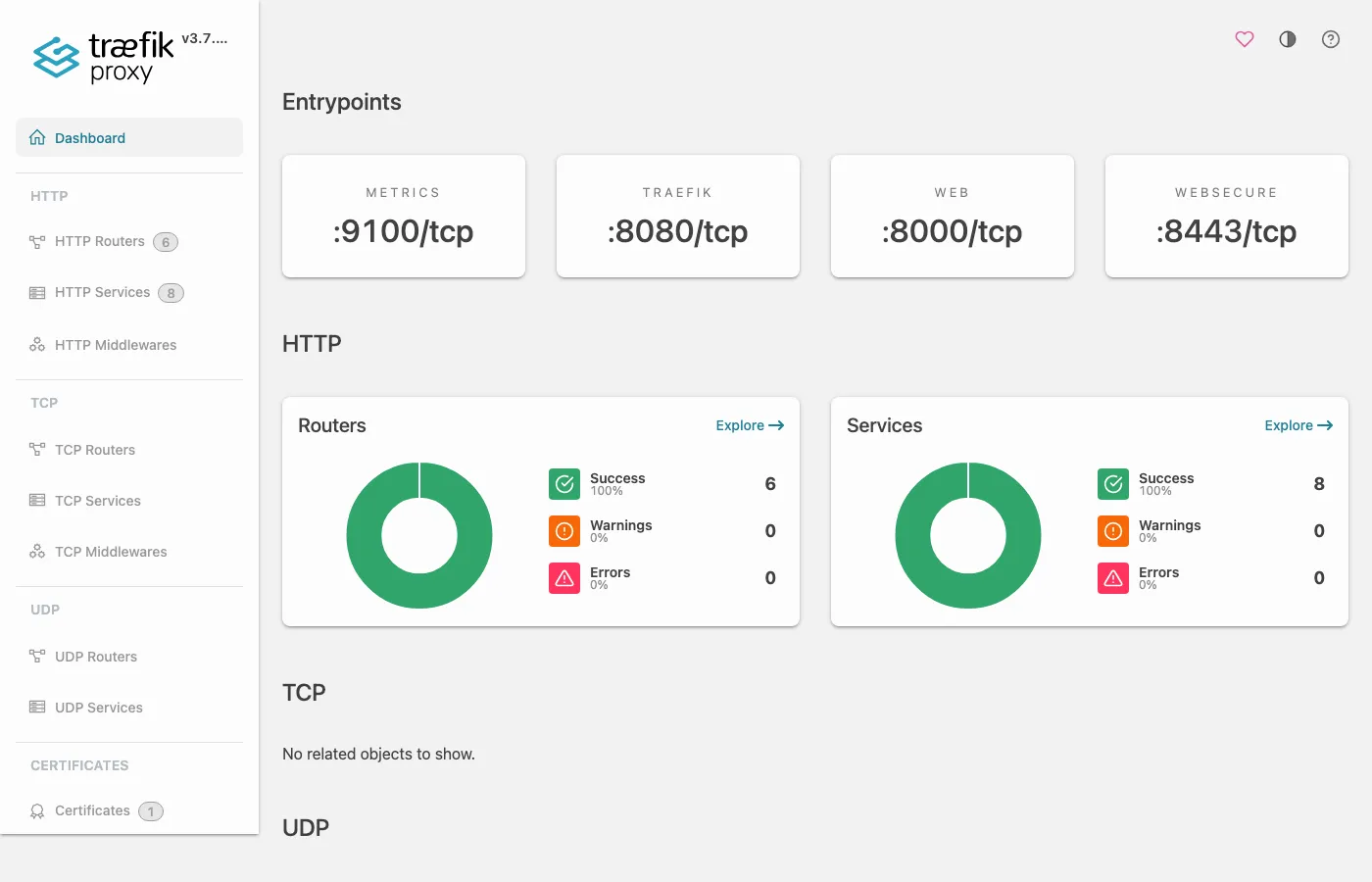
Under HTTP Routers you see every rule Traefik has built from Ingress, IngressRoute and HTTPRoute – with entrypoints and target Service:
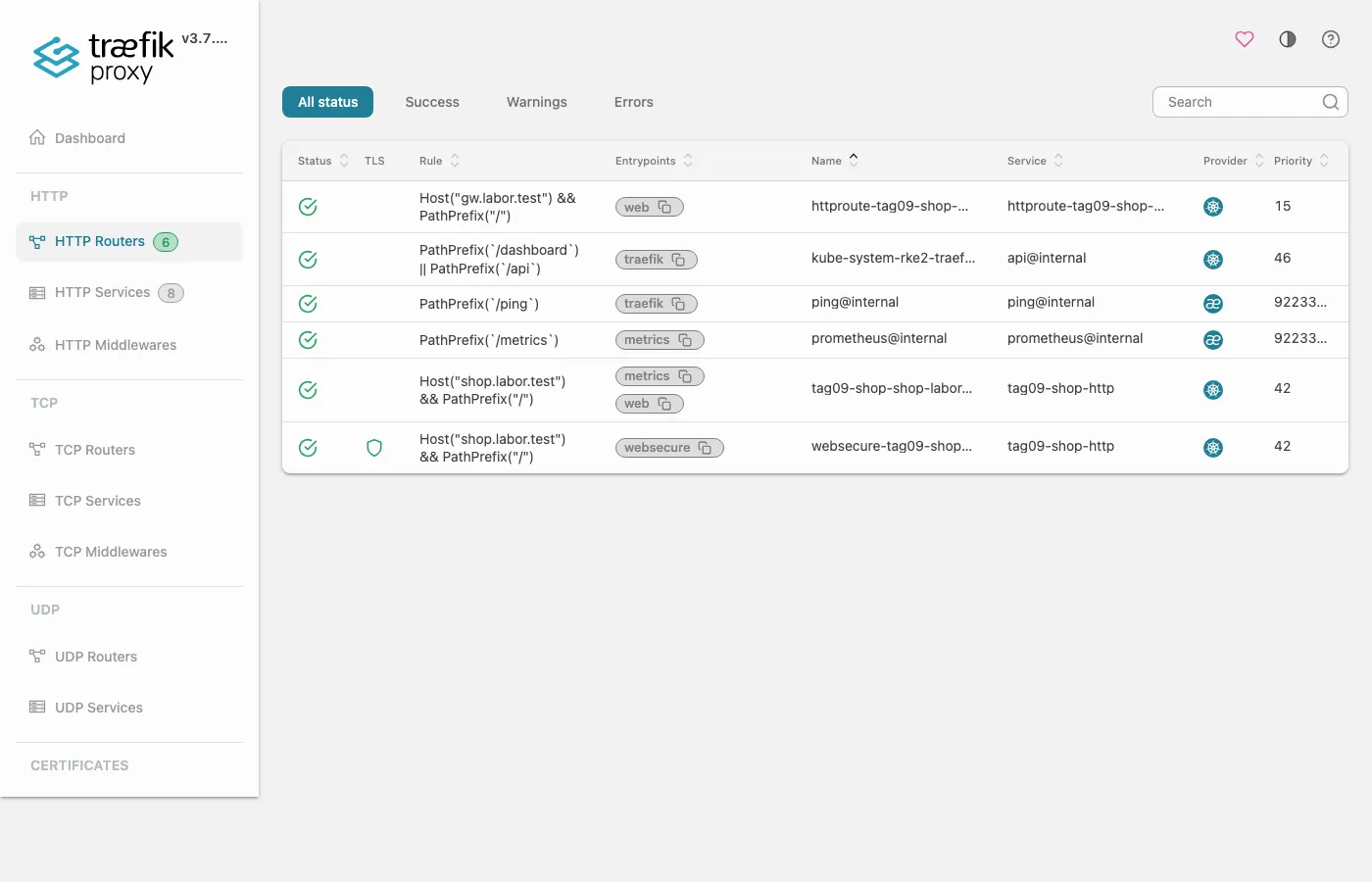
Why? Whatever is missing in the dashboard, Traefik did not build
(Drills 2 and 3). The router tag09-shop-shop-labor-test is
attached to web and metrics:
an Ingress without an entrypoint annotation is attached to all
entrypoints except the internal traefik; for
websecure, on which the RKE2 chart enables TLS, Traefik
builds a separate router websecure-… – even for an Ingress
without spec.tls (verified live with admin
from the challenge). The router list is also available as JSON at
http://127.0.0.1:9000/api/http/routers. Leave the port
forward running – the challenge needs the router API; the cleanup ends
it. Until then it prints Handling connection for 9000
between your outputs on every request.
Save your progress? Sign up for free
Exercise: Speed Drills
- Show which Ingress class is the default. Target time: 10 s
- Show the last two errors of the Traefik Pod on
cp1. Target time: 30 s - Show when the certificate served for
shop.labor.testexpires. Target time: 30 s - Show
Type,StatusandReasonof the conditions of the HTTPRouteshop. Target time: 30 s
Solution
# on cp1
kubectl get ingressclass
kubectl -n kube-system logs $T | grep ERR | tail -2 | cut -c1-88
echo | openssl s_client -connect 172.16.0.126:443 -servername shop.labor.test \
  2>/dev/null | openssl x509 -noout -enddate
kubectl -n tag09 describe httproute shop | sed -n '/Conditions/,/Controller Name/p' \
  | grep -E 'Reason|Status|Type'
Expected:
NAME                CONTROLLER                      PARAMETERS   AGE
traefik (default)   traefik.io/ingress-controller   <none>       117m
2026-11-20T08:28:48Z ERR Unable to load HTTPRoute backend: Cannot load HTTPBackendRef ta
2026-11-20T08:28:48Z ERR Unable to load HTTPRoute backend: Cannot load HTTPBackendRef ta
notAfter=Nov 21 08:27:36 2026 GMT
      Reason:                Accepted
      Status:                True
      Type:                  Accepted
      Reason:                ResolvedRefs
      Status:                True
      Type:                  ResolvedRefs
Save your progress? Sign up for free
Checkpoint
# on cp1
curl -s --resolve shop.labor.test:80:172.16.0.126 http://shop.labor.test/ | head -1
curl -sS --cacert shop.crt --resolve shop.labor.test:443:172.16.0.126 \
  https://shop.labor.test/ | head -1
curl -s --resolve gw.labor.test:80:172.16.0.126 http://gw.labor.test/ | head -1
Expected: three whoami answers, for example:
Hostname: shop-75888d6697-g8zbd
Hostname: shop-75888d6697-kwx9n
Hostname: shop-75888d6697-kwx9n
Challenge
A colleague creates an Ingress admin and reports:
“http://admin.labor.test returns 404, but the Ingress is
there and the class is right.” Find the cause without the Traefik log
and repair it.
# on cp1
cat > admin.yaml <<'EOF'
apiVersion: networking.k8s.io/v1
kind: Ingress
metadata:
  name: admin
  namespace: tag09
  annotations:
    traefik.ingress.kubernetes.io/router.entrypoints: websecure
spec:
  rules:
  - host: admin.labor.test
    http:
      paths:
      - path: /
        pathType: Prefix
        backend:
          service: {name: shop, port: {name: http}}
EOF
kubectl apply -f admin.yaml
Hint: Ask the dashboard’s router API which entrypoint the router is attached to.
Solution
# on cp1
curl -s -o /dev/null -w '%{http_code}\n' --resolve admin.labor.test:80:172.16.0.126 \
  http://admin.labor.test/
curl -s http://127.0.0.1:9000/api/http/routers | jq -c \
  '.[] | select(.name | test("admin")) | {name, entryPoints, tls}'
curl -sk -o /dev/null -w '%{http_code}\n' \
  --resolve admin.labor.test:443:172.16.0.126 https://admin.labor.test/
Expected (line wrapped):
404
{"name":"tag09-admin-admin-labor-test@kubernetes","entryPoints":["websecure"],
  "tls":{"options":"default"}}
200
The annotation binds the router to websecure (HTTPS)
only. Over HTTP no router matches. If HTTP should work as well, remove
the annotation:
# on cp1
kubectl -n tag09 annotate ingress admin \
  traefik.ingress.kubernetes.io/router.entrypoints-
sleep 3
curl -s -o /dev/null -w '%{http_code}\n' --resolve admin.labor.test:80:172.16.0.126 \
  http://admin.labor.test/
Expected:
ingress.networking.k8s.io/admin annotated
200
Save your progress? Sign up for free
Cleanup
The HelmChartConfig stays: you will need the access log, dashboard and Gateway provider again in the competition.
# on cp1
kill %1
kubectl delete namespace tag09
kubectl get gateway -A
Expected:
namespace "tag09" deleted
NAMESPACE     NAME              CLASS     ADDRESS   PROGRAMMED   AGE
kube-system   traefik-gateway   traefik             True         12m
Interview Note
- 404 or 503 from the Ingress – what’s the difference? 404: no router matches (class, host, path, entrypoint, broken backend). 503: the router matches, but there is no ready endpoint.
- HTTPS serves the wrong certificate?
openssl s_client -servernameshows what arrives;TRAEFIK DEFAULT CERTmeans: the Secret is missing or has the wrong keys. - Why Gateway API? Separation of roles (Gateway vs. Route) and conditions with reasons instead of a silent 404.
Enterprise Note
- In production, certificates come from cert-manager; expiry warnings
come from a metric
(
certmanager_certificate_expiration_timestamp_seconds) rather than fromopensslby hand. - In RKE2, change values only via
HelmChartConfig. If you edit the DaemonSet directly, you lose the change on the next Helm reconciliation. - Ingress controller behind a load balancer: you only get the real
client IP with Proxy Protocol or
externalTrafficPolicy: Local. - Never expose the dashboard to the outside without authentication.
- Gateway API in depth (TLS listeners, ReferenceGrant, separation of roles) is covered in “Gateway API hands-on”.