Day 2: sops basics
Goal: You encrypt a YAML file with sops and age, read every part of the encrypted file, change values without a plaintext file and put the result into Git. · Duration: approx. 60 min · Prerequisite: Day 1
Briefing
- sops encrypts the values of a structured file, the keys stay readable. A diff shows which field changed, but not how.
- Every file has its own random data key
(AES-256-GCM). sops encrypts it for each recipient – here with age – and
stores it in the block
sops:at the end of the file. - A MAC over all values protects against tampering:
anyone who swaps or deletes an
ENC[…]value is caught on decryption.
 app.yaml (plaintext)     app.enc.yaml
 password: lab-db-123 ──► password: ENC[AES256_GCM,data:…,iv:…,tag:…,type:str]
                          sops:
                            age: [{recipient: age1…, enc: <data key for age1…>}]
                            mac: ENC[…]          lastmodified: …
Drill 1: The key in its default location
sops looks for age identities first in SOPS_AGE_KEY_FILE
or SOPS_AGE_KEY and also in
~/.config/sops/age/keys.txt (Linux). Your key from Day 1
goes there.
# on argo
mkdir -p ~/.config/sops/age
cp ~/sops/tag01/ich.key ~/.config/sops/age/keys.txt
chmod 600 ~/.config/sops/age/keys.txt
age-keygen -y ~/.config/sops/age/keys.txt
Expected:
age126j96yd6te036uya83l76w0afmlaj9vyyluxrmdeheew3u0wzdmslw69y2Save your progress? Sign up for free
Drill 2: The first encrypted file
# on argo
mkdir -p ~/sops/tag02 && cd ~/sops/tag02
cat > app.yaml <<'EOF'
# Zugangsdaten der App notes (Laborwerte)
db:
  host: postgres.notes.svc
  port: 5432
  user: notes
  password: lab-db-123
api:
  key: lab-key-123
  debug: false
EOF
ICH=$(age-keygen -y ~/.config/sops/age/keys.txt)
sops encrypt --age $ICH app.yaml > app.enc.yaml
cut -c1-80 app.enc.yaml
Expected (abridged):
#ENC[AES256_GCM,data:nS42lu+pxZ0L0fO5loGnhAsKaAAVnY+D0B1ahGtX9vUR4FiSjpo5EA==,iv
db:
    host: ENC[AES256_GCM,data:zykq3F9iQlYgshBz5SONQaDq,iv:azAiSMlKVaSRZjvXmB0BQwkM
    port: ENC[AES256_GCM,data:HOqZPw==,iv:QQxaqLtCEMGx76WFEvXyjPGM9njBavkM05exBZcZ
    user: ENC[AES256_GCM,data:abyQGig=,iv:gYb8hlN2FocjCzViuSw2ReQ5OJC7o3mKJfLNRJHG
    password: ENC[AES256_GCM,data:wgpIz77GSNQL9Q==,iv:0teOuUqZlGuvvV5rirtetEglm9Gz
api:
    key: ENC[AES256_GCM,data:qHfuxmsr5gtU0zQ=,iv:4BSGm1ARYIMlUCFEMFs1Ss2P4ExvLa63u
    debug: ENC[AES256_GCM,data:bAi9KGg=,iv:hCq4PKCLPofOgO+KaZv6+F4sNrtuIURhOBI61tR
sops:
    age:
        - enc: |
            -----BEGIN AGE ENCRYPTED FILE-----
            YWdlLWVuY3J5cHRpb24ub3JnL3YxCi0+IFgyNTUxOSBSTGRBSXVMWGRxeC95WTFO
            ...
            -----END AGE ENCRYPTED FILE-----
          recipient: age126j96yd6te036uya83l76w0afmlaj9vyyluxrmdeheew3u0wzdmslw69y2
    lastmodified: "2026-11-20T16:16:24Z"
    mac: ENC[AES256_GCM,data:dFrwO6usy8RKhAhTwN3YY4cH3bZrnKr+bqfFKVCa5ohnJpkfq4eo22b
    unencrypted_suffix: _unencrypted
    version: 3.13.3
Three things stand out: the comment is encrypted too
(#ENC[…]), and so are the number and the boolean – only the
type stays in plaintext behind them. And sops indents with four spaces
(--indent changes that, Day 8).
Save your progress? Sign up for free
Drill 3: Read the sops block
# on argo
cd ~/sops/tag02
yq '.sops | keys' app.enc.yaml
yq '.sops.age[0].recipient' app.enc.yaml
grep -o 'type:[a-z]*' app.enc.yaml | sort | uniq -c
Expected:
- age
- lastmodified
- mac
- unencrypted_suffix
- version
age126j96yd6te036uya83l76w0afmlaj9vyyluxrmdeheew3u0wzdmslw69y2
      1 type:bool
      1 type:comment
      1 type:int
5 type:str| Field | Content |
|---|---|
age[].enc |
the data key, encrypted with age for this recipient |
age[].recipient |
public key – visible, unlike in age itself |
lastmodified |
time of the last change, part of the MAC |
mac |
checksum over all values, encrypted with the data key |
unencrypted_suffix |
keys with this suffix stay plaintext (Day 3) |
Why is the recipient in plaintext? When keys are added and removed later (Day 5), sops has to know whom the file is for. If you want to keep recipients secret, sops is the wrong tool.
Save your progress? Sign up for free
Drill 4: Decrypt and extract
# on argo
cd ~/sops/tag02
sops decrypt app.enc.yaml
sops decrypt --extract '["db"]["password"]' app.enc.yaml; echo
sops decrypt --extract '["db"]' app.enc.yaml
Expected:
# Zugangsdaten der App notes (Laborwerte)
db:
    host: postgres.notes.svc
    port: 5432
    user: notes
    password: lab-db-123
api:
    key: lab-key-123
    debug: false
lab-db-123
host: postgres.notes.svc
port: 5432
user: notes
password: lab-db-123
--extract takes a path in Python notation. A single
value comes without a trailing newline – hence the echo.
Output goes to standard output; nothing unencrypted stays on disk.
Save your progress? Sign up for free
Drill 5: Edit without a plaintext file
sops edit decrypts into a temporary file, opens
$EDITOR and encrypts again afterwards. Here
sed plays the editor so that you can see the effect
precisely:
# on argo
cd ~/sops/tag02
cp app.enc.yaml vorher.yaml
EDITOR="sed -i s/lab-key-123/lab-key-456/" sops edit app.enc.yaml; echo "rc=$?"
sops decrypt --extract '["api"]["key"]' app.enc.yaml; echo
diff <(cut -c1-40 vorher.yaml) <(cut -c1-40 app.enc.yaml)
Expected:
rc=0
lab-key-456
8c8
<     key: ENC[AES256_GCM,data:qHfuxmsr5gt
---
>     key: ENC[AES256_GCM,data:wF1M7YnO4PD
21,22c21,22
<     lastmodified: "2026-11-20T16:16:24Z"
<     mac: ENC[AES256_GCM,data:dFrwO6usy8R
---
>     lastmodified: "2026-11-20T16:16:34Z"
>     mac: ENC[AES256_GCM,data:OnYaRVK0WT4
Only the changed line, lastmodified and mac
change. sops keeps the data key and does not re-encrypt unchanged values
– that keeps diffs small and merge conflicts rare.
# on argo
cd ~/sops/tag02
cp app.enc.yaml v2.yaml
EDITOR=true sops edit app.enc.yaml; echo "rc=$?"
cmp v2.yaml app.enc.yaml && echo gleich
Expected (gleich means
“identical”):
File has not changed, exiting.
rc=200
gleich
Without a change, sops writes nothing and exits with code 200 – do not mistake it for an error in scripts.
Save your progress? Sign up for free
Drill 6: Set and remove values
sops set and sops unset change single
values, without any editor. The value is JSON: strings therefore need
double quotes inside the single ones.
# on argo
cd ~/sops/tag02
sops set app.enc.yaml '["db"]["pool"]' '10'
sops set app.enc.yaml '["api"]["key"]' '"lab-key-123"'
sops decrypt app.enc.yaml | tail -4
sops unset app.enc.yaml '["db"]["pool"]'
sops decrypt app.enc.yaml | grep -c pool
Expected:
    pool: 10
api:
    key: lab-key-123
    debug: false
0
Warning:
sops set … '["api"]["key"]' 'lab-key-123'without inner quotes is not valid JSON and fails. And values on the command line end up in the shell history – for real secrets usesops editor--value-stdin.
Save your progress? Sign up for free
Drill 7: Into Git and view it in the browser
# on argo
rm -f ~/sops/tag02/vorher.yaml ~/sops/tag02/v2.yaml
cd ~/sops/repo
mkdir -p notes
cp ~/sops/tag02/app.enc.yaml notes/app.enc.yaml
git add notes/app.enc.yaml
git commit -q -m "tag02: notes-Zugangsdaten verschlüsselt"
git push -q
sops set notes/app.enc.yaml '["db"]["password"]' '"lab-db-456"'
git diff --stat
git diff | grep '^[-+] ' | cut -c1-60
git commit -qam "tag02: DB-Passwort gewechselt"
git push -q
git log --oneline
Expected:
 notes/app.enc.yaml | 6 +++---
 1 file changed, 3 insertions(+), 3 deletions(-)
-    password: ENC[AES256_GCM,data:wgpIz77GSNQL9Q==,iv:0teOu
+    password: ENC[AES256_GCM,data:zdR0jylz2NF0Dg==,iv:hID7A
-    lastmodified: "2026-11-20T16:16:34Z"
-    mac: ENC[AES256_GCM,data:wi2Vc+Ce5vPUUrAM/Tuwi1vXA2xQg/
+    lastmodified: "2026-11-20T16:17:07Z"
+    mac: ENC[AES256_GCM,data:umDthFXQhx7CfZpa9f5iUGcwkL61jX
89ac791 tag02: DB-Passwort gewechselt
26bae02 tag02: notes-Zugangsdaten verschlüsselt
cbb84ec tag00: README
In the browser (http://172.16.0.182:30300/lab/secrets,
login lab / lab-forgejo-123) you see what
everyone with read access sees: the structure, not the values.
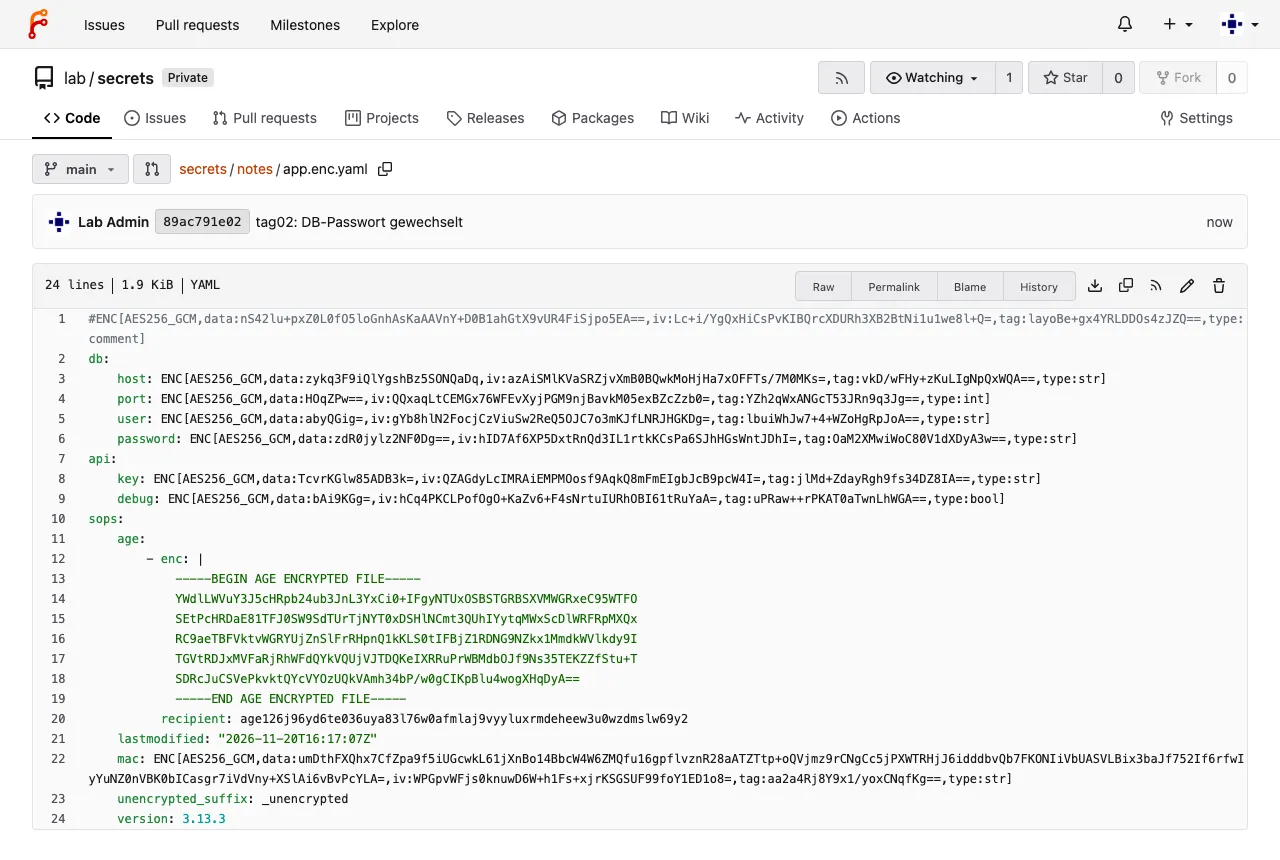
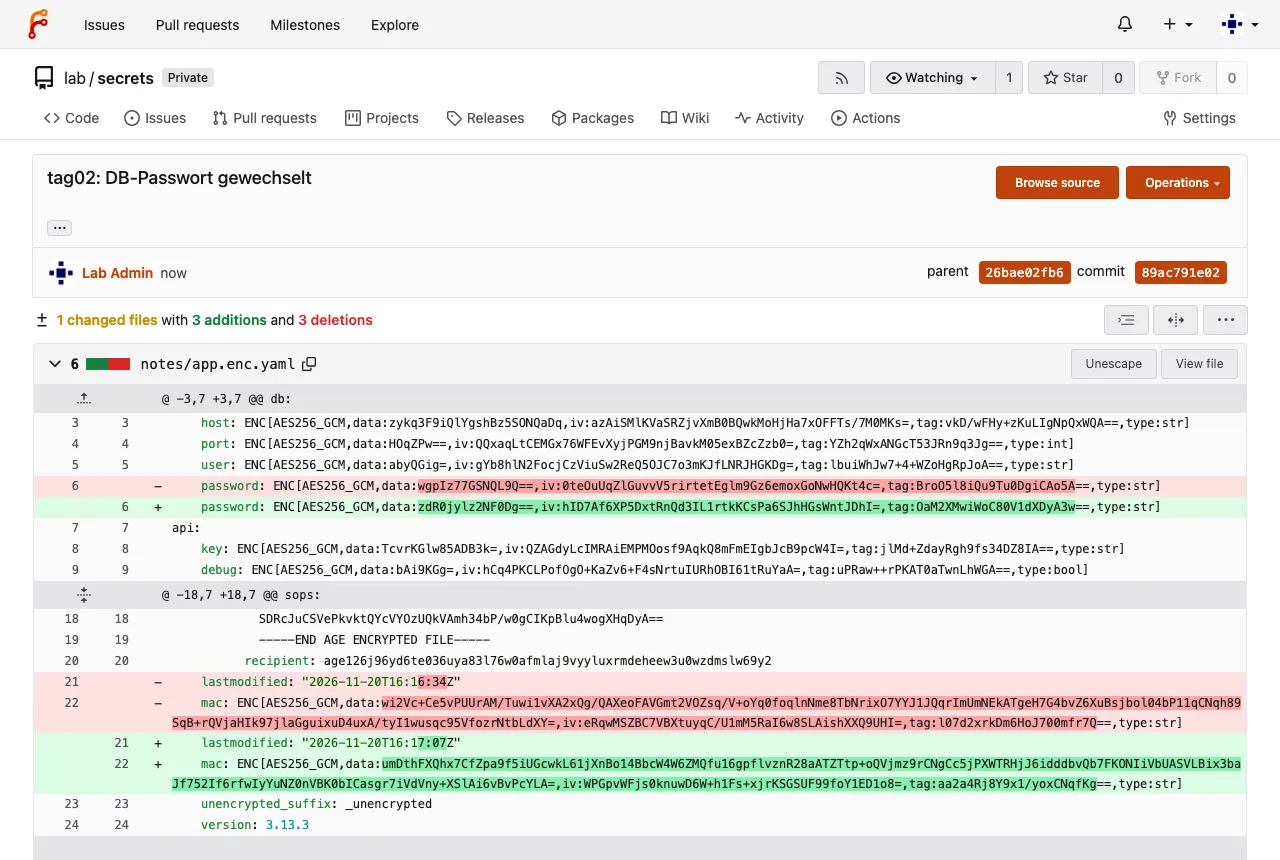
Why is that good? A review sees that the password was changed and nothing else – without knowing the value.
Save your progress? Sign up for free
Exercise: Speed Drills
- Print only the API key from
notes/app.enc.yamlin the repo. Target time: 15 s - Show which recipients the file is encrypted for. Target time: 15 s
- Check whether
app.yamlandapp.enc.yamlare encrypted. Target time: 20 s
Solution
# on argo
cd ~/sops/repo
sops decrypt --extract '["api"]["key"]' notes/app.enc.yaml; echo
yq '.sops.age[].recipient' notes/app.enc.yaml
cd ~/sops/tag02
sops filestatus app.yaml; sops filestatus app.enc.yaml
Expected:
lab-key-123
age126j96yd6te036uya83l76w0afmlaj9vyyluxrmdeheew3u0wzdmslw69y2
{"encrypted":false}
{"encrypted":true}
Save your progress? Sign up for free
Checkpoint
# on argo
cd ~/sops/repo && git status -sb && git log --oneline | wc -l
sops decrypt --extract '["db"]["password"]' notes/app.enc.yaml; echo
Expected:
## main...origin/main
3
lab-db-456
Challenge
Add a value api.timeout to
~/sops/tag02/app.enc.yaml as the string
"30" and check which type sops records for it in the
ENC[…]. What does it say when you set 30
without quotes? Remove the value again afterwards.
Hint: The type is at the end of every
ENC[…] value.
Solution
# on argo
cd ~/sops/tag02
sops set app.enc.yaml '["api"]["timeout"]' '30'
grep timeout app.enc.yaml | grep -o 'type:[a-z]*'
sops set app.enc.yaml '["api"]["timeout"]' '"30"'
grep timeout app.enc.yaml | grep -o 'type:[a-z]*'
sops decrypt app.enc.yaml | grep timeout
sops unset app.enc.yaml '["api"]["timeout"]'
Expected:
type:float
type:str
    timeout: "30"
JSON only knows “number”, sops stores it as float; after
decryption it still says 30. For Kubernetes Secrets (Day
3), only strings count in the end – always put numbers in quotes
there.
Save your progress? Sign up for free
Cleanup
The plaintext file has served its purpose:
# on argo
cd ~/sops/tag02
rm app.yaml
ls -1
Expected:
app.enc.yamlInterview Note
- What exactly does sops encrypt? Only the values (and
comments), with AES-256-GCM and one data key per file; the data key is
stored in the block
sops:, encrypted for each recipient (age, PGP, KMS, Vault). A MAC protects integrity. - Why are sops diffs small? Unchanged values keep their
ciphertext because the data key stays the same – only changed values,
lastmodifiedandmacchange.
Enterprise Note
- Key names are metadata and stay readable: no secrets in key names
(
password_fuer_kunde_x:). sops editbriefly puts the plaintext file into a temporary directory; on shared machines setTMPDIRto a private directory.- Editors with backup, swap or undo files (vim
.swp, cloud sync) can leave plaintext behind – start them without these features forsops edit. - Review rule: changes to
*.enc.yamlwithout asops:block are a leak (Day 9).