Day 11: Argo CD Decrypts
Goal: Argo CD decrypts with KSOPS and its own age key, you recognize the two typical setup mistakes by their messages, and you know the two places where Argo CD stores the plain text anyway. · Duration: approx. 75 min · Prerequisite: Day 10
Briefing
- Argo CD does not know sops. It builds manifests with kustomize, and KSOPS is a kustomize plugin (a generator) that decrypts sops files during the build.
- Three parts have to come together: the
ksopsbinary in the repo-server (init container), permission for plugins (kustomize.buildOptions) and a key (SOPS_AGE_KEY_FILE). - Argo CD gets its own age key. It is an additional
recipient in
.sops.yaml– only for the folders Argo CD is supposed to roll out. - The UI masks Secret values. But the plain text sits in the manifest cache (Redis) and – with client-side apply – in an annotation on the Secret.
- The basics (installation, Applications, sync) are in “GitOps with Argo CD hands-on”, Day 10. The other approach via Helm charts, helm-secrets, is in “Helm Charts hands-on”, Day 16.
 Forgejo lab/secrets
   argocd/dev/kustomization.yaml ─► generators: secret-generator.yaml (kind: ksops)
   dev/notes-db.yaml, dev/neu.yaml (sops, recipients: ich + argocd)
                     │
 argocd-repo-server  ▼  kustomize build --enable-alpha-plugins --enable-exec
   /usr/local/bin/ksops     (init container install-ksops)
   /sops/keys.txt           (Secret sops-age, SOPS_AGE_KEY_FILE)
                     │  plain-text manifests ─► Redis cache
                     ▼
 application-controller ─► Secrets in notes-dev
Drill 1: A key for Argo CD
Argo CD should be able to read dev/ – not
prod/, not tresor/. So it gets its own key as
an additional recipient of the dev rule.
# on argo
mkdir -p ~/sops/tag11 && cd ~/sops/tag11
age-keygen -o argocd.key 2>&1
A=$(age-keygen -y argocd.key)
cd ~/sops/repo
yq -i '(.creation_rules[] | select(.path_regex == "^dev/.*\\.yaml$")).age
  += ",'"$A"'"' .sops.yaml
yq '.creation_rules[1].age' .sops.yaml | tr ',' '\n'
sops updatekeys -y dev/notes-db.yaml 2>&1 | tail -1
sops updatekeys -y dev/neu.yaml 2>&1 | tail -1
Expected (abridged):
Public key: age1ymx7x29j3nctlanp5kwt76xve66dc0dm4lpklcq5jykxr7vq55fsmhu7ts
age1rnz4tqupd0f3lm4kfs564cfgys5j80497rk7ajzn2ekxh3d2g3uqdtdnv2
age1ymx7x29j3nctlanp5kwt76xve66dc0dm4lpklcq5jykxr7vq55fsmhu7ts
… File /home/ubuntu/sops/repo/dev/notes-db.yaml synced with new keys
… File /home/ubuntu/sops/repo/dev/neu.yaml synced with new keys
yq appends the key to the list of the rule
^dev/.*\.yaml$; updatekeys carries the new
list into the files (Day 5). Your key stays in.
Save your progress? Sign up for free
Drill 2: The KSOPS generator
Argo CD needs a folder with a kustomization.yaml. It
lives outside dev/ – there, the hook from Day 9 only allows
encrypted files.
# on argo
cd ~/sops/repo
mkdir -p argocd/dev
cat > argocd/dev/secret-generator.yaml <<'EOF'
apiVersion: viaduct.ai/v1
kind: ksops
metadata:
  name: dev-secrets
  annotations:
    config.kubernetes.io/function: |
      exec:
        path: ksops
files:
  - ../../dev/notes-db.yaml
  - ../../dev/neu.yaml
EOF
cat > argocd/dev/kustomization.yaml <<'EOF'
generators:
  - secret-generator.yaml
EOF
git add .sops.yaml dev argocd
git commit -q -m "tag11: Argo CD als Recipient, KSOPS-Generator" && git push -q
git log --oneline | head -1
Expected:
8e27b9b tag11: Argo CD als Recipient, KSOPS-Generatorkind: ksops is not a Kubernetes object but the plugin’s
configuration: kustomize calls the ksops program and takes
over whatever it outputs.
Save your progress? Sign up for free
Drill 3: Install Argo CD with KSOPS
The Helm chart argo/argo-cd 10.18.2 ships Argo CD
v3.6.2. The init container copies ksops and a matching
kustomize into an emptyDir, and the
repo-server mounts both into /usr/local/bin (as described
in the KSOPS docs). Dex, notifications and ApplicationSets stay off –
RAM.
# on argo
cd ~/sops/tag11
helm repo add argo https://argoproj.github.io/argo-helm >/dev/null
helm repo update argo >/dev/null
cat > argocd-values.yaml <<'EOF'
configs:
  params:
    server.insecure: true
server:
  service:
    type: NodePort
    nodePortHttp: 30080
dex:
  enabled: false
notifications:
  enabled: false
applicationSet:
  replicas: 0
repoServer:
  volumes:
    - name: custom-tools
      emptyDir: {}
  initContainers:
    - name: install-ksops
      image: viaductoss/ksops:v4.5.1
      command: ["/usr/local/bin/ksops", "install", "--with-kustomize",
                "/custom-tools"]
      volumeMounts:
        - {mountPath: /custom-tools, name: custom-tools}
  volumeMounts:
    - {mountPath: /usr/local/bin/kustomize, name: custom-tools, subPath: kustomize}
    - {mountPath: /usr/local/bin/ksops, name: custom-tools, subPath: ksops}
EOF
helm install argocd argo/argo-cd --version 10.18.2 -n argocd --create-namespace \
  -f argocd-values.yaml --wait --timeout 5m 2>&1 | grep STATUS
kubectl -n argocd get pods --no-headers | awk '{print $1, $3}'
Expected:
STATUS: deployed
argocd-application-controller-0 Running
argocd-redis-866bcf475c-9lrhq Running
argocd-redis-secret-init-zfmbj Completed
argocd-repo-server-786889ccbc-ksh9x Running
argocd-server-76d678bd6c-m2wxz Running
Save your progress? Sign up for free
Drill 4: Plugins are locked
Break it: Access to Forgejo and an Application for
argocd/dev, with automated sync.
ServerSideApply only comes in Drill 7.
# on argo
cd ~/sops/tag11
cat > repo.yaml <<'EOF'
apiVersion: v1
kind: Secret
metadata:
  name: forgejo-secrets
  namespace: argocd
  labels:
    argocd.argoproj.io/secret-type: repository
stringData:
  type: git
  url: http://forgejo-http.forgejo.svc:3000/lab/secrets.git
  username: lab
  password: lab-forgejo-123
EOF
cat > app-dev.yaml <<'EOF'
apiVersion: argoproj.io/v1alpha1
kind: Application
metadata:
  name: dev
  namespace: argocd
spec:
  project: default
  source:
    repoURL: http://forgejo-http.forgejo.svc:3000/lab/secrets.git
    targetRevision: main
    path: argocd/dev
  destination:
    server: https://kubernetes.default.svc
    namespace: notes-dev
  syncPolicy:
    automated: {prune: true}
    syncOptions: [CreateNamespace=true]
EOF
kubectl apply -f repo.yaml -f app-dev.yaml
sleep 25
Symptom and investigation:
# on argo
kubectl -n argocd get application dev
kubectl -n argocd get application dev \
  -o jsonpath='{.status.conditions[*].message}' | grep -o 'external.*'
Expected:
NAME   SYNC STATUS   HEALTH STATUS
dev    Unknown       Healthy
external plugins disabled; unable to load external plugin 'ksops'
Cause: kustomize only runs generator programs with
--enable-alpha-plugins --enable-exec. Argo CD passes these
options only when they are set in argocd-cm under
kustomize.buildOptions.
Fix:
# on argo
cd ~/sops/tag11
yq -i '.configs.cm."kustomize.buildOptions" = "--enable-alpha-plugins --enable-exec"' \
  argocd-values.yaml
helm upgrade argocd argo/argo-cd --version 10.18.2 -n argocd \
  -f argocd-values.yaml --wait 2>&1 | grep REVISION
kubectl -n argocd annotate application dev argocd.argoproj.io/refresh=hard \
  --overwrite >/dev/null
sleep 20
Expected:
REVISION: 2Save your progress? Sign up for free
Drill 5: Plugin present, key missing
Symptom and investigation:
# on argo
kubectl -n argocd get application dev \
  -o jsonpath='{.status.conditions[*].message}' | grep -o 'error decrypting.*' \
  | head -c 150; echo
Expected (line wrapped):
error decrypting file "../../dev/neu.yaml" from manifest.Files: trouble decrypting
file: Error getting data key: 0 successful groups required, got 0unable to genera
Cause: KSOPS runs and finds the file – the relative
path ../../dev works. But there is no key in the
repo-server. “0 successful groups” is sops’ way of saying: no identity
found.
Fix: The key becomes a Secret in the
argocd namespace; the repo-server mounts it and points to
it with SOPS_AGE_KEY_FILE.
# on argo
cd ~/sops/tag11
kubectl -n argocd create secret generic sops-age --from-file=keys.txt=argocd.key
yq -i '.repoServer.volumes += [{"name":"sops-age",
    "secret":{"secretName":"sops-age"}}] |
  .repoServer.volumeMounts += [{"mountPath":"/sops","name":"sops-age",
    "readOnly":true}] |
  .repoServer.env = [{"name":"SOPS_AGE_KEY_FILE","value":"/sops/keys.txt"}]' \
  argocd-values.yaml
helm upgrade argocd argo/argo-cd --version 10.18.2 -n argocd \
  -f argocd-values.yaml --wait 2>&1 | grep REVISION
kubectl -n argocd annotate application dev argocd.argoproj.io/refresh=hard \
  --overwrite >/dev/null
sleep 25
Expected:
secret/sops-age created
REVISION: 3
Verify:
# on argo
kubectl -n argocd get application dev
kubectl -n notes-dev get secret notes-db -o jsonpath='{.data.password}' \
  | base64 -d; echo
Expected:
NAME   SYNC STATUS   HEALTH STATUS
dev    Synced        Healthy
lab-db-dev-789
Save your progress? Sign up for free
Drill 6: What Argo CD shows
You get the CLI like the other tools, with a checksum.
# on argo
cd ~/sops/tag11
ARCH=$(dpkg --print-architecture)
G=https://github.com/argoproj/argo-cd/releases/download/v3.6.2
curl -fsSL -o argocd-linux-$ARCH $G/argocd-linux-$ARCH
curl -fsSLO $G/cli_checksums.txt
grep " argocd-linux-$ARCH$" cli_checksums.txt | sha256sum -c
sudo install -m 0755 argocd-linux-$ARCH /usr/local/bin/argocd
PW=$(kubectl -n argocd get secret argocd-initial-admin-secret \
  -o jsonpath='{.data.password}' | base64 -d)
argocd login 172.16.0.182:30080 --plaintext --username admin --password "$PW" \
  2>&1 | tail -1
argocd app manifests dev --source live | grep -A1 '^data:'
Expected:
argocd-linux-amd64: OK
Context '172.16.0.182:30080' updated
data:
  password: ++++++++
--
data:
  password: ++++++++
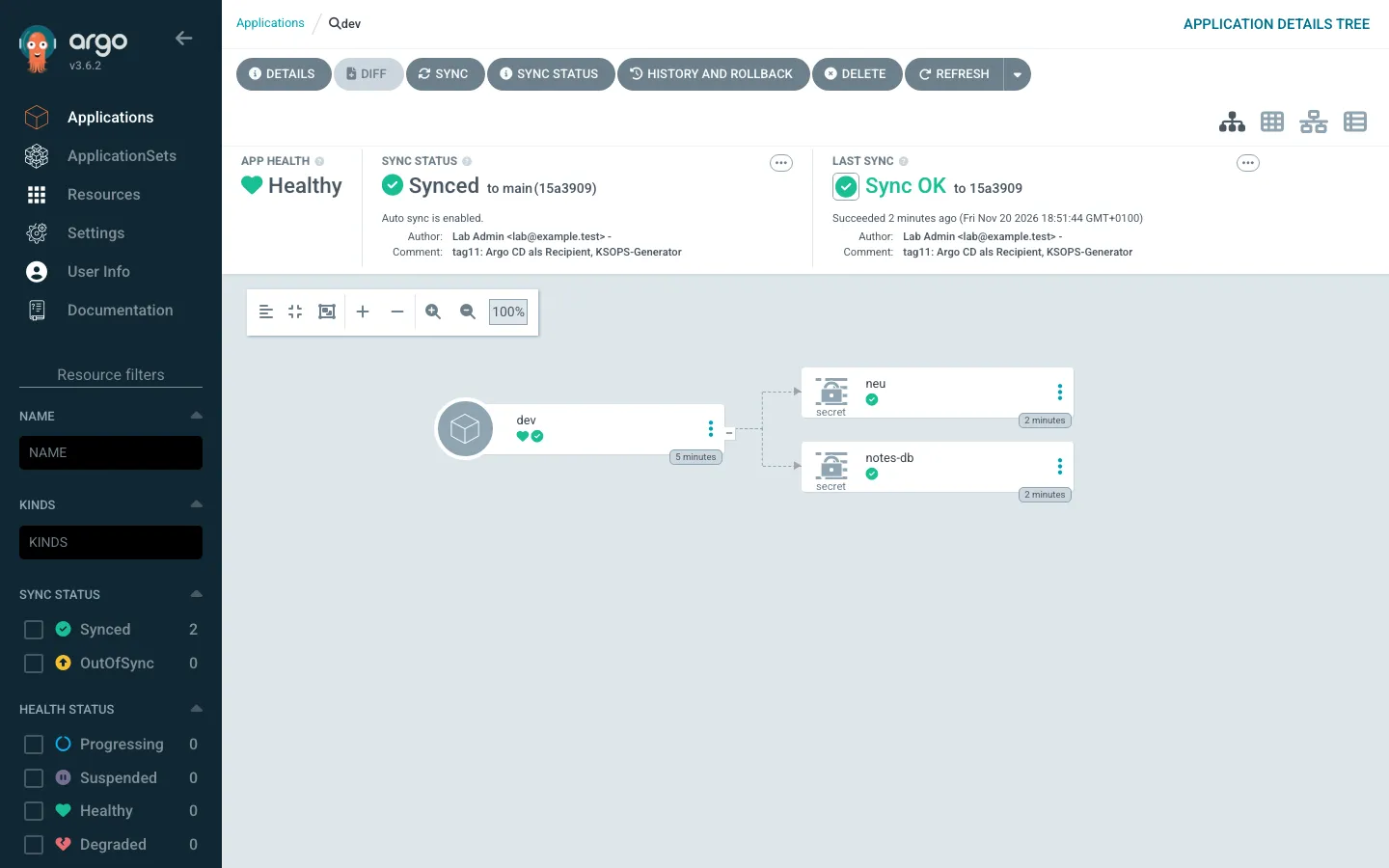
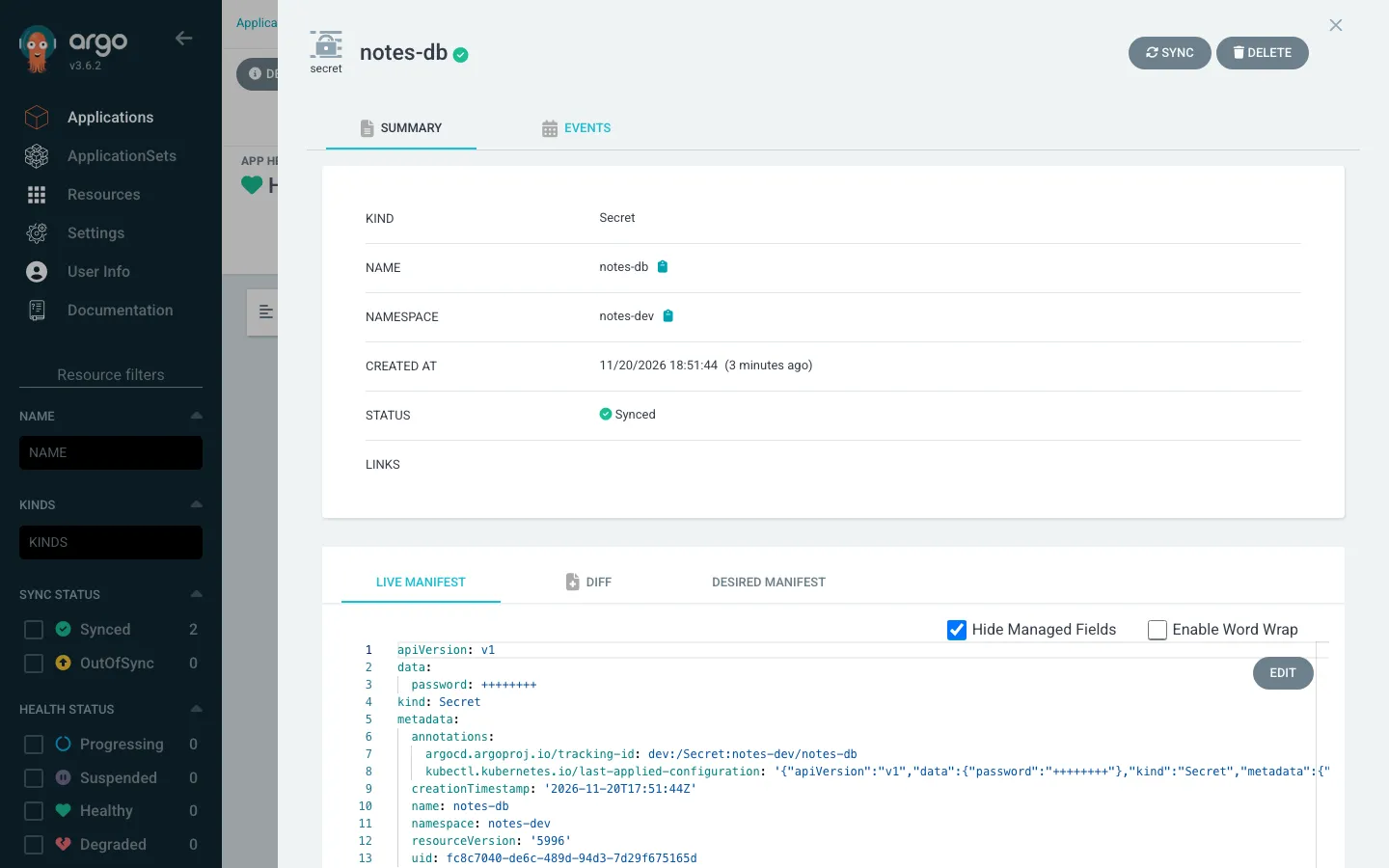
The UI (http://172.16.0.182:30080, user
admin, password as above) shows the same: the Application
with both Secrets, and only plus signs in the live manifest.
Save your progress? Sign up for free
Drill 7: Where the plain text still lives
The mask only applies to the display. First place: the annotation
that client-side kubectl apply attaches to every
object.
# on argo
kubectl -n notes-dev get secret notes-db -o jsonpath=\
'{.metadata.annotations.kubectl\.kubernetes\.io/last-applied-configuration}' \
  | jq -r .data.password | base64 -d; echo
Expected:
lab-db-dev-789Second place: the manifest cache in Argo CD’s Redis. The entries are gzip-compressed JSON – with the decrypted values.
# on argo
R=$(kubectl -n argocd get secret argocd-redis -o jsonpath='{.data.auth}' \
  | base64 -d)
K=$(kubectl -n argocd exec deploy/argocd-redis -- redis-cli -a "$R" \
  --no-auth-warning --scan --pattern 'mfst|*' | head -1)
kubectl -n argocd exec deploy/argocd-redis -- redis-cli -a "$R" \
  --no-auth-warning --raw get "$K" | gunzip 2>/dev/null | grep -o 'password[^}]*'
Expected:
password\":\"bGFiLWRiLW5ldS0xMjM=\"
password\":\"bGFiLWRiLWRldi03ODk=\"
bGFiLWRiLWRldi03ODk= is base64 for
lab-db-dev-789. The Argo CD docs warn about this
themselves: plugins that generate Secrets store them in the cache.
Whoever can read Redis can read the Secrets.
Fix for the annotation: Server-side apply does not
attach a last-applied-configuration.
# on argo
cd ~/sops/tag11
yq -i '.spec.syncPolicy.syncOptions += ["ServerSideApply=true"]' app-dev.yaml
kubectl apply -f app-dev.yaml
kubectl -n notes-dev annotate secret notes-db neu \
  kubectl.kubernetes.io/last-applied-configuration-
argocd app sync dev --force 2>&1 | grep -E '^ +Secret' | awk '{print $3, $4, $6}'
kubectl -n notes-dev get secret notes-db -o jsonpath='{.metadata.annotations}'; echo
Expected:
application.argoproj.io/dev configured
secret/notes-db annotated
secret/neu annotated
notes-db Synced serverside-applied
neu Synced serverside-applied
{"argocd.argoproj.io/tracking-id":"dev:/Secret:notes-dev/notes-db"}
Against the cache, only isolation helps: Redis reachable only by Argo
CD (NetworkPolicy, which the chart can bring along), a Redis password,
no exec into the argocd namespace for
humans.
Save your progress? Sign up for free
Drill 8: Change and roll out
# on argo
cd ~/sops/repo
sops set dev/notes-db.yaml '["data"]["password"]' \
  "\"$(printf lab-db-dev-999 | base64)\""
git add dev/notes-db.yaml && git commit -q -m "tag11: dev-Passwort gewechselt"
git push -q && git log --oneline | head -1
argocd app get dev --hard-refresh >/dev/null
sleep 15
argocd app get dev -o json | jq -r '.status.sync.status'
kubectl -n notes-dev get secret notes-db -o jsonpath='{.data.password}' \
  | base64 -d; echo
Expected:
c0c5d67 tag11: dev-Passwort gewechselt
Synced
lab-db-dev-999
Without --hard-refresh, Argo CD polls Forgejo every
three minutes. A webhook from Forgejo to Argo CD makes this instant (see
the note in “GitOps with Argo CD hands-on”, Day 2).
Save your progress? Sign up for free
Exercise: Speed Drills
- Show the kustomize options in
argocd-cm. Target time: 20 s - Show where
SOPS_AGE_KEY_FILEpoints in the repo-server. Target time: 20 s - Check that your own key can still decrypt
dev/notes-db.yaml. Target time: 15 s
Solution
# on argo
kubectl -n argocd get cm argocd-cm -o jsonpath='{.data.kustomize\.buildOptions}'
echo
kubectl -n argocd set env deploy/argocd-repo-server --list | grep SOPS
sops decrypt --extract '["data"]["password"]' ~/sops/repo/dev/notes-db.yaml \
  | base64 -d; echo
Expected:
--enable-alpha-plugins --enable-exec
SOPS_AGE_KEY_FILE=/sops/keys.txt
lab-db-dev-999
Save your progress? Sign up for free
Checkpoint
# on argo
argocd app get dev -o json | jq -r '.status.sync.status + " " + .status.health.status'
kubectl -n notes-dev get secret --no-headers | wc -l
grep -c "$(age-keygen -y ~/sops/tag11/argocd.key)" ~/sops/repo/dev/notes-db.yaml
Expected:
Synced Healthy
2
1
Challenge
Argo CD should also roll out dev/app.env (Day 4) as the
Secret app-env. KSOPS can create a Secret directly from a
dotenv file (secretFrom with envs). Extend the
generator, push – and read the message before you fix it.
Hint: .env files have their own rule in
.sops.yaml.
Solution
# on argo
cd ~/sops/repo
cat >> argocd/dev/secret-generator.yaml <<'EOF'
secretFrom:
  - metadata:
      name: app-env
    envs:
      - ../../dev/app.env
EOF
git add argocd && git commit -q -m "tag11: app.env als Secret" && git push -q
argocd app get dev --hard-refresh >/dev/null; sleep 10
argocd app get dev -o json | jq -r '.status.conditions[0].message' \
  | grep -o 'error decrypting[^:]*' | head -1
Expected:
error decrypting file "../../dev/app.env" from secretFrom.EnvsThe rule ^dev/.*\.env$ only knows your key. Fix as in
Drill 1:
# on argo
cd ~/sops/repo
A=$(age-keygen -y ~/sops/tag11/argocd.key)
yq -i '(.creation_rules[] | select(.path_regex == "^dev/.*\\.env$")).age
  += ",'"$A"'"' .sops.yaml
sops updatekeys -y dev/app.env 2>&1 | tail -1
git add .sops.yaml dev/app.env
git commit -q -m "tag11: Argo CD darf app.env lesen" && git push -q
argocd app get dev --hard-refresh >/dev/null
argocd app sync dev 2>&1 | grep -E '^Phase'
kubectl -n notes-dev get secret app-env -o jsonpath='{.data.API_KEY}' \
  | base64 -d; echo
Expected:
… File /home/ubuntu/sops/repo/dev/app.env synced with new keys
Phase:              Succeeded
lab-key-123
After a failed manifest build, Argo CD in the lab did not sync on its
own, even though the new state could be built –
argocd app sync kicks it off.
Save your progress? Sign up for free
Cleanup
Argo CD leaves the cluster again. Delete the Application first – with
prune and the finalizer it would otherwise hang during
teardown or take Secrets with it.
# on argo
kubectl -n argocd patch application dev --type merge \
  -p '{"metadata":{"finalizers":null}}'
kubectl -n argocd delete application dev
helm uninstall argocd -n argocd >/dev/null && kubectl delete namespace argocd notes-dev
rm ~/sops/tag11/argocd-linux-* ~/sops/tag11/cli_checksums.txt
kubectl get ns | grep -cE 'argocd|notes'
Expected:
application.argoproj.io/dev patched (no change)
application.argoproj.io "dev" deleted from argocd namespace
namespace "argocd" deleted
namespace "notes-dev" deleted
0
What stays for later days: ~/sops/tag11/argocd.key
(recipient in the dev rules), the folder argocd/dev in the
repo, the argocd binary. helm uninstall leaves
Argo CD’s CRDs in place; they do no harm.
Interview Note
- How do you teach Argo CD sops? Through a config management
tool: KSOPS as a kustomize generator (init container +
kustomize.buildOptions+ key in the repo-server) or helm-secrets for Helm charts. - Is the Secret safe in Argo CD because the UI shows
++++++++? No – plain text in the Redis cache and, with client-side apply, inlast-applied-configuration. - Why a separate key for Argo CD? It can be granted per
folder and revoked on its own (
updatekeys+rotate) without touching human keys.
Enterprise Note
- Many teams do not let Argo CD decrypt at all: the External Secrets Operator fetches the values from OpenBao at runtime, and Git only holds the reference (Day 15).
- The Argo CD project itself recommends this approach over plugins that generate Secrets during the build – precisely because of the cache.
- If you use KSOPS: a custom repo-server image instead of an init
container (faster start, signable), Redis with TLS and NetworkPolicy,
ServerSideApply=trueas the default in every Application (e.g. via an ApplicationSet template). - One key per cluster; recipient only for the paths this cluster rolls out.
- With a cloud KMS the repo-server gets access via workload identity, without a key file.