Day 4: Organization and Ownership
Goal: You map the Kranich organization with groups and users in the catalog, resolve all owners and let the guest appear as a real user entity. · Duration: approx. 90 min · Prerequisite: Day 3
Briefing
- Group and User are entities like
all the others. At Kranich they live in the repo
kranich/orgin a fileorg.yaml. - The hierarchy comes from
spec.parent(group) andspec.memberOf(user). The catalog adds the reverse direction (parentOf,hasMember) itself. spec.owner: team-sendungbecomes the relationownedBy → group:default/team-sendung. If the group is missing, the relation points nowhere – the yellow warning since Day 1.- Owned in the catalog shows what the signed-in identity or one of its groups owns.
kranich (organization)
└── it (department)
    ├── team-sendung (team) ◄─ memberOf ─ anna.berger, ben.kraus
    ├── team-web     (team) ◄─ memberOf ─ chris.dietz, thomas.zachmann
    └── plattform    (team) ◄─ memberOf ─ thomas.zachmann
Drill 1: Taking Stock
The starting point is the end of Day 3: the portal is running,
sendungs-api, tracking-web, the system
sendungsverfolgung and the external resources are in the
catalog, and app-config.local.yaml contains a
catalog.locations block.
source ~/backstage-lab/setup/env.sh
~/backstage-lab/setup/portal.sh start
mkdir -p ~/backstage-lab/tag04 && cd ~/backstage-lab/tag04- Open
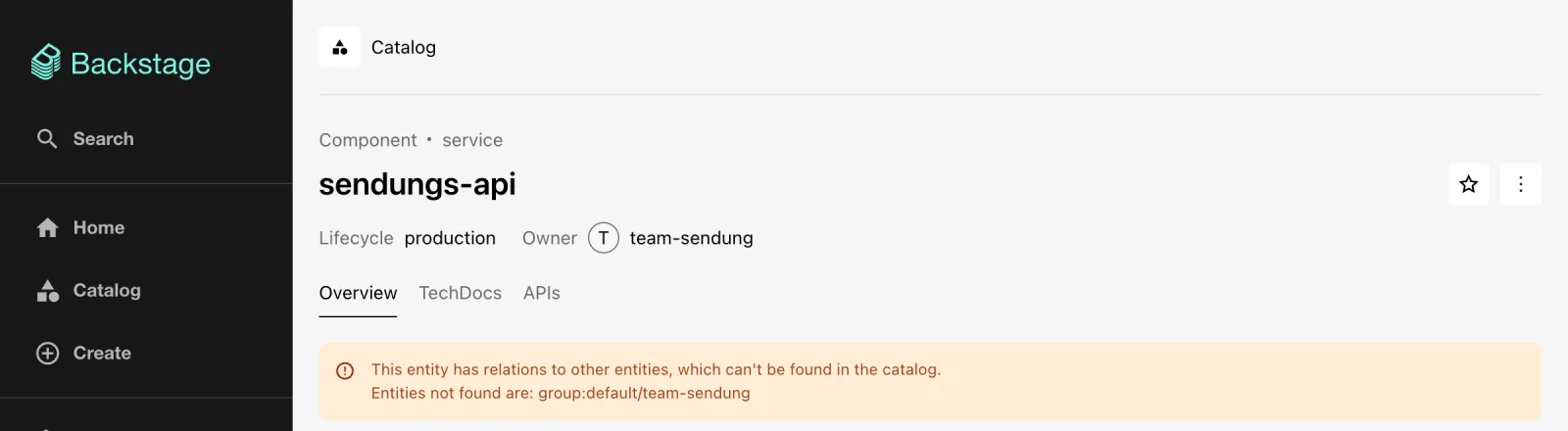
http://localhost:3000, click Enter and thensendungs-api. - Expected: the yellow warning as in the figure;
Owner only shows the bare name
team-sendung.
Which owners are missing overall? The script fetches all values of
the relation ownedBy as a facet and queries them together
via by-refs – missing entities come back as
null.
cat > ~/backstage-lab/tag04/owner-check.sh <<'EOF'
#!/usr/bin/env bash
# owner-check.sh – lists owner references for which no entity exists.
source ~/backstage-lab/setup/env.sh
refs=$(bs 'catalog/entity-facets?facet=relations.ownedBy' \
  | jq -c '[.facets[][] | .value]')
bs catalog/entities/by-refs -X POST -H 'Content-Type: application/json' \
  -d "{\"entityRefs\":$refs,\"fields\":[\"kind\"]}" \
  | jq -r --argjson r "$refs" '[range(0; $r | length) as $i
      | select(.items[$i] == null) | "✘ fehlt: \($r[$i])"]
      | if length == 0 then "✔ alle \($r | length) Owner vorhanden" else .[] end'
EOF
bash ~/backstage-lab/tag04/owner-check.sh
Expected:
✘ fehlt: group:default/team-sendung
✘ fehlt: group:default/team-web
(“fehlt” means “missing”.) group:default/guests and
user:default/guest are not missing – they come from
examples/org.yaml in the create-app template.
Save your progress? Sign up for free
Drill 2: The Repo kranich/org
The finished org.yaml is in the companion code. Five
groups, four users:
cp -R ~/backstage-lab/code/tag04/org ~/backstage-lab/tag04/
grep -E '^  name:' ~/backstage-lab/tag04/org/org.yaml
Expected:
  name: kranich
  name: it
  name: team-sendung
  name: team-web
  name: plattform
  name: anna.berger
  name: ben.kraus
  name: chris.dietz
  name: thomas.zachmann
An excerpt with the three building blocks – root, team, user:
kind: Group
metadata:
  name: kranich
  title: Kranich Logistik GmbH
spec:
  type: organization
  profile:
    displayName: Kranich Logistik GmbH
    email: [email protected]
  children: []
---
kind: Group
metadata:
  name: team-sendung
  title: Team Sendung
  description: Sendungsverfolgung – API, Worker, Datenbank
spec:
  type: team
  parent: it
  profile:
    displayName: Team Sendung
    email: [email protected]
  children: []
---
kind: User
metadata:
  name: thomas.zachmann
spec:
  profile:
    displayName: Thomas Zachmann
    email: [email protected]
  memberOf: [plattform, team-web]
Why children: []? The field is mandatory for groups. You
maintain the hierarchy only from below (parent); the
catalog adds the children as the relation parentOf.
spec.type is freely selectable – organization,
department and team are convention.
~/backstage-lab/setup/mkrepo.sh kranich/org ~/backstage-lab/tag04/orgExpected:
✔ kranich/org angelegt (http://127.0.0.1:3300/kranich/org)Save your progress? Sign up for free
Drill 3: Registering Despite catalog.rules
The obvious approach is a dry run via the API:
URL=$FORGEJO/kranich/org/src/branch/main/org.yaml
curl -s -H "Authorization: Bearer $BACKSTAGE_TOKEN" \
  -H 'Content-Type: application/json' -X POST \
  "$BACKSTAGE/api/catalog/locations?dryRun=true" \
  -d "{\"type\":\"url\",\"target\":\"$URL\"}" | jq -r .error.message
Expected (wrapped, shortened):
NotAllowedError: Entity group:default/kranich at url:http://127.0.0.1:3300/kranich/
org/src/branch/main/org.yaml, originated at url:…, is not of an allowed kind for
that location
Why? The global catalog.rules (Day 3) do not allow User
and Group. That is intended: otherwise anyone could create groups via
Register Existing Component and thus sneak their way
into ownership. The exception only applies to one location in the
configuration. In app-config.local.yaml, add the following
as the last list entry under catalog.locations (indented
like the other entries):
    # Day 4: organization from kranich/org
    - type: url
      target: http://127.0.0.1:3300/kranich/org/src/branch/main/org.yaml
      rules:
        - allow: [User, Group]
Warning: If the entry for
tag03/entwurf.yamlis still there, delete it. Both files definegroup:default/team-sendung. The catalog then keeps the version it saw first and writes to the log:Detected conflicting entityRef group:default/team-sendung already referenced by file:…/tag03/entwurf.yaml and now also url:…/kranich/org/….
~/backstage-lab/setup/portal.sh restart
sleep 20
bs 'catalog/entities?filter=kind=group,kind=user&fields=kind,metadata.name' \
  | jq -r '.[] | "\(.kind) \(.metadata.name)"' | sort
Expected:
Group guests
Group it
Group kranich
Group plattform
Group team-sendung
Group team-web
User anna.berger
User ben.kraus
User chris.dietz
User guest
User thomas.zachmann
Save your progress? Sign up for free
Drill 4: The Warning Disappears
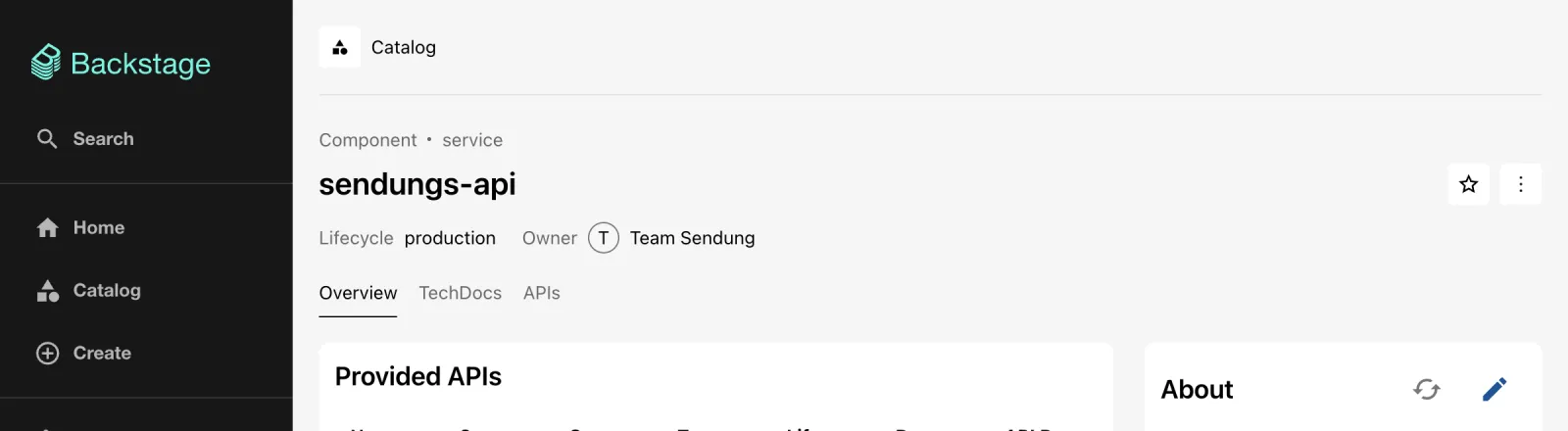
- Reload the entity page of
sendungs-api. - Expected: no more warning; Owner now shows the
displayName“Team Sendung” as a link – as in the figure.
bash ~/backstage-lab/tag04/owner-check.sh
bs catalog/entities/by-name/group/default/it \
  | jq -r '.spec.children, (.relations[] | "\(.type) -> \(.targetRef)")'
Expected:
✔ alle 5 Owner vorhanden
[]
childOf -> group:default/kranich
parentOf -> group:default/plattform
parentOf -> group:default/team-sendung
parentOf -> group:default/team-web
(“alle 5 Owner vorhanden” means “all 5 owners present”.)
spec.children stays empty; the parentOf
relations come from the parent fields of the three teams.
Queries and the user interface always work with relations, never with
spec.
Save your progress? Sign up for free
Drill 5: The Group Page
- On the entity page of
sendungs-api, click Team Sendung. - Expected: the group page as in the figure. On the right, the profile card with Entity Ref, Email, Parent Group (IT) and Child Groups (N/A); on the left the Relations mini graph with the members and everything the team owns.
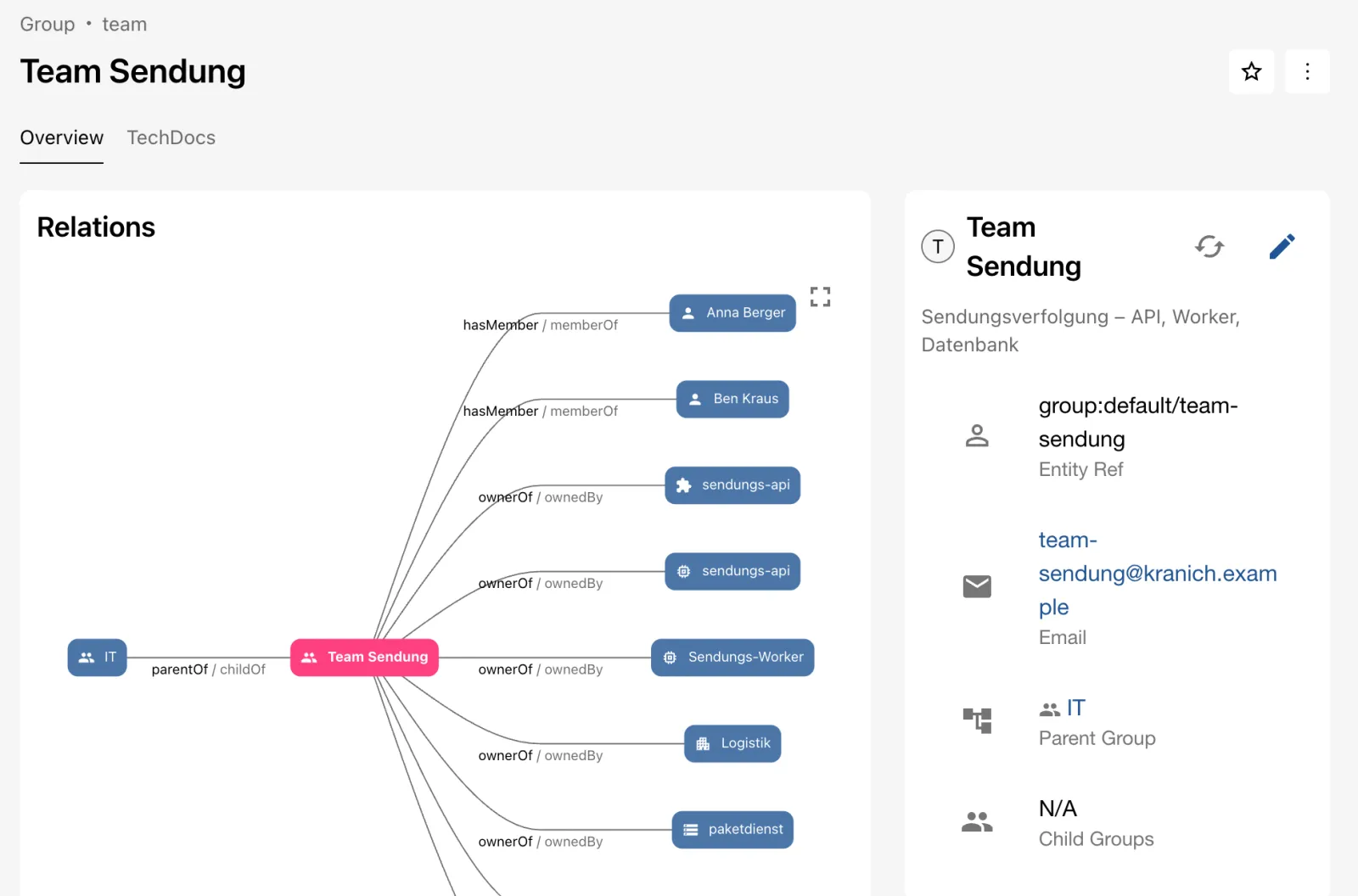
- Scroll down. The card Team Sendung members (2 of 2) lists Anna Berger and Ben Kraus with their e-mail addresses; the Ownership card counts the owned entities by type.
- In the profile card, click IT. The department has neither members nor entities of its own – Ownership is empty.
- In Ownership, turn on the Include indirect ownership switch.
- Expected: the sum of all three teams as in the figure.
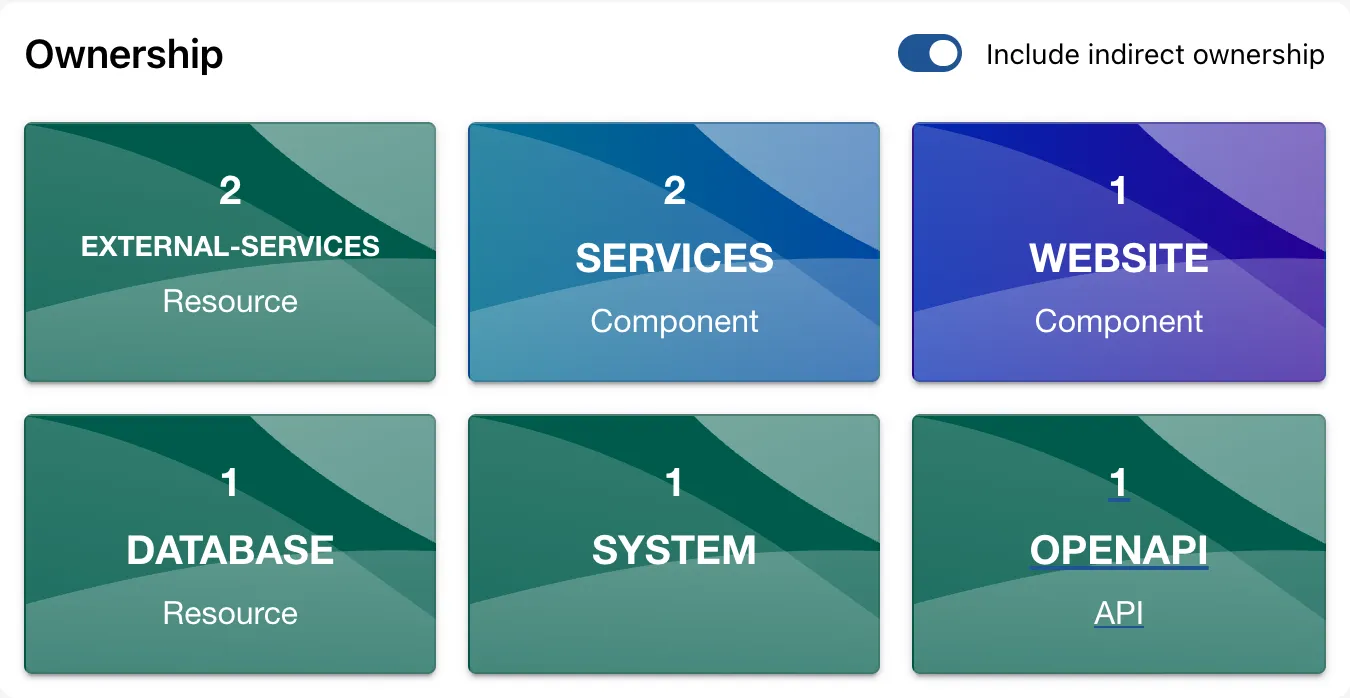
Why? “Indirect” follows the parentOf relations downward.
That way, a department head sees at a glance what their teams are
responsible for.
Tip: The cards come from the plugin
@backstage/plugin-organd can be configured inapp.extensions, e.g.entity-card:org/ownershipwithconfig.initialRelationAggregation: aggregated(Day 9).
Save your progress? Sign up for free
Drill 6: The User Page
- Click Catalog in the sidebar, set
Kind to
Userand openthomas.zachmann. - Expected: the user page as in the figure – profile card with e-mail and the groups Team Plattform and Team Web, below it Ownership.
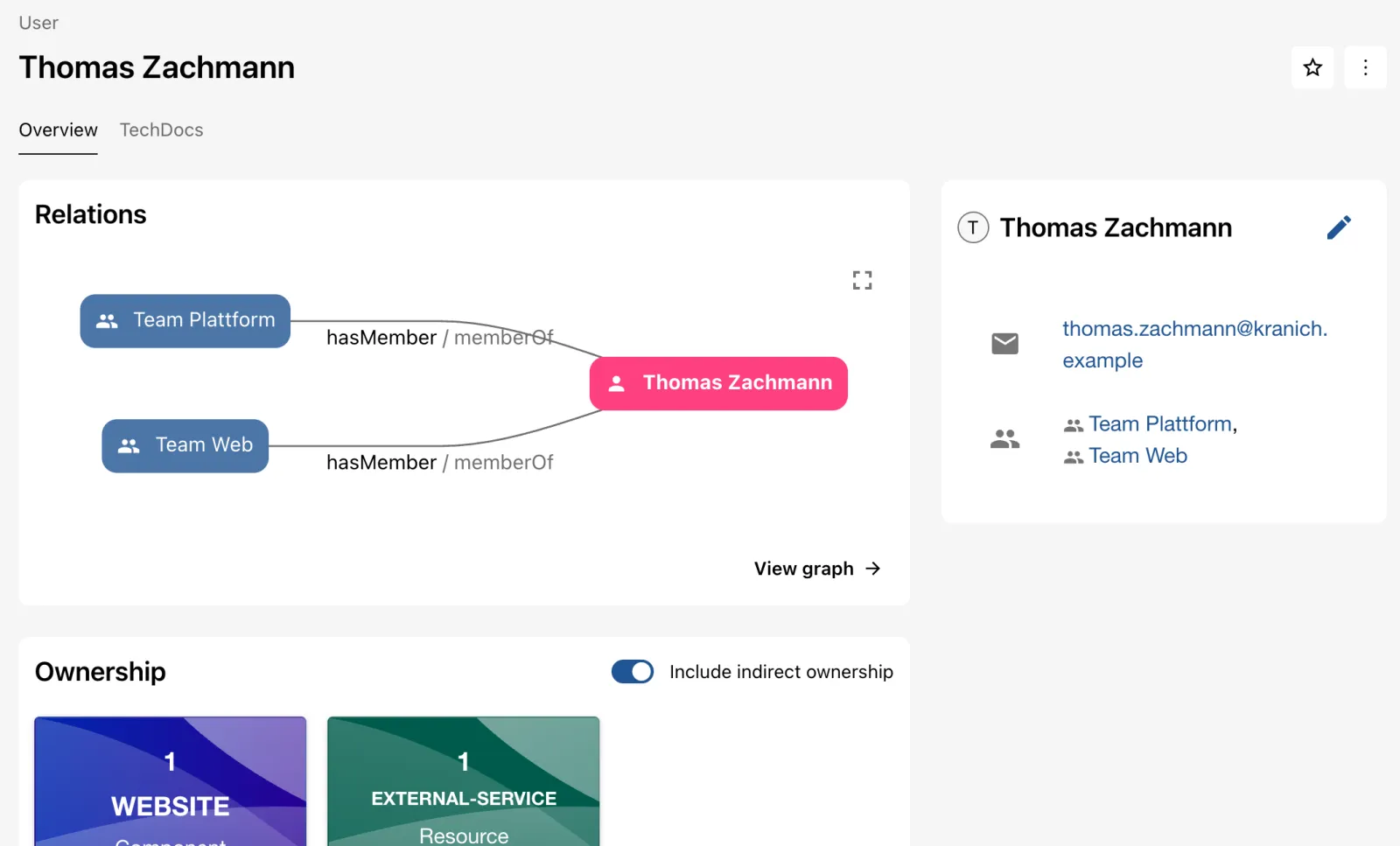
The user himself owns nothing. The Ownership card
still shows tracking-web and kartendienst: for
users, Include indirect ownership is on from the start
and counts everything that belongs to their groups.
Save your progress? Sign up for free
Drill 7: Owned and the Guest Identity
- Click Catalog and, on the left under PERSONAL, Owned.
- Expected: Owned shows
0, the table stays at “All Components”.
Why? The guest is user:development/guest – namespace
development, not default. The guest provider
looks for this entity in the catalog, doesn’t find it and issues a token
with ent: [user:development/guest]. This list
(ownershipEntityRefs) determines Owned,
and this ref owns nothing.
The installed code
(plugin-auth-backend-module-guest-provider, file
config.schema.json) contains two keys:
userEntityRef (default user:development/guest)
and ownershipEntityRefs. If the provider finds the user in
the catalog, it resolves the groups itself. Append to
app-config.local.yaml:
cat >> ~/backstage-lab/portal/app-config.local.yaml <<'EOF'
auth:
  providers:
    guest:
      userEntityRef: user:default/thomas.zachmann
EOF
grep -c '^auth:' ~/backstage-lab/portal/app-config.local.yaml
~/backstage-lab/setup/portal.sh restart
curl -s -H 'X-Requested-With: XMLHttpRequest' "$BACKSTAGE/api/auth/guest/refresh" \
  | jq .backstageIdentity.identity
Expected (the 1 means: no duplicate top-level key
auth):
1
{
  "type": "user",
  "userEntityRef": "user:default/thomas.zachmann",
  "ownershipEntityRefs": [
    "user:default/thomas.zachmann",
    "group:default/plattform",
    "group:default/team-web"
  ]
}
auth.providers.guest: {} from
app-config.yaml and your block are merged.
- Open Settings, click ⋮ in the profile and Sign Out, then Enter again.
- Expected: under Profile it says
user:default/thomas.zachmann, and the Backstage Identity card shows the identity as in the figure.
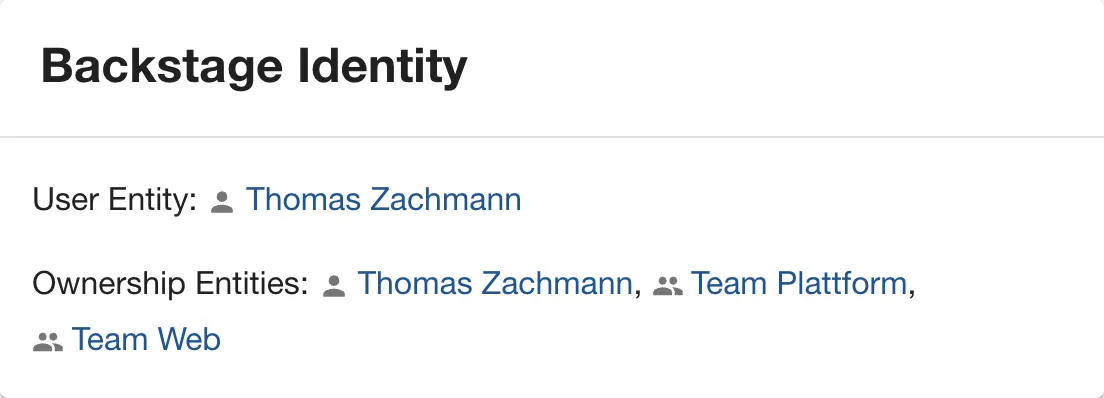
- Click Catalog and Owned. Expected:
“Owned Components (1)” with
tracking-webas in the figure.
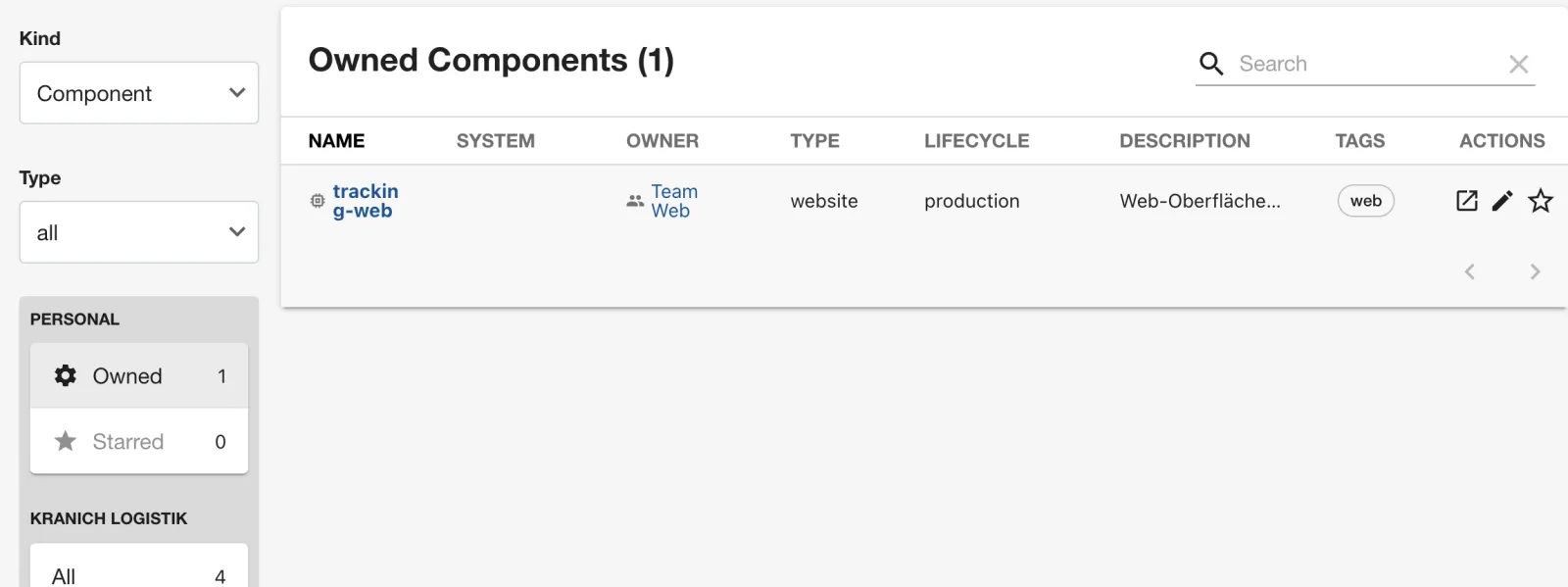
Starred is back at 0: stars belong to
the identity, and the new user doesn’t see the favorites of
user:development/guest from Day 1.
Security: The guest provider checks nothing – anyone who can reach the portal is now Thomas Zachmann. In the lab that is convenient; in production, a real sign-in with a resolver replaces this trick (Day 12).
Save your progress? Sign up for free
Drill 8: Ownership via the API and the Org Graph
A filter on the relation returns everything a team owns. It also works when the group is missing – it only compares strings.
bs 'catalog/entities?filter=relations.ownedBy=group:default/team-web' \
  | jq -r '.[] | "\(.kind) \(.metadata.name)"'
bs 'catalog/entity-facets?facet=relations.ownedBy' | jq -c '.facets[][]'
Expected:
Component tracking-web
Resource kartendienst
{"value":"group:default/guests","count":3}
{"value":"group:default/team-sendung","count":7}
{"value":"group:default/team-web","count":2}
{"value":"user:default/guest","count":1}
filter=spec.owner=team-web returns the same here, but
fails with spellings like group:team-web or
group:default/team-web. The relation is always fully
qualified – use the relation in scripts.
The organization as a graph:
- Open the group Kranich Logistik GmbH (via Parent Group of IT) and click View graph in Relations.
- Set MAX DEPTH to
3, select onlyGroupandUserunder KINDS, andTop to bottomunder Direction. - Expected: the org chart graph as in the figure. Thomas Zachmann hangs off two teams.
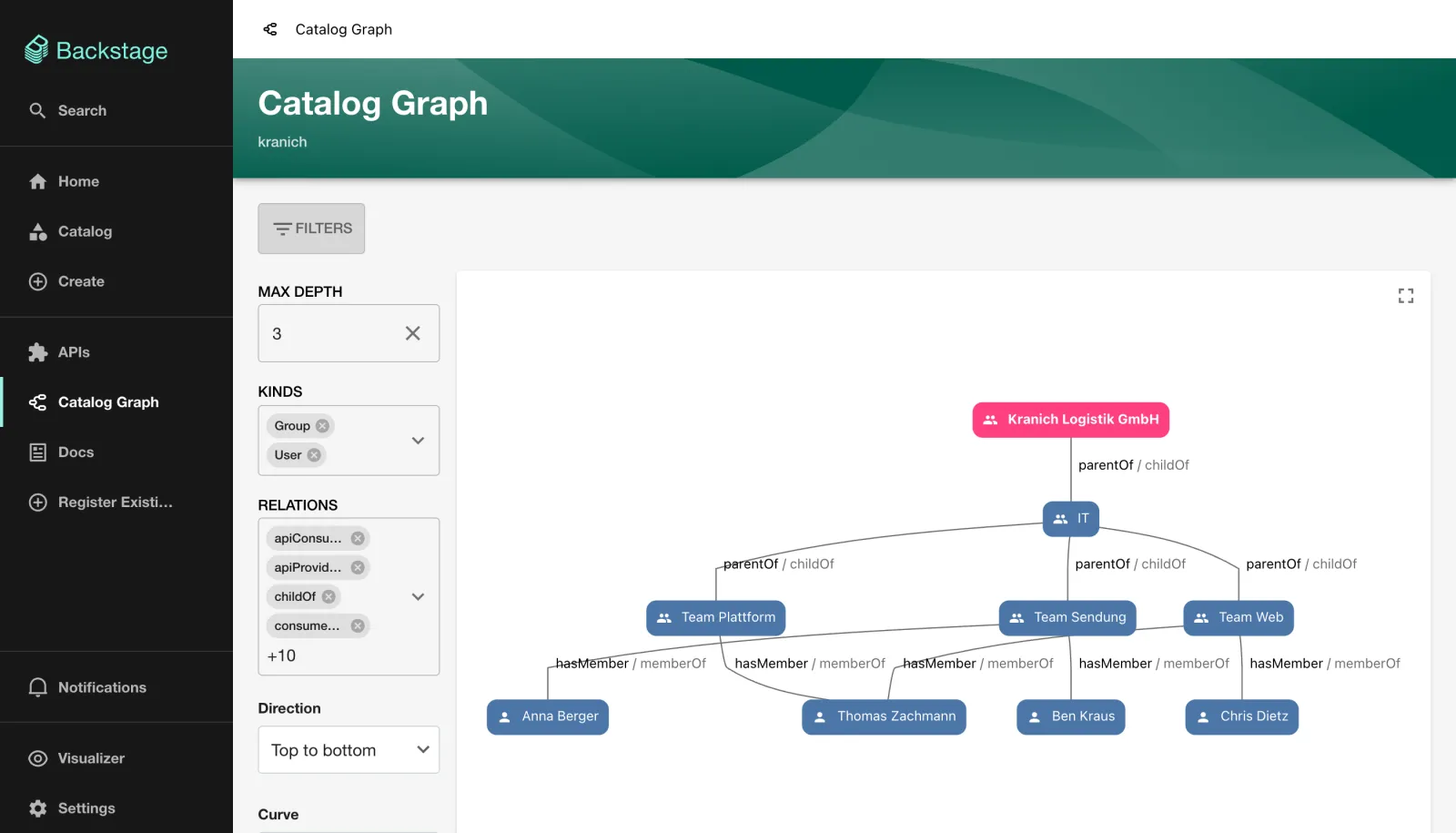
Save your progress? Sign up for free
Checkpoint
cat > ~/backstage-lab/tag04/kontrolle.sh <<'EOF'
#!/usr/bin/env bash
# kontrolle.sh – checkpoint Day 4 (✔/✘). Exit code = number of failures.
source ~/backstage-lab/setup/env.sh
fail=0
t() { if eval "$2" >/dev/null 2>&1; then echo "✔ $1"
  else echo "✘ $1"; fail=$((fail+1)); fi; }
e() { bs "catalog/entities/by-name/$1"; }

t "Gruppen kranich, it, team-sendung, team-web, plattform" \
  "for g in kranich it team-sendung team-web plattform; do
     e group/default/\$g || exit 1; done"
t "team-sendung hängt unter it" \
  "e group/default/team-sendung | jq -e '.relations[] |
     select(.type==\"childOf\" and .targetRef==\"group:default/it\")'"
t "User thomas.zachmann mit E-Mail" \
  "e user/default/thomas.zachmann | jq -e '.spec.profile.email | test(\"@\")'"
t "team-sendung besitzt die Component sendungs-api" \
  "bs 'catalog/entities?filter=relations.ownedBy=group:default/team-sendung' |
     jq -e '.[] | select(.metadata.name==\"sendungs-api\" and .kind==\"Component\")'"
t "Keine fehlenden Owner" \
  "bash ~/backstage-lab/tag04/owner-check.sh | grep -q '^✔'"
t "Gast tritt als user:default/thomas.zachmann auf" \
  "curl -sf -H 'X-Requested-With: XMLHttpRequest' \$BACKSTAGE/api/auth/guest/refresh |
     jq -e '.backstageIdentity.identity.userEntityRef ==
       \"user:default/thomas.zachmann\"'"
exit "$fail"
EOF
bash ~/backstage-lab/tag04/kontrolle.sh
Expected:
✔ Gruppen kranich, it, team-sendung, team-web, plattform
✔ team-sendung hängt unter it
✔ User thomas.zachmann mit E-Mail
✔ team-sendung besitzt die Component sendungs-api
✔ Keine fehlenden Owner
✔ Gast tritt als user:default/thomas.zachmann auf
Challenge
Found the team team-kunde under it with
Chris Dietz as a member and hand tracking-web over to it.
Everything via git push and refresh, without a restart.
Hint: A group can also declare its members itself
via spec.members, and a refresh of an entity rereads the
whole file it is in.
Solution
cd ~/backstage-lab/tag04
git clone -q http://lab-admin:[email protected]:3300/kranich/org.git org-repo
cat ~/backstage-lab/code/tag04/challenge/team-kunde.yaml >> org-repo/org.yaml
git -C org-repo -c user.name="Lab Admin" -c [email protected] \
  commit -qam "Neues Team Kunde" && git -C org-repo push -q origin main
git clone -q http://lab-admin:[email protected]:3300/kranich/tracking-web.git
sed -i '' 's/owner: team-web/owner: team-kunde/' tracking-web/catalog-info.yaml
git -C tracking-web -c user.name="Lab Admin" -c [email protected] \
  commit -qam "Owner team-kunde" && git -C tracking-web push -q origin main
for r in group:default/kranich component:default/tracking-web; do
  bs catalog/refresh -X POST -H 'Content-Type: application/json' \
    -d "{\"entityRef\":\"$r\"}" -w '%{http_code}\n'
done
sleep 6
bs catalog/entities/by-name/group/default/team-kunde \
  | jq -r '.relations[] | "\(.type) -> \(.targetRef)"'
Expected:
200
200
childOf -> group:default/it
hasMember -> user:default/chris.dietz
ownerOf -> component:default/tracking-web
The appended group (challenge/team-kunde.yaml) starts
with --- and contains members: [chris.dietz].
Chris is now in Team Web and Team Kunde. Owned no
longer shows any component for Thomas Zachmann –
tracking-web no longer belongs to Team Web.
Save your progress? Sign up for free
Enterprise Note
- Nobody maintains
org.yamlfor 5,000 employees by hand. Entity providers read users and groups from LDAP (catalog-backend-module-ldap), Microsoft Entra ID (catalog-backend-module-msgraph), or GitHub or GitLab orgs. - The org data belongs in locations from the configuration with
allow: [User, Group]. Globally allowed groups make ownership forgeable. - Owners are teams, not people: people change, teams remain. An owner check like the one in Drill 1 belongs as a gate in the CI of the catalog repos.
- The guest provider with
userEntityRefis only a lab tool. In production, a sign-in resolver maps the real login to a user entity, e.g. by e-mail (Day 12). - Ownership is the foundation for permissions: rules like “only owners may delete” require well-maintained groups and memberships.