Day 5: Software Templates
Goal: You build a golden path that, at the click of a button, creates a new Forgejo repo, fills it with code and registers the new component in the catalog. · Duration: approx. 120 min · Prerequisite: Day 4
Briefing
- A Software Template is an entity of kind
Template. It consists ofparameters(form),steps(actions in the backend) andoutput(links). - The Scaffolder runs the steps as a task. Every run has a log.
fetch:templaterenders a skeleton with Nunjucks (${{ values.name }}),publish:giteacreates the repo,catalog:registerregisters it.
Wizard (form)      ──►  Task in the Scaffolder backend
 name, owner,          fetch:template ─► publish:gitea ─► catalog:register
 repoUrl                 skeleton/        kranich/<name>    Component in the catalog
Drill 1: The Gitea Module for the Scaffolder
The starting point is the end of Day 4: the Gitea provider from Day 3
finds all kranich/* repos, and the groups
team-sendung, team-web and
plattform come from kranich/org. But the
Scaffolder can only publish to GitHub:
source ~/backstage-lab/setup/env.sh
~/backstage-lab/setup/portal.sh start
bs scaffolder/v2/actions | jq -r '.[].id' | grep '^publish'
Expected:
✔ Backstage läuft: http://localhost:3000 (Backend http://localhost:7007)
publish:github
publish:github:pull-request
You install the module for Gitea (and therefore Forgejo) into the backend:
~/backstage-lab/setup/portal.sh stop
cd ~/backstage-lab/portal
yarn --cwd packages/backend add @backstage/plugin-scaffolder-backend-module-gitea
grep scaffolder-backend-module-gitea packages/backend/package.json
Expected (shortened):
➤ YN0000: · Done with warnings in 12s 547ms
    "@backstage/plugin-scaffolder-backend-module-gitea": "^0.2.25",
Open packages/backend/src/index.ts and add, directly
below the line with
plugin-scaffolder-backend-module-github:
backend.add(import('@backstage/plugin-scaffolder-backend-module-gitea'));grep -n 'scaffolder-backend' packages/backend/src/index.tsExpected:
17:backend.add(import('@backstage/plugin-scaffolder-backend'));
18:backend.add(import('@backstage/plugin-scaffolder-backend-module-github'));
19:backend.add(import('@backstage/plugin-scaffolder-backend-module-gitea'));
21:  import('@backstage/plugin-scaffolder-backend-module-notifications'),
The module reads the credentials from integrations.gitea
in app-config.local.yaml. Since Day 0 that has been the bot
backstage-bot, which is in the Owners team of the org
kranich. So the action may create repos in the org. You
start the portal again only in Drill 3.
Save your progress? Sign up for free
Drill 2: The Template Repo kranich/templates
A template consists of template.yaml and a
skeleton/ folder that serves as the blueprint for the new
repo. First the template definition:
mkdir -p ~/backstage-lab/tag05/templates/node-service/skeleton/src
cd ~/backstage-lab/tag05/templates
cat > node-service/template.yaml <<'EOF'
apiVersion: scaffolder.backstage.io/v1beta3
kind: Template
metadata:
  name: node-service
  title: Node.js-Service
  description: Neuer Node.js-Service mit Repo in Forgejo und Katalog-Eintrag
  tags: [nodejs, kranich]
spec:
  owner: plattform
  type: service
  parameters:
    - title: Service
      required: [name, description, owner]
      properties:
        name:
          title: Name
          type: string
          description: Kleinbuchstaben, Ziffern, Bindestriche (z. B. lager-api)
          pattern: '^[a-z][a-z0-9-]{2,30}$'
          ui:autofocus: true
        description:
          title: Beschreibung
          type: string
          description: Ein Satz – erscheint in Forgejo und im Katalog
        owner:
          title: Owner
          type: string
          description: Team, das den Service betreut
          ui:field: OwnerPicker
          ui:options:
            catalogFilter:
              kind: Group
              spec.type: team
    - title: Repository
      required: [repoUrl]
      properties:
        repoUrl:
          title: Ablageort
          type: string
          ui:field: RepoUrlPicker
          ui:options:
            allowedHosts: ['127.0.0.1:3300']
            allowedOwners: [kranich]
  steps:
    - id: fetch
      name: Skeleton füllen
      action: fetch:template
      input:
        url: ./skeleton
        values:
          name: ${{ parameters.name }}
          description: ${{ parameters.description }}
          owner: ${{ parameters.owner }}
    - id: publish
      name: Repo in Forgejo anlegen
      action: publish:gitea
      input:
        repoUrl: ${{ parameters.repoUrl }}
        description: ${{ parameters.description }}
        defaultBranch: main
        repoVisibility: public
        gitCommitMessage: Erzeugt aus Template node-service
        gitAuthorName: Backstage Scaffolder
        gitAuthorEmail: [email protected]
    - id: register
      name: Im Katalog registrieren
      action: catalog:register
      input:
        repoContentsUrl: ${{ steps.publish.output.repoContentsUrl }}
        catalogInfoPath: catalog-info.yaml
  output:
    links:
      - title: Repository in Forgejo
        url: ${{ steps.publish.output.repoContentsUrl }}
      - title: Im Katalog öffnen
        icon: catalog
        entityRef: ${{ steps.register.output.entityRef }}
EOF
The key parts:
| Part | Meaning |
|---|---|
parameters |
two list entries = two wizard steps (JSON Schema) |
OwnerPicker |
selection from the catalog, filtered to groups of type
team |
RepoUrlPicker |
recognizes 127.0.0.1:3300 as a Gitea host and returns
host?owner=…&repo=… |
steps.publish.output |
outputs of an action: remoteUrl,
repoContentsUrl, commitHash |
publish:gitea requires repoUrl and
description. defaultBranch (default
main), repoVisibility
(public/private, default public)
and the Git details are optional.
Now the skeleton. During the run, fetch:template
replaces everything in ${{ … }} with the values from
values. Quoting 'EOF' prevents the shell from
touching $.
cat > node-service/skeleton/catalog-info.yaml <<'EOF'
apiVersion: backstage.io/v1alpha1
kind: Component
metadata:
  name: ${{ values.name }}
  description: ${{ values.description | dump }}
  tags: [nodejs]
spec:
  type: service
  lifecycle: experimental
  owner: ${{ values.owner }}
EOF
cat > node-service/skeleton/package.json <<'EOF'
{
  "name": "${{ values.name }}",
  "version": "0.1.0",
  "description": ${{ values.description | dump }},
  "main": "src/index.js",
  "scripts": { "start": "node src/index.js" },
  "license": "UNLICENSED"
}
EOF
cat > node-service/skeleton/src/index.js <<'EOF'
// ${{ values.name }} – erzeugt aus dem Template node-service
const http = require('node:http');

const port = process.env.PORT || 8080;
http
  .createServer((req, res) => {
    res.setHeader('Content-Type', 'application/json');
    res.end(JSON.stringify({ service: '${{ values.name }}', status: 'ok' }));
  })
  .listen(port, () => console.log('${{ values.name }} lauscht auf Port', port));
EOF
The skeleton’s README contains a code block itself. Take it from the companion code instead of typing it:
cp ~/backstage-lab/code/tag05/templates/node-service/skeleton/README.md \
  node-service/skeleton/
Why | dump? The Nunjucks filter turns the text into a
JSON string with quotes. That way a description containing a colon
breaks neither the YAML nor the JSON.
Finally, a location file in the root directory. Later, new templates
only need one more line under targets:
cat > templates.yaml <<'EOF'
apiVersion: backstage.io/v1alpha1
kind: Location
metadata:
  name: kranich-templates
  description: Alle Software Templates der Kranich Logistik
spec:
  targets:
    - ./node-service/template.yaml
EOF
~/backstage-lab/setup/mkrepo.sh kranich/templates ~/backstage-lab/tag05/templates
Expected:
✔ kranich/templates angelegt (http://127.0.0.1:3300/kranich/templates)The file is deliberately not called catalog-info.yaml.
Otherwise the Gitea provider from Day 3 would ingest it, and there the
global rules without Template apply.
Save your progress? Sign up for free
Drill 3: Registering the Template, Hiding the Example
Since Day 3, catalog.rules in
app-config.local.yaml only allows Component,
System, API, Resource,
Location and Domain. Templates only get
through with an additional rule. Change the catalog: block
in ~/backstage-lab/portal/app-config.local.yaml in three
places:
- Under
rules:add a second entry:
    # Day 5: templates only from the repo kranich/templates
    - allow: [Template]
      locations:
        - type: url
pattern: http://127.0.0.1:3300/kranich/templates/**- Under
locations:delete the entry../../examples/template/template.yamltogether with itsrules. This removes the example template fromcreate-app. - Add at the end under
locations::
    # Day 5: Software Templates from kranich/templates
    - type: url
      target: http://127.0.0.1:3300/kranich/templates/src/branch/main/templates.yaml
Warning:
rulesdirectly on a location only apply to exactly that file (exact comparison of the target), not to the files undertargets. Anallow: [Template]ontemplates.yamlwould therefore not unlocknode-service/template.yaml. The rule withpatternundercatalog.rulescovers the whole repo.
~/backstage-lab/setup/portal.sh restart
sleep 30
bs 'catalog/entities?filter=kind=template' \
  | jq -r '.[] | "\(.metadata.name) \(.spec.owner)"'
bs catalog/entities/by-name/location/default/kranich-templates | jq -c .spec.targets
Expected:
✔ gestoppt
✔ Backstage läuft: http://localhost:3000 (Backend http://localhost:7007)
node-service plattform
["./node-service/template.yaml"]- Click Create in the sidebar.
- Expected: the Templates page with exactly one
Node.js-Service card, as in the figure. Type
serviceis at the top, below it the description, tags and the owner Team Plattform.
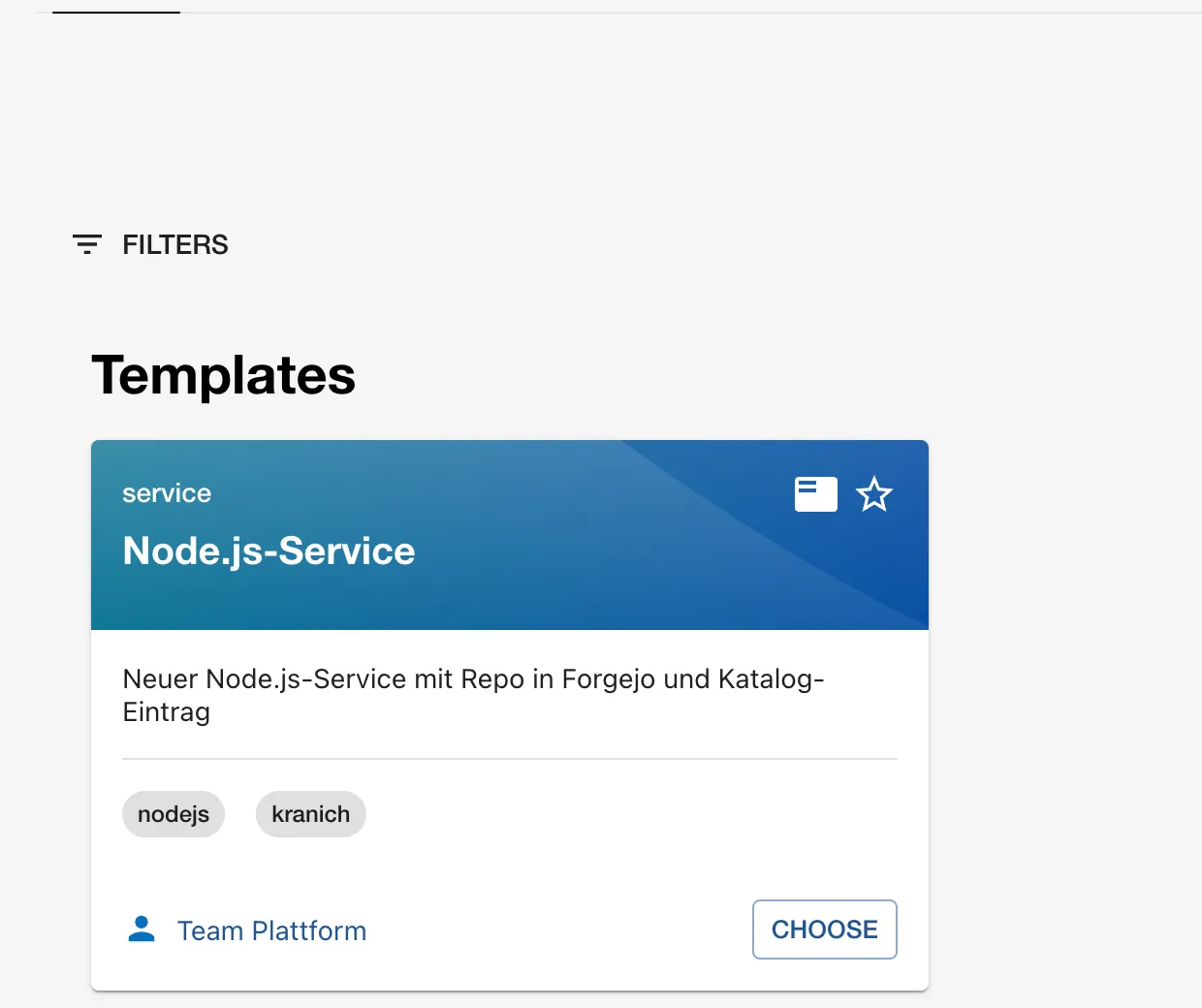
The tabs at the top all belong to the Scaffolder:
Tasks lists all runs, Actions shows
the installed actions with their inputs and outputs
(publish:gitea is listed there now). Template
Editor comes up on Day 6.
Save your progress? Sign up for free
Drill 4: The Wizard Step by Step
- Click CHOOSE on the card. The address is
/create/templates/default/node-service. - Enter
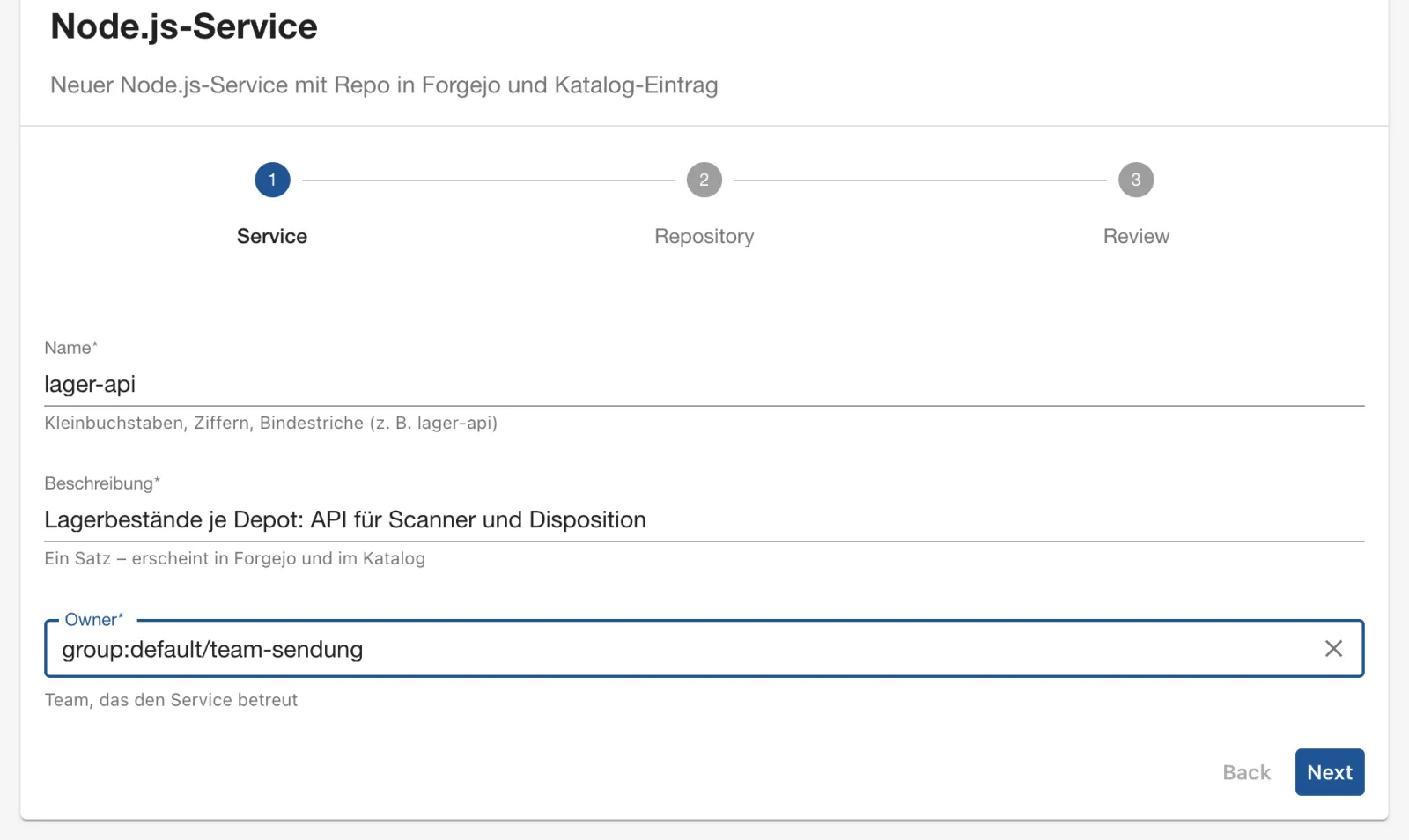
lager-apiunder Name, and under Beschreibung (description)Lagerbestände je Depot: API für Scanner und Disposition(“Stock levels per depot: API for scanners and dispatch”). - Click into Owner and choose Team
Sendung. The list only shows groups of type
team: Team Sendung, Team Plattform, Team Web andguestsfrom the example data. - Expected: the Service step as in the figure. The
owner appears in the field as the full entity reference
group:default/team-sendung.
Briefly try Lager_API as the name: Next
stays on the step and reports
'Name' must match pattern "^[a-z][a-z0-9-]{2,30}$" – the
pattern from the JSON Schema. Then enter
lager-api again.
- Click Next. The Repository step shows Host and Owner Available grayed out, because both lists have exactly one value.
- Enter
lager-apiunder Repository. - Expected: the step as in the figure.
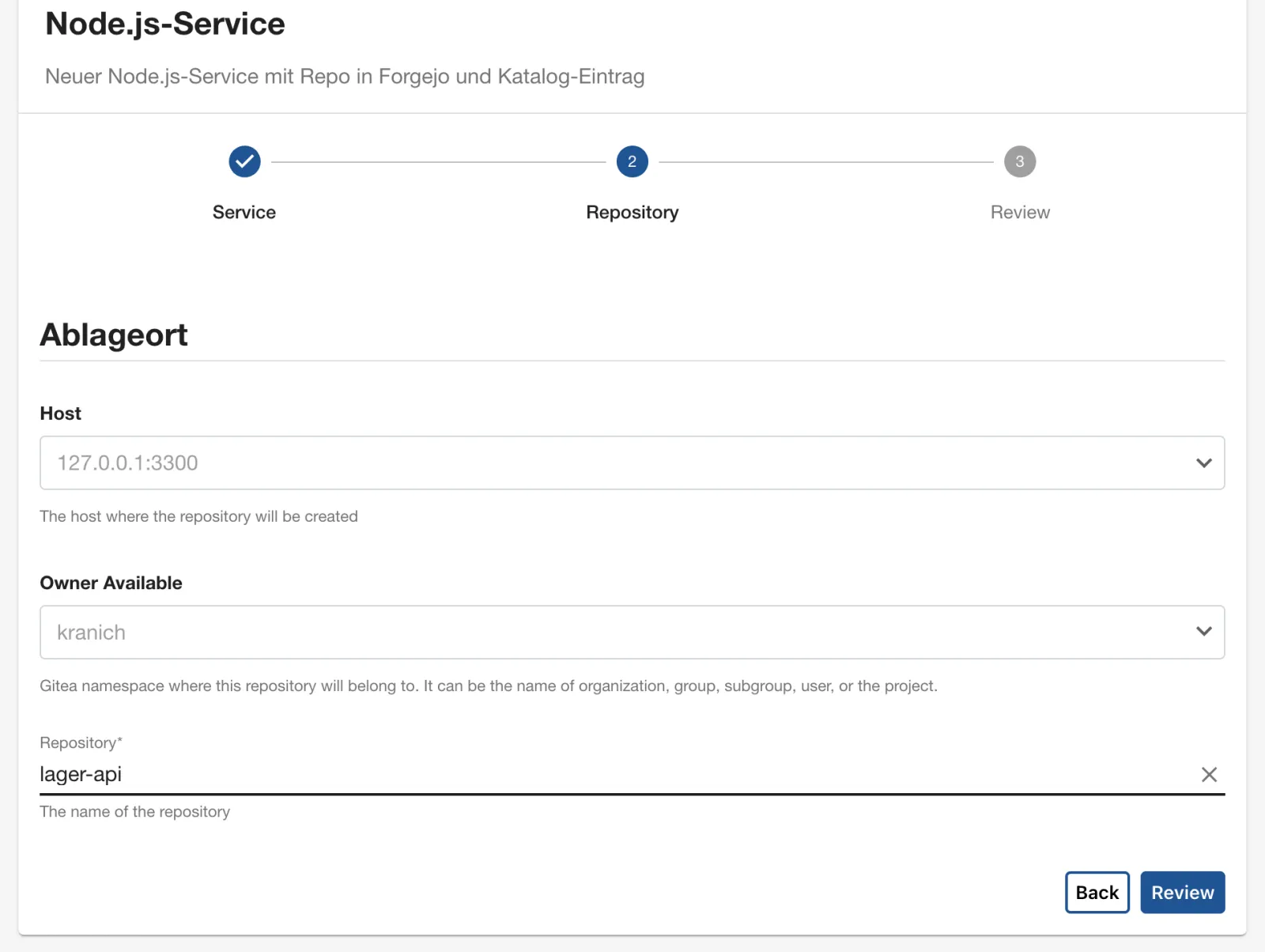
Why does the picker recognize Forgejo? It looks up the host from
allowedHosts in the integrations. The type is
gitea, so it shows the Gitea variant with the owner field.
With GitHub the field would look almost the same; with GitLab there is a
group path there.
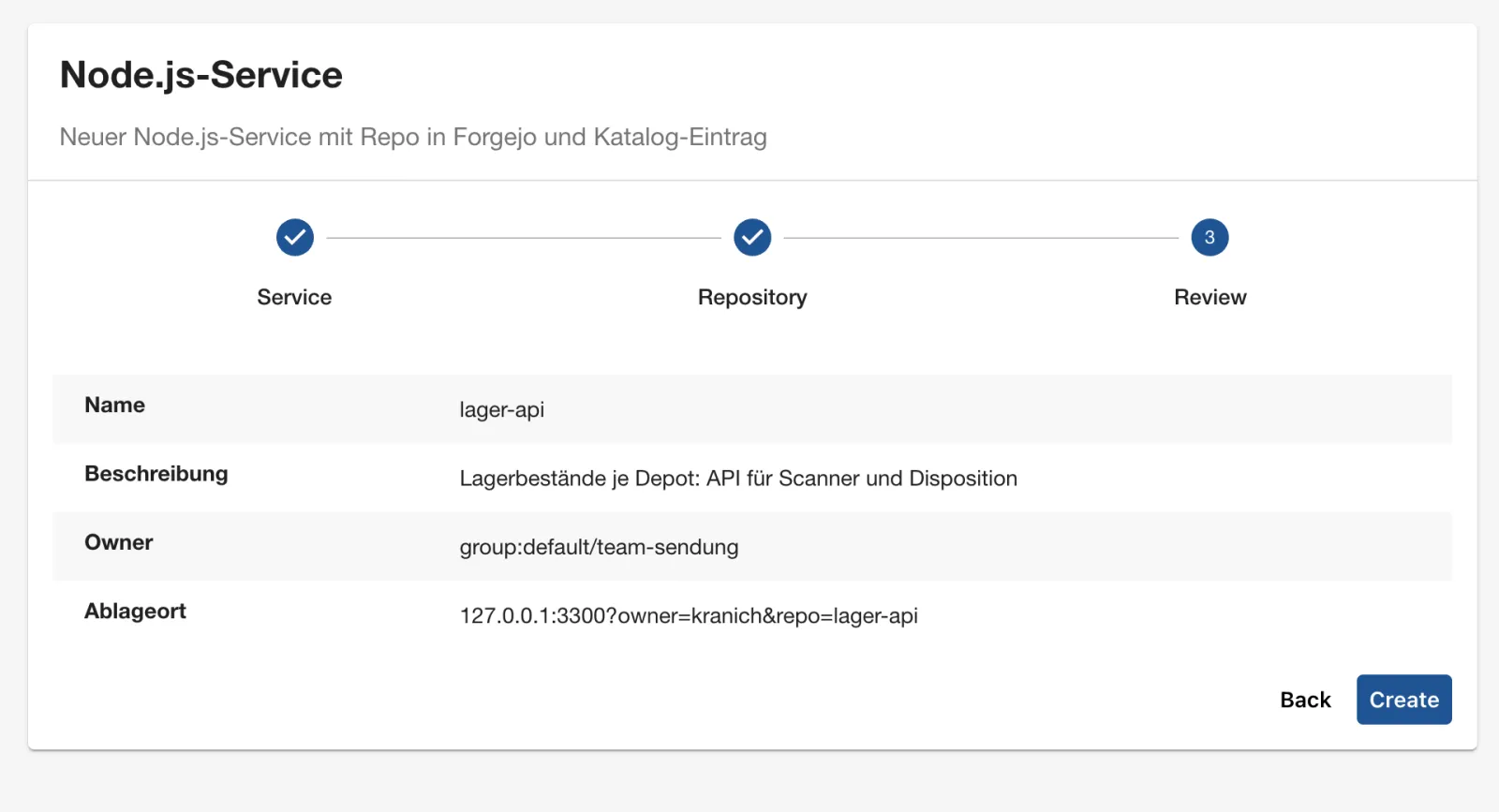
- Click Review. Expected: the summary as in the
figure. Ablageort (location) shows the format that
publish:giteaexpects:127.0.0.1:3300?owner=kranich&repo=lager-api.
Save your progress? Sign up for free
Drill 5: The Task Run and Its Log
- Click Create. The wizard jumps to
/create/tasks/<task-id>. - The three steps run one after another and each get a green check
mark. Below them the links from
output.linksappear, and at the very bottom the log. - Expected: the task page as in the figure.
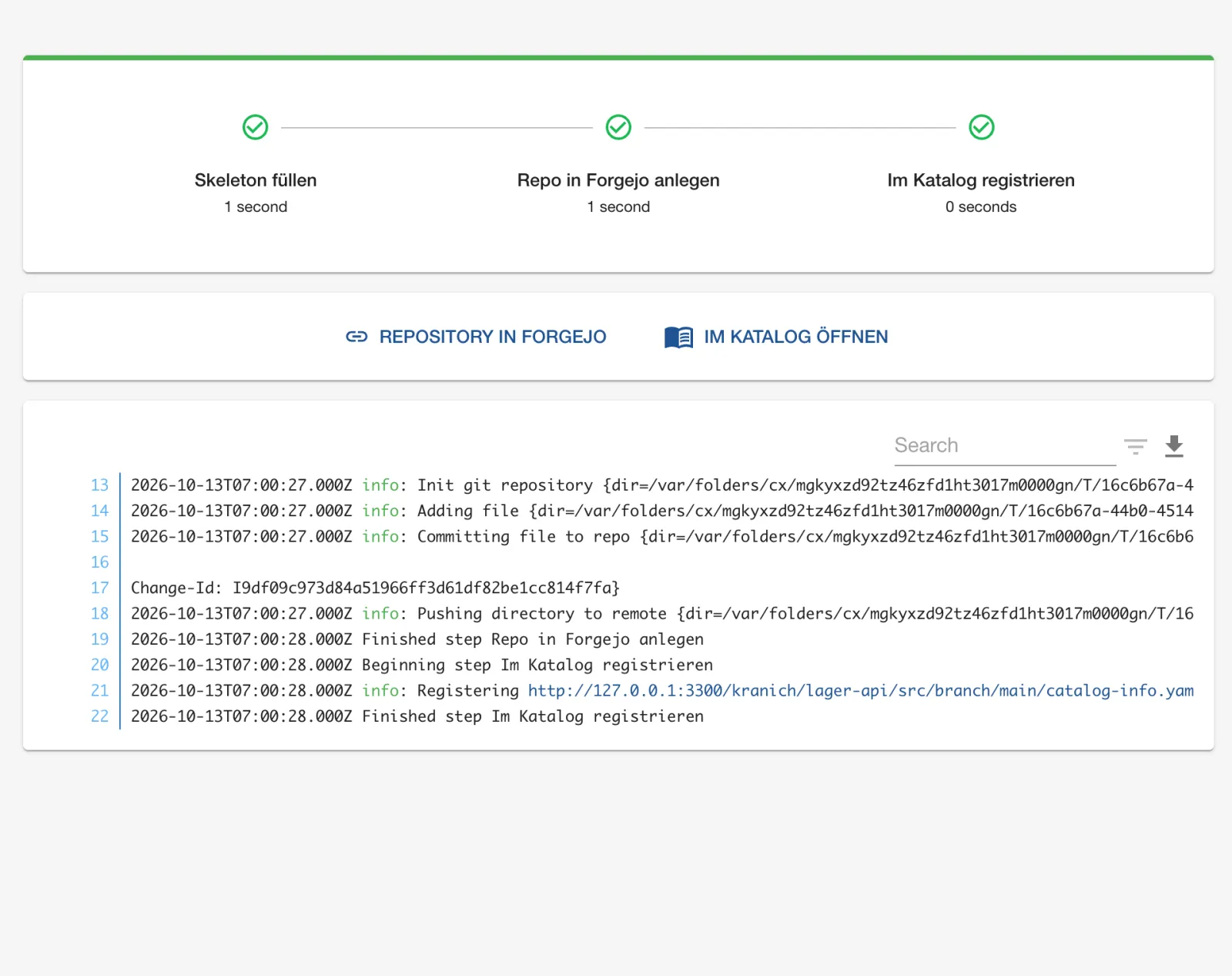
In the log you see what publish:gitea does: create a
local Git repo in the working directory, commit everything, push to
http://127.0.0.1:3300/kranich/lager-api.git.
catalog:register reports the file URL it registers. With
HIDE LOGS you hide the log; the download icon saves it
as a file.
The same run via the API:
bs 'scaffolder/v2/tasks?limit=1' | jq '.tasks[0] | {status, createdBy,
  template: .spec.templateInfo.entityRef, parameters: .spec.parameters}'
Expected:
{
  "status": "completed",
  "createdBy": "user:default/thomas.zachmann",
  "template": "template:default/node-service",
  "parameters": {
    "name": "lager-api",
    "description": "Lagerbestände je Depot: API für Scanner und Disposition",
    "owner": "group:default/team-sendung",
    "repoUrl": "127.0.0.1:3300?owner=kranich&repo=lager-api"
  }
}
Warning: Write
catalogInfoPathwithout a leading slash. With/catalog-info.yaml, Backstage resolves the path against the repo root and loses the branch for Forgejo URLs. The log then saysRegistering http://127.0.0.1:3300/kranich/lager-api/src/branch/catalog-info.yamlfollowed byResponseError: Request failed with 400 Bad Request.
Save your progress? Sign up for free
Drill 6: The Result in Forgejo and in the Catalog
First Forgejo:
R=$FORGEJO/api/v1/repos/kranich/lager-api
curl -sf -u "$ADMIN" "$R" | jq '{full_name, description, default_branch, private}'
curl -sf -u "$ADMIN" "$R/contents" | jq -r '.[].path'
curl -sf -u "$ADMIN" "$R/raw/catalog-info.yaml"
Expected:
{
  "full_name": "kranich/lager-api",
  "description": "Lagerbestände je Depot: API für Scanner und Disposition",
  "default_branch": "main",
  "private": false
}
README.md
catalog-info.yaml
package.json
src
apiVersion: backstage.io/v1alpha1
kind: Component
metadata:
  name: lager-api
  description: "Lagerbestände je Depot: API für Scanner und Disposition"
  tags: [nodejs]
spec:
  type: service
  lifecycle: experimental
  owner: group:default/team-sendung
The generated code runs right away:
cd ~/backstage-lab/tag05
git clone -q http://127.0.0.1:3300/kranich/lager-api.git && cd lager-api
git log --format='%an | %s'
node src/index.js & sleep 1; curl -s localhost:8080; echo; kill %1
Expected:
Backstage Scaffolder | Erzeugt aus Template node-service
lager-api lauscht auf Port 8080
{"service":"lager-api","status":"ok"}
(“lauscht auf Port” means “listening on port”.) Now the catalog:
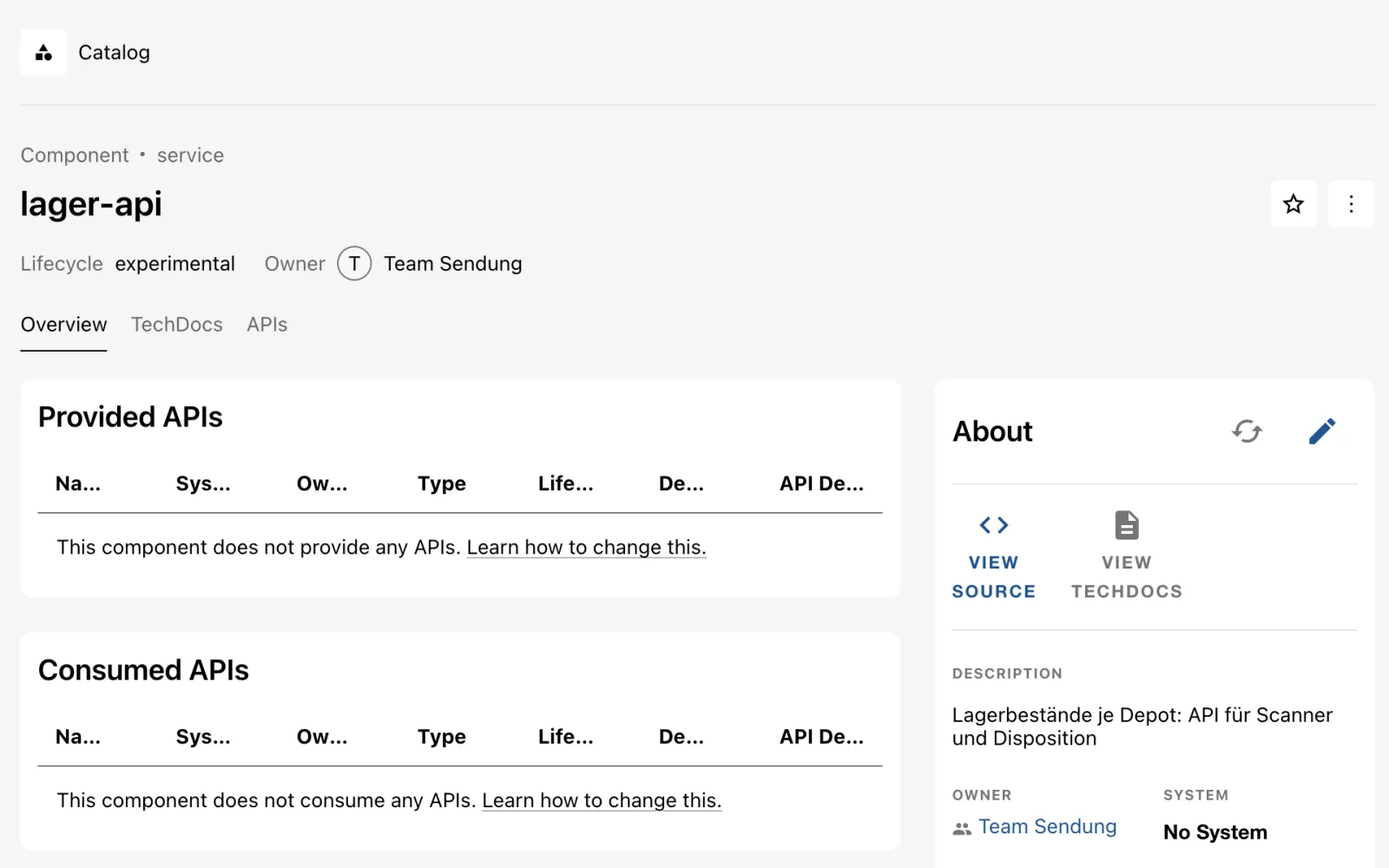
- On the task page, click IM KATALOG ÖFFNEN (“open in catalog”).
- Expected: the entity page of
lager-apias in the figure, withComponent • service, lifecycleexperimental, owner Team Sendung and the description from the wizard.
bs catalog/entities/by-name/component/default/lager-api \
  | jq -r '.spec.owner, .metadata.annotations["backstage.io/managed-by-location"]'
Expected:
group:default/team-sendung
url:http://127.0.0.1:3300/kranich/lager-api/src/branch/main/catalog-info.yaml
The Gitea provider from Day 3 would also have found the new repo
within a minute at the latest. catalog:register makes the
component visible immediately. Because both point to the same file, the
provider then writes a harmless warning to the log:
Source gitea-provider:kranich detected conflicting entityRef location:default/generated-….
If you use discovery, you can also leave out the register
step.
Save your progress? Sign up for free
Drill 7: Failure Case – the Repo Already Exists
In practice, templates mostly fail because of inputs. Provoke the classic:
- Click Create, then CHOOSE, and
fill in the wizard exactly as in Drill 4, so again with
lager-api. - Click Review and Create.
- Expected: a red bar, the step Repo in Forgejo anlegen (create repo in Forgejo) with an exclamation mark, and Im Katalog registrieren (register in the catalog) skipped, as in the figure.
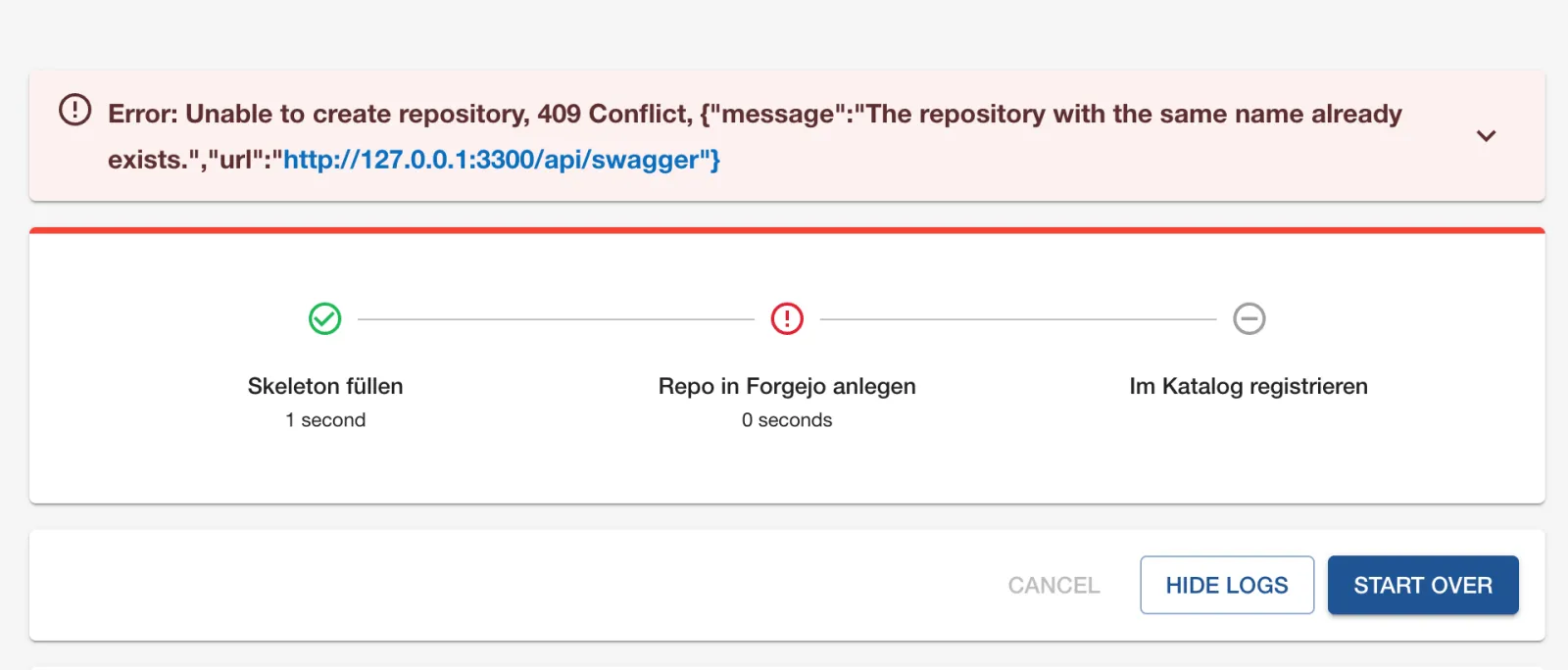
The log names the cause directly from the Forgejo API. Without the GUI you get it from the events of the last task:
ID=$(bs 'scaffolder/v2/tasks?limit=1' | jq -r '.tasks[0].id')
bs "scaffolder/v2/tasks/$ID/events" | jq -r '.[]
  | select(.type=="completion" or (.body.message | test("^Error")))
  | .body.message[0:84]'
Expected:
Error: Unable to create repository, 409 Conflict, {"message":"The repository with th
Run completed with status: failed
Why does nothing break? fetch:template only works in the
temporary working directory. publish:gitea aborts while
creating the repo, before it pushes, and the Scaffolder skips all later
steps. Now correct it:
- Click START OVER. The wizard opens with all
previous inputs (they are in the address as
formData). - Change Name to
lager-worker, click Next, change Repository tolager-worker, then Review and Create. - Expected: all three steps green. The last task has the status
completed.
Tip: Checking whether a name is already taken belongs in the form, not in the task. Day 6 shows custom field validations and
EntityNamePickerfor that.
Save your progress? Sign up for free
Checkpoint
cat > ~/backstage-lab/tag05/kontrollpunkt.sh <<'EOF'
#!/usr/bin/env bash
# kontrollpunkt.sh – checkpoint Day 5 (✔/✘). Exit code = number of failures.
source "${LAB:-$HOME/backstage-lab}/setup/env.sh"
fail=0
t() { if eval "$2" >/dev/null 2>&1; then echo "✔ $1"
  else echo "✘ $1"; fail=$((fail+1)); fi; }

t "Action publish:gitea installiert" \
  "bs scaffolder/v2/actions | jq -e '.[] | select(.id==\"publish:gitea\")'"
t "Template node-service registriert (Owner plattform)" \
  "bs catalog/entities/by-name/template/default/node-service \
     | jq -e '.spec.owner==\"plattform\"'"
t "Beispiel-Template ausgeblendet" \
  "! bs catalog/entities/by-name/template/default/example-nodejs-template"
t "Letzter Task completed" \
  "bs 'scaffolder/v2/tasks?limit=1' | jq -e '.tasks[0].status==\"completed\"'"
t "Repo kranich/lager-api mit catalog-info.yaml" \
  "curl -sf -u \$ADMIN \
     \$FORGEJO/api/v1/repos/kranich/lager-api/contents/catalog-info.yaml"
t "Component lager-api im Katalog (Owner team-sendung)" \
  "bs catalog/entities/by-name/component/default/lager-api \
     | jq -e '.spec.owner==\"group:default/team-sendung\"'"
exit "$fail"
EOF
bash ~/backstage-lab/tag05/kontrollpunkt.sh
Expected:
✔ Action publish:gitea installiert
✔ Template node-service registriert (Owner plattform)
✔ Beispiel-Template ausgeblendet
✔ Letzter Task completed
✔ Repo kranich/lager-api mit catalog-info.yaml
✔ Component lager-api im Katalog (Owner team-sendung)
Challenge
Extend node-service with a parameter port
(number, default 8080, allowed 1024 to 65535). The value
should end up in src/index.js and in the README. Use it to
create the service tour-api for team-web on
port 8081.
Hint: A new field needs three places:
properties in the first step, values in the
fetch step and ${{ values.port }} in the
skeleton.
Solution
In template.yaml, add under properties of
the Service step (after owner):
        port:
          title: Port
          type: integer
          description: HTTP-Port des Service
          default: 8080
          minimum: 1024
          maximum: 65535
And in the fetch step under values:
port: ${{ parameters.port }}The finished version is in the companion code. Take it over, adjust the skeleton, push and have the template reread immediately:
cd ~/backstage-lab/tag05
git clone -q http://lab-admin:[email protected]:3300/kranich/templates.git \
  templates-git && cd templates-git/node-service
cp ~/backstage-lab/code/tag05/challenge/node-service/template.yaml .
sed -i '' 's/process.env.PORT || 8080;/process.env.PORT || ${{ values.port }};/' \
  skeleton/src/index.js
sed -i '' 's/curl localhost:8080/curl localhost:${{ values.port }}/' skeleton/README.md
git -c user.name="Lab Admin" -c [email protected] \
  commit -qam "Parameter port" && git push -q origin main
bs catalog/refresh -X POST -H 'Content-Type: application/json' \
  -d '{"entityRef":"template:default/node-service"}' -w '%{http_code}\n'
Expected:
200The wizard now shows the field Port with
8080 in the Service step. Enter
tour-api, a description, Team Web, port
8081 and repository tour-api and click
Create. Then:
curl -sf -u "$ADMIN" "$FORGEJO/api/v1/repos/kranich/tour-api/raw/src/index.js" \
  | grep 'const port'
bs catalog/entities/by-name/component/default/tour-api | jq -r .spec.owner
Expected:
const port = process.env.PORT || 8081;
group:default/team-web
Save your progress? Sign up for free
Enterprise Note
- Like code, templates belong in a repo with review. The rule with
patternincatalog.rulesensures that only this repo may deliver templates. - The bot token from
integrationscreates repos on behalf of the platform. If you want to create repos on behalf of the users, userequestUserCredentialsin theRepoUrlPicker(requires OAuth login with the Git platform, Day 12). - On GitHub the actions are called
publish:github(orpublish:github:pull-requestfor changes to existing repos), on GitLabpublish:gitlab. The patternhost?owner=…&repo=…is the same everywhere. - After creation, infrastructure is usually still missing: branch protection, CI variables, a namespace in the cluster. Further actions or a downstream pipeline run take care of that. Templates and platform automation should be maintained by the same team.
- Who may see and run which templates is governed by permissions
(
scaffolder.template.parameter.read,scaffolder.action.execute, Day 12).