Day 5: Storage Pools, Writecache and Placement
Goal: Every worker has a data pool and a cache pool, the resource group
rg-k8screates volumes with two replicas in two zones including a writecache, and you read the device stack layer by layer. · Duration: approx. 60 min · Prerequisite: Day 4
Briefing
- A storage pool connects a name in LINSTOR with a VG on the node. Placement rules only know the name – it must be the same on all nodes.
dm-writecachebuffers writes on fast storage (pool_nvme) and writes them to the slow storage (pool_data) in the background. It does not speed up reads.- A resource group is a template: pool, number of
replicas, zone rule, layers, DRBD options.
spawn-resourcescreates volumes from it. - LINSTOR creates the tiebreaker itself. The zone rule helps decide where it lands.
   /dev/drbd1000          DRBD        replicated to the other zone
        |
 linstor_writecache_...   WRITECACHE  write buffer from pool_nvme (VG cache)
        |
   data-<res>_00000       STORAGE     LV from pool_data (VG data)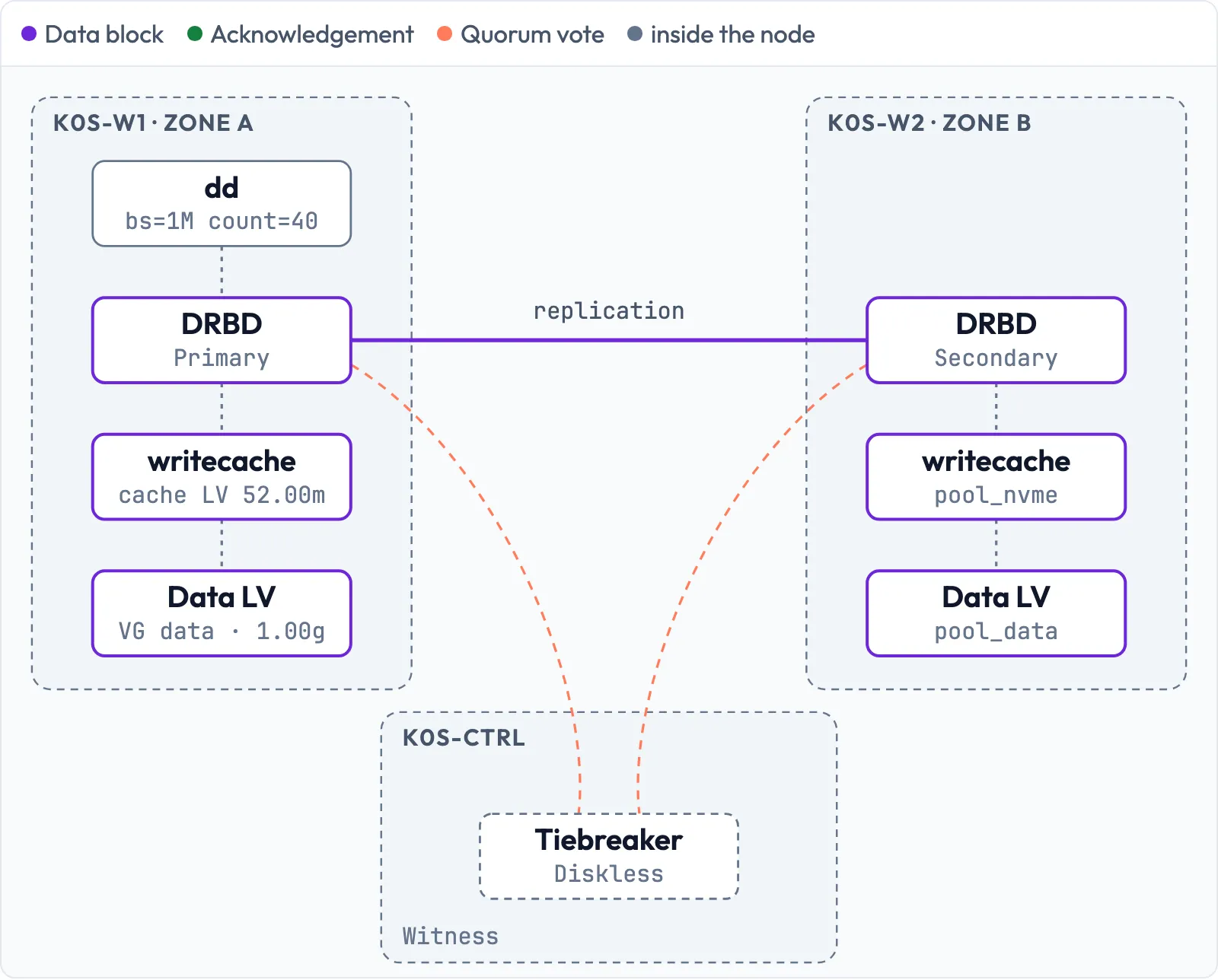
Drill 1: Create the cache pool
pool_data has existed since Day 4. The cache pool goes
on the VG cache, which plays the role of an NVMe in this
lab:
# on k0s-ctrl
mkdir -p ~/k0s-lab/tag05 && cd ~/k0s-lab/tag05
linstor storage-pool create lvm k0s-w1 pool_nvme cache
linstor storage-pool create lvm k0s-w2 pool_nvme cache
linstor storage-pool create lvm k0s-w3 pool_nvme cache
linstor --no-utf8 --no-color storage-pool list -s pool_data pool_nvme | cut -c1-88
Expected (abridged):
+---------------------------------------------------------------------------------------
| StoragePool | Node   | Driver | PoolName | FreeCapacity | TotalCapacity | CanSnapshots
|=======================================================================================
| pool_data   | k0s-w1 | LVM    | data     |    30.00 GiB |     30.00 GiB | False
| pool_data   | k0s-w2 | LVM    | data     |    30.00 GiB |     30.00 GiB | False
| pool_data   | k0s-w3 | LVM    | data     |    30.00 GiB |     30.00 GiB | False
| pool_nvme   | k0s-w1 | LVM    | cache    |     2.00 GiB |      2.00 GiB | False
| pool_nvme   | k0s-w2 | LVM    | cache    |     2.00 GiB |      2.00 GiB | False
| pool_nvme   | k0s-w3 | LVM    | cache    |     2.00 GiB |      2.00 GiB | False
+---------------------------------------------------------------------------------------
The lvm driver is classic (thick) LVM: a volume occupies
its full size immediately, nothing can be overcommitted, and no full
thin pool freezes all volumes at once. The price is in the last column:
CanSnapshots False. On Day 13 you will see what that means
for backups.
Save your progress? Sign up for free
Drill 2: The template rg-k8s
# on k0s-ctrl
linstor resource-group create rg-k8s --storage-pool pool_data --place-count 2 \
  --replicas-on-different zone --layer-list drbd,writecache,storage
linstor resource-group set-property rg-k8s Writecache/PoolName pool_nvme
linstor resource-group set-property rg-k8s Writecache/Size 5%
Expected (abridged):
SUCCESS:
    New resource group 'rg-k8s' created.
SUCCESS:
    Successfully set property key(s): Writecache/PoolName
...
SUCCESS:
Successfully set property key(s): Writecache/Size| Setting | Effect |
|---|---|
--place-count 2 |
two replicas with data |
--replicas-on-different zone |
never two replicas with the same Aux/zone |
--layer-list drbd,writecache,storage |
layers from top to bottom |
Writecache/Size 5% |
cache per volume: 5 % of the volume size from
pool_nvme |
The client adds the Aux/ in front of zone
by itself.
Save your progress? Sign up for free
Drill 3: DRBD options and volume group
# on k0s-ctrl
linstor resource-group drbd-options --quorum=majority --on-no-quorum=suspend-io \
  --on-suspended-primary-outdated=force-secondary rg-k8s
linstor volume-group create rg-k8s
linstor --no-utf8 --no-color resource-group list | cut -c1-70
linstor --no-utf8 --no-color resource-group list-properties rg-k8s
Expected (abridged):
SUCCESS:
    New volume group with number '0' of resource group 'rg-k8s' created.
+---------------------------------------------------------------------
| ResourceGroup | SelectFilter                                  | VlmN
|=====================================================================
| DfltRscGrp    | PlaceCount: 2                                 |
|---------------------------------------------------------------------
| rg-k8s        | PlaceCount: 2                                 | 0
|               | StoragePool(s): pool_data                     |
|               | ReplicasOnDifferent: ['Aux/zone']             |
|               | LayerStack: ['DRBD', 'WRITECACHE', 'STORAGE'] |
...
+----------------------------------------------------------------------+
| Key                                                | Value           |
|======================================================================|
| DrbdOptions/Resource/on-no-quorum                  | suspend-io      |
| DrbdOptions/Resource/on-suspended-primary-outdated | force-secondary |
| DrbdOptions/Resource/quorum                        | majority        |
| Internal/Drbd/QuorumSetBy                          | user            |
| Writecache/PoolName                                | pool_nvme       |
| Writecache/Size                                    | 5%              |
+----------------------------------------------------------------------+on-no-quorum=suspend-io: if the Primary loses the
majority, DRBD suspends all writes instead of returning errors. The
database hangs instead of losing its file system, and continues as soon
as quorum is back. The volume group here is a LINSTOR term, not an LVM
VG: without it (VlmNrs 0), spawn-resources
creates resources without a volume.
Save your progress? Sign up for free
Drill 4: A volume from the template
# on k0s-ctrl
linstor resource-group spawn-resources rg-k8s tag05-a 1G
linstor --no-utf8 --no-color resource list -r tag05-a
Expected (abridged):
INFO:
    Tie breaker resource 'tag05-a' created on k0s-ctrl
...
+------------------------------------------------------------------------------------...
| ResourceName | Node     | Layers                  | Usage  | Conns |              ...
|====================================================================================...
| tag05-a      | k0s-ctrl | DRBD,STORAGE            | Unused | Ok    |           Dis...
| tag05-a      | k0s-w1   | DRBD,WRITECACHE,STORAGE | Unused | Ok    |           UpT...
| tag05-a      | k0s-w2   | DRBD,WRITECACHE,STORAGE | Unused | Ok    | SyncTarget(24...
+------------------------------------------------------------------------------------...
One replica in zone a (k0s-w1), one in zone b
(k0s-w2), the tiebreaker diskless on the witness.
k0s-w3 is also in zone a and stays empty. The witness only
has DRBD,STORAGE: no data, no cache.
Save your progress? Sign up for free
Drill 5: The device stack
# on k0s-w1
lsblk /dev/sdb
sudo dmsetup table | grep writecache
sudo lvs
Expected:
NAME                                   MAJ:MIN  RM SIZE RO TYPE MOUNTPOINTS
sdb                                      8:16    0  32G  0 disk
├─sdb1                                   8:17    0  30G  0 part
│ └─data-tag05--a_00000                252:0     0   1G  0 lvm
│   └─linstor_writecache_tag05-a_00000 252:2     0   1G  0 dm
│     └─drbd1000                       147:1000  0   1G  0 disk
└─sdb2                                   8:18    0   2G  0 part
  └─cache-tag05--a.cache_00000         252:1     0  52M  0 lvm
    └─linstor_writecache_tag05-a_00000 252:2     0   1G  0 dm
      └─drbd1000                       147:1000  0   1G  0 disk
linstor_writecache_tag05-a_00000: 0 2105344 writecache s 252:0 252:1 4096 0
  LV                  VG    Attr       LSize  Pool Origin Data%  Meta%  Move Log ...
  tag05-a.cache_00000 cache -wi-ao---- 52.00m
  tag05-a_00000       data  -wi-ao----  1.00g
Read the dmsetup line like this: device
writecache, s = slow device first, then
252:0 (data LV) and 252:1 (cache LV), block
size 4096. 52 MiB is 5 % of 1 GiB, rounded up to LVM extents (4 MiB).
DRBD sits at the very top and sees only a single device.
Save your progress? Sign up for free
Drill 6: Watch the writecache at work
dmsetup status counts the cache blocks: after
writecache come the error flag, total blocks, free blocks
and blocks under writeback. Write 40 MiB directly to the volume:
Warning:
ddoverwrites the device without asking. Check the path: it must be the test resourcetag05-a.
# on k0s-w1
D=linstor_writecache_tag05-a_00000
sudo dmsetup status $D
sudo drbdadm primary tag05-a
sudo dd if=/dev/urandom of=/dev/drbd/by-res/tag05-a/0 bs=1M count=40 \
  oflag=direct status=none
sudo dmsetup status $D
sleep 5
sudo dmsetup status $D
sudo drbdadm secondary tag05-a
Expected (abridged):
0 2105344 writecache 0 13260 13194 0 264227 174 234 0 168 0 66 0 51 0
0 2105344 writecache 0 13260 2954 0 264227 174 10485 0 179 0 10306 0 62 0
0 2105344 writecache 0 13260 7372 0 264227 174 10485 0 179 0 10306 0 62 0
13,260 blocks of 4 KiB each are the 52 MiB of cache. After the
dd, only 2,954 are free: the 40 MiB are in the cache, and
dd was done before the slow disk had them. Five seconds
later, 7,372 are free – the kernel writes back until the cache drops
below its low watermark (default 45 %). The same happens on
k0s-w2, because DRBD replicates above the
cache: a write only counts as complete once it is in the cache of both
nodes.
Save your progress? Sign up for free
Drill 7: Where does LINSTOR put the replicas?
# on k0s-ctrl
linstor resource-group spawn-resources rg-k8s tag05-b 200M
linstor resource-group spawn-resources rg-k8s tag05-c 200M
linstor resource-group spawn-resources rg-k8s tag05-d 200M
linstor --no-utf8 --no-color resource list | cut -c1-88
Expected (abridged):
...
| tag05-b      | k0s-ctrl | DRBD,STORAGE            | Unused | Ok    | Diskless | Yes  |
| tag05-b      | k0s-w2   | DRBD,WRITECACHE,STORAGE | Unused | Ok    | UpToDate | Yes  |
| tag05-b      | k0s-w3   | DRBD,WRITECACHE,STORAGE | Unused | Ok    | UpToDate | Yes  |
| tag05-c      | k0s-ctrl | DRBD,STORAGE            | Unused | Ok    | Diskless | Yes  |
| tag05-c      | k0s-w2   | DRBD,WRITECACHE,STORAGE | Unused | Ok    | UpToDate | Yes  |
| tag05-c      | k0s-w3   | DRBD,WRITECACHE,STORAGE | Unused | Ok    | UpToDate | Yes  |
...
k0s-w2 is part of every volume, because
it is alone in zone b. In zone a, LINSTOR picks the node with more free
space. The tiebreaker lands on the witness every time. That is no
coincidence, as the counter-test without a zone rule shows:
# on k0s-ctrl
linstor resource-definition create tag05-ohne-rg
linstor volume-definition create tag05-ohne-rg 100M
linstor resource create k0s-w1 k0s-w2 tag05-ohne-rg --storage-pool pool_data \
  | grep 'Tie breaker'
linstor resource-definition delete tag05-ohne-rg
Expected (abridged):
    Tie breaker resource 'tag05-ohne-rg' created on k0s-w3
...
Without a rule, LINSTOR takes any free node, here the worker
k0s-w3. With --replicas-on-different zone,
k0s-w3 is ruled out because zone a is already taken – what
remains is the witness without a zone. So the zone rule also protects
the role of the witness. How large the next volume may be at most and
where it would land:
# on k0s-ctrl
linstor --no-utf8 --no-color resource-group query-size-info rg-k8s
Expected:
+-----------------------------------------------------------------+
| MaxVolumeSize | AvailableSize |  Capacity | Next Spawn Result   |
|=================================================================|
|     28.29 GiB |     29.30 GiB | 30.00 GiB | pool_data on k0s-w2 |
|               |               |           | pool_data on k0s-w3 |
+-----------------------------------------------------------------+
Save your progress? Sign up for free
Exercise: Speed Drills
- Show how much space is left in
pool_nvmeon each worker. Target time: 20 s - Show all writecache devices on
k0s-w2. Target time: 20 s - Show the properties of the resource group
rg-k8s. Target time: 15 s - Show on which nodes the next volume from
rg-k8swould land. Target time: 15 s
Solution
# on k0s-ctrl
linstor --no-utf8 --no-color storage-pool list -s pool_nvme | cut -c1-88
ssh k0s-w2 'sudo dmsetup ls --target writecache'
linstor --no-utf8 --no-color resource-group list-properties rg-k8s
linstor --no-utf8 --no-color resource-group query-size-info rg-k8s
Expected (abridged, from a later run with three more volumes):
| pool_nvme   | k0s-w1 | LVM    | cache    |     1.66 GiB |      2.00 GiB | True
| pool_nvme   | k0s-w2 | LVM    | cache    |     1.30 GiB |      2.00 GiB | True
| pool_nvme   | k0s-w3 | LVM    | cache    |     1.64 GiB |      2.00 GiB | True
linstor_writecache_pvc-11dccaf7-..._00000   (252, 7)
...
linstor_writecache_tag05-a_00000    (252, 12)
linstor_writecache_tag05-b_00000    (252, 15)
linstor_writecache_tag05-c_00000    (252, 18)
linstor_writecache_tag05-d_00000    (252, 21)
...
In your lab only the four test volumes sit in the cache pool. Do the
math: the VG cache has 2044 MiB, each cache LV takes 5 % of
its volume, rounded up to 4 MiB extents – 52 MiB for
tag05-a (1 GiB), 12 MiB for each 200 MiB volume.
k0s-w2 carries all four and so has 88 MiB less free (1.91
GiB). The column CanSnapshots shows False for
you; True only arrives with LINSTOR 1.35 (Day 15).
Save your progress? Sign up for free
Checkpoint
# on k0s-ctrl
linstor --no-utf8 --no-color storage-pool list | cut -c1-88
Expected: pool_data (VG
data) and pool_nvme (VG cache) on
all three workers, plus DfltDisklessStorPool on all four
nodes.
# on k0s-ctrl
linstor --no-utf8 --no-color resource-group list | cut -c1-70
Expected: rg-k8s with
PlaceCount: 2, StoragePool(s): pool_data,
ReplicasOnDifferent: ['Aux/zone'],
LayerStack: ['DRBD', 'WRITECACHE', 'STORAGE'].
# on k0s-ctrl
linstor --no-utf8 --no-color resource list -r tag05-a | cut -c1-88
Expected: one replica each in zone a and b with
WRITECACHE, tiebreaker Diskless on
k0s-ctrl.
Challenge
For a particularly important database, you want three replicas. Order
a volume tag05-drei with three replicas from
rg-k8s without changing the template. What does LINSTOR
say, and how do you still get three replicas with at most two per
zone?
Hint: spawn-resources knows the same
placement options as the template.
Solution
# on k0s-ctrl
linstor resource-group spawn-resources rg-k8s tag05-drei 100M --place-count 3
Expected (abridged):
ERROR:
Description:
    Not enough available nodes
Details:
    Not enough nodes fulfilling the following auto-place criteria:
...
       Replicas on nodes with different property:
          Aux/zone
Three replicas in three different zones are not possible – there are
only two. --x-replicas-on-different zone 2 allows two
replicas with the same zone value:
# on k0s-ctrl
linstor resource-group spawn-resources rg-k8s tag05-drei 100M --place-count 3 \
  --x-replicas-on-different zone 2
linstor --no-utf8 --no-color resource list -r tag05-drei | cut -c1-88
Expected (abridged):
| tag05-drei   | k0s-w1 | DRBD,WRITECACHE,STORAGE | Unused | Ok    | UpToDate | Yes  |
| tag05-drei   | k0s-w2 | DRBD,WRITECACHE,STORAGE | Unused | Ok    | UpToDate | Yes  |
| tag05-drei   | k0s-w3 | DRBD,WRITECACHE,STORAGE | Unused | Ok    | UpToDate | Yes  |
With three votes, no tiebreaker is needed, and the witness stays out.
Save your progress? Sign up for free
Cleanup
# on k0s-ctrl
linstor resource-definition delete tag05-a
linstor resource-definition delete tag05-b
linstor resource-definition delete tag05-c
linstor resource-definition delete tag05-d
linstor resource-definition delete tag05-drei
ssh k0s-w2 'sudo dmsetup ls'
Expected: No devices found. The pools
and rg-k8s stay.
Interview Note
- Why thick LVM instead of thin? Predictable: no overcommitment, no full thin pool that stops all volumes at the same time. The trade-off: no snapshots.
- Where does the writecache sit, and is that safe? Below DRBD, on every node with data. DRBD only acknowledges once both caches have the block. If an NVMe fails, that node’s replica is gone, the other one remains.
- What does a resource group do? It is a template for placement, layers and options. Resources inherit its properties.
Enterprise Note
- Writecache needs real enterprise NVMe with power-loss protection (PLP). Without PLP, a power outage can cost acknowledged writes.
- One resource group per storage class (e.g.
rg-fast,rg-bulk) instead of everything through one; keep pool naming identical on all nodes. - Define zones by real failure domain (fire compartment, rack, power circuit). A zone b with only one node means: this node needs as much space as all of zone a combined.
- Use thin pools only with fill-level monitoring and a reserve; then LVM snapshots, and with them CSI snapshots, become possible.