Day 6: Controller HA with drbd-reactor and VIP
Goal: The controller database lives on the DRBD resource
linstor_db, drbd-reactor starts the mount, VIP and controller only where it is Primary, and you have played through a planned switchover, a hard crash and a network split. · Duration: approx. 75 min · Prerequisite: Day 5
Briefing
- Apart from its H2 database under
/var/lib/linstor, the controller is stateless. Whoever has this file can be the controller. - The database goes on a small DRBD resource
linstor_dbwith three replicas on the workers. The witness takes part diskless. - drbd-reactor watches
linstor_db. Wherever it may become Primary, it starts a chain: mount → VIP10.10.0.100→linstor-controller. - The DRBD quorum prevents two controllers at the same time: without a majority, nobody becomes Primary.
 k0s-w1 (active)               k0s-w2, k0s-w3 (standby)
 linstor_db Primary            linstor_db Secondary
 /var/lib/linstor mounted      drbd-reactor waits
 VIP 10.10.0.100 on ens19
 linstor-controller running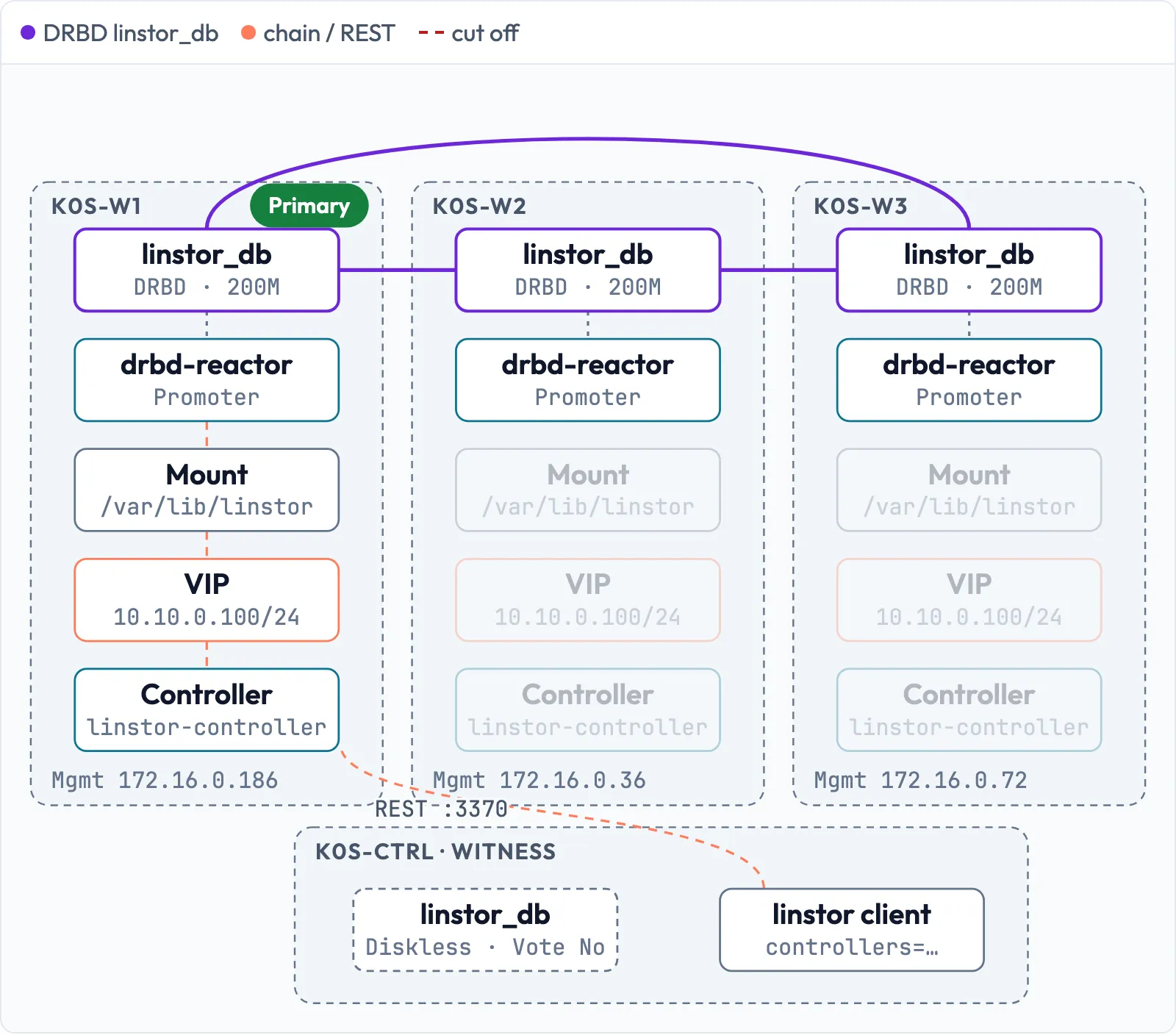
Drill 1: The resource linstor_db
# on k0s-ctrl
mkdir -p ~/k0s-lab/tag06 && cd ~/k0s-lab/tag06
linstor resource-group create linstor-db-grp --storage-pool pool_data --place-count 3 \
  --diskless-on-remaining true
linstor resource-group drbd-options --auto-promote=no --quorum=majority \
  --on-suspended-primary-outdated=force-secondary \
  --on-no-quorum=io-error --on-no-data-accessible=io-error linstor-db-grp
linstor volume-group create linstor-db-grp
linstor resource-group spawn-resources linstor-db-grp linstor_db 200M
linstor --no-utf8 --no-color resource list -r linstor_db
Expected (abridged):
SUCCESS:
    New resource group 'linstor-db-grp' created.
...
+---------------------------------------------------------------------------+
| ResourceName | Node     | Layers       | Usage  | Conns |    State | Vote |
|===========================================================================|
| linstor_db   | k0s-ctrl | DRBD,STORAGE | Unused | Ok    | Diskless | No   |
| linstor_db   | k0s-w1   | DRBD,STORAGE | Unused | Ok    | UpToDate | Yes  |
| linstor_db   | k0s-w2   | DRBD,STORAGE | Unused | Ok    | UpToDate | Yes  |
| linstor_db   | k0s-w3   | DRBD,STORAGE | Unused | Ok    | UpToDate | Yes  |
+---------------------------------------------------------------------------+| Option | Why |
|---|---|
auto-promote=no |
Only drbd-reactor promotes, not whoever opens first |
on-no-quorum=io-error |
Controller gets errors at once, drbd-reactor hands off |
on-suspended-primary-outdated |
an outdated ex-Primary is forced to Secondary |
--diskless-on-remaining |
witness takes part diskless |
With three replicas holding data, there is a clear majority even
without the witness (2 of 3), so its vote does not count here:
Vote No. Unlike rg-k8s, io-error
applies instead of suspend-io: a hanging controller would
be worse than one that hands off immediately.
Save your progress? Sign up for free
Drill 2: The empty databases on k0s-w2 and k0s-w3
On Day 3, the controller briefly ran on all candidates. Each of them created its own empty database in the process – and it is still there:
# on k0s-w2
sudo ls -l /var/lib/linstor
Expected (abridged):
-rw-r--r-- 1 61437 64264 172032 Nov 20 00:22 linstordb.mv.dbAs long as linstor_db is mounted there, the mount hides
this file. But if someone starts the controller without
the mount (maintenance, a typo, the wrong order), a second controller
runs with an empty cluster – the trap from Day 3, only worse. Two
safeguards: remove the old file, and let the controller start only on a
mount.
# on k0s-w2
sudo mv /var/lib/linstor /var/lib/linstor.leer
sudo mkdir /var/lib/linstor
sudo mkdir -p /etc/systemd/system/linstor-controller.service.d
sudo tee /etc/systemd/system/linstor-controller.service.d/nur-mit-db.conf <<'EOF'
[Unit]
ConditionPathIsMountPoint=/var/lib/linstor
EOF
sudo systemctl daemon-reload
sudo systemctl start linstor-controller
systemctl status linstor-controller --no-pager | grep -E 'Active|condition'
Expected (abridged):
[Unit]
ConditionPathIsMountPoint=/var/lib/linstor
     Active: inactive (dead)
... was skipped because of an unmet condition check (ConditionPathIsMountPoint=/v...
Repeat this on k0s-w3. The owners are numbers because
the unit runs with DynamicUser=true. Its
ExecStartPre resets the permissions on every start – even
on a freshly mounted file system.
Save your progress? Sign up for free
Drill 3: Move the database
The mount unit goes on all three candidates. It is not enabled; only drbd-reactor starts it:
# on k0s-w1
sudo tee /etc/systemd/system/var-lib-linstor.mount >/dev/null <<'EOF'
[Unit]
Description=Filesystem for the LINSTOR controller

[Mount]
What=/dev/drbd/by-res/linstor_db/0
Where=/var/lib/linstor
EOF
sudo systemctl daemon-reload
systemctl is-enabled var-lib-linstor.mount
Expected:
staticRepeat this on k0s-w2 and k0s-w3. The file
name must match the path: /var/lib/linstor becomes
var-lib-linstor.mount. Now the move on k0s-w1,
where the controller is still running with the database on the system
disk:
# on k0s-w1
sudo systemctl disable --now linstor-controller
sudo mv /var/lib/linstor /var/lib/linstor.orig
sudo mkdir /var/lib/linstor
sudo drbdadm primary linstor_db
sudo mkfs.ext4 -q -b 4096 /dev/drbd/by-res/linstor_db/0
sudo systemctl start var-lib-linstor.mount
sudo cp -a /var/lib/linstor.orig/. /var/lib/linstor/
sudo ls -l /var/lib/linstor
findmnt /var/lib/linstor
sudo umount /var/lib/linstor
sudo drbdadm secondary linstor_db
Expected (abridged):
Removed "/etc/systemd/system/multi-user.target.wants/linstor-controller.service".
-rw-r--r-- 1 61437 64264 385024 Nov 20 00:46 linstordb.mv.db
drwx------ 2 root  root   16384 Nov 20 00:46 lost+found
TARGET           SOURCE        FSTYPE OPTIONS
/var/lib/linstor /dev/drbd1000 ext4   rw,relatime
From now on, the controller is off until drbd-reactor starts it. The
volumes keep running anyway. On k0s-w1, create the same
drop-in file nur-mit-db.conf as in Drill 2.
Warning:
/var/lib/linstor.origis your backup from before the move. Never start a controller that points to it: it would have an outdated state. Delete it only once the controller has been running stably onlinstor_dbfor a few days.
Save your progress? Sign up for free
Drill 4: Set up drbd-reactor
For the VIP, drbd-reactor uses the OCF agent IPaddr2
from the Pacemaker ecosystem, without Pacemaker:
# on k0s-w1
sudo apt-get install -y resource-agents-base
sudo tee /etc/drbd-reactor.d/linstor_db.toml >/dev/null <<'EOF'
[[promoter]]
id = "linstor_db"
[promoter.resources.linstor_db]
start = [
  "var-lib-linstor.mount",
  "ocf:heartbeat:IPaddr2 linstor_vip ip=10.10.0.100 cidr_netmask=24 nic=ens19",
  "linstor-controller.service",
]
on-drbd-demote-failure = "reboot"
stop-services-on-exit = true
EOF
sudo tee /etc/linstor/linstor-client.conf >/dev/null <<'EOF'
[global]
controllers=10.10.0.100
EOF
Repeat this on k0s-w2 and k0s-w3.
| Line | Meaning |
|---|---|
start = [...] |
chain, in reverse when handing off |
ocf:heartbeat:IPaddr2 ... |
VIP in the storage network, moves along |
on-drbd-demote-failure = "reboot" |
if something holds the device, node reboots |
stop-services-on-exit |
stopping drbd-reactor also shuts down the chain |
The witness cannot reach the VIP – it has no address in the storage network. It gets the list of candidates and tries them in order:
# on k0s-ctrl
sudo tee /etc/linstor/linstor-client.conf >/dev/null <<'EOF'
[global]
controllers=172.16.0.186,172.16.0.36,172.16.0.72
EOF
ip route get 10.10.0.100
Expected:
10.10.0.100 via 172.16.0.1 dev eth0 src 172.16.0.176 uid 1000
    cache
Save your progress? Sign up for free
Drill 5: Start the promoter
First on k0s-w1, so that the controller starts where it
just was:
# on k0s-w1
sudo systemctl restart drbd-reactor
sleep 15
sudo drbd-reactorctl status linstor_db
ip -br addr show ens19
Expected:
/etc/drbd-reactor.d/linstor_db.toml:
Promoter: Resource linstor_db currently active on this node
● drbd-services@linstor_db.target
● ├─ drbd-promote@linstor_db.service
● ├─ var-lib-linstor.mount
● ├─ ocf.rs@linstor_vip_linstor_db.service
● └─ linstor-controller.service

ens19            UP             10.10.0.11/24 10.10.0.100/24 fe80::be24:11ff:feba:...
Then run sudo systemctl restart drbd-reactor on
k0s-w2 and k0s-w3. There, the status shows
empty circles:
# on k0s-w2
sudo drbd-reactorctl status linstor_db
Expected:
/etc/drbd-reactor.d/linstor_db.toml:
Promoter: Resource linstor_db currently active on node 'k0s-w1'
○ drbd-services@linstor_db.target
○ ├─ drbd-promote@linstor_db.service
○ ├─ var-lib-linstor.mount
○ ├─ ocf.rs@linstor_vip_linstor_db.service
○ └─ linstor-controller.service
And the proof that the moved controller still knows everything:
# on k0s-ctrl
linstor --no-utf8 --no-color node list
linstor --no-utf8 --no-color resource list -r linstor_db
Expected (abridged):
| k0s-ctrl | LINUX    | SATELLITE | 172.16.0.176:3366 (PLAIN) | Online |
| k0s-w1   | LINUX    | SATELLITE | 10.10.0.11:3366 (PLAIN)   | Online |
...
| linstor_db   | k0s-w1   | DRBD,STORAGE | InUse  | Ok    | UpToDate | Yes  |
...
Save your progress? Sign up for free
Drill 6: Planned switchover
Open a second terminal on k0s-w2 as a measuring
instrument for the REST API via the VIP (weg means
“gone”):
# on k0s-w2
while sleep 1; do
  curl -sf -m 2 -o /dev/null http://10.10.0.100:3370/v1/controller/version \
    && echo "$(date +%T) ok" || echo "$(date +%T) weg"
done
In the first terminal, you move the controller away, for example before maintenance:
# on k0s-w1
sudo drbd-reactorctl evict linstor_db
Expected:
/etc/drbd-reactor.d/linstor_db.toml:
Evicting linstor_db
Created symlink /run/systemd/system/drbd-services@linstor_db.target → /dev/null.
20..19..
Node 'k0s-w3' took over
Re-enabling linstor_db
Removed /run/systemd/system/drbd-services@linstor_db.target.
Expected in the measuring instrument (abridged, stop with Ctrl+C):
00:49:01 ok
00:49:02 weg
...
00:49:17 weg
00:49:19 ok
About 16 seconds without an API – almost all of it is the
controller’s Java startup. evict briefly masks the chain so
that k0s-w1 does not grab it back immediately. Running
volumes notice nothing: the data flows between the DRBD modules, not
through the controller.
Save your progress? Sign up for free
Drill 7: Hard crash
Now without warning. The witness tells you who is currently active:
Warning:
bin/proc/sysrq-triggerreboots the host immediately without syncing file systems – like pressing the reset button. Lab only.
# on k0s-ctrl
sudo drbdadm status linstor_db | grep Primary
ssh k0s-w3 'date +%T; echo b | sudo tee /proc/sysrq-trigger'
Expected:
  k0s-w3 role:Primary
00:50:17
b
The SSH session hangs, k0s-w3 is gone. On one of the
other two candidates:
# on k0s-w2
sudo journalctl -k --since "-2min" | grep 'k0s-w3: PingAck'
sudo journalctl -u drbd-reactor -u linstor-controller --since "-2min" \
  | grep -E 'may promote|Controller initialized' | cut -c1-88
Expected (abridged):
Nov 20 00:50:26 k0s-w2 kernel: drbd linstor_db k0s-w3: PingAck did not arrive in time.
Nov 20 00:50:26 k0s-w2 drbd-reactor[24466]: INFO [drbd_reactor::plugin::promoter] run...
Nov 20 00:50:43 k0s-w2 Controller[25503]: 2026-11-20 00:50:43.004 [Main] INFO LINST...| Time | Event |
|---|---|
| 00:50:17 | k0s-w3 crashes |
| 00:50:26 | DRBD notices (ping timeout), k0s-w2 may become
Primary |
| 00:50:28 | mount and VIP on k0s-w2 |
| 00:50:43 | controller ready, after 26 seconds |
After the reboot, k0s-w3 comes back as Secondary.
drbd-reactor does not move the controller back – there is no “home
node”.
Save your progress? Sign up for free
Drill 8: Quorum prevents two controllers
What happens if the active node is alive but can no longer reach the
others? Cut k0s-w2 off from DRBD traffic (ports 7000–7999);
SSH and Kubernetes keep running:
# on k0s-w2
sudo iptables -I INPUT -p tcp -m multiport --ports 7000:7999 -j DROP
sudo iptables -I OUTPUT -p tcp -m multiport --ports 7000:7999 -j DROP
sleep 30
sudo drbdadm status linstor_db
sudo drbd-reactorctl status linstor_db | head -3
systemctl is-active linstor-controller
Expected:
linstor_db role:Secondary
  disk:UpToDate quorum:no open:no
  k0s-ctrl connection:Connecting
  k0s-w1 connection:Connecting
  k0s-w3 connection:Connecting

/etc/drbd-reactor.d/linstor_db.toml:
Promoter: Resource linstor_db currently active on <unknown>
○ drbd-services@linstor_db.target
inactive
k0s-w2 now only sees itself – one of three votes,
quorum:no. drbd-reactor stopped the chain immediately, and
without quorum, k0s-w2 does not become Primary again. On
the other side, k0s-w1 and k0s-w3 together
have the majority:
# on k0s-ctrl
linstor --no-utf8 --no-color resource list -r linstor_db | cut -c1-88
Expected (abridged):
| linstor_db   | k0s-ctrl | DRBD,STORAGE | Unused | Connecting(k0s-w2)                 |
| linstor_db   | k0s-w1   | DRBD,STORAGE | InUse  | Connecting(k0s-w2)                 |
| linstor_db   | k0s-w2   | DRBD,STORAGE | Unused | Connecting(k0s-w3,k0s-ctrl,k0s-w1) |
| linstor_db   | k0s-w3   | DRBD,STORAGE | Unused | Connecting(k0s-w2)                 |
In the lab, the API was gone for 21 seconds, then the controller ran
on k0s-w1 – and only there. Restore the network:
# on k0s-w2
sudo iptables -D INPUT -p tcp -m multiport --ports 7000:7999 -j DROP
sudo iptables -D OUTPUT -p tcp -m multiport --ports 7000:7999 -j DROP
sleep 15
sudo drbdadm status linstor_db
Expected:
linstor_db role:Secondary
  disk:UpToDate open:no
  k0s-ctrl role:Secondary
    peer-disk:Diskless peer-client:yes
  k0s-w1 role:Primary
    peer-disk:UpToDate
  k0s-w3 role:Secondary
    peer-disk:UpToDate
Tip: Do not simulate the split with
ip link set ens19 down. In the lab, theIPaddr2agent brought the interface back up by itself with “Bringing device ens19 up” when the chain restarted. And as long as the Primary reaches the witness via the management network, it stays Primary: the cut-off Secondaries mark themselves asOutdatedvia the witness.
Save your progress? Sign up for free
Exercise: Speed Drills
- Show from the witness where the controller runs now. Target time: 10 s
- Show which node holds the VIP. Target time: 30 s
- Show which units belong to the chain on the active node. Target time: 20 s
- Show that the controller on
k0s-w3would not start without the mount. Target time: 20 s
Solution
# on k0s-ctrl
sudo drbdadm status linstor_db | grep Primary
for h in k0s-w1 k0s-w2 k0s-w3; do ssh $h 'ip -br addr show ens19' | grep -q '\.100/' \
  && echo $h; done
ssh k0s-w1 'sudo drbd-reactorctl status linstor_db'
ssh k0s-w3 'systemctl cat linstor-controller | grep Condition'
Expected (abridged):
  k0s-w1 role:Primary
k0s-w1
...
● ├─ var-lib-linstor.mount
● ├─ ocf.rs@linstor_vip_linstor_db.service
● └─ linstor-controller.service
ConditionPathIsMountPoint=/var/lib/linstor
Save your progress? Sign up for free
Checkpoint
# on k0s-ctrl
linstor --no-utf8 --no-color resource list -r linstor_db
Expected: three replicas UpToDate on
the workers, one of them InUse, witness
Diskless, all Ok.
# on k0s-ctrl
for h in k0s-w1 k0s-w2 k0s-w3; do
  ssh $h 'sudo drbd-reactorctl status linstor_db | sed -n 2p'
done
Expected: once
currently active on this node, twice
active on node '…' with the same name.
# on k0s-ctrl
for h in k0s-w1 k0s-w2 k0s-w3; do ssh $h systemctl is-enabled linstor-controller; done
Expected: disabled three times – only
drbd-reactor starts the controller.
# on k0s-ctrl
ssh k0s-w2 'sudo iptables -S | grep -c 7000:7999'
Expected: 0 – the rules from Drill 8
are gone.
Challenge
For maintenance on k0s-w1, the controller should move
specifically to k0s-w3 – not to k0s-w2.
evict alone leaves the choice to the fastest candidate.
Hint: evict masks the chain on its own
node. You can also do that by hand on another node.
Solution
# on k0s-w2
sudo systemctl mask --runtime drbd-services@linstor_db.target
# on k0s-w1
sudo drbd-reactorctl evict linstor_db# on k0s-w2
sudo systemctl unmask --runtime drbd-services@linstor_db.target
sudo drbd-reactorctl status linstor_db | sed -n 2pExpected (abridged):
Created symlink /run/systemd/system/drbd-services@linstor_db.target → /dev/null.
...
Node 'k0s-w3' took over
...
Removed "/run/systemd/system/drbd-services@linstor_db.target".
Promoter: Resource linstor_db currently active on node 'k0s-w3'
--runtime puts the mask under /run, so a
reboot also lifts it. drbd-reactorctl evict --keep-masked
does not help here: on an inactive node, it only reports
nothing to do on this node, ignoring.
Save your progress? Sign up for free
Cleanup
# on k0s-w2
sudo rm -rf /var/lib/linstor.leer
Do the same on k0s-w3.
/var/lib/linstor.orig on k0s-w1 stays as a
backup for now.
If you did the challenge, the controller is now running on
k0s-w3. Bring it back to k0s-w1 with the same
move so that your state matches the outputs of the following days: mask
on k0s-w2, evict on k0s-w3, unmask on
k0s-w2.
# on k0s-w2
sudo systemctl mask --runtime drbd-services@linstor_db.target
# on k0s-w3
sudo drbd-reactorctl evict linstor_db# on k0s-w2
sudo systemctl unmask --runtime drbd-services@linstor_db.target
sudo drbd-reactorctl status linstor_db | sed -n 2pExpected (abridged):
Created symlink /run/systemd/system/drbd-services@linstor_db.target → /dev/null.
...
Evicting linstor_db
...
Node 'k0s-w1' took over
Re-enabling linstor_db
...
Removed "/run/systemd/system/drbd-services@linstor_db.target".
Promoter: Resource linstor_db currently active on node 'k0s-w1'
Interview Note
- How do you make the LINSTOR controller highly available? Database on a DRBD resource with three replicas; drbd-reactor starts the mount, VIP and controller where it is Primary. No Pacemaker needed.
- What happens to the volumes when the controller fails? Nothing. DRBD keeps replicating. Only creating, deleting and changing have to wait.
- How do you prevent two controllers? DRBD quorum: only whoever sees the majority becomes Primary, and the controller only runs on the Primary.
Enterprise Note
- Spread the three replicas of
linstor_dbacross three failure domains; do not put the witness in the same rack as two candidates. - Back up the database regularly
(
linstor controller backupdbor a copy of the file system) and before every LINSTOR update – Day 15. - Instead of H2, an external database (PostgreSQL) or the Kubernetes
API server is also possible as a backend; then
linstor_dbgoes away, but the dependency moves with it. - Monitor drbd-reactor:
:9942/metrics(Day 17) anddrbd-reactorctl statusin the maintenance runbooks.