Day 10: Silences in karma
Goal: You create silences directly from an alert group, check beforehand what they hit, acknowledge alerts with one click and manage all silences in one place. Behind it is karma’s proxy, which you also use via
curl. · Duration: approx. 45 min · Prerequisite: Day 9
Briefing
- Silences are the only place where karma changes something. With
proxy: true, the browser sends every silence to karma, and karma passes it on to Alertmanager:POST /proxy/alertmanager/<name>/api/v2/silences. - In a cluster, it is enough to send the silence to one node. The cluster distributes it (Day 6).
- An acknowledgement (ack) is a short silence that karma creates with one click. It tells the team: someone is on it.
- Preview before creating: karma shows which alerts the matchers hit. That prevents the silence that accidentally mutes half of production.
 Browser ─ POST /proxy/alertmanager/dev/api/v2/silences ─► karma ─► alertmanager-dev
                                                            (Day 11: check permissions)
Drill 1: Silence From a Group
So that there is a real outage in prod:
cd ~/am-lab
docker compose stop notes-api
Plus PlatteVoll test alerts, as in Day 7, this time to
all three prod nodes. After the restart in Day 9, node 1 no longer knows
the old ones:
N=$(date -u +%Y-%m-%dT%H:%M:%SZ)
E=$(date -u -d '+3 hours' +%Y-%m-%dT%H:%M:%SZ)
amtool alert add alertname=PlatteVoll team=notes severity=warning instance=b \
  --annotation='summary="Platte b zu 92 % voll"' --start=$N --end=$E \
  --alertmanager.url=http://localhost:9093
The same with 9094 and 9095, and likewise
for instance=a. notes-api stays stopped until Day 14; that
is intentional.
The error rate in dev is intentional. Nobody should have to deal with
it. Open karma with http://172.16.0.61:8000/?q= and, in the
NotesHighErrorRate tile, click the menu at the top left
(three lines):
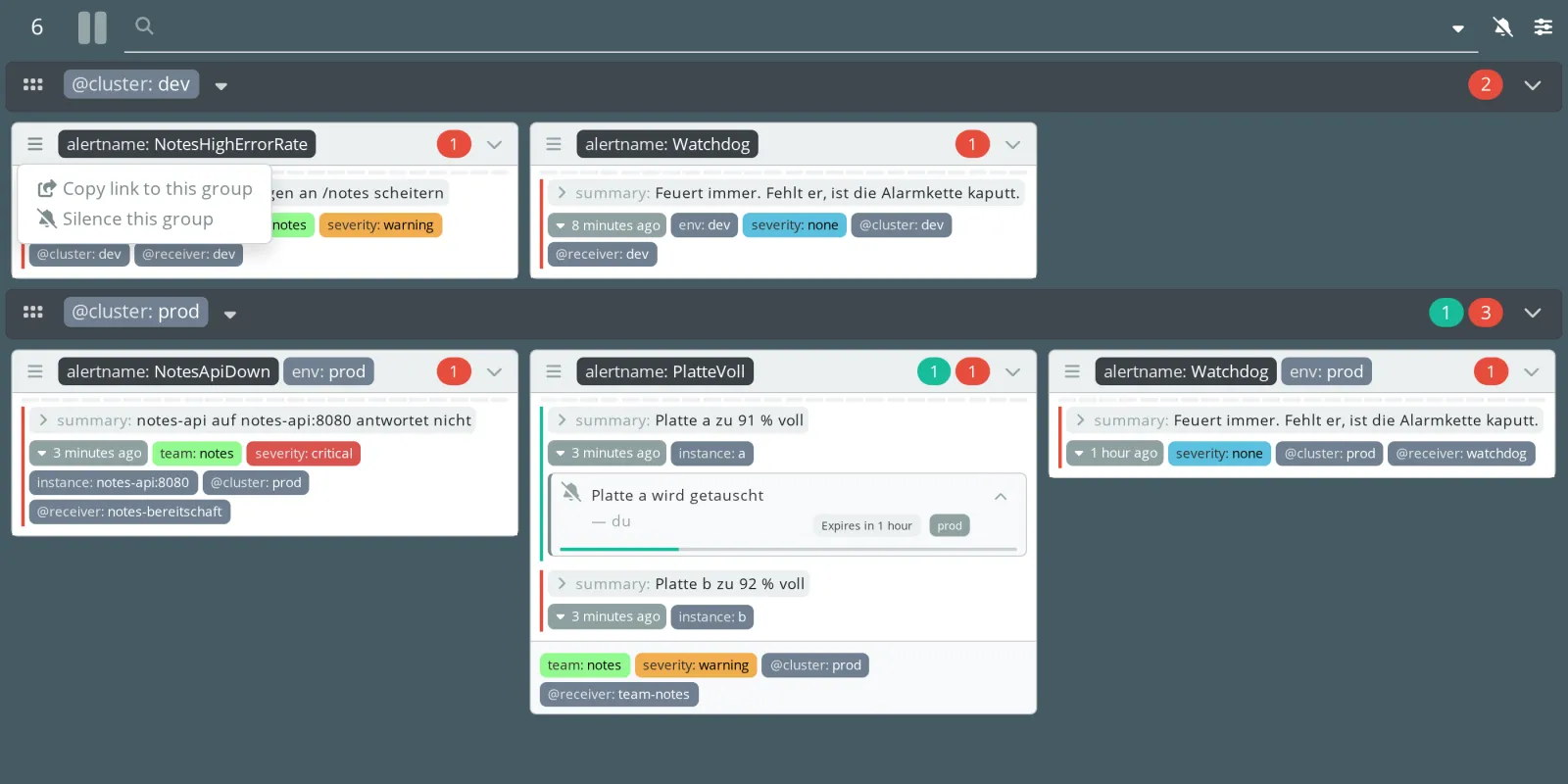
Silence this group opens the form, already filled in:
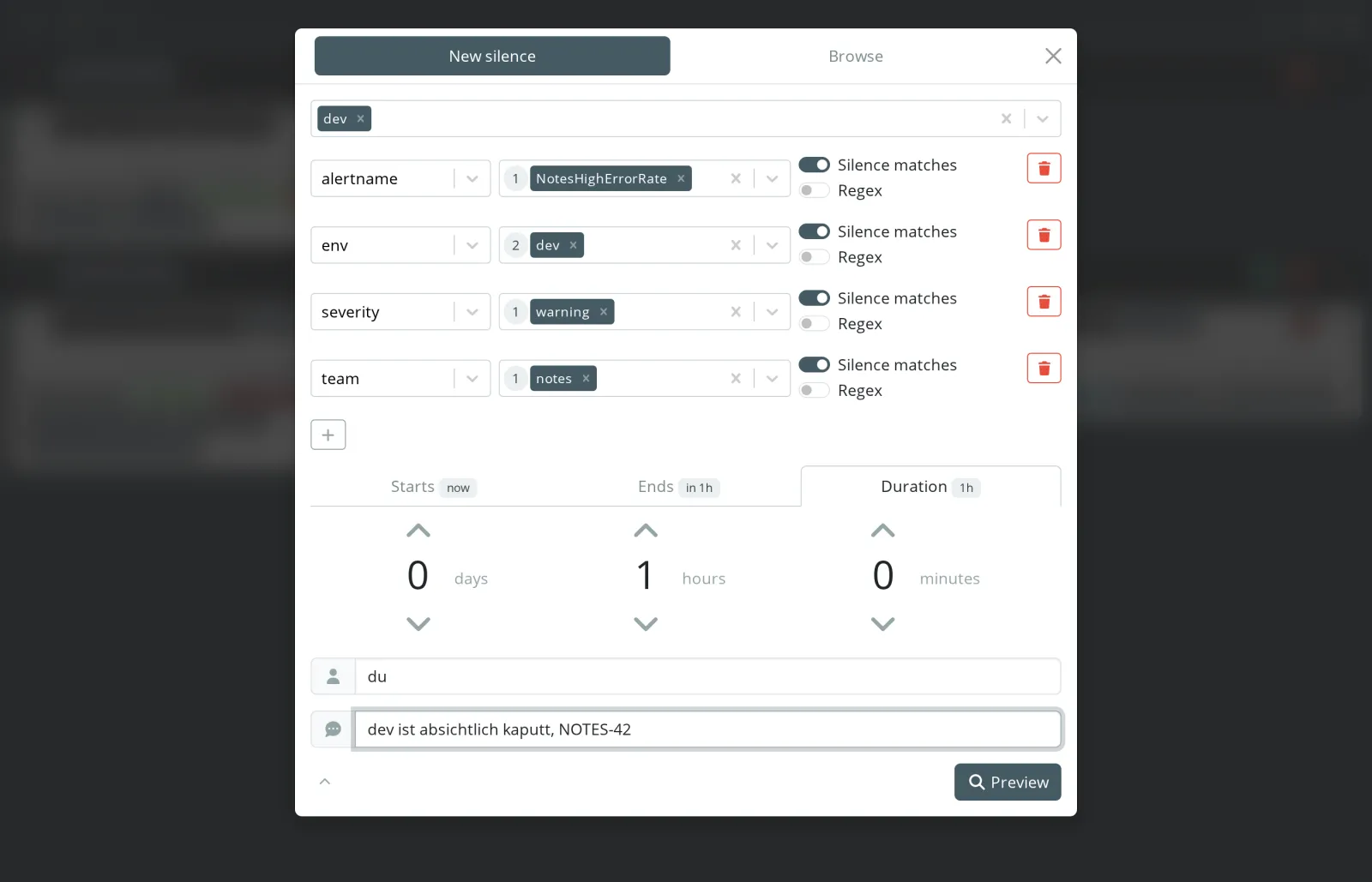
- The Alertmanagers are at the top. karma selected only
devbecause the group only occurs there. - Every common label of the group becomes a matcher. The number in front of the value tells you how many alerts have this value.
- Silence matches means
=, switched off it means!=. Regex turns the value into a regular expression. - You set the duration with the arrows; the default is one hour.
Enter du as Author and
dev ist absichtlich kaputt, NOTES-42 as
Comment. Then Preview:
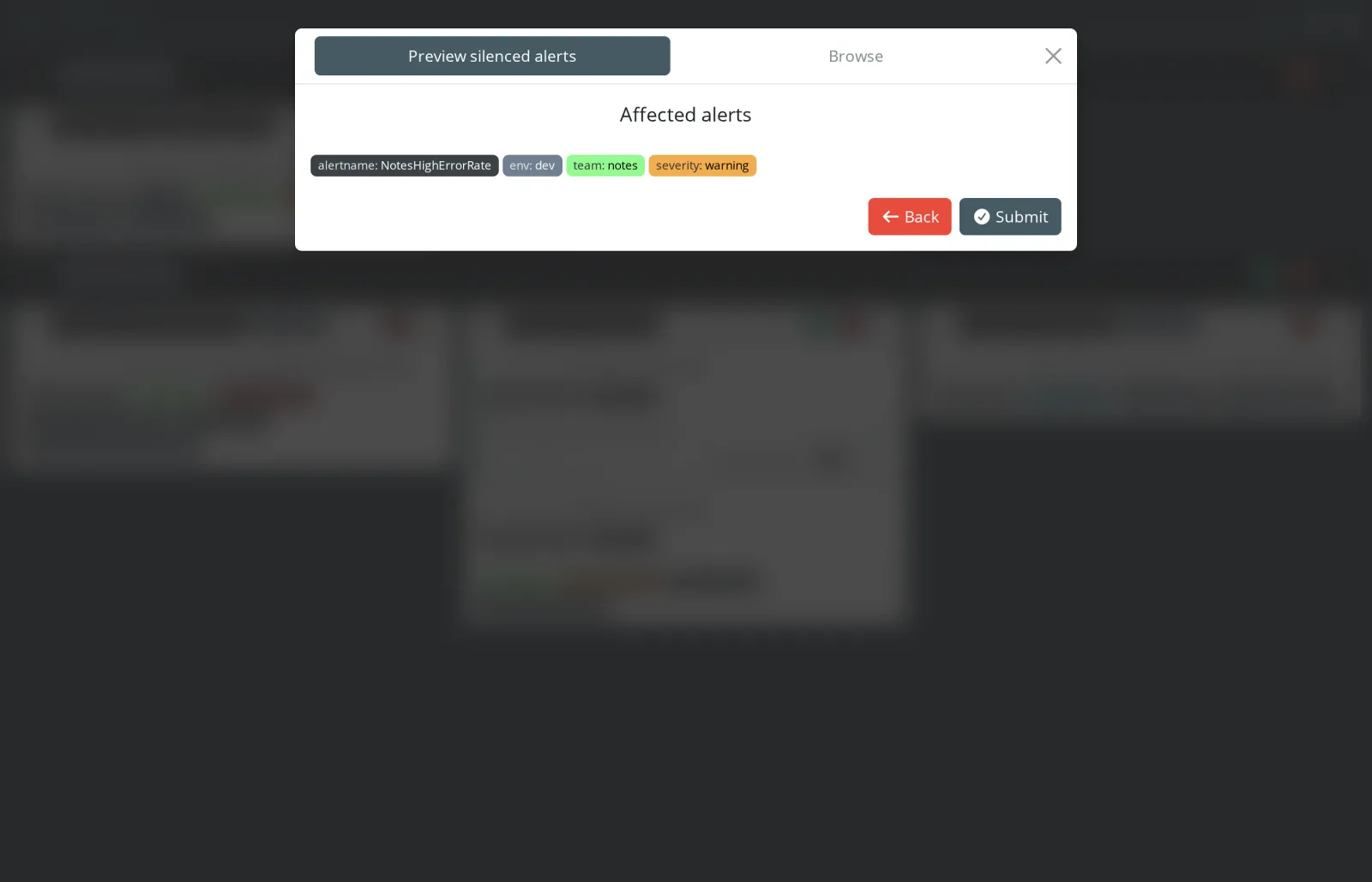
Exactly one alert. If the preview had shown 30 alerts, now would be the moment to check the matchers. Submit creates the silence, and karma shows its ID. Check on Alertmanager itself:
amtool silence query --alertmanager.url=http://localhost:9096Expected:
ID                                    Matchers                                                                  Ends At                  Created By  Comment
620f32df-cc96-4cb5-a832-950c696a6fd4  alertname="NotesHighErrorRate" env="dev" severity="warning" team="notes"  2026-11-16 21:33:00 UTC  du          dev ist absichtlich kaputt, NOTES-42
The silence lives in Alertmanager. karma stores no data of its own.
Save your progress? Sign up for free
Drill 2: Acknowledgements and Ticket Links
Two sections in karma/karma.yaml:
cat >> karma/karma.yaml <<'EOF'

alertAcknowledgement:
  enabled: true
  duration: 15m
  author: karma
  comment: "ACK! In Arbeit seit %NOW%"

silences:
  expired: 10m
  comments:
    linkDetect:
      rules:
        - regex: "(NOTES-[0-9]+)"
          uriTemplate: https://tickets.example.com/browse/$1
EOF
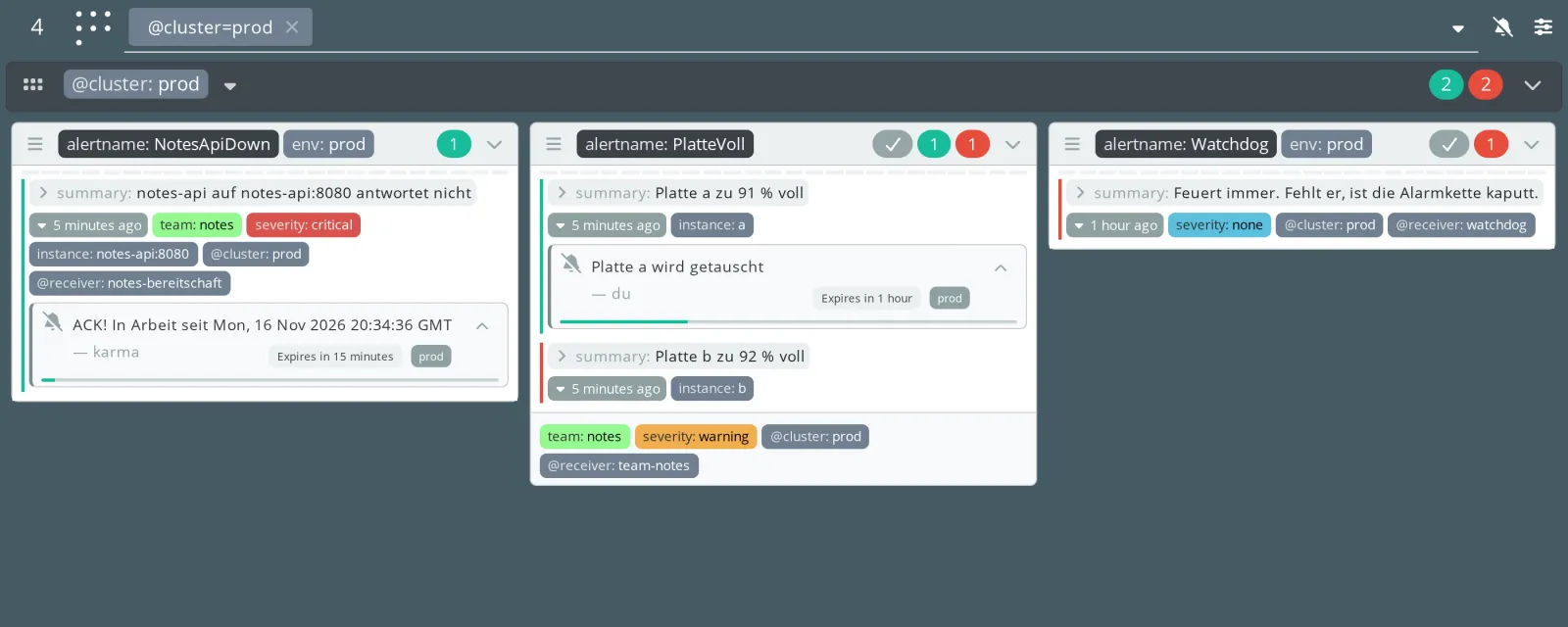
docker compose restart karmaalertAcknowledgement: a check mark appears on every group. One click creates a silence for 15 minutes.%NOW%is replaced by the current time in UTC.linkDetect: ticket numbers in the comment become links.expired: 10m: expired silences stay visible on the alert for another ten minutes. More on this in the Challenge.
Click the check mark on the NotesApiDown tile. After the
next fetch:
amtool silence query alertname=NotesApiDown -o json \
  | jq '.[0] | {createdBy, comment, endsAt}'
Expected:
{
  "createdBy": "karma",
  "comment": "ACK! In Arbeit seit Mon, 16 Nov 2026 20:34:36 GMT",
  "endsAt": "2026-11-16T20:49:36.851Z"
}
The acknowledgement is a perfectly normal silence. If the problem is
not fixed after 15 minutes, the alert comes back. That is exactly what
is intended. If you do not want that, you can use kthxbye
(also from prymitive) to extend acknowledgements automatically as long
as the alert keeps firing.
Note: The author is
karmabecause nobody is logged in. From Day 11 on, karma enters the name of the logged-in user.
Save your progress? Sign up for free
Drill 3: All Silences
The bell icon at the top right opens the form, and the Browse tab opens the list:

- The number on the right is the number of alerts the silence
currently hits.
0means: it affects nothing, often a sign of a typo in a matcher or a forgotten leftover. NOTES-42has become a link.- With the checkboxes on the left, you select several silences and expire them together (red trash can icon).
- A click on a silence expands it: matchers, times, buttons for editing and expiring.
Save your progress? Sign up for free
Drill 4: Silences via curl
What the browser does also works from the command line, through the same proxy. A silence is JSON:
N=$(date -u +%Y-%m-%dT%H:%M:%SZ)
E=$(date -u -d '+1 day' +%Y-%m-%dT%H:%M:%SZ)
cat > silence.json <<EOF
{
  "matchers": [
    {"name": "alertname", "value": "PlatteVoll", "isRegex": false, "isEqual": true},
    {"name": "instance", "value": "b", "isRegex": false, "isEqual": true}
  ],
  "startsAt": "$N",
  "endsAt": "$E",
  "createdBy": "du",
  "comment": "Platte b wird morgen getauscht, NOTES-43"
}
EOF
<<EOF without quotes fills in $N and
$E. Every matcher has four fields: name, value, regex yes
or no, equal or not equal.
curl -s -X POST -H 'Content-Type: application/json' -d @silence.json \
  localhost:8000/proxy/alertmanager/prod-1/api/v2/silences
Expected:
{"silenceID":"8cad538c-cd6c-4d13-9de8-eae6da8e044f"}The response comes from Alertmanager; karma only passed it through.
Expiring works with DELETE and the ID:
ID=$(amtool silence query instance=b -q)
curl -s -o /dev/null -w '%{http_code}\n' -X DELETE \
  localhost:8000/proxy/alertmanager/prod-1/api/v2/silence/$ID
Expected:
200amtool silence query -q prints only the IDs. The name in
the path must be an upstream from karma.yaml. An unknown
name returns 404.
Save your progress? Sign up for free
Checkpoint
amtool silence query --alertmanager.url=http://localhost:9096 | grep NOTES-42Expected: the silence from Drill 1.
amtool silence query alertname=NotesApiDownExpected: the acknowledgement from Drill 2 with
Created By karma. If more than 15 minutes have
passed since the click, you find it with --expired.
docker compose logs --no-log-prefix karma | grep -A2 'msg=alertAcknowledgement'Expected: enabled: true and
duration: 15m0s.
Challenge
Expire the silence NOTES-42 in dev via curl
through the proxy. What does karma show afterwards on the
NotesHighErrorRate tile?
Note: amtool silence query -q with the
address of the dev Alertmanager returns the ID.
Solution
ID=$(amtool silence query -q --alertmanager.url=http://localhost:9096)
curl -s -o /dev/null -w '%{http_code}\n' -X DELETE \
  localhost:8000/proxy/alertmanager/dev/api/v2/silence/$ID
Expected:
200After the next fetch:
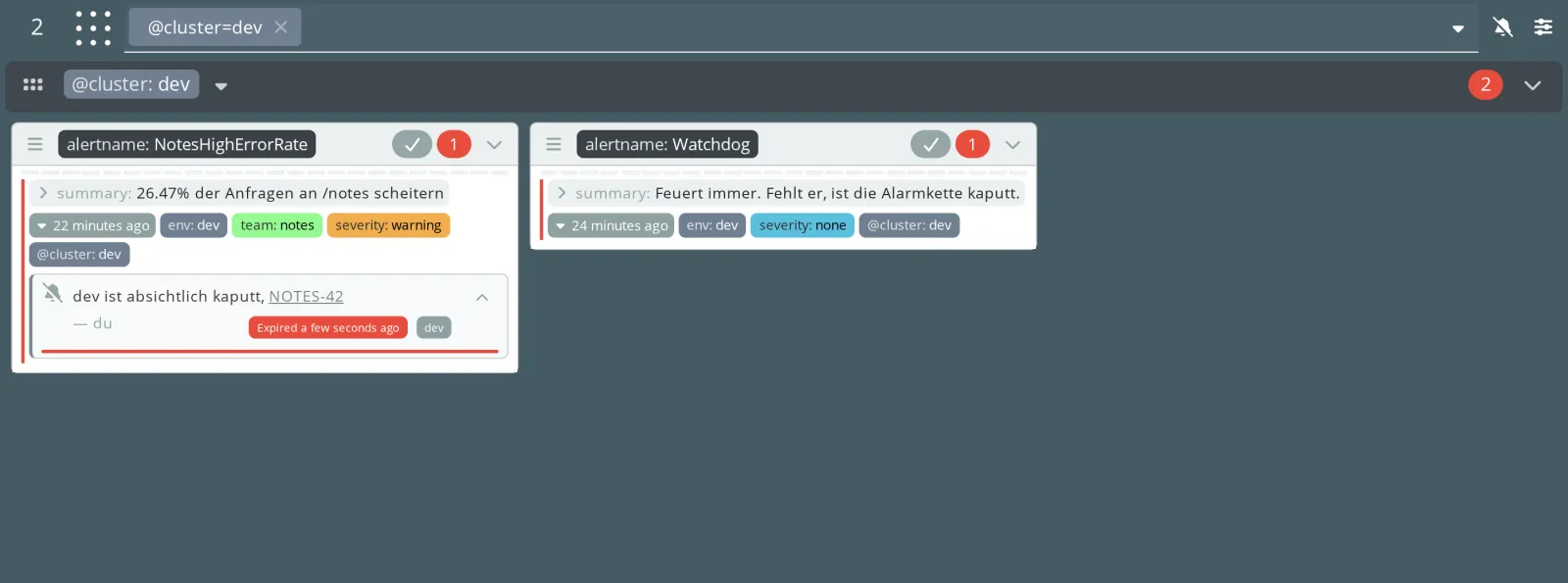
The alert is active again (red number), and the silence is still
attached to it, red and with “Expired a few seconds ago”. That is
silences.expired: 10m. Whoever comes back from a break
immediately sees that someone has just expired the silence here, and
with which comment. karma only shows this for alerts that have been
firing longer than these ten minutes.
Save your progress? Sign up for free
Enterprise Note
- Make a comment with a ticket number mandatory. An ACL cannot check that; it only sees matchers. That remains a matter of agreement, review and automation.
- Keep acknowledgements short (15–30 minutes) and rather extend them. An acknowledgement lasting a day is a hidden silence.
- Look at hit count
0in the silence list regularly. Silences that hit nothing are garbage or mistakes. - Automation (deployments, maintenance windows) is better off creating silences directly on Alertmanager than via karma. Going through karma is only worthwhile if the ACLs from Day 11 should also apply to machines.