Day 9: Multiple Alertmanagers
Goal: A second environment
devwith its own Prometheus and Alertmanager joins. karma reads all four Alertmanagers, combines the three prod nodes into a cluster and shows every alert only once. · Duration: approx. 50 min · Prerequisite: Day 8
Briefing
- karma’s strength is the combined view: many
Alertmanagers, one screen. Every entry under
serversis an upstream. - karma merges identical alerts (same labels) from several upstreams into one (deduplication). The alert shows everywhere it was found.
- Upstreams that belong to the same HA cluster get the same
clustername. karma also detects clusters itself; withclusteryou assign readable names. - The HA cluster shares silences and the notification log, but no alerts. Every node only knows what was sent to it. That will show today.
 Prometheus (env=prod) ──► alertmanager, -2, -3 ─┐ cluster prod
 Prometheus-dev (env=dev) ──► alertmanager-dev ──┤ cluster dev
                                                 └──► karma :8000
Drill 1: The dev Environment
A separate notes-api without a database, with a built-in error rate, so that dev has something to report. Plus its own Prometheus with the same rules and a single Alertmanager:
cd ~/am-lab
mkdir -p dev
cat > dev/prometheus.yml <<'EOF'
global:
  scrape_interval: 15s
  evaluation_interval: 15s
  external_labels:
    env: dev

rule_files:
  - /etc/prometheus/rules/*.yml

scrape_configs:
  - job_name: notes-api
    static_configs:
      - targets: ["notes-api-dev:8080"]

alerting:
  alertmanagers:
    - static_configs:
        - targets: ["alertmanager-dev:9093"]
EOF
cat > dev/alertmanager.yml <<'EOF'
route:
  receiver: dev
  group_by: [alertname]

receivers:
  - name: dev
    webhook_configs:
      - url: http://alarm-log:5001/dev
EOF
external_labels: env: devdistinguishes the alerts from prod, even though they come from the same rules.- The dev Alertmanager is deliberately simple: one receiver, everything goes there.
The Compose building block:
cat > dev.yaml <<'EOF'
services:
  notes-api-dev:
    image: notes-api:0.8.0
    environment:
      NOTES_API_KEY: lab-api-key-123
      NOTES_ERROR_RATE: "0.2"

  last-dev:
    image: curlimages/curl:8.23.0
    entrypoint: ["sh", "-c"]
    command: ["while true; do curl -s -o /dev/null -m 5 http://notes-api-dev:8080/notes; sleep 1; done"]

  prometheus-dev:
    image: prom/prometheus:v3.16.0
    command:
      - --config.file=/etc/prometheus/prometheus.yml
      - --web.external-url=http://${VM_IP}:9091
    volumes:
      - ./dev/prometheus.yml:/etc/prometheus/prometheus.yml:ro
      - ./prometheus/rules:/etc/prometheus/rules:ro
    ports:
      - "9091:9090"

  alertmanager-dev:
    image: prom/alertmanager:v0.35.0
    command:
      - --config.file=/etc/alertmanager/alertmanager.yml
      - --web.external-url=http://${VM_IP}:9096
      - --cluster.listen-address=
    volumes:
      - ./dev/alertmanager.yml:/etc/alertmanager/alertmanager.yml:ro
    ports:
      - "9096:9093"
EOF
echo "  - dev.yaml" >> compose.yaml
docker compose up -d- Without
NOTES_DB_URL, notes-api keeps the notes in memory. That is enough for dev. - dev reads the rules from the same folder as prod. A change applies to both.
docker compose up -dalso recreates notes-api in prod if you still hadNOTES_ERROR_RATEset from Day 7. That ends the error rate in prod.
After a little over three minutes, the error rate fires in dev:
amtool alert --alertmanager.url=http://localhost:9096Expected:
Alertname           Starts At                Summary                                             State
Watchdog            2026-11-16 20:24:18 UTC  Feuert immer. Fehlt er, ist die Alarmkette kaputt.  active
NotesHighErrorRate  2026-11-16 20:26:43 UTC  23.76% der Anfragen an /notes scheitern             active
Save your progress? Sign up for free
Drill 2: Four Upstreams in karma
In karma/karma.yaml, replace the
alertmanager section with this one:
alertmanager:
  interval: 30s
  servers:
    - name: prod-1
      cluster: prod
      uri: http://alertmanager:9093
      external_uri: http://172.16.0.61:9093
      timeout: 10s
      proxy: true
    - name: prod-2
      cluster: prod
      uri: http://alertmanager-2:9093
      external_uri: http://172.16.0.61:9094
      timeout: 10s
      proxy: true
    - name: prod-3
      cluster: prod
      uri: http://alertmanager-3:9093
      external_uri: http://172.16.0.61:9095
      timeout: 10s
      proxy: true
    - name: dev
      uri: http://alertmanager-dev:9093
      external_uri: http://172.16.0.61:9096
      timeout: 10s
proxy: true- The names appear in karma as
@alertmanager.prodis now calledprod-1. cluster: prodon all three nodes. Without it, karma detects the cluster itself and generates a name for it. Your own name reads better.devhas nocluster. A single upstream forms a cluster with its own name, heredev.
docker compose restart karma
docker compose logs --no-log-prefix --since 20s karma | grep 'Configured Alertmanager'
Expected:
level=INFO msg="Configured Alertmanager source" name=prod-1 cluster=prod uri=http://alertmanager:9093 proxy=true readonly=false
level=INFO msg="Configured Alertmanager source" name=prod-2 cluster=prod uri=http://alertmanager-2:9093 proxy=true readonly=false
level=INFO msg="Configured Alertmanager source" name=prod-3 cluster=prod uri=http://alertmanager-3:9093 proxy=true readonly=false
level=INFO msg="Configured Alertmanager source" name=dev cluster=dev uri=http://alertmanager-dev:9093 proxy=true readonly=false
And what karma fetched from each upstream:
docker compose logs --no-log-prefix --since 20s karma | grep 'Deduplicating'Expected:
level=INFO msg="Deduplicating alert groups" alertmanager=dev groups=1
level=INFO msg="Deduplicating alert groups" alertmanager=prod-3 groups=4
level=INFO msg="Deduplicating alert groups" alertmanager=prod-2 groups=4
level=INFO msg="Deduplicating alert groups" alertmanager=prod-1 groups=8
prod-1 has eight groups, the other two only four. You
sent the test alerts from Day 7 (PlatteVoll,
Werbeaktion) with amtool only to node 1. The
cluster did not distribute them.
Open http://172.16.0.61:8000/?q=. The empty
q= switches off the default filters from Day 8 for this
request.
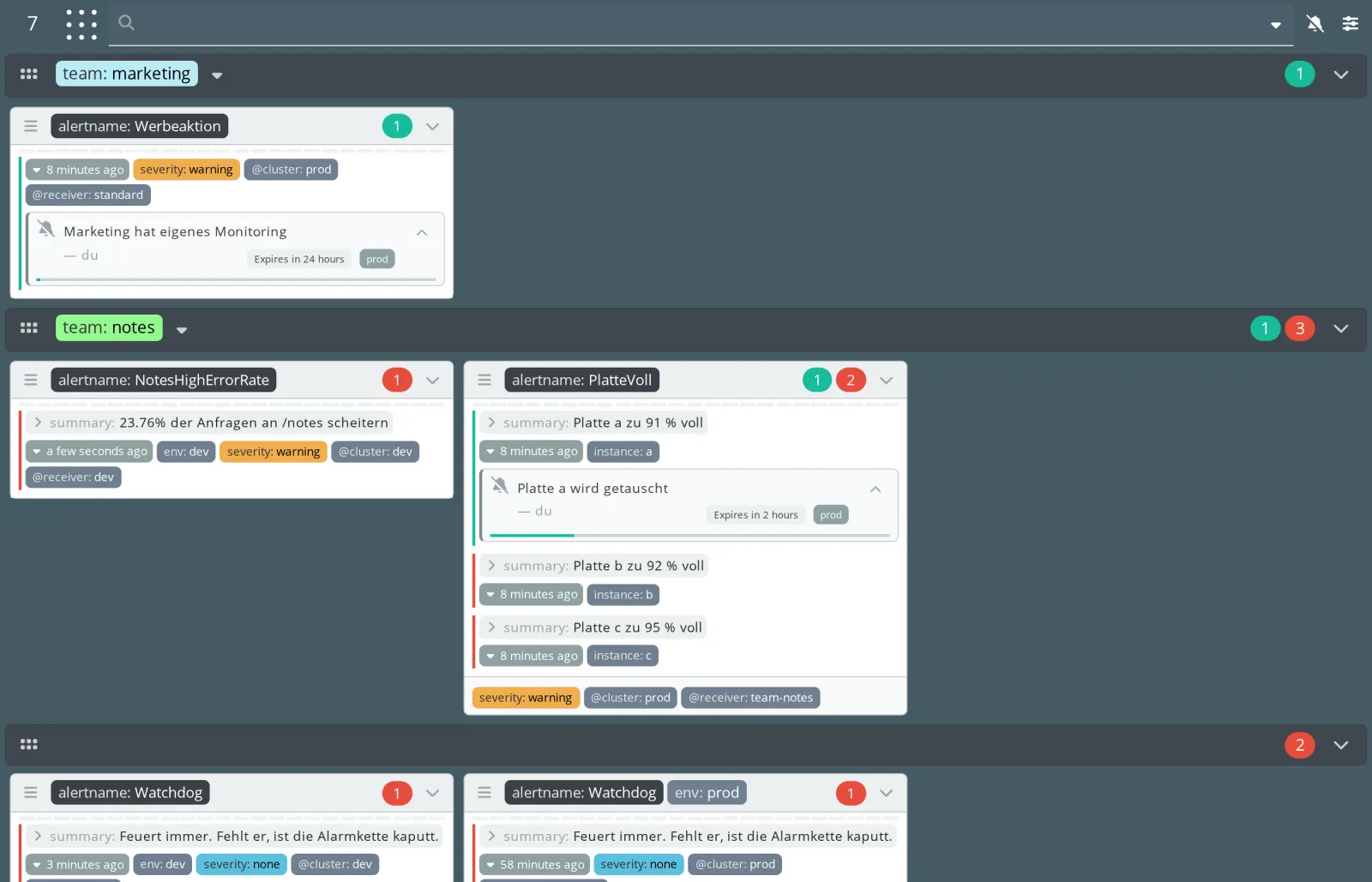
NotesHighErrorRatenow comes from dev, withenv: devand@cluster: dev.- Alerts from prod show
@cluster: prod, no matter how many nodes they came from. - Silences carry the cluster as a small badge (
prod). A silence always applies only in the cluster in which it was created.
Save your progress? Sign up for free
Drill 3: Who Knows Which Alert?
The filters @alertmanager and @cluster show
where an alert comes from:
curl -s -G localhost:8000/counters.json --data-urlencode 'q=@cluster=prod' | jq .total
curl -s -G localhost:8000/counters.json --data-urlencode 'q=@alertmanager=prod-1' \
  | jq .total
curl -s -G localhost:8000/counters.json --data-urlencode 'q=@alertmanager=prod-2' \
  | jq .total
Expected:
5
5
1
Five alerts in prod, and prod-1 knows all five.
prod-2 knows only one: the Watchdog, which Prometheus sends
to all three nodes. What happens if prod-1 fails? Stop it,
along with the dev Alertmanager:
docker compose stop alertmanager alertmanager-devAfter one minute, karma looks like this:
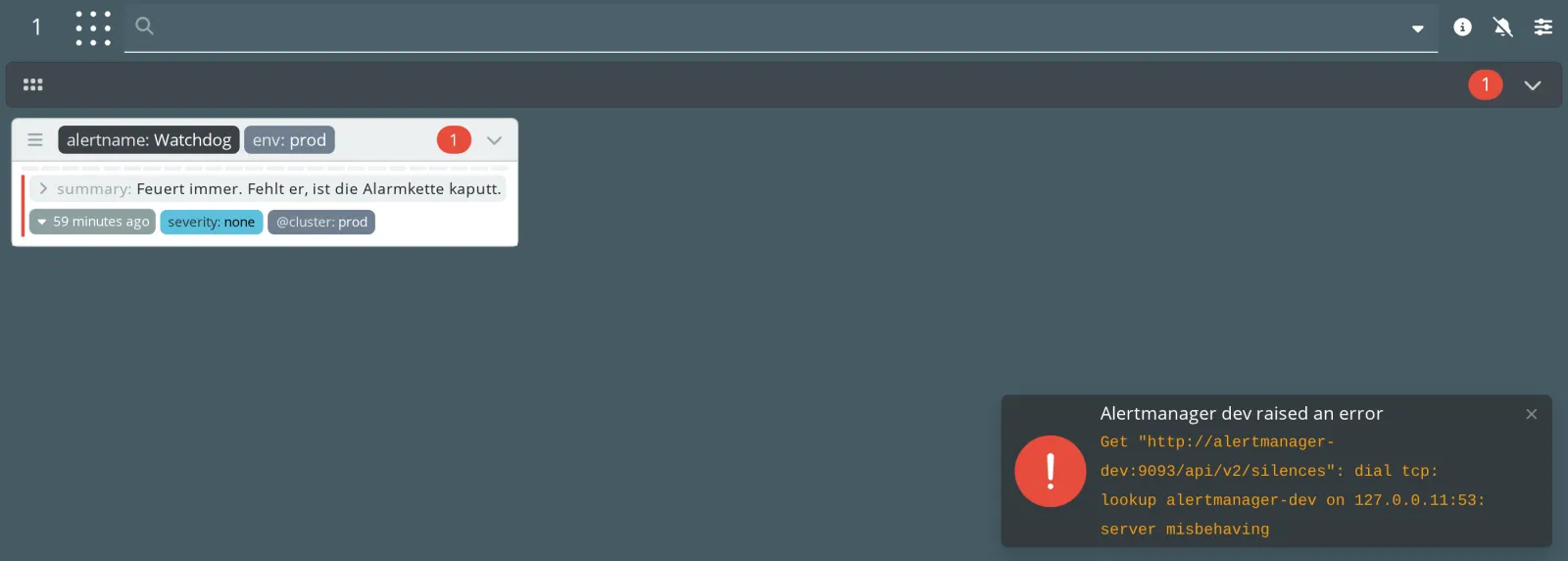
- Of prod, only the Watchdog remains. Everything that only
prod-1knew has disappeared. - For dev, karma shows an error at the bottom right, and an info icon with all errors appears at the top.
- For
prod-1, no message appears as a tile. After all, the cluster is still alive.
karma’s metrics tell you more precisely:
curl -s localhost:8000/metrics | grep '^karma_alertmanager_up'Expected:
karma_alertmanager_up{alertmanager="dev"} 0
karma_alertmanager_up{alertmanager="prod-1"} 0
karma_alertmanager_up{alertmanager="prod-2"} 1
karma_alertmanager_up{alertmanager="prod-3"} 1
The lesson from the picture: in HA mode, every sender must deliver to
all nodes. Prometheus does that; a script running
amtool against one node does not. karma shows you this
mistake as soon as a node is missing.
docker compose start alertmanager alertmanager-devAfter the restart, prod-1 no longer knows the test
alerts from Day 7. Alertmanager keeps alerts only in memory; Prometheus
resends its own within a minute at most.
Save your progress? Sign up for free
Checkpoint
curl -s localhost:8000/metrics | grep -c '^karma_alertmanager_up.* 1$'Expected: 4, all upstreams reachable.
curl -s -G localhost:8000/counters.json --data-urlencode 'q=@cluster=dev' | jq .totalExpected: 2, Watchdog and error rate from dev.
docker compose restart karma
docker compose logs --no-log-prefix --since 30s karma | grep -c 'Configured Alertmanager source'
Expected: 4, one upstream per line.
Challenge
The control room no longer wants to split by team but by cluster: dev at the top, prod below.
Note: Besides label names,
ui.multiGridLabel knows the special values
@alertmanager, @cluster,
@receiver and @auto. YAML needs quotes for
values with @.
Solution
sed -i 's/  multiGridLabel: team/  multiGridLabel: "@cluster"/' karma/karma.yaml
grep multiGridLabel karma/karma.yaml
docker compose restart karma
Expected:
multiGridLabel: "@cluster"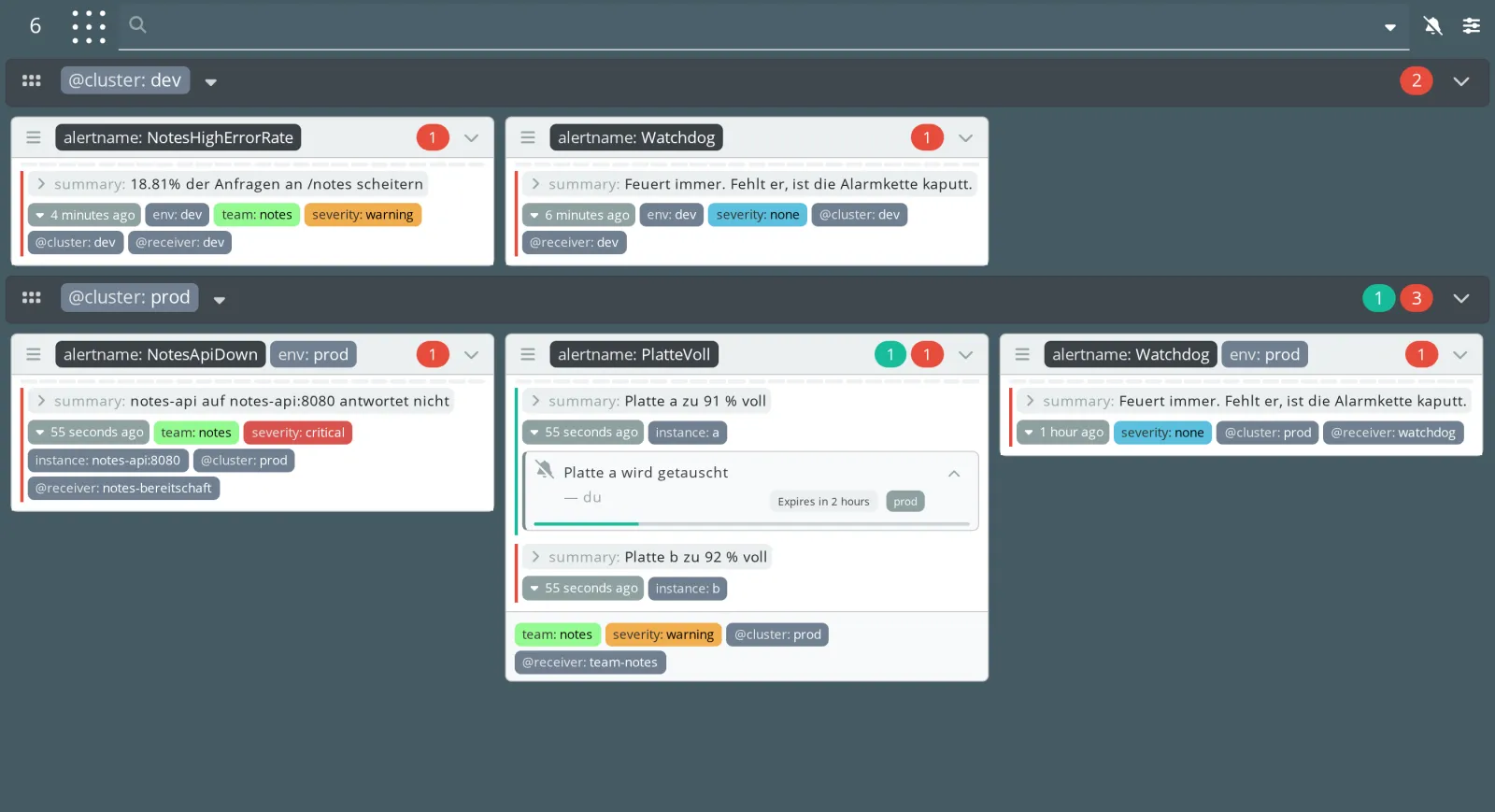
The grids are in alphabetical order, dev before
prod. With ui.multiGridSortReverse: true, prod
would come to the top.
Save your progress? Sign up for free
Enterprise Note
- One karma instance for all environments is convenient. But it is also a target that is allowed to read all Alertmanagers. Secure the network and access accordingly (Day 11).
- Choose cluster names in karma that match the environment names
(
prod,dev). Then filter URLs read like sentences. karma_alertmanager_upbelongs in Prometheus and on an alert. karma is often the first thing humans look at. Otherwise missing upstreams go unnoticed.- Always send alerts that do not come from Prometheus (scripts, cron jobs, other systems) to all nodes of a cluster.