Day 5: Mappers, Scopes, Audience
Goal: Use client scopes and mappers to decide what goes into a token: an audience for notes-api, groups on request, a custom attribute. And have notes-api check the audience. · Duration: approx. 75 min · Prerequisite: Day 4
Briefing
- A protocol mapper writes a claim into the token: roles, groups, attributes, an audience.
- Client scopes bundle mappers.
Default scopes always end up in the token,
optional scopes only when the client requests them with
scope=…. - The audience (
aud) says whom a token is meant for. An API should only accept tokens that were issued for it. - In Keycloak 26, custom attributes must be defined in the user profile, otherwise Keycloak discards them.
 Client notes-web ── default scope notes-api ── mapper aud-notes-api → "aud":["notes-api"]
                                            └─ mapper abteilung     → "abteilung":"…"
 Client notes-cli ── optional scope groups ──── mapper groups        → "groups":[…]
Drill 1: A Client for the API
source ~/kc-lab/setup/env.sh
mkdir -p ~/kc-lab/tag05 && cd ~/kc-lab/tag05
kclogin
OIDC=$KC_URL/realms/lab/protocol/openid-connect
cid() { kcadm get clients -r lab -q clientId=$1 --fields id --format csv --noquotes; }
uid() { kcadm get users -r lab -q username=$1 -q exact=true --fields id \
  --format csv --noquotes; }
kcadm create clients -r lab -s clientId=notes-api -s enabled=true \
  -s publicClient=false -s secret=lab-client-secret-123 \
  -s standardFlowEnabled=false -s directAccessGrantsEnabled=false \
  -s serviceAccountsEnabled=false
Expected (abridged):
Logging into http://localhost:8080 as user kcadmin of realm master
Created new client with id 'ac5cd1fe-…'
A client without any flow: It never fetches a token. It stands for the API itself, as the name for the audience and with its own secret for introspection.
Save your progress? Sign up for free
Drill 2: A Scope with an Audience
kcadm create client-scopes -r lab -s name=notes-api -s protocol=openid-connect \
  -s 'attributes."include.in.token.scope"=true'
SID=$(kcadm get client-scopes -r lab --fields id,name --format csv --noquotes \
  | grep ',notes-api$' | cut -d, -f1)
kcadm create client-scopes/$SID/protocol-mappers/models -r lab -s name=aud-notes-api \
  -s protocol=openid-connect -s protocolMapper=oidc-audience-mapper \
  -s 'config."included.client.audience"=notes-api' \
  -s 'config."access.token.claim"=true' -s 'config."introspection.token.claim"=true'
for c in notes-web notes-cli; do
  kcadm update clients/$(cid $c)/default-client-scopes/$SID -r lab && echo "$c ok"
done
jwt "$(token)" | jq -c '{aud, scope}'
Expected (abridged):
Created new client-scope with id '6acd9b68-…'
Created new model with id '6a2742d0-…'
notes-web ok
notes-cli ok
{"aud":["notes-api","account"],"scope":"openid profile notes-api email"}
The scope is a default scope for both clients, so
notes-api is now in every one of their tokens.
Save your progress? Sign up for free
Drill 3: Introspection, Second Attempt
On Day 3, Keycloak refused the introspection because the requesting client was not in the audience. Now the API itself asks:
T=$(token)
curl -s -u notes-cli:lab-client-secret-123 -d token=$T $OIDC/token/introspect \
  | jq -c '{active}'
curl -s -u notes-api:lab-client-secret-123 -d token=$T $OIDC/token/introspect \
  | jq -c '{active, username, client_id, aud}'
Expected:
{"active":false}
{"active":true,"username":"anna","client_id":"notes-cli","aud":["notes-api","account"]}
notes-cli may not check the token,
notes-api may, because the token is meant for it. That is
exactly how it should be: Whoever uses a token is not automatically the
one who may evaluate it.
Save your progress? Sign up for free
Drill 4: notes-api Requires Its Audience
The notes compose.yaml passes
NOTES_AUDIENCE on to notes-api. Set it:
echo 'export NOTES_AUDIENCE=notes-api' >> ~/kc-lab/setup/vms.env
source ~/kc-lab/setup/env.sh
cd ~/kc-lab/notes && docker compose up -d --wait notes-api
docker compose logs notes-api 2>&1 | grep -o 'audience=[a-z-]*' | tail -1
api() { docker run --rm --network lab curlimages/curl:8.17.0 -s "$@"; }
F=$(curl -s -d grant_type=password -d client_id=admin-cli -d username=anna \
  -d password=lab-user-pw-123 $OIDC/token | jq -r .access_token)
jwt "$F" | jq -c '{aud, azp}'
api -w ' %{http_code}\n' -H "Authorization: Bearer $F" notes-api:8080/whoami
api -o /dev/null -w '%{http_code}\n' -H "Authorization: Bearer $(token)" \
  notes-api:8080/whoami
Expected (abridged):
 Container notes-notes-api-1 Healthy
audience=notes-api
{"aud":null,"azp":"admin-cli"}
{"error":"Audience \"notes-api\" fehlt"}
 401
200
admin-cli exists in every realm. Its token is real,
valid and anna’s, but not meant for notes-api (“fehlt”, missing).
Without the audience check, notes-api would have accepted it.
Save your progress? Sign up for free
Drill 5: Groups on Request
kcadm create client-scopes -r lab -s name=groups -s protocol=openid-connect
GID=$(kcadm get client-scopes -r lab --fields id,name --format csv --noquotes \
  | grep ',groups$' | cut -d, -f1)
kcadm create client-scopes/$GID/protocol-mappers/models -r lab -s name=groups \
  -s protocol=openid-connect -s protocolMapper=oidc-group-membership-mapper \
  -s 'config."claim.name"=groups' -s 'config."full.path"=false' \
  -s 'config."access.token.claim"=true' -s 'config."id.token.claim"=true' \
  -s 'config."userinfo.token.claim"=true'
kcadm update clients/$(cid notes-cli)/optional-client-scopes/$GID -r lab \
  && echo optional
jwt "$(token)" | jq -c '{groups}'
G=$(curl -s -d grant_type=password -d client_id=notes-cli \
  -d client_secret=lab-client-secret-123 -d username=anna -d password=lab-user-pw-123 \
  -d 'scope=openid groups' $OIDC/token | jq -r .access_token)
jwt "$G" | jq -c '{groups, scope}'
Expected (abridged):
Created new client-scope with id 'fd230c46-…'
Created new model with id '401da0eb-…'
optional
{"groups":null}
{"groups":["team-notes"],"scope":"openid groups profile notes-api email"}
Without scope=groups, no claim. Optional scopes keep
tokens small and only hand out what a client explicitly needs.
Save your progress? Sign up for free
Drill 6: A Custom Attribute
anna works in development. Try it directly (abteilung
means department, Entwicklung development):
kcadm update users/$(uid anna) -r lab -s 'attributes.abteilung=["Entwicklung"]'
kcadm get users/$(uid anna) -r lab | jq -c .attributes
kcadm get users/profile -r lab | jq -c '[.attributes[].name]'
Expected:
null
["username","email","firstName","lastName"]
No error, but no attribute either. The user profile knows only four attributes; Keycloak silently discards everything else. Extend the profile:
kcadm get users/profile -r lab > profile.json
jq '.attributes += [{"name":"abteilung","displayName":"Abteilung","multivalued":false,
  "permissions":{"view":["admin","user"],"edit":["admin"]}}]' profile.json \
  > profile-neu.json
docker compose -f ~/kc-lab/keycloak/compose.yaml cp profile-neu.json \
  keycloak:/tmp/profile.json
kcadm update users/profile -r lab -f /tmp/profile.json && echo profil-ok
kcadm update users/$(uid anna) -r lab -s 'attributes.abteilung=["Entwicklung"]'
kcadm get users/$(uid anna) -r lab | jq -c .attributes
Expected (abridged):
 keycloak-keycloak-1 Copied profile-neu.json to keycloak-keycloak-1:/tmp/profile.json
profil-ok
{"abteilung":["Entwicklung"]}
kcadm runs in the container, so the file has to go in
first. anna may see her department, but only an admin may change it. Now
the mapper into the token, in the scope notes-api:
kcadm create client-scopes/$SID/protocol-mappers/models -r lab -s name=abteilung \
  -s protocol=openid-connect -s protocolMapper=oidc-usermodel-attribute-mapper \
  -s 'config."user.attribute"=abteilung' -s 'config."claim.name"=abteilung' \
  -s 'config."jsonType.label"=String' -s 'config."access.token.claim"=true' \
  -s 'config."id.token.claim"=true'
jwt "$(token)" | jq -c '{preferred_username, abteilung, aud}'
Expected (abridged):
Created new model with id 'ca3d1830-…'
{"preferred_username":"anna","abteilung":"Entwicklung","aud":["notes-api","account"]}
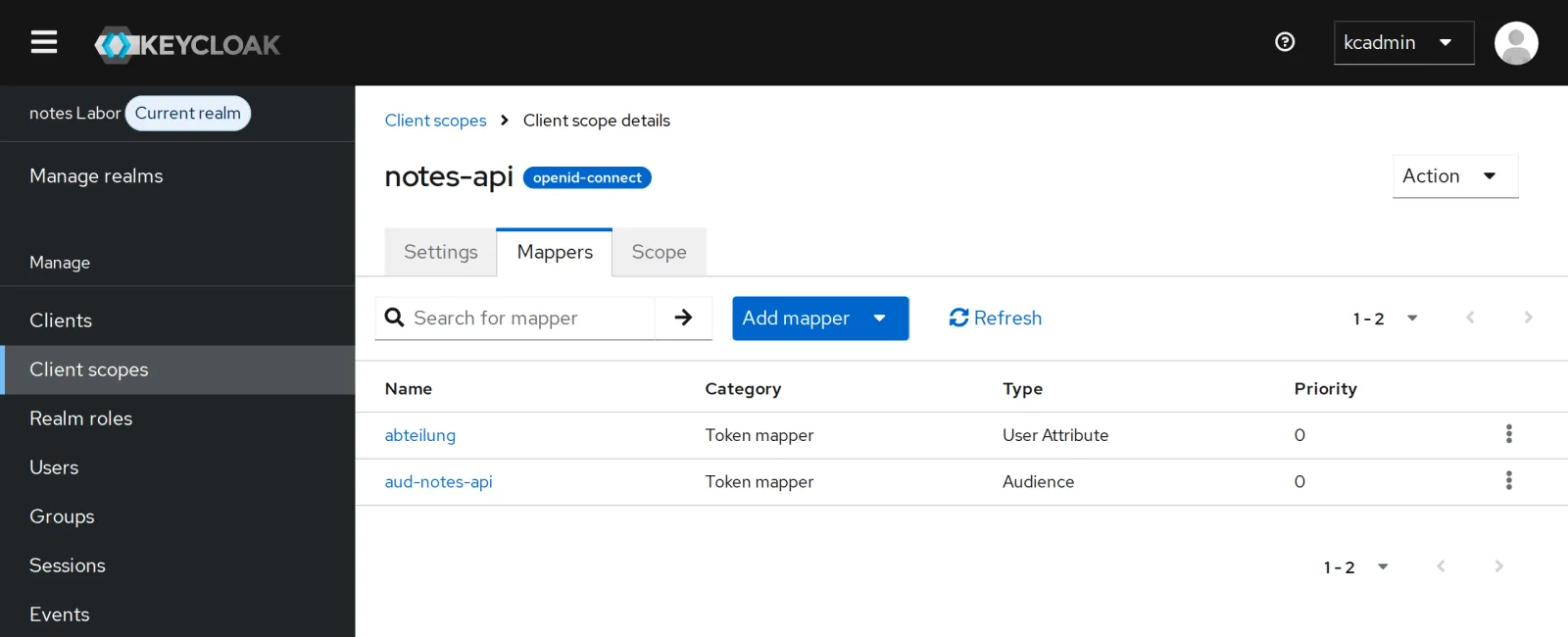
In the console under Client scopes, notes-api, Mappers you see both mappers:
Save your progress? Sign up for free
Drill 7: Viewing a Token Without Logging In
What would be in ben’s token for notes-web? Keycloak can compute it:
kcadm get clients/$(cid notes-web)/evaluate-scopes/generate-example-access-token \
  -r lab -q userId=$(uid ben) -q scope=openid \
  | jq -c '{preferred_username, aud, abteilung, roles: .realm_access.roles}'
Expected:
{"preferred_username":"ben","aud":["notes-api","account"],"abteilung":null,"roles":
["offline_access","notes-lesen","default-roles-lab","uma_authorization"]}
The console can do the same under Client scopes, Evaluate. For troubleshooting that is worth its weight in gold: You see a token without knowing ben’s password.
Save your progress? Sign up for free
Checkpoint
jwt "$(token)" | jq -c .audExpected: Tokens are meant for notes-api.
["notes-api","account"]api -o /dev/null -w '%{http_code}\n' -H "Authorization: Bearer $F" notes-api:8080/whoamiExpected: notes-api rejects a token without this audience.
401jwt "$(token)" | jq -r .abteilungExpected: the attribute from the user profile.
EntwicklungChallenge
notes-api should know a role of its own,
notes-api:archiv (archive), that only the team has. Create
it as a client role, give it to the group
team-notes and find it in the token.
Hint:
kcadm create clients/<id>/roles,
add-roles with --cclientid; client roles are
under resource_access.
Solution
kcadm create clients/$(cid notes-api)/roles -r lab -s name=archiv
kcadm add-roles -r lab --gname team-notes --cclientid notes-api --rolename archiv
jwt "$(token)" | jq -c .resource_access
jwt "$(token ben lab-user-pw-456)" | jq -c .resource_access
Expected:
Created new role with id 'archiv'
{"account":{"roles":["manage-account","manage-account-links","view-profile"]},
"notes-api":{"roles":["archiv"]}}
{"account":{"roles":["manage-account","manage-account-links","view-profile"]}}
Realm roles apply to all applications; client roles belong to one application and sit in the token under its name. For permissions that only one API understands, they are the better choice.
Save your progress? Sign up for free
Enterprise Note
- Always check the audience: Every API checks
aud. Otherwise it accepts tokens that were issued for another application, even from a compromised client. - Small tokens: Only default scopes that really everyone needs; the rest as optional. Tokens travel with every request, into logs as well.
- Lightweight access tokens (a client setting) leave out almost all claims; the API fetches them via introspection.
- The user profile is the place for validation, required fields and permissions on attributes, also for self-registration.