Day 9: Active Directory with Samba
Goal: Set up an Active Directory with Samba, get to know the quirks of AD, connect Keycloak via LDAPS with a verified certificate, and take over accounts, groups and disabled users from AD. · Duration: approx. 90 min · Prerequisite: Day 8
Briefing
- Samba can be an Active Directory domain controller: LDAP, Kerberos, DNS, the same attributes as Windows.
- In AD, the login name is
sAMAccountName; alongside it there is theuserPrincipalName([email protected]). The ID isobjectGUID. - An AD requires an encrypted connection for simple
binds. That is why Keycloak speaks
ldaps://and must trust the domain controller’s certificate. - Disabled accounts are recognized by
userAccountControl; Keycloak takes that over with the “MSAD account controls” mapper.
 Keycloak ─ldaps://dc1.ad.notes.lab:636─► Samba DC1 (AD.NOTES.LAB)
   └ trusts samba-ca.pem (conf/truststores)
   CN=Users: gustav, hanna, notes-ad-schreiber
Drill 1: A Domain Controller
source ~/kc-lab/setup/env.sh
mkdir -p ~/kc-lab/tag09
cp -R ~/kc-lab/code/samba ~/kc-lab/samba && cd ~/kc-lab/samba
grep -E 'image|hostname|privileged|REALM|DOMAIN|ADMIN_PASS|dc1.ad' compose.yaml
docker compose up -d
sleep 40
docker compose exec dc1 samba-tool domain info 127.0.0.1 | head -4
Expected (abridged):
    image: diegogslomp/samba-ad-dc:4.25.1
    hostname: DC1
    privileged: true                     # Samba braucht ACLs und xattrs im Dateisystem
      REALM: AD.NOTES.LAB
      DOMAIN: NOTES
      ADMIN_PASS: Lab-Ad-Pw-123          # muss die Komplexitätsregeln von AD erfüllen
          - dc1.ad.notes.lab             # Name im TLS-Zertifikat von Samba
 Container samba-dc1-1 Started
Forest           : ad.notes.lab
Domain           : ad.notes.lab
Netbios domain   : NOTES
DC name          : dc1.ad.notes.lab
On the first start, Samba creates the domain (“provision”). Samba
needs privileged for file permissions in the container; in
production, a DC runs on a VM of its own.
Save your progress? Sign up for free
Drill 2: Users and Group
st() { docker compose -f ~/kc-lab/samba/compose.yaml exec -T dc1 samba-tool "$@"; }
st user create gustav Lab-Ad-User-123 --given-name=Gustav --surname=Domain \
  --mail-address=[email protected] --department=Entwicklung
st user create hanna Lab-Ad-User-123 --given-name=Hanna --surname=Domain \
  --mail-address=[email protected] --department=Support
st group add notes-ad-schreiber
st group addmembers notes-ad-schreiber gustav
st user list | sort
Expected:
User 'gustav' added successfully
User 'hanna' added successfully
Added group notes-ad-schreiber
Added members to group notes-ad-schreiber
Administrator
Guest
gustav
hanna
krbtgt
An AD brings accounts of its own (Administrator,
Guest, krbtgt) and requires complex passwords:
upper- and lowercase letters, digits, at least seven characters.
Save your progress? Sign up for free
Drill 3: No Bind Without Encryption
A Windows AD rejects simple binds without encryption. The Samba image allows them out of the box; turn on the requirement as in a real AD:
cd ~/kc-lab/samba
docker compose exec -T dc1 sed -i \
  's/ldap server require strong auth = No/ldap server require strong auth = Yes/' \
  /usr/local/samba/etc/smb.conf
docker compose restart dc1
sleep 25
docker compose cp dc1:/usr/local/samba/private/tls/ca.pem samba-ca.pem
ad() {
  docker run --rm --network lab -v ~/kc-lab/samba:/w:ro \
    -e LDAPTLS_CACERT=/w/samba-ca.pem \
    --entrypoint ldapsearch lab/openldap:2.6.10 -x -D '[email protected]' \
    -w Lab-Ad-Pw-123 -b DC=ad,DC=notes,DC=lab -LLL "$@"
}
ad -H ldap://dc1.ad.notes.lab '(sAMAccountName=gustav)' dn
Expected (abridged):
 Container samba-dc1-1 Started
 samba-dc1-1 Copied samba-dc1-1:/usr/local/samba/private/tls/ca.pem to samba-ca.pem
ldap_bind: Strong(er) authentication required (8)
    additional info: BindSimple: Transport encryption required.
ad uses the ldapsearch from your OpenLDAP
image, in the network lab, with Samba’s CA. Via
ldap://, the bind fails. Via ldaps://:
ad -H ldaps://dc1.ad.notes.lab '(sAMAccountName=gustav)' sAMAccountName \
  userPrincipalName department memberOf userAccountControl
ad -H ldaps://dc1 '(sAMAccountName=gustav)' dn
Expected (abridged):
dn: CN=Gustav Domain,CN=Users,DC=ad,DC=notes,DC=lab
department: Entwicklung
sAMAccountName: gustav
userPrincipalName: [email protected]
userAccountControl: 512
memberOf: CN=notes-ad-schreiber,CN=Users,DC=ad,DC=notes,DC=lab
…
ldap_sasl_bind(SIMPLE): Can't contact LDAP server (-1)
With the name from the certificate, it works. With the short name
dc1, the hostname check fails, and ldapsearch
only reports “Can’t contact”. The DN of an AD user starts with the full
name (CN=Gustav Domain), not with the login.
Save your progress? Sign up for free
Drill 4: Keycloak Trusts the DC
At startup, Keycloak loads every certificate from
conf/truststores. Your compose.yaml has
mounted this folder since Day 1:
grep truststores ~/kc-lab/keycloak/compose.yaml
cp ~/kc-lab/samba/samba-ca.pem ~/kc-lab/keycloak/truststores/
cd ~/kc-lab/keycloak && docker compose restart keycloak
sleep 45
docker compose logs keycloak 2>&1 | grep -o 'Found the following truststore files.*' \
  | tail -1 | cut -c1-86
Expected (abridged):
      - ./truststores:/opt/keycloak/conf/truststores:ro   # CA-Zertifikate (ab Tag 9)
 Container keycloak-keycloak-1 Started
Found the following truststore files in the truststore paths [/opt/keycloak/bin/../co…
Save your progress? Sign up for free
Drill 5: The Provider for AD
kclogin
RID=$(kcadm get realms/lab --fields id --format csv --noquotes)
kcadm create components -r lab -s name=samba-ad -s providerId=ldap \
  -s providerType=org.keycloak.storage.UserStorageProvider -s parentId=$RID \
  -s 'config.enabled=["true"]' -s 'config.vendor=["ad"]' \
  -s 'config.connectionUrl=["ldaps://dc1.ad.notes.lab:636"]' \
  -s 'config.useTruststoreSpi=["always"]' -s 'config.authType=["simple"]' \
  -s 'config.bindDn=["CN=Administrator,CN=Users,DC=ad,DC=notes,DC=lab"]' \
  -s 'config.bindCredential=["Lab-Ad-Pw-123"]' \
  -s 'config.usersDn=["CN=Users,DC=ad,DC=notes,DC=lab"]' \
  -s 'config.usernameLDAPAttribute=["sAMAccountName"]' \
  -s 'config.rdnLDAPAttribute=["cn"]' \
  -s 'config.uuidLDAPAttribute=["objectGUID"]' \
  -s 'config.userObjectClasses=["person, organizationalPerson, user"]' \
  -s 'config.customUserSearchFilter=["(mail=*)"]' -s 'config.searchScope=["1"]' \
  -s 'config.editMode=["READ_ONLY"]' -s 'config.importEnabled=["true"]' \
  -s 'config.pagination=["true"]'
AID=$(kcadm get components -r lab -q name=samba-ad --fields id --format csv --noquotes)
kcadm get components -r lab -q parent=$AID --fields name --format csv --noquotes | sort
kcadm create user-storage/$AID/sync -r lab -q action=triggerFullSync -o \
  | jq -c '{added, status}'
jwt "$(token gustav Lab-Ad-User-123)" | jq -c '{preferred_username, email, given_name}'
Expected (abridged):
Logging into http://localhost:8080 as user kcadmin of realm master
Created new component with id 'stwPs7wrQi2vo8mTV7_gLQ'
Kerberos principal attribute mapper
MSAD account controls
creation date
email
full name
last name
modify date
username
{"added":2,"status":"2 imported users, 0 updated users"}
{"preferred_username":"gustav","email":"[email protected]","given_name":"Gustav"}
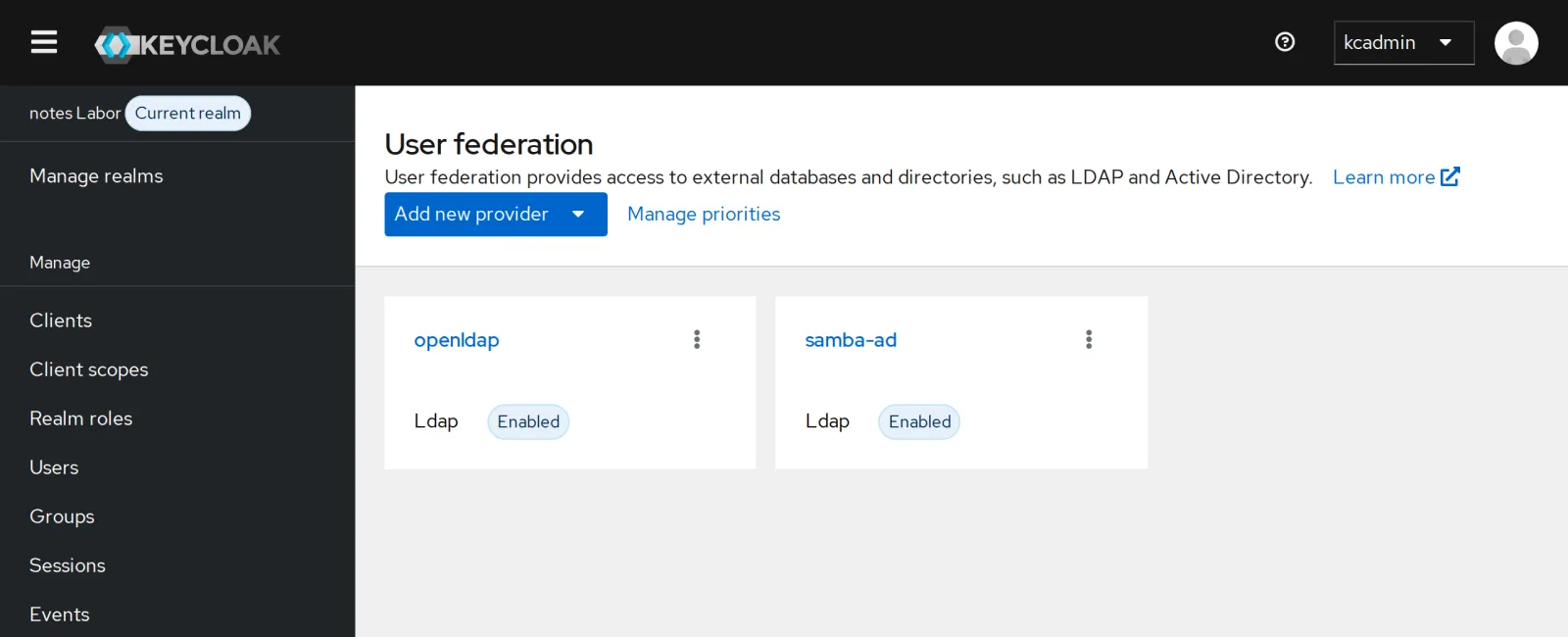
With vendor=ad, Keycloak creates different mappers than
for OpenLDAP: “full name” for cn and “MSAD account
controls” for disabled and expired accounts. The filter
(mail=*) keeps the built-in accounts out; only gustav and
hanna are imported. Both providers now sit side by side:
Save your progress? Sign up for free
Drill 6: Groups from AD
An AD has dozens of built-in groups. A filter fetches only the ones for notes:
kcadm create components -r lab -s name=ad-gruppen -s providerId=group-ldap-mapper \
  -s providerType=org.keycloak.storage.ldap.mappers.LDAPStorageMapper -s parentId=$AID \
  -s 'config."groups.dn"=["CN=Users,DC=ad,DC=notes,DC=lab"]' \
  -s 'config."groups.ldap.filter"=["(cn=notes-ad-*)"]' \
  -s 'config."group.name.ldap.attribute"=["cn"]' \
  -s 'config."group.object.classes"=["group"]' \
  -s 'config."membership.ldap.attribute"=["member"]' \
  -s 'config."membership.attribute.type"=["DN"]' -s 'config.mode=["READ_ONLY"]' \
  -s 'config."user.roles.retrieve.strategy"=["GET_GROUPS_FROM_USER_MEMBEROF_ATTRIBUTE"]' \
  -s 'config."memberof.ldap.attribute"=["memberOf"]' \
  -s 'config."preserve.group.inheritance"=["false"]' -s 'config."groups.path"=["/"]'
GM=$(kcadm get components -r lab -q name=ad-gruppen --fields id --format csv --noquotes)
kcadm create user-storage/$AID/mappers/$GM/sync -r lab -q direction=fedToKeycloak -o \
  | jq -c '{added, status}'
kcadm add-roles -r lab --gname notes-ad-schreiber --rolename notes-schreiben \
  --rolename notes-lesen
G() {
  curl -s -d grant_type=password -d client_id=notes-cli \
    -d client_secret=lab-client-secret-123 -d username=$1 -d password=$2 \
    -d 'scope=openid groups' $KC_URL/realms/lab/protocol/openid-connect/token \
    | jq -r .access_token
}
jwt "$(G gustav Lab-Ad-User-123)" | jq -c '{groups, notes: (.realm_access.roles
  | map(select(startswith("notes"))) | sort)}'
Expected (abridged):
Created new component with id '82b362b9-…'
{"added":1,"status":"1 imported groups, 0 updated groups, 0 removed groups"}
{"groups":["notes-ad-schreiber"],"notes":["notes-lesen","notes-schreiben"]}
This time Keycloak reads the groups from memberOf on the
user. An AD always maintains that, and with large groups it is faster
than searching every group for member.
Save your progress? Sign up for free
Drill 7: A Disabled Account
st user disable hanna
st user show hanna --attributes=userAccountControl | grep userAccountControl
kcadm create clear-user-cache -r lab
curl -s -d grant_type=password -d client_id=notes-cli \
  -d client_secret=lab-client-secret-123 -d username=hanna -d password=Lab-Ad-User-123 \
  $KC_URL/realms/lab/protocol/openid-connect/token | jq -c .
kcadm get users -r lab -q username=hanna -q exact=true --fields username,enabled
Expected:
userAccountControl: 514
{"error":"invalid_grant","error_description":"Invalid user credentials"}
[ {
  "username" : "hanna",
  "enabled" : false
} ]
514 is 512 (normal account) plus
2 (disabled). Keycloak reads that through the “MSAD account
controls” mapper and disables the account on its side as well. The
client only learns “Invalid user credentials”, not why; an attacker
should not learn which accounts exist.
Save your progress? Sign up for free
Checkpoint
kcadm get users -r lab --fields username,federationLink --format csv --noquotes \
  | grep -c ",$AID"
Expected: two users from AD.
2ad -H ldaps://dc1.ad.notes.lab '(sAMAccountName=gustav)' userPrincipalName \
| grep userPrincipalNameExpected: LDAPS with a verified certificate works.
userPrincipalName: [email protected]jwt "$(G gustav Lab-Ad-User-123)" | jq -c .groupsExpected: gustav’s group from AD.
["notes-ad-schreiber"]Challenge
hanna is back from vacation. Enable her in AD and make sure she can log in immediately.
Hint: samba-tool user enable; Keycloak
has hanna in its cache as disabled.
Solution
st user enable hanna
kcadm create clear-user-cache -r lab
curl -s -d grant_type=password -d client_id=notes-cli \
  -d client_secret=lab-client-secret-123 -d username=hanna -d password=Lab-Ad-User-123 \
  $KC_URL/realms/lab/protocol/openid-connect/token \
  | jq -c '{ok: (.access_token != null)}'
Expected:
Enabled user 'hanna'
{"ok":true}
As on Day 8: Keycloak sees changes in the directory as soon as the user is no longer in the cache.
Save your progress? Sign up for free
Enterprise Note
- A real AD: Instead of
Administrator, a dedicated service account with read rights, LDAPS with the certificate of the company CA in the truststore, several DCs as URLs. - Kerberos/SPNEGO: Machines in the domain log in without a password. Keycloak can do that with a keytab for a service principal.
- Nested groups are common in AD;
LDAP_MATCHING_RULE_IN_CHAINfetches them recursively (strategyLOAD_GROUPS_BY_MEMBER_ATTRIBUTE_RECURSIVELY). - Several directories: As here, with OpenLDAP and AD side by side, ordered for the search with Manage priorities. Usernames must be unique across all providers.