Day 12: Proxy, TLS, Two Instances, Export, Upgrade
Goal: Put Keycloak behind a TLS proxy, run it as a cluster of two instances, move all addresses, query health and metrics, export a realm, test an upgrade on a trial instance and turn on passkeys. · Duration: approx. 150 min · Prerequisite: Day 11
Briefing
- In production, TLS usually terminates at a reverse
proxy. Behind it, Keycloak speaks HTTP and learns from the
X-Forwarded-*headers how the browser reached it (KC_PROXY_HEADERS=xforwarded). - Several instances with the same database form a cluster. They find each other through the database (JDBC_PING) and share caches via Infinispan. Sessions are also stored in the database – the failure of one instance logs no one out.
- The hostname is part of every token
(
iss). If it changes, everything has to follow: applications, brokers, SAML partners. - Keycloak serves health and metrics on the management port 9000.
- Export writes a realm including users as JSON. You test upgrades on a copy before rolling them out to production.
- Passkeys (WebAuthn) require a secure context: HTTPS with a certificate the browser trusts.
 Browser/notes ─https─► Caddy :443 (lab CA certificate)
                          ├─► keycloak   :8080 ─┐
                          └─► keycloak-2 :8080 ─┴─► kc-db (Postgres, JDBC_PING)
Drill 1: A CA of Your Own
No public CA issues a certificate for sslip.io names in your own
network. We build a lab CA and use it to sign the certificate for
kc.<IP>.sslip.io:
source ~/kc-lab/setup/env.sh
mkdir -p ~/kc-lab/tag12 ~/kc-lab/tls && cd ~/kc-lab/tls
openssl req -x509 -newkey rsa:3072 -nodes -days 3650 -subj "/CN=notes Lab CA" \
  -keyout ca.key -out ca.pem 2>/dev/null
openssl req -newkey rsa:2048 -nodes -subj "/CN=kc.$VM_IP.sslip.io" \
  -keyout kc.key -out kc.csr 2>/dev/null
printf 'subjectAltName=DNS:kc.%s.sslip.io\nextendedKeyUsage=serverAuth\n' "$VM_IP" \
  > kc.ext
openssl x509 -req -in kc.csr -CA ca.pem -CAkey ca.key -CAcreateserial -days 397 \
  -extfile kc.ext -out kc.pem
chmod 644 kc.key
openssl x509 -in kc.pem -noout -issuer -ext subjectAltName
Expected:
Certificate request self-signature ok
subject=CN = kc.192.168.64.5.sslip.io
issuer=CN = notes Lab CA
X509v3 Subject Alternative Name:
    DNS:kc.192.168.64.5.sslip.io
Browsers only check the subject alternative name
now, not the CN. So that curl, Terraform (Day 13) and all
other tools on the VM trust the lab CA, it goes into the system’s
certificate store:
sudo cp ~/kc-lab/tls/ca.pem /usr/local/share/ca-certificates/notes-lab-ca.crt
sudo update-ca-certificates 2>&1 | tail -1
Expected:
done.Save your progress? Sign up for free
Drill 2: Two Instances Behind Caddy
The companion code has a new Compose file for the project
keycloak: the same database, two Keycloak instances and
Caddy as the proxy.
cd ~/kc-lab/keycloak
grep -E 'KC_PROXY|keycloak-2:|image: caddy|443' ~/kc-lab/code/keycloak-ha/compose.yaml
cat ~/kc-lab/code/keycloak-ha/Caddyfile
Expected:
    KC_PROXY_HEADERS: xforwarded        # Proxy setzt X-Forwarded-*
  keycloak-2:
    image: caddy:2.11.7-alpine
      - "443:443"
# Caddyfile – TLS mit dem Zertifikat der Lab-CA, Lastverteilung auf zwei Instanzen
kc.{$VM_IP}.sslip.io {
    tls /certs/kc.pem /certs/kc.key
    reverse_proxy keycloak:8080 keycloak-2:8080 {
        lb_policy round_robin
        health_uri /health/ready
        health_port 9000
        health_interval 5s
    }
}
Caddy asks every instance for /health/ready every five
seconds and sends requests only to healthy ones. Port 8080 is no longer
open to the outside – everything goes through 443. From now on, Keycloak
is called https://kc.<IP>.sslip.io. We record that in
vms.env, which env.sh reads at the end:
echo 'export KC_URL="https://kc.$VM_IP.sslip.io"' >> ~/kc-lab/setup/vms.env
source ~/kc-lab/setup/env.sh && echo "$KC_URL"
cp ~/kc-lab/tls/ca.pem ~/kc-lab/keycloak/truststores/lab-ca.pem
cp compose.yaml compose.tag01.yaml
cp ~/kc-lab/code/keycloak-ha/compose.yaml ~/kc-lab/code/keycloak-ha/Caddyfile .
docker compose up -d --wait 2>&1 | grep -E 'Healthy|Started'
docker compose ps --format '{{.Service}}\t{{.Status}}'
kclogin
curl -s $KC_URL/realms/lab/.well-known/openid-configuration | jq -r .issuer
Expected (abridged, after one to two minutes):
https://kc.192.168.64.5.sslip.io
 Container keycloak-keycloak-1 Started
 Container keycloak-keycloak-2-1 Started
 Container keycloak-proxy-1 Started
…
 Container keycloak-keycloak-2-1 Healthy
 Container keycloak-keycloak-1 Healthy
kc-db   Up 3 hours (healthy)
keycloak    Up 1 minute (healthy)
keycloak-2  Up 1 minute (healthy)
proxy   Up 1 minute
Logging into http://localhost:8080 as user kcadmin of realm master
https://kc.192.168.64.5.sslip.io/realms/lab- The lab CA is also in Keycloak’s truststore. As a broker, Keycloak
calls itself via
$KC_URL(Drill 4) and must then trust the certificate. kcloginis necessary because the new containers do not know the oldkcadmlogin.kcadmkeeps talking internally tohttp://localhost:8080.- The
issueris now the https address – without a port.
Have the two instances found each other?
docker compose logs keycloak-2 | grep -o 'ISPN000094: Received new cluster view.*' \
  | tail -1 | cut -c1-60
curl -s 127.0.0.1:9000/metrics | grep '^vendor_cluster_size'
Expected:
ISPN000094: Received new cluster view for channel ISPN: [
vendor_cluster_size{cache_manager="keycloak",node="…"} 2.0
Save your progress? Sign up for free
Drill 3: notes Moves Along
oauth2-proxy and notes-api now fetch discovery and JWKS via https.
Both are written in Go and read trusted CAs from the file in
SSL_CERT_FILE. Docker Compose automatically reads a
compose.override.yaml in the project folder as well:
cd ~/kc-lab/notes
cat ~/kc-lab/code/notes-stack/compose.tls.yaml | grep -v '^#' | head -6
cp ~/kc-lab/code/notes-stack/compose.tls.yaml compose.override.yaml
docker compose up -d --wait 2>&1 | grep -c Healthy
jwt "$(token)" | jq -r .iss
Expected:
services:
  migrate:
    environment:
      SSL_CERT_FILE: /etc/lab-ca.pem
    volumes:
      - ../tls/ca.pem:/etc/lab-ca.pem:ro
5
https://kc.192.168.64.5.sslip.io/realms/lab
docker compose up recreates all containers whose
configuration has changed – here because of the new KC_URL
and the override file. Open notes in the browser and log in as anna. The
browser warns about Keycloak’s certificate because it doesn’t know the
lab CA; for now you can click the warning away (Drill 8 does it
properly). notes itself keeps running over HTTP on port 4180.
Save your progress? Sign up for free
Drill 4: Moving All Addresses
The brokers and SAML from Day 11 still know the old address. Where exactly? A partial export returns a realm’s configuration without users:
OLD="http://kc.$VM_IP.sslip.io:8080"
alt() { kcadm create "realms/$1/partial-export?exportClients=true" -o 2>/dev/null \
  | jq -r --arg o "$OLD" '(.clients[]? | select(tostring | contains($o))
      | "client \(.id) \(.clientId)"), (.identityProviders[]?
      | select(tostring | contains($o)) | "idp \(.alias)")'; }
alt lab; alt partner
Expected:
client … http://kc.192.168.64.5.sslip.io:8080/realms/partner
idp partner
client … lab-broker
idp notes-lab
Four objects. We fetch each one, replace the address and write it back:
umziehen() { kcadm get "$2" -r "$1" | sed "s#$OLD#$KC_URL#g" \
  | kcadm update "$2" -r "$1" -f - && echo "$1 $2 umgezogen"; }
SID=$(kcadm get clients -r lab -q clientId=$OLD/realms/partner | jq -r '.[0].id')
LB=$(kcadm get clients -r partner -q clientId=lab-broker | jq -r '.[0].id')
umziehen lab clients/$SID
umziehen partner clients/$LB
umziehen partner identity-provider/instances/notes-lab
umziehen lab identity-provider/instances/partner
Expected:
lab clients/… umgezogen
partner clients/… umgezogen
partner identity-provider/instances/notes-lab umgezogen
Client secret must be re-entered when the token URL, client ID, authentication method, …
Keycloak never hands out secrets – kcadm get returns
**********. If the token URL changes, Keycloak requires the
secret again so that it doesn’t go to a foreign address. So we set it
when writing back:
kcadm get identity-provider/instances/partner -r lab | sed "s#$OLD#$KC_URL#g" \
  | jq '.config.clientSecret = "lab-client-secret-123"' \
  | kcadm update identity-provider/instances/partner -r lab -f - && echo umgezogen
alt lab; alt partner; echo "Rest: keiner"
Expected:
umgezogen
Rest: keiner
In a private window, log in to notes via Sign in with Partner GmbH as pia, and via partner’s account console with SAML as anna – both work again.
Save your progress? Sign up for free
Drill 5: One Instance Fails
cd ~/kc-lab/keycloak
OIDC=$KC_URL/realms/lab/protocol/openid-connect
R=$(curl -s -d grant_type=password -d client_id=notes-cli \
  -d client_secret=lab-client-secret-123 -d username=anna -d password=lab-user-pw-123 \
  -d scope=openid $OIDC/token | jq -r .refresh_token)
docker compose stop keycloak 2>&1 | tail -1
for i in 1 2 3 4; do
  curl -s -o /dev/null -w '%{http_code} ' $KC_URL/realms/lab
done; echo
curl -s -d grant_type=refresh_token -d client_id=notes-cli \
  -d client_secret=lab-client-secret-123 -d refresh_token=$R $OIDC/token \
  | jq -c '{ok: (.access_token != null)}'
docker compose start keycloak 2>&1 | tail -1
until docker compose ps keycloak | grep -q healthy; do sleep 5; done; echo wieder da
kclogin
Expected:
 Container keycloak-keycloak-1 Stopped
200 200 200 200
{"ok":true}
 Container keycloak-keycloak-1 Started
wieder da
Logging into http://localhost:8080 as user kcadmin of realm master
Caddy notices the failure through the health check and sends everything to keycloak-2. Anna’s session lives on: The refresh token works even though the instance where she logged in is gone.
Save your progress? Sign up for free
Drill 6: Health and Metrics
curl -s 127.0.0.1:9000/health/ready | jq -c '{status, checks: (.checks | length)}'
curl -s 127.0.0.1:9000/health/ready | jq -r '.checks[].name' | sort
curl -s 127.0.0.1:9000/metrics | grep -E '^vendor_cluster_size|^agroal_active_count'
Expected:
{"status":"UP","checks":4}
Graceful Shutdown
Keycloak Initialized
Keycloak cluster health check
Keycloak database connections async health check
vendor_cluster_size{cache_manager="keycloak",node="…"} 2.0
agroal_active_count{datasource="default"} 0.0/health/readychecks database and cluster – that is the right question for a load balancer./health/liveonly says whether the process is alive./metricsreturns the Prometheus format:agroal_*is the connection pool to the database,vendor_*are cache and cluster,http_server_*the requests.- Port 9000 is deliberately reachable only locally. It is not available through the proxy.
Save your progress? Sign up for free
Drill 7: Export and Upgrade Trial
An export runs as a separate Keycloak process against the same database:
mkdir -p ~/kc-lab/tag12/export && cd ~/kc-lab/keycloak
docker compose run --rm --no-deps -v ~/kc-lab/tag12/export:/export keycloak \
  export --dir /export --realm lab --users realm_file 2>&1 | grep -o 'KC-SERVICES0035.*'
jq -c '{realm, users: (.users | length), clients: (.clients | length),
  idps: (.identityProviders | length)}' ~/kc-lab/tag12/export/lab-realm.json
Expected:
KC-SERVICES0035: Export finished successfully
{"realm":"lab","users":11,"clients":10,"idps":1}
The file contains everything: roles, flows, clients with secrets, users with password hashes. Treat it like a database backup. We use it to test an upgrade: A trial instance with its own database starts with Keycloak 26.8.0 and imports the realm.
cp -R ~/kc-lab/code/kc-probe ~/kc-lab/kc-probe && cd ~/kc-lab/kc-probe
mkdir -p import && cp ~/kc-lab/tag12/export/lab-realm.json import/
grep -E 'image: quay|command' compose.yaml
docker compose up -d --wait 2>&1 | tail -1
docker compose logs probe | grep -o -E "Realm 'lab' imported|Keycloak 26[.0-9]* on JVM"
Expected:
    image: quay.io/keycloak/keycloak:${KC_VERSION:-26.8.0}
    command: ["start-dev", "--import-realm"]
 Container kc-probe-probe-1 Healthy
Realm 'lab' imported
Keycloak 26.8.0 on JVM
Since Keycloak 26, update-compatibility tells you
whether an upgrade can go rolling – instance by
instance without downtime – or whether all instances have to restart at
the same time. The old version writes its metadata, the new one checks
it:
docker compose exec -T probe /opt/keycloak/bin/kc.sh update-compatibility metadata \
  --file=/tmp/meta.json >/dev/null
docker compose cp probe:/tmp/meta.json ./meta-26.8.0.json 2>/dev/null
KC_VERSION=26.8.1 docker compose run --rm --no-deps \
  -v ./meta-26.8.0.json:/tmp/m.json:ro probe update-compatibility check \
  --file=/tmp/m.json 2>&1 | grep -E '^\['
KC_VERSION=26.8.1 docker compose up -d --wait 2>&1 | tail -1
docker compose logs probe --since 3m | grep -o -E "Keycloak 26[.0-9]* on JVM"
curl -s localhost:8081/realms/lab | jq -r .realm
Expected:
[cacheEmbedded] Provider is compatible.
[cacheRemote] Provider is compatible.
[database] Provider is compatible.
[feature-compatibility] Provider is compatible.
[jgroupsMtls] Provider is compatible.
[keycloak] Provider is compatible.
[OK] Rolling Update is available.
 Container kc-probe-probe-1 Healthy
Keycloak 26.8.1 on JVM
lab
The trial instance runs 26.8.1 on the 26.8.0 database – the upgrade is tested. In production, you now swap the image of one instance after the other.
Save your progress? Sign up for free
Drill 8: Passkeys
Now the browser enables WebAuthn – if it trusts the certificate. Copy the lab CA to your computer and trust it there. On the Mac (not on the VM):
multipass transfer kc:kc-lab/tls/ca.pem ./notes-lab-ca.pem
sudo security add-trusted-cert -d -r trustRoot \
  -k /Library/Keychains/System.keychain notes-lab-ca.pem
On Windows, you import the file with a double-click into Trusted Root Certification Authorities; on Linux, as in Drill 1. Firefox has its own store (Settings → Certificates → Import). Then restart the browser. Now turn on passkeys and ask anna to register:
kcadm update realms/lab -s webAuthnPolicyPasswordlessPasskeysEnabled=true
AID=$(kcadm get users -r lab -q username=anna -q exact=true | jq -r '.[0].id')
kcadm update users/$AID -r lab -s 'requiredActions=["webauthn-register-passwordless"]'
echo "$KC_URL/realms/lab/account"
Expected:
https://kc.192.168.64.5.sslip.io/realms/lab/accountLog in there as anna with her password. Keycloak requires the registration of a passkey:
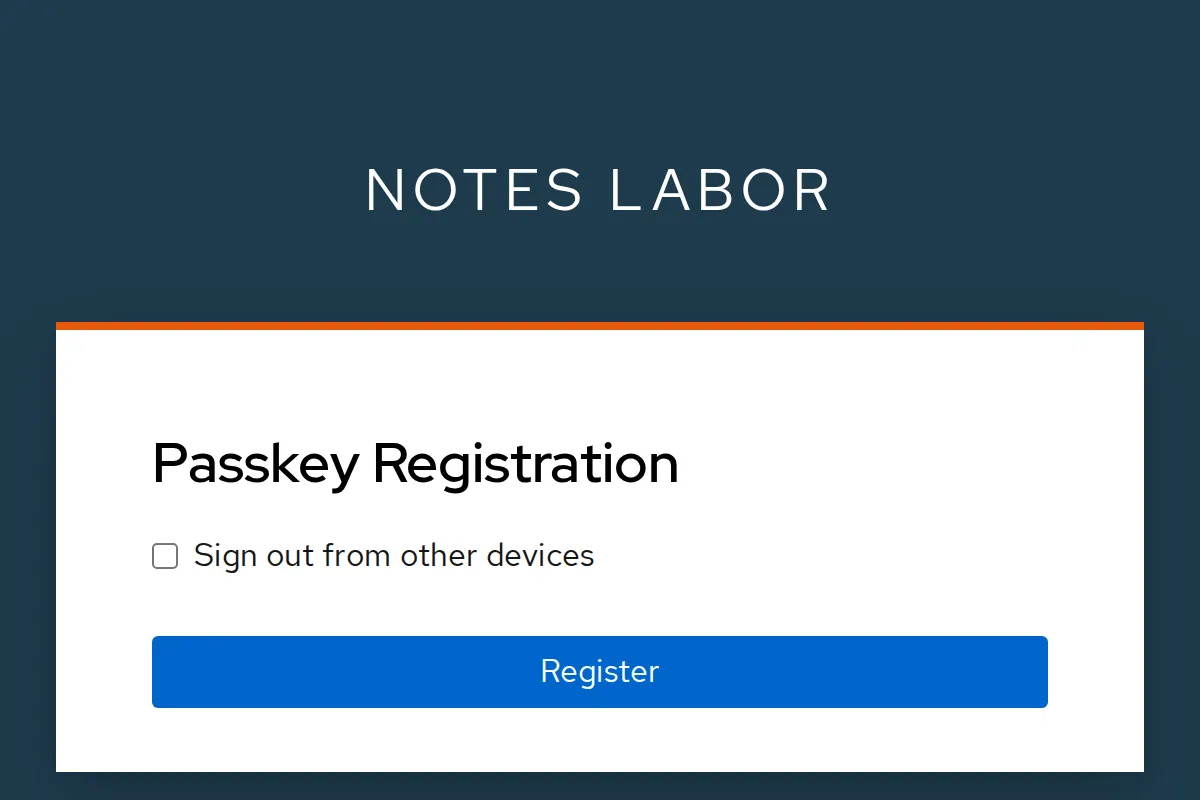
Click Register, confirm with fingerprint, PIN or
phone and enter laptop as the name. Then:
kcadm get users/$AID/credentials -r lab \
  | jq -r '.[] | [.type, .userLabel // "-"] | @tsv'
Expected:
password    -
webauthn-passwordless   laptop
Sign out. The login page now offers Sign in with Passkey – one click, without username and password. Browsers with passkey support also suggest it directly in the Username field.
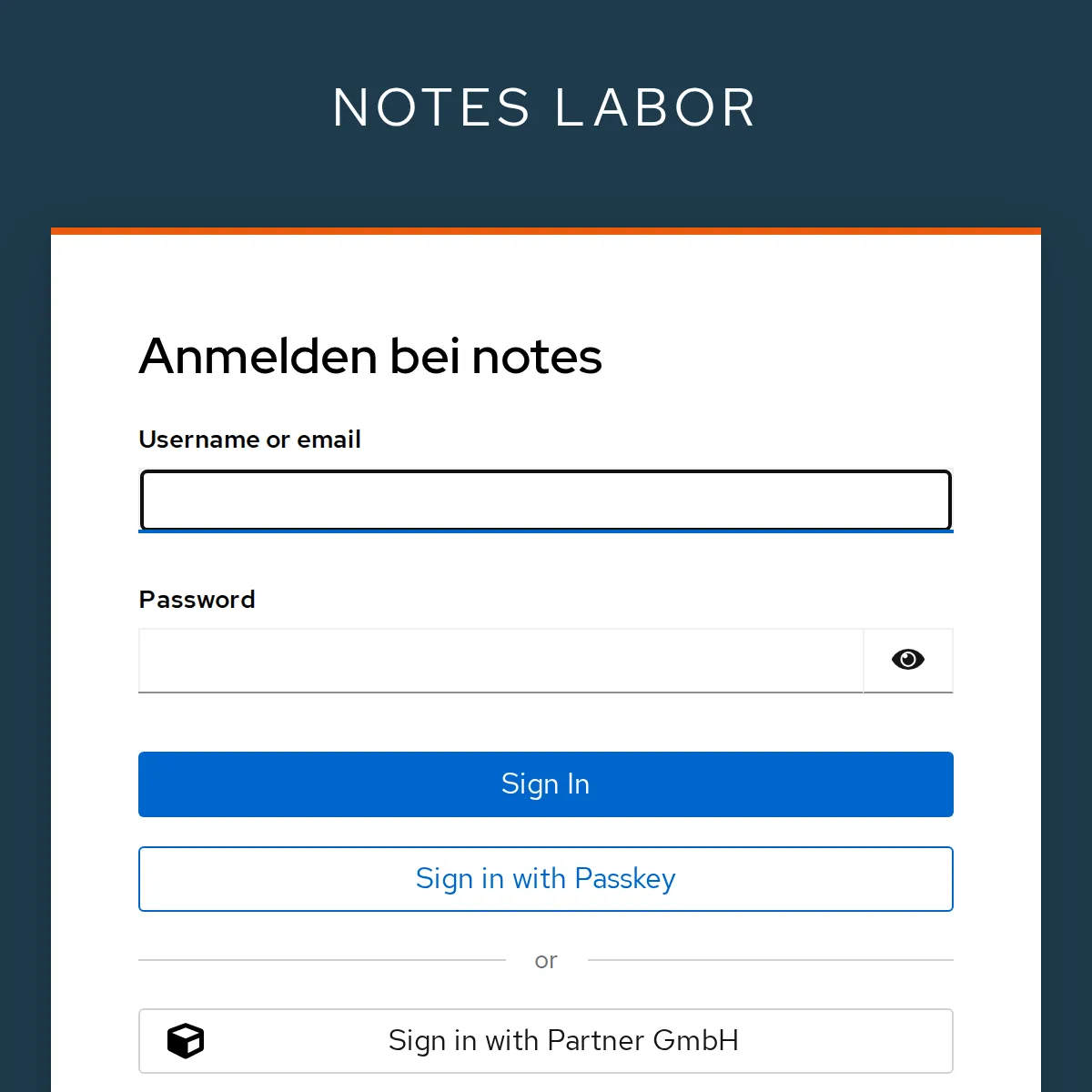
Anna’s password remains valid, so the password grant
(token) works as before.
Save your progress? Sign up for free
Checkpoint
cd ~/kc-lab/keycloak
docker compose ps --format '{{.Service}}' | sort | tr '\n' ' '; echo
Expected: database, two instances, proxy.
kc-db keycloak keycloak-2 proxy curl -s -o /dev/null -w '%{http_code} %{ssl_verify_result}\n' $KC_URL/realms/labExpected: a response over TLS, certificate verified (0 = OK).
200 0jwt "$(token)" | jq -r .issExpected:
https://kc.192.168.64.5.sslip.io/realms/labcurl -s 127.0.0.1:9000/metrics | grep '^vendor_cluster_size' | grep -o '[0-9.]*$'Expected:
2.0Challenge
The trial instance contains a copy of lab. Show that anna can get a token there with her password, and then tear down the trial instance including its database.
Hint: The trial instance listens on
localhost:8081. Export and import carry over client secrets
and password hashes.
Solution
curl -s -d grant_type=password -d client_id=notes-cli \
  -d client_secret=lab-client-secret-123 -d username=anna -d password=lab-user-pw-123 \
  localhost:8081/realms/lab/protocol/openid-connect/token \
  | jq -c '{ok: (.access_token != null)}'
cd ~/kc-lab/kc-probe && docker compose down -v 2>&1 | grep -c Removed
Expected:
{"ok":true}
4
down -v also removes the volume probe-data.
The export under ~/kc-lab/tag12 stays – Day 15 needs
it.
Save your progress? Sign up for free
Enterprise Note
- Real certificates: With a public name via ACME (Let’s Encrypt), in the company from the internal CA. Shorter lifetimes mean: Automate renewal.
- TLS all the way to Keycloak: If you must encrypt
internally too, give Keycloak its own certificate
(
KC_HTTPS_CERTIFICATE_FILE) and have the proxy usereencrypt. - Admin console not public: With
KC_HOSTNAME_ADMIN, the console gets a name of its own that is reachable only internally; the proxy does not forward/adminto the outside. - Cluster in Kubernetes: The operator (Day 14) implements discovery, health checks and rolling updates itself. Several data centers need an external Infinispan.
- Backups: The export is no substitute for database
backups (
pg_dump, PITR). It is suited to copying realms between environments.