Day 5: Consumers and Keys
Goal: Create consumers with API keys and passwords, bind writing to a key and group, hide the backend key behind Kong and protect the Admin API through Kong. · Duration: approx. 75 min · Prerequisite: Day 4
Briefing
- A consumer is someone who uses the API: a person, an application, a team. It has credentials (key, password) and ACL groups.
- Authentication (
key-auth,basic-auth) establishes who is asking: otherwise 401. Authorization (acl) establishes whether they are allowed: otherwise 403. - After a successful login, Kong sends
X-Consumer-UsernameandX-Consumer-Idto the backend. hide_credentials: trueremoves the key before the request reaches the backend.
 POST /api/v1/notes  apikey: lab-key-anna-123
   key-auth (1250) ─► anna? yes       else 401
   acl (950)       ─► schreiber? yes  else 403
   request-transformer ─► X-API-Key: lab-api-key-123 (only Kong knows it)
   ─► notes-api
Drill 1: Two Consumers
source ~/kong-lab/setup/env.sh
mkdir -p ~/kong-lab/tag05 && cd ~/kong-lab/tag05
cp ~/kong-lab/code/tag05/{consumers,dienste,auth}.yaml .
grep -v '^#' consumers.yaml
Expected:
consumers:
  - username: anna
    keyauth_credentials:
      - key: lab-key-anna-123
    basicauth_credentials:
      - username: anna
        password: lab-user-pw-123
    acls:
      - group: schreiber
      - group: admins
  - username: ben
    keyauth_credentials:
      - key: lab-key-ben-123
    acls:
      - group: leser
anna may write and administer, ben may only read.
dienste.yaml brings two new services: whoami
(echo with key-auth) and admin-api (the Admin
API, protected with basic-auth and acl). Merge
everything:
deck file merge ~/kong-lab/kong/kong.yaml consumers.yaml dienste.yaml -o m1.yaml
deck gateway validate m1.yaml && deck gateway diff m1.yaml | tail -4
cp m1.yaml ~/kong-lab/kong/kong.yaml && kreload
Expected (shortened):
Warning: import/export of basic-authcredentials using decK doesn't work due to hashing
of passwords in Kong.
Summary:
  Created: 15
  Updated: 0
  Deleted: 0
Kong reloaded
The warning comes up in Drill 6.
Save your progress? Sign up for free
Drill 2: Who Are You?
curl -si $PROXY/whoami | sed -n '1p;$p'; echo
curl -s -o /dev/null -w '%{http_code}\n' -H 'apikey: falsch' $PROXY/whoami
curl -s -H 'apikey: lab-key-anna-123' $PROXY/whoami \
  | jq -c '.headers | with_entries(select(.key | test("Consumer|Credential|Apikey")))'
Expected (shortened, your IDs will differ):
HTTP/1.1 401 Unauthorized
}
401
{"Apikey":["lab-key-anna-123"],"X-Consumer-Id":["453bf3ae-…"],
"X-Consumer-Username":["anna"],"X-Credential-Identifier":["fce61e6b-…"]}
Without a key and with a wrong key: 401. With a key, the backend
learns who is asking: X-Consumer-Username: anna. But it
also sees the key itself (Apikey), because
whoami does not set hide_credentials.
By default, key-auth looks for the key in the
apikey header and in the query parameter
of the same name:
curl -s "$PROXY/whoami?apikey=lab-key-ben-123" \
  | jq -c '{url, wer: .headers."X-Consumer-Username"}'
Expected:
{"url":"http://echo:8080/anything?apikey=lab-key-ben-123","wer":["ben"]}Keys in URLs end up in logs, browser histories and proxies.
key_in_query: false turns that off.
Save your progress? Sign up for free
Drill 3: Writing Only with Key and Group
auth.yaml puts three plugins on the
notes-schreiben route:
grep -v '^#' auth.yamlExpected:
_format_version: "1.0"
add-plugins:
  - selectors:
      - $..routes[?(@.name=="notes-schreiben")]
    plugins:
      - name: key-auth
        config:
          hide_credentials: true
      - name: acl
        config:
          allow: [schreiber]
      - name: request-transformer
        config:
          remove:
            headers: ["X-API-Key"]
          add:
            headers: ["X-API-Key:lab-api-key-123"]
request-transformer runs after the two checks (priority
801). It removes any X-API-Key the client sent and sets the
real notes-api key. From then on, only Kong knows it.
deck file add-plugins -s ~/kong-lab/kong/kong.yaml auth.yaml -o neu.yaml
cp neu.yaml ~/kong-lab/kong/kong.yaml && kreload
schreib() {
  curl -s -w ' %{http_code}\n' -X POST -H 'Content-Type: application/json' "$@" \
    -d '{"text":"mit Schlüssel"}' $PROXY/api/v1/notes | tr -d '\n'; echo
}
schreib
schreib -H 'X-API-Key: lab-api-key-123'
schreib -H 'apikey: lab-key-ben-123'
schreib -H 'apikey: lab-key-anna-123'
Expected:
Kong reloaded
{  "message":"No API key found in request",  "request_id":"d519fc6d…"} 401
{  "message":"No API key found in request",  "request_id":"ccb75343…"} 401
{  "message":"You cannot consume this service",  "request_id":"9d141228…"} 403
{"id":"612af107-…","text":"mit Schlüssel"} 201
The old backend key is now useless to clients. ben is logged in, but
not in the schreiber group: 403. Only anna writes.
Save your progress? Sign up for free
Drill 4: The Admin API Behind Kong
The admin-api service points to
http://127.0.0.1:8001, that is, to the Admin API in the
same container. In front of it are basic-auth and
acl with the group admins:
curl -s -o /dev/null -w '%{http_code}\n' $PROXY/admin-api/status
curl -s -u anna:falsch -o /dev/null -w '%{http_code}\n' $PROXY/admin-api/status
curl -s -u anna:lab-user-pw-123 $PROXY/admin-api/status | jq .server.total_requests
curl -s -H 'apikey: lab-key-ben-123' -o /dev/null -w '%{http_code}\n' \
  $PROXY/admin-api/status
Expected (shortened):
401
401
1107
401
Only anna with her password gets through. ben’s key is useless here:
the route requires basic-auth, not key-auth.
This way the Admin API is reachable through the proxy port without being
open; port 8001 stays on 127.0.0.1.
Security: Over HTTP, username and password travel through the network in readable form. From Day 10 on, this runs over HTTPS.
Save your progress? Sign up for free
Drill 5: Consumers in Kong Manager
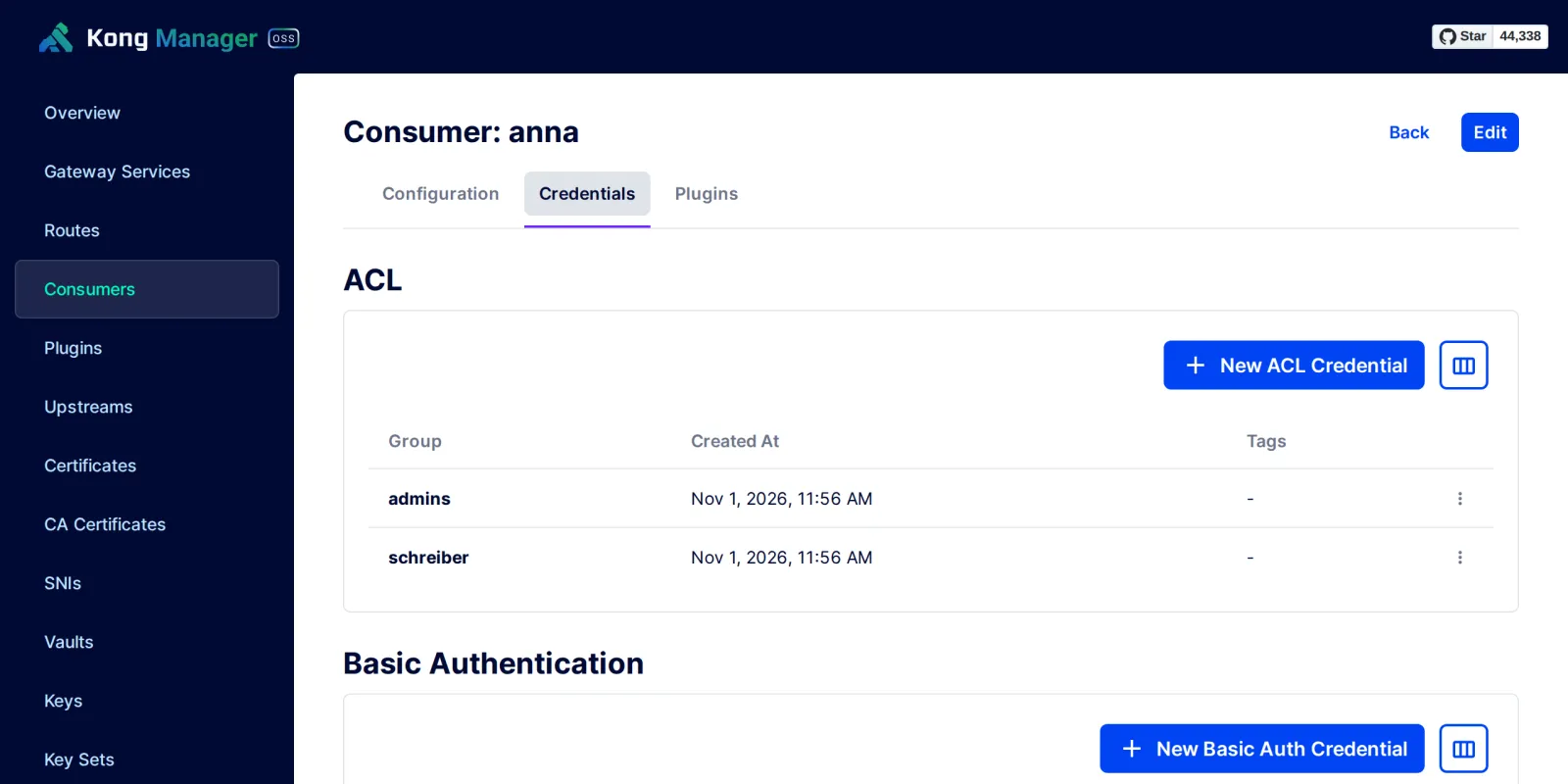
Open the tunnel from your laptop as on Day 1, then Consumers and anna. Under Credentials you see her groups and credentials.
Save your progress? Sign up for free
Drill 6: What Kong Stores
curl -s $ADMIN/key-auths | jq -r '.data[] | [.consumer.id[0:8], .key] | @tsv'
curl -s $ADMIN/basic-auths | jq -r '.data[] | [.username, .password[0:12]] | @tsv'
Expected (shortened):
794db315    lab-key-ben-123
453bf3ae    lab-key-anna-123
anna    d4cf5515a47b
Kong stores API keys in plain text, passwords only as a hash. That is
why decK warns: an export (deck gateway dump) with
passwords cannot be imported back, it contains only hashes. The source
for passwords is your file, not the running Kong.
Save the state:
cp ~/kong-lab/code/tag05/kong.yaml ~/kong-lab/kong/kong.yaml
cd ~/kong-lab/kong && kreload
git add kong.yaml && git commit -qm "Tag 5: Consumers, key-auth, acl, Admin API"
Expected:
Kong reloadedSave your progress? Sign up for free
Checkpoint
curl -s $ADMIN/consumers | jq -r '.data[].username' | sortExpected: two consumers.
anna
ben
curl -s -o /dev/null -w '%{http_code}\n' -X POST -H 'apikey: lab-key-ben-123' \
-H 'Content-Type: application/json' -d '{"text":"ben"}' $PROXY/api/v1/notesExpected: ben is known, but may not write.
403curl -s -o /dev/null -w '%{http_code}\n' $PROXY/api/v1/notesExpected: reading stays open.
200Challenge
anna’s key ended up in a chat. Give her a new one
(lab-key-anna-456) without her application losing even a
single request, and then block the old one.
Note: A consumer may have several keys.
Solution
Step 1: add a second key; both are valid.
cd ~/kong-lab/kong
sed -i 's/^  - key: lab-key-anna-123$/&\n  - key: lab-key-anna-456/' kong.yaml
kreload
for k in 123 456; do
  curl -s -o /dev/null -w "$k %{http_code}\n" -H "apikey: lab-key-anna-$k" $PROXY/whoami
done
Expected:
Kong reloaded
123 200
456 200
Step 2: Once the application has switched over, delete the old one.
sed -i '/^  - key: lab-key-anna-123$/d' kong.yaml
kreload
for k in 123 456; do
  curl -s -o /dev/null -w "$k %{http_code}\n" -H "apikey: lab-key-anna-$k" $PROXY/whoami
done
git commit -qam "anna: Schlüssel rotiert"
Expected:
Kong reloaded
123 401
456 200
Save your progress? Sign up for free
Enterprise Note
- Keep keys out of Git: Real credentials do not
belong in
kong.yaml. Kong can read values from environment variables ({vault://env/…}); Enterprise connects HashiCorp Vault, OpenBao, AWS and others. - People belong with an identity provider: For
people, API keys and Basic Auth are second choice. Day 6 shows JWT with
Keycloak; Enterprise offers
openid-connect. - Several methods on one route (key
or password) work with an anonymous consumer
(
config.anonymous) and a final check. - Admin API: Enterprise has RBAC with its own admin tokens. In the free edition, only protection at the network level or through Kong itself, as in Drill 4, remains.