Day 6: JWT with Keycloak
Goal: Start Keycloak as the issuer of tokens, let Kong verify the signature and build a route that accepts a key or a token. · Duration: approx. 75 min · Prerequisite: Day 5
Briefing
- A JWT consists of header, payload and signature. Keycloak signs with its private RSA key (RS256), Kong verifies with the public one.
- The
jwtplugin finds the matching key via theissclaim (issuer). The key belongs to a consumer, herekeycloak. - So the consumer is the issuer, not the person. Kong OSS does not see exactly who is in the token (see Day 11).
- Several auth plugins on one route mean and. For or there is the anonymous consumer.
 notes-cli ──client_secret──► Keycloak :8180 ──► JWT (iss, exp, RS256)
 notes-cli ──Bearer JWT─────► Kong jwt ──iss?──► Consumer keycloak ──verify key
Drill 1: Start Keycloak
source ~/kong-lab/setup/env.sh
mkdir -p ~/kong-lab/tag06 && cd ~/kong-lab/tag06
cp -R ~/kong-lab/code/keycloak ~/kong-lab/keycloak
grep -E 'image|KC_HOSTNAME|8180:' ~/kong-lab/keycloak/compose.yaml
jq '{realm, accessTokenLifespan, clients: [.clients[].clientId],
  users: [.users[].username]}' ~/kong-lab/keycloak/realm-lab.json
cd ~/kong-lab/keycloak && docker compose up -d --wait
docker compose logs keycloak | grep -E "imported|started in" | cut -c1-110
Expected (shortened, one to two minutes the first time):
    image: quay.io/keycloak/keycloak:26.8.1
      KC_HOSTNAME: http://localhost:8180   # fester Aussteller (iss) in jedem Token
      - "127.0.0.1:8180:8080"
{
  "realm": "lab",
  "accessTokenLifespan": 60,
  "clients": [
    "notes-cli"
  ],
  "users": [
    "anna"
  ]
}
 Container keycloak-keycloak-1 Healthy
keycloak-1  | … INFO  [org.keycloak.exportimport.util.ImportUtils] (main) Realm 'lab' i…
keycloak-1  | … INFO  [io.quarkus] (main) Keycloak 26.8.1 on JVM (powered by Quarkus 3.4
Keycloak runs in development mode with the realm lab.
KC_HOSTNAME makes sure that every token carries the same
issuer, no matter which way it was fetched. Tokens are valid for 60
seconds so that you do not have to wait long in Drill 5.
Save your progress? Sign up for free
Drill 2: Fetch and Read a Token
env.sh brings the token function: it logs
in the client notes-cli with its secret (client
credentials) and prints the access token.
cd ~/kong-lab/tag06
curl -s $KC/.well-known/openid-configuration | jq -r '.issuer, .jwks_uri'
TOKEN=$(token)
echo ${#TOKEN}
echo "$TOKEN" | jq -R 'split(".")[0] | @base64d | fromjson'
echo "$TOKEN" | jq -R 'split(".")[1] | gsub("-";"+") | gsub("_";"/") | @base64d
  | fromjson | {iss, azp, preferred_username, exp}'
Expected (shortened, your values will differ):
http://localhost:8180/realms/lab
http://localhost:8180/realms/lab/protocol/openid-connect/certs
1239
{
  "alg": "RS256",
  "typ": "JWT",
  "kid": "mxakh5-l1apcw4monopJzQpw44nxWRSJ5ZoSycxVeyA"
}
{
  "iss": "http://localhost:8180/realms/lab",
  "azp": "notes-cli",
  "preferred_username": "service-account-notes-cli",
  "exp": 1793535699
}
Header and payload are just Base64; anyone can read them. None of it is protected, only tamper-proof: the signature in the third part matches exactly this content and nothing else.
Security: A token is an ID card. Do not print it, do not paste it into tickets, and store it only in variables such as
$TOKEN.
Save your progress? Sign up for free
Drill 3: Keycloak as a Consumer
Kong needs the realm’s public key as PEM. Keycloak delivers it as Base64; four lines turn it into a PEM:
PUB=$(curl -s $KC | jq -r .public_key)
{ echo "-----BEGIN PUBLIC KEY-----"; echo "$PUB" | fold -w 64
  echo "-----END PUBLIC KEY-----"; } > keycloak.pem
openssl pkey -pubin -in keycloak.pem -noout -text | head -1
Expected:
Public-Key: (2048 bit)With it you build two consumers: keycloak with the key
and the group schreiber, and gast for Drill
6.
cat > consumers-jwt.yaml <<EOF
consumers:
  - username: gast
    acls:
      - group: gast
  - username: keycloak
    acls:
      - group: schreiber
    jwt_secrets:
      - key: $KC
        algorithm: RS256
        secret: nur-fuer-hs256
        rsa_public_key: |
$(sed 's/^/          /' keycloak.pem)
EOF
sed -n '1,13p' consumers-jwt.yaml
deck file merge ~/kong-lab/kong/kong.yaml consumers-jwt.yaml -o m1.yaml
deck gateway validate m1.yaml && cp m1.yaml ~/kong-lab/kong/kong.yaml && kreload
Expected (shortened):
consumers:
  - username: gast
    acls:
      - group: gast
  - username: keycloak
    acls:
      - group: schreiber
    jwt_secrets:
      - key: http://localhost:8180/realms/lab
        algorithm: RS256
        secret: nur-fuer-hs256
        rsa_public_key: |
          -----BEGIN PUBLIC KEY-----
Kong reloaded
key must match the iss in the token
exactly. secret is only needed for HS256; decK requires the
field anyway, so it holds a self-explanatory placeholder.
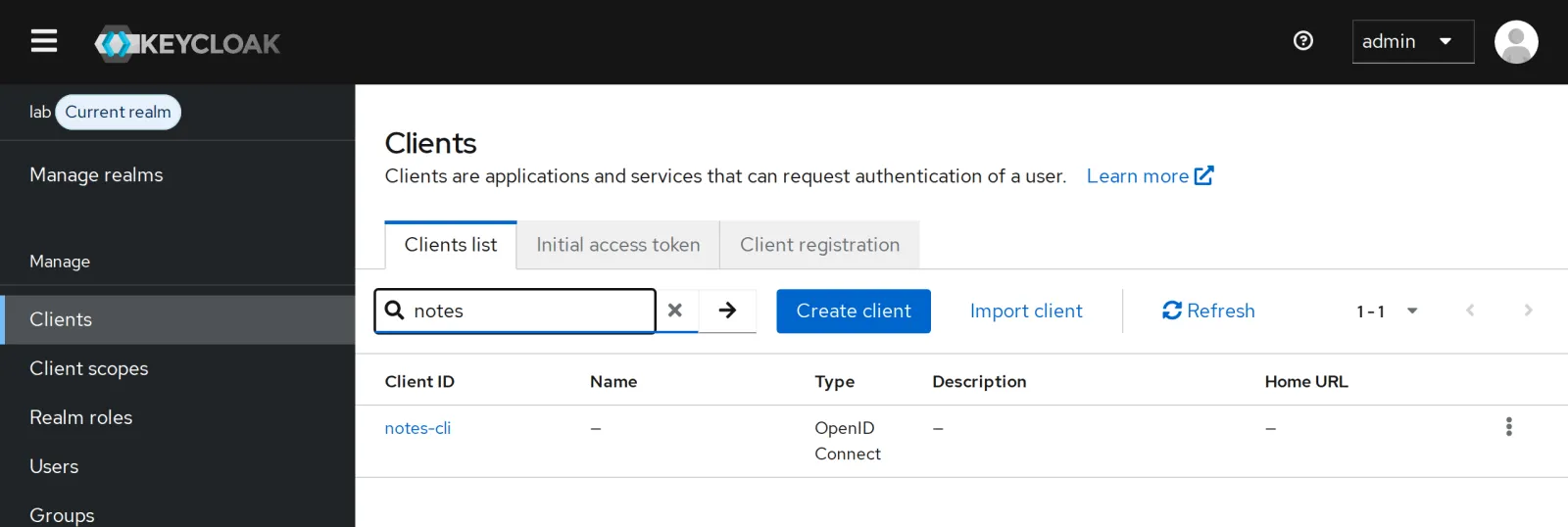
In the Keycloak UI (tunnel with an additional
-L 8180:localhost:8180, then
http://localhost:8180, user admin, password
lab-admin-pw-123) you find the client
notes-cli in the realm lab:
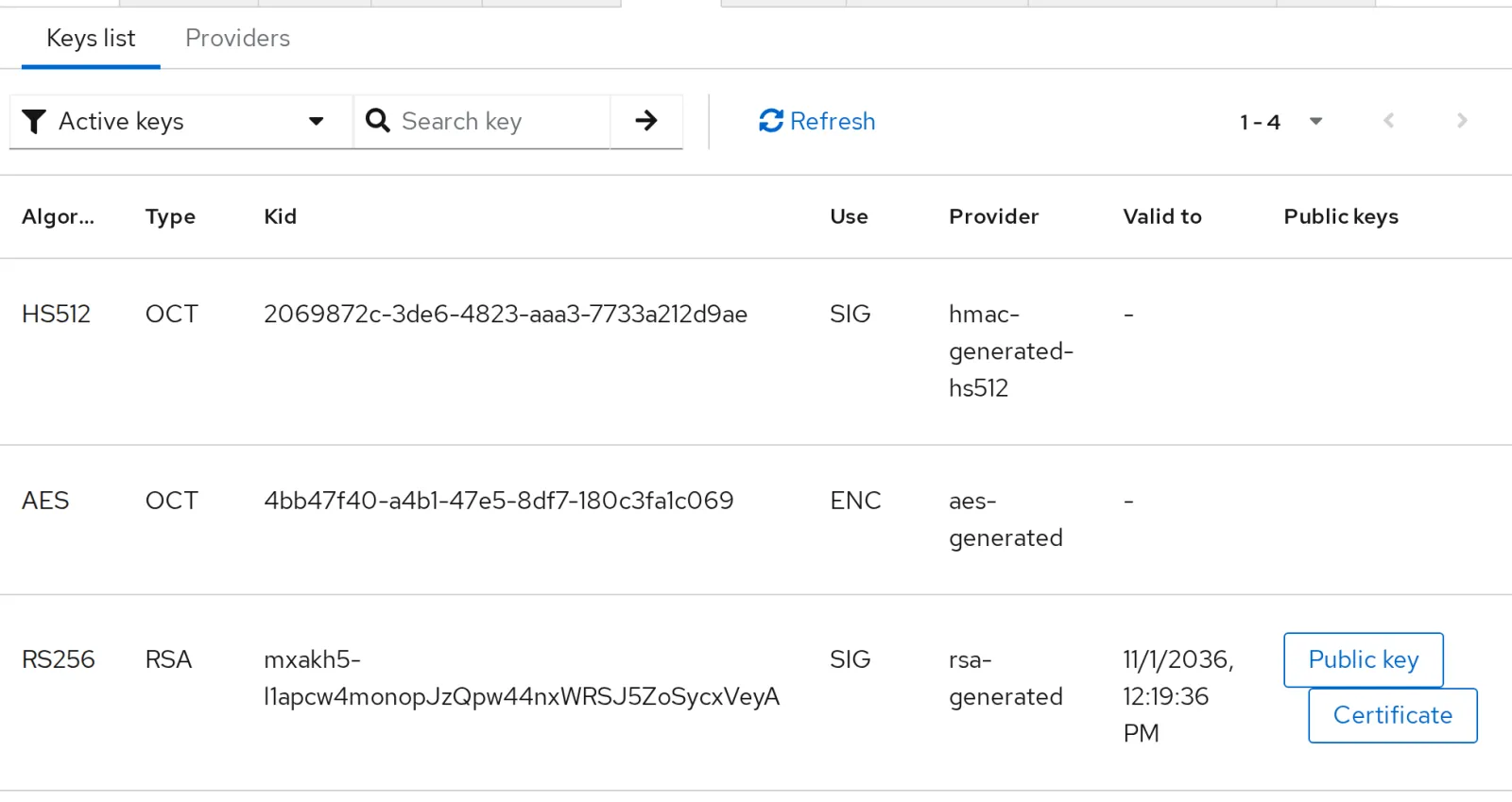
Under Realm settings, Keys you see the RS256 key whose public part Kong now knows. The kid matches the one from the header in Drill 2.
Save your progress? Sign up for free
Drill 4: Two Plugins Means Both
whoami has had key-auth since Day 5. Add
jwt:
cp ~/kong-lab/code/tag06/*.yaml .
deck file add-plugins -s ~/kong-lab/kong/kong.yaml nur-jwt.yaml -o neu.yaml
cp neu.yaml ~/kong-lab/kong/kong.yaml && kreload
TOKEN=$(token)
K='apikey: lab-key-anna-456'
curl -s -w ' %{http_code}\n' -H "$K" $PROXY/whoami
curl -s -w ' %{http_code}\n' -H "Authorization: Bearer $TOKEN" $PROXY/whoami \
  | tr -d '\n'; echo
curl -s -H "$K" -H "Authorization: Bearer $TOKEN" $PROXY/whoami \
  | jq -c '.headers | {"X-Consumer-Username"}'
Expected (shortened):
Kong reloaded
{"message":"Unauthorized"} 401
{  "message":"No API key found in request",  "request_id":"3ecee47f…"} 401
{"X-Consumer-Username":["anna"]}
With the key alone the token is missing, with the token alone the
key: each plugin demands its own. With both you get through, and
key-auth (priority 1250) sets the consumer last, so
anna.
Now the failure modes of jwt. A token whose payload you
change, and a token that is not a JWT:
H=$(echo "$TOKEN" | cut -d. -f1); S=$(echo "$TOKEN" | cut -d. -f3)
P=$(echo "$TOKEN" | jq -cR 'split(".")[1] | gsub("-";"+") | gsub("_";"/") | @base64d
  | fromjson | .azp = "boese"' | base64 -w0 | tr '/+' '_-' | tr -d '=')
curl -s -w ' %{http_code}\n' -H "$K" -H "Authorization: Bearer $H.$P.$S" $PROXY/whoami
curl -s -w ' %{http_code}\n' -H "$K" -H 'Authorization: Bearer kaputt' $PROXY/whoami
Expected:
{"message":"Invalid signature"} 401
{"message":"Bad token; invalid JSON"} 401
A single changed field, and the signature no longer matches.
Save your progress? Sign up for free
Drill 5: Expiration
claims_to_verify: [exp] makes Kong check the expiration
time. The token from Drill 4 is older by now. Wait until it has
definitely expired:
sleep 60
curl -s -w ' %{http_code}\n' -H "$K" -H "Authorization: Bearer $TOKEN" $PROXY/whoami
Expected:
{"exp":"token expired"} 401Without claims_to_verify, Kong would accept expired
tokens as long as the signature is valid. A short lifetime plus checking
exp limits the damage of a stolen token.
Save your progress? Sign up for free
Drill 6: Key or Token
Writing should work with anna’s key or a token from
Keycloak. The trick: both plugins get anonymous: gast. If
one fails, the consumer becomes gast instead of a
rejection, and only the ACL decides:
grep -v '^#' oder.yaml | sed -n '1,17p'
deck file add-plugins -s ~/kong-lab/kong/kong.yaml oder.yaml -o neu.yaml
deck gateway diff neu.yaml | grep -E '^(creating|updating|deleting)'
cp neu.yaml ~/kong-lab/kong/kong.yaml && kreload
Expected (shortened):
_format_version: "1.0"
add-plugins:
  - selectors:
      - $..routes[?(@.name=="notes-schreiben")]
      - $.services[?(@.name=="whoami")]
    overwrite: true
    plugins:
      - name: key-auth
        config:
          hide_credentials: true
          anonymous: gast
      - name: jwt
        config:
          anonymous: gast
          claims_to_verify: [exp]
  - selectors:
      - $.services[?(@.name=="whoami")]
Warning: import/export of basic-authcredentials using decK doesn't work due to hashing
of passwords in Kong.
updating plugin jwt for service whoami  {
creating plugin jwt for route notes-schreiben
updating plugin key-auth for route notes-schreiben  {
updating plugin key-auth for service whoami  {
creating plugin acl for service whoami
Kong reloaded
overwrite: true replaces the existing
key-auth and jwt. Try all the ways:
TOKEN=$(token)
schreib() {
  curl -s -w ' %{http_code}\n' -X POST -H 'Content-Type: application/json' "$@" \
    -d '{"text":"Schlüssel oder Token"}' $PROXY/api/v1/notes | tr -d '\n'; echo
}
schreib
schreib -H "Authorization: Bearer $TOKEN"
schreib -H 'apikey: lab-key-anna-456'
schreib -H 'apikey: lab-key-ben-123'
schreib -H 'Authorization: Bearer kaputt'
curl -s -H "Authorization: Bearer $TOKEN" $PROXY/whoami \
  | jq -c '.headers | {"X-Consumer-Username", "X-Credential-Identifier"}'
Expected (shortened):
{  "message":"You cannot consume this service",  "request_id":"707fe21c…"} 403
{"id":"e017094b-…","text":"Schlüssel oder Token"} 201
{"id":"f8c827b2-…","text":"Schlüssel oder Token"} 201
{  "message":"You cannot consume this service",  "request_id":"6ab52218…"} 403
{  "message":"You cannot consume this service",  "request_id":"7790240e…"} 403
{"X-Consumer-Username":["keycloak"],"X-Credential-Identifier":["http://localhost:8180/r…
Token and key work. Everything else ends up as gast and
fails at the ACL with 403, even a broken token. The price of
or: the client no longer learns why it
was rejected. And the backend sees keycloak as the
consumer, not the name from the token.
Save the state:
cd ~/kong-lab/kong
git add kong.yaml && git commit -qm "Tag 6: JWT von Keycloak, Schlüssel oder Token"
git log --oneline | head -1
Expected (your hash will differ):
5d1e0a3 Tag 6: JWT von Keycloak, Schlüssel oder TokenWarning: From today on, your
kong.yamlcontains the public key of your Keycloak. The companion code therefore can no longer deliver it ready-made; from here on, your Git state is the basis.
Save your progress? Sign up for free
Checkpoint
curl -s $ADMIN/consumers | jq -r '.data[].username' | sortExpected: four consumers.
anna
ben
gast
keycloak
curl -s $ADMIN/jwts | jq -r '.data[] | [.key, .algorithm] | @tsv'Expected: one key for the issuer of your realm.
http://localhost:8180/realms/lab RS256curl -s -o /dev/null -w '%{http_code}\n' -X POST -H "Authorization: Bearer $(token)" \
-H 'Content-Type: application/json' -d '{"text":"Kontrolle"}' $PROXY/api/v1/notesExpected: a fresh token may write.
201Challenge
Fetch a token for the user anna instead of the
client (password grant; her password is lab-user-pw-123).
Which name does the token carry, which consumer does the backend see,
and why do they differ?
Note: grant_type=password with
username and password; the client allows it
(directAccessGrantsEnabled).
Solution
UTOKEN=$(curl -s -d grant_type=password -d client_id=notes-cli \
  -d client_secret=lab-client-secret-123 -d username=anna -d password=lab-user-pw-123 \
  $KC/protocol/openid-connect/token | jq -r .access_token)
echo "$UTOKEN" | jq -R 'split(".")[1] | gsub("-";"+") | gsub("_";"/") | @base64d
  | fromjson | {preferred_username, email}'
curl -s -H "Authorization: Bearer $UTOKEN" $PROXY/whoami \
  | jq -c '.headers | {"X-Consumer-Username"}'
Expected:
{
  "preferred_username": "anna",
  "email": "[email protected]"
}
{"X-Consumer-Username":["keycloak"]}
The token says anna, the backend receives
keycloak. The jwt plugin maps tokens to a
consumer via iss, and all tokens of this realm have the
same issuer. Passing the name from the token to the backend is the job
of your own plugin on Day 11.
Save your progress? Sign up for free
Enterprise Note
- openid-connect: Kong Enterprise ships a plugin for
OpenID Connect: discovery, JWKS with key rotation, browser login, scopes
and claims as headers. In OSS,
jwtwith a fixed key is what you have. - Key rotation: If Keycloak rotates its RSA key, all tokens fail until Kong knows the new one. Plan the switch: add the new key alongside, then switch over.
- Keycloak in production: not
start-dev, butstartwith Postgres, TLS and several instances; depth in the book “Keycloak hands-on”. - Password grant has been removed in OAuth 2.1. For people, the authorization code flow with PKCE belongs in the frontend; for machines, client credentials.