Day 3: mTLS and Identity
Goal: You prove on the wire that
web → notes-apiandnotes-api → postgresare encrypted, read a proxy’s certificate, and know where the mesh still accepts plaintext. · Duration: approx. 60 min · Prerequisite: Day 2
Briefing
- Every proxy fetches a certificate from
linkerd-identityat startup. The name in it is the ServiceAccount:<sa>.<namespace>.serviceaccount.identity.linkerd.cluster.local. - The certificate is valid for 24 hours. The proxy renews it itself, long before it expires.
- Between two proxies, mTLS always runs – without changing the app. The client proxy connects to the target proxy’s inbound port 4143, not to the app port.
- Only the path inside the Pod (proxy ↔︎ app via
lo) is plaintext. It never leaves the Pod. - Linkerd still accepts connections without a proxy. The mesh encrypts; it does not lock anything down yet.
 web Pod                                 notes-api Pod
 ┌───────────────────┐   mTLS :4143      ┌─────────────────────────┐
 │ nginx ─lo─> proxy │ ════════════════> │ proxy ─lo:8080─> app    │
 └───────────────────┘                   └─────────────────────────┘
 tag03/ohne (no proxy) ── plaintext :8080 ──> is accepted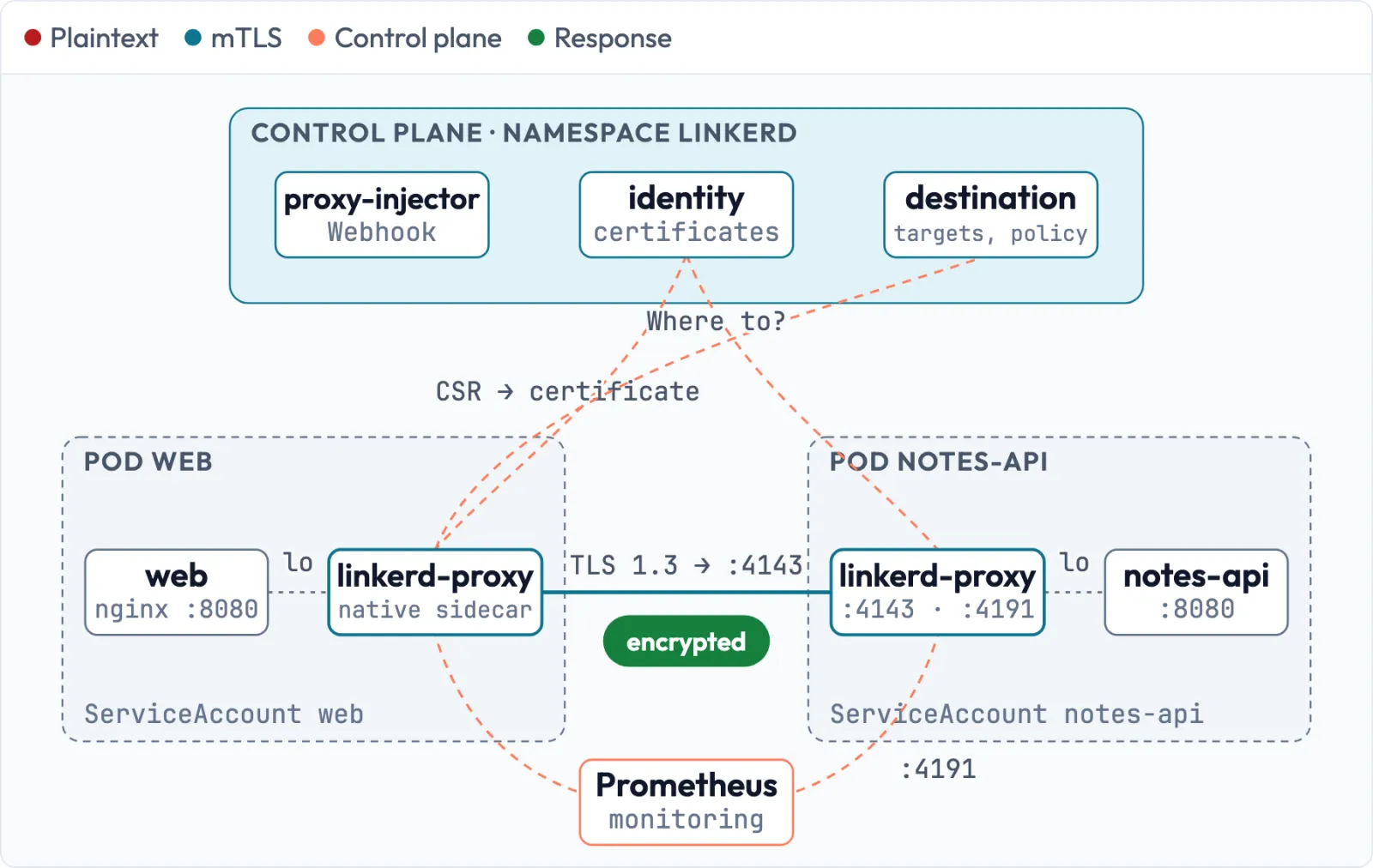
Drill 1: A proxy’s identity
mkdir -p ~/linkerd/tag03 && cd ~/linkerd/tag03
linkerd identity -n notes -l app=web | grep -E 'POD|Issuer|Not |Subject:|DNS:'
Expected (abridged):
POD web-5cc48998cb-d4mnb (1 of 2)
        Issuer: CN=identity.linkerd.
            Not Before: Nov 19 15:14:50 2026 UTC
            Not After : Nov 20 15:15:30 2026 UTC
        Subject: CN=web.notes.serviceaccount.identity.linkerd.cluster.local
                DNS:web.notes.serviceaccount.identity.linkerd.cluster.local
...
linkerd identity opens a port-forward to the proxy and
shows the certificate it is currently using. The identity appears as a
DNS name in the Subject Alternative Name. The name is not a real DNS
record, just a unique identifier. Pods get no SPIFFE URI; Linkerd only
assigns those to external workloads outside Kubernetes.
Who issued the certificate? Both sides log it:
kubectl -n notes logs deploy/web -c linkerd-proxy | grep 'Certified identity'
kubectl -n linkerd logs deploy/linkerd-identity -c identity | grep issued | tail -1
Expected (abridged):
INFO ThreadId(02) daemon:identity: linkerd_app: Certified identity id=web.notes.serv...
level=info msg="issued certificate for notes-api.notes.serviceaccount.identity.link...
  until 2026-11-20 15:27:53 +0000 UTC: 6671c3119c3d96cdf70755f8397a0440bba2b8d7b..."
The proxy generates its key itself, sends only a CSR along with the
ServiceAccount token to identity, and gets the signed
certificate back. The private key never leaves the Pod.
Save your progress? Sign up for free
Drill 2: Lifetime and renewal
kubectl -n linkerd get configmap linkerd-config -o jsonpath='{.data.values}' \
  | grep -E 'issuanceLifetime|clockSkewAllowance'
linkerd diagnostics proxy-metrics -n notes deploy/web | grep '^control_identity_cert'
date +%s
Expected (abridged):
    clockSkewAllowance: 20s
    issuanceLifetime: 24h0m0s
control_identity_cert_expiration_timestamp_seconds 1795187730.0
control_identity_cert_refresh_timestamp_seconds 1795101310.6312726
control_identity_cert_refreshes_total{result="error"} 0
control_identity_cert_refreshes_total{result="ok"} 1
...
1795102084
Expiry minus now: 85,646 seconds, so just under 24 hours.
Not Before lies 20 seconds in the past – that is the
allowed clock skew. The counter
refreshes_total{result="ok"} grows with every renewal;
result="error" must never rise. This is exactly the metric
you monitor on Day 4.
Warning: The proxy certificates renew themselves, the issuer above them does not. If it expires, new Pods no longer get an identity. That is what Day 5 is about.
Save your progress? Sign up for free
Drill 3: A listening post in the Pod
An ephemeral container shares the network with the Pod. With
--profile=netadmin it gets the privileges for
tcpdump. The image nicolaka/netshoot is
available for amd64 and arm64; it is a good 200 MB in size, so the first
start takes a while.
kubectl -n notes get pods -o custom-columns=NAME:.metadata.name,IP:.status.podIP
P=$(kubectl -n notes get pod -l app=notes-api -o jsonpath='{.items[0].metadata.name}')
kubectl -n notes debug $P --image=docker.io/nicolaka/netshoot:v0.15 \
  --profile=netadmin -c sniff -- sleep 1800
kubectl -n notes wait pod/$P --timeout=120s \
  --for=jsonpath='{.status.ephemeralContainerStatuses[0].state.running}'
kubectl -n notes exec $P -c sniff -- \
  tcpdump -i eth0 -nn -q -c 12 'tcp and not port 4191' 2>/dev/null
Expected (abridged):
NAME                         IP
...
notes-api-79585895b4-dlzk5   10.0.1.2
web-5cc48998cb-d4mnb         10.0.1.1
web-5cc48998cb-h5wfc         10.0.2.24
pod/notes-api-79585895b4-dlzk5 condition met
15:28:16.908969 IP 10.0.2.24.33092 > 10.0.1.2.4143: tcp 0
15:28:16.909066 IP 10.0.1.2.4143 > 10.0.2.24.33092: tcp 0
15:28:16.911686 IP 10.0.2.24.33092 > 10.0.1.2.4143: tcp 1512
15:28:16.913440 IP 10.0.1.2.4143 > 10.0.2.24.33092: tcp 2376
...
The traffic from web arrives on port
4143, not on 8080. Port 4191 is the proxy’s admin port
(probes, metrics) – you filter it out.
Tip:
kubectl debugwants a Pod, not a Deployment (deploy/notes-apireports “not supported by debug”). An ephemeral container cannot be removed; it stays in the spec until the Pod’s next restart.
Save your progress? Sign up for free
Drill 4: Plaintext versus mTLS
First the counter-check in the Pod itself: on lo, the
proxy hands the request on to the app.
kubectl -n notes exec $P -c sniff -- timeout 10 \
  tcpdump -i eth0 -nn -A 'tcp port 4143' 2>/dev/null | grep -c 'lab-key'
kubectl -n notes exec $P -c sniff -- timeout 10 \
  tcpdump -i lo -nn -A 'tcp port 8080' 2>/dev/null | grep -i -m1 'api-key'
Expected:
0
x-api-key: lab-key-123
No API key on the network, readable inside the Pod. Now two clients in a separate namespace, one without and one with a proxy:
kubectl create namespace tag03
cat > clients.yaml <<'EOF'
apiVersion: v1
kind: Pod
metadata: {name: ohne, namespace: tag03}
spec:
  containers:
  - name: curl
    image: docker.io/curlimages/curl:8.23.0
    command: [sleep, "86400"]
---
apiVersion: v1
kind: Pod
metadata:
  name: mit
  namespace: tag03
  annotations: {linkerd.io/inject: enabled}
spec:
  containers:
  - name: curl
    image: docker.io/curlimages/curl:8.23.0
    command: [sleep, "86400"]
EOF
kubectl apply -f clients.yaml
kubectl -n tag03 wait pod --all --for=condition=Ready --timeout=120s
Expected (abridged):
pod/mit condition met
pod/ohne condition met
Both call the same Pod directly while tcpdump captures
for 20 seconds:
IP=$(kubectl -n notes get pod $P -o jsonpath='{.status.podIP}')
MIT=$(kubectl -n tag03 get pod mit -o jsonpath='{.status.podIP}')
kubectl -n notes exec $P -c sniff -- timeout 20 tcpdump -i eth0 -nn -A \
  'tcp port 8080 or tcp port 4143' > cap.txt 2>/dev/null &
sleep 3
for c in ohne mit; do
  kubectl -n tag03 exec $c -c curl -- curl -s -o /dev/null -w "$c %{http_code}\n" \
    -H 'X-API-Key: lab-key-123' http://$IP:8080/notes
done
wait
grep -a -E 'HTTP: GET|lab-key' cap.txt | cut -c1-62
grep -a -c "IP $MIT.* > $IP.4143" cap.txt
Expected:
ohne 200
mit 200
15:29:14.872048 IP 10.0.1.225.57378 > 10.0.1.2.8080: Flags [P.
X-API-Key: lab-key-123
15:29:19.639287 IP 10.0.1.116.33186 > 10.0.1.2.8080: Flags [P.
15:29:29.638323 IP 10.0.1.116.45132 > 10.0.1.2.8080: Flags [P.
19
Both get 200. ohne (10.0.1.225) sends the
API key readably over the network; mit only shows up with
19 encrypted packets on port 4143. The lines from 10.0.1.116 are the
kubelet’s readiness probes from the node – they are plaintext too.
Save your progress? Sign up for free
Drill 5: The handshake
The handshake says whom the client expects. tshark reads
it along:
kubectl -n notes exec $P -c sniff -- timeout 15 tshark -i eth0 -f 'tcp port 4143' \
  -Y tls.handshake -T fields -e ip.src -e tls.handshake.type \
  -e tls.handshake.extensions_server_name \
  -e tls.handshake.extensions.supported_version \
  > tls.txt 2>/dev/null &
sleep 5
kubectl -n tag03 exec mit -c curl -- curl -s -o /dev/null -w "%{http_code}\n" \
  -H 'X-API-Key: lab-key-123' http://$IP:8080/notes
wait
cat tls.txt
Expected (order and IPs vary):
200
10.0.1.254  1  notes-api.notes.serviceaccount.identity.linkerd.cluster.local  0x0304
10.0.1.2    2                                                                 0x0304
Type 1 is the ClientHello from the proxy of mit, type 2
the response from notes-api. As SNI, the client sends the
identity it expects – which
linkerd-destination told it. 0x0304 is TLS
1.3. If a proxy with a different identity answers at the target, the
client aborts.
If you see nothing, the proxy is still using an open connection. Wait 30 seconds and repeat the drill.
Save your progress? Sign up for free
Drill 6: Postgres too
notes-api talks to Postgres without TLS
(sslmode=disable). Check what arrives on the wire – with a
second listening post and a psql without a proxy as a
counter-check:
kubectl -n notes debug postgres-0 --image=docker.io/nicolaka/netshoot:v0.15 \
  --profile=netadmin -c sniff -- sleep 1800
kubectl -n tag03 run psql --image=docker.io/library/postgres:18.7-alpine \
  --env=PGPASSWORD=lab-db-123 --command -- sleep 86400
kubectl -n tag03 wait pod/psql --for=condition=Ready --timeout=120s
kubectl -n notes wait pod/postgres-0 --timeout=120s \
  --for=jsonpath='{.status.ephemeralContainerStatuses[0].state.running}'
kubectl -n notes exec postgres-0 -c sniff -- timeout 20 tcpdump -i eth0 -nn -A \
  'tcp port 5432 or tcp port 4143' > pg.txt 2>/dev/null &
sleep 3
kubectl -n tag03 exec psql -- psql -h postgres.notes -U notes -d notes \
  -c 'select count(*) from notes'
wait
grep -a -c '4143' pg.txt
grep -a -o 'select count.*notes' pg.txt
grep -a -c -i 'from notes' pg.txt
Expected:
 count
-------
     1
(1 row)

171
select count(*) from notes
1
The queries from notes-api run encrypted over 4143 – not
a single FROM notes in plaintext. The one match is the
query from tag03/psql, which ran unprotected over 5432. So
for Postgres as an opaque port (Day 2), the same applies as for HTTP:
the proxy encrypts the TCP stream without understanding it.
Save your progress? Sign up for free
Drill 7: The proxies keep count
It also works without a capture: every proxy counts incoming connections with the client’s identity.
linkerd diagnostics proxy-metrics -n notes pod/$P \
  | grep '^tcp_open_total{direction="inbound",peer="src"' \
  | grep -oE '(target_port|client_id|no_tls_reason)="[^"]*"|[0-9]+$' | paste - - -
linkerd diagnostics proxy-metrics -n notes pod/postgres-0 \
  | grep '^tcp_open_total{direction="inbound",peer="src"' \
  | grep -oE '(target_port|client_id|no_tls_reason)="[^"]*"|[0-9]+$' | paste - - -
Expected (abridged, numbers vary):
target_port="8080"  client_id="web.notes.serviceaccount.identity.linkerd.c…"     19
target_port="8080"  client_id="default.tag03.serviceaccount.identity.linkerd…"   4
target_port="4191"  no_tls_reason="no_tls_from_remote"                           71
target_port="8080"  no_tls_reason="no_tls_from_remote"                           32
target_port="5432"  client_id="notes-api.notes.serviceaccount.identity.linke…"   9
target_port="5432"  no_tls_reason="port_skipped"                                 1
target_port="4191" no_tls_reason="no_tls_from_remote" 65client_id= mTLS, with the peer’s identity.mitis calleddefault.tag03– it uses the ServiceAccountdefault.no_tls_from_remote= plaintext: kubelet probes andtag03/ohne.port_skipped= plaintext on an opaque port, herepsqlfromtag03.
All three plaintext cases were accepted. Linkerd’s
default policy is called all-unauthenticated. How to switch
this to “mTLS only, specific identities only” is shown on Day 6.
Save your progress? Sign up for free
Exercise: Speed Drills
- Show the identity of the
postgres-0proxy from its log. Target time: 20 s - Show when the certificates of the
helperPods expire. Target time: 20 s - Count how many certificates
linkerd-identityhas issued since it started. Target time: 20 s - Show which Pods in
noteshave an ephemeral container. Target time: 40 s
Solution
kubectl -n notes logs postgres-0 -c linkerd-proxy | grep 'Certified identity'
linkerd identity -n notes -l app=helper | grep 'Not After'
kubectl -n linkerd logs deploy/linkerd-identity -c identity | grep -c issued
kubectl -n notes get pods -o \
  custom-columns=NAME:.metadata.name,DEBUG:.spec.ephemeralContainers[*].name
Expected (excerpt for 2 and 4):
            Not After : Nov 20 15:15:30 2026 UTC
            Not After : Nov 20 15:15:37 2026 UTC
NAME                         DEBUG
helper-76b4db44b6-2xlc5      <none>
...
notes-api-79585895b4-dlzk5   sniff
postgres-0                   sniff
Save your progress? Sign up for free
Checkpoint
linkerd identity -n notes -l app=notes-api | grep -c 'Subject: CN=notes-api.notes'Expected: 2
linkerd diagnostics proxy-metrics -n notes pod/postgres-0 \
  | grep '^tcp_open_total' | grep -c 'client_id="notes-api.notes'
Expected: 1 – Postgres sees
notes-api with mTLS.
kubectl -n tag03 exec ohne -- curl -s -o /dev/null -w '%{http_code}\n' \
  http://web.notes/
Expected: 200 – plaintext from outside
the mesh is (still) accepted.
Challenge
Prove without tcpdump that web → helper
also runs over mTLS. Also explain where the plaintext connections on
port 8080 of helper come from.
Hint: Look at the spec of helper, not
at the load generator.
Solution
linkerd diagnostics proxy-metrics -n notes deploy/helper \
  | grep '^tcp_open_total{direction="inbound",peer="src"' \
  | grep -oE '(target_port|client_id|no_tls_reason)="[^"]*"|[0-9]+$' | paste - - -
kubectl -n notes get deploy helper \
  -o jsonpath='{.spec.template.spec.containers[0].readinessProbe}{"\n"}'
Expected (abridged, for both Pods):
target_port="8080"  client_id="web.notes.serviceaccount.identity.linkerd.c…"     54
target_port="8080"  no_tls_reason="no_tls_from_remote"                          105
target_port="4191"  no_tls_reason="no_tls_from_remote"                          210
...
{"failureThreshold":3,"httpGet":{"path":"/status/200","port":"http","scheme":...
web arrives with an identity, so mTLS. The plaintext on
8080 is the readiness probe: the kubelet runs on the node without a
proxy. Linkerd lets probes through – even after you lock down everything
else on Day 6.
Save your progress? Sign up for free
Cleanup
kubectl delete namespace tag03
kubectl -n notes rollout restart deploy/notes-api
kubectl -n notes rollout status deploy/notes-api --timeout=180s
The restart removes the ephemeral container from
notes-api. In postgres-0 it exits by itself
after 30 minutes; the entry disappears at the next restart (Day 4).
Interview Note
- How do you prove that Linkerd encrypts? A capture on the
Pod interface: traffic on 4143, TLS 1.3, SNI = expected identity; plus
client_idin the proxy metrics. - Where does the identity come from and how long is it valid?
From the ServiceAccount token;
linkerd-identitysigns the proxy’s CSR, lifetime 24 h, renewed automatically. - Is a service in the mesh isolated? No. The default is
all-unauthenticated; plaintext without a proxy is accepted. Only policies lock things down.
Enterprise Note
- Audits want evidence: export proxy metrics with
tls/client_idinstead of one-off captures. kubectl debug --profile=netadminis powerful – restrict it via RBAC (pods/ephemeralcontainers) and Pod Security.- Linkerd only encrypts between proxies. For the compliance requirement “encryption all the way to the database”, check whether Jobs, backups and admin access also run in the mesh.
- For Postgres access from outside (admins, migrations via pipeline),
sslmode=verify-fullremains necessary – the mesh only covers the mesh.