
Day 5: Who is listening?
Goal: You use
ssto read which process listens on which address and which port, recognize from the bind address why a service only answers locally, find the process behind “Address already in use”, and infer application bugs from TCP states and queues · Duration: approx. 75 min · Prerequisite: Day 4 including clean-up
Briefing
- On Day 4 you asked from the outside: Is the port open? Today you look at the same machine from the inside: Who listens there, on which address, and what happens to the connections that arrive?
- The tool for this is
ss(socket statistics) from iproute2. It replaces the oldnetstat, reads the data directly from the kernel and stays fast even with tens of thousands of connections. - Three failure patterns are so common in practice that you build each
of them yourself today: a service listens only on
127.0.0.1, a port is already taken, and an application does not close its connections. On top of that comes a service that still listens but no longer accepts.
Drill 1: Reading ss
# on netz
# Listening TCP sockets in namespace web, with process
#   -l   only listening sockets
#   -t   only TCP
#   -n   addresses and ports as numbers, no names
#   -p   process that owns the socket (needs root)
sudo ip netns exec web ss -ltnp
Expected (your PID will differ):
State  Recv-Q Send-Q Local Address:Port Peer Address:PortProcess
LISTEN 0      5          10.2.0.10:80        0.0.0.0:*    users:(("python3",pid=45984,fd=3))
Go through each column once:
| Column | Meaning |
|---|---|
State |
state of the socket; listening sockets are called
LISTEN |
Recv-Q |
for LISTEN: connections that are fully established but
not yet accepted by the application |
Send-Q |
for LISTEN: size of this queue (backlog); the Python
server allows only 5 |
Local Address:Port |
address and port being listened on |
Peer Address:Port |
peer; for LISTEN, 0.0.0.0:* means: anyone
may come |
Process |
program name, PID and file descriptor (fd) of the
socket in the process |
For connected sockets (from Drill 4 on), Recv-Q and
Send-Q mean something else: received bytes the application
has not read yet, and sent bytes the peer has not acknowledged yet.
On the VM itself more services listen, also over UDP:
# on netz
# Listening TCP and UDP sockets in the root namespace
#   -u   UDP as well (UDP has no LISTEN, there it is called UNCONN)
sudo ss -ltunp
Expected (shortened; depending on the VM, more services may listen on yours):
Netid State  Recv-Q Send-Q     Local Address:Port Peer Address:PortProcess
udp   UNCONN 0      0             127.0.0.54:53        0.0.0.0:*    users:(("systemd-resolve",pid=8443,fd=16))
udp   UNCONN 0      0          127.0.0.53%lo:53        0.0.0.0:*    users:(("systemd-resolve",pid=8443,fd=14))
udp   UNCONN 0      0      172.16.0.123%eth0:68        0.0.0.0:*    users:(("systemd-network",pid=547,fd=18))
tcp   LISTEN 0      4096       127.0.0.53%lo:53        0.0.0.0:*    users:(("systemd-resolve",pid=8443,fd=15))
tcp   LISTEN 0      4096             0.0.0.0:22        0.0.0.0:*    users:(("sshd",pid=43797,fd=3),("systemd",pid=1,fd=121))
tcp   LISTEN 0      4096                [::]:22           [::]:*    users:(("sshd",pid=43797,fd=4),("systemd",pid=1,fd=122))
Four things are in there:
127.0.0.53%lo:53is the local DNS resolver from Day 0.%lomeans: bound to the interfacelo. That is why no namespace reaches it, and why client, web and db needed their ownresolv.conf.:68is the DHCP client,:22the SSH server – once for IPv4 (0.0.0.0), once for IPv6 ([::]).- Two processes on the same socket (
sshdandsystemd) are normal with socket activation: systemd opens the port and hands it over to the service. - If the address is just
*, an IPv6 socket is listening that accepts IPv4 as well (dual stack).
With many sockets you filter directly in ss instead of
with grep:
# on netz
# Only sockets with source port 80
#   'sport = :80'   filter expression: own port (source port) is 80
#                   (dport would be the peer's port; can be combined with and/or)
sudo ip netns exec web ss -ltn 'sport = :80'
# Summary: how many sockets in which state
#   -s   summary
sudo ip netns exec web ss -s | head -2
Expected (the numbers after TCP: depend
on what you tested before; closed counts sockets that are
being torn down or have no connection yet):
State  Recv-Q Send-Q Local Address:Port Peer Address:PortProcess
LISTEN 0      5          10.2.0.10:80        0.0.0.0:*
Total: 1
TCP:   7 (estab 0, closed 6, orphaned 0, timewait 0)
ss -s is the fastest look at a server that acts “weird”:
thousands of timewait or orphaned stand out
immediately. What these states mean comes in Drill 4.
Save your progress? Sign up for free
Drill 2: On which address?
The database team reports: “The DB is running, I can reach it locally.” The web server at the same site cannot reach it. The Python web server again stands in for the database, this time on port 5432 (PostgreSQL) in namespace db – configured the way many databases ship by default:
# on netz
# Database dummy that listens only on the loopback address
#   --unit=db-app       name of the transient unit
#   --bind 127.0.0.1    listen only on the loopback address
sudo systemd-run --unit=db-app ip netns exec db python3 -m http.server 5432 --bind 127.0.0.1
# from outside (client)
sudo ip netns exec client nc -zv -w3 10.2.0.20 5432
# “locally” in namespace db via 127.0.0.1
sudo ip netns exec db nc -zv -w3 127.0.0.1 5432
# in namespace db, but via its own LAN address
sudo ip netns exec db nc -zv -w3 10.2.0.20 5432
Expected:
Running as unit: db-app.service; invocation ID: ec1c9d9ac25c4c1e8fd6de5f3d77b21a
nc: connect to 10.2.0.20 port 5432 (tcp) failed: Connection refused
Connection to 127.0.0.1 5432 port [tcp/postgresql] succeeded!
nc: connect to 10.2.0.20 port 5432 (tcp) failed: Connection refused
The team is right, and so is the colleague.
Connection refused comes immediately, so the machine is
there (Day 4), but nobody listens on 10.2.0.20:5432. The
third line is the proof: even from the same machine it fails as soon as
you don’t address 127.0.0.1. ss shows the
reason in one line:
# on netz
sudo ip netns exec db ss -ltnp 'sport = :5432'
Expected:
State  Recv-Q Send-Q Local Address:Port Peer Address:PortProcess
LISTEN 0      5          127.0.0.1:5432      0.0.0.0:*    users:(("python3",pid=50798,fd=3))
The obvious fix is “listen on all addresses”. Try it, and then ask who can get in now:
# on netz
# Stop the unit and restart it on all IPv4 addresses
#   systemctl stop db-app   stop the unit (transient units disappear afterwards)
#   --bind 0.0.0.0          listen on all IPv4 addresses of this namespace
sudo systemctl stop db-app
sudo systemd-run --unit=db-app ip netns exec db python3 -m http.server 5432 --bind 0.0.0.0
# from client over the LAN
sudo ip netns exec client nc -zv -w3 10.2.0.20 5432
# from web over the storage network
sudo ip netns exec web nc -zv -w3 10.10.0.20 5432
sudo ip netns exec db ss -ltn 'sport = :5432'
Expected (the Running as unit: line is
omitted from here on):
Connection to 10.2.0.20 5432 port [tcp/postgresql] succeeded!
Connection to 10.10.0.20 5432 port [tcp/postgresql] succeeded!
State  Recv-Q Send-Q Local Address:Port Peer Address:PortProcess
LISTEN 0      5            0.0.0.0:5432      0.0.0.0:*
0.0.0.0 means: every address the machine has or will get
later – LAN, storage network, and tomorrow perhaps a third network
nobody thought of. If the database should only be reachable for web over
the storage network, you bind it to exactly that address:
# on netz
sudo systemctl stop db-app
#   --bind 10.10.0.20   listen only in the storage network
sudo systemd-run --unit=db-app ip netns exec db python3 -m http.server 5432 --bind 10.10.0.20
sudo ip netns exec client nc -zv -w3 10.2.0.20 5432
sudo ip netns exec web nc -zv -w3 10.10.0.20 5432
Expected:
nc: connect to 10.2.0.20 port 5432 (tcp) failed: Connection refused
Connection to 10.10.0.20 5432 port [tcp/postgresql] succeeded!| Bind address | reachable via | typical case |
|---|---|---|
127.0.0.1 |
only loopback in the same namespace | databases and admin UIs by default, development servers |
| specific address | only this address | putting a service into one network on purpose |
0.0.0.0 |
all IPv4 addresses | default of many servers, container images |
[::] or * |
all IPv6 addresses, usually IPv4 too | dual-stack services |
You see the same picture in containers: a development server that
listens on 127.0.0.1 inside the container is never
reachable from outside – not even with port publishing, because
127.0.0.1 in the container is the loopback of the
container (Day 11).
# on netz
sudo systemctl stop db-app
Save your progress? Sign up for free
Drill 3: Address already in use
A colleague wants to start a new version of the web server on web without stopping the old one:
# on netz
# Second web server on the same address and the same port
sudo systemd-run --unit=web-neu --property=WorkingDirectory=/home/ubuntu/www \
  ip netns exec web python3 -m http.server 80 --bind 10.2.0.10
# Is it running?
#   is-active   prints only the state of the unit
systemctl is-active web-neu
# Why not? The last lines of the unit's journal
#   -u web-neu   only messages of this unit
#   -o cat       only the text, without timestamp and host name
#   --no-pager   print directly, don't open in less
sudo journalctl -u web-neu -o cat --no-pager | tail -3
Expected (right after the start,
is-active may briefly report activating):
failed
OSError: [Errno 98] Address already in use
web-neu.service: Main process exited, code=exited, status=1/FAILURE
web-neu.service: Failed with result 'exit-code'.
Address already in use (error number 98,
EADDRINUSE) means: another socket already holds this
address with this port. Which one, ss tells you with filter
and process:
# on netz
sudo ip netns exec web ss -ltnp 'sport = :80'
Expected:
State  Recv-Q Send-Q Local Address:Port Peer Address:PortProcess
LISTEN 0      5          10.2.0.10:80        0.0.0.0:*    users:(("python3",pid=45984,fd=3))
With the PID you find the unit, and with it the owner:
# on netz
# Which systemd unit does the process belong to?
#   -o unit=   only the unit column, without header (the = drops it)
#   -p 45984   only this process (use your PID from ss)
ps -o unit= -p 45984
Expected:
web-http.serviceA port is always taken per address, and
0.0.0.0 covers all addresses. Two counter-checks:
# on netz
# Clean up the failed unit so the name is free again
#   reset-failed web-neu   forget the “failed” state
sudo systemctl reset-failed web-neu
# Port 80 on 0.0.0.0: collides as well, because 0.0.0.0 includes 10.2.0.10
sudo systemd-run --unit=web-neu --property=WorkingDirectory=/home/ubuntu/www \
  ip netns exec web python3 -m http.server 80 --bind 0.0.0.0
systemctl is-active web-neu
sudo systemctl reset-failed web-neu
# Port 80 on the address in the storage network: free
sudo systemd-run --unit=web-neu --property=WorkingDirectory=/home/ubuntu/www \
  ip netns exec web python3 -m http.server 80 --bind 10.10.0.10
sudo ip netns exec web ss -ltn 'sport = :80'
sudo systemctl stop web-neu
Expected:
failed
State  Recv-Q Send-Q Local Address:Port Peer Address:PortProcess
LISTEN 0      5          10.2.0.10:80        0.0.0.0:*
LISTEN 0      5         10.10.0.10:80        0.0.0.0:*
In practice the holder of the port is often a process nobody has on
their radar anymore: a forgotten test server, an old container, a second
system service with the same default configuration.
ss -ltnp 'sport = :PORT' answers the question in one
line.
Save your progress? Sign up for free
Drill 4: The states of a connection
A TCP connection goes through fixed states. Most are visible for only
milliseconds; three stay long enough to catch them with ss
– and those are exactly the ones that show up in tickets.
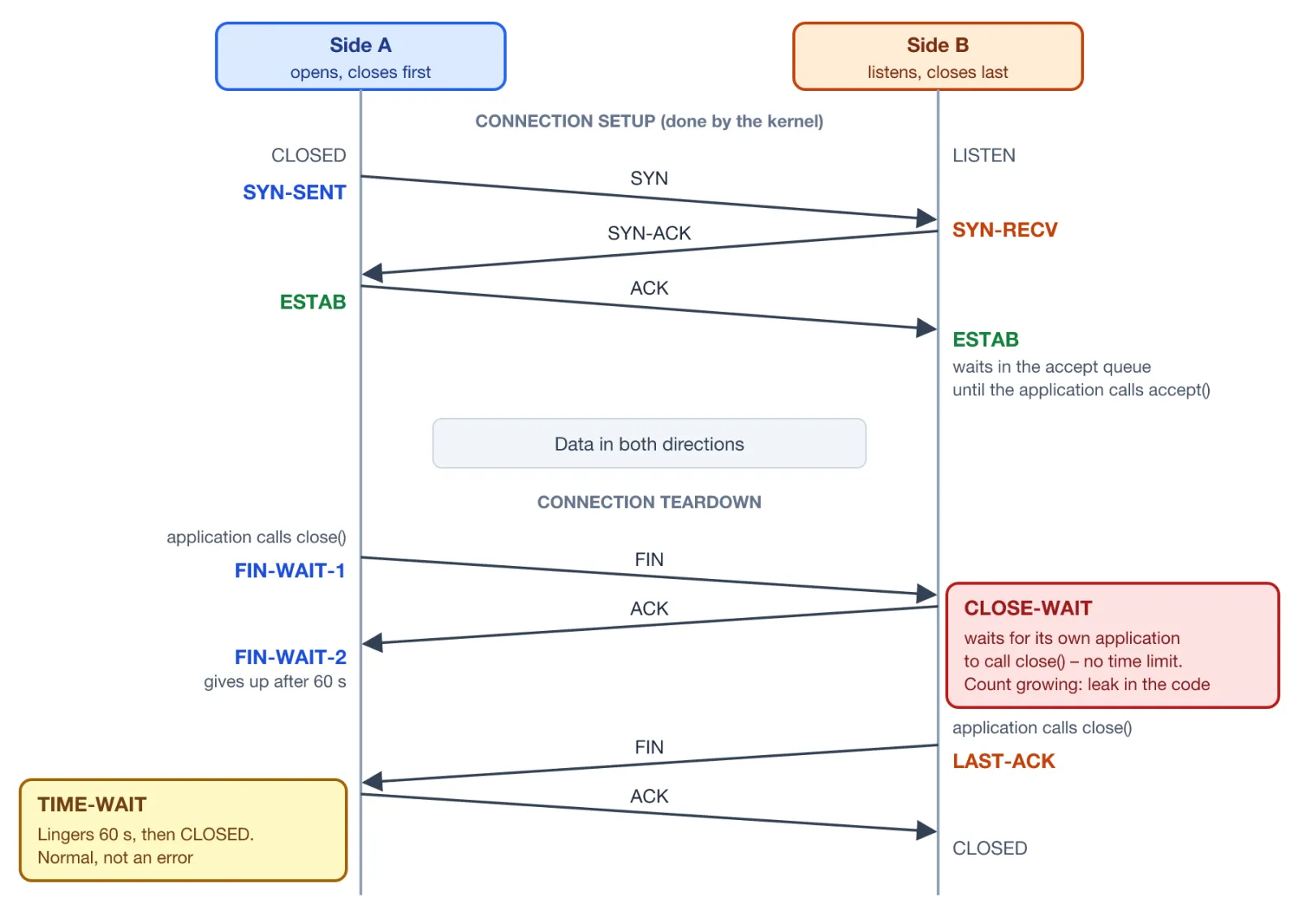
First a normal request. Afterwards you check on both sides what is left of the connection:
# on netz
sudo ip netns exec client curl -s http://10.2.0.10/
# client side: all TCP sockets to destination port 80
#   -a            all sockets, not just connected ones (also shows TIME-WAIT)
#   'dport = :80' peer's port is 80
sudo ip netns exec client ss -tan 'dport = :80'
# web side: all TCP sockets with own port 80
#   -o            show timers (how long the state will still last)
sudo ip netns exec web ss -tano 'sport = :80'
Expected (peer port and remaining time differ):
hallo von web
State Recv-Q Send-Q Local Address:Port Peer Address:PortProcess
State     Recv-Q Send-Q Local Address:Port Peer Address:Port Process
LISTEN    0      5          10.2.0.10:80        0.0.0.0:*
TIME-WAIT 0      0          10.2.0.10:80      10.1.0.10:34206 timer:(timewait,59sec,0)
TIME-WAIT stays with the side that closes the connection first, for 60 seconds. Here that is the server: the Python web server speaks HTTP/1.0 and ends the connection itself after every response. Nothing is left on the client. TIME-WAIT is not an error but intentional – late packets of the old connection must not end up in a new one. It only becomes a problem when a client opens thousands of short connections to the same destination and runs out of local ports (Enterprise note).
Next, a connection setup that never completes. For this, the DROP rule from Day 4 comes back for a moment:
# on netz
# Firewall in web that silently drops port 8080 (like Day 4, Drill 2)
sudo ip netns exec web nft add table inet fw
sudo ip netns exec web nft add chain inet fw in '{ type filter hook input priority 0; policy accept; }'
sudo ip netns exec web nft add rule inet fw in tcp dport 8080 drop
# Connection attempt in the background, abort after 10 seconds
#   timeout 10   ends the following command after 10 seconds
#   &            start in the background, the shell is free again immediately
sudo ip netns exec client timeout 10 nc -z 10.2.0.10 8080 &
# wait two seconds, then look
sleep 2
#   state syn-sent   filter: only sockets in this state
sudo ip netns exec client ss -tano state syn-sent
Expected (the line with [1] and the job
number is printed by the shell):
[1] 51231
Recv-Q Send-Q Local Address:Port  Peer Address:PortProcess
0      1          10.1.0.10:53962    10.2.0.10:8080 timer:(on,041ms,1)
SYN-SENT means: the SYN is out, a reply never came.
With state …, ss omits the State
column because it would be the same everywhere. Send-Q 1 is
the unacknowledged SYN, and the timer tells you more: on is
the retransmission timer, the last number the count of retransmissions
so far. The kernel in the lab (6.8) first retransmits a SYN four times
at one-second intervals
(net.ipv4.tcp_syn_linear_timeouts = 4), then with doubling
intervals; older kernels double from the start (1, 2, 4, 8 … seconds).
Day 10 shows it in a capture. If you see many sockets in SYN-SENT to the
same destination on a client, someone in between is swallowing the
packets – exactly the timeout picture from Day 4, only from the
inside.
# on netz
# wait for the background job to end (the shell then reports “Exit 124”: timeout aborted it)
wait
sudo ip netns exec web nft delete table inet fw| State | where | means | suspicious if … |
|---|---|---|---|
LISTEN |
server | waiting for connections | it is missing or on the wrong address |
SYN-SENT |
client | SYN sent, no reply | many to the same destination: packet is dropped |
SYN-RECV |
server | SYN received, SYN-ACK sent, waiting for ACK | many: return path broken or SYN flood |
ESTAB |
both | connection is up | Recv-Q grows: application does not read |
TIME-WAIT |
whoever closes first | 60 s linger | tens of thousands on a client: ports run short |
CLOSE-WAIT |
whoever closes last | other side has closed, own application not yet | it grows: bug in the application (Exercise) |
FIN-WAIT-2 |
whoever closes first | own FIN acknowledged, waiting for the other side’s | counterpart of CLOSE-WAIT on the other side |
Save your progress? Sign up for free
Exercise
On web, a small service runs on port 9000 that accepts connections and keeps them in a list but never closes them – the pattern of a connection pool that leaks its connections:
# on netz
# Service with a connection leak as a transient unit
#   python3 -c '…'                         run Python code directly from the command line
#   socket.create_server(("10.2.0.10", 9000))   open a listening TCP socket on address and port
#   offen.append(s.accept()[0])            accept a connection and keep it in the list, never close it
sudo systemd-run --unit=leak-app ip netns exec web python3 -c '
import socket
s = socket.create_server(("10.2.0.10", 9000))
offen = []
while True:
    offen.append(s.accept()[0])'
# Five clients connect and hang up immediately
#   for i in 1 2 3 4 5; do …; done   loop: run five times
for i in 1 2 3 4 5; do sudo ip netns exec client nc -z 10.2.0.10 9000; done
After a few days the service reports Too many open files
and accepts nothing anymore. Use ss to find out (1) in
which state the connections on web are stuck, (2) which process holds
them, (3) why the client notices nothing, and (4) how many such
connections the process can hold at most.
Solution
# on netz
# (1) and (2): connections in CLOSE-WAIT on web, with process
sudo ip netns exec web ss -tnp state close-wait
Expected (ports, PID and fd differ):
Recv-Q Send-Q Local Address:Port Peer Address:Port Process
1      0          10.2.0.10:9000    10.1.0.10:53652 users:(("python3",pid=51096,fd=8))
1      0          10.2.0.10:9000    10.1.0.10:53642 users:(("python3",pid=51096,fd=6))
1      0          10.2.0.10:9000    10.1.0.10:53634 users:(("python3",pid=51096,fd=5))
1      0          10.2.0.10:9000    10.1.0.10:53618 users:(("python3",pid=51096,fd=4))
1      0          10.2.0.10:9000    10.1.0.10:53650 users:(("python3",pid=51096,fd=7))
CLOSE-WAIT means: the other side has sent its FIN,
the kernel has acknowledged it, and now it waits for the own
application to call close(). That never happens
here. Recv-Q 1 is that FIN, which the application never
read. Each connection occupies a file descriptor (fd=4 to
fd=8). No kernel timeout cleans up CLOSE-WAIT – only the
application itself or its termination.
# on netz
# (3) client side
sudo ip netns exec client ss -tano 'dport = :9000'
Expected (within one minute after the connections):
State      Recv-Q Send-Q Local Address:Port  Peer Address:PortProcess
FIN-WAIT-2 0      0          10.1.0.10:53642    10.2.0.10:9000 timer:(timewait,59sec,0)
FIN-WAIT-2 0      0          10.1.0.10:53650    10.2.0.10:9000 timer:(timewait,59sec,0)
FIN-WAIT-2 0      0          10.1.0.10:53634    10.2.0.10:9000 timer:(timewait,59sec,0)
FIN-WAIT-2 0      0          10.1.0.10:53618    10.2.0.10:9000 timer:(timewait,59sec,0)
FIN-WAIT-2 0      0          10.1.0.10:53652    10.2.0.10:9000 timer:(timewait,59sec,0)
The client waits in FIN-WAIT-2 for the FIN from web, but gives up
after 60 seconds (net.ipv4.tcp_fin_timeout). After that
everything is clean on its side, and only the server keeps collecting.
That is why you always look for a connection leak on the side that shows
CLOSE-WAIT.
# on netz
# (4) open-files limit of the process
#   systemctl show -p MainPID --value leak-app   PID of the main process (like Day 0)
#   /proc/<PID>/limits                           resource limits of this process
#   grep 'open files'                            only the line for file descriptors
grep 'open files' /proc/$(systemctl show -p MainPID --value leak-app)/limits
# Count the connections in CLOSE-WAIT, without header
#   -H   no header line (otherwise wc -l counts it too)
sudo ip netns exec web ss -Htan state close-wait | wc -l
Expected:
Max open files            1024                 524288               files
5
At 1024 open files (soft limit, first number) it’s over: then
accept() fails with Too many open files, and
the service accepts nothing anymore. Raising the limit only postpones
the outage. The fix belongs in the code: close connections or return
them to a pool. Until then only a restart helps – and the proof that the
restart frees the sockets:
# on netz
sudo systemctl stop leak-app
sudo ip netns exec web ss -Htan state close-wait | wc -l
Expected:
0Save your progress? Sign up for free
Challenge
Build in the fault:
# on netz
# Pause the web server without terminating it
#   kill -STOP <PID>   freeze the process (like Ctrl+Z); it stays in memory but does nothing anymore
sudo kill -STOP $(systemctl show -p MainPID --value web-http)
A colleague reports: “curl to
http://10.2.0.10/ hangs, but nc -zv says the
port is open. After a few attempts nc hangs too. Is it the
firewall?” Prove without looking at any firewall that the fault is in
the application, show why nc only fails later, and fix it
with proof.
Solution
# on netz
# Symptom 1: the HTTP request runs into the timeout after 3 seconds
#   -sS     silent, but still show error messages
#   -m3     at most 3 seconds for the whole request
sudo ip netns exec client curl -sS -m3 http://10.2.0.10/
# Symptom 2: the connection setup works
sudo ip netns exec client nc -zv -w3 10.2.0.10 80
Expected:
curl: (28) Operation timed out after 3002 milliseconds with 0 bytes received
Connection to 10.2.0.10 80 port [tcp/http] succeeded!
The setup works, the response does not come. The handshake is done by
the kernel, not the application – it accepts
connections and puts them into the queue of the listening socket until
the application picks them up with accept(). A
succeeded therefore only proves that the kernel is alive.
Now a few more attempts, as an impatient user or a health check would
trigger them:
# on netz
# Eight requests with a 1-second timeout each
#   -o /dev/null   discard the response (none will come anyway)
for i in 1 2 3 4 5 6 7 8; do sudo ip netns exec client curl -s -m1 -o /dev/null http://10.2.0.10/; done
# Queue of the listening socket
sudo ip netns exec web ss -ltn 'sport = :80'
# and now the connection setup again
sudo ip netns exec client nc -zv -w3 10.2.0.10 80
Expected:
State  Recv-Q Send-Q Local Address:Port Peer Address:PortProcess
LISTEN 6      5          10.2.0.10:80        0.0.0.0:*
nc: connect to 10.2.0.10 port 80 (tcp) timed out: Operation now in progress
Recv-Q 6 with Send-Q 5: the queue is full
(Linux allows one connection more than the backlog). From now on the
kernel silently drops new SYNs – from the outside this looks like a DROP
rule. The kernel counts it:
# on netz
# Kernel counters for overflowed queues in namespace web
#   nstat   reads the kernel's network counters
#   -a      absolute values since boot (instead of change since the last call)
#   -z      also show counters with value 0
#   TcpExtListenOverflows TcpExtListenDrops   only these two counters
sudo ip netns exec web nstat -az TcpExtListenOverflows TcpExtListenDrops
# And who is not reading the queue? State of the process
#   -o pid,stat,cmd   columns PID, process state and command
ps -o pid,stat,cmd -p $(systemctl show -p MainPID --value web-http)
Expected (your counters will differ, they just must not be 0):
#kernel
TcpExtListenOverflows           25                 0.0
TcpExtListenDrops               25                 0.0
    PID STAT CMD
  45984 Ts   python3 -m http.server 80 --bind 10.2.0.10
T means stopped, the s after it only that
the process is a session leader. In real life you would rather see
S or R here, and the application hangs on a
lock, a slow backend or a full garbage collection – the picture in
ss is the same. Fix and proof:
# on netz
#   kill -CONT <PID>   let a stopped process continue
sudo kill -CONT $(systemctl show -p MainPID --value web-http)
sudo ip netns exec client curl -sS -m3 http://10.2.0.10/
sudo ip netns exec web ss -ltn 'sport = :80'
Expected:
hallo von web
State  Recv-Q Send-Q Local Address:Port Peer Address:PortProcess
LISTEN 0      5          10.2.0.10:80        0.0.0.0:*
The queue is empty: after waking up, the server worked through the waiting connections.
Save your progress? Sign up for free
Checkpoint
# on netz
# In web only the web server from Day 0 is listening
sudo ip netns exec web ss -Hltn
# In db nobody is listening
sudo ip netns exec db ss -Hltn | wc -l
# no connections in CLOSE-WAIT
sudo ip netns exec web ss -Htan state close-wait | wc -l
# no firewall in web
sudo ip netns exec web nft list tables | wc -l
# web server is running and not stopped
ps -o stat= -p $(systemctl show -p MainPID --value web-http)
sudo ip netns exec client curl -s http://10.2.0.10/
Expected:
LISTEN 0      5      10.2.0.10:80 0.0.0.0:*
0
0
0
Ss
hallo von web
Clean up
You have already stopped the units db-app,
web-neu and leak-app and deleted the firewall
in web. Check that no failed unit is left:
# on netz
# all units with these names, including stopped or failed ones
#   --all        also show inactive units
#   --no-legend  without header and footer
systemctl list-units --all --no-legend db-app.service web-neu.service leak-app.service | wc -l
Expected:
0If something shows up there,
sudo systemctl reset-failed <Unit> removes the
entry.
Interview note
“A service is running but not reachable from outside. What do you
check on the server?” ss -ltnp 'sport = :PORT': Is it
listening at all, on which address (127.0.0.1
vs. 0.0.0.0), and which process is it? Bonus points:
TIME-WAIT sits with whoever closes first and is normal; CLOSE-WAIT that
grows is always a bug in your own application; and a full backlog
(Recv-Q > Send-Q for LISTEN)
makes an open port look like a DROP firewall from the outside.
Enterprise note
Two metrics from this chapter belong in every monitoring setup: the
number of sockets in CLOSE-WAIT per service (a leak grows slowly over
days, long before Too many open files appears) and
TcpExtListenOverflows (node_exporter provides it as
node_netstat_TcpExt_ListenOverflows). And TIME-WAIT: a
client that opens very many short connections to one
destination (proxy, batch job without keep-alive) can exhaust the local
ports – net.ipv4.ip_local_port_range covers about 28,000
ports by default. The right answer is almost always keep-alive or a
connection pool, not a kernel parameter someone found in a blog
post.