Day 3: Installing Rancher Manager
Goal: Build an RKE2 cluster on a dedicated VM, install cert-manager and Rancher via Helm, go through the first login and see what Rancher creates in the cluster. · Duration: approx. 75 min · Prerequisite: Day 2
Briefing
- Rancher Manager is itself a Kubernetes application. It runs in its own cluster, the local cluster, and manages all the others from there.
- Here the local cluster is an RKE2 with one node on the VM
rancher. In production it has three nodes. - Rancher needs cert-manager for its TLS certificate and an ingress controller. RKE2 1.36 comes with Traefik; unlike in the sister book, it stays on this time.
- Almost everything Rancher can do lives in CRDs
(
*.cattle.io). The UI only displays these objects;kubectlsees them too.
 Mac                                VM rancher
 ┌──────────────────────────┐       ┌─────────────────────────────────────────┐
 │ Browser ─── https ───────┼──443─►│ Traefik ─► rancher (cattle-system)       │
 │ kubectl, helm ───────────┼─6443─►│ RKE2 "local": cert-manager, Fleet,       │
 │ rancher.<IP>.sslip.io    │       │ rancher-webhook, 89 CRDs *.cattle.io     │
 └──────────────────────────┘       └─────────────────────────────────────────┘
Drill 1: The VM rancher
Rancher wants memory. Don’t stop the k3s VM from Day 2; it gets imported on Day 4.
multipass launch 24.04 --name rancher --cpus 4 --memory 8G --disk 40G
source ~/rancher-lab/setup/env.sh
echo "export RANCHER=$(multipass info rancher --format json \
  | jq -r '.info.rancher.ipv4[0]')" >> "$LAB/setup/vms.env"
source "$LAB/setup/env.sh"
echo "$RANCHER"
mkdir -p "$LAB/tag03" && cd "$LAB/tag03"
Expected (abridged, names, IPs and times differ on your machine):
Launched: rancher
…
Save your progress? Sign up for free
Drill 2: RKE2 as the local Cluster
The same steps as in “Kubernetes hands-on”, Day 12, just with one
node and without ingress-controller: none:
printf 'write-kubeconfig-mode: "0600"\ntls-san:\n  - %s\n' "$RANCHER" > config.yaml
cat config.yaml
multipass transfer config.yaml rancher:/tmp/config.yaml
multipass exec rancher -- sudo install -D -m 600 /tmp/config.yaml \
  /etc/rancher/rke2/config.yaml
multipass exec rancher -- bash -c \
  'curl -sfL https://get.rke2.io | sudo INSTALL_RKE2_VERSION=v1.36.5+rke2r1 sh -'
multipass exec rancher -- sudo systemctl enable --now rke2-server
Expected (abridged):
write-kubeconfig-mode: "0600"
tls-san:
  - …
[INFO]  unpacking tarball file to /usr/local
Created symlink /etc/systemd/system/multi-user.target.wants/rke2-server.service → …
After a minute and a half the server is running. Fetch the kubeconfig to the Mac:
multipass exec rancher -- sudo cat /etc/rancher/rke2/rke2.yaml \
  | sed -e "s/127.0.0.1/$RANCHER/" -e 's/: default$/: rancher/' \
  > "$LAB/kube/rancher.yaml"
chmod 600 "$LAB/kube/rancher.yaml"
export KUBECONFIG="$LAB/kube/rancher.yaml"
kubectl wait --for=condition=Ready node --all --timeout=300s
kubectl get ingressclass
Expected (abridged):
node/rancher condition met
NAME                CONTROLLER                      PARAMETERS   AGE
traefik (default)   traefik.io/ingress-controller   <none>       32s
(default) means: an Ingress without
ingressClassName ends up at Traefik. That is exactly what
the Rancher chart uses in a moment.
Save your progress? Sign up for free
Drill 3: cert-manager
Rancher uses cert-manager to create its own CA and a certificate for its hostname. cert-manager comes as an OCI chart:
helm install cert-manager oci://quay.io/jetstack/charts/cert-manager \
  --version v1.20.5 -n cert-manager --create-namespace \
  --set crds.enabled=true --wait | grep -E '^(Pulled|NAME|STATUS):'
kubectl -n cert-manager get pods
Expected (abridged):
Pulled: quay.io/jetstack/charts/cert-manager:v1.20.5
NAME: cert-manager
STATUS: deployed
NAME                                       READY   STATUS    RESTARTS   AGE
cert-manager-5d5c8b595c-hw8gm              1/1     Running   0          38s
cert-manager-cainjector-65cc6c7d87-fd4rv   1/1     Running   0          38s
cert-manager-webhook-969545db-5f85m        1/1     Running   0          38s
crds.enabled=true installs cert-manager’s CRDs along
with it. Without the option, Certificate and
Issuer are missing, and the Rancher chart fails.
Save your progress? Sign up for free
Drill 4: Rancher
Three values are enough: the hostname, a bootstrap password and one replica instead of three.
helm repo add rancher-stable https://releases.rancher.com/server-charts/stable
helm repo update rancher-stable
helm install rancher rancher-stable/rancher --version 2.15.3 \
  -n cattle-system --create-namespace \
  --set hostname="rancher.$RANCHER.sslip.io" \
  --set bootstrapPassword=lab-admin-pw-123 \
  --set replicas=1 | grep -E '^(NAME|STATUS):'
kubectl -n cattle-system rollout status deploy/rancher --timeout=600s
kubectl -n cattle-system get ingress,certificate
curl -sk "https://rancher.$RANCHER.sslip.io/ping"; echo
Expected (abridged):
"rancher-stable" has been added to your repositories
…
NAME: rancher
STATUS: deployed
Waiting for deployment "rancher" rollout to finish: 0 of 1 updated replicas are …
deployment "rancher" successfully rolled out
NAME                                CLASS     HOSTS                ADDRESS   PORTS
ingress.networking.k8s.io/rancher   traefik   rancher.….sslip.io             80, 443
NAME                                              READY   SECRET                AGE
certificate.cert-manager.io/tls-rancher-ingress   True    tls-rancher-ingress   3m11s
pong
The rollout takes about three minutes. -k makes curl
accept the certificate: it comes from a CA that Rancher just created
itself and that your Mac doesn’t trust.
Security:
bootstrapPasswordis in plain text in the Helm values. It is only the bootstrap password for the first login. In production you leave it out; Rancher then generates a random one that you read once from the Secretbootstrap-secret.
Save your progress? Sign up for free
Drill 5: The First Login
Open https://rancher.<IP>.sslip.io in the browser
and confirm the certificate warning.
open "https://rancher.$RANCHER.sslip.io"Expected: the welcome page as in the figure.
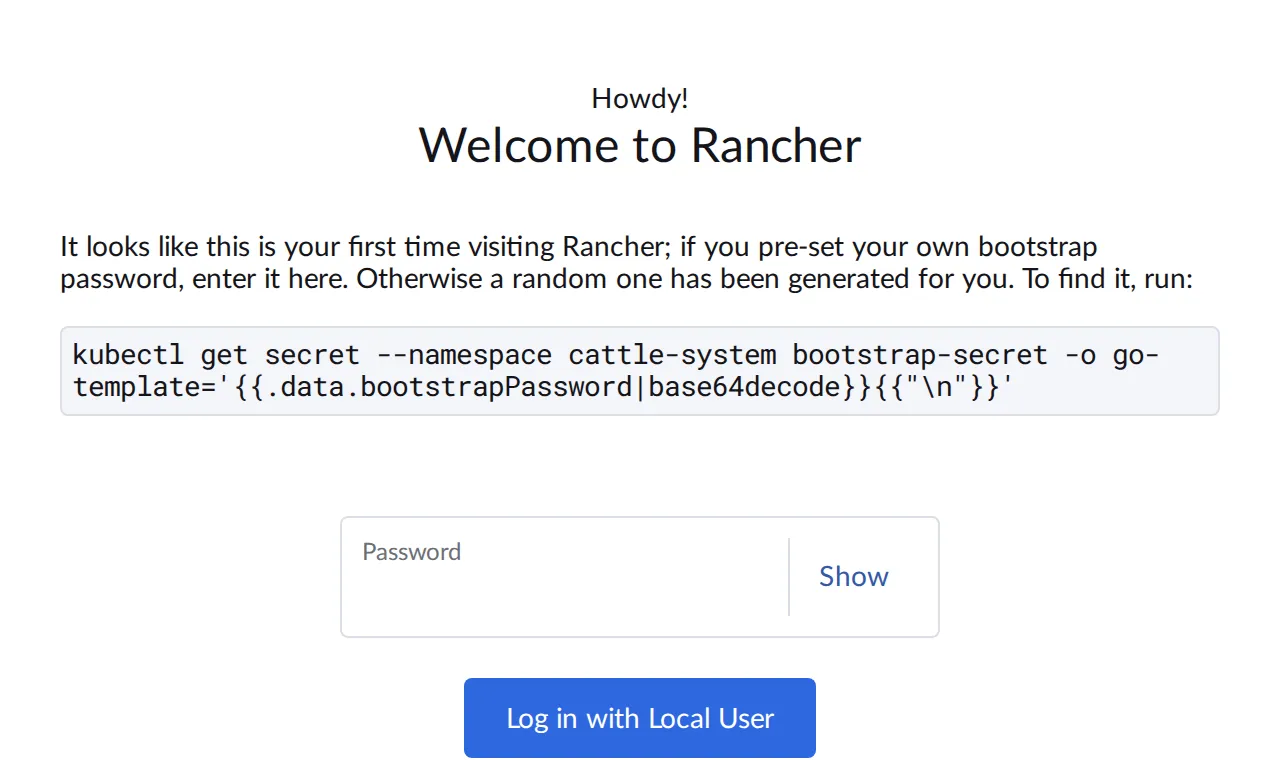
Enter lab-admin-pw-123 and click Log in with
Local User. Because the password comes from the Helm values,
Rancher only asks for the address at which all clusters should reach it,
and for agreement to the license:
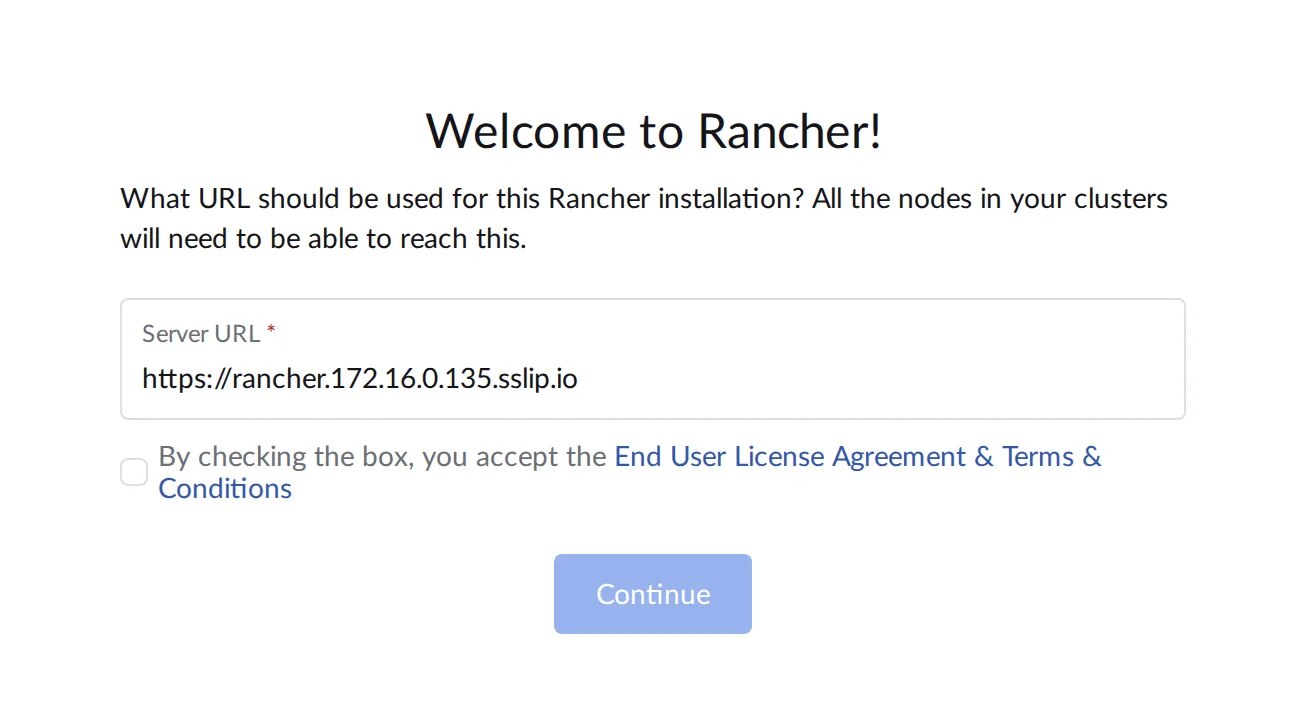
The Server URL is prefilled with the hostname. Leave it as is, check the box and click Continue. Every agent in a managed cluster later connects to this address; changing it afterwards is tedious.
Save your progress? Sign up for free
Drill 6: A Tour
After the login, Rancher shows the home page with all clusters. There is only one so far:
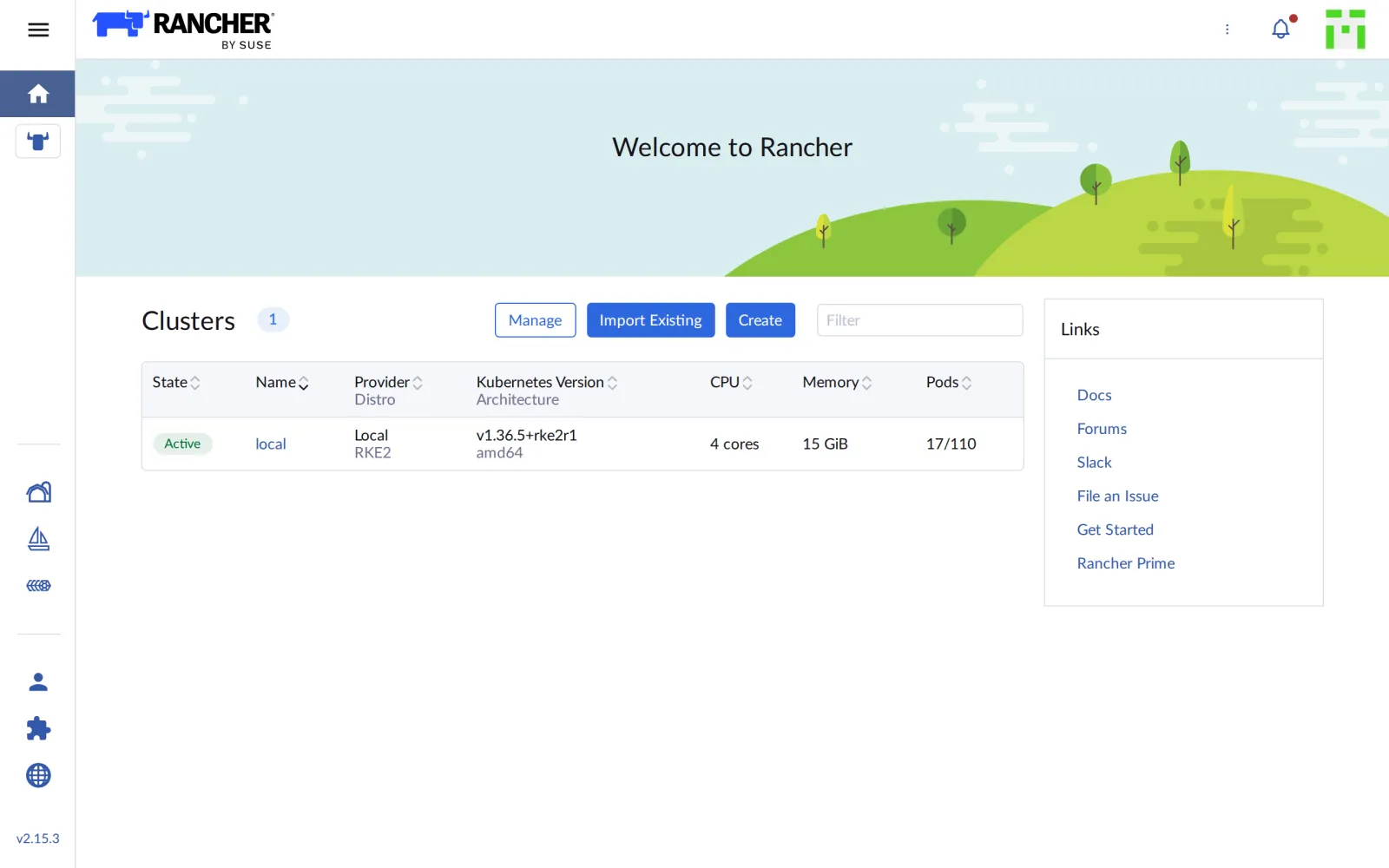
local is the cluster that Rancher itself runs on: RKE2
v1.36.5, one node, 4 CPUs. Via the menu at the top left you reach
Cluster Management, the hub for all clusters:
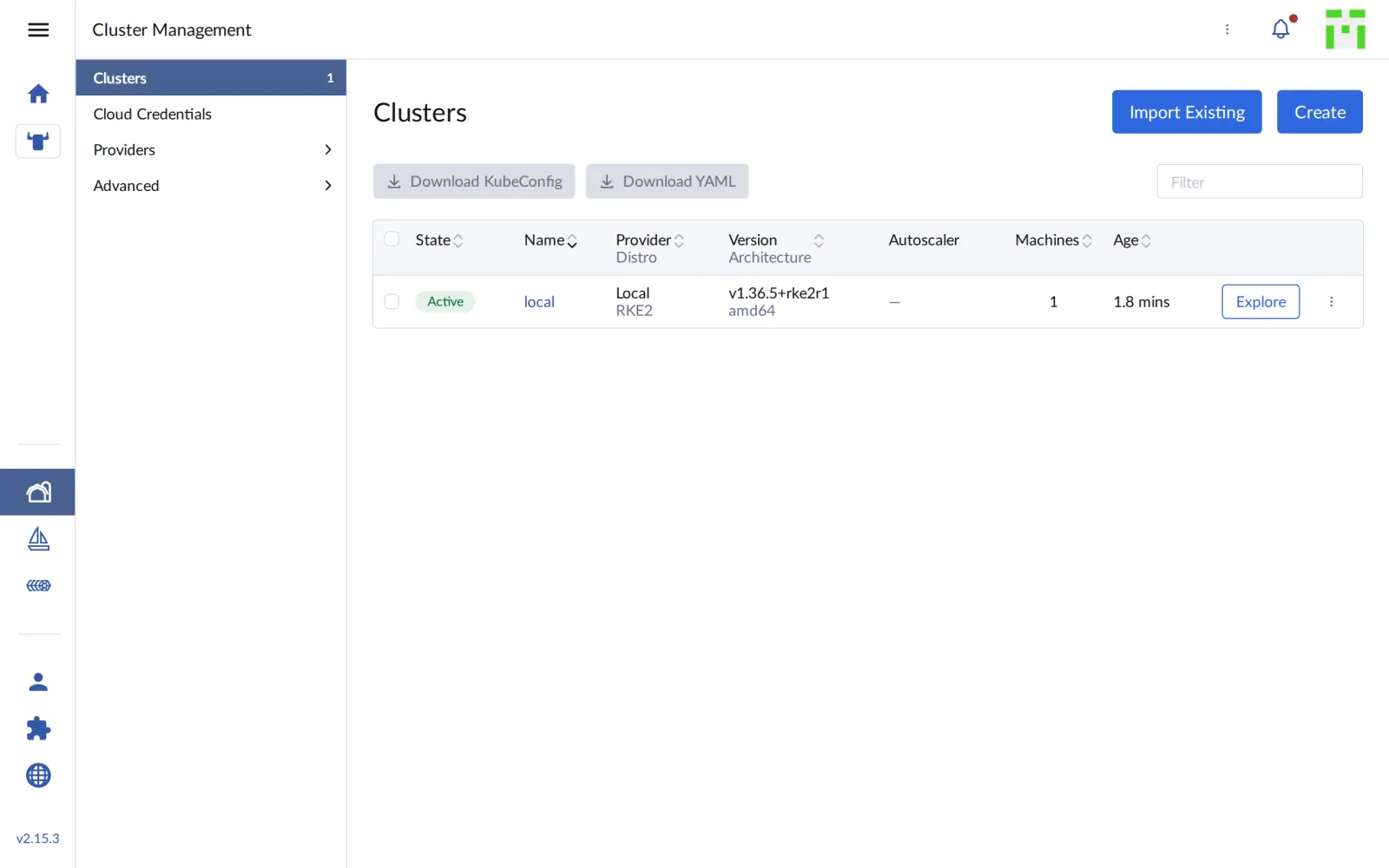
The two buttons at the top right are the next days: Import Existing takes an existing cluster under management (Day 4), Create builds a new one (Day 5).
Save your progress? Sign up for free
Drill 7: What Rancher Created
The same cluster object that the UI shows lives as a CRD in the local cluster:
kubectl get clusters.provisioning.cattle.io -A
kubectl get clusters.management.cattle.io
kubectl get settings.management.cattle.io server-url -o jsonpath='{.value}'; echo
kubectl get users.management.cattle.io \
  -o custom-columns=NAME:.metadata.name,USER:.username,DISPLAY:.displayName
Expected (abridged):
NAMESPACE     NAME    VERSION   CLUSTER NAME   AGE     KUBECONFIG         READY
fleet-local   local             local          2m37s   local-kubeconfig   true
NAME    AGE
local   2m44s
https://rancher.….sslip.io
NAME           USER     DISPLAY
u-b4qkhsnliz   <none>   System account for Cluster local
u-mo773yttt4   <none>   <none>
user-t26cs     admin    Default Admin
Two cluster types, two API groups:
provisioning.cattle.io describes how a
cluster comes into being (from Day 5 on you write such objects
yourself), management.cattle.io is Rancher’s view of every
managed cluster. The Server URL from Drill 5 is a Setting,
the admin a User.
Save your progress? Sign up for free
Drill 8: Rancher Installs More
In the first minutes after the login, Rancher installs further charts into its own cluster:
helm list -A | grep -E 'NAME|fleet|rancher|upgrade'
kubectl -n cattle-system get pods
kubectl -n cattle-fleet-local-system get pods
Expected (abridged):
NAME                        NAMESPACE                   …   CHART
fleet                       cattle-fleet-system         …   fleet-110.0.3+up0.16.3
fleet-agent-local           cattle-fleet-local-system   …   fleet-agent-local-v0.0.0+s-…
fleet-crd                   cattle-fleet-system         …   fleet-crd-110.0.3+up0.16.3
rancher                     cattle-system               …   rancher-2.15.3
rancher-turtles             cattle-turtles-system       …   rancher-turtles-110.0.4+…
rancher-webhook             cattle-system               …   rancher-webhook-110.0.4+…
system-upgrade-controller   cattle-system               …   system-upgrade-controller-…
NAME                                         READY   STATUS      RESTARTS   AGE
helm-operation-46jd6                         0/2     Completed   0          4m11s
…
rancher-6d985fd969-xkplw                     1/1     Running     0          11m
rancher-webhook-7b4dc74ccc-w26jg             1/1     Running     0          4m2s
system-upgrade-controller-5dc7c44677-q8vwv   1/1     Running     0          5m4s
NAME                           READY   STATUS    RESTARTS   AGE
fleet-agent-846cbd8fcb-ffwzx   1/1     Running   0          6m
The helm-operation-… pods are Rancher’s own Helm runs.
After about ten minutes everything is there:
- Fleet for GitOps (Day 8), with an agent in the local cluster.
- rancher-webhook checks every change to Rancher objects.
- rancher-turtles brings Cluster API; Rancher uses it to create clusters from Day 5 on.
- system-upgrade-controller runs upgrades of k3s and RKE2 (Day 12).
Only when no helm-operation is running anymore is it
worth starting Day 4.
Save your progress? Sign up for free
Checkpoint
curl -sk "https://rancher.$RANCHER.sslip.io/rancherversion"; echoExpected: version v2.15.3.
{"Version":"v2.15.3","GitCommit":"99ab89e9…","RancherPrime":"false"}kubectl -n cattle-system get deployExpected: rancher, rancher-webhook and
system-upgrade-controller, all 1/1.
NAME                        READY   UP-TO-DATE   AVAILABLE   AGE
rancher                     1/1     1            1           11m
rancher-webhook             1/1     1            1           5m5s
system-upgrade-controller   1/1     1            1           4m45s
kubectl get clusters.management.cattle.ioExpected: exactly one cluster, local.
NAME    AGE
local   5m36s
Challenge
Rancher comes with many CRDs. Count them per API group without going through the list by hand. Which group is the biggest, and which one belongs to Fleet?
Hint: Every CRD carries its group in
.spec.group.
Solution
kubectl get crd -o custom-columns=GROUP:.spec.group --no-headers \
  | grep cattle.io | sort | uniq -c | sort -rn
Expected:
     32 management.cattle.io
     14 fleet.cattle.io
     12 rke-machine.cattle.io
      6 rke.cattle.io
      6 rke-machine-config.cattle.io
      4 catalog.cattle.io
      3 operation.cattle.io
      2 turtles-capi.cattle.io
      2 k3s.cattle.io
      2 helm.cattle.io
      1 upgrade.cattle.io
      1 ui.cattle.io
      1 telemetry.cattle.io
      1 provisioning.cattle.io
      1 plan.cattle.io
      1 auditlog.cattle.io
89 CRDs. management.cattle.io (users, roles, projects,
settings) is the biggest group, fleet.cattle.io belongs to
Fleet. rke-machine and rke-machine-config
describe machines at cloud providers such as Amazon EC2 or Harvester; in
the lab they stay empty.
Save your progress? Sign up for free
Enterprise Note
- High availability: The local cluster has three
server nodes and Rancher three replicas (chart default
replicas: 3). In front of it sits a load balancer with a fixed DNS name. - Certificates: Instead of Rancher’s own CA,
certificates come from Let’s Encrypt
(
ingress.tls.source=letsEncrypt) or from your own PKI (ingress.tls.source=secret). Agents must trust the CA. - Separation: No applications run on the local cluster, only Rancher and its tools. Whoever has permissions there has permissions on all clusters.
- Without internet: Rancher can be installed with a
private registry and
systemDefaultRegistry; the docs describe the air-gap path. - Rancher Prime: SUSE’s commercial edition brings
support and hardened images.
/rancherversionshows"RancherPrime":"false"for the free version.