Day 4: Importing Clusters
Goal: Register the k3s cluster from Day 2 in Rancher via YAML, understand the agent inside it and find notes again in Rancher’s UI. · Duration: approx. 45 min · Prerequisite: Day 3
Briefing
- Importing means: an existing cluster stays as it is. Rancher manages it, but doesn’t build it and doesn’t upgrade it on its own.
- Afterwards the cattle-cluster-agent runs in the target cluster. It opens a connection to Rancher from the inside (WebSocket over HTTPS). So Rancher doesn’t need to be able to reach the cluster, only the other way around.
- What gets created is a
Clusterobject inprovisioning.cattle.io. For it, Rancher generates a registration token and a manifest for the agent. - The token is a secret: whoever has it can register any cluster under this name.
 VM k3s                                  VM rancher
 ┌──────────────────────────────┐        ┌──────────────────────────────────┐
 │ cattle-system:               │ wss:// │ rancher (cattle-system)          │
 │  cattle-cluster-agent ───────┼──443──►│  Cluster k3s = c-m-…             │
 │ cattle-fleet-system:         │        │  Fleet (Day 8)                   │
 │  fleet-agent ────────────────┼───────►│                                  │
 │ notes (from Day 2) keeps running      └──────────────────────────────────┘
 └──────────────────────────────┘
Drill 1: Start of the Day
source ~/rancher-lab/setup/env.sh
mkdir -p "$LAB/tag04" && cd "$LAB/tag04"
cp "$LAB/code/tag04/"* .
export KUBECONFIG="$LAB/kube/rancher.yaml"
kubectl get clusters.provisioning.cattle.io -A
Expected (abridged, names, IPs and times differ on your machine):
NAMESPACE     NAME    VERSION   CLUSTER NAME   AGE   KUBECONFIG         READY
fleet-local   local             local          1h    local-kubeconfig   true
Today kubectl talks to the local cluster, that is, to
Rancher. For the k3s cluster you pass the second kubeconfig explicitly
each time.
Save your progress? Sign up for free
Drill 2: The Cluster Object
# tag04/cluster-k3s.yaml – state at end of Day 4: an imported cluster
apiVersion: provisioning.cattle.io/v1
kind: Cluster
metadata:
  name: k3s
  namespace: fleet-default
  labels:
    lab: rancher-lab
spec: {}
An empty spec means: imported. A cluster that Rancher
builds itself gets an rkeConfig on Day 5. The namespace
fleet-default is the place for all clusters except
local.
kubectl apply --dry-run=server -f cluster-k3s.yaml
kubectl apply -f cluster-k3s.yaml
kubectl -n fleet-default get clusters.provisioning.cattle.io k3s
ID=$(kubectl -n fleet-default get clusters.provisioning.cattle.io k3s \
  -o jsonpath='{.status.clusterName}')
echo "$ID"
kubectl -n "$ID" get clusterregistrationtokens.management.cattle.io
Expected (abridged):
cluster.provisioning.cattle.io/k3s created (server dry run)
cluster.provisioning.cattle.io/k3s created
NAME   VERSION   CLUSTER NAME   AGE   KUBECONFIG   READY
k3s              c-m-5pjkcmvg   10s
c-m-5pjkcmvg
NAME            AGE
default-token   9s
Rancher assigns an internal ID of the form c-m-…. Under
this name there is a namespace in the local cluster; it contains the
registration token default-token.
Save your progress? Sign up for free
Drill 3: Token and Manifest
The token itself isn’t in the token object but in a Secret next to
it. The object only contains the address of the manifest, with the
placeholder {token}:
kubectl -n "$ID" get clusterregistrationtokens.management.cattle.io default-token \
  -o jsonpath='{.status.tokenSecretName}'; echo
kubectl -n "$ID" get clusterregistrationtokens.management.cattle.io default-token \
  -o jsonpath='{.status.manifestUrl}' | grep -o '/v3/import/{token}_[^.]*'
Expected (abridged):
crt-token-default-token
/v3/import/{token}_c-m-5pjkcmvg
Security: Never print the token, not in logs or tickets either. The following commands only put it into a variable and delete it right away. If it did become visible after all: delete the object
default-tokenand recreate it withspec.clusterName. Rancher then generates a new token.
Save your progress? Sign up for free
Drill 4: Apply the Agent
The manifest comes from Rancher and is applied in the
k3s cluster. -k is needed because the Mac
doesn’t trust the Rancher CA (Day 3):
URL=$(kubectl -n "$ID" get clusterregistrationtokens.management.cattle.io \
  default-token -o jsonpath='{.status.manifestUrl}')
T=$(kubectl -n "$ID" get secret crt-token-default-token \
  -o jsonpath='{.data.token}' | base64 -d)
curl -sfk "${URL/\{token\}/$T}" | kubectl --kubeconfig "$LAB/kube/k3s.yaml" apply -f -
unset URL T
Expected:
clusterrole.rbac.authorization.k8s.io/proxy-clusterrole-kubeapiserver created
clusterrolebinding.rbac.authorization.k8s.io/proxy-role-binding-kubernetes-mas… created
namespace/cattle-system created
serviceaccount/cattle created
clusterrolebinding.rbac.authorization.k8s.io/cattle-admin-binding created
secret/cattle-credentials-d18a5e6a19 created
clusterrole.rbac.authorization.k8s.io/cattle-admin created
deployment.apps/cattle-cluster-agent created
service/cattle-cluster-agent created
${URL/\{token\}/$T} replaces the placeholder in the
address with the token. Without the replacement, Rancher answers with
cluster not found or invalid token. The agent gets
cattle-admin, that is, full permissions in the cluster:
with it, Rancher manages the cluster completely.
Save your progress? Sign up for free
Drill 5: The Cluster Checks In
kubectl --kubeconfig "$LAB/kube/k3s.yaml" -n cattle-system \
  rollout status deploy/cattle-cluster-agent --timeout=300s
kubectl -n fleet-default wait clusters.provisioning.cattle.io/k3s \
  --for=jsonpath='{.status.ready}'=true --timeout=300s
kubectl -n fleet-default get clusters.provisioning.cattle.io
c='NAME:.metadata.name,DISPLAY:.spec.displayName,VERSION:.status.version.gitVersion'
c+=',PROVIDER:.status.provider'
kubectl get clusters.management.cattle.io -o custom-columns="$c"
Expected (abridged):
deployment "cattle-cluster-agent" successfully rolled out
cluster.provisioning.cattle.io/k3s condition met
NAME   VERSION   CLUSTER NAME   AGE   KUBECONFIG       READY
k3s              c-m-5pjkcmvg   21m   k3s-kubeconfig   true
NAME           DISPLAY   VERSION          PROVIDER
c-m-5pjkcmvg   k3s       v1.36.5+k3s1     k3s
local          local     v1.36.5+rke2r1   rke2
After about two minutes k3s is ready. Rancher detects
the distribution on its own. A few minutes later it has installed
further helpers in the k3s cluster:
kubectl --kubeconfig "$LAB/kube/k3s.yaml" get pods -A | grep -E 'NAMESPACE|cattle' \
  | grep -v helm-operation
Expected (abridged):
NAMESPACE             NAME                                           READY   STATUS
cattle-fleet-system   fleet-agent-55c4598cb8-7tqvr                   1/1     Running
cattle-system         apply-system-agent-upgrader-on-k3s-with-…      0/1     Completed
cattle-system         cattle-cluster-agent-ccfdbf89f-wcqn7           1/1     Running
cattle-system         rancher-webhook-cbf65548f-ql56j                1/1     Running
cattle-system system-upgrade-controller-5dc7c44677-drsmr 1/1 Running- fleet-agent: Through it you roll out applications via GitOps on Days 8 and 9.
- rancher-webhook: checks changes to Rancher objects, now in k3s too.
- system-upgrade-controller: runs k3s upgrades (Day
12). The job
apply-system-agent-upgrader-…has used it right away to set up the system agent.
Save your progress? Sign up for free
Drill 6: k3s in the UI
Cluster Management now lists two clusters:
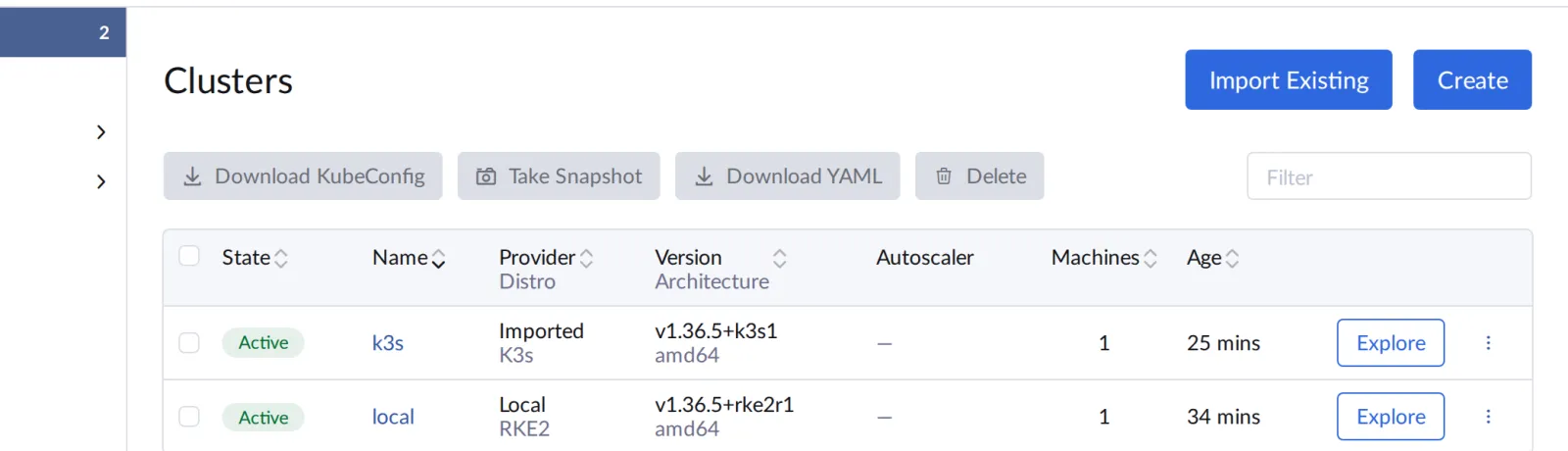
The Provider column distinguishes
Imported and Local. Explore
opens a cluster. Expected: the k3s Cluster Dashboard as in the
figure.
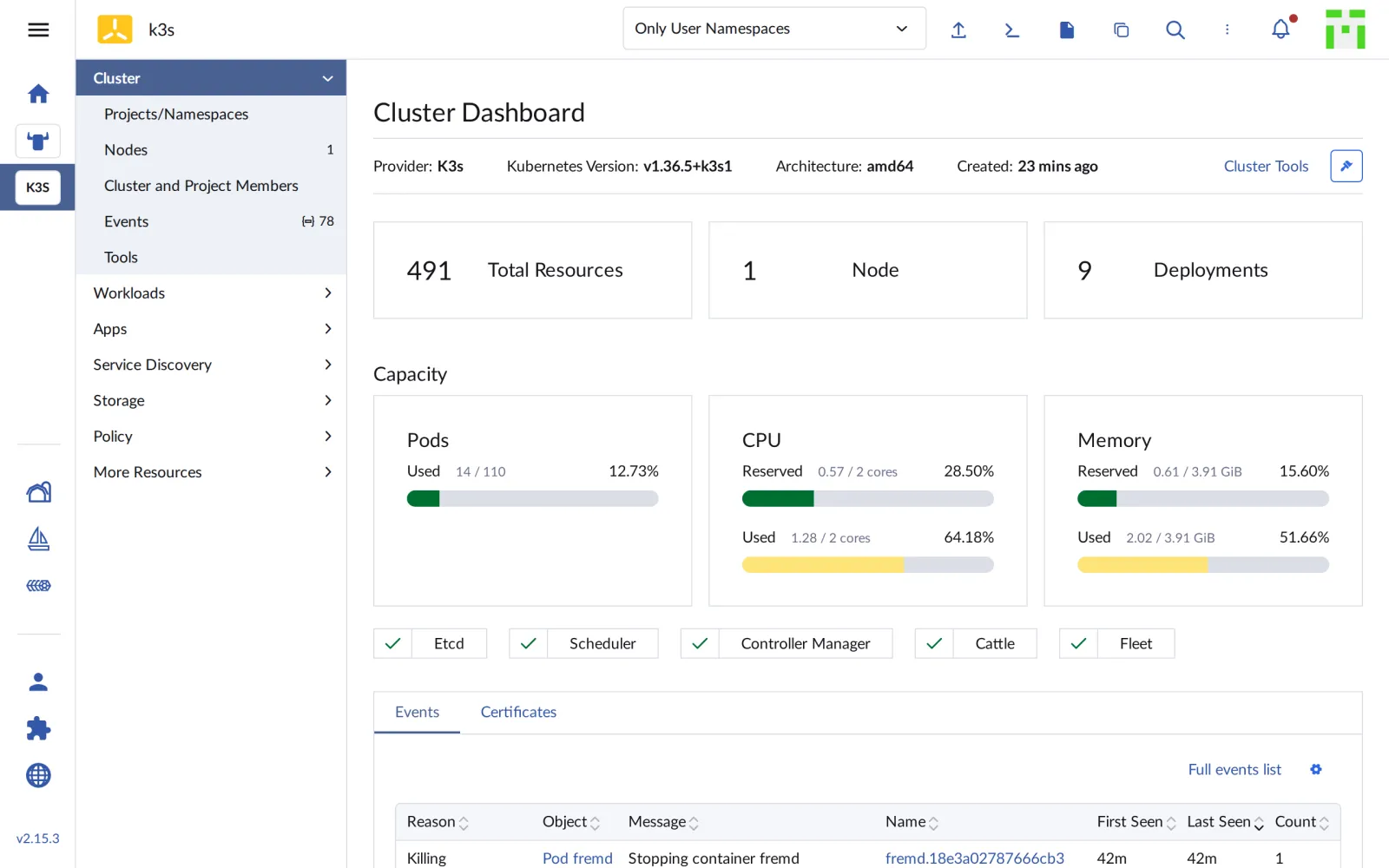
At the top are key metrics, below them the utilization and the state of the components: Etcd, Scheduler, Controller Manager, plus the Cattle and Fleet agents. Under Workloads › Deployments you find notes from Day 2:
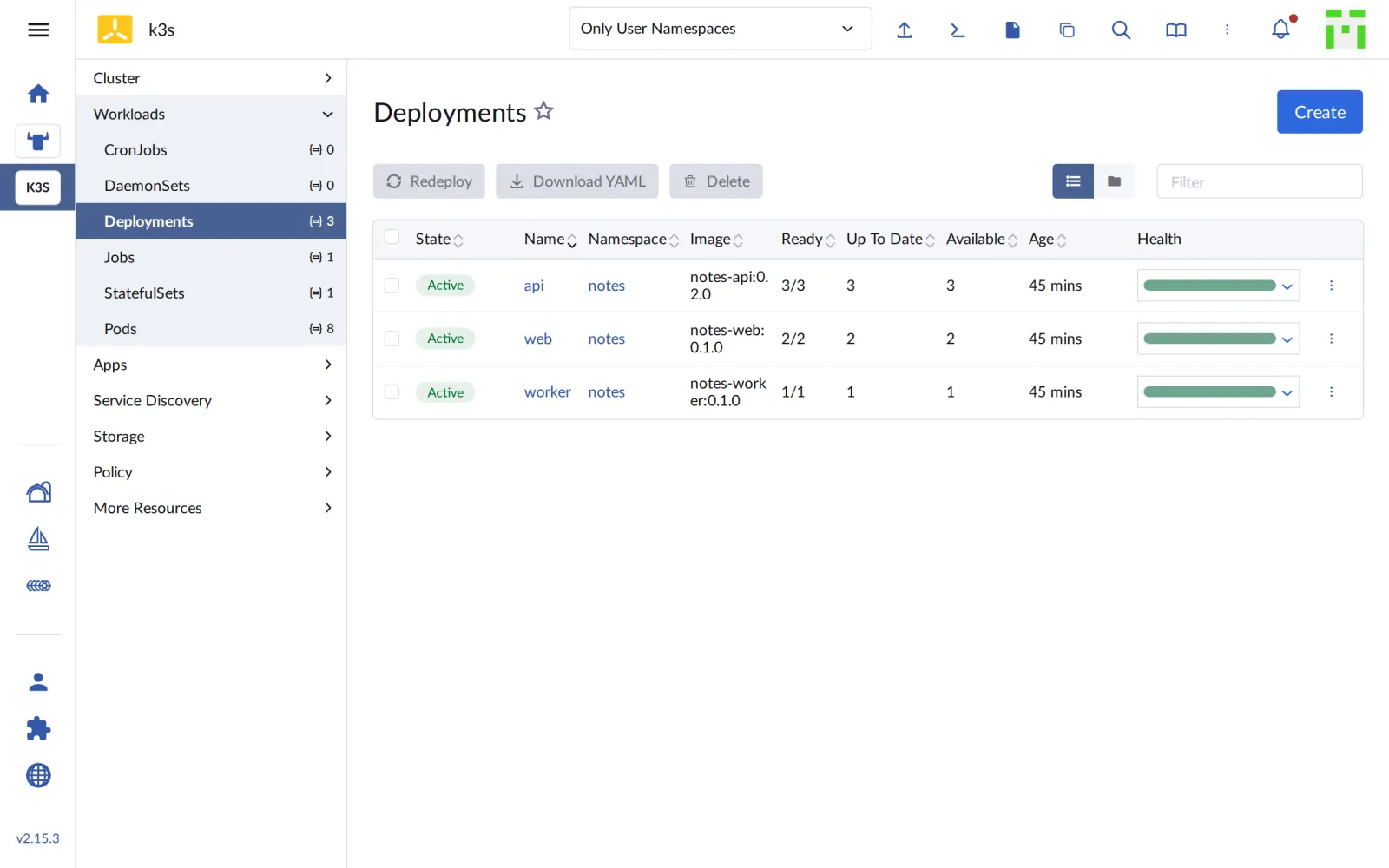
Rancher has changed nothing about notes. It only shows what was there
anyway. From here on you can work in the cluster through the UI just as
you would with kubectl.
Save your progress? Sign up for free
Checkpoint
kubectl -n fleet-default get clusters.provisioning.cattle.ioExpected: k3s with READY true and a
kubeconfig k3s-kubeconfig.
NAME   VERSION   CLUSTER NAME   AGE   KUBECONFIG       READY
k3s              c-m-5pjkcmvg   25m   k3s-kubeconfig   true
kubectl --kubeconfig "$LAB/kube/k3s.yaml" -n cattle-system get deployExpected: agent, webhook and upgrade controller are running, all
1/1.
NAME                        READY   UP-TO-DATE   AVAILABLE   AGE
cattle-cluster-agent        1/1     1            1           8m6s
rancher-webhook             1/1     1            1           2m56s
system-upgrade-controller   1/1     1            1           2m30s
curl -s "http://notes.$K3S.sslip.io/api/notes"; echoExpected: notes keeps running unchanged, with your note from Day 2.
[{"id":"395a46da-…","text":"läuft auf k3s"}]Challenge
What does Rancher see when the agent is missing? Scale
cattle-cluster-agent in the k3s cluster to zero, read the
Ready condition of the management cluster and bring the
agent back.
Hint: The condition is in
.status.conditions of
clusters.management.cattle.io.
Solution
kubectl --kubeconfig "$LAB/kube/k3s.yaml" -n cattle-system \
  scale deploy/cattle-cluster-agent --replicas=0
f='{range .status.conditions[?(@.type=="Ready")]}{.status} {.reason} {.message}{end}'
kubectl get clusters.management.cattle.io "$ID" -o jsonpath="$f"; echo
kubectl --kubeconfig "$LAB/kube/k3s.yaml" -n cattle-system \
  scale deploy/cattle-cluster-agent --replicas=1
kubectl get clusters.management.cattle.io "$ID" -o jsonpath="$f"; echo
Expected (abridged; the second time it may take half a minute until
True):
deployment.apps/cattle-cluster-agent scaled
False Disconnected Cluster agent is not connected
deployment.apps/cattle-cluster-agent scaled
True
After a few seconds without a connection the cluster is
Disconnected, shown in the UI as
Unavailable. notes keeps running undisturbed: the agent
is only Rancher’s wire into the cluster, not part of the data path.
After about 30 seconds the connection is back.
Save your progress? Sign up for free
Enterprise Note
- Outbound only: Because the agent opens the connection, clusters behind firewalls or NAT can be imported. You only need to allow HTTPS to Rancher.
- Trust: In production the Rancher certificate comes
from a CA that the clusters trust. Then
-kis no longer needed, and the agent verifies the server. - Hosted clusters: Rancher imports EKS, AKS and GKE the same way. With cloud credentials it can also create and upgrade them itself.
- Token hygiene: Registration tokens expire after
about 30 days. After a leak the token is regenerated; the running agent
uses its own credentials (
cattle-credentials-…) and is not affected. - Deregistering: If you delete an imported cluster in Rancher, Rancher tries to remove the agents. notes and all other workloads stay in place.