Day 14: Security and Access
Goal: Issue API tokens with an expiry date and scope, make werk reachable even without Rancher, and enforce Pod Security for the entire cluster. · Duration: approx. 60 min · Prerequisite: Day 13
Briefing
- API tokens open Rancher to scripts and CI. Good tokens expire and apply to only one cluster.
- So far every access to werk went through the Rancher proxy. If Rancher goes down, you’re locked out. The Authorized Cluster Endpoint (ACE) allows the direct path to the API server, with the same Rancher tokens.
- With a Pod Security Admission template,
restrictedapplies to all namespaces of a cluster, with fixed exemptions for system namespaces.
 kubectl ─► context werk       ─► Rancher proxy ─► cluster-agent ─► API server werk1
        └─► context werk-werk1 ───────────────────────────────────► API server werk1
                                                     (kube-api-auth checks the token)
Drill 1: A Token for CI
source ~/rancher-lab/setup/env.sh
mkdir -p "$LAB/tag14" && cd "$LAB/tag14"
cp "$LAB/code/tag14/"* .
export KUBECONFIG="$LAB/kube/rancher.yaml"
R="https://rancher.$RANCHER.sslip.io"
H="Authorization: Bearer $(cat "$LAB/rancher-token")"
W_ID=$(kubectl -n fleet-default get clusters.provisioning.cattle.io werk \
  -o jsonpath='{.status.clusterName}')
K_ID=$(kubectl -n fleet-default get clusters.provisioning.cattle.io k3s \
  -o jsonpath='{.status.clusterName}')
( umask 077
  curl -sk -X POST -H "$H" -H 'Content-Type: application/json' "$R/v3/tokens" \
    -d "{\"type\":\"token\",\"description\":\"ci-werk\",\"clusterId\":\"$W_ID\",
         \"ttl\":3600000}" | jq -r .token > ci-token )
T="Authorization: Bearer $(cat ci-token)"
curl -sk -o /dev/null -w 'werk: %{http_code}\n' -H "$T" \
  "$R/k8s/clusters/$W_ID/api/v1/namespaces/notes/pods"
curl -sk -o /dev/null -w 'k3s: %{http_code}\n' -H "$T" \
  "$R/k8s/clusters/$K_ID/api/v1/namespaces/notes/pods"
curl -sk -o /dev/null -w 'Rancher-API: %{http_code}\n' -H "$T" "$R/v3/clusters"
Expected:
werk: 200
k3s: 403
Rancher-API: 401
ttl is given in milliseconds, here one hour.
clusterId restricts the token to werk: access there with
the admin’s permissions, but not on k3s or the Rancher API. For CI, that
is the right scope.
c='DESC:.description,CLUSTER:.clusterName,TTL:.ttl,EXPIRED:.expired'
kubectl get tokens.management.cattle.io -o custom-columns="$c" \
  | grep -E 'DESC|ci-werk|cli'
Expected (abridged):
DESC               CLUSTER        TTL          EXPIRED
rancher-lab cli    <none>         57600000     false
ci-werk            c-m-ct8fr7hj   3600000      false
anna cli           <none>         57600000     false
The login tokens from Days 5 and 6 are valid for 16 hours (57600000 ms). After that you log in again, as on Day 5, Drill 7.
Save your progress? Sign up for free
Drill 2: Who Has Which Keys
Under Account and API Keys (profile picture at the top right) you see all tokens of the logged-in user:
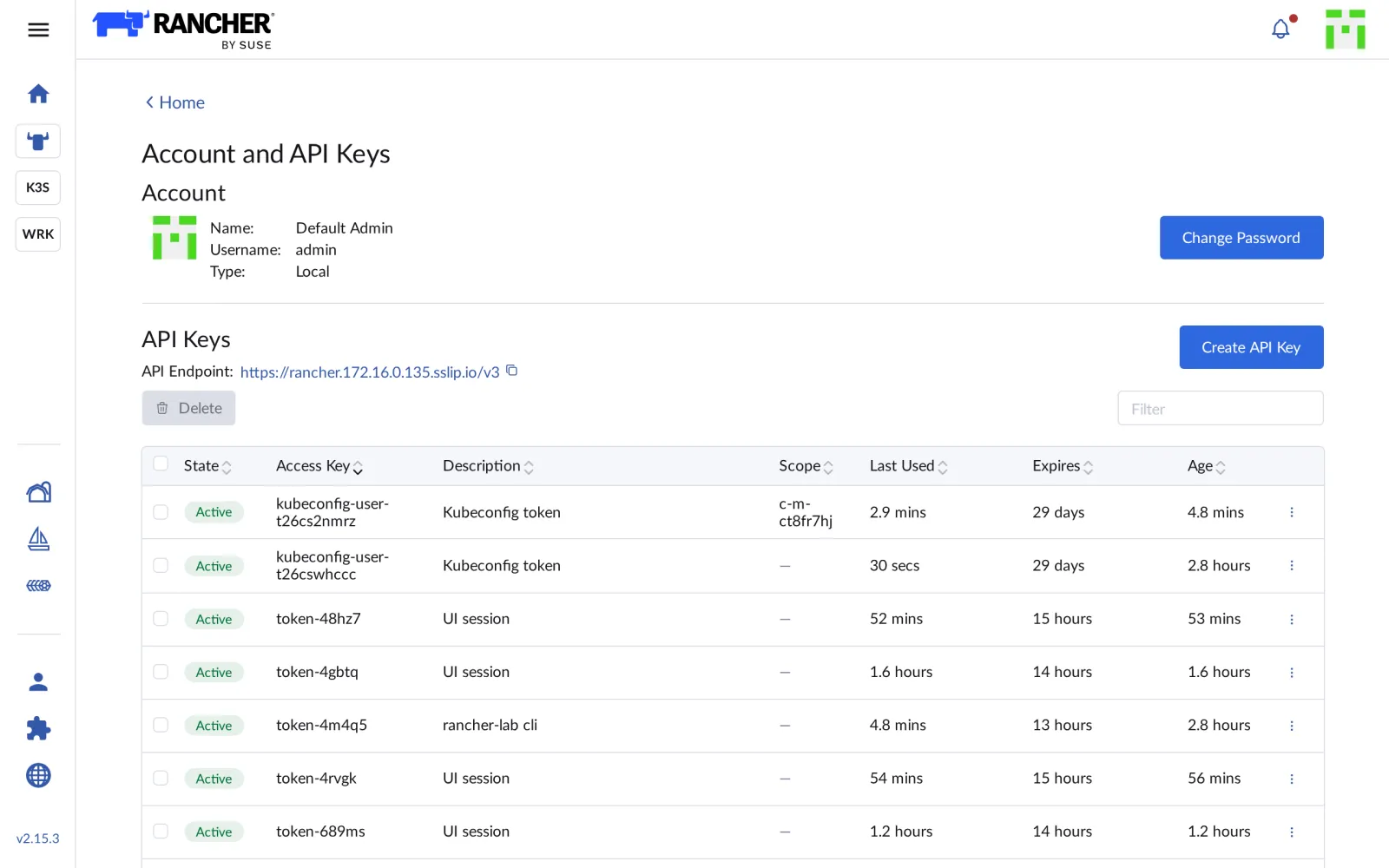
The Kubeconfig token entries stand out: every file
generated with generateKubeconfig or Download
KubeConfig brings its own token, valid for 29 days. Whoever
hands out kubeconfigs hands out keys. You delete the ones no longer
needed here.
Save your progress? Sign up for free
Drill 3: Direct Access to werk
# tag14/werk-zugang.yaml – state at end of Day 14: excerpt for the spec of cluster werk
# Apply with kubectl patch --type merge -p "$(yq -o=json werk-zugang.yaml)".
spec:
  localClusterAuthEndpoint:
    enabled: true                  # direct access to werk1, even without Rancher
  defaultPodSecurityAdmissionConfigurationTemplateName: rancher-restricted
First only the access; Pod Security follows in Drill 5:
kubectl -n fleet-default patch clusters.provisioning.cattle.io werk --type merge \
  -p '{"spec":{"localClusterAuthEndpoint":{"enabled":true}}}'
kubectl --kubeconfig "$LAB/kube/werk.yaml" -n cattle-system rollout status \
  ds/kube-api-auth --timeout=300s
( umask 077
  curl -sk -X POST -H "$H" "$R/v3/clusters/$W_ID?action=generateKubeconfig" \
    | jq -r .config > "$LAB/kube/werk-ace.yaml" )
kubectl --kubeconfig "$LAB/kube/werk-ace.yaml" config get-contexts
grep 'server:' "$LAB/kube/werk-ace.yaml"
Expected (abridged):
cluster.provisioning.cattle.io/werk patched
daemon set "kube-api-auth" successfully rolled out
CURRENT   NAME         CLUSTER      AUTHINFO   NAMESPACE
*         werk         werk         werk
          werk-werk1   werk-werk1   werk
    server: "https://rancher.….sslip.io/k8s/clusters/c-m-ct8fr7hj"
    server: "https://…:6443"
The new kubeconfig has two contexts: werk through
Rancher as before, werk-werk1 directly to the API server of
werk1. For this, Rancher started the service kube-api-auth
on the control plane node and reconfigured the API server so that it
accepts Rancher tokens. That requires an RKE2 restart; until then
werk-werk1 answers with Unauthorized. After
two or three minutes:
kubectl --kubeconfig "$LAB/kube/werk-ace.yaml" --context werk-werk1 get nodesExpected:
NAME    STATUS   ROLES                       AGE    VERSION
werk1   Ready    control-plane,etcd,worker   179m   v1.36.5+rke2r1
werk2   Ready    worker                      174m   v1.36.5+rke2r1
werk3   Ready    worker                      163m   v1.36.5+rke2r1
Save your progress? Sign up for free
Drill 4: Rancher Goes Down
Now the proof. Switch Rancher off:
kubectl -n cattle-system scale deploy rancher --replicas=0
kubectl -n cattle-system wait --for=delete pod -l app=rancher --timeout=120s
A="$LAB/kube/werk-ace.yaml"
kubectl --kubeconfig "$A" --context werk get nodes --request-timeout=10s
kubectl --kubeconfig "$A" --context werk-werk1 -n notes get pods | head -3
curl -s "http://notes.$WERK1.sslip.io/api/notes"; echo
Expected (abridged):
deployment.apps/rancher scaled
pod/rancher-6d985fd969-v7vrd condition met
Error from server (ServiceUnavailable): the server is currently unable to handle the
request (get nodes)
NAME                   READY   STATUS    RESTARTS       AGE
api-5968bfb5cc-5smz4   1/1     Running   11 (12m ago)   81m
api-5968bfb5cc-zzpn8   1/1     Running   9 (11m ago)    81m
[{"id":"c0c70ff3-…","text":"aus dem eigenen Katalog"}]
Nothing works through Rancher anymore, everything works directly, and notes keeps running anyway: Rancher isn’t in the applications’ data path. Bring Rancher back:
kubectl -n cattle-system scale deploy rancher --replicas=1
kubectl -n cattle-system rollout status deploy/rancher --timeout=300s
Expected:
deployment.apps/rancher scaled
…
deployment "rancher" successfully rolled out
After a minute and a half the context werk works again
too.
Save your progress? Sign up for free
Drill 5: Pod Security for the Entire Cluster
So far only the namespace notes protects its pods with
restricted (Day 6). In the namespace default
of werk, everything is still allowed:
W="$LAB/kube/werk.yaml"
o='{"spec":{"containers":[{"name":"priv","image":"busybox:1.37",
    "securityContext":{"privileged":true}}]}}'
kubectl --kubeconfig "$W" -n default run priv --image=busybox:1.37 --restart=Never \
  --dry-run=server --overrides="$o"
kubectl get podsecurityadmissionconfigurationtemplates.management.cattle.io
Expected:
pod/priv created (server dry run)
NAME                 AGE
rancher-privileged   3h41m
rancher-restricted   3h41m
A privileged pod, that is, root on the node, would have gotten
through. Rancher brings two templates; rancher-restricted
sets restricted for all namespaces except a list of system
namespaces:
kubectl -n fleet-default patch clusters.provisioning.cattle.io werk --type merge \
  -p '{"spec":{"defaultPodSecurityAdmissionConfigurationTemplateName":
       "rancher-restricted"}}'
kubectl -n fleet-default wait clusters.provisioning.cattle.io/werk \
  --for=condition=Updated --timeout=600s
kubectl --kubeconfig "$W" -n default run priv --image=busybox:1.37 --restart=Never \
  --dry-run=server --overrides="$o"
kubectl --kubeconfig "$W" -n default run plain --image=busybox:1.37 --restart=Never \
  --dry-run=server
Expected (abridged; if the first attempt still says
created, wait a minute):
cluster.provisioning.cattle.io/werk patched
cluster.provisioning.cattle.io/werk condition met
Error from server (Forbidden): pods "priv" is forbidden: violates PodSecurity
"restricted:latest": privileged (container "priv" must not set
securityContext.privileged=true), allowPrivilegeEscalation …
Error from server (Forbidden): pods "plain" is forbidden: violates PodSecurity
"restricted:latest": allowPrivilegeEscalation != false (container "plain" must set …
Now even a plain busybox pod fails, because it lacks the hardening.
notes keeps running: the chart has been restricted-proof
since “Kubernetes hands-on”, Day 8.
kubectl get podsecurityadmissionconfigurationtemplates.management.cattle.io \
  rancher-restricted -o jsonpath='{.configuration.exemptions.namespaces}' \
  | tr ',' '\n' | grep -E 'longhorn|monitoring|kube-system|local-path'
Expected:
"cattle-monitoring-system"
"kube-system"
"longhorn-system"
Warning:
local-path-storageis not on the list. The local-path helper pods that create new volumes are not hardened and now fail. On werk that no longer matters, since Longhorn is the default. If you keep local-path, add the namespace to a template of your own.
Save your progress? Sign up for free
Checkpoint
kubectl --kubeconfig "$LAB/kube/werk-ace.yaml" config get-contexts -o nameExpected: both contexts.
werk
werk-werk1
kubectl -n fleet-default get clusters.provisioning.cattle.io werk \
-o jsonpath='{.spec.defaultPodSecurityAdmissionConfigurationTemplateName}'; echoExpected: rancher-restricted.
rancher-restrictedcurl -sk -o /dev/null -w '%{http_code}\n' -H "$T" "$R/v3/clusters"Expected: the CI token can’t get at Rancher’s own API.
401Challenge
Prove that a token really expires. Create one for werk that expires after one minute, and query the notes pods once immediately and once after 75 seconds.
Hint: ttl counts in milliseconds.
Solution
( umask 077
  curl -sk -X POST -H "$H" -H 'Content-Type: application/json' "$R/v3/tokens" \
    -d "{\"type\":\"token\",\"description\":\"kurz\",\"clusterId\":\"$W_ID\",
         \"ttl\":60000}" | jq -r .token > kurz-token )
K="Authorization: Bearer $(cat kurz-token)"
P="$R/k8s/clusters/$W_ID/api/v1/namespaces/notes/pods"
curl -sk -o /dev/null -w 'sofort: %{http_code}\n' -H "$K" "$P"
sleep 75
curl -sk -o /dev/null -w 'nach 75 s: %{http_code}\n' -H "$K" "$P"
rm kurz-token
Expected:
sofort: 200
nach 75 s: 403
After expiry, Rancher treats the token as if there were none: the
answer names the user system:unauthenticated. The token
object still shows EXPIRED false for a while; Rancher
cleans up expired tokens with a delay.
Save your progress? Sign up for free
Enterprise Note
- Login: Local users and the admin password are for emergencies. Day to day, everyone logs in through Keycloak, Entra ID, LDAP or GitHub, with group permissions.
- ACE with a load balancer: In production,
localClusterAuthEndpoint.fqdnpoints to a load balancer in front of all control plane nodes, with the certificate incaCerts. - Limit tokens: The settings
auth-token-max-ttl-minutesandkubeconfig-default-token-ttl-minutesset upper limits for all tokens. - Audit:
auditLog.levelin the Rancher chart records every API request: who, when, what. In regulated environments the log goes into a SIEM. - Hardening: The RKE2 CIS profile
(
profile: cis) and Rancher’s compliance scans (CIS Benchmark) check nodes and clusters against recognized standards.