Day 13: Backup and Restore
Goal: Back up Rancher itself with the backup operator and recover from an operator error, then create an etcd snapshot of werk through Rancher and restore it. · Duration: approx. 90 min · Prerequisite: Day 12
Briefing
- There are two levels. Rancher Backups save Rancher’s objects (clusters, users, projects, permissions, settings) in the local cluster. etcd snapshots save the complete state of a managed cluster.
- Neither of them backs up data in volumes. For that there is
pg_dump(Day 10) or Longhorn backups. - Rancher Backups run as an operator with CRDs:
Backup,Restore,ResourceSet. - Rancher requests etcd snapshots for werk through fields in the cluster object; the same fields also start the restore.
 local cluster                              Cluster werk
 rancher-backup ─► Backup (PV, tar.gz)       etcd on werk1
   Restore ◄── file from the backup            ▲ snapshot / restore
 Cluster werk: rkeConfig.etcdSnapshotCreate ───┘
               rkeConfig.etcdSnapshotRestore
Drill 1: The Backup Operator
The backup operator also comes from rancher-charts, this
time into the local cluster. The backups land on a volume:
source ~/rancher-lab/setup/env.sh
mkdir -p "$LAB/tag13" && cd "$LAB/tag13"
cp "$LAB/code/tag13/"* .
export KUBECONFIG="$LAB/kube/rancher.yaml"
H="Authorization: Bearer $(cat "$LAB/rancher-token")"
API="https://rancher.$RANCHER.sslip.io/v1/catalog.cattle.io.clusterrepos/rancher-charts"
VER=110.0.3+up11.0.4
curl -sk -X POST -H "$H" -H 'Content-Type: application/json' "$API?action=install" \
  -d "{\"charts\":[
        {\"chartName\":\"rancher-backup-crd\",\"version\":\"$VER\",
         \"releaseName\":\"rancher-backup-crd\",\"values\":{}},
        {\"chartName\":\"rancher-backup\",\"version\":\"$VER\",
         \"releaseName\":\"rancher-backup\",
         \"values\":{\"persistence\":{\"enabled\":true,\"storageClass\":\"local-path\",
                                      \"size\":\"2Gi\"}}}],
      \"namespace\":\"cattle-resources-system\",\"wait\":true,\"timeout\":\"600s\"}" \
  | jq -c '{operationName}'
kubectl -n cattle-resources-system rollout status deploy/rancher-backup --timeout=300s
kubectl get resourcesets.resources.cattle.io
Expected (abridged, names, IPs and times differ on your machine):
{"operationName":"helm-operation-v27bl"}
deployment "rancher-backup" successfully rolled out
NAME                         AGE
rancher-resource-set-basic   45s
rancher-resource-set-full    45s
Without the /k8s/clusters/… part in the address, the API
talks to the local cluster. The two ResourceSets define what gets backed
up: basic the Rancher objects, full all
Secrets in addition. A full backup should be encrypted.
Save your progress? Sign up for free
Drill 2: A Backup
# tag13/backup.yaml – state at end of Day 13: Rancher backs itself up
apiVersion: resources.cattle.io/v1
kind: Backup
metadata:
  name: vor-dem-unfall
spec:
  resourceSetName: rancher-resource-set-basic   # Rancher objects without the apps' Secrets
kubectl apply -f backup.yaml
kubectl wait backups.resources.cattle.io/vor-dem-unfall --for=condition=Ready \
--timeout=300s
kubectl get backups.resources.cattle.io
F=$(kubectl get backups.resources.cattle.io vor-dem-unfall \
-o jsonpath='{.status.filename}')
kubectl -n cattle-resources-system exec deploy/rancher-backup -- ls -l /var/lib/backupsExpected (abridged):
backup.resources.cattle.io/vor-dem-unfall created
backup.resources.cattle.io/vor-dem-unfall condition met
NAME             LOCATION   TYPE       LATEST-BACKUP                         …   STATUS
vor-dem-unfall   PV         One-time   vor-dem-unfall-…-16-49-15Z.tar.gz   Completed
-rw-r--r-- 1 bro bro 1074841 Oct 31 16:49 vor-dem-unfall-e813ed2a-…-16-49-15Z.tar.gz
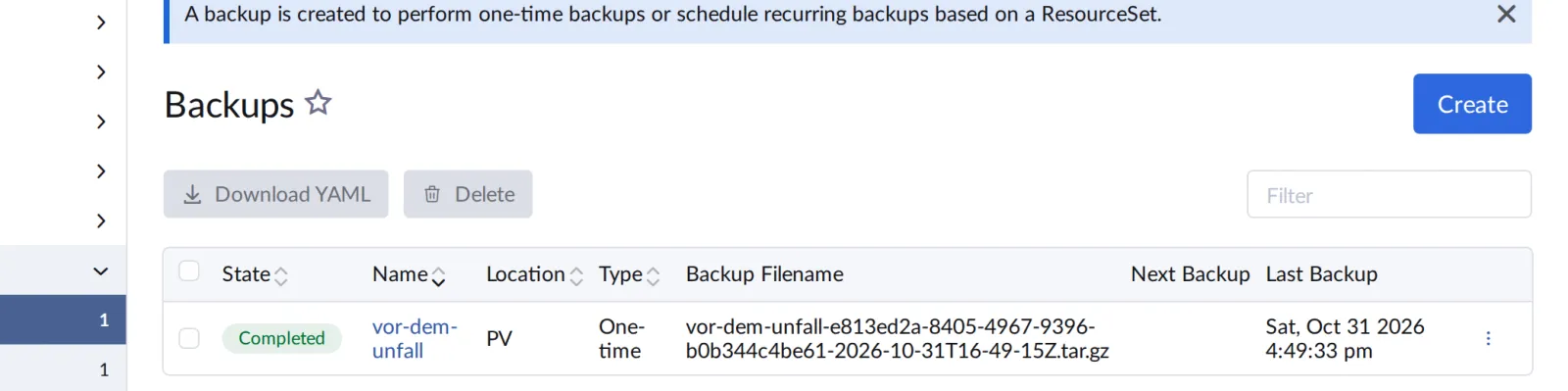
One megabyte for all of Rancher. In the UI the backup is listed in the local cluster under Rancher Backups:
Save your progress? Sign up for free
Drill 3: Accident and Restore
Someone accidentally deletes anna’s membership in the project notes (Day 6):
W_ID=$(kubectl -n fleet-default get clusters.provisioning.cattle.io werk \
  -o jsonpath='{.status.clusterName}')
kubectl -n "$W_ID-p-notes" delete projectroletemplatebindings.management.cattle.io \
  anna-member
kubectl --kubeconfig "$LAB/kube/werk-anna.yaml" -n notes get pods
Expected (abridged):
projectroletemplatebinding.management.cattle.io "anna-member" deleted from c-m-…
Error from server (Forbidden): … User "u-8k6lh" cannot get resource "clusters" …
The restore brings the objects back from the file.
prune: false leaves everything in place that was added
after the backup:
# tag13/restore.yaml – state at end of Day 13: bring Rancher objects back from the backup
# Template: Drill 3 replaces BACKUP_FILE with the file name from the backup.
apiVersion: resources.cattle.io/v1
kind: Restore
metadata:
  name: nach-dem-unfall
spec:
  backupFilename: BACKUP_FILE
  prune: false        # don't delete anything that was added after the backup
sed -i '' "s/BACKUP_FILE/$F/" restore.yaml
kubectl apply -f restore.yaml
kubectl wait restores.resources.cattle.io/nach-dem-unfall --for=condition=Ready \
--timeout=600s
kubectl -n "$W_ID-p-notes" get projectroletemplatebindings.management.cattle.io \
-o custom-columns=NAME:.metadata.name,ROLE:.roleTemplateName
kubectl -n cattle-system rollout status deploy/rancher --timeout=300s
kubectl --kubeconfig "$LAB/kube/werk-anna.yaml" -n notes get pods | head -3Expected (abridged):
restore.resources.cattle.io/nach-dem-unfall created
restore.resources.cattle.io/nach-dem-unfall condition met
NAME          ROLE
anna-member   project-member
deployment "rancher" successfully rolled out
NAME                   READY   STATUS    RESTARTS      AGE
api-5968bfb5cc-5smz4   1/1     Running   4 (58m ago)   58m
…
The restore takes a good minute. Afterwards Rancher restarts so that
it reads all objects fresh; for about a minute the UI is gone and anna
gets ServiceUnavailable. Then her access is back.
Save your progress? Sign up for free
Drill 4: An etcd Snapshot of werk
Rancher requests a snapshot when the number generation
changes. That is exactly what the Snapshot Now button
does too:
kubectl -n fleet-default patch clusters.provisioning.cattle.io werk --type merge \
  -p '{"spec":{"rkeConfig":{"etcdSnapshotCreate":{"generation":1}}}}'
c='NAME:.metadata.name,FILE:.snapshotFile.name,SIZE:.snapshotFile.size'
c+=',STATUS:.snapshotFile.status'
kubectl -n fleet-default get etcdsnapshots.rke.cattle.io -o custom-columns="$c"
Expected (abridged, after a good minute):
cluster.provisioning.cattle.io/werk patched
NAME                                FILE                         SIZE       STATUS
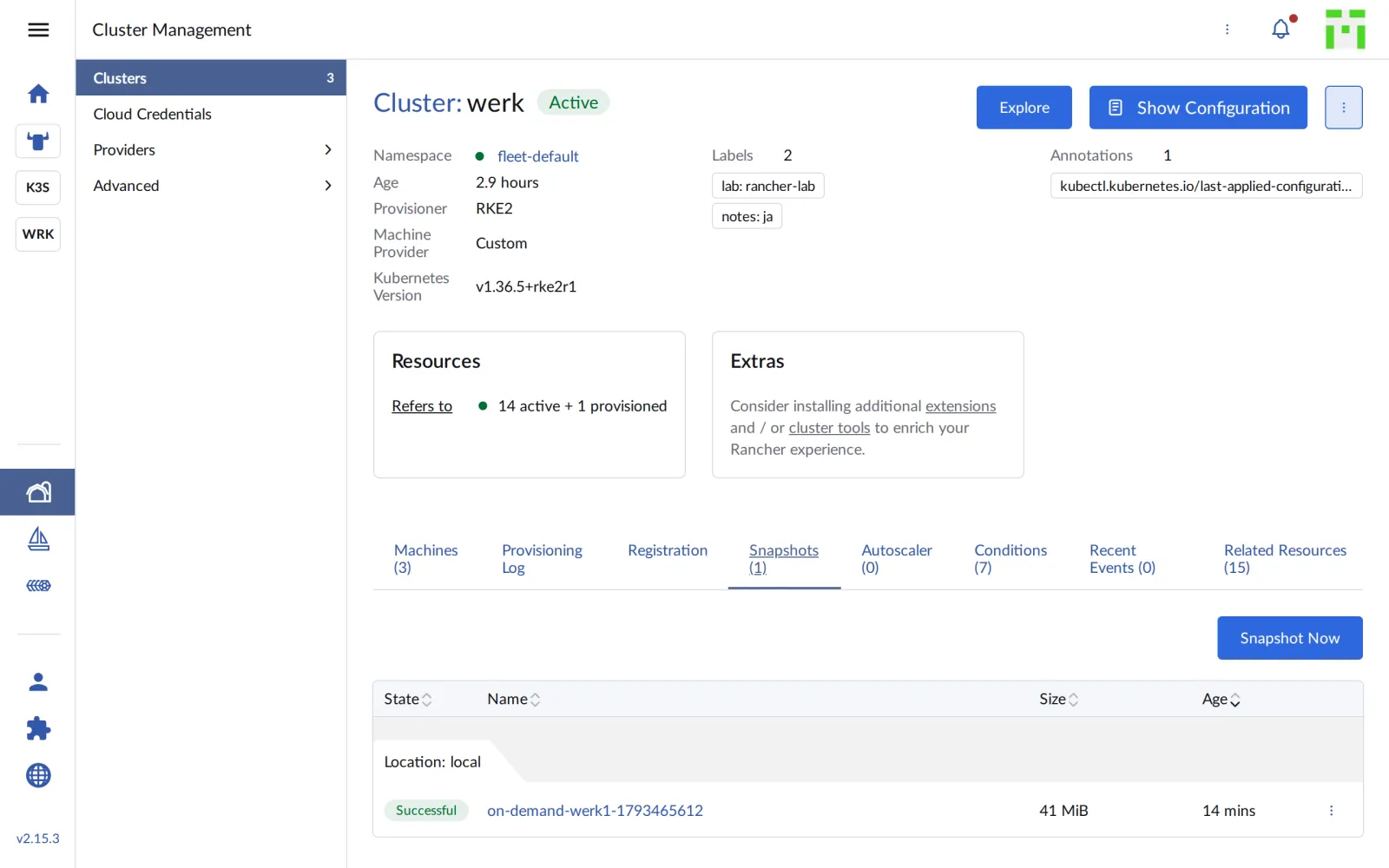
werk-local-on-demand-werk1-17934…   on-demand-werk1-1793465612   43094048   successful
The snapshot lives on werk1 under
/var/lib/rancher/rke2/server/db/snapshots, just as in
“Kubernetes hands-on”, Day 14, only this time Rancher requested it. On
the werk detail page it is listed under Snapshots:
Save your progress? Sign up for free
Drill 5: The Restore
After the snapshot, create something that the restore should remove again, and start the measurement loop against notes in a second terminal (Day 10, Drill 6):
kubectl --kubeconfig "$LAB/kube/werk.yaml" -n default \
  create configmap nach-dem-snapshot \
  --from-literal=zeit="$(date +%T)"
S=$(kubectl -n fleet-default get etcdsnapshots.rke.cattle.io \
  -o jsonpath='{.items[0].metadata.name}')
kubectl -n fleet-default patch clusters.provisioning.cattle.io werk --type merge \
  -p "{\"spec\":{\"rkeConfig\":{\"etcdSnapshotRestore\":{\"name\":\"$S\",
       \"generation\":1,\"restoreRKEConfig\":\"none\"}}}}"
f='{range .status.conditions[?(@.type=="Updated")]}{.status} {.message}{end}'
kubectl -n fleet-default get clusters.provisioning.cattle.io werk -o jsonpath="$f"; echo
Expected (abridged):
configmap/nach-dem-snapshot created
cluster.provisioning.cattle.io/werk patched
Unknown waiting for etcd restore
Rancher stops RKE2 on all nodes, restores the snapshot on werk1 and
starts the nodes again one after the other.
restoreRKEConfig: none leaves the cluster configuration
untouched; only etcd is reset. After about seven minutes:
kubectl -n fleet-default wait clusters.provisioning.cattle.io/werk \
  --for=condition=Ready --timeout=900s
kubectl --kubeconfig "$LAB/kube/werk.yaml" -n default get configmap nach-dem-snapshot
kubectl --kubeconfig "$LAB/kube/werk.yaml" -n notes get pods
Expected (abridged):
cluster.provisioning.cattle.io/werk condition met
Error from server (NotFound): configmaps "nach-dem-snapshot" not found
NAME                      READY   STATUS             RESTARTS        AGE
api-5968bfb5cc-5smz4      0/1     CrashLoopBackOff   9 (2m14s ago)   68m
api-5968bfb5cc-zzpn8      0/1     CrashLoopBackOff   7 (3s ago)      68m
db-0                      0/1     Unknown            0               29m
…
The ConfigMap is gone; the restore worked. But db-0 is
stuck: according to etcd, the Longhorn volume is still attached to the
node on which db-0 ran before the restore.
kubectl --kubeconfig "$LAB/kube/werk.yaml" -n notes describe pod db-0 \
  | grep FailedAttachVolume
kubectl --kubeconfig "$LAB/kube/werk.yaml" -n notes delete pod db-0
kubectl --kubeconfig "$LAB/kube/werk.yaml" -n notes wait --for=condition=Ready \
  pod/db-0 --timeout=300s
curl -s "http://notes.$WERK1.sslip.io/api/notes"; echo
Expected (abridged; the api needs a few more minutes afterwards):
  Warning  FailedAttachVolume  8s  attachdetach-controller  Waiting for detach for …
"pvc-f51c8b9d-…" Volume is already exclusively attached to one node, waiting on de…
pod "db-0" deleted from notes namespace
pod/db-0 condition met
[{"id":"c0c70ff3-…","text":"aus dem eigenen Katalog"}]
db-0 comes back after just under a minute; meanwhile the
api has worked itself up into a long restart backoff and follows a few
minutes later. The data is there: an etcd restore resets Kubernetes
objects, not the volume. In total, notes was down for around ten
minutes. An etcd restore is a tool for emergencies, not for trifles like
a deleted ConfigMap.
Save your progress? Sign up for free
Checkpoint
kubectl get backups.resources.cattle.io vor-dem-unfallExpected: status Completed.
NAME             LOCATION   TYPE       LATEST-BACKUP            …   STATUS
vor-dem-unfall   PV         One-time   vor-dem-unfall-…tar.gz   …   Completed
kubectl -n fleet-default get etcdsnapshots.rke.cattle.io -o custom-columns="$c"Expected: the snapshot from werk1, successful.
NAME                                FILE                         SIZE       STATUS
werk-local-on-demand-werk1-17934…   on-demand-werk1-1793465612   43094048   successful
kubectl -n fleet-default get clusters.provisioning.cattle.io werk \
-o jsonpath='{.status.conditions[?(@.type=="Ready")].status}'; echoExpected: True.
TrueChallenge
A one-time backup only helps if someone remembers it. Have Rancher back itself up every five minutes and keep only the last three backups.
Hint: A Backup knows
schedule (cron syntax) and retentionCount.
Solution
cat > backup-zeitplan.yaml <<'EOF'
apiVersion: resources.cattle.io/v1
kind: Backup
metadata:
  name: alle-5-minuten
spec:
  resourceSetName: rancher-resource-set-basic
  schedule: "*/5 * * * *"
  retentionCount: 3
EOF
kubectl apply -f backup-zeitplan.yaml
kubectl get backups.resources.cattle.io
kubectl get backups.resources.cattle.io alle-5-minuten \
  -o jsonpath='{.status.nextSnapshotAt}'; echo
Expected (abridged, after about half a minute):
backup.resources.cattle.io/alle-5-minuten created
NAME             LOCATION   TYPE        LATEST-BACKUP                  …   STATUS
alle-5-minuten   PV         Recurring   alle-5-minuten-…-17-10-37Z.tar.gz   Completed
vor-dem-unfall   PV         One-time    vor-dem-unfall-…-16-49-15Z.tar.gz   Completed
2026-10-31T17:15:00Z
A recurring backup backs up once immediately and then at the cron interval. The operator itself deletes files older than the last three. In production a daily interval is common, with a target outside the cluster.
Save your progress? Sign up for free
Enterprise Note
- Target outside: Backups and etcd snapshots belong on S3 or other storage outside the clusters. A backup on the volume of the cluster that has just failed doesn’t help.
- Encrypt: The full ResourceSet contains Secrets. An
EncryptionConfigurationSecret for the operator encrypts the backups. - Moving Rancher: With a backup, Rancher can be restored onto a new local cluster, for example after a total failure. The docs describe the order (cert-manager, restore, then the Rancher chart).
- Automatic etcd snapshots: In the cluster object,
rkeConfig.etcddefines the schedule and retention of the snapshots, as in “Kubernetes hands-on”, Day 14, only centrally. - Practice: Restore is the part that doesn’t work in an emergency if nobody has practiced it. Schedule restore tests firmly.