Day 6: Advanced Templates
Goal: You build a template with catalog fields, conditions, loops and a custom action, test it with a dry run and control tasks via the API. · Duration: approx. 150 min · Prerequisite: Day 5
Briefing
- The Template Editor (a tab under Create) shows forms live and runs templates as a dry run: files and log without a repo or catalog entry.
- Field extensions like
EntityPickerandOwnerPickerfetch values from the catalog. Steps supportif:(condition) andeach:(loop). - If an action is missing, you write it yourself: a small
backend module with
createTemplateAction. - Everything the wizard can do also works via the API:
scaffolder/v2/….
Wizard / API ──► Task
                  fetch:template ─► fetch:template:file (each) ─► fetch:plain (if)
                  ─► debug:log ─► kranich:ticket:create ─► publish:gitea ─► register
Template Editor ──► Dry run: the same steps, publish and register skipped
Drill 1: Looking Up Actions and Filters
The starting point is the end of Day 5: the Gitea provider and
publish:gitea are installed, and
kranich/templates delivers the template
node-service (with the parameter port from the
challenge). Before you write a template, you check which actions and
Nunjucks filters exist:
source ~/backstage-lab/setup/env.sh
~/backstage-lab/setup/portal.sh start
bs scaffolder/v2/actions | jq -r '.[].id' | wc -l
bs scaffolder/v2/actions | jq -r '.[].id' | grep -E '^(fetch|debug|publish:gitea)'
bs scaffolder/v2/templating-extensions | jq -r '.filters | keys[]'
Expected:
✔ Backstage läuft: http://localhost:3000 (Backend http://localhost:7007)
      40
debug:log
debug:wait
fetch:plain
fetch:plain:file
fetch:template
fetch:template:file
publish:gitea
parseEntityRef
parseRepoUrl
pick
projectSlug
On top of that come the built-in Nunjucks filters such as
dump, join or lower. The inputs
of an action are in its JSON Schema:
bs scaffolder/v2/actions | jq -r '.[] | select(.id=="fetch:template:file")
  | .schema.input | "Pflicht: \(.required | join(" "))",
    "Alle:    \(.properties | keys | join(" "))"'
Expected:
Pflicht: url targetPath
Alle:    cookiecutterCompat lstripBlocks replace targetPath token trimBlocks url values
(“Pflicht” means “required”, “Alle” means “all”.) You see the same in the GUI: Create → Actions tab. On the left is the list with a search field; after a click, the Input and Output tables appear on the right. The Templating Extensions tab next to it lists the filters with examples.
Save your progress? Sign up for free
Drill 2: A Custom Action as a Backend Module
Kranich wants an onboarding ticket for every new service. There is no
ticket system in the lab. So the action writes a file
TICKET.md into the repo and outputs a ticket number.
yarn new generates the scaffolding and registers it in the
backend:
~/backstage-lab/setup/portal.sh stop
cd ~/backstage-lab/portal
yarn new --select scaffolder-backend-module --option moduleId=kranich
grep -n kranich packages/backend/src/index.ts
Expected (shortened):
  templating    plugins/scaffolder-backend-module-kranich ✔
  backend       adding @internal/backstage-plugin-scaffolder-backend-module-kranich ✔
  executing     yarn install ✔
  executing     yarn lint --fix ✔
🎉  Successfully created scaffolder-backend-module
74:backend.add(import('@internal/backstage-plugin-scaffolder-backend-module-kranich'));
The scaffolding contains an example action acme:example.
Replace it with your own action:
cd plugins/scaffolder-backend-module-kranich/src
rm actions/example.ts actions/example.test.ts
cat > actions/ticket.ts <<'EOF'
import { resolveSafeChildPath } from '@backstage/backend-plugin-api';
import { createTemplateAction } from '@backstage/plugin-scaffolder-node';
import { promises as fs } from 'node:fs';
import { setTimeout as sleep } from 'node:timers/promises';

// kranich:ticket:create – simulates a ticket system: writes TICKET.md
export function createTicketAction() {
  return createTemplateAction({
    id: 'kranich:ticket:create',
    description: 'Legt ein Onboarding-Ticket an (Lab: Datei TICKET.md)',
    supportsDryRun: true,
    schema: {
      input: {
        title: z => z.string({ description: 'Titel des Tickets' }),
        team: z => z.string({ description: 'Zuständiges Team (Entity-Ref)' }),
        token: z => z.string({ description: 'API-Token' }).optional(),
        delaySeconds: z =>
          z.number({ description: 'Simulierte Antwortzeit' }).default(0),
      },
      output: {
        ticketId: z => z.string({ description: 'Nummer des Tickets' }),
      },
    },
    async handler(ctx) {
      const { title, team, token, delaySeconds } = ctx.input;
      ctx.logger.info(`Ticketsystem: Token ${token ? 'gesetzt' : 'fehlt'}`);
      // demo only: the Scaffolder masks secrets in the log
      if (token) ctx.logger.info(`Token zur Kontrolle: ${token}`);
      await sleep(delaySeconds * 1000, undefined, { signal: ctx.signal });

      const ticketId = ctx.isDryRun ? 'KRA-DRYRUN' : `KRA-${Date.now() % 100000}`;
      const file = resolveSafeChildPath(ctx.workspacePath, 'TICKET.md');
      await fs.writeFile(file, `# ${ticketId}: ${title}\n\nTeam: ${team}\n`);
      ctx.logger.info(`Ticket ${ticketId} für ${team} angelegt`);
      ctx.output('ticketId', ticketId);
    },
  });
}
EOF
cat > module.ts <<'EOF'
import { createBackendModule } from '@backstage/backend-plugin-api';
import { scaffolderActionsExtensionPoint } from '@backstage/plugin-scaffolder-node';
import { createTicketAction } from './actions/ticket';

export const scaffolderModule = createBackendModule({
  pluginId: 'scaffolder',
  moduleId: 'kranich',
  register({ registerInit }) {
    registerInit({
      deps: { scaffolderActions: scaffolderActionsExtensionPoint },
      async init({ scaffolderActions }) {
        scaffolderActions.addActions(createTicketAction());
      },
    });
  },
});
EOF
The key parts:
| Part | Meaning |
|---|---|
schema.input |
Zod schemas; the JSON Schema in the Actions tab is generated from them |
supportsDryRun |
without true, a dry run skips the action |
ctx.signal |
is triggered when the task is canceled (Drill 8) |
resolveSafeChildPath |
prevents paths like ../../etc outside the
workspace |
A unit test is in the companion code. It uses
createMockActionContext and a temporary directory:
C=~/backstage-lab/code/tag06/scaffolder-backend-module-kranich
cp $C/src/actions/ticket.test.ts actions/
cd .. && yarn test --watchAll=false && yarn lint
cd ~/backstage-lab/portal && yarn tsc && ~/backstage-lab/setup/portal.sh start
bs scaffolder/v2/actions | jq -c '.[] | select(.id|startswith("kranich"))
  | {id, required: .schema.input.required}'
Expected (shortened):
PASS src/actions/ticket.test.ts
  kranich:ticket:create
    ✓ schreibt TICKET.md und gibt die Ticketnummer aus (8 ms)
Tests:       1 passed, 1 total
✔ Backstage läuft: http://localhost:3000 (Backend http://localhost:7007)
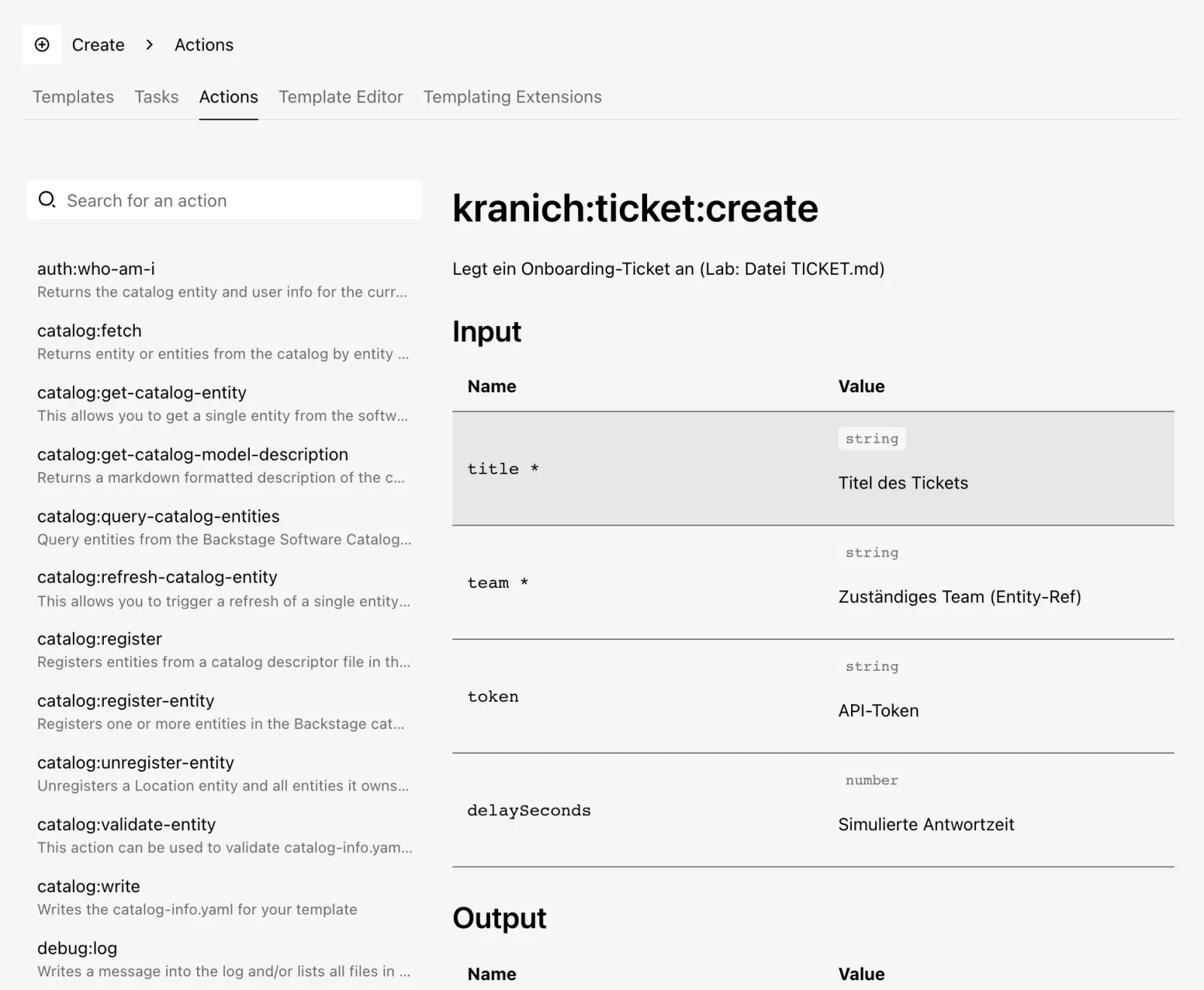
{"id":"kranich:ticket:create","required":["title","team"]}- Click Create in the sidebar, then the Actions tab.
- Click kranich:ticket:create in the list.
- Expected: on the right the description, Input with
title *,team *,token,delaySecondsand below it Output, as in the figure.
Save your progress? Sign up for free
Drill 3: The Template kranich-service
The new template uses everything at once. First get the template repo and the finished helper files from the companion code:
mkdir -p ~/backstage-lab/tag06 && cd ~/backstage-lab/tag06
git clone -q http://lab-admin:[email protected]:3300/kranich/templates.git
cd templates
cp -R ~/backstage-lab/code/tag06/templates/kranich-service .
find kranich-service -type f | sort
Expected:
kranich-service/ci/ci.yaml
kranich-service/skeleton/README.md
kranich-service/skeleton/catalog-info.yaml
kranich-service/skeleton/src/index.js
kranich-service/template.yaml
kranich-service/vorlagen/config.json
The template for the environments (vorlagen) shows
Nunjucks logic with {% if %} and an inline
if:
cat kranich-service/vorlagen/config.jsonExpected:
{
  "service": "${{ values.name }}",
  "umgebung": "${{ values.umgebung }}",
  "port": {% if values.umgebung == 'prod' %}80{% else %}8080{% endif %},
  "logLevel": "${{ 'warn' if values.umgebung == 'prod' else 'debug' }}"
}
ci/ci.yaml is a Forgejo Actions workflow with
${{ forgejo.ref_name }}. fetch:plain copies it
unchanged; fetch:template would replace the expression and
break the workflow. Now the template definition. It is already in the
folder; here is the complete content so you can follow along:
apiVersion: scaffolder.backstage.io/v1beta3
kind: Template
metadata:
  name: kranich-service
  title: Kranich-Service
  description: Node.js-Service mit System, Umgebungen und optionaler CI
  tags: [nodejs, kranich]
spec:
  owner: plattform
  type: service
  parameters:
    - title: Service
      required: [name, description, system, owner]
      properties:
        name:
          title: Name
          type: string
          description: Name der Component (z. B. lager-scanner)
          ui:field: EntityNamePicker
          ui:autofocus: true
        description:
          title: Beschreibung
          type: string
        system:
          title: System
          type: string
          description: Zu welchem System gehört der Service?
          ui:field: EntityPicker
          ui:options:
            catalogFilter:
              kind: System
            defaultKind: System
            allowArbitraryValues: false
        owner:
          title: Owner
          type: string
          ui:field: OwnerPicker
          ui:options:
            catalogFilter:
              kind: Group
              spec.type: team
    - title: Optionen
      properties:
        umgebungen:
          title: Umgebungen
          description: Je Umgebung entsteht eine Datei im Ordner config
          type: array
          items:
            type: string
            enum: [dev, test, prod]
          uniqueItems: true
          default: [dev]
          ui:widget: checkboxes
        ci:
          title: Forgejo-Actions-Workflow anlegen
          type: boolean
          default: false
        ticketToken:
          title: Token für das Ticketsystem
          type: string
          ui:field: Secret
    - title: Repository
      required: [repoUrl]
      properties:
        repoUrl:
          title: Ablageort
          type: string
          ui:field: RepoUrlPicker
          ui:options:
            allowedHosts: ['127.0.0.1:3300']
            allowedOwners: [kranich]
  steps:
    - id: fetch
      name: Skeleton füllen
      action: fetch:template
      input:
        url: ./skeleton
        values:
          name: ${{ parameters.name }}
          description: ${{ parameters.description }}
          owner: ${{ parameters.owner }}
          system: ${{ parameters.system }}
    - id: config
      name: Konfiguration je Umgebung
      each: ${{ parameters.umgebungen }}
      action: fetch:template:file
      input:
        url: ./vorlagen/config.json
        targetPath: config/${{ each.value }}.json
        values:
          name: ${{ parameters.name }}
          umgebung: ${{ each.value }}
    - id: ci
      name: CI-Workflow kopieren
      if: ${{ parameters.ci }}
      action: fetch:plain
      input:
        url: ./ci
        targetPath: .forgejo/workflows
    - id: log
      name: Eingaben prüfen
      action: debug:log
      input:
        message: >-
          Repo ${{ parameters.repoUrl | parseRepoUrl | pick('repo') }}
          für Team ${{ parameters.owner | parseEntityRef | pick('name') }}
        listWorkspace: true
    - id: ticket
      name: Onboarding-Ticket anlegen
      action: kranich:ticket:create
      input:
        title: Onboarding ${{ parameters.name }}
        team: ${{ parameters.owner }}
        token: ${{ secrets.ticketToken }}
        delaySeconds: 10
    - id: publish
      name: Repo in Forgejo anlegen
      action: publish:gitea
      input:
        repoUrl: ${{ parameters.repoUrl }}
        description: ${{ parameters.description }}
        defaultBranch: main
        gitCommitMessage: Erzeugt aus Template kranich-service
        gitAuthorName: Backstage Scaffolder
        gitAuthorEmail: [email protected]
    - id: register
      name: Im Katalog registrieren
      action: catalog:register
      input:
        repoContentsUrl: ${{ steps.publish.output.repoContentsUrl }}
        catalogInfoPath: catalog-info.yaml
  output:
    links:
      - title: Repository in Forgejo
        url: ${{ steps.publish.output.repoContentsUrl }}
      - title: Im Katalog öffnen
        icon: catalog
        entityRef: ${{ steps.register.output.entityRef }}
    text:
      - title: Nächste Schritte
        content: |
          **${{ parameters.name }}** ist angelegt.

          - Repo: `${{ parameters.repoUrl | projectSlug }}`
          - Umgebungen: ${{ parameters.umgebungen | join(', ') }}
          - CI-Workflow: ${{ 'ja' if parameters.ci else 'nein' }}
          - Ticket: ${{ steps.ticket.output.ticketId }}
What is new compared to Day 5:
| Part | Effect |
|---|---|
EntityNamePicker |
checks the format of an entity name right in the form |
EntityPicker + catalogFilter |
a selection list of all systems; returns
system:default/… |
each: |
the step runs once per list entry; the value is in
each.value |
if: |
the step only runs if the expression is true, otherwise “Skipping” |
ui:field: Secret |
the value ends up in secrets.ticketToken, not in the
parameters |
output.text |
Markdown box on the task page |
Into the repo with it, plus one line in the location file:
echo '    - ./kranich-service/template.yaml' >> templates.yaml
git add -A
git -c user.name="Lab Admin" -c [email protected] \
  commit -qm "Template kranich-service" && git push -q origin main
bs catalog/refresh -X POST -H 'Content-Type: application/json' \
  -d '{"entityRef":"location:default/kranich-templates"}' -w '%{http_code}\n'
sleep 20
bs 'catalog/entities?filter=kind=template' | jq -r '.[].metadata.name'
Expected:
200
node-service
kranich-service
Tip:
EntityNamePickeronly checks the format, not whether the name is already taken in the catalog. For that kind of check you need a custom field extension in the frontend (Day 11).
Save your progress? Sign up for free
Drill 4: Building the Form Live in the Template Editor
- Click Create and then the Template Editor tab. Four cards appear: Load Template Directory, Create New Template, Template Form Playground and Custom Field Explorer.
- Click Template Form Playground, then TEMPLATES at the top, and choose Kranich-Service.
- On the left is the
parameterspart as YAML, on the right the finished form. Enterlager-etikettenunder Name. - Expected: the view as in the figure.
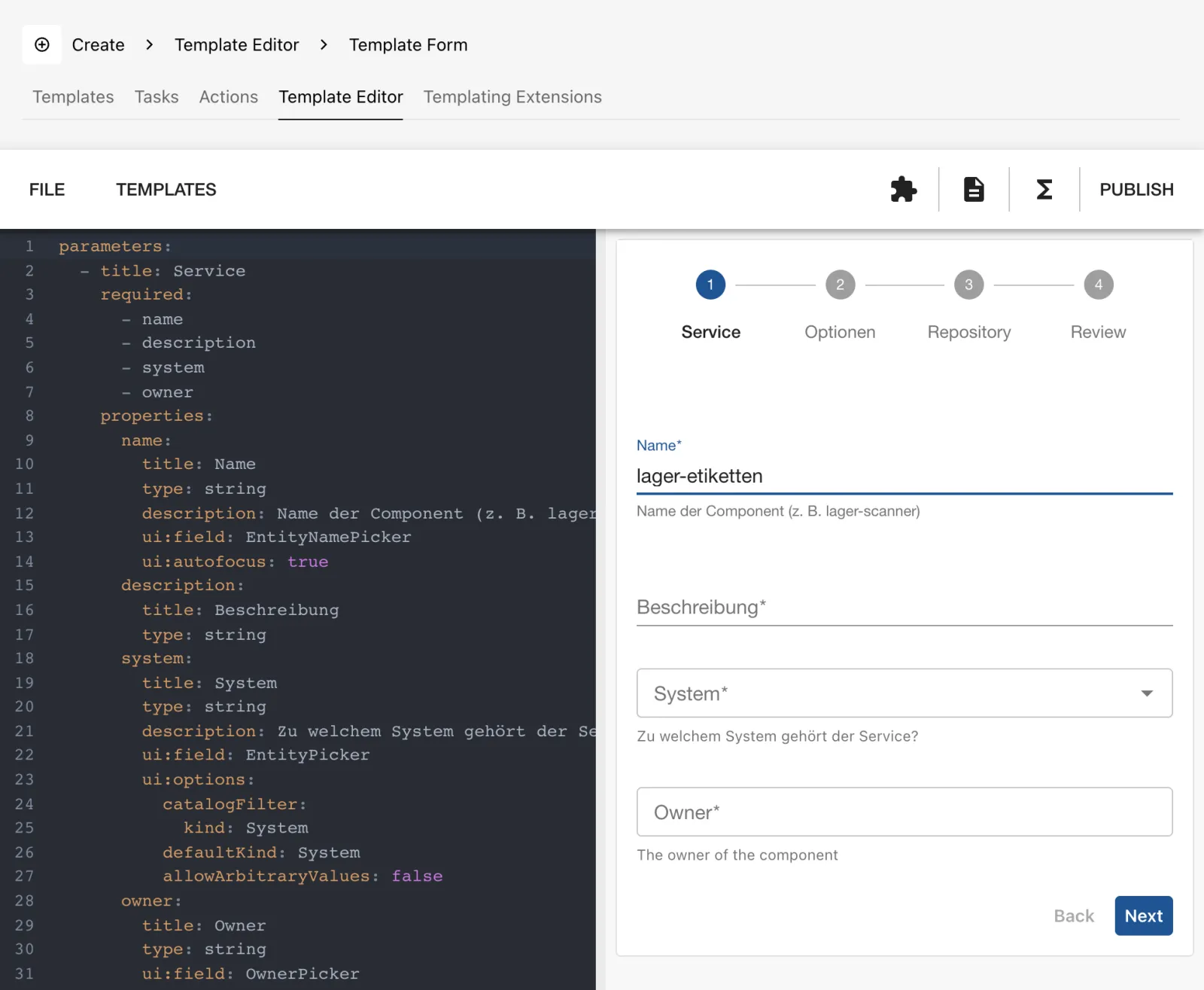
Change a line on the left, for instance title: Name to
title: Service-Name. The form on the right picks this up
immediately. This way you try out ui:options without
pushing. Nothing is saved here.
The three icons at the top right open the Custom Fields Explorer, the Installed Actions Documentation and the Templating Extensions Documentation. PUBLISH only shows instructions: changes belong in the template repo via a pull request.
Save your progress? Sign up for free
Drill 5: Dry Run in the Template Editor
The playground only knows the form. For a trial run with the skeleton, the editor loads the whole template directory from your file system.
- In the Template Editor tab, click Load Template Directory.
- Choose the folder
~/backstage-lab/tag06/templates/kranich-serviceand allow Chrome access. - On the left
skeleton,ci,vorlagenandtemplate.yamlappear, in the middle the editor, on the right the form. - Fill in the form:
lager-etiketten, a description, system Sendungsverfolgung, owner Team Sendung. Under Optionen (options) also check test and Forgejo-Actions-Workflow anlegen (create Forgejo Actions workflow), enter any token, and under Repositorylager-etiketten. - Click Review and Create.
- Expected: at the bottom Dry-run results with
Result 1. The Files tab lists
.forgejo,configwithdev.jsonandtest.json,src,README.md,TICKET.mdandcatalog-info.yaml, as in the figure.
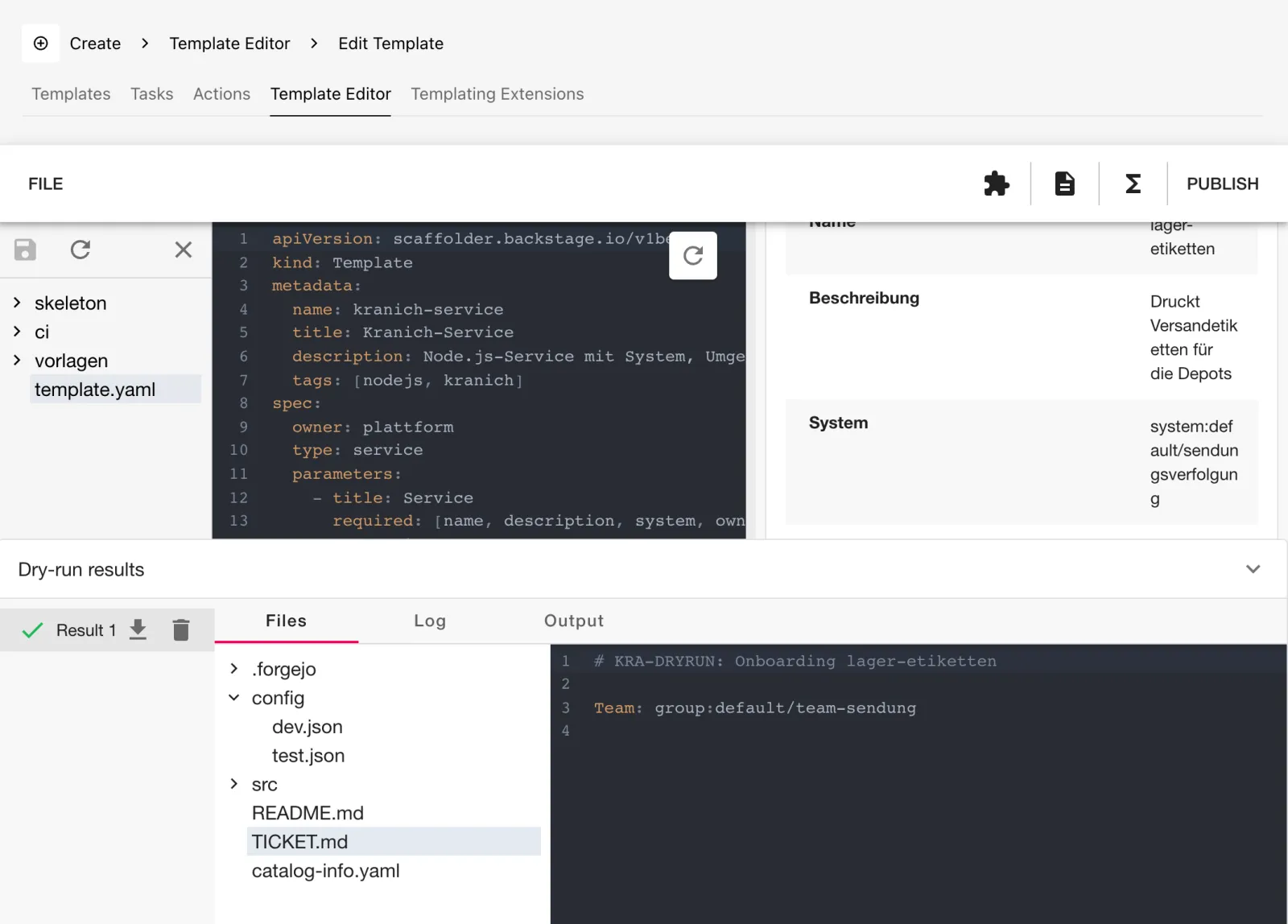
The Log and Output tabs show the
task log and output.text. The download icon packs all files
as a ZIP. The floppy disk icon writes changes in the editor back to the
folder.
Warning: Load Template Directory needs the File System Access API, so Chrome or Edge with
localhostor HTTPS. In Firefox and Safari the card is grayed out. In addition, in 1.55 the editor shows umlauts from the skeleton garbled (für), because it transfers files withbtoa. The real run and the dry run via the API (Drill 6) are not affected.
Save your progress? Sign up for free
Drill 6: Dry Run via the API
The same trial run works without a browser, for example in a pipeline
before merging into the template repo. The endpoint
POST scaffolder/v2/dry-run wants the template definition as
JSON, the form values and all files base64-encoded. The script in the
companion code assembles the request:
sed -n 8,16p ~/backstage-lab/code/tag06/dryrun.shExpected:
files=$(cd "$dir" && find . -type f ! -path './.git/*' | sed 's|^\./||' | sort \
  | while read -r f; do
      jq -n --arg p "$f" --arg c "$(base64 < "$f" | tr -d '\n')" \
        '{path: $p, base64Content: $c}'
    done | jq -s .)
template=$(bs "catalog/entities/by-name/template/$ref")
jq -n --argjson t "$template" --argjson f "$files" --slurpfile v "$3" \
  '{template: $t, values: $v[0], directoryContents: $f}' \
  | bs scaffolder/v2/dry-run -X POST -H 'Content-Type: application/json' -d @-
Here the template definition comes from the catalog, the files from the local folder. Now the values and the run:
cd ~/backstage-lab/tag06
cat > werte.json <<'EOF'
{
  "name": "lager-scanner",
  "description": "Scanner-Ereignisse aus den Depots",
  "system": "system:default/sendungsverfolgung",
  "owner": "group:default/team-sendung",
  "umgebungen": ["dev", "prod"],
  "ci": true,
  "repoUrl": "127.0.0.1:3300?owner=kranich&repo=lager-scanner"
}
EOF
~/backstage-lab/code/tag06/dryrun.sh template:default/kranich-service \
  templates/kranich-service werte.json > dry.json
jq -r '.directoryContents[].path' dry.json
jq -r '.log[].body.message' dry.json | grep -E '^(Beginning|Skipping)'
Expected:
README.md
TICKET.md
catalog-info.yaml
src/index.js
config/dev.json
config/prod.json
.forgejo/workflows/ci.yaml
Beginning step Skeleton füllen
Beginning step Konfiguration je Umgebung
Beginning step CI-Workflow kopieren
Beginning step Eingaben prüfen
Beginning step Onboarding-Ticket anlegen
Beginning step Repo in Forgejo anlegen
Skipping because publish:gitea does not support dry-run
Beginning step Im Katalog registrieren
Skipping because catalog:register does not support dry-run
each and if did their job, and so did the
filters. A look at the log and at a generated file:
jq -r '.log[].body.message' dry.json | sed 's/\x1b\[[0-9;]*m//g' \
  | grep -E '^info: (Repo|Running step each)'
jq -r '.directoryContents[] | select(.path=="config/prod.json")
  | .base64Content' dry.json | base64 -d
jq -r '.output.text[0].content' dry.json
Expected:
info: Running step each: {"key":"0","value":"dev"}
info: Running step each: {"key":"1","value":"prod"}
info: Repo lager-scanner für Team team-sendung
{
  "service": "lager-scanner",
  "umgebung": "prod",
  "port": 80,
  "logLevel": "warn"
}
**lager-scanner** ist angelegt.

- Repo: `kranich/lager-scanner`
- Umgebungen: dev, prod
- CI-Workflow: ja
- Ticket: KRA-DRYRUN
The custom action runs along in the dry run because it sets
supportsDryRun: true. ctx.isDryRun gives it
the number KRA-DRYRUN instead of a real one.
Save your progress? Sign up for free
Drill 7: Tasks via the Wizard and via the API
First the real run in the GUI:
- Click Create and, for Kranich-Service, CHOOSE.
- Fill in the Service step as in Drill 5
(
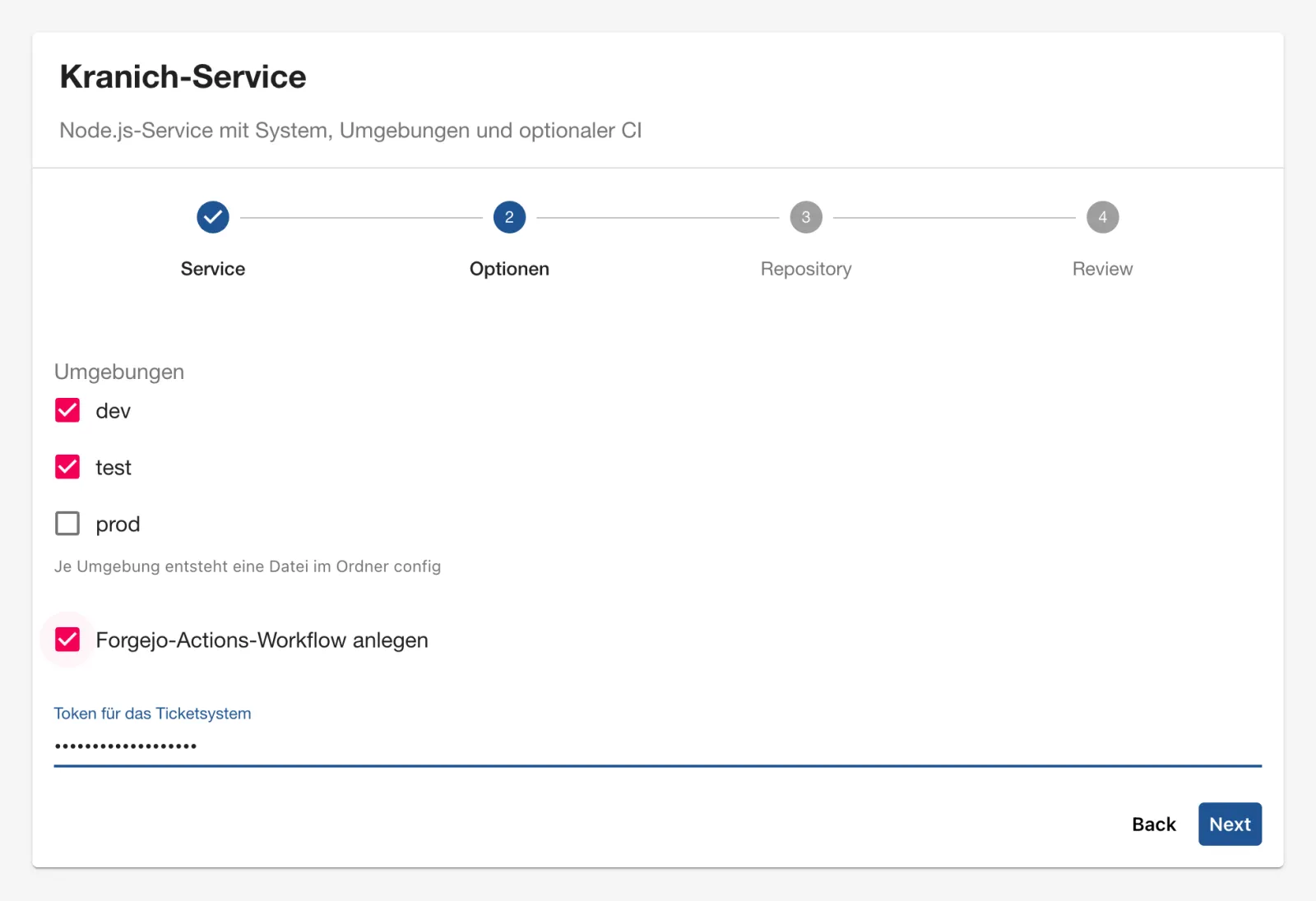
lager-etiketten). The list under System only shows systems: Sendungsverfolgung andexamples. - Click Next. Expected: the Optionen step as in the figure. Check test and the workflow, and enter a token. It only appears as dots.
- Click Next, enter
lager-etikettenunder Repository, then Review and Create. - Expected: seven green steps; the ticket step takes about 10 seconds. Below them the links and the Nächste Schritte (next steps) box, as in the figure.
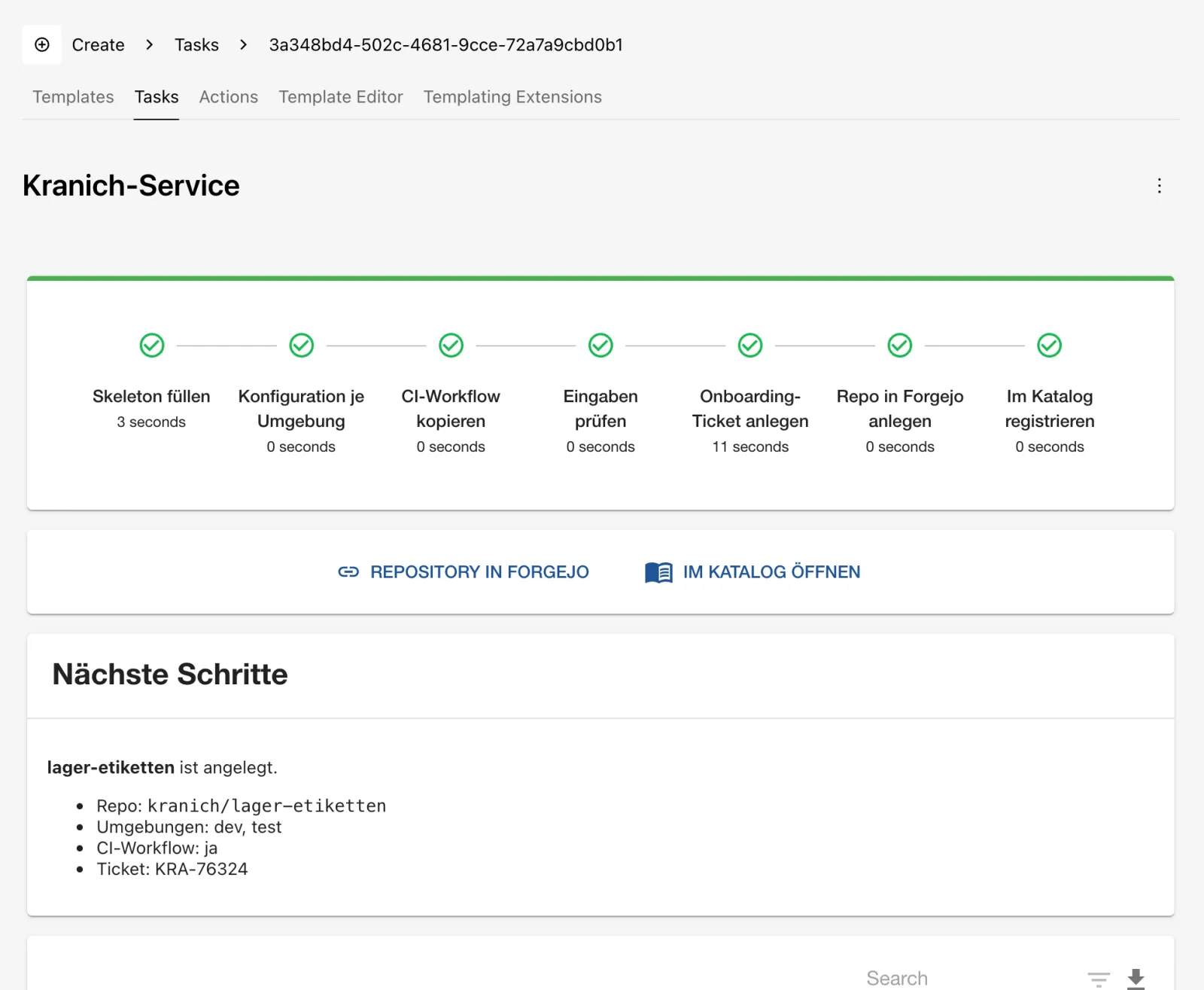
What happened to the token? The parameters only contain a placeholder, the log shows the mask:
ID=$(bs 'scaffolder/v2/tasks?createdBy=user:default/thomas.zachmann' \
  | jq -r '.tasks[0].id')
bs scaffolder/v2/tasks/$ID | jq -c '.spec.parameters | {ticketToken, umgebungen}'
bs "scaffolder/v2/tasks/$ID/events" | jq -r '.[].body.message' | grep Token
Expected:
{"ticketToken":"*******************","umgebungen":["dev","test"]}
info: Ticketsystem: Token gesetzt
info: Token zur Kontrolle: ***
Now the same via the API. POST scaffolder/v2/tasks wants
templateRef, values and optionally
secrets. The values from Drill 6 fit directly:
cd ~/backstage-lab/tag06
jq -n --slurpfile v werte.json '{templateRef: "template:default/kranich-service",
  values: $v[0], secrets: {ticketToken: "lab-ticket-token-42"}}' > auftrag.json
ID=$(bs scaffolder/v2/tasks -X POST -H 'Content-Type: application/json' \
  -d @auftrag.json | jq -r .id); echo $ID
sleep 20
bs scaffolder/v2/tasks/$ID | jq '{status, createdBy}'
curl -sf -u "$ADMIN" "$FORGEJO/api/v1/repos/kranich/lager-scanner/raw/TICKET.md"
Expected:
e0ee0179-daf6-475f-9da6-1dd69abaa819
{
  "status": "completed",
  "createdBy": null
}
# KRA-23452: Onboarding lager-scanner

Team: group:default/team-sendung
createdBy is empty: the lab token belongs to the service
lab-cli, not to a user. Check the list:
- Click the Tasks tab. Under TASK OWNER, Owned is selected, and you only see your own run.
- Click All.
- Expected: all runs as in the figure; the ones started via the API have the owner Unknown.
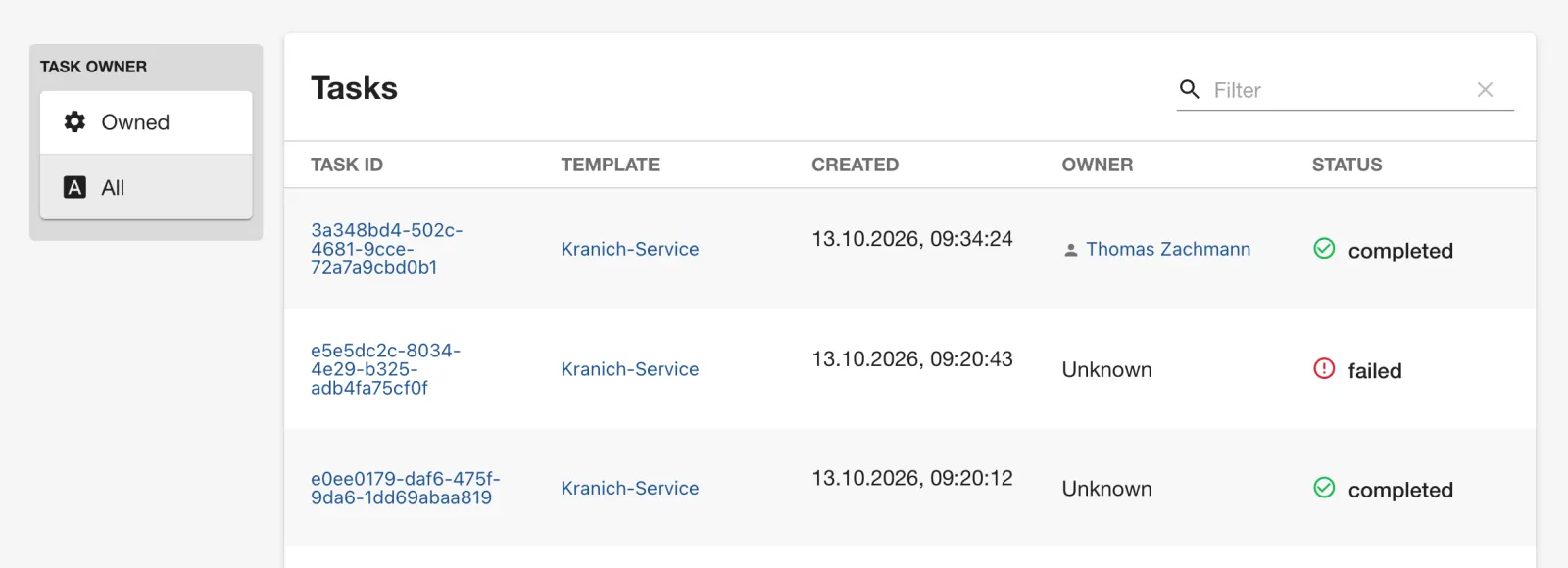
The same list via the API, newest first:
bs 'scaffolder/v2/tasks?limit=3&order=desc:created_at' \
  | jq -r '.tasks[] | "\(.status)  \(.createdBy // "-")  \(.spec.parameters.name)"'
Expected:
completed  -  lager-scanner
completed  user:default/thomas.zachmann  lager-etiketten
completed  -  tour-api
Save your progress? Sign up for free
Drill 8: Canceling a Task
The ticket step waits 10 seconds. You send the cancellation into that gap:
cd ~/backstage-lab/tag06
jq '.values.name="lager-abbruch"
  | .values.repoUrl="127.0.0.1:3300?owner=kranich&repo=lager-abbruch"' \
  auftrag.json > abbruch.json
ID=$(bs scaffolder/v2/tasks -X POST -H 'Content-Type: application/json' \
  -d @abbruch.json | jq -r .id)
sleep 4; bs scaffolder/v2/tasks/$ID | jq -r .status
bs scaffolder/v2/tasks/$ID/cancel -X POST; echo
sleep 3; bs scaffolder/v2/tasks/$ID | jq -r .status
Expected:
processing
{"status":"cancelled"}
failed
The events show what happened:
bs "scaffolder/v2/tasks/$ID/events" \
  | jq -r '.[] | (.body.message | split("\n")[0][0:50]) as $m
    | "\(.type) \(.body.stepId // "-") \($m)"' | sed 's/\x1b\[[0-9;]*m//g' | tail -5
curl -s -o /dev/null -w '%{http_code}\n' -u "$ADMIN" \
  "$FORGEJO/api/v1/repos/kranich/lager-abbruch"
Expected:
cancelled ticket Step ticket has been cancelled.
log ticket AbortError: The operation was aborted
log publish Skipping step publish because a previous step fail
log register Skipping step register because a previous step fai
completion - Run completed with status: failed
404
Why does this work so cleanly? The cancellation triggers
ctx.signal, sleep aborts with
AbortError, and all following steps are dropped. An action
that ignores the signal keeps running until the end of its step.
Afterwards the overall status is failed, and an event of
type cancelled marks the cancellation. In the GUI, while
the task is running, Cancel appears at the top right of
the task page.
Save your progress? Sign up for free
Checkpoint
cat > ~/backstage-lab/tag06/kontrollpunkt.sh <<'EOF'
#!/usr/bin/env bash
# kontrollpunkt.sh – checkpoint Day 6 (✔/✘). Exit code = number of failures.
source "${LAB:-$HOME/backstage-lab}/setup/env.sh"
fail=0
t() { if eval "$2" >/dev/null 2>&1; then echo "✔ $1"
  else echo "✘ $1"; fail=$((fail+1)); fi; }
R=$FORGEJO/api/v1/repos/kranich

t "Eigene Action kranich:ticket:create installiert" \
  "bs scaffolder/v2/actions | jq -e '.[] | select(.id==\"kranich:ticket:create\")'"
t "Filter parseRepoUrl verfügbar" \
  "bs scaffolder/v2/templating-extensions | jq -e '.filters.parseRepoUrl'"
t "Template kranich-service registriert" \
  "bs catalog/entities/by-name/template/default/kranich-service"
t "lager-scanner: config/prod.json (each) und CI-Workflow (if)" \
  "curl -sf -u \$ADMIN \$R/lager-scanner/contents/config/prod.json \
   && curl -sf -u \$ADMIN \$R/lager-scanner/contents/.forgejo/workflows/ci.yaml"
t "lager-scanner: TICKET.md aus der eigenen Action" \
  "curl -sf -u \$ADMIN \$R/lager-scanner/raw/TICKET.md | grep -q '^# KRA-'"
t "Component lager-scanner gehört zum System sendungsverfolgung" \
  "bs catalog/entities/by-name/component/default/lager-scanner \
     | jq -e '.spec.system==\"system:default/sendungsverfolgung\"'"
t "Abgebrochener Task hat kein Repo lager-abbruch erzeugt" \
  "! curl -sf -u \$ADMIN \$R/lager-abbruch"
exit "$fail"
EOF
bash ~/backstage-lab/tag06/kontrollpunkt.sh
Expected:
✔ Eigene Action kranich:ticket:create installiert
✔ Filter parseRepoUrl verfügbar
✔ Template kranich-service registriert
✔ lager-scanner: config/prod.json (each) und CI-Workflow (if)
✔ lager-scanner: TICKET.md aus der eigenen Action
✔ Component lager-scanner gehört zum System sendungsverfolgung
✔ Abgebrochener Task hat kein Repo lager-abbruch erzeugt
Challenge
Extend the template node-service from Day 5 with a
checkbox mit TechDocs (with TechDocs) (default: on). If
it is checked, the repo gets mkdocs.yml,
docs/index.md and the annotation
backstage.io/techdocs-ref: dir:.. In addition, every run
should create an onboarding ticket and show its number on the task page.
Use it to create paket-api for Team
Web.
Hint: For the annotation, a
{%- if values.techdocs %} block in
skeleton/catalog-info.yaml is enough; a second
fetch:template step with if: fetches the docs
scaffolding.
Solution
In template.yaml, add under properties of
the Service step (after port):
        techdocs:
          title: mit TechDocs
          description: Legt mkdocs.yml und docs/index.md an
          type: boolean
          default: true
Under values of the fetch step add the line
techdocs: ${{ parameters.techdocs }}, then two new steps
before publish:
    - id: techdocs
      name: TechDocs-Gerüst
      if: ${{ parameters.techdocs }}
      action: fetch:template
      input:
        url: ./techdocs
        values:
          name: ${{ parameters.name }}
          description: ${{ parameters.description }}
    - id: ticket
      name: Onboarding-Ticket anlegen
      action: kranich:ticket:create
      input:
        title: Onboarding ${{ parameters.name }}
        team: ${{ parameters.owner }}
And under output:
    text:
      - title: Ticket
        content: Onboarding-Ticket **${{ steps.ticket.output.ticketId }}** ist angelegt.
The head of skeleton/catalog-info.yaml then looks like
this (the - in {%- removes the line break
before it):
metadata:
  name: ${{ values.name }}
  description: ${{ values.description | dump }}
  tags: [nodejs]
{%- if values.techdocs %}
  annotations:
    backstage.io/techdocs-ref: dir:.
{%- endif %}
All files are in the companion code. Take them over, push, create via the API:
cd ~/backstage-lab/tag06/templates/node-service
L=~/backstage-lab/code/tag06/challenge/node-service
cp $L/template.yaml . && cp $L/skeleton/catalog-info.yaml skeleton/
cp -R $L/techdocs . && cd ..
git add -A && git -c user.name="Lab Admin" -c [email protected] \
  commit -qm "TechDocs-Option und Ticket" && git push -q origin main
bs catalog/refresh -X POST -H 'Content-Type: application/json' \
  -d '{"entityRef":"template:default/node-service"}' -w '%{http_code}\n'
ID=$(bs scaffolder/v2/tasks -X POST -H 'Content-Type: application/json' -d '{
  "templateRef": "template:default/node-service",
  "values": {"name": "paket-api", "description": "Paketdaten für Partner",
    "owner": "group:default/team-web", "port": 8082, "techdocs": true,
    "repoUrl": "127.0.0.1:3300?owner=kranich&repo=paket-api"}}' | jq -r .id)
sleep 15
curl -sf -u "$ADMIN" "$FORGEJO/api/v1/repos/kranich/paket-api/contents" \
  | jq -r '.[].path' | tr '\n' ' '; echo
bs "scaffolder/v2/tasks/$ID/events" \
  | jq -r '.[] | select(.type=="completion") | .body.output.text[0].content'
Expected:
200
README.md TICKET.md catalog-info.yaml docs mkdocs.yml package.json src
Onboarding-Ticket **KRA-18820** ist angelegt.
With "techdocs": false the log reports
Skipping step techdocs because its if condition was false,
and catalog-info.yaml has no annotations. The
TechDocs tab only gets filled on Day 7.
Save your progress? Sign up for free
Enterprise Note
- Custom actions are backend code with the permissions of the
Scaffolder. Like any plugin, they need review and tests; secrets come in
via
secrets, never viaparameters, and never go into the log. - Template repos get a pipeline that calls
scaffolder/v2/dry-runon every pull request. That way a broken template is noticed before the merge, not by the first user. - Who may run, cancel or dry-run templates is controlled by
permissions (
scaffolder.task.create,scaffolder.task.cancel,scaffolder.template.dry-run, Day 12). - Tasks started via the API with a service token have no owner. In production, it is better to work with the token of the triggering user or to attribute the caller in the audit log.
- Real ticket or approval actions must be idempotent: a task can be canceled or run again with Retry.