Day 7: TechDocs
Goal: Build Markdown docs from the
sendungs-apirepo in the portal without Docker, extend them, update them and check them locally in advance. · Duration: approx. 75 min · Prerequisite: Day 6
Briefing
- Docs like code: the documentation lives as Markdown next to the code in the same repo, is changed via pull request and is shown by the portal alongside the component.
- TechDocs = MkDocs (Python) + the plugin
techdocs-core. The annotationbackstage.io/techdocs-ref: dir:.says:mkdocs.ymlis next to thecatalog-info.yaml. - Out of the box, Backstage builds in a Docker container
(
runIn: docker). In the lab we build locally with a Python venv (runIn: local). - Prerequisite (end of Day 6): the portal is running,
sendungs-apiis in the catalog, and its repo containsmkdocs.ymlanddocs/index.md.
 Forgejo kranich/sendungs-api          Backend (techdocs)                 Frontend
 ┌──────────────────────┐  1 prepare   ┌─────────────────────────────┐   ┌──────────┐
 │ catalog-info.yaml    │ ───────────► │ 2 generate: mkdocs build    │   │ TechDocs │
 │ mkdocs.yml           │   (Git state)│   (venv, runIn: local)      │──►│ tab and  │
 │ docs/*.md            │              │ 3 publish: local (files)    │   │ /docs    │
 └──────────────────────┘              └─────────────────────────────┘   └──────────┘
Drill 1: Docs Like Code in the Repo
First look at what is already there – the annotation via the API, the files via the Forgejo API:
source ~/backstage-lab/setup/env.sh
mkdir -p ~/backstage-lab/tag07
bs catalog/entities/by-name/component/default/sendungs-api \
  | jq -r '.metadata.annotations["backstage.io/techdocs-ref"]'
curl -sf -u "$ADMIN" "$FORGEJO/api/v1/repos/kranich/sendungs-api/raw/mkdocs.yml"
Expected:
dir:.
site_name: Sendungs-API
nav:
  - Überblick: index.md
plugins:
  - techdocs-core
dir:. is relative to the entity’s location: Backstage
fetches the repo at the state of main and builds from its
root. nav defines the order and titles of the pages
(“Überblick” means “Overview”).
Save your progress? Sign up for free
Drill 2: The Failure with runIn: docker
The app-config.yaml from create-app
contains:
grep -A5 '^techdocs:' ~/backstage-lab/portal/app-config.yamlExpected:
techdocs:
  builder: 'local' # Alternatives - 'external'
  generator:
    runIn: 'docker' # Alternatives - 'local'
  publisher:
type: 'local' # Alternatives - 'googleGcs' or 'awsS3'. Read documentation for …- Open Catalog →
sendungs-api. - Click the TechDocs tab.
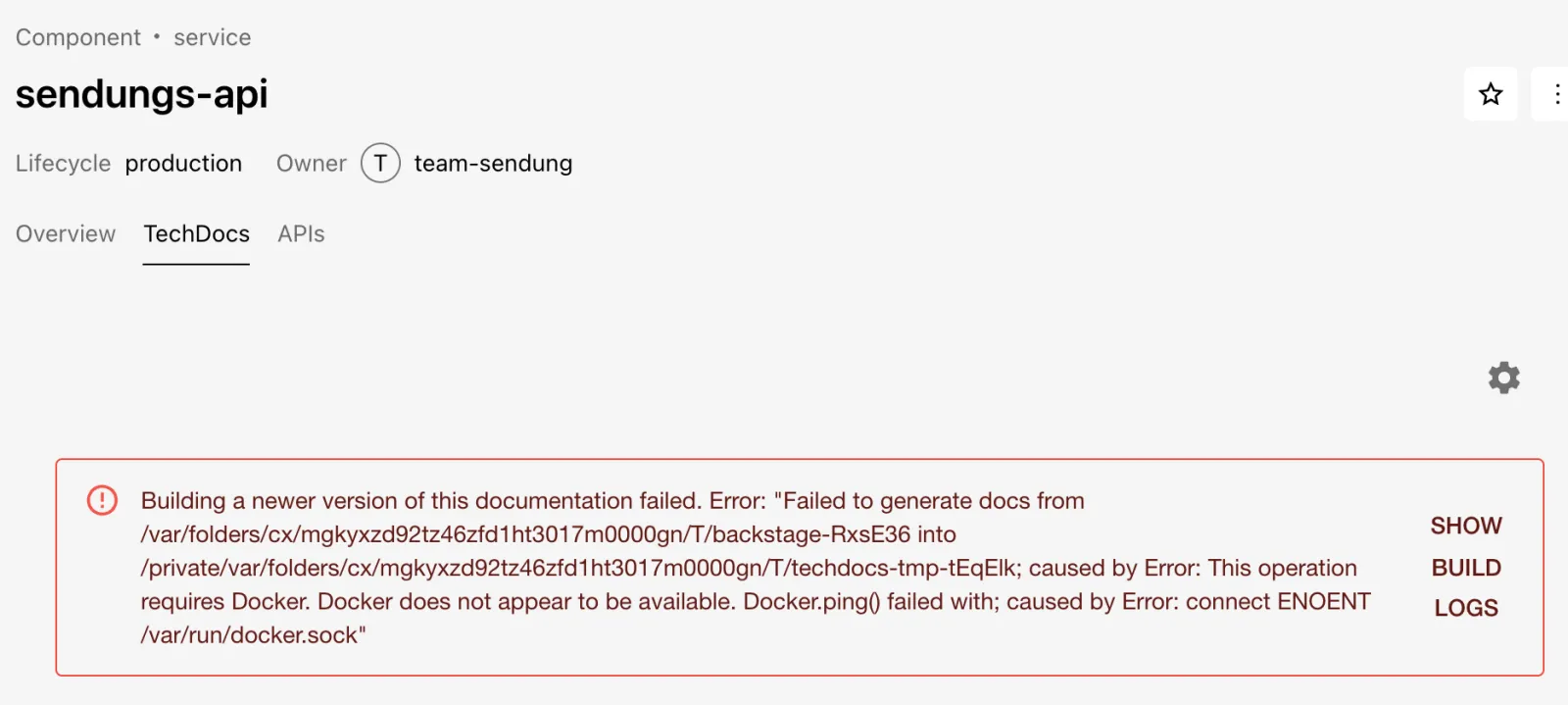
Expected: a red message as in the figure. Via Show Build Logs you see the log of the build attempt.
The same without a browser: the endpoint techdocs/sync
starts the build and streams the log as server-sent events
(-N turns off curl’s buffering):
bs techdocs/sync/default/component/sendungs-api -N \
  | grep -oE 'Step [0-9] of 3: [A-Za-z]+ docs|requires Docker[^;]*' | uniq
Expected:
Step 1 of 3: Preparing docs
Step 2 of 3: Generating docs
requires Docker. Docker does not appear to be available. Docker.ping() failed with
Why? The generator talks to the Docker API via the socket
/var/run/docker.sock. Colima puts its socket somewhere
else, so even the ping fails – in the test run with
connect ENOENT /var/run/docker.sock.
Warning: With Docker Desktop the socket is reachable. Then Backstage pulls the image
spotify/techdocs:v1.2.8the first time the tab is opened (techdocs.generator.pullImageistrueout of the box) and builds inside it. That works, but costs disk space and needs access to Docker Hub. We are about to switch torunIn: local.
Save your progress? Sign up for free
Drill 3: MkDocs in a Python venv
mkdocs-techdocs-core brings MkDocs, the Material theme
and all Markdown extensions that TechDocs expects. A venv keeps this
away from the system Python (approx. 150 MB):
python3 -m venv ~/backstage-lab/venv
~/backstage-lab/venv/bin/pip install -q mkdocs-techdocs-core
~/backstage-lab/venv/bin/pip show mkdocs-techdocs-core | grep '^Version'
~/backstage-lab/venv/bin/mkdocs --version | cut -d' ' -f1-3
Expected (test run from October 13, 2026 with Python 3.14.8):
Version: 1.7.1
mkdocs, version 1.6.1
Tip: For reproducible builds, pin the version (
pip install mkdocs-techdocs-core==1.7.1) – exactly as the CI should do later.
Save your progress? Sign up for free
Drill 4: Switching the Backend to runIn: local
With runIn: local the backend simply calls
mkdocs build – it looks for the program in the
PATH of its own process. portal.sh loads
env.sh on every start, so the venv belongs there (not just
in your current shell):
cat >> ~/backstage-lab/setup/env.sh <<'EOF'
# Day 7: find mkdocs from the Python venv (TechDocs with runIn: local)
export PATH="$LAB/venv/bin:$PATH"
EOF
source ~/backstage-lab/setup/env.sh
command -v mkdocs
Expected:
/Users/<du>/backstage-lab/venv/bin/mkdocsNow the configuration. Since Day 2,
app-config.local.yaml has had a top-level block
catalog:; techdocs: is a new top-level key and
can go at the end as a block of its own. It overrides the values from
app-config.yaml:
cd ~/backstage-lab/portal
cat >> app-config.local.yaml <<'EOF'
# Day 7: TechDocs without Docker – mkdocs runs locally (PATH from env.sh)
techdocs:
  builder: local
  generator:
    runIn: local
  publisher:
    type: local
EOF
grep -c '^techdocs:' app-config.local.yaml
yarn backstage-cli config:print --lax | grep -A5 '^techdocs:'
Expected:
1
techdocs:
  builder: local
  generator:
    runIn: local
  publisher:
    type: local
If grep -c shows a 2, you appended the
block twice – YAML then silently takes only one of them.
config:print shows the merged configuration from all
app-config*.yaml files. Restart:
~/backstage-lab/setup/portal.sh restartExpected:
✔ gestoppt
✔ Backstage läuft: http://localhost:3000 (Backend http://localhost:7007)
Warning: If you ever start the portal without
env.sh(e.g. directly withyarn startin a new shell), the backend finds nomkdocsand reportsspawn mkdocs ENOENTon the next build.
Save your progress? Sign up for free
Drill 5: The TechDocs Tab and the Docs Page
First build via the API and watch:
bs techdocs/sync/default/component/sendungs-api -N | grep -oE \
  'Step [0-9] of 3: [A-Za-z]+ docs|Documentation built[^"]*|\{"updated":[a-z]+\}'
Expected (the time varies):
Step 1 of 3: Preparing docs
Step 2 of 3: Generating docs
Documentation built in 0.25 seconds
Step 3 of 3: Publishing docs
{"updated":true}
In the code, the three steps are called prepare (fetch the
repo state), generate (mkdocs build) and
publish (store the result). The local publisher writes to
portal/node_modules/@backstage/plugin-techdocs-backend/static/docs/
– after a fresh yarn install this is gone and gets
rebuilt.
- Open Catalog →
sendungs-api→ TechDocs tab.
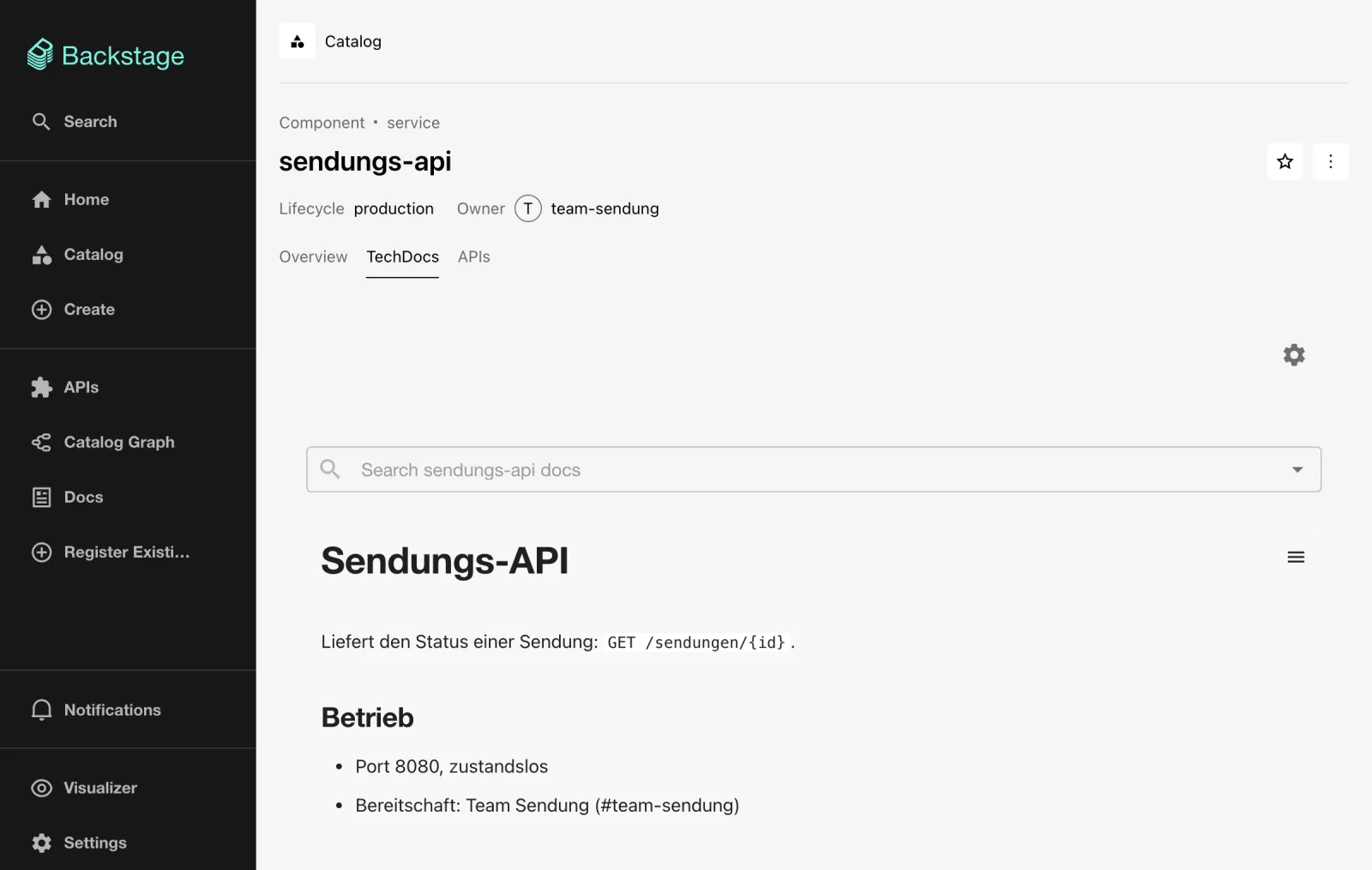
Expected: the rendered docs/index.md with a search field
above it, as in the figure.
- Click Docs in the sidebar.
Expected: the All table with all entities that have
a techdocs-ref – today only sendungs-api,
owner team-sendung. The Actions column
copies the link or sets a star. The challenge shows what the page looks
like with two entries.
Save your progress? Sign up for free
Drill 6: Extending the Docs
A second page with code, an admonition and a table. Clone, write the
files, check locally with the same mkdocs, push:
cd ~/backstage-lab/tag07
GIT=http://lab-admin:[email protected]:3300
git clone -q $GIT/kranich/sendungs-api.git && cd sendungs-api
cat > mkdocs.yml <<'EOF'
site_name: Sendungs-API
nav:
  - Überblick: index.md
  - Betrieb: betrieb.md
plugins:
  - techdocs-core
EOF
cat > docs/betrieb.md <<'EOF'
# Betrieb
## Start
```bash
npm install
PORT=8080 npm start
```
!!! note "Bereitschaft"
Störungen meldest du im Kanal `#team-sendung`. Außerhalb der Geschäftszeiten
ist die Rufbereitschaft von Team Sendung zuständig.
## Kennzahlen
| Kennzahl | Zielwert |
|-----------------|-----------|
| Verfügbarkeit | 99,9 % |
| Antwortzeit p95 | < 200 ms |
!!! warning
Die API ist zustandslos – Sendungsdaten liegen im Zustelldienst.
EOFmkdocs build -q -d "$(mktemp -d)" 2>&1 | grep -iE 'error|warning:' || echo "Build ok"
git add -A && git commit -qm "Doku: Seite Betrieb" && git push -q origin main
git log --oneline -1Expected:
Build ok
1a41822 Doku: Seite Betrieb
The local build additionally prints a red box “Warning from the
Material for MkDocs team” about MkDocs 2.0 – a notice from the theme
authors, not an error. !!! note and
!!! warning are admonitions; techdocs-core
enables the extension for them automatically.
Mermaid diagrams do not work without extras:
techdocs-core does not set up a Mermaid fence, so a
```mermaid block appears as source text. That would require
a frontend addon – we leave it out.
- Wait a little over a minute (Drill 7 shows why) and open the
TechDocs tab of
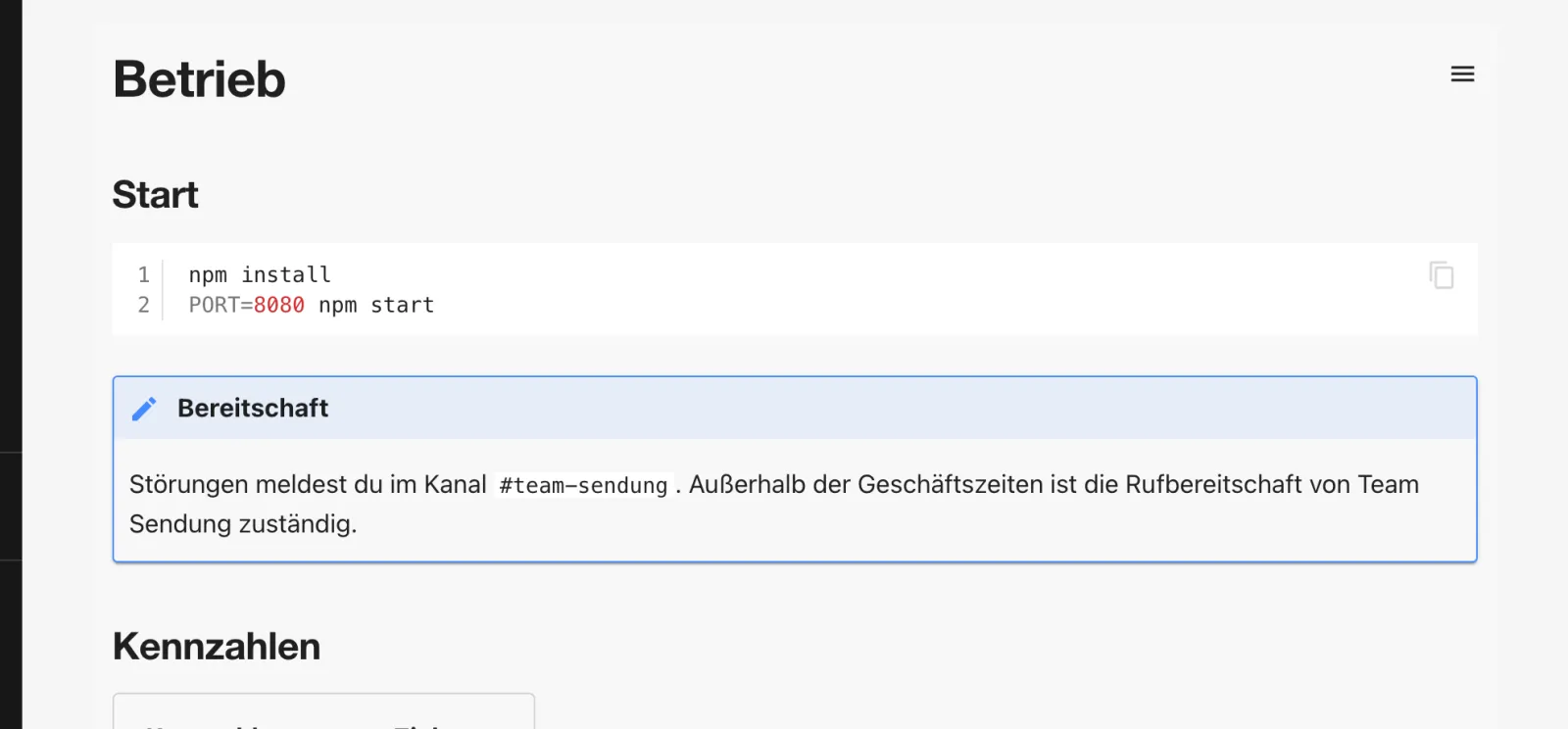
sendungs-api. - Click Refresh as soon as the green message appears, then, in the menu (the icon with three lines), click Betrieb (operations).
Expected: the new page with a code block and a blue note box, as in the figure.
Save your progress? Sign up for free
Drill 7: Rebuild After git push
Backstage does not build on every push, but on read:
when someone opens the tab, the frontend immediately shows the stored
version and asks techdocs/sync in the background. The
backend compares the Git state with the etag of the last
build and only builds if they differ. One more change:
cd ~/backstage-lab/tag07/sendungs-api
cat >> docs/index.md <<'EOF'

Wie du den Dienst startest und wen du bei Störungen erreichst, steht unter
[Betrieb](betrieb.md).
EOF
git commit -qam "Doku: Verweis auf Betrieb" && git push -q origin main
git rev-parse HEAD
bs techdocs/metadata/techdocs/default/component/sendungs-api | jq -r .etag
Expected (hashes differ):
b46b539e9b072f5b1c13c6453f0818a8c248fe4e
1a41822ebd1f82c792f45ba3ca0326398e7009a1
The stored state is still the old commit.
- Open the TechDocs tab of
sendungs-api.
Expected: first “A newer version of this documentation is being prepared …”, after a few seconds the green message with Refresh, as in the figure. A click loads the new version without reloading the page.

Now synchronize twice in a row:
for i in 1 2; do
  bs techdocs/sync/default/component/sendungs-api -N | grep -o '{"updated[^}]*}'
done
Expected:
{"updated":false}
{"updated":false}
Why false? The first call finds the state already built
(etag equals the commit), and the second doesn’t even
check: after each check, the backend looks again at most once
per minute per entity. A push right after a tab visit therefore
only shows up the second time the tab is opened after that. This is
memory in the backend process, not a config key –
techdocs.cache.ttl is something else: an optional cache for
the served files (see the Enterprise Note).
Save your progress? Sign up for free
Drill 8: Preview with the TechDocs CLI
Authors want to see what TechDocs makes of their docs before they
push. The CLI does exactly the backend’s generate step – with
--no-docker via the mkdocs in the
PATH:
cd ~/backstage-lab/tag07/sendungs-api
npx -y @techdocs/[email protected] generate --no-docker
ls site
echo "site/" >> .gitignore
Expected (shortened, without the Material notice box; the first
npx call downloads the CLI and takes a little over a
minute):
info: Using source dir /Users/<du>/backstage-lab/tag07/sendungs-api
info: Will output generated files in /Users/<du>/backstage-lab/tag07/sendungs-api/site
info: Generating documentation...
info: Successfully generated docs from /Users/<du>/…/sendungs-api into …/site using …
info: Computed generated site content hash: e79f746b6d10c328e25673579faaa2b053a8f52…
info: Done!
404.html  assets  betrieb  index.html  search  sitemap.xml  sitemap.xml.gz
techdocs_metadata.json
That is exactly the directory a publisher uploads.
techdocs-cli serve additionally starts a preview with the
Backstage frame, but it occupies port 3000 for that – so only with the
portal stopped (not tested live). For a quick look,
mkdocs serve in the venv is enough.
In the Recommended Setup, it is not the portal that builds, but the CI on every merge. The backend then only reads from an object store (shortened, may differ depending on the version; not tested live):
techdocs:
  builder: external
  publisher:
    type: awsS3
    awsS3:
      bucketName: kranich-techdocs
      region: eu-central-1
The corresponding CI job after generate:
npx @techdocs/[email protected] publish --publisher-type awsS3 \
  --storage-name kranich-techdocs --entity default/component/sendungs-api \
  --directory ./site
With builder: external the backend never calls
mkdocs; techdocs/sync reports
{"updated":false} immediately. For Google Cloud Storage the
type is googleGcs.
Save your progress? Sign up for free
Checkpoint
The file is also available at
~/backstage-lab/code/tag07/kontrollpunkt.sh.
#!/usr/bin/env bash
# kontrollpunkt.sh – Day 7: TechDocs (✔/✘). Exit code = number of failures.
source ~/backstage-lab/setup/env.sh
fail=0
t() { if eval "$2" >/dev/null 2>&1; then echo "✔ $1"
  else echo "✘ $1"; fail=$((fail+1)); fi; }
DOCS=techdocs/static/docs/default/component/sendungs-api
t "mkdocs aus dem venv im PATH" "command -v mkdocs | grep -q '/venv/bin/mkdocs'"
t "mkdocs-techdocs-core installiert" "pip show mkdocs-techdocs-core"
t "Generator läuft lokal (runIn: local)" \
  "grep -A2 '^  generator:' '$PORTAL/app-config.local.yaml' | grep -q 'runIn: local'"
t "Annotation techdocs-ref an sendungs-api" \
  "bs catalog/entities/by-name/component/default/sendungs-api \
     | jq -e '.metadata.annotations[\"backstage.io/techdocs-ref\"] == \"dir:.\"'"
t "Metadaten: Site Sendungs-API gebaut" \
  "bs techdocs/metadata/techdocs/default/component/sendungs-api \
     | jq -e '.site_name == \"Sendungs-API\"'"
t "Startseite index.html ausgeliefert" "bs $DOCS/index.html"
t "Seite Betrieb mit Admonition" \
  "bs $DOCS/betrieb/index.html | grep -q 'admonition note'"
exit "$fail"
Expected:
✔ mkdocs aus dem venv im PATH
✔ mkdocs-techdocs-core installiert
✔ Generator läuft lokal (runIn: local)
✔ Annotation techdocs-ref an sendungs-api
✔ Metadaten: Site Sendungs-API gebaut
✔ Startseite index.html ausgeliefert
✔ Seite Betrieb mit Admonition
techdocs/metadata/techdocs/… returns the
techdocs_metadata.json of the last build (site name, file
list, etag), techdocs/static/docs/… the built
pages themselves.
Challenge
Give tracking-web docs of its own: annotation,
mkdocs.yml and a start page with a !!! tip
box. Prove via the API that they were built, and check whether the Docs
page now shows two entries.
Hint: The files are in
~/backstage-lab/code/tag07/challenge/tracking-web; you add
the annotation to the existing catalog-info.yaml without
changing the rest (e.g. with yq, Homebrew package
yq).
Solution
source ~/backstage-lab/setup/env.sh
cd ~/backstage-lab/tag07
git clone -q http://lab-admin:[email protected]:3300/kranich/tracking-web.git
cd tracking-web
yq -i '.metadata.annotations["backstage.io/techdocs-ref"] = "dir:."' catalog-info.yaml
cp -R ~/backstage-lab/code/tag07/challenge/tracking-web/. .
git add -A && git commit -qm "TechDocs für tracking-web" && git push -q origin main
sleep 70   # Gitea provider (1/min) reads the new catalog-info.yaml
bs catalog/entities/by-name/component/default/tracking-web \
  | jq -r '.metadata.annotations["backstage.io/techdocs-ref"]'
bs techdocs/sync/default/component/tracking-web -N | grep -o '{"updated[^}]*}'
bs techdocs/metadata/techdocs/default/component/tracking-web | jq -r .site_name
Expected:
dir:.
{"updated":true}
Tracking-Web
yq -i only adds metadata.annotations and
leaves system, consumesApis and
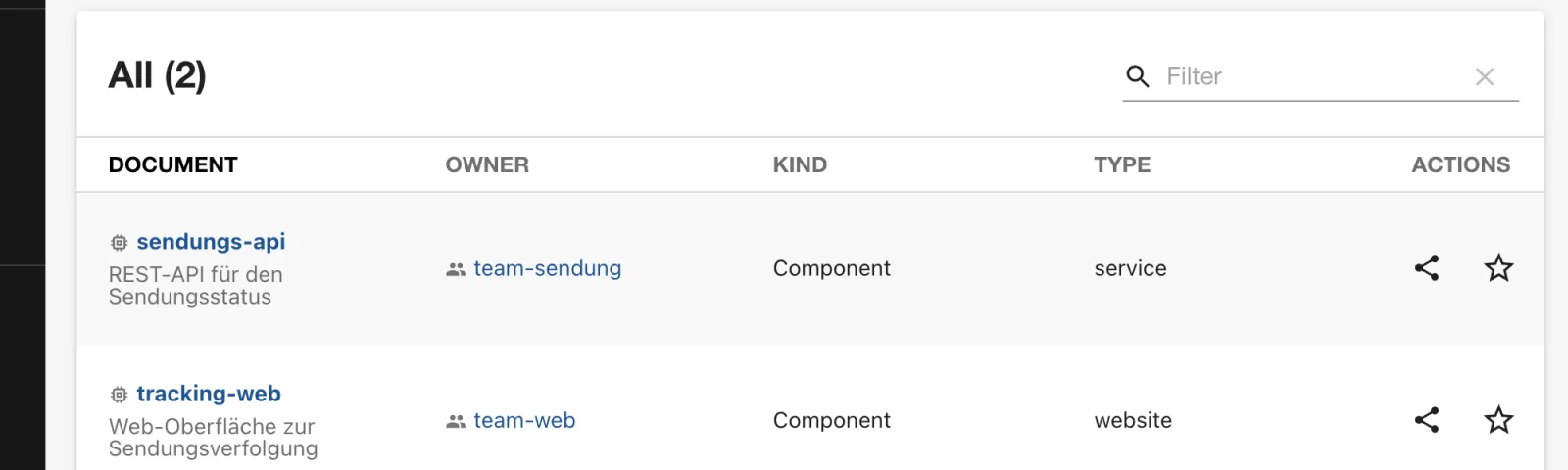
dependsOn from Day 2 in place. Under Docs
both components now appear, as in the figure.
Save your progress? Sign up for free
Enterprise Note
- Recommended Setup: CI builds
(
techdocs-cli generate, pinnedmkdocs-techdocs-coreversion in its own image) and publishes (publish) to S3, GCS or Azure Blob; the portal runs withbuilder: externaland needs neither Python nor Docker nor write access to the repos. runIn: dockerin a Kubernetes pod means Docker-in-Docker or a socket mount – usually taboo in regulated environments. So there, use either a CI build or a backend image with a preinstalled venv andrunIn: local.- MkDocs configuration can execute code: the backend removes unknown
mkdocs.ymlkeys and plugins (allowlist). Unlock them viatechdocs.generator.mkdocs.dangerouslyAllowAdditionalPlugins/…Keysonly after review. - With many readers, set
techdocs.cache.ttl(requires abackend.cachesuch as Redis/Memcache) so that not every page view hits the object store. - Access: with permissions enabled (Day 12), TechDocs checks whether the reader may see the entity; a public bucket bypasses this – keep the bucket private.