Day 8: Search and API Docs
Goal: You find everything in the portal via search and the search API, know when the index knows about new entities, and document APIs as OpenAPI, AsyncAPI and GraphQL. · Duration: approx. 90 min · Prerequisite: Day 7
Briefing
- Search does not query the catalog live, but an index. Collators fill it on a schedule: one for the catalog, one for TechDocs.
- The search engine is interchangeable. With SQLite,
Lunr runs in the backend’s memory; with PostgreSQL, the
module
search-backend-module-pg. - An API entity carries its definition in
spec.definition– inline or via$textfrom a file in the repo.spec.typedetermines how it is displayed. - Prerequisite: the state at the end of Day 7, i.e. the portal with
the Gitea provider, the organization from
kranich/organd built TechDocs forsendungs-api.
 Catalog ──► Collator software-catalog ─┐  Schedule      GET /api/search/query
                                        ├─► (default  ─► Lunr (RAM) ─► search page,
 TechDocs ─► Collator techdocs ─────────┘   10 min)      or Postgres    modal, bs
Drill 1: Which Search Engine Is Running?
create-app already registers everything in
packages/backend/src/index.ts: the search backend, the
Postgres engine and two collators. Which engine actually does the work
is revealed by the log:
source ~/backstage-lab/setup/env.sh
grep -n 'search' $PORTAL/packages/backend/src/index.ts | grep backend.add
sed 's/\x1b\[[0-9;]*m//g' $LAB/portal.log | grep 'search warn Postgres' | cut -c26-100
sed 's/\x1b\[[0-9;]*m//g' $LAB/portal.log \
  | grep -oE 'task: search_index_[a-z_]+.*"cadence":"[^"]+"' \
  | sed -E 's/task: ([a-z_]+).*"cadence":"([^"]+)"/\1 \2/'
Expected:
50:backend.add(import('@backstage/plugin-search-backend'));
54:backend.add(import('@backstage/plugin-search-backend-module-pg'));
57:backend.add(import('@backstage/plugin-search-backend-module-catalog'));
58:backend.add(import('@backstage/plugin-search-backend-module-techdocs'));
search warn Postgres search engine is not supported, skipping registration
search_index_software_catalog PT10M
search_index_techdocs PT10M
Why? The pg module checks the database at startup. With SQLite it
opts out, and search-backend, lacking a registered engine,
falls back to the built-in LunrSearchEngine (source:
plugin-search-backend/dist/plugin.cjs.js). There is no
“Lunr” log line – the warning is the clue. PT10M means:
both collators rebuild their index every ten minutes.
Tip: The line numbers in
index.tsdiffer if you registered more modules on the previous days. What matters are the four lines.
Save your progress? Sign up for free
Drill 2: The Search Modal and the Search Page
- Click Search at the very top of the sidebar. A modal opens.
- Type
sendung. The results appear as you type, without Enter. - Expected: the modal as in the figure, with highlighted word parts.
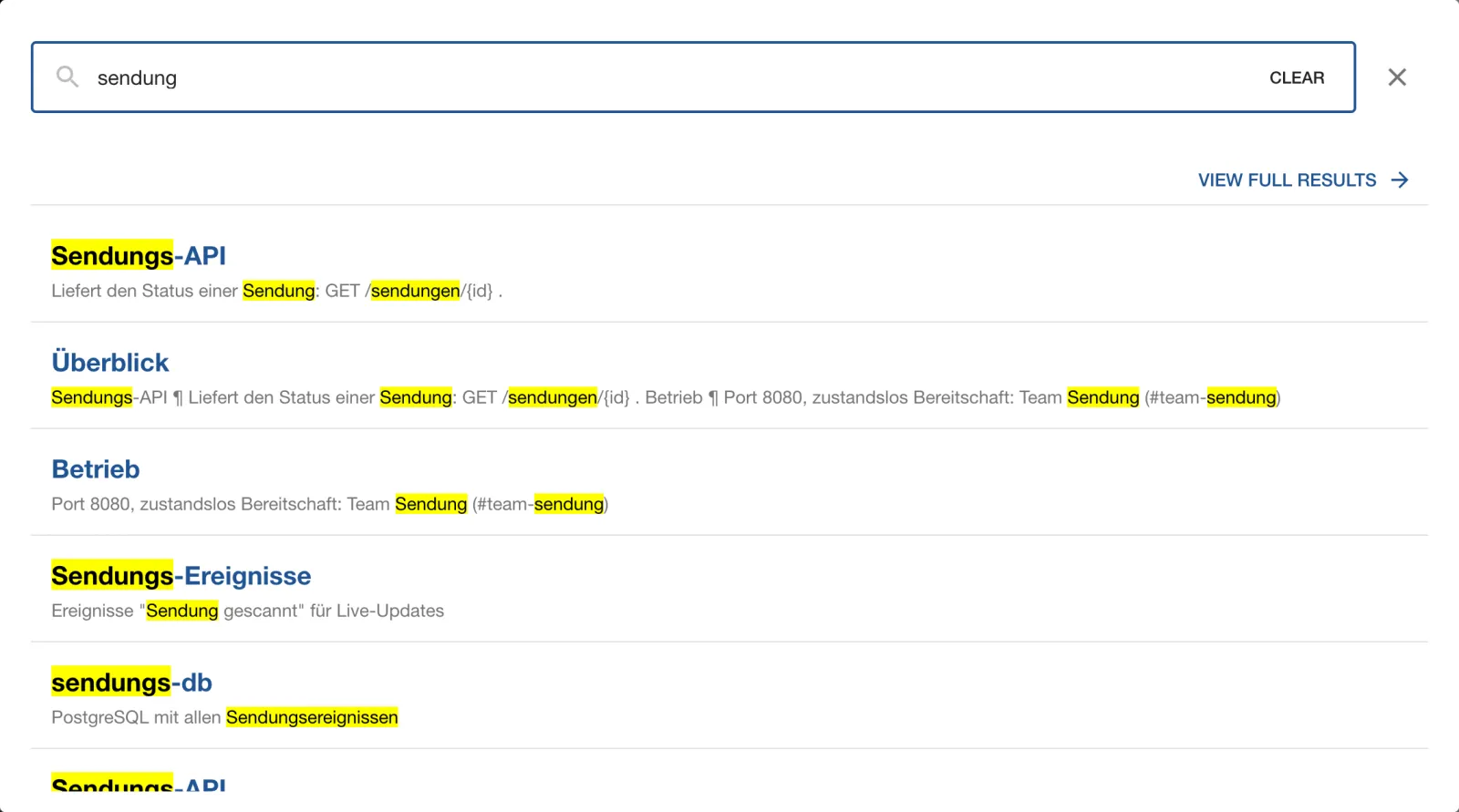
There is no keyboard shortcut to open it in this version.
SidebarSearchModal (wired into
packages/app/src/modules/nav/Sidebar.tsx) only reacts to a
click; Esc closes the modal.
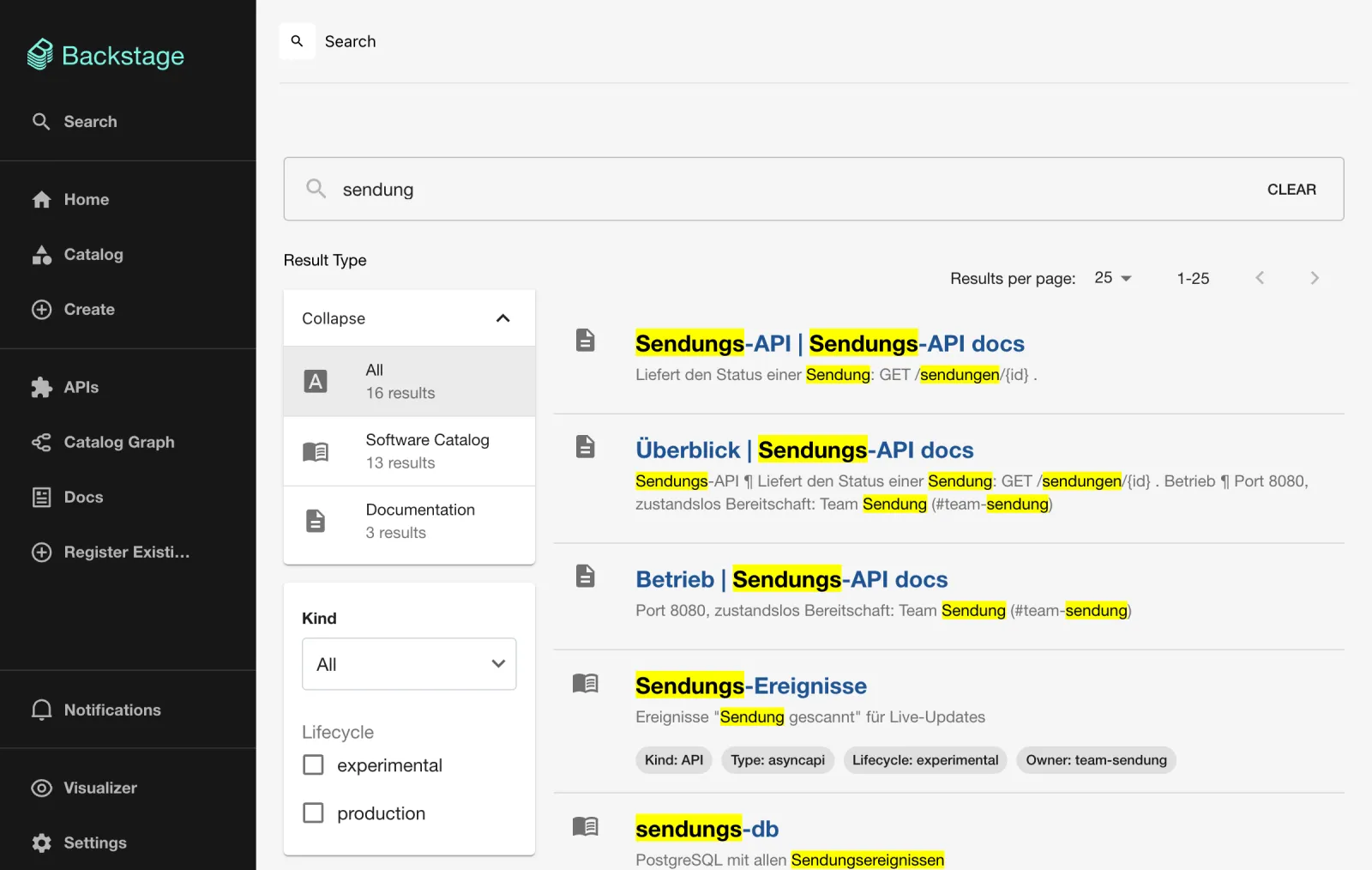
- Click VIEW FULL RESULTS. You land on
http://localhost:3000/search?query=sendung. - Expected: the search page as in the figure. On the left Result Type with Software Catalog and Documentation, below it the filters Kind and Lifecycle. Each result shows kind, type, lifecycle and owner as chips. If the TechDocs from Day 7 are already indexed, results with a document icon are mixed in.
- Set Kind to
API. What remains issendungs-apiand – further down –example-grpc-api, even though it has nothing to do with “sendung”. Drill 3 shows why. - Set Kind back to All and check
experimentalunder Lifecycle. Expected: at the topSendungs-Workerandzustell-app, below them unrelated results again, such asexample-website.
Save your progress? Sign up for free
Drill 3: The Search API with jq
The page calls GET /api/search/query. The same via
bs:
Q='search/query?term=sendung&types%5B0%5D=software-catalog'
bs "$Q" | jq '.numberOfResults'
bs "$Q" | jq '.results[0] | {type, document: (.document | {kind, title, location})}'
Expected (shortened):
11
{
  "type": "software-catalog",
  "document": {
    "kind": "Resource",
    "title": "sendungs-db",
    "location": "/catalog/default/resource/sendungs-db"
  }
}
types[0]=software-catalog hides the TechDocs results
from Day 7. Each result has type (the collator),
document (the indexed fields: title,
text from the description, kind,
type, lifecycle, owner,
location), rank and highlight.
You append filters and the type as query parameters, with square
brackets URL-encoded:
bs 'search/query?term=sendung&types%5B0%5D=software-catalog&filters%5Bkind%5D=API' \
  | jq -r '.results[] | "\(.document.title) (\(.document.type))"'
bs 'search/query?term=zustelung' | jq -r '.results[].document.title'
Expected:
sendungs-api (openapi)
example-grpc-api (grpc)
Logistik
Two Lunr quirks: as soon as a filter is set, the search term becomes
optional and is only used for sorting – that is why
example-grpc-api shows up. And Lunr searches fuzzily (up to
two typos, editDistance: 2 in the source of
LunrSearchEngine), so zustelung finds the
domain with “Zustellung” (delivery) in its description.
Save your progress? Sign up for free
Drill 4: A New API and the Index Gap
The AsyncAPI sendungs-ereignisse from the Day 2
challenge now gets a proper definition file in the repo
kranich/sendungsverfolgung. The finished files are in the
companion code: asyncapi.yaml and a
catalog-info.yaml in which the worker has
providesApis: [sendungs-ereignisse] and the API loads its
definition via $text: ./asyncapi.yaml.
mkdir -p ~/backstage-lab/tag08 && cd ~/backstage-lab/tag08
git clone -q \
  http://lab-admin:[email protected]:3300/kranich/sendungsverfolgung.git
cp ~/backstage-lab/code/tag08/sendungsverfolgung/* sendungsverfolgung/
git -C sendungsverfolgung add -A
git -C sendungsverfolgung -c user.name="Lab Admin" -c [email protected] \
  commit -qm "AsyncAPI Sendungs-Ereignisse"
git -C sendungsverfolgung push -q origin main
sleep 60
bs catalog/entities/by-name/api/default/sendungs-ereignisse \
  | jq -r '.spec.type, .spec.definition' | head -3
bs 'search/query?term=ereignisse' \
  | jq -r '.results[] | "\(.document.kind) \(.document.title)"'
Expected:
asyncapi
asyncapi: 3.0.0
info:
Component Sendungs-Worker
The catalog knows the API after less than a minute (provider and
processingInterval from Day 3), but search does not. It
waits for the next collator run – up to ten minutes. If you solved the
Day 2 challenge, search finds the old inline version; the new title
Sendungs-Ereignisse is still missing.
The catalog module reads the schedule from
search.collators.catalog.schedule, the TechDocs module from
search.collators.techdocs.schedule (both in the modules’
config.schema.json). app-config.yaml does not
have a search key yet:
cd ~/backstage-lab/portal
grep -c '^search:' app-config.yaml app-config.local.yaml
cat >> app-config.local.yaml <<'EOF'
search:
  collators:
    catalog:
      schedule:
        frequency: { minutes: 1 }
        timeout: { minutes: 5 }
    techdocs:
      schedule:
        frequency: { minutes: 1 }
        timeout: { minutes: 5 }
EOF
~/backstage-lab/setup/portal.sh restart
curl -s -H "Authorization: Bearer $BACKSTAGE_TOKEN" \
  "$BACKSTAGE/api/search/query?term=ereignisse" | jq -r .error.name
Expected:
app-config.yaml:0
app-config.local.yaml:0
✔ gestoppt
✔ Backstage läuft: http://localhost:3000 (Backend http://localhost:7007)
MissingIndexError
Lunr keeps the index in RAM only. After every restart it is empty until the collators have run once; until then the search API responds with HTTP 500 and the search page stays empty. After about 30 seconds:
sleep 30
sed 's/\x1b\[[0-9;]*m//g' $LAB/portal.log \
  | grep -oE 'task: search_index_[a-z_]+.*"cadence":"[^"]+"' \
  | sed -E 's/task: ([a-z_]+).*"cadence":"([^"]+)"/\1 \2/'
bs 'search/query?term=ereignisse' \
  | jq -r '.results[] | "\(.document.kind) \(.document.title)"'
Expected:
search_index_software_catalog PT1M
search_index_techdocs PT1M
API Sendungs-Ereignisse
Component Sendungs-Worker
Warning: An index rebuild every minute is meant for the lab. With thousands of entities and many docs pages, every run puts load on the catalog and the backend; in production, 10–60 minutes is common.
Save your progress? Sign up for free
Drill 5: TechDocs in Search
The TechDocs collator does not read the Markdown files, but the
search/search_index.json that mkdocs generates during the
build (Day 7). So it only indexes docs that have already been built and
stored once.
bs techdocs/static/docs/default/component/sendungs-api/search/search_index.json \
  | jq '.docs | length'
bs 'search/query?term=bereitschaft' \
  | jq -r '.results[] | "\(.type) \(.document.title) \(.document.location)"'
Expected:
7
techdocs Betrieb /docs/default/component/sendungs-api/#betrieb
techdocs Start /docs/default/component/sendungs-api/betrieb/#start
techdocs Überblick /docs/default/component/sendungs-api/
techdocs Betrieb /docs/default/component/sendungs-api/betrieb/
Seven entries in the mkdocs index: every page and every heading is a separate document with its own anchor address.
If the first command returns nothing, open the
TechDocs tab of sendungs-api once and wait
a minute. In the GUI:
- Open the search page, search for
bereitschaft(on-call) and click Documentation on the left. - Expected: four results from both pages of the docs, plus a new filter Entity – as in the figure.
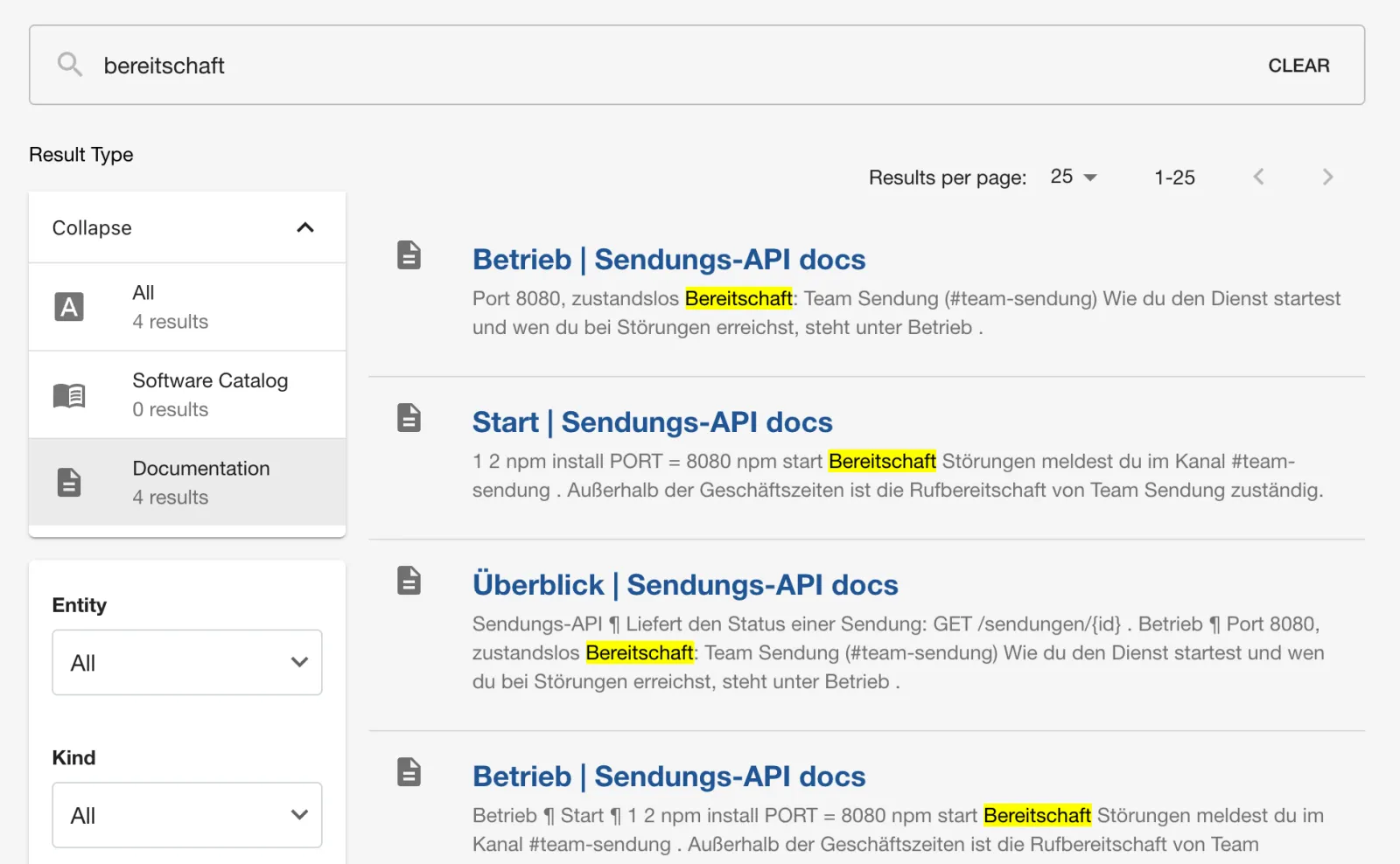
A click on Start | Sendungs-API docs jumps straight to the section in the document.
Save your progress? Sign up for free
Drill 6: The APIs Page
- Click APIs in the sidebar.
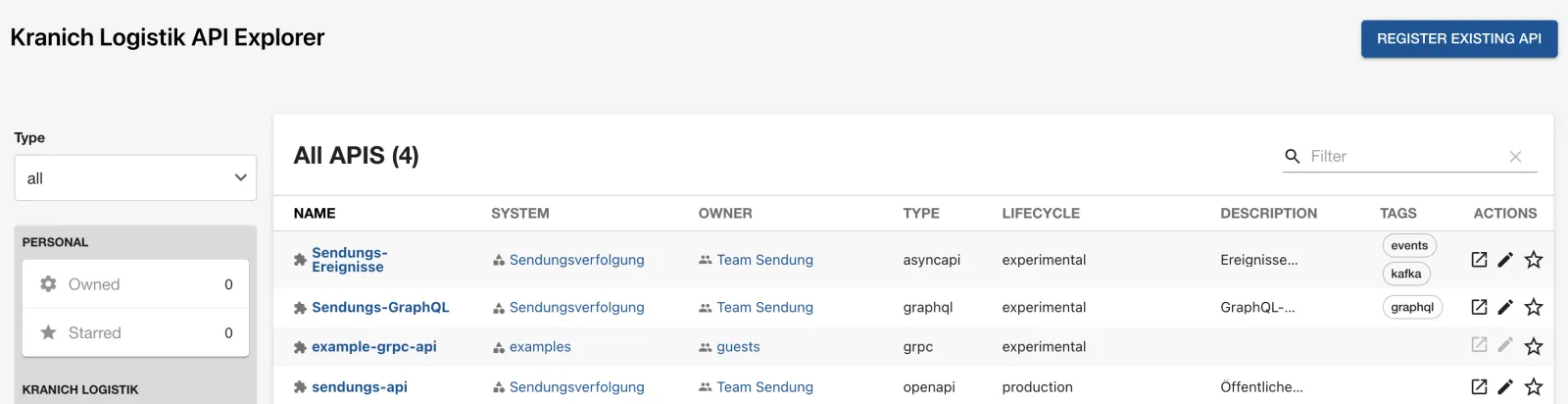
- Expected: the API Explorer with all API entities
and the columns TYPE and LIFECYCLE, as
in the figure (it already shows
Sendungs-GraphQLfrom Drill 8). On the left you filter by Type, Owner, Lifecycle and Tags.
The same list via the API:
bs 'catalog/entities?filter=kind=api&fields=metadata.name,spec.type,spec.lifecycle' \
  | jq -r '.[] | "\(.spec.type) \(.spec.lifecycle) \(.metadata.name)"' | sort
Expected (after Drill 8, graphql is added):
asyncapi experimental sendungs-ereignisse
grpc experimental example-grpc-api
openapi production sendungs-api
Which types get a view of their own is defined in
plugin-api-docs
(dist/components/ApiDefinitionCard/ApiDefinitionWidget.esm.js):
openapi, asyncapi, graphql,
grpc and trpc. Any other
spec.type appears as plain text.
Save your progress? Sign up for free
Drill 7: OpenAPI, Consumers and Providers
- Click
sendungs-apiand stay on Overview. - Scroll below the definition. Expected: the Consumers and Providers cards, as in the figure.
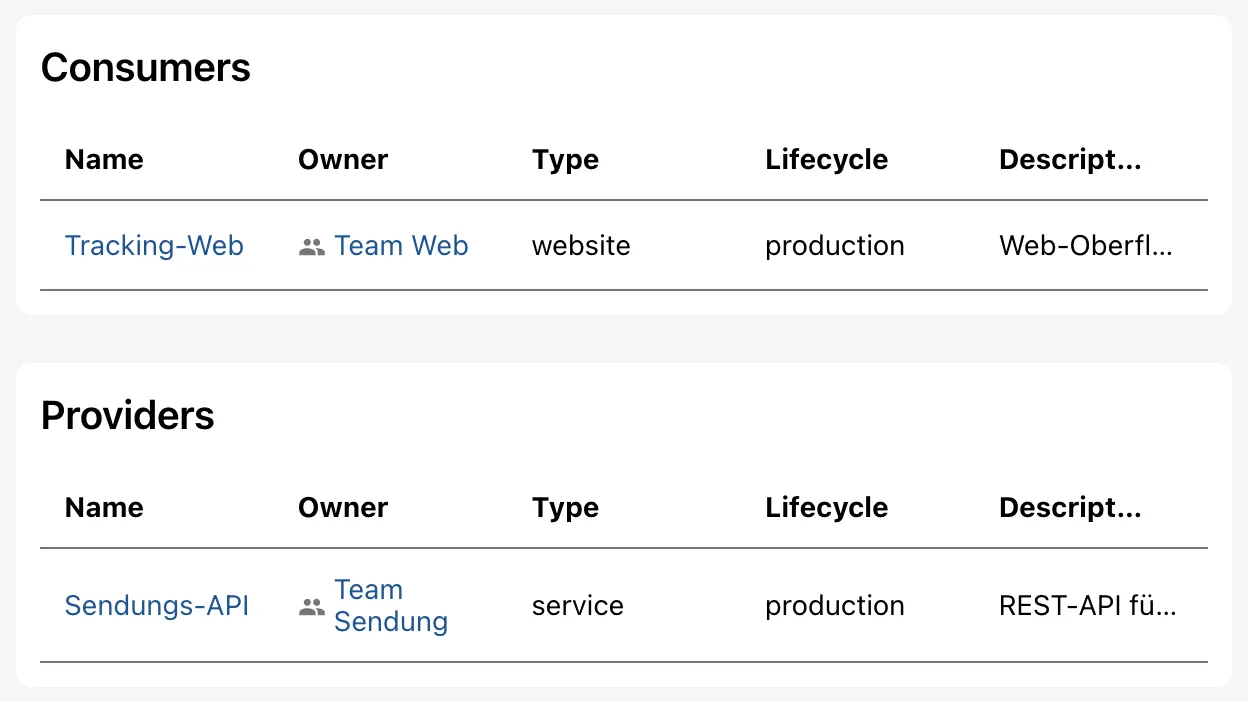
The cards read the relations apiConsumedBy and
apiProvidedBy, which the catalog derives from
consumesApis on tracking-web and
providesApis on the component sendungs-api.
The API itself names neither consumers nor providers.
- In the definition, click the line GET /sendungen/{id}.
- Expected: parameter
idwith the example valueKR-1001and the responses 200 and 404, as in the figure.
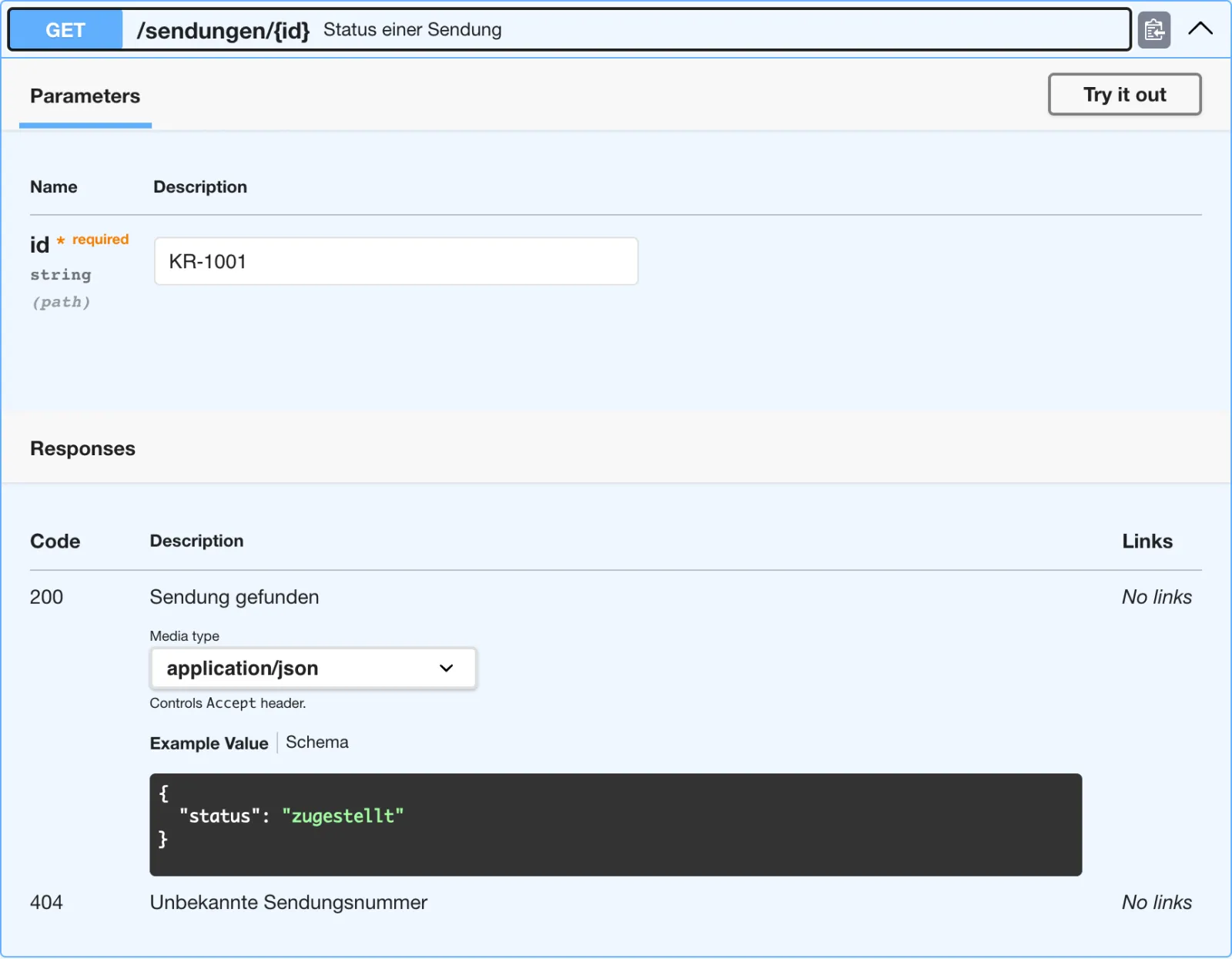
Try it out is visible, but doesn’t help here:
openapi.yaml has no servers section, so
Swagger UI would send the request to the portal itself. With real
servers entries, the browser queries the API directly –
then its CORS configuration must allow the portal.
Save your progress? Sign up for free
Drill 8: AsyncAPI and GraphQL
- In APIs, open the entity Sendungs-Ereignisse, the Documentation tab, menu item Definition.
- Under Operations, click Expand all.
- Expected: the operation RECEIVE
sendungen.gescanntwith the fields of the message, as in the figure.
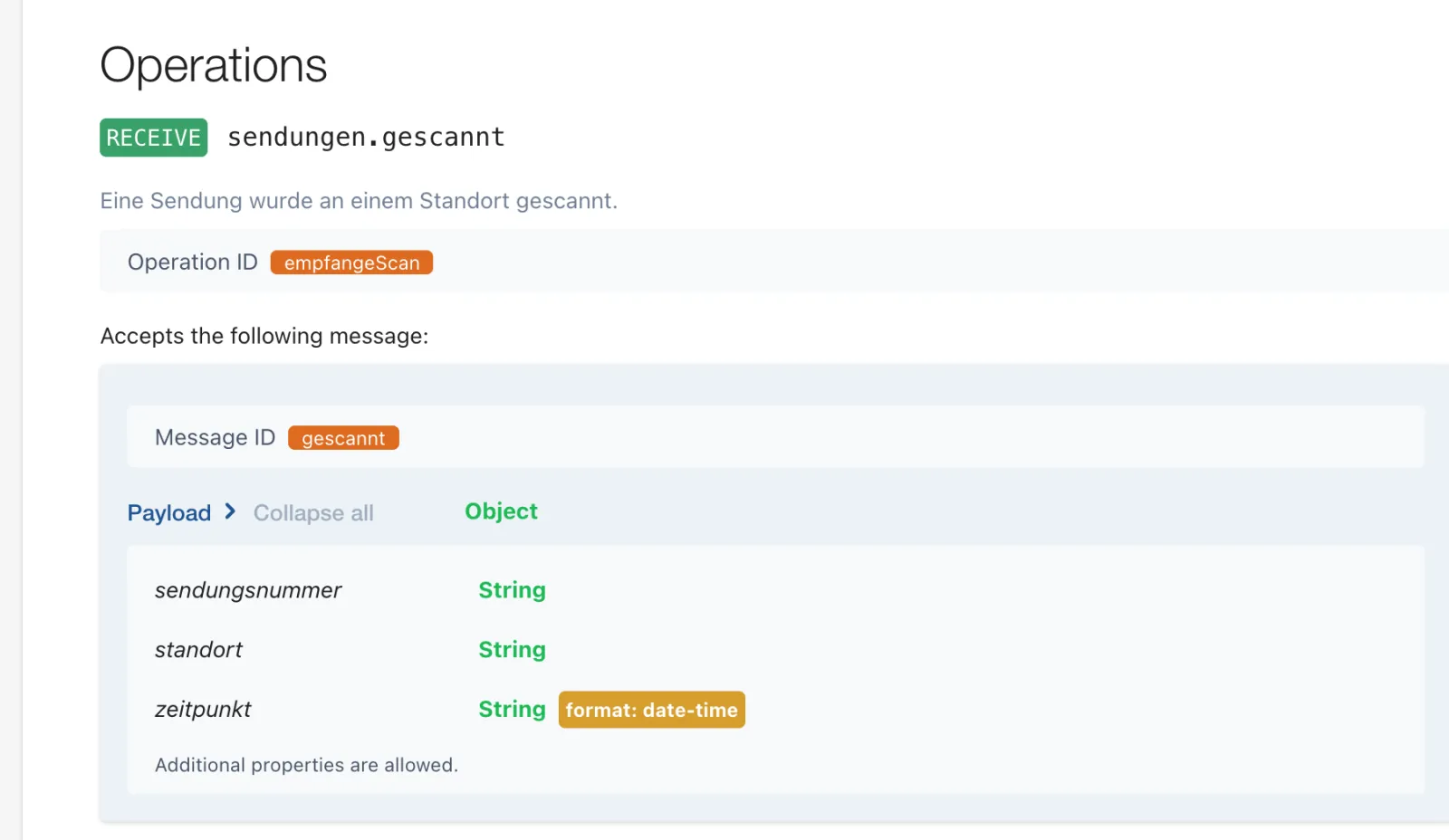
Now a GraphQL API whose schema lives next to the code in the repo
kranich/sendungs-api. You append the API entity to the
existing catalog-info.yaml; yq (as in the Day
7 challenge) adds providesApis to the component and
consumesApis to tracking-web, without touching
the rest of the files:
cd ~/backstage-lab/tag08
G=http://lab-admin:[email protected]:3300/kranich
T=~/backstage-lab/code/tag08
git clone -q $G/sendungs-api.git && git clone -q $G/tracking-web.git
cp $T/sendungs-api/schema.graphql sendungs-api/
cat $T/sendungs-api/api-graphql.yaml >> sendungs-api/catalog-info.yaml
yq -i 'select(.kind == "Component").spec.providesApis += ["sendungs-graphql"]' \
  sendungs-api/catalog-info.yaml
yq -i '.spec.consumesApis += ["sendungs-ereignisse", "sendungs-graphql"] |
  .spec.consumesApis |= unique' tracking-web/catalog-info.yaml
git -C tracking-web diff | grep '^[-+] '
for r in sendungs-api tracking-web; do
  git -C $r add -A
  git -C $r -c user.name="Lab Admin" -c [email protected] \
    commit -qm "GraphQL-API" && git -C $r push -q origin main
done
sleep 75
bs 'search/query?term=graphql' \
  | jq -r '.results[] | "\(.document.kind) \(.document.title) \(.document.type)"'
Expected (without the Day 7 challenge, the diff additionally shows
dependsOn, which yq puts in quotes the first
time it writes the file):
-  consumesApis: [sendungs-api]
+  consumesApis: [sendungs-api, sendungs-ereignisse, sendungs-graphql]
API Sendungs-GraphQL graphql
unique prevents duplicates in case
sendungs-ereignisse from the Day 2 challenge is already
listed. The annotation backstage.io/techdocs-ref from the
Day 7 challenge is preserved.
This time without a restart: the collator now runs every minute.
- Open Sendungs-GraphQL → Documentation → Definition and, under Root Types, click Query.
- Expected: the fields of the query with arguments and descriptions from the schema, as in the figure.
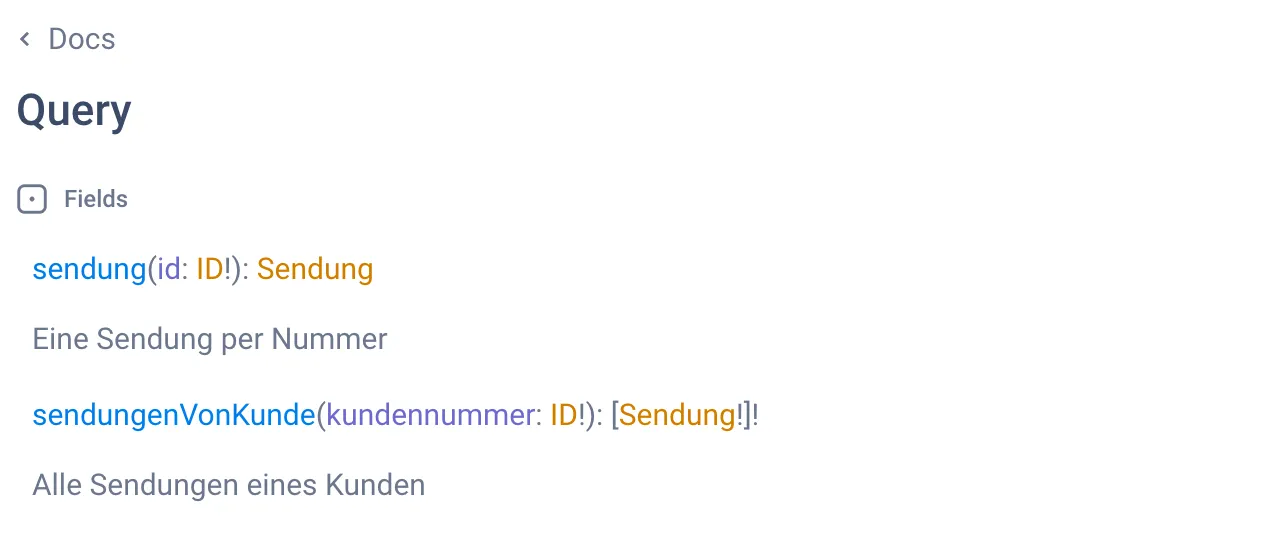
Backstage only shows GraphiQL’s Doc Explorer; you can’t run queries here. The search field with ⌘ K belongs to GraphiQL and only searches the schema.
$text or inline? $text keeps the definition
where it is maintained and tested, and the catalog rereads it on every
processing run. Inline (Day 2) is only good for sketches. For large
specs with $ref to other files, the add-on module
@backstage/plugin-catalog-backend-module-openapi (not
installed in the lab) brings the placeholders $openapi and
$asyncapi, which resolve the references while
ingesting.
Save your progress? Sign up for free
Checkpoint
The file is also available at
~/backstage-lab/code/tag08/kontrolle.sh.
cat > ~/backstage-lab/tag08/kontrolle.sh <<'EOF'
#!/usr/bin/env bash
# kontrolle.sh – checkpoint Day 8 (✔/✘). Exit code = number of failures.
source ~/backstage-lab/setup/env.sh
fail=0
t() { if eval "$2" >/dev/null 2>&1; then echo "✔ $1"
  else echo "✘ $1"; fail=$((fail+1)); fi; }
q() { bs "search/query?term=$1"; }

t "Suche liefert die API sendungs-api" \
  "q sendung | jq -e '.results[] | select(.type==\"software-catalog\"
     and .document.kind==\"API\" and .document.title==\"sendungs-api\")'"
t "Suche liefert TechDocs-Treffer" \
  "q bereitschaft | jq -e '.results[] | select(.type==\"techdocs\")'"
t "Katalog-Kollator läuft jede Minute" \
  "grep -q 'search_index_software_catalog.*PT1M' $LAB/portal.log"
for typ in openapi asyncapi graphql; do
  t "API vom Typ $typ im Katalog" \
    "bs 'catalog/entities?filter=kind=api,spec.type=$typ' | jq -e 'length > 0'"
done
t "sendungs-ereignisse: Definition aus Datei geladen" \
  "bs catalog/entities/by-name/api/default/sendungs-ereignisse |
     jq -e '.spec.definition | startswith(\"asyncapi: 3.0.0\")'"
t "tracking-web konsumiert sendungs-graphql" \
  "bs catalog/entities/by-name/api/default/sendungs-graphql | jq -e '.relations[] |
     select(.type==\"apiConsumedBy\" and
       .targetRef==\"component:default/tracking-web\")'"
exit "$fail"
EOF
bash ~/backstage-lab/tag08/kontrolle.sh
Expected:
✔ Suche liefert die API sendungs-api
✔ Suche liefert TechDocs-Treffer
✔ Katalog-Kollator läuft jede Minute
✔ API vom Typ openapi im Katalog
✔ API vom Typ asyncapi im Katalog
✔ API vom Typ graphql im Katalog
✔ sendungs-ereignisse: Definition aus Datei geladen
✔ tracking-web konsumiert sendungs-graphql
Challenge
The delivery app reports doorstep scans via a gRPC service. In the
repo kranich/zustell-app, create the API
scan-annahme (type grpc) with its definition
in proto/scan.proto, make zustell-app a
consumer and find the API via search with scan.
Hint: $text resolves paths relative to
catalog-info.yaml, including in subdirectories.
Solution
cd ~/backstage-lab/tag08
git clone -q http://lab-admin:[email protected]:3300/kranich/zustell-app.git
cp -R ~/backstage-lab/code/tag08/challenge/zustell-app/. zustell-app/
git -C zustell-app add -A
git -C zustell-app -c user.name="Lab Admin" -c [email protected] \
  commit -qm "gRPC-API scan-annahme" && git -C zustell-app push -q origin main
sleep 75
bs 'search/query?term=scan' \
  | jq -r '.results[0:2][] | "\(.document.kind) \(.document.title)"'
bs catalog/entities/by-name/api/default/scan-annahme \
  | jq -r '(.spec.definition | split("\n")[0]),
           (.relations[] | "\(.type) -> \(.targetRef)")'
Expected:
API Scan-Annahme
Component zustell-app
syntax = "proto3";
apiConsumedBy -> component:default/zustell-app
ownedBy -> group:default/team-sendung
partOf -> system:default/sendungsverfolgung
Under Definition, Backstage shows the proto file as
highlighted source code – there is no interactive gRPC view. Search
returns further results such as Sendungs-Worker
(“Scanner-Ereignisse”), because Lunr also matches prefixes and
typos.
Save your progress? Sign up for free
Enterprise Note
- Lunr in RAM is for the lab only: every backend restart empties the
index, and multiple backend replicas would each have their own. With
PostgreSQL (Day 13), the already registered
search-backend-module-pgtakes over without further configuration; large installations use Elasticsearch or OpenSearch (search-backend-module-elasticsearch). - The collator schedule is a trade-off between freshness and load – with Postgres and Elasticsearch, every run ends up as a complete rebuild in the database.
- With
permission.enabled, search filters results by the user’s read permissions; without permissions, everyone sees everything that is indexed. - API definitions belong next to the code and in CI: lint (Spectral),
breaking-change check against
main, only then merge – the catalog only shows what is in the repo. - “Try it out” against production APIs is risky (real requests with
the user’s token). Common practice: point
serversat a sandbox or route Swagger requests throughproxy.endpoints.