Day 9: Customizing the app
Goal: You turn the template portal into the Kranich developer portal: home page, widgets, navigation, logo, theme and entity page – mostly through configuration. · Duration: approx. 90 min · Prerequisite: Day 8
Briefing
- The new frontend system builds the app as a tree of
extensions. Every extension has an ID
<kind>:<plugin>/<name>(e.g.page:home,entity-card:catalog/about) and attaches to an input of its parent node. - Plugins ship extensions.
app.extensionsin the configuration disables them, configures them, reattaches them and sets their order – without code. - You only need code for new extensions: logo,
sidebar layout, your own theme. They live as modules in
packages/app/src/modules/. app.extensionsis a list. A second config file replaces it completely.
app/root
└─ children ─► app/layout
               ├─ nav ─────► app/nav ── content ─► nav-content:app
               └─ content ─► app/routes
                             └─ routes ─┬─► page:home ── widgets ─► home-page-widget:…
                                        ├─► page:catalog ── filters
                                        └─► page:catalog/entity
                                            └ contents ► entity-content:catalog/overview
                                                         └ cards ► entity-card:…
Drill 1: The extension tree
You start where Day 8 ended. The catalog is still on /,
the home page with widgets on /home.
source ~/backstage-lab/setup/env.sh
~/backstage-lab/setup/portal.sh start
mkdir -p ~/backstage-lab/tag09 && cd ~/backstage-lab/tag09- Open
http://localhost:3000, click Enter and, at the bottom of the sidebar, Visualizer. - The Tree view shows the whole tree as a graphic, Detailed shows each node with its outputs (React Element, Utility API, Route Path, Route Ref).
- Click Text and scroll to
<app/routes>. - Expected: the tree as indented text, as in the figure. Under
routes [hang all pages, underpage:catalogthe filters of the catalog page.
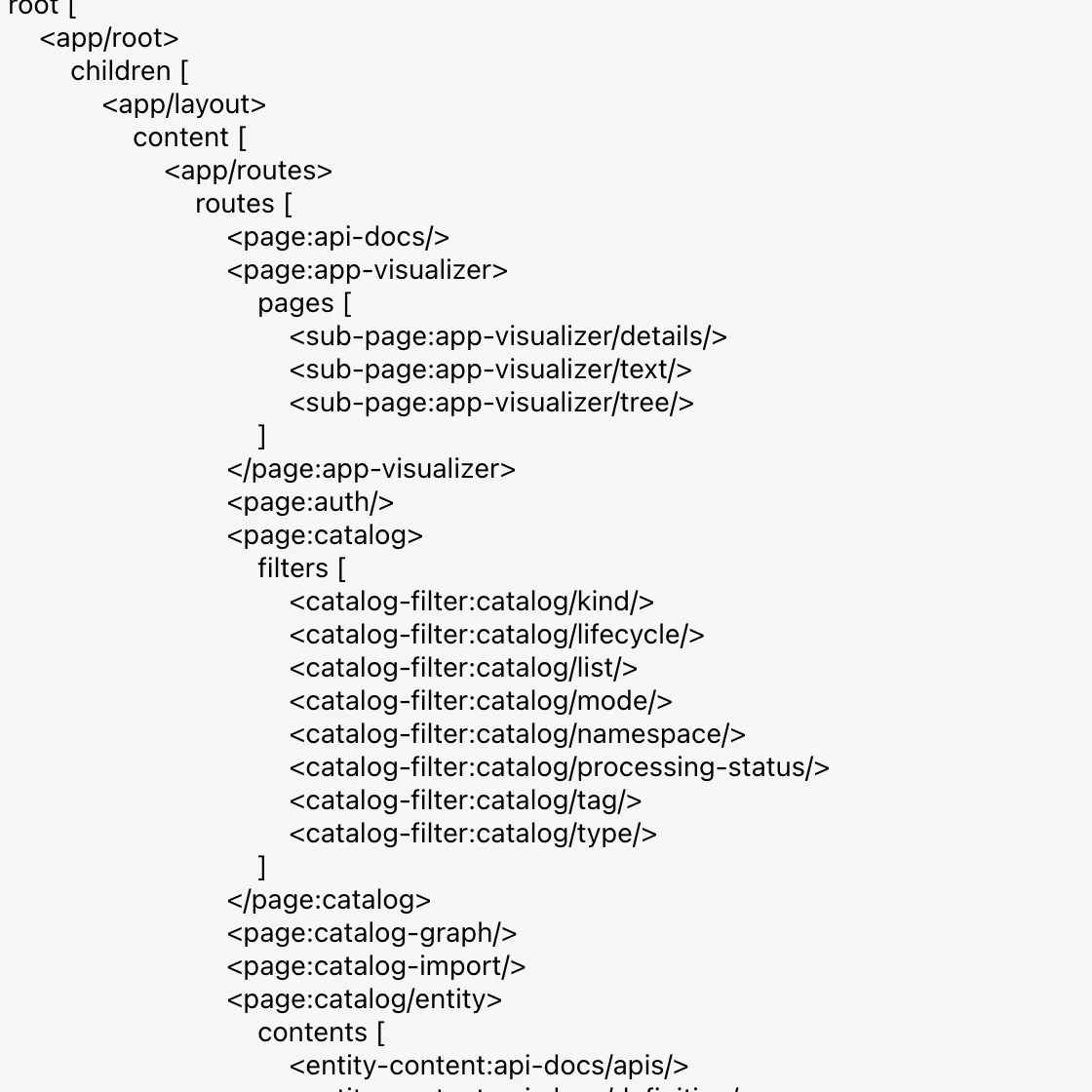
Here you find every ID you will need in app.extensions
in a moment. A little further down are page:catalog/entity
with all cards of the entity page and page:home with the
widgets. At the very bottom, Show Disabled displays
disabled extensions in gray.
Tip: The IDs follow from the code:
HomePageWidgetBlueprintwithname: 'toolkit'in the pluginhomebecomeshome-page-widget:home/toolkit. In the installed package you find them, for example, withgrep -n "name:" node_modules/@backstage/plugin-home/dist/alpha.esm.js.
Save your progress? Sign up for free
Drill 2: Where app.extensions takes effect
What is in effect right now? config:print shows the
merged configuration of all app-config*.yaml files, and
with --frontend only the part the browser sees.
cd ~/backstage-lab/portal
yarn backstage-cli config:print --frontend --format json 2>/dev/null \
  | jq -r '.app.extensions[] | keys[0]'
Expected:
page:catalog
home-page-widget:home/toolkit
home-page-widget:home/world-clock
page:home
These are the four entries from the template’s
app-config.yaml. Now an experiment: you want to disable
Register Existing Component only locally and add an
entry to app-config.local.yaml for it. Because
app.title is already there, you set the key with
yq instead of appending a second app:
block.
yq -i '.app.extensions = [{"page:catalog-import": false}]' app-config.local.yaml
yarn backstage-cli config:print --frontend --format json 2>/dev/null \
  | jq -c '.app.extensions'
~/backstage-lab/setup/portal.sh restart
Expected:
[{"page:catalog-import":false}]
✔ gestoppt
✔ Backstage läuft: http://localhost:3000 (Backend http://localhost:7007)- Reload
http://localhost:3000. - Expected: Register Existing Component is gone from
the sidebar – but
/now showsERROR 404: PAGE NOT FOUND.
Why? @backstage/config merges objects key by key, but
for lists the file with higher precedence wins
completely. The single line from the local file pushed
out all four entries from app-config.yaml:
page:catalog is back on its default path
/catalog, page:home on /home, and
nothing is on / anymore. You already know this from
catalog.locations (Day 3).
The rule for this book: the design of the app belongs in
app-config.yaml (checked in, applies to everyone), while
app-config.local.yaml stays for lab values and secrets.
Roll back the experiment:
yq -i 'del(.app.extensions)' app-config.local.yaml
grep -c 'extensions' app-config.local.yaml
Expected:
0Tip:
yq(mikefarah,brew install yq) rewrites the file and in the process turns{ seconds: 20 }into{seconds: 20}– the same content.
Save your progress? Sign up for free
Drill 3: The home page on /
A developer portal greets you with a home page, not a table. First
the Getting Started card: it is not a plugin but a
widget in the app module modules/home. Replace its
content:
cat > ~/backstage-lab/portal/packages/app/src/modules/home/homeModule.tsx <<'EOF'
import { createFrontendModule } from '@backstage/frontend-plugin-api';
import { HomePageWidgetBlueprint } from '@backstage/plugin-home-react/alpha';
import { MarkdownContent } from '@backstage/core-components';

const content = `
## Willkommen im Kranich Entwicklerportal

Alles über unsere Software an einem Ort: Services, APIs, Teams und Doku.

- **[Katalog](/catalog)** – wem gehört was, wer nutzt welche API?
- **[Neues Projekt](/create)** – Golden Paths als Software Templates
- **[Dokumentation](/docs)** – TechDocs direkt aus den Repos

Fragen? Team Plattform, [email protected]
`;

const gettingStartedWidget = HomePageWidgetBlueprint.make({
  name: 'getting-started',
  params: {
    name: 'GettingStarted',
    title: 'Erste Schritte',
    description: 'Einstieg ins Kranich Entwicklerportal',
    components: async () => ({
      Content: () => <MarkdownContent content={content} />,
    }),
  },
});

export const homeModule = createFrontendModule({
  pluginId: 'home',
  extensions: [gettingStartedWidget],
});
EOF
name: 'GettingStarted' is the name under which the
layout references the widget.
The new list for app.extensions is in the companion
code. The beginning, with home page, layout and widgets:
- page:home:
    config:
      path: /
      defaultConfig:
        - component: HomePageSearchBar
          column: 0
          row: 0
          width: 12
          height: 2
          deletable: false
        - component: GettingStarted
          column: 0
          row: 2
          width: 6
          height: 5
        - component: HomePageToolkit
          column: 6
          row: 2
          width: 6
          height: 3
        # … HomePageWorldClock (column 6, row 5), HomePageStarredEntities (row 7)
- home-page-widget:home/toolkit:
    config:
      tools:
        - url: http://127.0.0.1:3300/kranich
          label: Forgejo
          icon: externalLink
        - url: /create
          label: Neues Projekt
          icon: scaffolder
        # … TechDocs (/docs) and Backstage docs
- home-page-widget:home/world-clock:
    config:
      clockConfigs:
        - label: Berlin
          timeZone: Europe/Berlin
        - label: UTC
          timeZone: UTC
page:catalog no longer appears, so the catalog sits on
its default path /catalog. The keys
defaultConfig, tools and
clockConfigs are defined in the configSchema
of the extensions in
@backstage/plugin-home/dist/alpha.esm.js; the icon names
(scaffolder, techdocs, docs,
externalLink, …) are the app’s default icons.
The script extensions-setzen.sh replaces the block under
app.extensions in app-config.yaml with a file
and creates a backup first:
cd ~/backstage-lab/portal
bash ~/backstage-lab/code/tag09/extensions-setzen.sh \
  ~/backstage-lab/code/tag09/app-extensions.yaml
yarn backstage-cli config:print --frontend --format json 2>/dev/null \
  | jq -r '.app.extensions[] | keys[0]'
~/backstage-lab/setup/portal.sh restart
Expected:
✔ app.extensions aus app-extensions.yaml übernommen (Sicherung: app-config.yaml.bak)
page:home
home-page-widget:home/toolkit
home-page-widget:home/world-clock
home-page-widget:home/random-joke
page:app-visualizer
entity-card:catalog/about
entity-card:catalog-graph/relations
entity-card:org/ownership
✔ gestoppt
✔ Backstage läuft: http://localhost:3000 (Backend http://localhost:7007)- Open
http://localhost:3000(window at least about 1500 px wide). - Expected: the home page as in the figure – search, Erste Schritte (Getting Started), Toolkit with the Forgejo link and World Clocks with Berlin and UTC.
- Click Catalog in the sidebar. The address bar now
shows
http://localhost:3000/catalog.
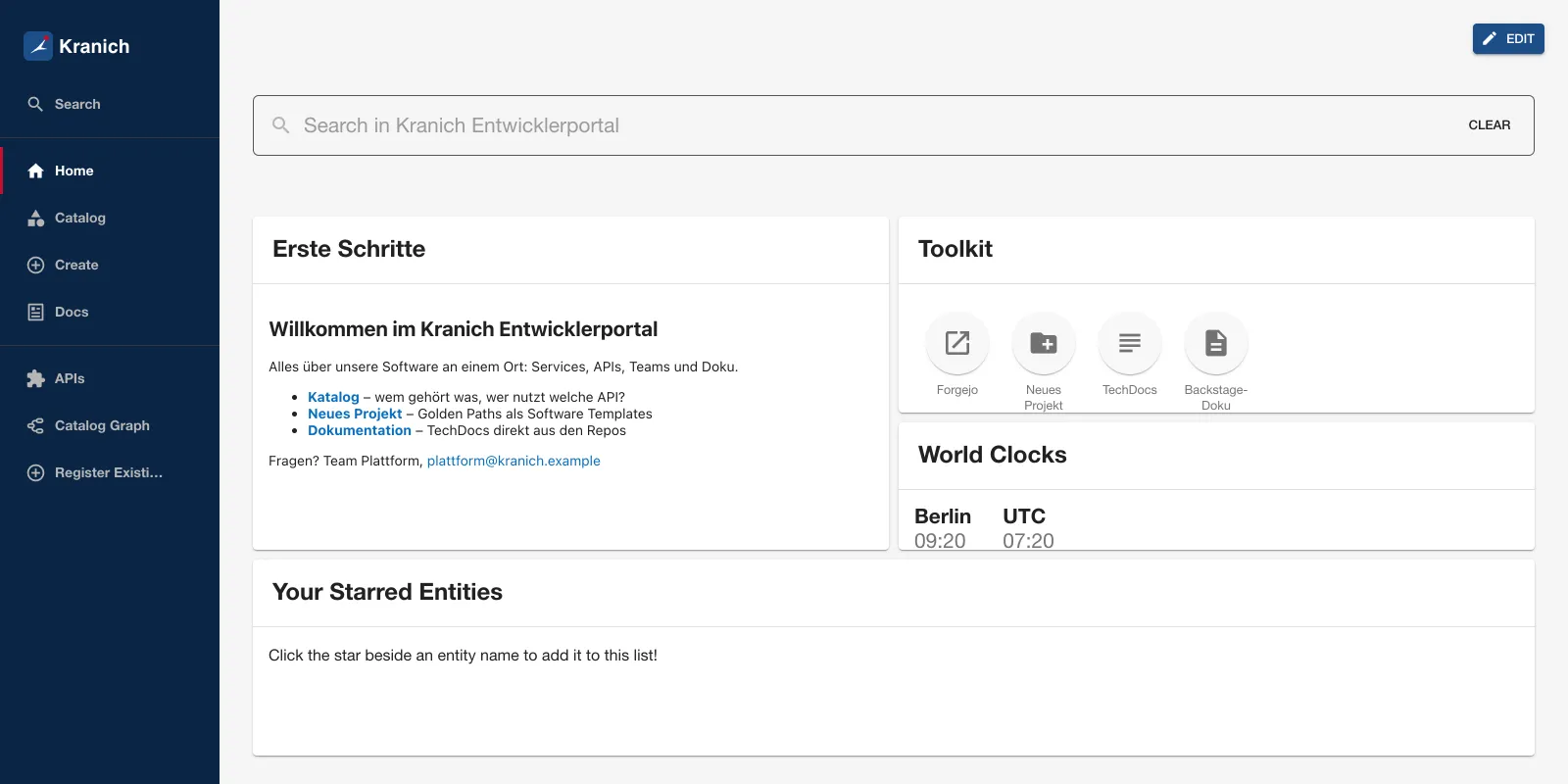
The figure already shows the logo and theme from Drills 5 and 6. The
grid has 12 columns only from the breakpoint width lg (1280
px of content); below that it has 10 or fewer – and widgets shift
around.
Warning:
defaultConfigapplies only until someone rearranges the page via EDIT. After that, Backstage stores the layout per user (buckethome.customHomepage); that user sees new defaults only after Restore defaults in edit mode.
Save your progress? Sign up for free
Drill 4: Disable, rename, reorder
The rest of app-extensions.yaml needs no code at
all:
# Joke widget calls an external API – unwanted on the corporate network
- home-page-widget:home/random-joke: false
# Navigation: rename the page title
- page:app-visualizer:
    config:
      title: App-Struktur
# Entity page: About first, the relations graph below it in the right column
- entity-card:catalog/about: true
- entity-card:catalog-graph/relations:
    config:
      type: info
      title: Beziehungen
      height: 280
# Group pages: indirect ownership from the start
- entity-card:org/ownership:
    config:
      initialRelationAggregation: aggregated
Four mechanisms, all from the installed code:
| Entry | Effect | Source |
|---|---|---|
- <id>: false |
Disable the extension | readAppExtensionsConfig |
config.title |
Page title and sidebar text | PageBlueprint |
config.type: info |
Card in the right column | EntityCardBlueprint |
| Order of the list | Listed extensions come first | resolveAppNodeSpecs |
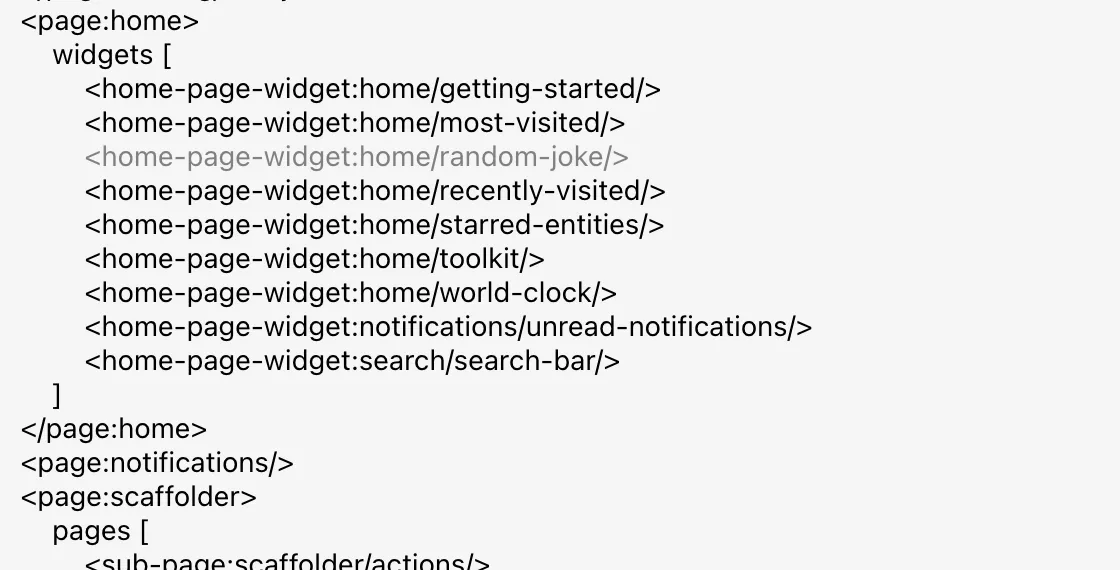
- Click App-Struktur (app structure; previously Visualizer) at the bottom of the sidebar, then Text, scroll to the end and turn on Show Disabled.
- Expected:
home-page-widget:home/random-jokeappears in gray underpage:home, as in the figure.
- Open
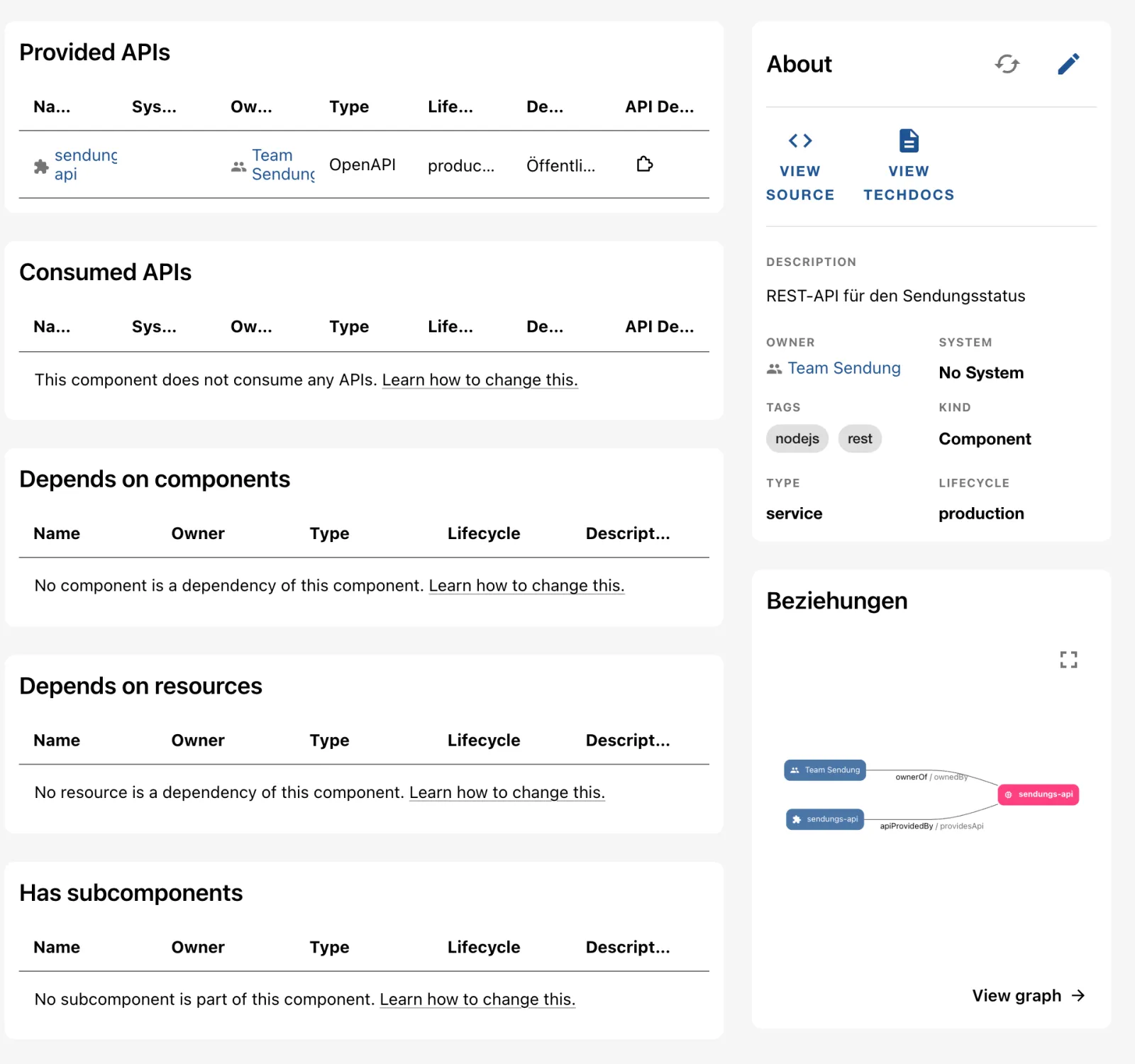
sendungs-apiin the catalog. - Expected: About on the right, below it the Beziehungen (relations) card with Team Sendung and the API, as in the figure. Previously the graph was at the bottom of the left column.
- Via Owner, open the group Team Sendung, then IT (Parent Group). Ownership now immediately shows the sum of the teams – the Include indirect ownership toggle is already on (Day 4, Drill 5).
Warning: A typo in an ID breaks nothing; it is simply ignored. The browser console then reports
INVALID_EXTENSION_CONFIG_KEY: Extension home-page-widget:home/randomjoke does not exist. If a change has no effect, look there first.
Save your progress? Sign up for free
Drill 5: Sidebar and logo
The order of the sidebar is not in the config but in
modules/nav/Sidebar.tsx: nav.take('page:…')
puts an entry exactly at that spot,
nav.rest({ sortBy: 'title' }) sorts the rest
alphabetically. Docs should sit directly below
Create:
cd ~/backstage-lab/portal/packages/app/src/modules/nav
sed -i '' "s|^\( *\){nav.take('page:scaffolder')}$|&\n\1{nav.take('page:techdocs')}|" \
  Sidebar.tsx
grep -n "nav.take('page:" Sidebar.tsx
Expected:
25:      nav.take('page:search'); // Using search modal instead
26:      nav.take('page:notifications'); // Using NotificationsSidebarItem manually …
36:            {nav.take('page:home')}
37:            {nav.take('page:catalog')}
38:            {nav.take('page:scaffolder')}
39:            {nav.take('page:techdocs')}
54:            {nav.take('page:app-visualizer')}
55:            {nav.take('page:user-settings')}
The texts of the entries, on the other hand, come from the pages
themselves – that is why config.title was enough in Drill
4. Now the logo: SidebarLogo.tsx shows
LogoFull when the sidebar is expanded and
LogoIcon when it is collapsed. You replace both with a
simple SVG with a Kranich (crane) mark:
cat > LogoIcon.tsx <<'EOF'
import { makeStyles } from '@material-ui/core';

const useStyles = makeStyles({
  svg: { width: 'auto', height: 28 },
});

// Logo mark: blue square, stylized crane, red crown
export const KranichMark = () => (
  <g>
    <rect width="40" height="40" rx="8" fill="#1d4e89" />
    <path
      d="M9 30 L20 21 L31 9 L24 22 L33 24 L20 25 Z"
      fill="#ffffff"
    />
    <circle cx="31" cy="9" r="3.5" fill="#c8102e" />
  </g>
);

export const LogoIcon = () => {
  const classes = useStyles();
  return (
    <svg
      className={classes.svg}
      xmlns="http://www.w3.org/2000/svg"
      viewBox="0 0 40 40"
    >
      <KranichMark />
    </svg>
  );
};
EOF
cat > LogoFull.tsx <<'EOF'
import { makeStyles } from '@material-ui/core';
import { KranichMark } from './LogoIcon';

const useStyles = makeStyles({
  svg: { width: 'auto', height: 30 },
});

// Logo mark plus the "Kranich" wordmark for the expanded sidebar
export const LogoFull = () => {
  const classes = useStyles();
  return (
    <svg
      className={classes.svg}
      xmlns="http://www.w3.org/2000/svg"
      viewBox="0 0 170 40"
    >
      <KranichMark />
      <text
        x="48"
        y="29"
        fill="#ffffff"
        fontFamily="Helvetica, Arial, sans-serif"
        fontSize="26"
        fontWeight="bold"
      >
        Kranich
      </text>
    </svg>
  );
};
EOF
yarn start recompiles frontend code on save – no restart
needed.
- Reload the portal.
- Expected: top left, the logo mark with the wordmark Kranich, below it Home, Catalog, Create, Docs – as in the figure of the home page in Drill 3.
- Click the logo. It links to
/, which is now the home page.
Save your progress? Sign up for free
Drill 6: Light, dark, Kranich
- Click Settings at the bottom of the sidebar.
- Under Appearance you choose DARK, LIGHT or AUTO (follows the operating system). Click DARK.
- Expected: the whole app turns dark, as in the figure. The browser
stores the choice (
localStorage, keytheme).
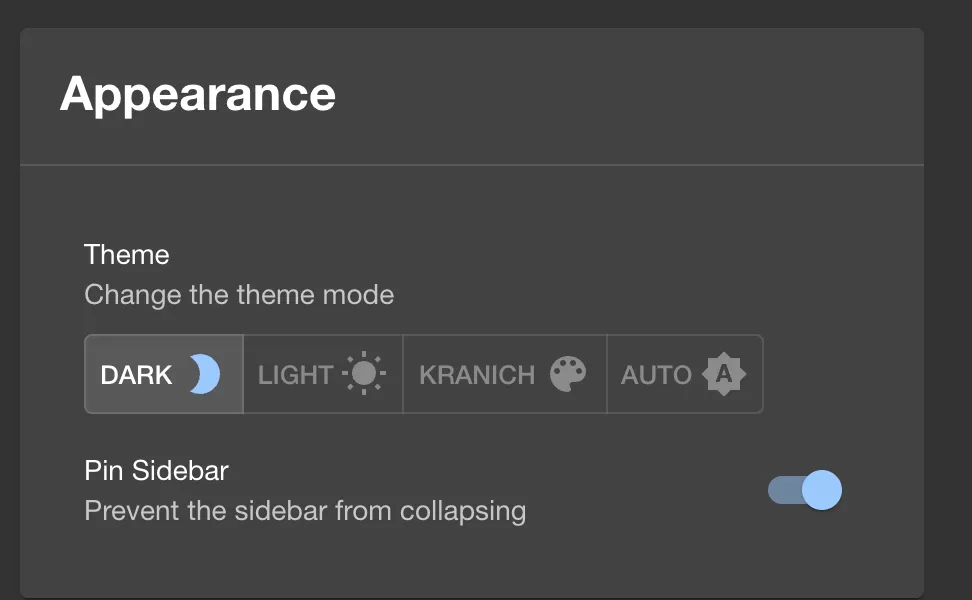
The two themes are extensions of the plugin app:
theme:app/light and theme:app/dark. A third
theme is another extension made from ThemeBlueprint
(@backstage/plugin-app-react).
createUnifiedTheme from @backstage/theme
builds the colors. The package is already installed but not registered
as a dependency of the app:
cd ~/backstage-lab/portal
yarn --cwd packages/app add @backstage/theme@^0.7.3
jq '.dependencies["@backstage/theme"]' packages/app/package.json
Expected (shortened, may differ depending on the version):
➤ YN0000: · Done in 3s 512ms
"^0.7.3"
The version ^0.7.3 is already in yarn.lock,
so yarn downloads nothing.
mkdir -p packages/app/src/modules/theme
cat > packages/app/src/modules/theme/index.tsx <<'EOF'
import { createFrontendModule } from '@backstage/frontend-plugin-api';
import { ThemeBlueprint } from '@backstage/plugin-app-react';
import PaletteIcon from '@material-ui/icons/Palette';
import {
  UnifiedThemeProvider,
  createUnifiedTheme,
  genPageTheme,
  palettes,
  shapes,
} from '@backstage/theme';

// Kranich colors: midnight blue, Kranich blue and the red of the crown
const kranichTheme = createUnifiedTheme({
  palette: {
    ...palettes.light,
    primary: { main: '#1d4e89' },
    secondary: { main: '#c8102e' },
    navigation: {
      ...palettes.light.navigation,
      background: '#0b2545',
      indicator: '#c8102e',
      selectedColor: '#ffffff',
    },
  },
  defaultPageTheme: 'home',
  pageTheme: {
    home: genPageTheme({ colors: ['#0b2545', '#1d4e89'], shape: shapes.wave }),
  },
});

const kranichThemeExtension = ThemeBlueprint.make({
  name: 'kranich',
  params: {
    theme: {
      id: 'kranich',
      title: 'Kranich',
      variant: 'light',
      icon: <PaletteIcon />,
      Provider: ({ children }) => (
        <UnifiedThemeProvider theme={kranichTheme} children={children} />
      ),
    },
  },
});

export const themeModule = createFrontendModule({
  pluginId: 'app',
  extensions: [kranichThemeExtension],
});
EOF
cat > packages/app/src/App.tsx <<'EOF'
import { createApp } from '@backstage/frontend-defaults';
import catalogPlugin from '@backstage/plugin-catalog/alpha';
import { navModule } from './modules/nav';
import { homeModule } from './modules/home';
import { themeModule } from './modules/theme';

export default createApp({
  features: [catalogPlugin, navModule, homeModule, themeModule],
});
EOF
The module belongs to the plugin app, so the new
extension is called theme:app/kranich.
- Reload Settings. Under Appearance you now see KRANICH with a palette icon. Click it.
- Open Catalog.
- Expected: a midnight-blue sidebar with a red marker on the active
entry and blue buttons, as in the figure. The heading “Kranich Logistik
Catalog” comes from
organization.namein yourapp-config.local.yaml.
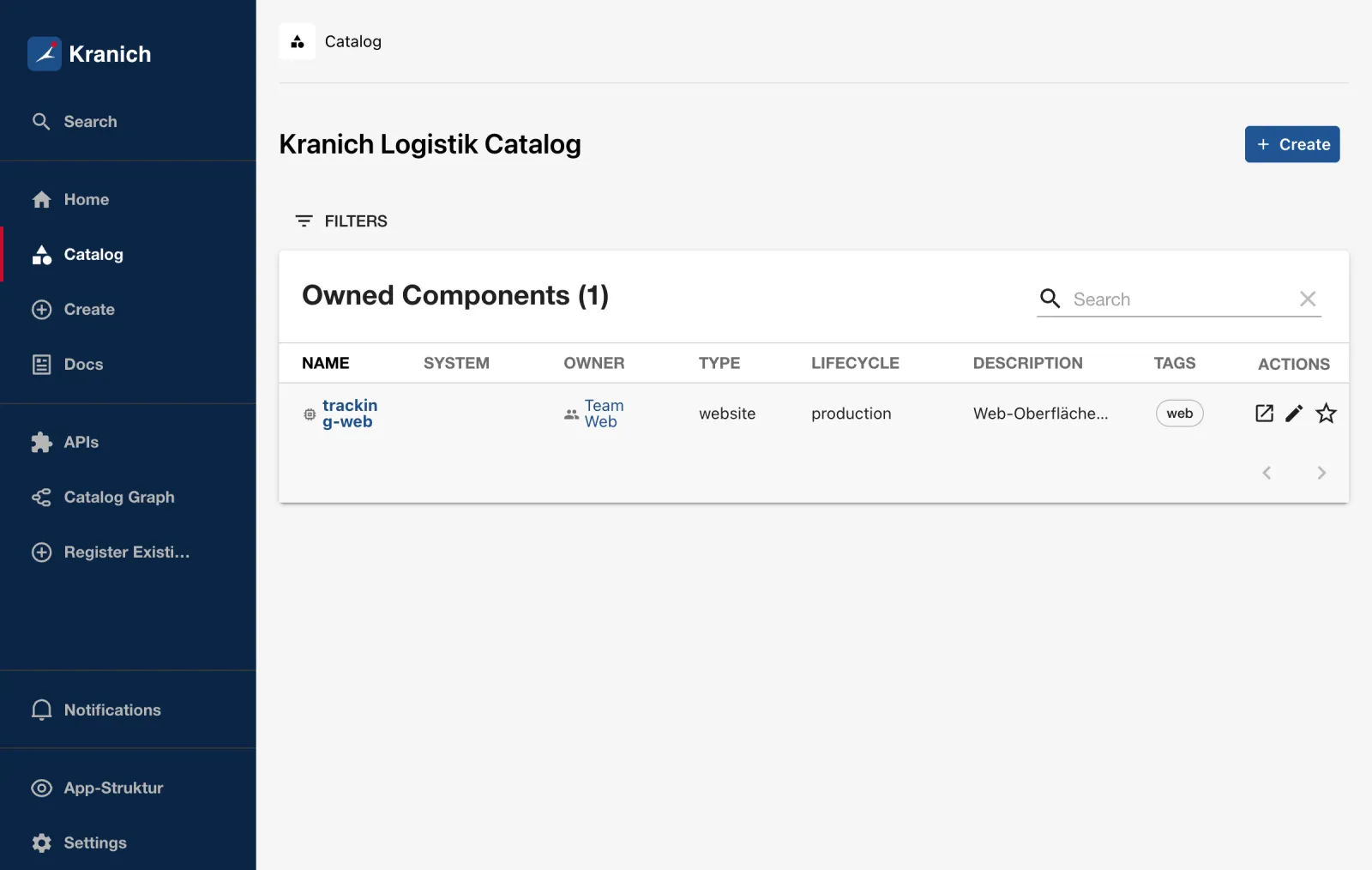
Why doesn’t the page header change? It comes from the extension
component:app/core-page-layout, which uses
PluginHeader from @backstage/ui. This new UI
library is styled through CSS variables, not through the MUI theme.
createUnifiedTheme affects all Material UI components
(sidebar, buttons, links, cards).
Save your progress? Sign up for free
Drill 7: Checking before the commit
yarn start does not check frontend code for types or
missing dependencies. The app’s lint and tests take care of that:
cd ~/backstage-lab/portal
yarn --cwd packages/app lint && echo "✔ lint"
CI=true yarn --cwd packages/app test 2>&1 | grep -E '✓|Tests:'
Expected:
✔ lint
    ✓ should render (19 ms)
Tests:       1 passed, 1 total
Without the entry in package.json from Drill 6, lint
would have rejected it:
@backstage/theme must be declared in dependencies of packages/app/package.json,
run 'yarn --cwd packages/app add @backstage/theme' from the project root
The check is called @backstage/no-undeclared-imports. It
prevents an import from working only by chance through another package
and breaking at the next upgrade.
Save your progress? Sign up for free
Checkpoint
The UI can hardly be checked with curl – the frontend is
a single-page app. What you can check are the title in the HTML, the
effective configuration and the files.
cat > ~/backstage-lab/tag09/kontrolle.sh <<'EOF'
#!/usr/bin/env bash
# kontrolle.sh – checkpoint Day 9 (✔/✘). Exit code = number of failures.
source ~/backstage-lab/setup/env.sh
cd "$PORTAL" || exit 1
fail=0
t() { if eval "$2" >/dev/null 2>&1; then echo "✔ $1"
  else echo "✘ $1"; fail=$((fail+1)); fi; }
# effective frontend configuration (all app-config*.yaml merged)
cfg=$(yarn backstage-cli config:print --frontend --format json 2>/dev/null)
ext() { jq -e --arg id "$1" \
  '[.app.extensions[] | select(type == "object" and has($id)) | .[$id]][0]' <<<"$cfg"; }

t "Frontend liefert Titel Kranich Entwicklerportal" \
  "curl -sf $APP/ | grep -q '<title>Kranich Entwicklerportal</title>'"
t "Keine app.extensions in app-config.local.yaml" \
  "! grep -q '^  extensions:' app-config.local.yaml"
t "page:home liegt auf /" "ext page:home | jq -e '.config.path == \"/\"'"
t "page:catalog nicht mehr auf / umgebogen" "! ext page:catalog"
t "Random Joke abgeschaltet" \
  "ext home-page-widget:home/random-joke | jq -e '. == false'"
t "Toolkit verlinkt Forgejo" \
  "ext home-page-widget:home/toolkit | jq -e '.config.tools[] |
     select(.label == \"Forgejo\")'"
t "Weltuhr zeigt Berlin" \
  "ext home-page-widget:home/world-clock | jq -e '.config.clockConfigs[] |
     select(.timeZone == \"Europe/Berlin\")'"
t "Logo mit Schriftzug Kranich" \
  "grep -q 'Kranich' packages/app/src/modules/nav/LogoFull.tsx"
t "Kranich-Theme in App.tsx registriert" \
  "grep -q themeModule packages/app/src/App.tsx"
t "@backstage/theme als Abhängigkeit deklariert" \
  "jq -e '.dependencies[\"@backstage/theme\"]' packages/app/package.json"
exit "$fail"
EOF
bash ~/backstage-lab/tag09/kontrolle.sh
Expected:
✔ Frontend liefert Titel Kranich Entwicklerportal
✔ Keine app.extensions in app-config.local.yaml
✔ page:home liegt auf /
✔ page:catalog nicht mehr auf / umgebogen
✔ Random Joke abgeschaltet
✔ Toolkit verlinkt Forgejo
✔ Weltuhr zeigt Berlin
✔ Logo mit Schriftzug Kranich
✔ Kranich-Theme in App.tsx registriert
✔ @backstage/theme als Abhängigkeit deklariert
The title in the HTML is set by
packages/app/public/index.html with
config.getOptionalString('app.title') – it comes from your
local file. With the experiment from Drill 2, six checks fail.
Challenge
The widgets Recently Visited and Most Visited already exist, but they stay empty. Put both on the home page below the favorites and make sure they fill up – through configuration only.
Hint: In the Visualizer, under api: and
app-root-element:, there are two extensions of the plugin
home that are disabled out of the box.
Solution
The file challenge/app-extensions.yaml is the list from
Drill 3 plus two layout entries and two enabled extensions:
        - component: HomePageRecentlyVisited
          column: 0
          row: 10
          width: 6
          height: 4
        - component: HomePageMostVisited
          column: 6
          row: 10
          width: 6
          height: 4
# Visit history: API and listener are disabled out of the box
- api:home/visits: true
- app-root-element:home/visit-listener: true
cd ~/backstage-lab/portal
bash ~/backstage-lab/code/tag09/extensions-setzen.sh \
~/backstage-lab/code/tag09/challenge/app-extensions.yaml
~/backstage-lab/setup/portal.sh restart- Open a few pages, e.g.
sendungs-api, Docs andsendungs-apiagain. - Click Home and scroll down.
- Expected: both widgets with your visits, as in the figure.
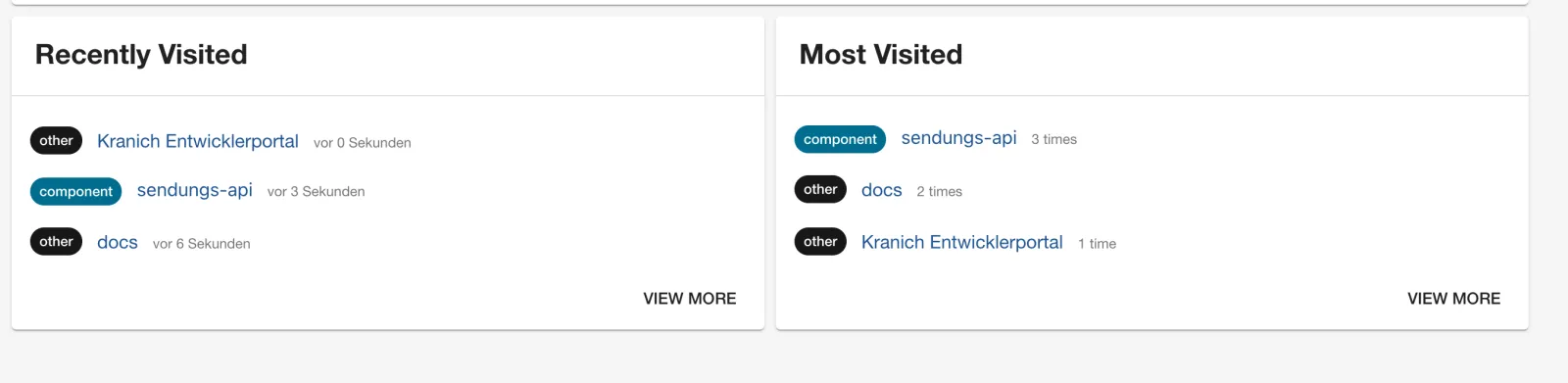
app-root-element:home/visit-listener records every page
change, api:home/visits stores it through the app’s storage
API. In the template, that API is provided by
api:app/user-settings-storage – so the visits are stored
per user in the backend, not just in the browser.
Save your progress? Sign up for free
Enterprise Note
app.extensionsbelongs inapp-config.yamland therefore in review. Environments differ viaapp-config.production.yaml– but only with a complete list, because lists are replaced, not merged.- Disable widgets with external calls (Random Joke, weather, feeds) on
the corporate network; otherwise the Content Security Policy
(
backend.csp) blocks them anyway or requires exceptions. - Logo, colors and font belong in a small theme module, not scattered across components. Check contrast (WCAG) for light and dark; many companies approve only one theme.
- The Visualizer is a tool for platform teams. In production, disable
it (
- page:app-visualizer: false) or allow it only internally. - With every Backstage upgrade (Day 14), extension IDs and
configSchemacan change. A check script like the one above catches silent ignores.