Day 10: Installing plugins
Goal: You connect the Kubernetes plugin to a local kind cluster, see the pods of
sendungs-apiin the portal and set up a proxy endpoint to the Forgejo API. · Duration: approx. 120 min · Prerequisite: Day 9
Briefing
- A plugin usually consists of several npm packages:
frontend (
@backstage/plugin-kubernetes), backend (…-kubernetes-backend), optional modules (…-backend-module-…) and libraries (-react,-common,-node). - Where to find them: the plugin directory at
backstage.io/plugins, plus npm and the repobackstage/community-plugins. - Frontend:
app.packages: allloads every plugin frompackages/app/package.jsonautomatically (feature discovery). Backend: one linebackend.add(import(…)). - After that, almost every plugin still needs configuration and often an annotation on the entity.
 Browser              Backend :7007                    kind cluster backstage-lab
 ┌────────────┐ POST  ┌─────────────────────────┐ GET  ┌───────────────────────────┐
 │ Tab        │ ────► │ /api/kubernetes/        │ ───► │ Pods, Deployments, … with │
 │ Kubernetes │       │ services/<id>           │      │ label backstage.io/       │
 └────────────┘       │ ServiceAccount token    │      │ kubernetes-id=sendungs-api│
                      └─────────────────────────┘      └───────────────────────────┘
Drill 1: What is already installed?
You start where Day 9 ended: the portal is running, with a catalog
containing sendungs-api, sendungs-worker (repo
kranich/sendungsverfolgung) and the organization from Day
4. Before you install anything, check what the create-app template
already ships:
source ~/backstage-lab/setup/env.sh
~/backstage-lab/setup/portal.sh start
cd ~/backstage-lab/portal
grep -h '"@backstage/plugin-kubernetes' packages/app/package.json \
  packages/backend/package.json
grep -n kubernetes packages/backend/src/index.ts
Expected:
    "@backstage/plugin-kubernetes": "^0.12.23",
    "@backstage/plugin-kubernetes-backend": "^0.21.11",
59:// kubernetes plugin
60:backend.add(import('@backstage/plugin-kubernetes-backend'));
So both halves are already there – this plugin does not need a
yarn add. Why does the frontend find the plugin without an
entry in App.tsx?
jq '.backstage | {role, pluginId, features}' \
  node_modules/@backstage/plugin-kubernetes/package.json
grep -n 'packages:' app-config.yaml
Expected:
{
  "role": "frontend-plugin",
  "pluginId": "kubernetes",
  "features": {
    "./alpha": "@backstage/FrontendPlugin"
  }
}
6:  packages: all
Why? app.packages: all searches the dependencies of
packages/app for packages with
role: frontend-plugin and a feature export, and loads them.
That is how the Kubernetes plugin brings along the entity extension
entity-content:kubernetes/kubernetes – the
Kubernetes tab, which only appears for entities with
the annotation backstage.io/kubernetes-id.
Tip: You install a plugin that is still missing the same way as on Day 5:
yarn --cwd packages/app add @backstage/plugin-…(frontend) oryarn --cwd packages/backend add …plusbackend.add(import(…)), thenportal.sh restart.
The backend, on the other hand, is only half active:
~/backstage-lab/setup/portal.sh logs 300 | sed 's/\x1b\[[0-9;]*m//g' \
  | grep 'kubernetes warn' | cut -c1-88
Expected:
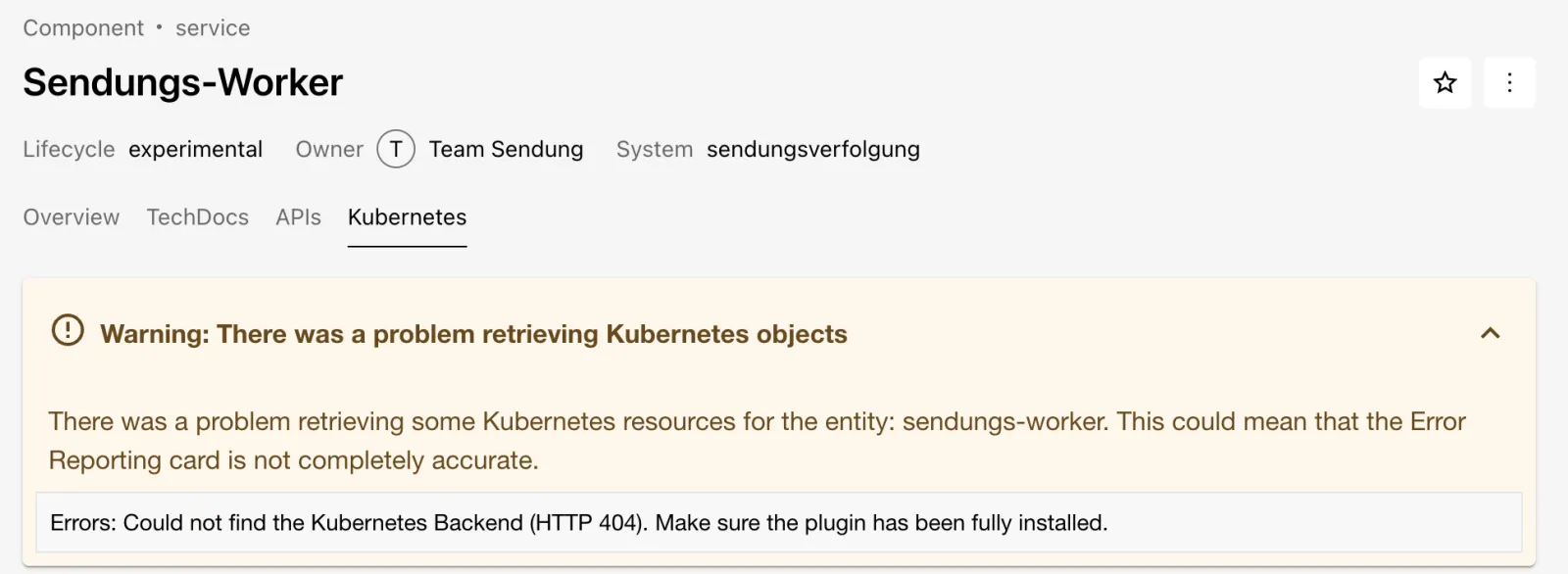
2026-10-13T07:17:34.973Z kubernetes warn Failed to initialize kubernetes backend: validWithout a kubernetes: block (it is empty in
app-config.yaml), the plugin registers no routes. Look at
the failure in the portal:
- Open
sendungs-worker– the component has had the annotation since Day 2. - Click the Kubernetes tab and expand the warning.
- Expected: “Could not find the Kubernetes Backend (HTTP 404)”, as in the figure.
Save your progress? Sign up for free
Drill 2: The kind cluster backstage-lab
You need kind and kubectl (Homebrew:
brew install kind kubectl). The cluster gets its own
kubeconfig file – your ~/.kube/config and its current
context stay untouched.
mkdir -p ~/backstage-lab/tag10 && cd ~/backstage-lab/tag10
export KUBECONFIG=~/backstage-lab/tag10/kubeconfig
kind create cluster --name backstage-lab --image kindest/node:v1.37.0 \
  --kubeconfig "$KUBECONFIG"
kubectl wait --for=condition=Ready node --all --timeout=90s
kubectl get nodes
Expected (shortened):
Creating cluster "backstage-lab" ...
 ✓ Ensuring node image (kindest/node:v1.37.0)
 ✓ Starting control-plane
Set kubectl context to "kind-backstage-lab"
node/backstage-lab-control-plane condition met
NAME                          STATUS   ROLES           AGE   VERSION
backstage-lab-control-plane   Ready    control-plane   20s   v1.37.0
“Set kubectl context” refers only to the file in
$KUBECONFIG. If the image kindest/node:v1.37.0
is not available locally, kind downloads it the first time (a good 1
GB).
Warning: Every new terminal needs
export KUBECONFIG=~/backstage-lab/tag10/kubeconfigagain, otherwisekubectltalks to your default cluster.
Save your progress? Sign up for free
Drill 3: The sendungs-api in the cluster
The deployment is a small nginx in the namespace
kranich. The key part is the label
backstage.io/kubernetes-id on the Deployment, pod template
and Service:
cp -R ~/backstage-lab/code/tag10/k8s ~/backstage-lab/tag10/
grep -n -B1 'kubernetes-id' k8s/sendungs-api.yaml
Expected:
13-    app: sendungs-api
14:    backstage.io/kubernetes-id: sendungs-api
--
23-        app: sendungs-api
24:        backstage.io/kubernetes-id: sendungs-api
--
40-  labels:
41:    backstage.io/kubernetes-id: sendungs-api
kubectl apply -f k8s/sendungs-api.yaml
kubectl -n kranich rollout status deploy/sendungs-api --timeout=120s
kubectl get pods -n kranich -L backstage.io/kubernetes-idExpected:
namespace/kranich created
deployment.apps/sendungs-api created
service/sendungs-api created
deployment "sendungs-api" successfully rolled out
NAME                           READY   STATUS    RESTARTS   AGE   KUBERNETES-ID
sendungs-api-dc8cbccbf-dqrl4   1/1     Running   0          9s    sendungs-api
The node pulls nginx:1.24-alpine from Docker Hub itself.
Why a label? By default the plugin searches with the label selector
backstage.io/kubernetes-id=<annotation> across all
namespaces – the name of the Deployment does not matter.
Save your progress? Sign up for free
Drill 4: A ServiceAccount for Backstage
Backstage authenticates to the cluster with the token of its own ServiceAccount. For now without permissions – you will see the failure in Drill 6.
cat > k8s/backstage-sa.yaml <<'EOF'
# backstage-sa.yaml – technical access for Backstage (no permissions yet)
apiVersion: v1
kind: Namespace
metadata:
  name: backstage
---
apiVersion: v1
kind: ServiceAccount
metadata:
  name: backstage
  namespace: backstage
---
apiVersion: v1
kind: Secret
metadata:
  name: backstage-token
  namespace: backstage
  annotations:
    kubernetes.io/service-account.name: backstage
type: kubernetes.io/service-account-token
EOF
kubectl apply -f k8s/backstage-sa.yaml
kubectl auth can-i list pods --as=system:serviceaccount:backstage:backstage
Expected:
namespace/backstage created
serviceaccount/backstage created
secret/backstage-token created
no
The cluster itself fills the Secret of type
service-account-token with a non-expiring token –
convenient for the lab; for production see the Enterprise Note.
Save your progress? Sign up for free
Drill 5: Configuring the cluster
You take three values from the kubeconfig and the Secret: API URL, CA certificate, token.
K8S_URL=$(kubectl config view --raw --minify \
  -o jsonpath='{.clusters[0].cluster.server}')
K8S_CA=$(kubectl config view --raw --minify \
  -o jsonpath='{.clusters[0].cluster.certificate-authority-data}')
K8S_TOKEN=$(kubectl -n backstage get secret backstage-token \
  -o jsonpath='{.data.token}' | base64 -d)
echo "$K8S_URL ${#K8S_CA} ${#K8S_TOKEN}"
Expected (the port differs for every cluster):
https://127.0.0.1:50509 1476 905Append the block to app-config.local.yaml. This time the
EOF has no quotes, so the shell
substitutes the three variables – token and CA thus end up in the local
file, which is not checked in:
cat >> ~/backstage-lab/portal/app-config.local.yaml <<EOF
kubernetes:
  serviceLocatorMethod:
    type: multiTenant
  clusterLocatorMethods:
    - type: config
      clusters:
        - name: backstage-lab
          url: $K8S_URL
          authProvider: serviceAccount
          serviceAccountToken: $K8S_TOKEN
          caData: $K8S_CA
          skipMetricsLookup: true
EOF
grep -c '^kubernetes:' ~/backstage-lab/portal/app-config.local.yaml
~/backstage-lab/setup/portal.sh restart
bs kubernetes/clusters | jq -c '.items[]'
Expected:
1
✔ gestoppt
✔ Backstage läuft: http://localhost:3000 (Backend http://localhost:7007)
{"name":"backstage-lab","authProvider":"serviceAccount"}
Why? multiTenant asks every configured cluster about
every entity. skipMetricsLookup: true skips the query to
the metrics-server, which kind doesn’t have.
Tip: Instead of
caData,skipTLSVerify: truealso works in the lab – then the backend does not verify the API server’s certificate at all. Only for sandboxes.
Save your progress? Sign up for free
Drill 6: Annotation and the 403 failure
sendungs-api has no annotation yet. Add it only to the
component (the file also contains API entities) and push:
cd ~/backstage-lab/tag10
git clone -q http://lab-admin:[email protected]:3300/kranich/sendungs-api.git
cd sendungs-api
yq -i '(select(.kind == "Component")
  | .metadata.annotations["backstage.io/kubernetes-id"]) = "sendungs-api"' \
  catalog-info.yaml
git diff
git -c user.name="Lab Admin" -c [email protected] \
  commit -qam "Kubernetes-ID für das Kubernetes-Plugin"
git push -q origin main
Expected:
@@ -6,6 +6,7 @@ metadata:
   tags: [nodejs, rest]
   annotations:
     backstage.io/techdocs-ref: dir:.
+    backstage.io/kubernetes-id: sendungs-api
 spec:
   type: service
After one or two minutes (Gitea provider), the entity has the annotation. Ask the plugin directly – the tab makes exactly this call too:
sleep 70
k8s() { bs kubernetes/services/$1 -X POST -H 'Content-Type: application/json' \
  -d "{\"entity\":{\"kind\":\"Component\",\"metadata\":{\"name\":\"$1\"}}}"; }
k8s sendungs-api | jq -r '.items[].errors[] | "\(.statusCode) \(.resourcePath)"' \
  | head -4
Expected:
403 /api/v1/pods
403 /api/v1/services
403 /api/v1/configmaps
403 /api/v1/limitranges
Connection and TLS are fine, but the ServiceAccount is not allowed to read anything. In the portal:
- Open
sendungs-apiand click Kubernetes. - Expand Warning: There was a problem retrieving Kubernetes objects.
- Expected: one line per object type with
status code: 403, as in the figure.
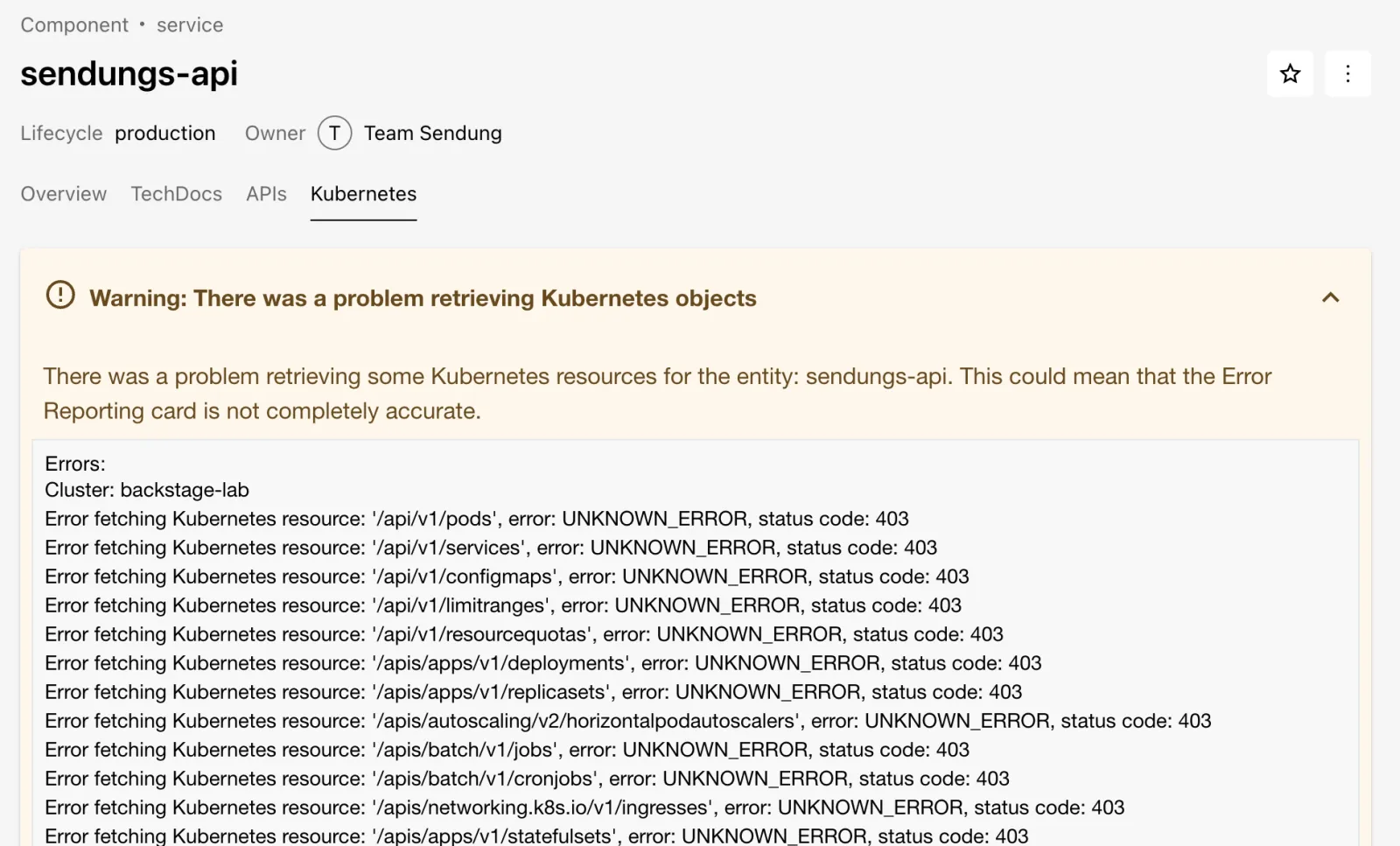
The list shows which resources the plugin queries – exactly those are what the role needs.
Save your progress? Sign up for free
Drill 7: Granting read permissions
A ClusterRole with get, list and
watch on these types, bound to the ServiceAccount:
cat > ~/backstage-lab/tag10/k8s/backstage-rbac.yaml <<'EOF'
# backstage-rbac.yaml – read permissions (get/list/watch) for the ServiceAccount backstage
apiVersion: rbac.authorization.k8s.io/v1
kind: ClusterRole
metadata:
  name: backstage-read-only
rules:
  - apiGroups: [""]
    resources: [pods, pods/log, services, configmaps, limitranges, resourcequotas]
    verbs: [get, list, watch]
  - apiGroups: [apps]
    resources: [deployments, replicasets, statefulsets, daemonsets]
    verbs: [get, list, watch]
  - apiGroups: [autoscaling]
    resources: [horizontalpodautoscalers]
    verbs: [get, list, watch]
  - apiGroups: [networking.k8s.io]
    resources: [ingresses]
    verbs: [get, list, watch]
  - apiGroups: [batch]
    resources: [jobs, cronjobs]
    verbs: [get, list, watch]
---
apiVersion: rbac.authorization.k8s.io/v1
kind: ClusterRoleBinding
metadata:
  name: backstage-read-only
roleRef:
  apiGroup: rbac.authorization.k8s.io
  kind: ClusterRole
  name: backstage-read-only
subjects:
  - kind: ServiceAccount
    name: backstage
    namespace: backstage
EOF
kubectl apply -f ~/backstage-lab/tag10/k8s/backstage-rbac.yaml
SA=system:serviceaccount:backstage:backstage
kubectl auth can-i list pods --as=$SA; kubectl auth can-i delete pods --as=$SA
k8s sendungs-api | jq -r '.items[] | "errors: \(.errors | length)",
  (.resources[] | select(.resources | length > 0)
   | "\(.type): \([.resources[].metadata.name] | join(", "))")'
Expected:
clusterrole.rbac.authorization.k8s.io/backstage-read-only created
clusterrolebinding.rbac.authorization.k8s.io/backstage-read-only created
yes
no
errors: 0
pods: sendungs-api-dc8cbccbf-dqrl4
services: sendungs-api
deployments: sendungs-api
replicasets: sendungs-api-dc8cbccbf
pods/log is included so that the LOGS
button in the pod detail works. No restart needed – the backend queries
live on every call.
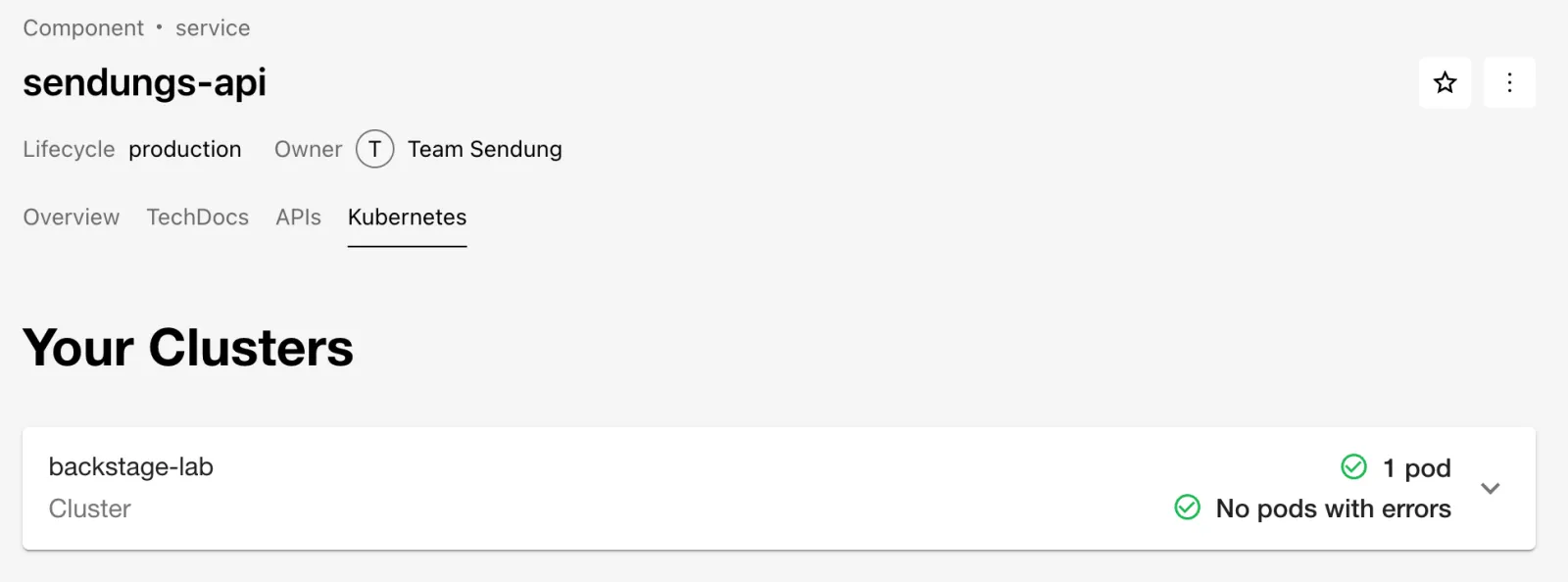
- Reload the Kubernetes tab of
sendungs-api. - Expected: the cluster card backstage-lab with “1 pod” and “No pods with errors”, as in the figure.
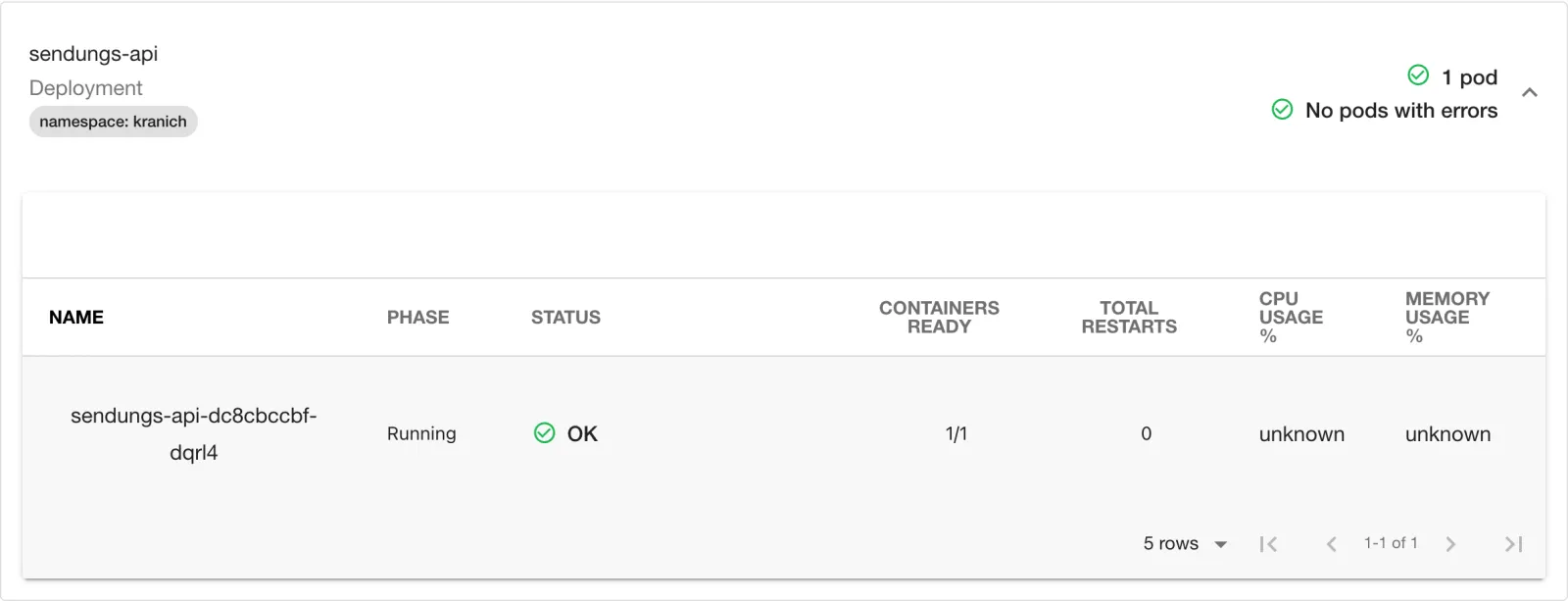
- Expand backstage-lab and, inside it, the Deployment sendungs-api.
- Expected: the pod table, as in the figure. CPU and memory show
unknownbecause no metrics-server is running.
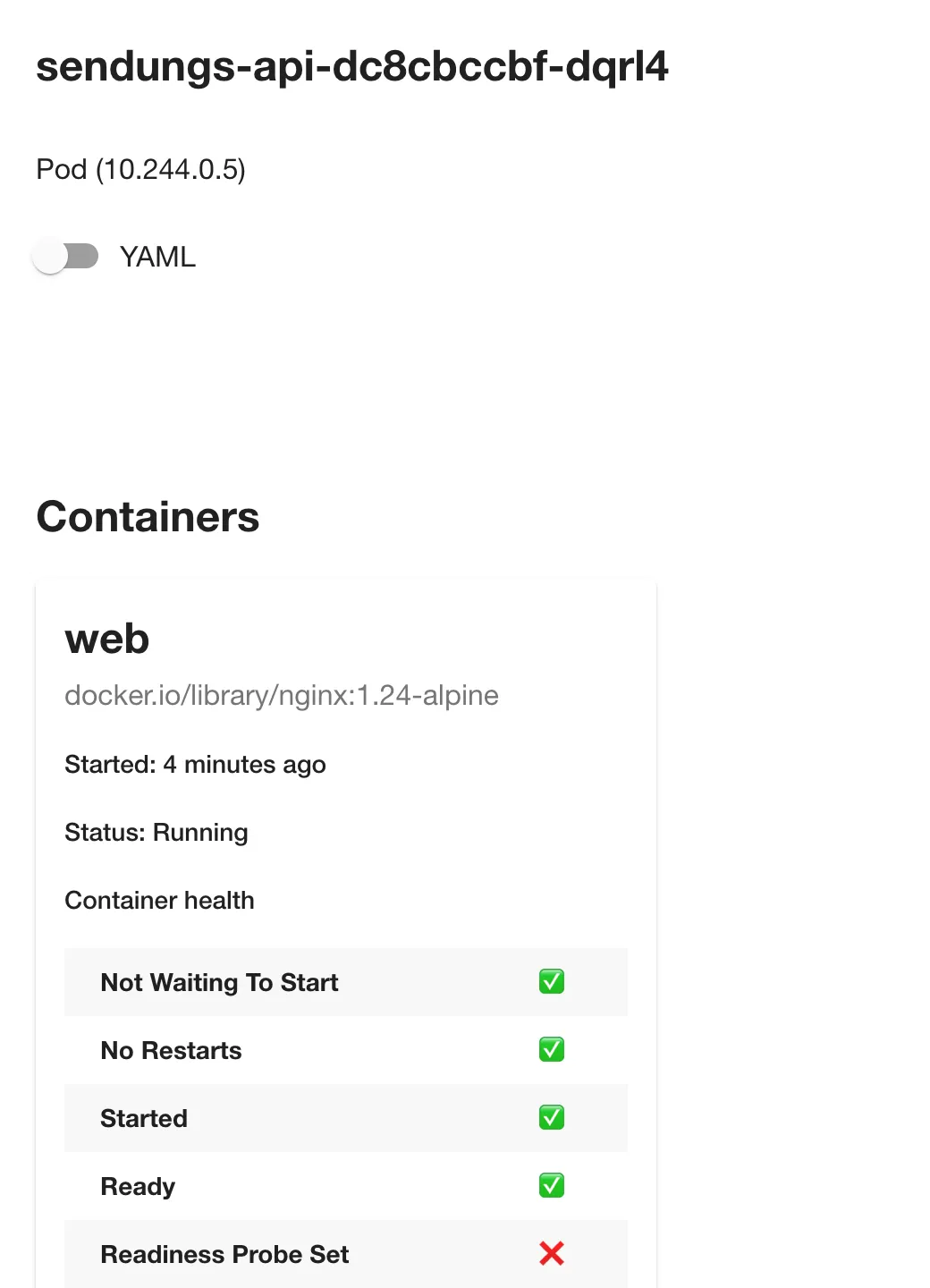
- Click the pod name.
- Expected: a side panel with container
web, image and Container health, as in the figure. The red cross at Readiness Probe Set is a real finding – the demo deployment has no probe.
Save your progress? Sign up for free
Drill 8: Second plugin – proxy to the Forgejo API
@backstage/plugin-proxy-backend is also already in
index.ts. A proxy endpoint forwards calls under
/api/proxy/<route> to a target and sets headers on
the way – so the Forgejo token stays in the backend and the browser
never sees it.
cat >> ~/backstage-lab/portal/app-config.local.yaml <<'EOF'
proxy:
  endpoints:
    /forgejo:
      target: http://127.0.0.1:3300/api/v1
      headers:
        Authorization: token ${FORGEJO_TOKEN}
      allowedMethods: [GET]
EOF
grep -c '^proxy:' ~/backstage-lab/portal/app-config.local.yaml
~/backstage-lab/setup/portal.sh restart
bs proxy/forgejo/user | jq -r .login
bs proxy/forgejo/orgs/kranich/repos | jq -r '.[].full_name'
bs 'proxy/forgejo/repos/kranich/sendungs-api/commits?limit=2' \
  | jq -r '.[] | "\(.sha[0:7]) \(.commit.message | split("\n")[0])"'
Expected (the repo list may be longer, depending on the state of your org):
1
backstage-bot
kranich/sendungs-api
kranich/tracking-web
kranich/org
kranich/sendungsverfolgung
a2130d1 Kubernetes-ID für das Kubernetes-Plugin
7458306 Initialer Stand
Now the counter-checks – without a Backstage token and with a write method:
curl -s "$BACKSTAGE/api/proxy/forgejo/user" | jq -r .error.message
curl -s -o /dev/null -w '%{http_code}\n' -X DELETE \
  -H "Authorization: Bearer $BACKSTAGE_TOKEN" \
  "$BACKSTAGE/api/proxy/forgejo/repos/kranich/org"
curl -sf -u "$ADMIN" "$FORGEJO/api/v1/repos/kranich/org" | jq -r .full_name
Expected:
Missing credentials
404
kranich/org
Why? The default is credentials: require – only
signed-in users or services may pass through the proxy.
allowedMethods: [GET] doesn’t let the DELETE
through at all, and the repo stays. Without this line, every portal user
would have the bot’s write permissions.
Security: A proxy endpoint lends the permissions of its token to all users of the portal. Use tokens with minimal scopes, set
allowedMethods, and never usecredentials: dangerously-allow-unauthenticatedfor internal APIs.
Save your progress? Sign up for free
Checkpoint
The file is also available at
~/backstage-lab/code/tag10/kontrolle.sh.
#!/usr/bin/env bash
# kontrolle.sh – checkpoint Day 10 (✔/✘). Exit code = number of failures.
source ~/backstage-lab/setup/env.sh
export KUBECONFIG=~/backstage-lab/tag10/kubeconfig
fail=0
t() { if eval "$2" >/dev/null 2>&1; then echo "✔ $1"
  else echo "✘ $1"; fail=$((fail+1)); fi; }
k8s() { bs kubernetes/services/sendungs-api -X POST \
  -H 'Content-Type: application/json' \
  -d '{"entity":{"kind":"Component","metadata":{"name":"sendungs-api"}}}'; }

t "kind-Cluster backstage-lab läuft" "kubectl get nodes"
t "ServiceAccount darf Pods lesen" \
  "kubectl auth can-i list pods --as=system:serviceaccount:backstage:backstage \
     | grep -qx yes"
t "Backstage kennt den Cluster backstage-lab" \
  "bs kubernetes/clusters | jq -e '.items[] | select(.name==\"backstage-lab\")'"
t "Annotation kubernetes-id an sendungs-api" \
  "bs catalog/entities/by-name/component/default/sendungs-api \
     | jq -e '.metadata.annotations[\"backstage.io/kubernetes-id\"]'"
t "Backend liefert Pods ohne Fehler" \
  "k8s | jq -e '.items[0].errors == [] and
     ([.items[0].resources[] | select(.type==\"pods\") | .resources[]] | length > 0)'"
t "Proxy /forgejo liefert Repos der Org kranich" \
  "bs proxy/forgejo/orgs/kranich/repos | jq -e 'length > 0'"
exit "$fail"
bash ~/backstage-lab/code/tag10/kontrolle.shExpected:
✔ kind-Cluster backstage-lab läuft
✔ ServiceAccount darf Pods lesen
✔ Backstage kennt den Cluster backstage-lab
✔ Annotation kubernetes-id an sendungs-api
✔ Backend liefert Pods ohne Fehler
✔ Proxy /forgejo liefert Repos der Org kranich
With the role from Drill 4 alone (without Drill 7), checks 2 and 5 fail.
Challenge
Scale sendungs-api to three replicas. Prove via the
Backstage API that the plugin sees three running pods, and check the tab
in the portal.
Hint: The backend queries the cluster live on every
call – a kubectl scale is enough; the query from Drill 6
shows the new state.
Solution
export KUBECONFIG=~/backstage-lab/tag10/kubeconfig
kubectl -n kranich scale deployment sendungs-api --replicas=3
kubectl -n kranich rollout status deployment sendungs-api --timeout=90s
bs kubernetes/services/sendungs-api -X POST -H 'Content-Type: application/json' \
  -d '{"entity":{"kind":"Component","metadata":{"name":"sendungs-api"}}}' \
  | jq -r '.items[0].resources[] | select(.type=="pods") | .resources[]
      | "\(.metadata.name) \(.status.phase)"'
Expected:
deployment.apps/sendungs-api scaled
deployment "sendungs-api" successfully rolled out
sendungs-api-dc8cbccbf-6jnf7 Running
sendungs-api-dc8cbccbf-dqrl4 Running
sendungs-api-dc8cbccbf-gtl85 Running
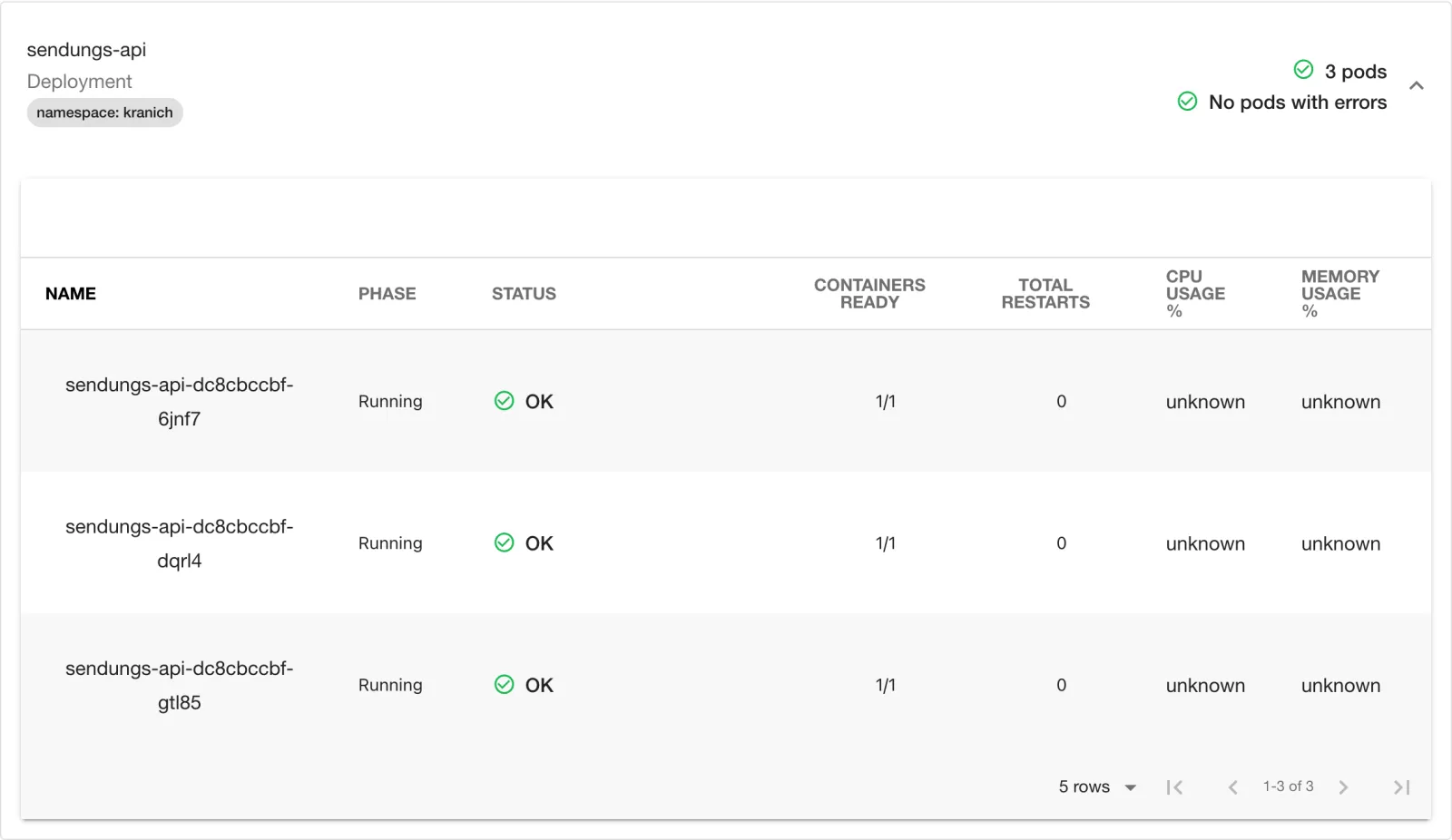
In the Kubernetes tab, the Deployment now shows “3 pods”, as in the figure.
Tip: The kind cluster costs RAM (not tested live). Pause it with
docker stop backstage-lab-control-plane, resume withdocker start …; the API address stays the same. If you delete it (kind delete cluster --name backstage-lab), you have to repeat Drills 2 to 5 and 7 – URL, CA and token change.
Save your progress? Sign up for free
Enterprise Note
- If Backstage itself runs in the cluster,
serviceAccountTokenis not needed: withauthProvider: serviceAccountand no token, the backend uses the pod token. For other clusters, use short-lived tokens orauthProvider: oidc/aws/googleinstead of non-expiring Secrets. - Many clusters:
clusterLocatorMethodsof typecatalog(clusters as Resource entities) orgke; the backend checks cluster URLs from the catalog against SSRF (private IPs only viadangerouslyAllowClusterUrls). - For name collisions across teams, use the annotation
backstage.io/kubernetes-label-selectorinstead ofkubernetes-id; with a metrics-server and withoutskipMetricsLookup, CPU and memory appear. - With your own permission policy (Day 12), grant the permissions
kubernetes.clusters.read,kubernetes.resources.readandkubernetes.proxyselectively – the latter allows calls to the Kubernetes API via/api/kubernetes/proxy. - Vet plugins before adopting them: maintainers, release cadence,
support for the new frontend system, license; bump versions together
with
yarn backstage-cli versions:bump(Day 14).