Day 11: A plugin of your own
Goal: Using
yarn new, you build a backend and a frontend pluginbereitschaft(on-call) that shows on every component page who in the owner team is on call today. · Duration: approx. 120 min · Prerequisite: Day 10
Briefing
- A plugin usually consists of two packages: the backend
plugin provides a REST API under
/api/<pluginId>, the frontend plugin provides extensions for the app. yarn newcreates both packages underplugins/and registers them right away in the backend and the app.- The frontend calls the backend via
fetchApi– with the token of the signed-in user. Without a token, every plugin backend responds with 401. - The on-call roster lives in the configuration, not in the code.
Entity page sendungs-api (spec.owner: team-sendung)
  └─ entity-card:bereitschaft/heute ──fetchApi──► GET /api/bereitschaft/heute
                                                     ?team=team-sendung
                                    ◄── {"person":"user:default/ben.kraus", …}
     app-config.local.yaml: bereitschaft.teams.team-sendung: [anna.berger, …]
Drill 1: Creating a backend plugin
You start where Day 10 ended. For this chapter,
sendungs-api, tracking-web and the
organization from Day 4 in the catalog are enough; Kubernetes does not
need to be running. At the end, the generator itself runs
yarn install and yarn lint --fix.
source ~/backstage-lab/setup/env.sh
cd ~/backstage-lab/portal
yarn new
In the menu, use the arrow keys to select
backend-plugin and enter bereitschaft as
the ID. Expected (shortened; the prompt lines may differ depending on
the version):
? What do you want to create? backend-plugin - A new backend plugin
? Enter the ID of the plugin [required] bereitschaft
  templating    plugins/bereitschaft-backend ✔
  backend       adding @internal/backstage-plugin-bereitschaft-backend ✔
  executing     yarn install ✔
  executing     yarn lint --fix ✔
Tip: Without prompts, e.g. in scripts:
yarn new --select backend-plugin --option pluginId=bereitschaft. Both flags are listed inyarn new --help.
The package name follows the pattern
@internal/backstage-plugin-<id>-backend. The
generator has already registered it in the backend:
git diff packages/backend/src/index.ts | grep '^+b'
find plugins/bereitschaft-backend/src -type f | sort
Expected:
+backend.add(import('@internal/backstage-plugin-bereitschaft-backend'));
plugins/bereitschaft-backend/src/index.ts
plugins/bereitschaft-backend/src/plugin.test.ts
plugins/bereitschaft-backend/src/plugin.ts
plugins/bereitschaft-backend/src/router.test.ts
plugins/bereitschaft-backend/src/router.ts
plugins/bereitschaft-backend/src/services/TodoListService.ts
plugins/bereitschaft-backend/src/setupTests.ts
The template is a small todo API (/todos). In Drill 2
you replace it with the on-call roster.
Save your progress? Sign up for free
Drill 2: Router and configuration
The router knows only one route. wer() (“who”) picks in
rotation; each day the next person is up. You throw errors as
InputError (400) or NotFoundError (404) from
@backstage/errors – the backend turns them into a JSON
error response.
cd ~/backstage-lab/portal/plugins/bereitschaft-backend
rm -r src/services
cat > src/router.ts <<'EOF'
import { InputError, NotFoundError } from '@backstage/errors';
import express from 'express';
import Router from 'express-promise-router';

/** Team name → list of user names (from bereitschaft.teams) */
export type Teams = Record<string, string[]>;

/** Rotation: each day the next person is up. */
export function wer(personen: string[], datum: Date): string {
  const tag = Math.floor(datum.getTime() / 86_400_000);
  return personen[tag % personen.length];
}

export function createRouter(options: { teams: Teams }): express.Router {
  const router = Router();

  router.get('/heute', async (req, res) => {
    const team = req.query.team;
    if (typeof team !== 'string' || team === '') {
      throw new InputError('Parameter team fehlt');
    }
    const personen = options.teams[team];
    if (!personen?.length) {
      throw new NotFoundError(`Keine Bereitschaft für ${team}`);
    }
    const datum = new Date();
    res.json({
      team,
      datum: datum.toISOString().slice(0, 10),
      person: `user:default/${wer(personen, datum)}`,
    });
  });

  return router;
}
EOF
Through dependency injection, the plugin gets the configuration, a
logger and the httpRouter, which mounts everything under
/api/bereitschaft:
cat > src/plugin.ts <<'EOF'
import {
  coreServices,
  createBackendPlugin,
} from '@backstage/backend-plugin-api';
import { createRouter, Teams } from './router';

/**
 * bereitschaftPlugin backend plugin
 *
 * @public
 */
export const bereitschaftPlugin = createBackendPlugin({
  pluginId: 'bereitschaft',
  register(env) {
    env.registerInit({
      deps: {
        config: coreServices.rootConfig,
        logger: coreServices.logger,
        httpRouter: coreServices.httpRouter,
      },
      async init({ config, logger, httpRouter }) {
        const teams = config.getOptional<Teams>('bereitschaft.teams') ?? {};
        logger.info(`Bereitschaft für ${Object.keys(teams).length} Teams`);
        httpRouter.use(createRouter({ teams }));
      },
    });
  },
});
EOF
The key bereitschaft is your own choice. Append it as a
separate top-level block to the local file (the users come from
kranich/org, Day 4):
cat ~/backstage-lab/code/tag11/bereitschaft.yaml \
  >> ~/backstage-lab/portal/app-config.local.yaml
tail -4 ~/backstage-lab/portal/app-config.local.yaml
~/backstage-lab/setup/portal.sh restart
grep -a 'Bereitschaft für' ~/backstage-lab/portal.log | sed 's/\x1b\[[0-9;]*m//g'
Expected:
bereitschaft:
  teams:
    team-sendung: [anna.berger, ben.kraus]
    team-web: [chris.dietz, thomas.zachmann]
✔ gestoppt
✔ Backstage läuft: http://localhost:3000 (Backend http://localhost:7007)
2026-10-13T07:31:08.373Z bereitschaft info Bereitschaft für 2 Teams
The template’s test files no longer match the code. You replace them
in Drill 7; yarn start doesn’t mind.
Save your progress? Sign up for free
Drill 3: Calling the API – and why 401
curl -s "$BACKSTAGE/api/bereitschaft/heute?team=team-sendung" \
  | jq -c '.error | {name, message}'
bs 'bereitschaft/heute?team=team-sendung' | jq
bs 'bereitschaft/heute?team=team-xyz' -w '%{http_code}\n'
Expected (the person changes daily; bs uses
curl -f and on a 404 prints only the status code):
{"name":"AuthenticationError","message":"Missing credentials"}
{
  "team": "team-sendung",
  "datum": "2026-10-13",
  "person": "user:default/ben.kraus"
}
404
Why? In the new backend system, every route is subject to the default
policy of the httpRouter: only requests with a valid token
get through – either a user token from the login or a service token.
bs sends the static lab token from
backend.auth.externalAccess, so the backend sees the
service principal lab-cli. A wrong token yields
Illegal token, also 401.
Security: A route can only be opened deliberately in the plugin, e.g.
httpRouter.addAuthPolicy({ path: '/health', allow: 'unauthenticated' }). If you additionally want to allow only users, check in the handler withawait httpAuth.credentials(req, { allow: ['user'] })– that is what the todo template does.
Save your progress? Sign up for free
Drill 4: Creating a frontend plugin
cd ~/backstage-lab/portal
yarn new
Select frontend-plugin and again the ID
bereitschaft. Expected (shortened):
? What do you want to create? frontend-plugin - A new frontend plugin
? Enter the ID of the plugin [required] bereitschaft
  templating    plugins/bereitschaft ✔
  app           adding import ✔
  executing     yarn install ✔
  executing     yarn lint --fix ✔
“adding import” is a leftover from the old frontend system:
App.tsx stays unchanged. The generator only registers the
package as a dependency of the app:
git diff packages/app/package.json | grep bereitschaft
grep -n 'packages: all' app-config.yaml
Expected:
+    "@internal/backstage-plugin-bereitschaft": "workspace:^",
6:  packages: all
That is enough: app.packages: all makes the CLI include
all frontend plugins from the dependencies of packages/app
automatically (feature discovery). The template ships a page, a
PageBlueprint on path /bereitschaft.
~/backstage-lab/setup/portal.sh restart- Open
http://localhost:3000/bereitschaft. - Expected: the page “Welcome to bereitschaft!”, as in the figure. The
two entries are sample data – the page calls
/todos, which no longer exists since Drill 2.
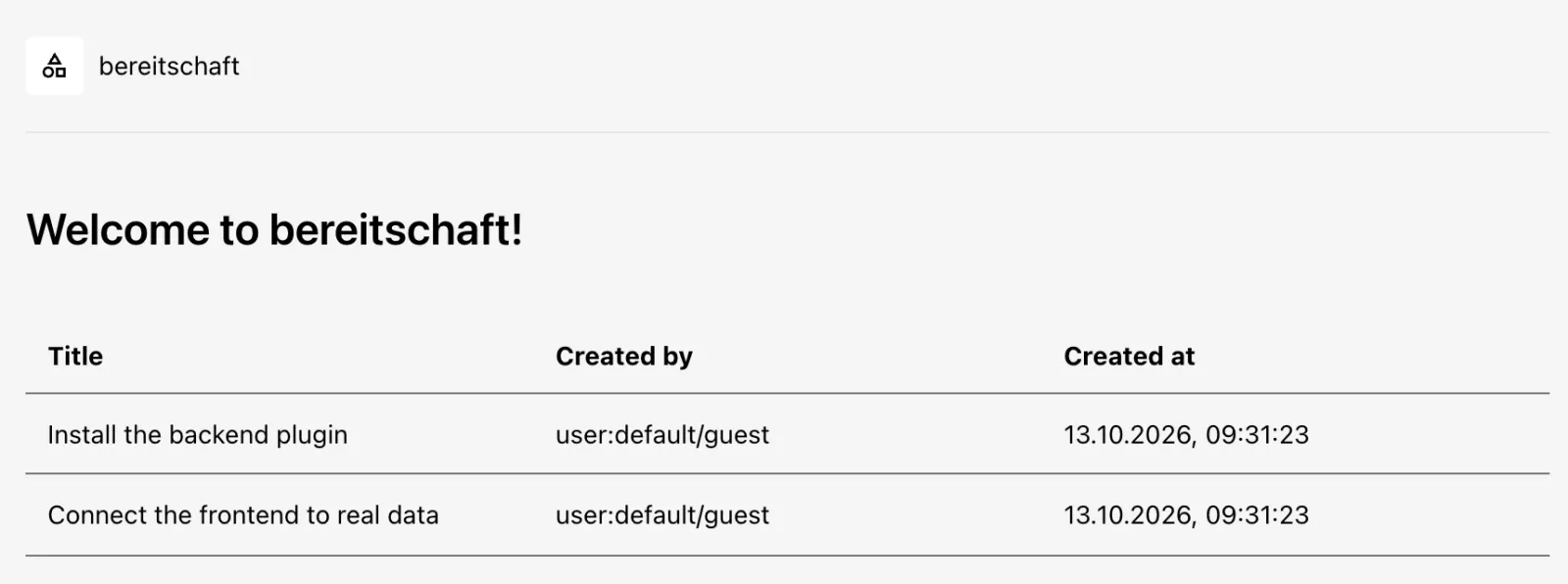
Tip: Explicit instead of automatic: instead of
all,app.packagesalso acceptsinclude:/exclude:with package names. Withexclude: ['@internal/backstage-plugin-bereitschaft'], the plugin only appears once you import it inApp.tsxand add it underfeatures.
Save your progress? Sign up for free
Drill 5: The entity card
The card needs two more packages: plugin-catalog-react
(blueprint, useEntity, EntityRefLink) and
catalog-model (parseEntityRef).
cd ~/backstage-lab/portal/plugins/bereitschaft
yarn add @backstage/plugin-catalog-react @backstage/catalog-model
jq -r '.dependencies | keys[]' package.json
Expected:
@backstage/catalog-model
@backstage/core-components
@backstage/frontend-plugin-api
@backstage/plugin-catalog-react
@backstage/theme
@backstage/ui
react-use
The app has already installed both packages, so yarn add
downloads nothing; the ranges (^3.2.3,
^1.10.1) match Backstage 1.55.
The template’s page goes away; instead, the plugin gets an
EntityCardBlueprint. The filter
{ kind: 'component' } ensures that the card appears only on
component pages.
rm -r src/components/TodoPage src/components/TodoList src/routes.ts
cat > src/plugin.tsx <<'EOF'
import { createFrontendPlugin } from '@backstage/frontend-plugin-api';
import { EntityCardBlueprint } from '@backstage/plugin-catalog-react/alpha';

export const bereitschaftCard = EntityCardBlueprint.make({
  name: 'heute',
  params: {
    filter: { kind: 'component' },
    loader: () =>
      import('./components/BereitschaftCard').then(m => <m.BereitschaftCard />),
  },
});

export const bereitschaftPlugin = createFrontendPlugin({
  pluginId: 'bereitschaft',
  extensions: [bereitschaftCard],
});
EOF
The component reads spec.owner of the current entity.
parseEntityRef turns both team-sendung and
group:default/team-sendung (OwnerPicker, Day 5) into the
same name. fetchApi resolves
plugin://bereitschaft/… to the backend URL via the
discoveryApi and attaches the user’s token.
mkdir -p src/components/BereitschaftCard
cat > src/components/BereitschaftCard/BereitschaftCard.tsx <<'EOF'
import { InfoCard, Progress, WarningPanel } from '@backstage/core-components';
import { fetchApiRef, useApi } from '@backstage/frontend-plugin-api';
import { parseEntityRef } from '@backstage/catalog-model';
import { EntityRefLink, useEntity } from '@backstage/plugin-catalog-react';
import { Text } from '@backstage/ui';
import useAsync from 'react-use/esm/useAsync';

type Bereitschaft = { team: string; datum: string; person: string };

export const BereitschaftCard = () => {
  const { entity } = useEntity();
  const { fetch } = useApi(fetchApiRef);
  const owner = String(entity.spec?.owner ?? '');
  const team = parseEntityRef(owner, { defaultKind: 'group' }).name;

  const { value, loading, error } = useAsync(async () => {
    const res = await fetch(`plugin://bereitschaft/heute?team=${team}`);
    if (!res.ok) throw new Error(`${res.status} ${res.statusText}`);
    return (await res.json()) as Bereitschaft;
  }, [fetch, team]);

  return (
    <InfoCard title="Bereitschaft">
      {loading && <Progress />}
      {error && <WarningPanel title={`Kein Plan für ${team}`} />}
      {value && (
        <Text as="p">
          Heute ({value.datum}) für {team}:{' '}
          <EntityRefLink entityRef={value.person} />
        </Text>
      )}
    </InfoCard>
  );
};
EOF
echo "export { BereitschaftCard } from './BereitschaftCard';" \
  > src/components/BereitschaftCard/index.ts
~/backstage-lab/setup/portal.sh restart- Open
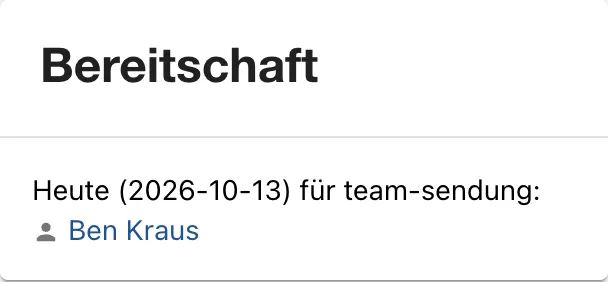
sendungs-apiin the catalog and scroll down in the Overview tab. - Expected: below the API cards, the Bereitschaft
(on-call) card with “Heute (…) für team-sendung:” (today for
team-sendung) and the linked name.
EntityRefLinkshows thedisplayNameof the user entity, i.e. “Ben Kraus” instead ofben.kraus. - Open the API
sendungs-api. Expected: no on-call card – the filter works.
Save your progress? Sign up for free
Drill 6: Configuring the card
The extension ID is made up of kind, plugin ID and name:
entity-card:bereitschaft/heute. Like every extension (Day
9), it can be configured in app-config.yaml.
EntityCardBlueprint knows the options filter
and type; type: info moves the card into the
right column. In app-config.yaml, append as the last entry
under app.extensions (indented like the other entries;
template in code/tag11/app-extensions.yaml):
    # Day 11: on-call card in the right column
    - entity-card:bereitschaft/heute:
        config:
          type: info
~/backstage-lab/setup/portal.sh restart- Reload the entity page of
sendungs-api. - Expected: the card is now at the top right above About, as in the figure.
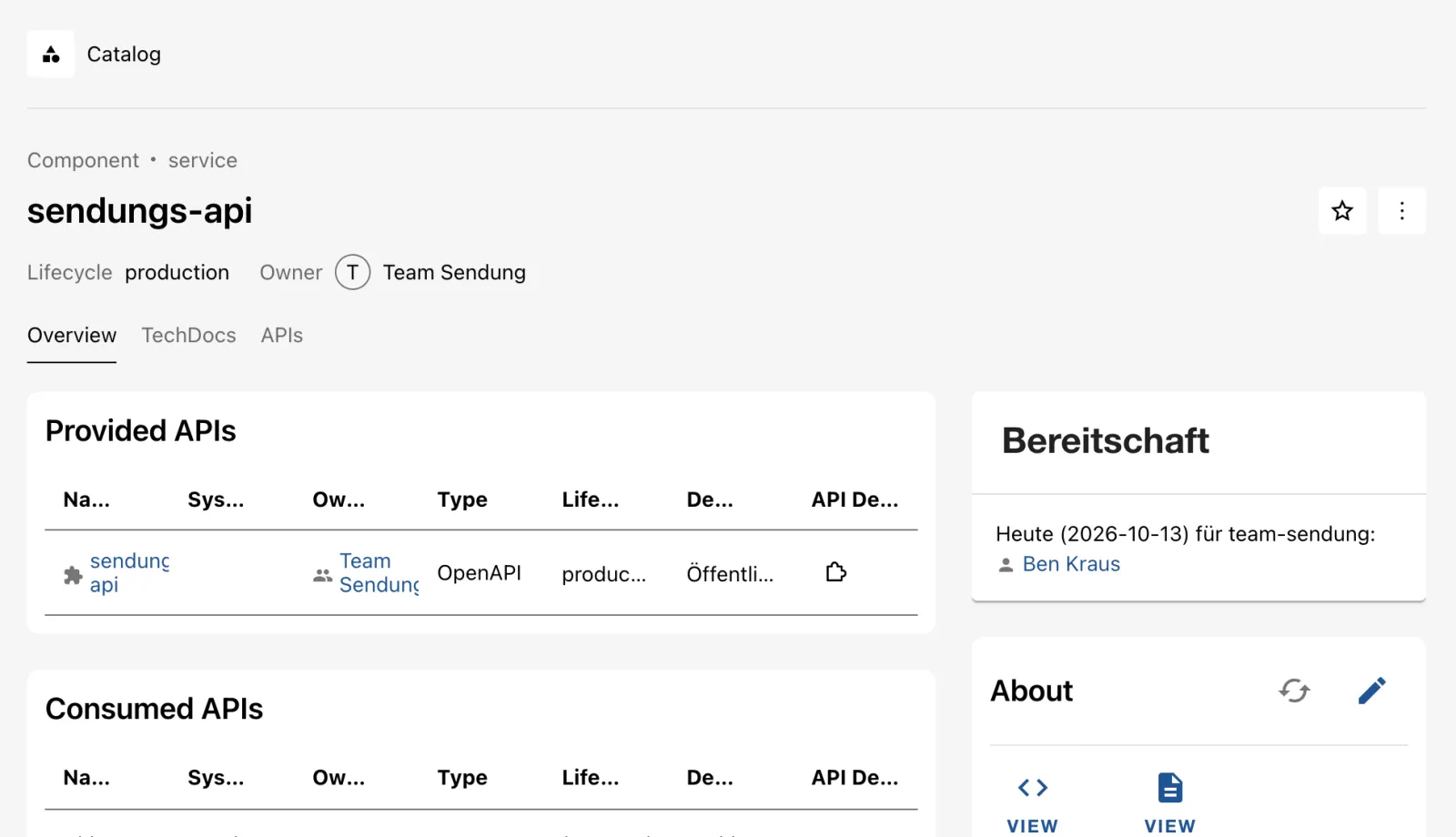
- Open App-Struktur in the sidebar and select the Detailed tab.
- Expected: under
page:catalog/entity→entity-content:catalog/overview→ cards,entity-card:bereitschaft/heuteis the first card, as in the figure.
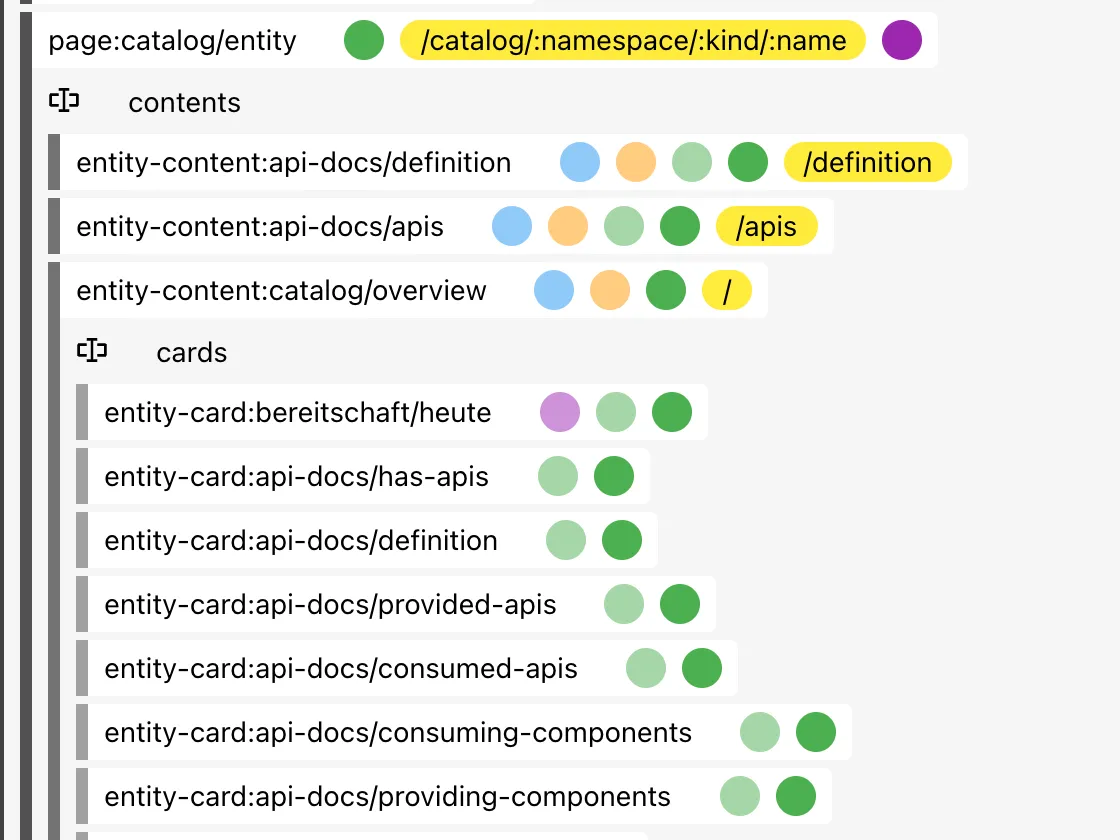
Why in app-config.yaml and not in code? That way
platform operations decides where the card sits or whether it is off for
certain entities – without a new build.
Save your progress? Sign up for free
Drill 7: Tests, types, lint
The generated tests still check the todo API. For the backend, you
replace them with a unit test of the router (without a backend, using
supertest) and a plugin test with
startTestBackend that also checks the auth policy:
cd ~/backstage-lab/portal
cat > plugins/bereitschaft-backend/src/router.test.ts <<'EOF'
import { mockErrorHandler } from '@backstage/backend-test-utils';
import express from 'express';
import request from 'supertest';
import { createRouter, wer } from './router';

const teams = { 'team-sendung': ['anna.berger', 'ben.kraus'] };

describe('createRouter', () => {
  const app = express().use(createRouter({ teams })).use(mockErrorHandler());

  it('liefert die Bereitschaft eines Teams', async () => {
    const res = await request(app).get('/heute?team=team-sendung');
    expect(res.status).toBe(200);
    expect(res.body.person).toMatch(
      /^user:default\/(anna\.berger|ben\.kraus)$/,
    );
  });

  it('antwortet 400 ohne team und 404 für unbekannte Teams', async () => {
    expect((await request(app).get('/heute')).status).toBe(400);
    expect((await request(app).get('/heute?team=team-xyz')).status).toBe(404);
  });
});

describe('wer', () => {
  it('wechselt jeden Tag', () => {
    const p = ['a', 'b'];
    const montag = wer(p, new Date('2026-10-12T08:00:00Z'));
    expect(wer(p, new Date('2026-10-13T08:00:00Z'))).not.toBe(montag);
  });
});
EOF
cat > plugins/bereitschaft-backend/src/plugin.test.ts <<'EOF'
import {
  mockCredentials,
  mockServices,
  startTestBackend,
} from '@backstage/backend-test-utils';
import request from 'supertest';
import { bereitschaftPlugin } from './plugin';

describe('bereitschaftPlugin', () => {
  it('liest die Teams aus der Config und verlangt Auth', async () => {
    const { server } = await startTestBackend({
      features: [
        bereitschaftPlugin,
        mockServices.rootConfig.factory({
          data: { bereitschaft: { teams: { 'team-web': ['chris.dietz'] } } },
        }),
      ],
    });
    const url = '/api/bereitschaft/heute?team=team-web';

    const res = await request(server).get(url).expect(200);
    expect(res.body.person).toBe('user:default/chris.dietz');

    await request(server)
      .get(url)
      .set('Authorization', mockCredentials.none.header())
      .expect(401);
  });
});
EOF
startTestBackend treats requests without a header as a
signed-in mock user; mockCredentials.none simulates the
anonymous curl from Drill 3. For the frontend, the test of
the card is in the companion code. It renders the card with a fake
entity and a fetch stub and checks the URL that was
called:
cp ~/backstage-lab/code/tag11/frontend/src/components/BereitschaftCard/*.test.tsx \
  plugins/bereitschaft/src/components/BereitschaftCard/
grep -n 'apis:\|mountedRoutes\|toHaveBeenCalledWith' -A1 \
  plugins/bereitschaft/src/components/BereitschaftCard/BereitschaftCard.test.tsx
Expected:
27:        apis: [[fetchApiRef, { fetch }]],
28:        mountedRoutes: { '/catalog/:namespace/:kind/:name': entityRouteRef },
29-      },
--
33:    expect(fetch).toHaveBeenCalledWith(
34-      'plugin://bereitschaft/heute?team=team-sendung',
EntityRefLink needs mountedRoutes;
otherwise the test aborts with
No path for routeRef{type=absolute,id=catalog:entity}. Now
check everything:
CI=true yarn test plugins/bereitschaft
yarn tsc && echo "✔ tsc"
yarn --cwd plugins/bereitschaft lint && yarn --cwd plugins/bereitschaft-backend lint
Expected (shortened, paths truncated):
PASS @internal/backstage-plugin-bereitschaft-backend …/router.test.ts
PASS @internal/backstage-plugin-bereitschaft-backend …/plugin.test.ts
PASS @internal/backstage-plugin-bereitschaft …/plugin.test.ts
PASS @internal/backstage-plugin-bereitschaft …/BereitschaftCard.test.tsx
Test Suites: 4 passed, 4 total
Tests:       6 passed, 6 total
✔ tsc
CI=true turns off watch mode; the pattern
plugins/bereitschaft matches both packages. Lint without
output means: no findings. The root script yarn lint only
checks changes since origin/master – in the lab without a
remote, use the package scripts or yarn lint:all.
Save your progress? Sign up for free
Checkpoint
mkdir -p ~/backstage-lab/tag11
cp ~/backstage-lab/code/tag11/kontrolle.sh ~/backstage-lab/tag11/
bash ~/backstage-lab/tag11/kontrolle.sh
The script checks the files in the portal (entry in the backend, dependency of the app, filter, extension configuration) and the API with and without a token. An excerpt:
t "Ohne Token: 401" \
  "[ \$(curl -s -o /dev/null -w '%{http_code}' \
     \$BACKSTAGE/api/bereitschaft/heute?team=team-sendung) = 401 ]"
t "Mit Lab-Token: Person aus team-sendung" \
  "bs 'bereitschaft/heute?team=team-sendung' |
     jq -e '.person | test(\"anna.berger|ben.kraus\")'"
Expected:
✔ Backend-Plugin in packages/backend/src/index.ts
✔ Frontend-Plugin als Abhängigkeit von packages/app
✔ Karte nutzt EntityCardBlueprint mit Filter kind=component
✔ Karte in app-config.yaml als info konfiguriert
✔ Ohne Token: 401
✔ Mit Lab-Token: Person aus team-sendung
✔ Unbekanntes Team: 404
Challenge
The card should also show the person’s phone number. The numbers are
in the configuration under bereitschaft.telefon, one per
user name.
Hint: The frontend cannot read
bereitschaft.* (config is only visible there with
@visibility frontend) – deliver the number from the
backend.
Solution
The changed files are in code/tag11/challenge/. The key
lines:
// router.ts – new optional option and one more field in the response
export function createRouter(options: {
  teams: Teams;
  telefon?: Record<string, string>;
}): express.Router {
  // …
    const name = wer(personen, datum);
    res.json({
      team,
      datum: datum.toISOString().slice(0, 10),
      person: `user:default/${name}`,
      telefon: options.telefon?.[name],
    });
// plugin.ts
        const telefon =
          config.getOptional<Record<string, string>>('bereitschaft.telefon') ??
          {};
        httpRouter.use(createRouter({ teams, telefon }));
// BereitschaftCard.tsx – add telefon?: string to the type, then:
      {value?.telefon && <Text as="p">Telefon: {value.telefon}</Text>}
telefon is optional so that router.test.ts
compiles unchanged. The config block is indented by two spaces and
belongs under bereitschaft: – appending it with
>> only works if that block is at the end of the
file.
cd ~/backstage-lab/portal
C=~/backstage-lab/code/tag11/challenge
cp $C/router.ts $C/plugin.ts plugins/bereitschaft-backend/src/
cp $C/BereitschaftCard.tsx plugins/bereitschaft/src/components/BereitschaftCard/
cat $C/telefon.yaml >> app-config.local.yaml
yarn tsc && CI=true yarn test plugins/bereitschaft 2>&1 | grep '^Tests:'
~/backstage-lab/setup/portal.sh restart
bs 'bereitschaft/heute?team=team-web' | jq
Expected:
Tests:       6 passed, 6 total
✔ gestoppt
✔ Backstage läuft: http://localhost:3000 (Backend http://localhost:7007)
{
  "team": "team-web",
  "datum": "2026-10-13",
  "person": "user:default/thomas.zachmann",
  "telefon": "+49 40 5550-202"
}
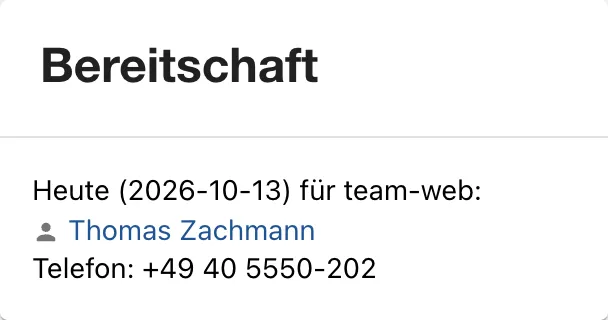
On the entity page of tracking-web, the card now shows
the number, as in the figure.
Save your progress? Sign up for free
Enterprise Note
- Your own plugins belong in a separate repo or a monorepo folder with
CI:
yarn tsc,yarn test,yarn lintandyarn buildas a gate before every merge. - You publish reusable plugins to an internal npm registry
(
--scope,publishConfig);@internal/…is meant only for the monorepo. - In practice, on-call data comes from PagerDuty or Opsgenie. There are community plugins for that – check the plugin directory before building your own.
- Your own config needs a schema (
config.d.tsin the plugin), otherwise validation at startup is missing, and secrets in it must be marked with@visibility secret. - Every new route is attack surface: never open the auth policy
wholesale, validate input (the template uses
zod), tie write routes to permissions (Day 12).