Day 12: Login and permissions
Goal: Anna and Thomas sign in to the portal with their Forgejo accounts, and a permission policy of your own lets only Team Plattform delete entities and run templates. · Duration: approx. 120 min · Prerequisite: Day 11
Briefing
- So far nobody checks who you are: the guest provider turns everyone into Thomas Zachmann (Day 4). Today Forgejo takes over sign-in as the OIDC provider.
- A sign-in resolver translates the Forgejo identity
into a user entity from
kranich/org. No matching entity, no login. - The result is a Backstage token with
sub(user) andent(ownershipEntityRefs: user plus groups). - The permission policy decides on every protected action based on this token: ALLOW, DENY or CONDITIONAL.
Browser ─Sign In─► Popup: Forgejo /login/oauth/authorize ─► login + authorize
   ▲                                                            │ code
   │ Backstage token (sub, ent)                                 ▼
Backend /api/auth/oidc/handler/frame ── token + ID token ── Forgejo
   │ Resolver: email ─► user:default/anna.berger (memberOf team-sendung)
   ▼
Permission policy: catalog.entity.delete? scaffolder.task.create? ─► ALLOW/DENY
Drill 1: Preparing Forgejo
You start where Day 11 ended. Important for today:
kranich/org with the users from Day 4 (emails
<name>@kranich.example) and the template
node-service from Day 5. First, Forgejo needs accounts with
exactly these email addresses:
source ~/backstage-lab/setup/env.sh
mkdir -p ~/backstage-lab/tag12 && cd ~/backstage-lab/tag12
for u in anna.berger thomas.zachmann; do
  docker exec "$FORGEJO_NAME" forgejo admin user create --username "$u" \
    --password lab-user-pw-123 --email "$u@kranich.example" \
    --must-change-password=false
done
Expected (the password lab-user-pw-123 is a lab
value):
New user 'anna.berger' has been successfully created!
New user 'thomas.zachmann' has been successfully created!
Now the OAuth2 application. It belongs to lab-admin; the
redirect URI is the backend’s callback for the provider
oidc:
curl -s -u "$ADMIN" -H 'Content-Type: application/json' \
  -X POST "$FORGEJO/api/v1/user/applications/oauth2" \
  -d '{"name":"Backstage","confidential_client":true,
       "redirect_uris":["http://localhost:7007/api/auth/oidc/handler/frame"]}' \
  > oauth-app.json
jq '.client_secret |= .[0:8] + "…"' oauth-app.json
Expected (IDs differ):
{
  "id": 4,
  "name": "Backstage",
  "client_id": "f5c8cbb4-cdc1-40cc-8da7-a6c1e5c0bd86",
  "client_secret": "gto_x7qc…",
  "confidential_client": true,
  "redirect_uris": [
    "http://localhost:7007/api/auth/oidc/handler/frame"
  ],
  "created": "2026-10-13T07:30:35Z"
}
Forgejo shows the secret only this one time. Together with a session
secret for the auth backend, it goes into the lab file
setup/oidc-client, which env.sh loads from now
on:
{ jq -r '"export OIDC_CLIENT_ID=\(.client_id)",
         "export OIDC_CLIENT_SECRET=\(.client_secret)"' oauth-app.json
  echo "export AUTH_SESSION_SECRET=$(openssl rand -hex 24)"
} > ~/backstage-lab/setup/oidc-client
chmod 600 ~/backstage-lab/setup/oidc-client && rm oauth-app.json
echo '[ -s "$LAB/setup/oidc-client" ] && source "$LAB/setup/oidc-client" || true' \
  >> ~/backstage-lab/setup/env.sh
source ~/backstage-lab/setup/env.sh
echo "${OIDC_CLIENT_ID:0:8}… Secret: ${#OIDC_CLIENT_SECRET} Zeichen"
curl -s "$FORGEJO/.well-known/openid-configuration" \
  | jq -c '{issuer, authorization_endpoint, scopes_supported}'
Expected:
f5c8cbb4… Secret: 56 Zeichen
{"issuer":"http://127.0.0.1:3300","authorization_endpoint":"http://127.0.0.1:3300/
login/oauth/authorize","scopes_supported":["openid","profile","email","groups"]}
The || true at the end is intentional: scripts such as
up.sh load env.sh with set -e and
would otherwise abort as long as the file is missing.
Security:
oidc-clientcontains real secrets of your lab instance. Likeforgejo-token, it lives only insetup/and never in the portal repo.
Save your progress? Sign up for free
Drill 2: The OIDC provider in the backend
cd ~/backstage-lab/portal
yarn --cwd packages/backend add @backstage/plugin-auth-backend-module-oidc-provider \
  @backstage/backend-plugin-api
grep -E 'oidc-provider|backend-plugin-api' packages/backend/package.json
Expected (shortened):
➤ YN0000: · Done with warnings in 2s 188ms
    "@backstage/backend-plugin-api": "^1.10.1",
    "@backstage/plugin-auth-backend-module-oidc-provider": "^0.4.21",
You need backend-plugin-api from Drill 5 on for your own
modules. The OIDC module goes directly below the guest provider:
sed -i '' "/plugin-auth-backend-module-guest-provider'));/a\\
backend.add(import('@backstage/plugin-auth-backend-module-oidc-provider'));
" packages/backend/src/index.ts
grep "auth-backend" packages/backend/src/index.ts
Expected:
backend.add(import('@backstage/plugin-auth-backend'));
backend.add(import('@backstage/plugin-auth-backend-module-guest-provider'));
backend.add(import('@backstage/plugin-auth-backend-module-oidc-provider'));
The configuration keys are in the module’s
config.schema.json (metadataUrl,
clientId, clientSecret, optionally
prompt, additionalScopes …), the resolvers in
dist/resolvers.cjs.js:
emailMatchingUserEntityProfileEmail and
emailLocalPartMatchingUserEntityName. The old
auth block from Day 4 goes away – the guest should no
longer be Thomas Zachmann:
yq -i 'del(.auth)' app-config.local.yaml
cat >> app-config.local.yaml <<'EOF'
auth:
  environment: development
  session:
    secret: ${AUTH_SESSION_SECRET}
  providers:
    oidc:
      development:
        metadataUrl: http://127.0.0.1:3300/.well-known/openid-configuration
        clientId: ${OIDC_CLIENT_ID}
        clientSecret: ${OIDC_CLIENT_SECRET}
        signIn:
          resolvers:
            - resolver: emailMatchingUserEntityProfileEmail
            - resolver: emailLocalPartMatchingUserEntityName
EOF
grep -c '^auth:' app-config.local.yaml
~/backstage-lab/setup/portal.sh restart
curl -s -o /dev/null -w '%{http_code} %{redirect_url}\n' \
  "$BACKSTAGE/api/auth/oidc/start?env=development" | cut -c1-80
Expected:
1
✔ gestoppt
✔ Backstage läuft: http://localhost:3000 (Backend http://localhost:7007)
302 http://127.0.0.1:3300/login/oauth/authorize?client_id=f5c8cbb4-cdc1-40cc-8da
development under oidc is the name of the
environment from auth.environment. Backstage tries the
resolvers in order; if one reports “not found”, the next one gets its
turn. Without userEntityRef, the guest is
user:development/guest again.
Warning: Without
auth.session.secret,oidc/startreturns HTTP 500, and the log showsAuthentication failed, authentication requires session support. The OIDC provider storesstateand the PKCE verifier in a server session, and that only exists with a secret.
Save your progress? Sign up for free
Drill 3: The sign-in page
The default sign-in page of the new frontend system is hard-wired:
@backstage/plugin-app/dist/extensions/DefaultSignInPage.esm.js
renders <SignInPage providers={["guest"]} />, with no
config key. You replace the extension sign-in-page:app with
an app module of your own using SignInPageBlueprint. There
is no ready-made API reference for OIDC, so you create one and have it
built by OAuth2.create from
@backstage/core-app-api:
yarn --cwd packages/app add @backstage/core-app-api
mkdir -p packages/app/src/modules/signin
cat > packages/app/src/modules/signin/index.tsx <<'EOF'
import {
  ApiBlueprint,
  configApiRef,
  createApiRef,
  createFrontendModule,
  discoveryApiRef,
  oauthRequestApiRef,
} from '@backstage/frontend-plugin-api';
import {
  BackstageIdentityApi,
  OpenIdConnectApi,
  ProfileInfoApi,
  SessionApi,
} from '@backstage/core-plugin-api';
import { OAuth2 } from '@backstage/core-app-api';
import { SignInPageBlueprint } from '@backstage/plugin-app-react';
import { SignInPage } from '@backstage/core-components';

// Our own API reference: core-plugin-api does not ship one for OIDC
export const forgejoAuthApiRef = createApiRef<
  OpenIdConnectApi & ProfileInfoApi & BackstageIdentityApi & SessionApi
>().with({ id: 'auth.forgejo' });

const forgejoAuthApi = ApiBlueprint.make({
  name: 'forgejo-auth',
  params: defineParams =>
    defineParams({
      api: forgejoAuthApiRef,
      deps: {
        discoveryApi: discoveryApiRef,
        oauthRequestApi: oauthRequestApiRef,
        configApi: configApiRef,
      },
      factory: ({ discoveryApi, oauthRequestApi, configApi }) =>
        OAuth2.create({
          configApi,
          discoveryApi,
          oauthRequestApi,
          environment: configApi.getOptionalString('auth.environment'),
          // must be called 'oidc': path /api/auth/oidc/… in the backend
          provider: { id: 'oidc', title: 'Forgejo', icon: () => null },
          defaultScopes: ['openid', 'profile', 'email'],
        }),
    }),
});

const signInPage = SignInPageBlueprint.make({
  params: {
    loader: async () => props =>
      (
        <SignInPage
          {...props}
          title="Kranich Entwicklerportal"
          providers={[
            'guest',
            {
              id: 'forgejo-auth-provider',
              title: 'Forgejo',
              message: 'Mit dem Forgejo-Konto anmelden',
              apiRef: forgejoAuthApiRef,
            },
          ]}
        />
      ),
  },
});

export const signInModule = createFrontendModule({
  pluginId: 'app',
  extensions: [forgejoAuthApi, signInPage],
});
EOF
The module must go into App.tsx under
features (as of Day 9):
cd packages/app/src
sed -i '' "/modules\/theme';/a\\
import { signInModule } from './modules/signin';
" App.tsx
sed -i '' 's/themeModule\]/themeModule, signInModule]/' App.tsx
grep -n 'signInModule' App.tsx
cd ~/backstage-lab/portal && yarn tsc && ~/backstage-lab/setup/portal.sh restart
Expected:
6:import { signInModule } from './modules/signin';
9:  features: [catalogPlugin, navModule, homeModule, themeModule, signInModule],
✔ gestoppt
✔ Backstage läuft: http://localhost:3000 (Backend http://localhost:7007)
If your features list looks different after Day 11, add
signInModule by hand. Why pluginId: 'app'? A
module may only override extensions of its own plugin, and
sign-in-page:app belongs to the app plugin – just like the
sidebar module from Day 9.
- Open
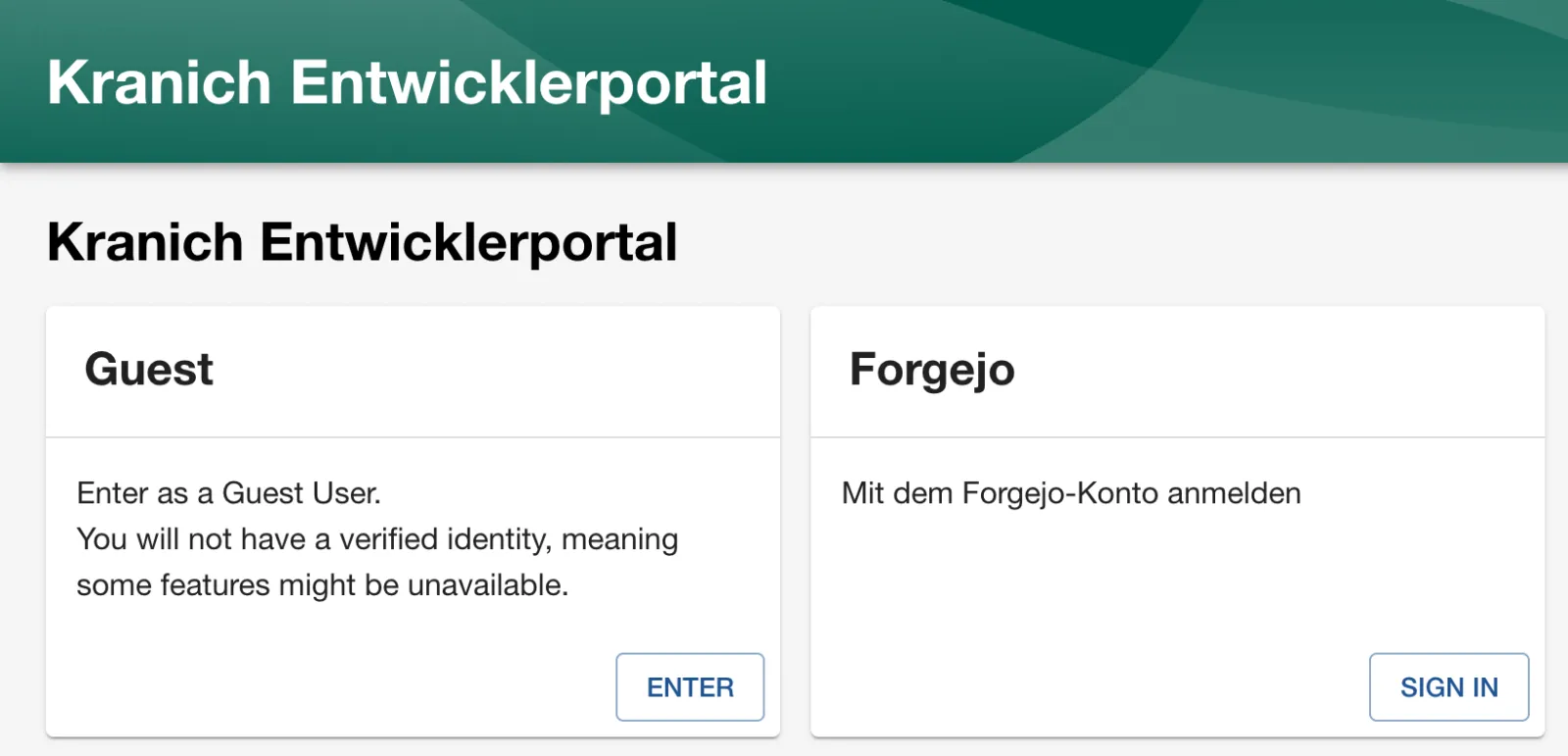
http://localhost:3000in a fresh window (or sign out via Settings → ⋮ → Sign Out). - Expected: two cards, Guest with Enter and Forgejo with Sign In, as in the figure.
Save your progress? Sign up for free
Drill 4: First login – without an email
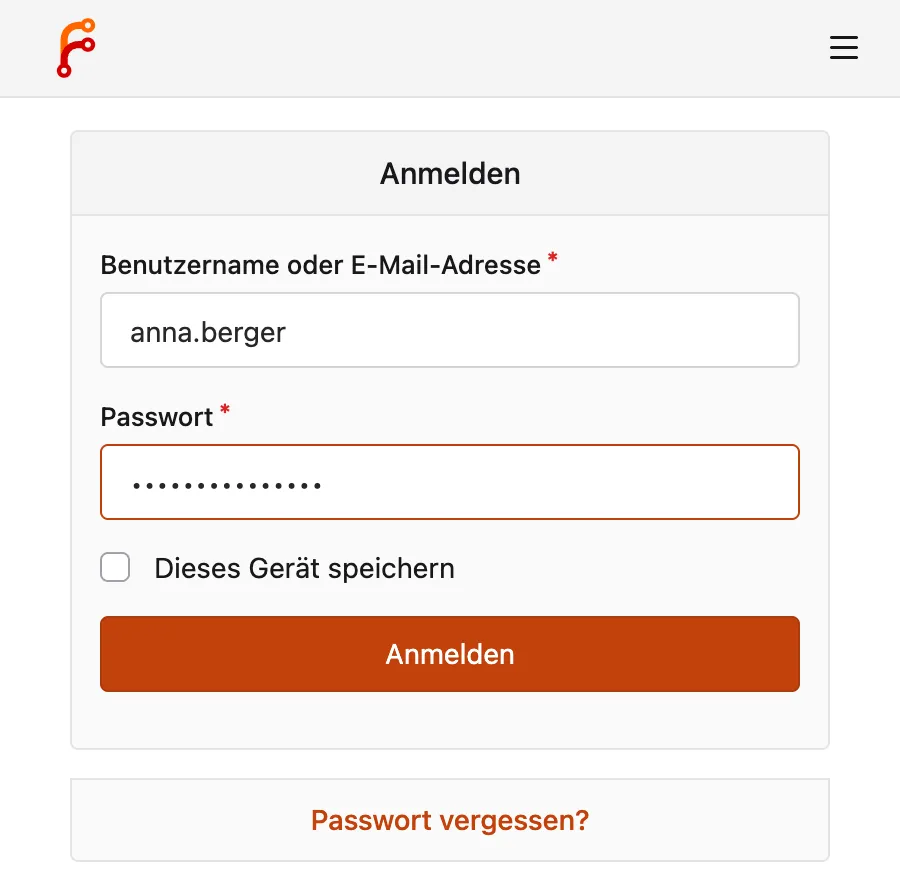
- Click Sign In on Forgejo. A popup opens with the Forgejo login.
- Sign in as
anna.berger/lab-user-pw-123(Anmelden, i.e. Sign In), as in the figure.
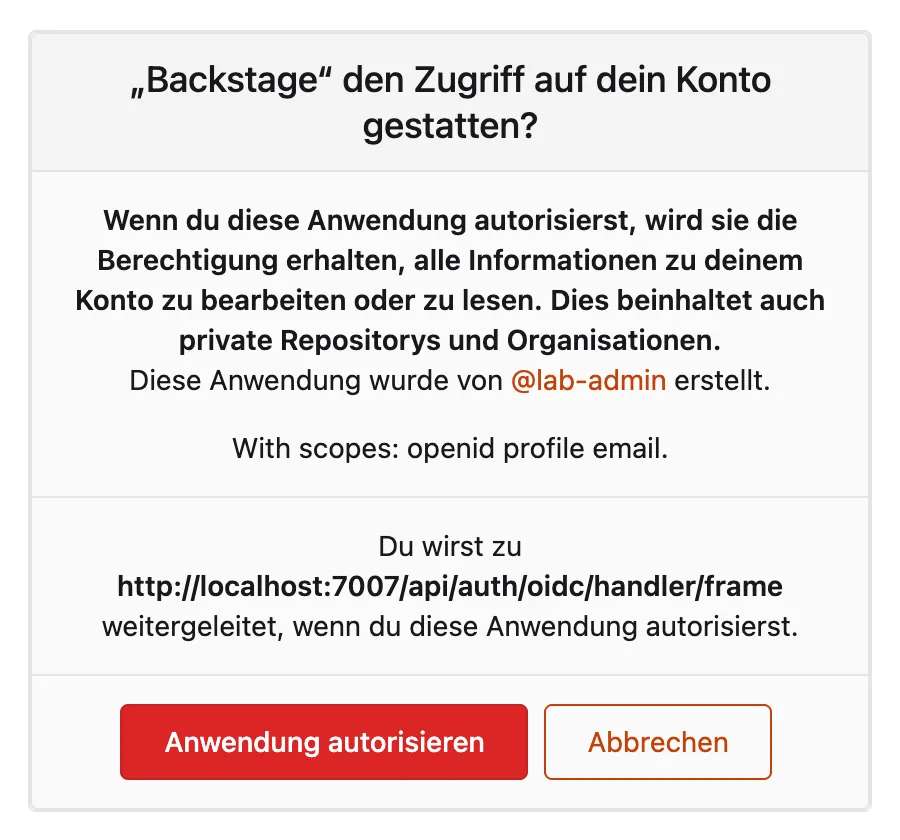
- Expected: Forgejo asks whether “Backstage” may access the account –
with the scopes
openid profile emailand the redirect URI from Drill 1, as in the figure. Click Anwendung autorisieren (Authorize Application).
- Expected: the popup closes, but the sign-in fails. At the bottom you see:
Login failed; caused by Error: Login failed, user profile does not contain an emailYet Anna does have an email address. The cause is in the module:
M=node_modules/@backstage/plugin-auth-backend-module-oidc-provider
grep -n -A1 email_verified $M/dist/authenticator.cjs.js
Expected:
23:      ...input.fullProfile.userinfo.email_verified === true && {
24-        email: input.fullProfile.userinfo.email
The module only takes over the email if the userinfo
endpoint reports email_verified: true. Under
/login/oauth/userinfo, however, Forgejo returns only
sub, name, preferred_username,
email and picture –
email_verified is only in the ID token.
Without an email in the profile, the resolver throws an error before it
searches the catalog.
Save your progress? Sign up for free
Drill 5: An auth module of your own
The package exports the oidcAuthenticator and the
resolvers individually. From them you build your own provider
oidc with a profileTransform that takes the
email from the verified ID token:
mkdir -p packages/backend/src/modules
cat > packages/backend/src/modules/forgejoAuth.ts <<'EOF'
import { createBackendModule } from '@backstage/backend-plugin-api';
import {
  authProvidersExtensionPoint,
  createOAuthProviderFactory,
} from '@backstage/plugin-auth-node';
import {
  oidcAuthenticator,
  oidcSignInResolvers,
} from '@backstage/plugin-auth-backend-module-oidc-provider';

// Replaces the default module: Forgejo reports email_verified only in the ID token,
// not in /login/oauth/userinfo – without the transform, profile.email would stay empty.
export default createBackendModule({
  pluginId: 'auth',
  moduleId: 'forgejo-oidc',
  register(reg) {
    reg.registerInit({
      deps: { providers: authProvidersExtensionPoint },
      async init({ providers }) {
        providers.registerProvider({
          providerId: 'oidc',
          factory: createOAuthProviderFactory({
            authenticator: oidcAuthenticator,
            async profileTransform({ fullProfile }) {
              const claims = fullProfile.tokenset.claims();
              return {
                profile: {
                  email:
                    claims.email_verified === true ? claims.email : undefined,
                  displayName: fullProfile.userinfo.name,
                  picture: fullProfile.userinfo.picture,
                },
              };
            },
            signInResolverFactories: oidcSignInResolvers,
          }),
        });
      },
    });
  },
});
EOF
OLD="'@backstage/plugin-auth-backend-module-oidc-provider'"
sed -i '' "s#import($OLD)#import('./modules/forgejoAuth')#" \
  packages/backend/src/index.ts
grep -E "guest-provider|forgejoAuth|oidc" packages/backend/src/index.ts
Expected:
backend.add(import('@backstage/plugin-auth-backend-module-guest-provider'));
backend.add(import('./modules/forgejoAuth'));
The default module has to go: two modules with
providerId: 'oidc' don’t get along. Config and resolver
names stay the same because signInResolverFactories
registers the same factories. The backend restarts by itself after you
save.
- Reload
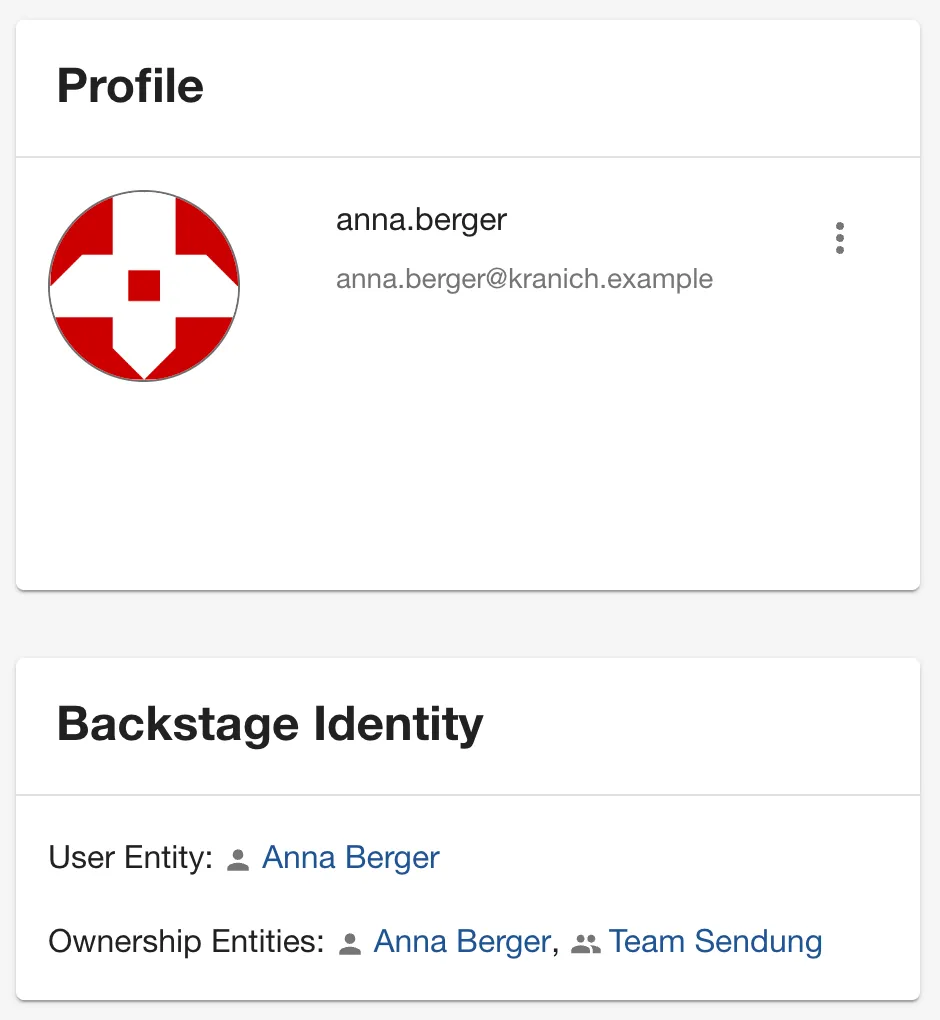
http://localhost:3000and click Sign In on Forgejo. This time the popup closes without asking – Forgejo has remembered the authorization. - Open Settings.
- Expected: Profile with the Forgejo avatar and email, below it Backstage Identity with the user entity Anna Berger and Team Sendung, as in the figure.
What happens to someone who exists in Forgejo but not in
org.yaml? Try it with the Forgejo admin:
- Sign out of Backstage (Settings → ⋮ → Sign
Out) and open
http://localhost:3000in a new private window. - Sign In on Forgejo, login
lab-admin/lab-admin-pw-123, Anwendung autorisieren (Authorize Application). - Expected: the error message, as in the figure.
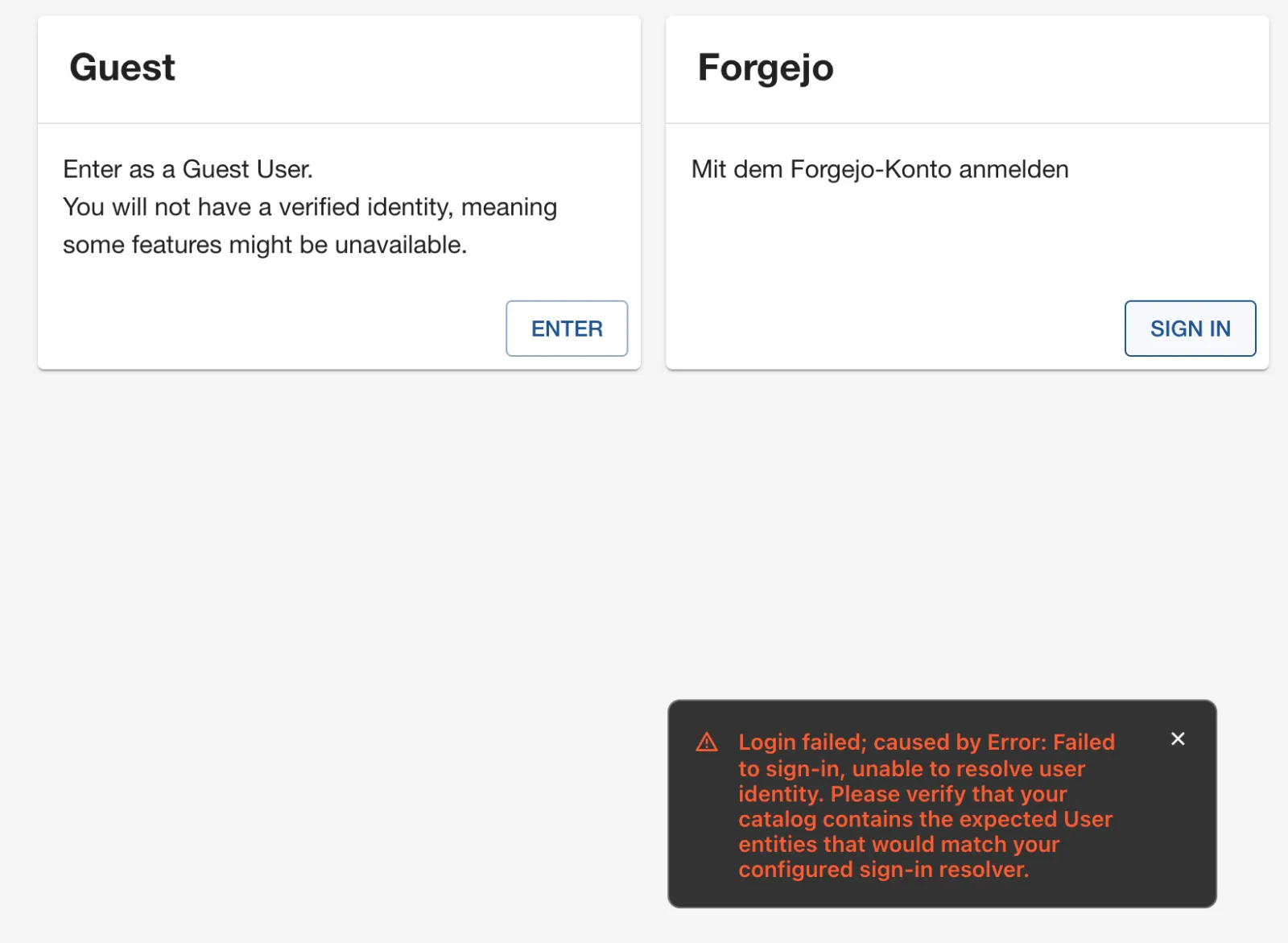
Neither resolver finds anything: there is no user with
[email protected] and none named admin. That is
exactly how it should be – Forgejo only proves the identity; whether it
may enter the portal is decided by the catalog.
Tip: Sign Out only ends the Backstage session. The Forgejo session in the browser remains, and the next Sign In signs you in again as the same user without a password. To switch between Anna and Thomas, use a private window or sign out of Forgejo as well.
Save your progress? Sign up for free
Drill 6: A permission policy of your own
The permission framework has been enabled since create-app
(permission.enabled: true in app-config.yaml),
but the policy allows everything:
grep -A2 'permission.enabled\|^permission:' app-config.yaml | grep enabled
grep -B1 -A1 allow-all-policy packages/backend/src/index.ts
Expected:
  enabled: true
backend.add(
  import('@backstage/plugin-permission-backend-module-allow-all-policy'),
);
The permission names are in
@backstage/plugin-catalog-common and
@backstage/plugin-scaffolder-common
(dist/permissions.esm.js), e.g.
catalog.entity.delete, catalog.location.delete
and scaffolder.task.create. The policy attaches to the
permission plugin as a module, via the extension point
policyExtensionPoint from
@backstage/plugin-permission-node/alpha:
cat > packages/backend/src/modules/permissionPolicy.ts <<'EOF'
import {
  coreServices,
  createBackendModule,
  UserInfoService,
} from '@backstage/backend-plugin-api';
import {
  AuthorizeResult,
  PolicyDecision,
} from '@backstage/plugin-permission-common';
import {
  PermissionPolicy,
  PolicyQuery,
  PolicyQueryUser,
} from '@backstage/plugin-permission-node';
import { policyExtensionPoint } from '@backstage/plugin-permission-node/alpha';

// These actions are reserved for Team Plattform
const NUR_PLATTFORM = [
  'catalog.entity.delete',
  'catalog.location.delete',
  'scaffolder.task.create',
];
const PLATTFORM = 'group:default/plattform';

class KranichPolicy implements PermissionPolicy {
  constructor(private readonly userInfo: UserInfoService) {}

  async handle(
    request: PolicyQuery,
    user?: PolicyQueryUser,
  ): Promise<PolicyDecision> {
    if (!NUR_PLATTFORM.includes(request.permission.name)) {
      return { result: AuthorizeResult.ALLOW };
    }
    if (!user) {
      return { result: AuthorizeResult.DENY };
    }
    const { ownershipEntityRefs } = await this.userInfo.getUserInfo(
      user.credentials,
    );
    return ownershipEntityRefs.includes(PLATTFORM)
      ? { result: AuthorizeResult.ALLOW }
      : { result: AuthorizeResult.DENY };
  }
}

export default createBackendModule({
  pluginId: 'permission',
  moduleId: 'kranich-policy',
  register(reg) {
    reg.registerInit({
      deps: {
        policy: policyExtensionPoint,
        userInfo: coreServices.userInfo,
      },
      async init({ policy, userInfo }) {
        policy.setPolicy(new KranichPolicy(userInfo));
      },
    });
  },
});
EOF
In packages/backend/src/index.ts, replace the three
lines with allow-all-policy with:
backend.add(import('./modules/permissionPolicy'));grep -E "permission-backend'|permissionPolicy" packages/backend/src/index.ts
yarn tsc && yarn --cwd packages/backend lint && echo "✔ tsc + lint"Expected:
backend.add(import('@backstage/plugin-permission-backend'));
backend.add(import('./modules/permissionPolicy'));
✔ tsc + lint
Why userInfo.getUserInfo() instead of
user.info? The field info is marked as
deprecated in PolicyQueryUser.
catalog.location.delete is in the list because, for
registered locations, the unregister dialog deletes the location, not
the entity.
Save your progress? Sign up for free
Drill 7: Counter-check in the GUI
- In a private window, sign in as
anna.berger(Team Sendung) and click Create. - Expected: the Node.js-Service card has no Choose button – as in the figure.
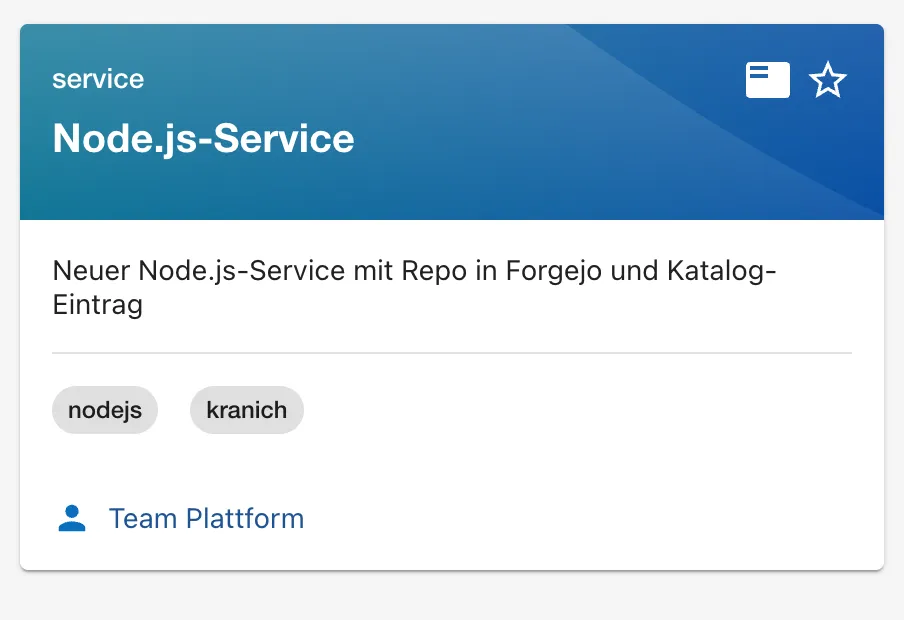
- Open
tracking-webin the catalog, click ⋮ at the top right and then Unregister entity. - Expected: nothing happens. In 1.55 the entry looks the same as
always, but it is locked (
aria-disabled="true") – the policy’s answer was DENY. - Repeat both in a new private window as
thomas.zachmann(Team Plattform and Team Web). - Expected: Choose is there, and Unregister entity opens the dialog, as in the figures. Click Cancel there.
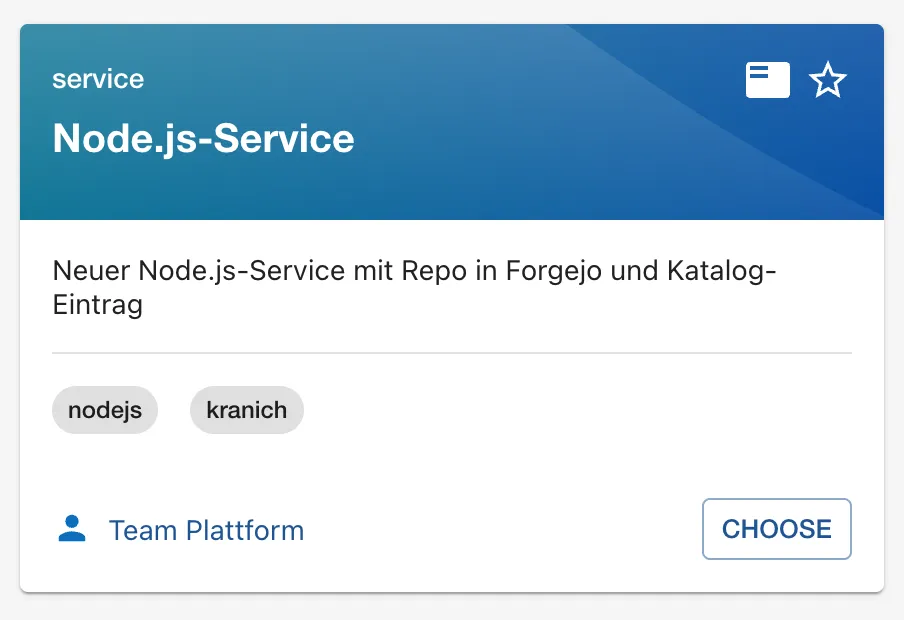
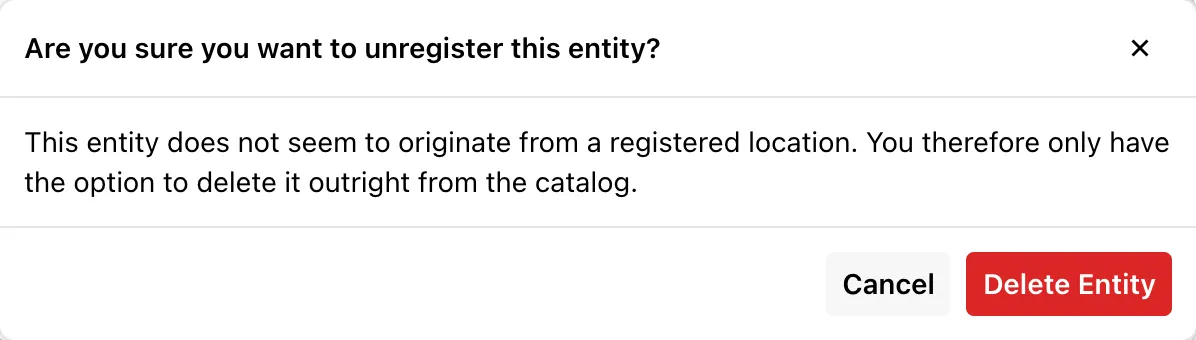
For every button, the frontend asks
POST /api/permission/authorize in advance and hides or
locks it. The actual protection sits in the backend: a direct API call
fails too. Try it with the guest, who has no groups:
GUEST=$(curl -s -H 'X-Requested-With: XMLHttpRequest' \
  "$BACKSTAGE/api/auth/guest/refresh" | jq -r .backstageIdentity.token)
curl -s -H "Authorization: Bearer $GUEST" -H 'Content-Type: application/json' \
  "$BACKSTAGE/api/permission/authorize" -d '{"items":[
   {"id":"1","permission":{"type":"basic","name":"scaffolder.task.create",
    "attributes":{"action":"create"}}},
   {"id":"2","permission":{"type":"basic","name":"catalog.entity.read",
    "attributes":{"action":"read"}}}]}' | jq -c .
UID_TW=$(bs catalog/entities/by-name/component/default/tracking-web \
  | jq -r .metadata.uid)
curl -s -o /dev/null -w '%{http_code}\n' -X DELETE \
  -H "Authorization: Bearer $GUEST" "$BACKSTAGE/api/catalog/entities/by-uid/$UID_TW"
Expected:
{"items":[{"id":"1","result":"DENY"},{"id":"2","result":"ALLOW"}]}
403
Save your progress? Sign up for free
Drill 8: And the lab token?
Since Day 0 you have been working with bs and the static
token lab-cli. Does the policy apply to it as well?
curl -s -H "Authorization: Bearer $BACKSTAGE_TOKEN" \
  -H 'Content-Type: application/json' "$BACKSTAGE/api/permission/authorize" \
  -d '{"items":[]}' | jq -r .error.message
UID_EX=$(bs catalog/entities/by-name/component/default/example-website \
  | jq -r .metadata.uid)
bs catalog/entities/by-uid/$UID_EX -X DELETE -w '%{http_code}\n'
sleep 10
bs catalog/entities/by-name/component/default/example-website | jq -r .metadata.name
Expected:
This endpoint does not allow 'service' credentials
204
example-website
The token is a service principal, not a user.
ServerPermissionClient in
@backstage/plugin-permission-node decides immediately by
itself for service principals and doesn’t ask the policy at all –
without restrictions that means ALLOW. The entity comes back after a few
seconds because its location still exists.
You can restrict a token only at the source, with
accessRestrictions in
backend.auth.externalAccess (keys plugin,
permission, permissionAttribute.action
according to backend-defaults). A second, read-only
token:
yq -i '.backend.auth.externalAccess += [{"type": "static",
  "options": {"token": "lab-ro-token-0123456789abcdef", "subject": "lab-readonly"},
  "accessRestrictions": [{"plugin": "catalog",
    "permissionAttribute": {"action": "read"}}]}]' app-config.local.yaml
~/backstage-lab/setup/portal.sh restart
RO=lab-ro-token-0123456789abcdef                          # lab value!
curl -s -o /dev/null -w 'GET catalog: %{http_code}\n' \
  -H "Authorization: Bearer $RO" "$BACKSTAGE/api/catalog/entities?limit=1"
curl -s -o /dev/null -w 'DELETE: %{http_code}\n' -X DELETE \
  -H "Authorization: Bearer $RO" "$BACKSTAGE/api/catalog/entities/by-uid/$UID_EX"
curl -s -H "Authorization: Bearer $RO" "$BACKSTAGE/api/scaffolder/v2/tasks" \
  | jq -r .error.message
Expected:
✔ gestoppt
✔ Backstage läuft: http://localhost:3000 (Backend http://localhost:7007)
GET catalog: 200
DELETE: 403
This token's access is restricted to plugin(s) 'catalog'
Plugins missing from accessRestrictions are completely
closed to this token. Leave lab-cli unrestricted; the
following chapters need it.
Save your progress? Sign up for free
Checkpoint
cp ~/backstage-lab/code/tag12/kontrolle.sh ~/backstage-lab/tag12/
bash ~/backstage-lab/tag12/kontrolle.sh
The script fetches a guest token and asks the policy directly; a user token for Anna is only available through the browser login. The core of the check:
authz() { curl -sf -H "Authorization: Bearer $GUEST" \
  -H 'Content-Type: application/json' "$BACKSTAGE/api/permission/authorize" \
  -d "{\"items\":[{\"id\":\"1\",\"permission\":{\"type\":\"basic\",
       \"name\":\"$1\",\"attributes\":{}}}]}" | jq -r '.items[0].result'; }
t "Gast darf keine Templates ausführen (scaffolder.task.create = DENY)" \
  "[ \"\$(authz scaffolder.task.create)\" = DENY ]"
Expected:
✔ OAuth2-App Backstage in Forgejo
✔ Forgejo-User anna.berger und thomas.zachmann
✔ auth/oidc/start leitet zu Forgejo um
✔ Gast darf lesen (catalog.entity.read = ALLOW)
✔ Gast darf keine Templates ausführen (scaffolder.task.create = DENY)
✔ Lab-Token lab-cli liest weiter den Katalog
Challenge
Refreshing an entity (the circular arrow in the
About card) should only be allowed for its owner. Anna
may refresh sendungs-api, but not
tracking-web.
Hint: For resource permissions, the policy may
return a condition instead of ALLOW/DENY, which the catalog checks
itself – ready-made building blocks are in
@backstage/plugin-catalog-backend/alpha.
Solution
The complete file is at
code/tag12/challenge/permissionPolicy.ts. New are two
imports and a branch before the group check; in addition,
catalog.entity.refresh now belongs to the permissions the
policy handles at all:
import {
  AuthorizeResult,
  isResourcePermission,
  PolicyDecision,
} from '@backstage/plugin-permission-common';
import {
  catalogConditions,
  createCatalogConditionalDecision,
} from '@backstage/plugin-catalog-backend/alpha';
// … in handle():
    const regelt =
      NUR_PLATTFORM.includes(request.permission.name) ||
      request.permission.name === 'catalog.entity.refresh';
    if (!regelt) {
      return { result: AuthorizeResult.ALLOW };
    }
    // … check user, get ownershipEntityRefs as before, then:
    if (
      isResourcePermission(request.permission, 'catalog-entity') &&
      request.permission.name === 'catalog.entity.refresh'
    ) {
      return createCatalogConditionalDecision(
        request.permission,
        catalogConditions.isEntityOwner({ claims: ownershipEntityRefs }),
      );
    }
cp ~/backstage-lab/code/tag12/challenge/permissionPolicy.ts \
~/backstage-lab/portal/packages/backend/src/modules/permissionPolicy.ts
cd ~/backstage-lab/portal && yarn tsc && echo "✔ tsc"Expected: ✔ tsc. Sign in as Anna: on
sendungs-api (owner Team Sendung), About
shows the refresh button; on tracking-web (Team Web) it is
missing. The policy does not know the entity – it only returns the
condition IS_ENTITY_OWNER, and the catalog backend
evaluates it against the entity’s relations.
Save your progress? Sign up for free
Enterprise Note
- In companies, OIDC usually comes from Entra ID, Keycloak or Okta. The resolver then matches against user entities from the same directory (Day 4) – email or a stable object ID claim, never a freely editable display name.
- Outside of
NODE_ENV=development, the guest provider refuses to work unless someone setsdangerouslyAllowOutsideDevelopment: true. Leave it that way and remove'guest'from the sign-in page. auth.session.secret, client secret and backend keys belong in a secret store (Vault, Kubernetes Secret) and are injected via env; redirect URIs only with HTTPS.- Policies are code: with unit tests, review and change history. For many rules, an RBAC plugin that maintains roles via UI or CSV pays off.
- Always issue static tokens for CI and scripts with
accessRestrictionsand their ownsubject– otherwise service principals bypass every policy.