Day 13: Running on PostgreSQL
Goal: You switch the portal to PostgreSQL, build it as for production and run frontend and backend as one Node process on port 7007 – configured through files and environment variables. · Duration: approx. 90 min · Prerequisite: Day 12
Briefing
- SQLite is a lab shortcut: one file per plugin, only one process, no backups while running, search only as Lunr in RAM. In production: PostgreSQL.
- In Postgres, Backstage creates one database per
plugin (
backstage_plugin_catalog,…_search, …) and migrates the tables itself. - The production build
(
yarn build:backend) packs the backend and the built frontend intobundle.tar.gz. The pluginapp-backendserves the app – one process, one address. - Configuration: several
--configfiles, the later one wins; secrets via${ENV}, single values viaAPP_CONFIG_*.
 dev (yarn start)                       Production (node packages/backend)
 ┌───────────────┐  ┌───────────────┐   ┌──────────────────────────────────┐
 │ Frontend :3000│─►│ Backend :7007 │   │ :7007  app-backend  /  (app)     │
 │ (dev server)  │  │ SQLite → pg   │   │        plugins      /api/…       │
 └───────────────┘  └──────┬────────┘   └───────────────┬──────────────────┘
                           └─────────────┬──────────────┘
                              container bs-postgres  127.0.0.1:5432
                              backstage_plugin_catalog, …_search, …
The prerequisite is the state at the end of Day 12: catalog with the
Gitea provider, organization from kranich/org, templates
from kranich/templates.
Drill 1: PostgreSQL in a container
The password is a lab value and lives in a file, not in the YAML configuration:
mkdir -p ~/backstage-lab/tag13 && cd ~/backstage-lab/tag13
cp ~/backstage-lab/code/tag13/pg.env . && chmod 600 pg.env
cat pg.env
Expected:
# pg.env – Zugang zur Lab-Datenbank (Lab-Werte!). Laden mit: source pg.env
export POSTGRES_HOST=127.0.0.1
export POSTGRES_PORT=5432
export POSTGRES_USER=backstage
export POSTGRES_PASSWORD=lab-pg-pw-123
source pg.env
docker run -d --name bs-postgres -p "127.0.0.1:$POSTGRES_PORT:5432" \
-v bs-postgres-data:/var/lib/postgresql/data \
-e POSTGRES_USER -e POSTGRES_PASSWORD \
postgres:16.4-alpine
until docker exec bs-postgres pg_isready -h 127.0.0.1 -U backstage; do sleep 1; done
docker exec bs-postgres psql -U backstage -Atc 'select version()' | cut -c1-40Expected:
c4d4aaa233aa5fc94fd90e0c3a2863f0f0a7b6643dfe0fbc98bb8add49ab7e8d
127.0.0.1:5432 - accepting connections
PostgreSQL 16.4 on aarch64-unknown-linux
-e POSTGRES_USER without a value takes the variable from
your shell. With it, the image creates a superuser
backstage; the data lives in the volume
bs-postgres-data and survives docker rm. Why
-h 127.0.0.1? On the first start, an init server briefly
runs only on the Unix socket – only the TCP response really means
“ready”.
Warning: If another Postgres (e.g. from Homebrew) already occupies port 5432,
docker runreports “port is already allocated”. Then enter e.g.5433inpg.env, delete the container (docker rm -f bs-postgres) and start it again.
Save your progress? Sign up for free
Drill 2: Switching the portal to PostgreSQL
In app-config.local.yaml, you replace the SQLite block
with the same form as in the app-config.production.yaml of
the create-app template: client: pg, all values from
environment variables.
source ~/backstage-lab/setup/env.sh
cd ~/backstage-lab/portal
cp app-config.local.yaml app-config.local.yaml.sqlite
yq -i '.backend.database = {"client": "pg", "connection": {
  "host": "${POSTGRES_HOST}", "port": "${POSTGRES_PORT}",
  "user": "${POSTGRES_USER}", "password": "${POSTGRES_PASSWORD}"}}' \
  app-config.local.yaml
yq '.backend.database' app-config.local.yaml
Expected:
client: pg
connection:
  host: ${POSTGRES_HOST}
  port: ${POSTGRES_PORT}
  user: ${POSTGRES_USER}
  password: ${POSTGRES_PASSWORD}
portal.sh needs to know the variables. So that every new
terminal has them, you append pg.env to env.sh
(like the venv on Day 7):
echo 'if [ -f "$LAB/tag13/pg.env" ]; then source "$LAB/tag13/pg.env"; fi' \
  >> ~/backstage-lab/setup/env.sh
source ~/backstage-lab/setup/env.sh && echo "$POSTGRES_HOST:$POSTGRES_PORT"
~/backstage-lab/setup/portal.sh restart
docker exec bs-postgres psql -U backstage -lqt | cut -d'|' -f1 | grep backstage
Expected:
127.0.0.1:5432
✔ gestoppt
✔ Backstage läuft: http://localhost:3000 (Backend http://localhost:7007)
 backstage
 backstage_plugin_app
 backstage_plugin_auth
 backstage_plugin_catalog
 backstage_plugin_kubernetes
 backstage_plugin_mcp-actions
 backstage_plugin_notifications
 backstage_plugin_permission
 backstage_plugin_proxy
 backstage_plugin_scaffolder
 backstage_plugin_search
 backstage_plugin_signals
 backstage_plugin_techdocs
 backstage_plugin_user-settings
Why so many databases? The default is
pluginDivisionMode: database – each plugin gets its own
database with the prefix backstage_plugin_ and may only see
its own tables. For that, the DB user needs the CREATEDB
privilege. The database backstage was created by the image;
Backstage doesn’t use it.
The new database is empty. In the first few minutes, the catalog
fills up again from the configuration and the Gitea provider. Only data
that lived solely in SQLite is lost: stars/favorites, notifications, old
scaffolder tasks. The SQLite files in ~/backstage-lab/data
stay where they are.
Save your progress? Sign up for free
Drill 3: A look into the database
What the catalog stores now lives in normal tables:
sql() { docker exec bs-postgres psql -U backstage -d "$1" -Atc "$2"; }
sql backstage_plugin_catalog "select tablename from pg_tables
  where schemaname = 'public' and tablename not like '%knex%'
  and tablename not like 'backstage_%' order by 1"
sql backstage_plugin_catalog "select final_entity::json->>'kind', count(*)
  from final_entities group by 1 order by 1"
Expected (shortened, numbers depend on your catalog):
final_entities
location_update_log
locations
refresh_keys
refresh_state
refresh_state_references
relations
search
stitch_queue
API|2
Component|3
Group|6
Location|5
System|1
User|5
final_entities holds each entity as finished JSON,
refresh_state controls processing, and the table
search serves the filters of the catalog API (not full-text
search). And search?
sed 's/\x1b\[[0-9;]*m//g' $LAB/portal.log \
  | grep -c 'Postgres search engine is not supported'
sql backstage_plugin_search "select type, count(*) from documents group by 1"
Expected:
0
software-catalog|22
The warning from Day 8 is gone: the module
search-backend-module-pg detects Postgres and registers
itself as the engine; the index lives in the table
documents. As soon as the TechDocs collator has run, a
techdocs row is added. The proof of the difference from
Lunr:
~/backstage-lab/setup/portal.sh restart
bs 'search/query?term=sendung' | jq -r '.results[].document.title'
Expected (shortened):
✔ Backstage läuft: http://localhost:3000 (Backend http://localhost:7007)
sendungs-api
sendungs-api
Team Sendung
tracking-web
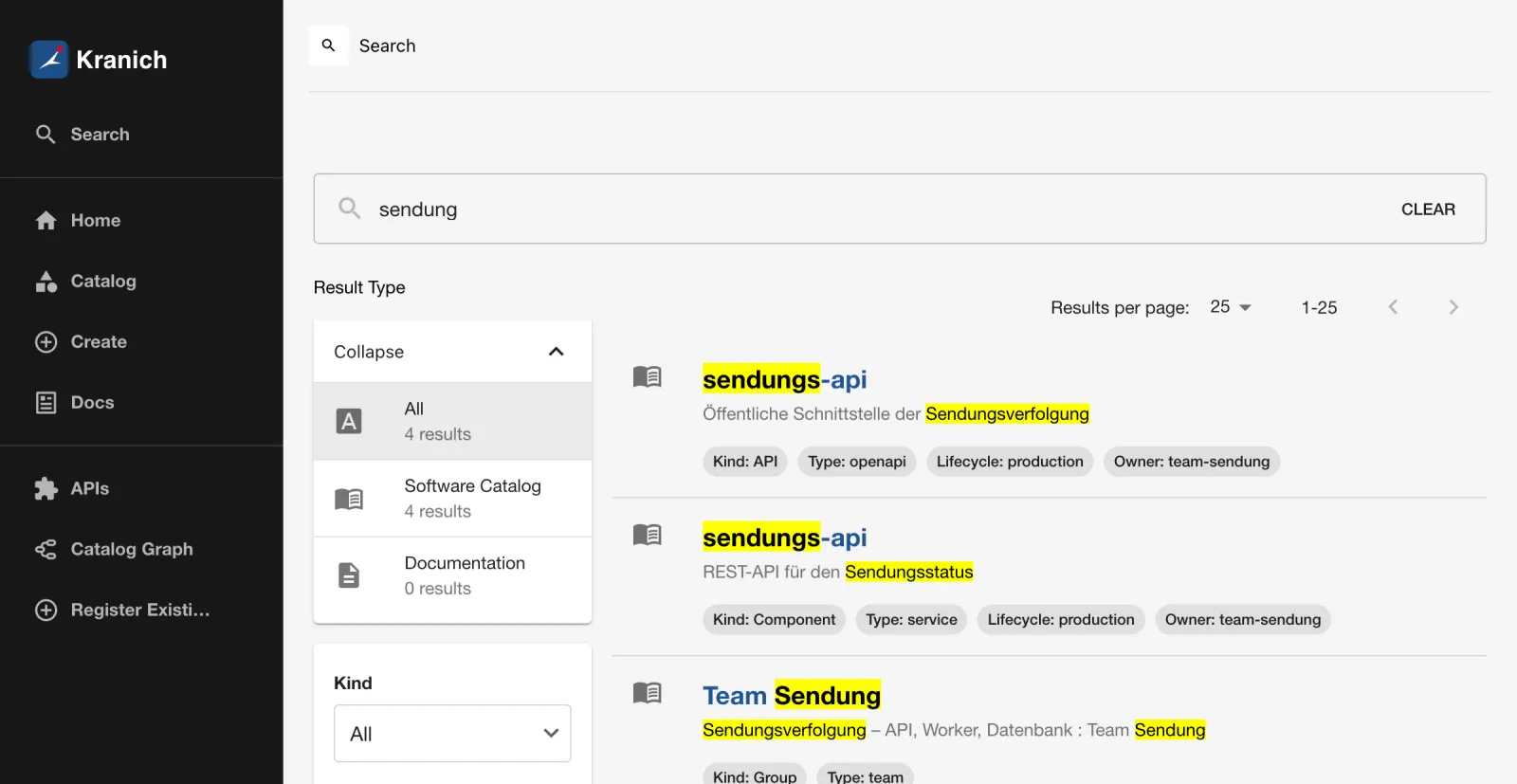
Right after the restart there are hits – no more HTTP 500 with
MissingIndexError as on Day 8. In the portal under
Search, it looks like the figure.
Save your progress? Sign up for free
Drill 4: The production build
yarn start compiles everything in memory and needs about
2 GB of RAM. For operations, you build once in advance. The portal
doesn’t need to be running for this:
~/backstage-lab/setup/portal.sh stop
cd ~/backstage-lab/portal
time yarn tsc
time yarn build:backend
ls -lh packages/backend/dist | awk 'NR>1 {print $5, $9}'
du -sh packages/app/dist
Expected (duration depends heavily on the machine):
✔ gestoppt
yarn tsc  3,87s user 0,66s system 117% cpu 3,852 total
yarn build:backend  16,17s user 3,18s system 225% cpu 8,591 total
15M bundle.tar.gz
895B skeleton.tar.gz
 66M    packages/app/dist
yarn tsc only checks types (no output without errors).
You don’t need yarn install --immutable from the comment in
the Dockerfile locally – your node_modules are up to date.
What’s in the archives?
tar tzf packages/backend/dist/skeleton.tar.gz
tar tzf packages/backend/dist/bundle.tar.gz | cut -d/ -f1-3 | sort -u | head -8
Expected:
packages/app/package.json
packages/backend/package.json
./
package.json
packages/
packages/app/
packages/app/dist
packages/app/package.json
packages/backend/
packages/backend/dist
Why two archives? The skeleton contains only the
package.json files – enough for yarn install
in the Docker build, which thus stays cached as long as dependencies
don’t change. The bundle brings the built code.
build:backend also builds all workspace packages that
backend depends on, including packages/app (in
the log: “Building app separately because it is a bundled package”) and
your backend plugin from Day 11. A separate
yarn workspace app build is not necessary.
Save your progress? Sign up for free
Drill 5: app-config.production.yaml
The template from create-app already has client: pg, but
also the example locations. You replace it with a file that defines what
is different in production:
cd ~/backstage-lab/portal
cp app-config.production.yaml app-config.production.yaml.vorlage
cp ~/backstage-lab/code/tag13/app-config.production.yaml .
cat app-config.production.yaml
# app-config.production.yaml – Tag 13: Produktionsbetrieb, ein Prozess auf :7007
# Keine Secrets in dieser Datei: alles Geheime kommt per ${ENV} herein.
app:
# Frontend und Backend unter derselben Adresse (app-backend liefert die App aus)
baseUrl: http://localhost:7007
backend:
baseUrl: http://localhost:7007
listen: ':7007'
database:
client: pg
connection:
host: ${POSTGRES_HOST}
port: ${POSTGRES_PORT}
user: ${POSTGRES_USER}
password: ${POSTGRES_PASSWORD}
auth:
providers:
guest:
# Nur fürs Lab! Ohne NODE_ENV=development lehnt der Guest-Provider sonst ab.
dangerouslyAllowOutsideDevelopment: true
catalog:
# Ersetzt die Liste aus app-config.local.yaml: keine file-Locations in Produktion
locations:
- type: url
target: http://127.0.0.1:3300/kranich/katalog/src/branch/main/locations.yaml
- type: url
target: http://127.0.0.1:3300/kranich/org/src/branch/main/org.yaml
rules:
- allow: [User, Group]
- type: url
target: http://127.0.0.1:3300/kranich/templates/src/branch/main/templates.yamlThree points are new. app.baseUrl equals
backend.baseUrl because there is no dev server anymore.
catalog.locations replaces the list completely (arrays are
not merged, Day 3): the file locations
../../examples/… are relative to the working directory of
the process – with yarn start that is
packages/backend, in operation the root directory. The
example entities thus disappear (orphans). And the guest provider checks
NODE_ENV: everything other than development
counts as production. If you removed the guest provider on Day 12, leave
out the auth block – the OIDC login works unchanged because
its callback runs through port 7007 anyway.
config:print shows which values apply in the end – with
secrets masked:
yarn backstage-cli config:print --config app-config.yaml \
  --config app-config.local.yaml --config app-config.production.yaml \
  2>/dev/null | yq '.backend.database, .app.baseUrl'
env -u POSTGRES_PASSWORD yarn backstage-cli config:print --config app-config.yaml \
  --config app-config.production.yaml 2>/dev/null | yq '.backend.database.connection'
Expected:
client: pg
connection:
  host: 127.0.0.1
  port: "5432"
  user: backstage
  password: <secret>
http://localhost:7007
host: 127.0.0.1
port: "5432"
user: backstage
If a variable is missing, the key silently disappears – no error on
loading; only the login to the database fails.
${VAR:-default} sets a fallback value, $$
protects a real dollar sign.
Save your progress? Sign up for free
Drill 6: One process on port 7007
In the Docker image, the bundle is unpacked into an empty directory
and installed there with
yarn workspaces focus --all --production. Locally you save
yourself the installation: an APFS clone (cp -c) of your
node_modules costs no disk space.
rm -rf ~/backstage-lab/release && mkdir ~/backstage-lab/release
cd ~/backstage-lab/release
tar xzf ../portal/packages/backend/dist/bundle.tar.gz
cp -c -R ../portal/node_modules .
cp ../portal/app-config.yaml ../portal/app-config.local.yaml \
  ../portal/app-config.production.yaml .
ls
Expected:
app-config.local.yaml
app-config.production.yaml
app-config.yaml
node_modules
package.json
packages
yarn.lock
The clone works because the workspace links are relative
(node_modules/app -> ../packages/app) and now point to
the built packages in the release. Start it in the background, with all
variables from env.sh and pg.env:
source ~/backstage-lab/setup/env.sh
nohup node packages/backend --config app-config.yaml \
  --config app-config.local.yaml --config app-config.production.yaml \
  > ~/backstage-lab/prod.log 2>&1 & echo $! > ~/backstage-lab/prod.pid
until curl -sf $BACKSTAGE/.backstage/health/v1/readiness; do sleep 1; done; echo
head -3 ~/backstage-lab/prod.log | sed 's/\x1b\[[0-9;]*m//g' | cut -c1-88
grep -o 'Serving static app content from .*' ~/backstage-lab/prod.log
curl -s $BACKSTAGE/ | grep -o '<title>[^<]*'
Expected:
{"status":"ok"}
Loading config from MergedConfigSource{FileConfigSource{path="/Users/<du>/backstage-lab/
2026-10-13T07:44:27.860Z backstage info Found 4 new secrets in config that will be redac
2026-10-13T07:44:27.865Z rootHttpRouter info Listening on :7007
Serving static app content from /Users/<du>/backstage-lab/release/packages/app/dist
<title>Kranich Entwicklerportal
The process needs only a fraction of the RAM of
yarn start:
ps -o rss= -p "$(cat ~/backstage-lab/prod.pid)" | awk '{printf "%d MB\n", $1/1024}'Expected (varies; for me between a good 100 and 520 MB):
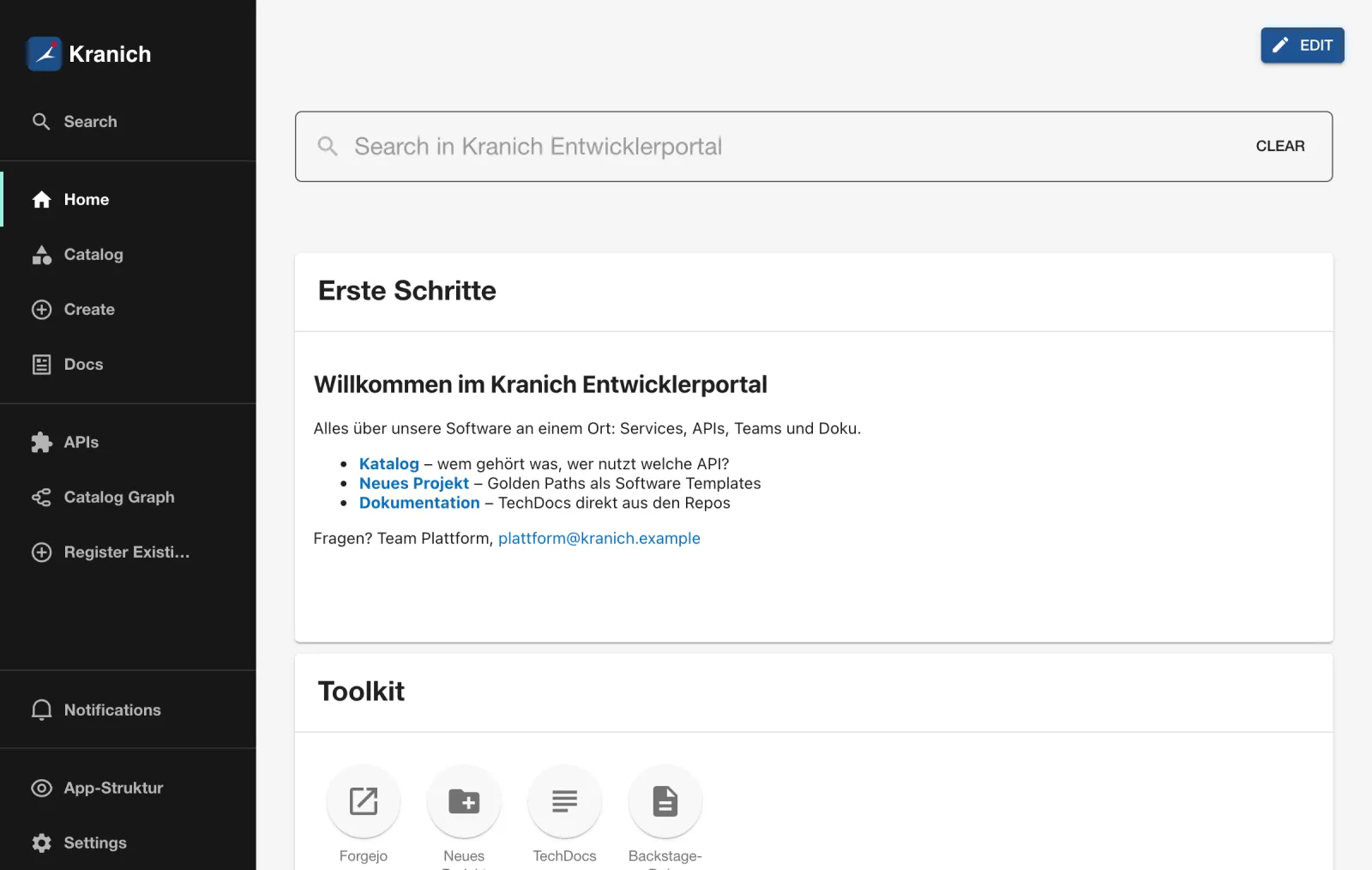
518 MBOpen http://localhost:7007 (no longer 3000!) and sign in
with Enter. Expected: your home page from Day 9, served
by the backend, as in the figure.
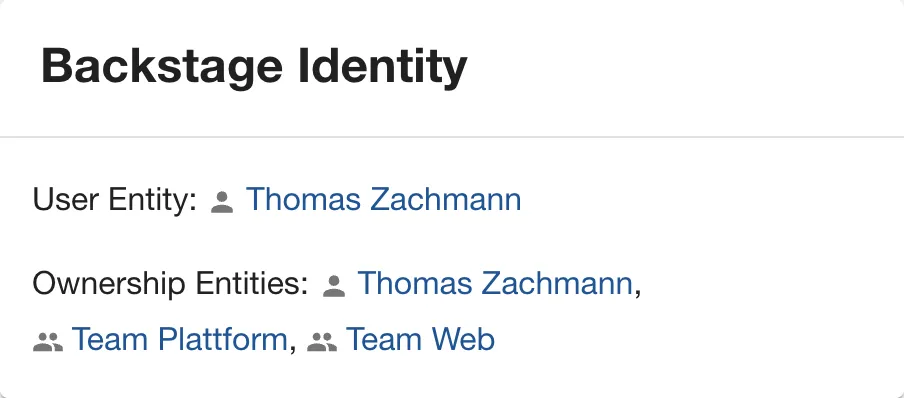
- Click Settings in the sidebar.
- Expected: the Backstage Identity card shows your user entity with its groups, as in the figure – the sign-in resolver works in production too.
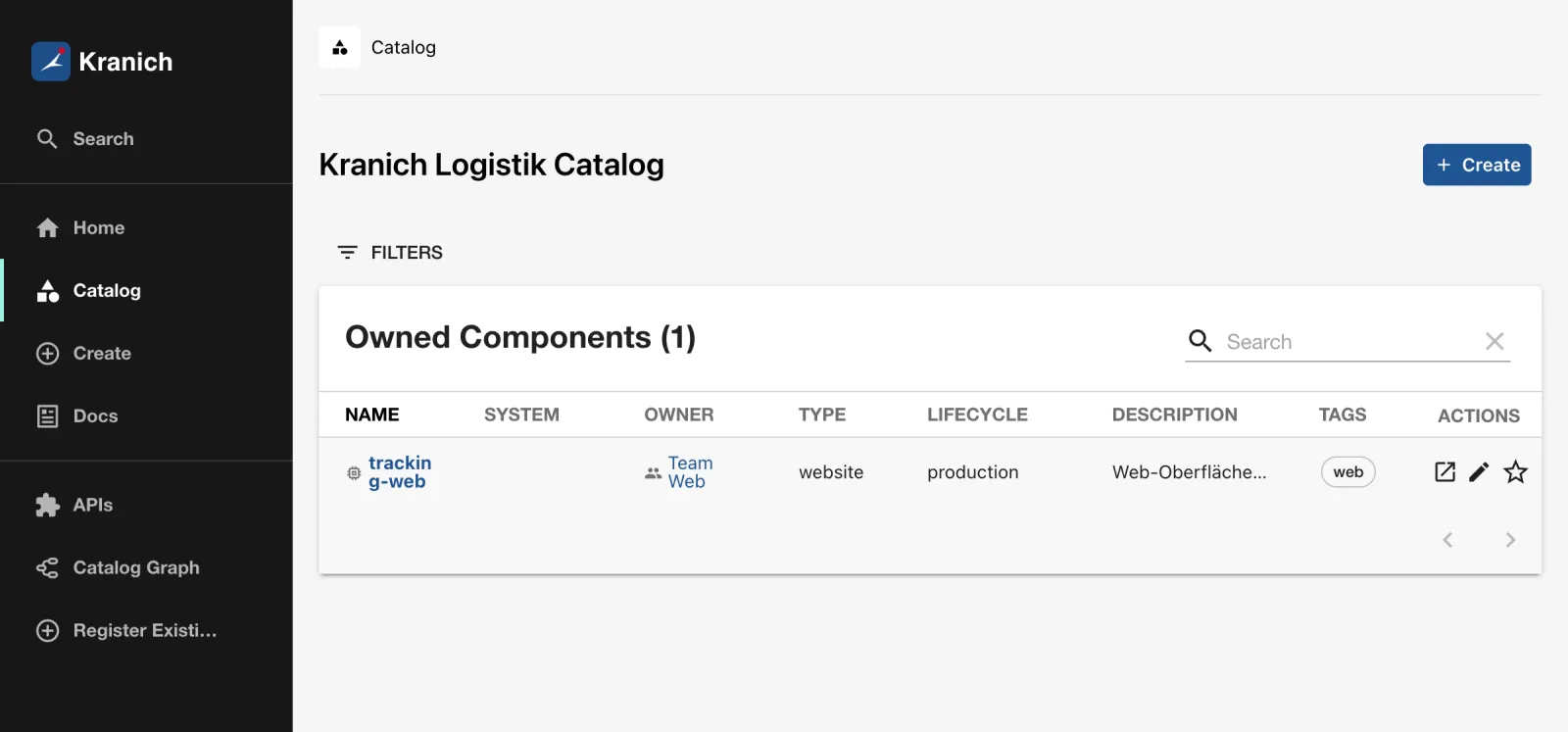
- Click Catalog. Expected: the catalog as in the figure, without the example entities from create-app.
Tip: Stop it with
kill $(cat ~/backstage-lab/prod.pid). After every code change:yarn tsc,yarn build:backend, unpack the release again.
Save your progress? Sign up for free
Drill 7: Configuration via environment and health endpoints
Besides ${VAR} in YAML, there are overrides without a
file: every variable APP_CONFIG_<path> with
_ as separator sets a value. The value is read as JSON,
otherwise as text. Restart with two overrides:
cd ~/backstage-lab/release
kill $(cat ~/backstage-lab/prod.pid); sleep 3
APP_CONFIG_app_title='Kranich Portal (Prod)' \
APP_CONFIG_auth_providers_guest_dangerouslyAllowOutsideDevelopment=false \
nohup node packages/backend --config app-config.yaml \
  --config app-config.local.yaml --config app-config.production.yaml \
  > ~/backstage-lab/prod.log 2>&1 & echo $! > ~/backstage-lab/prod.pid
until curl -sf $BACKSTAGE/.backstage/health/v1/readiness >/dev/null; do sleep 1; done
head -1 ~/backstage-lab/prod.log | grep -o 'EnvConfigSource{[^}]*}'
curl -s $BACKSTAGE/ | grep -o '<title>[^<]*'
curl -s $BACKSTAGE/api/auth/guest/refresh -H 'X-Requested-With: XMLHttpRequest' \
  | jq -r .error.message | fold -w 88
Expected:
EnvConfigSource{count=2}
<title>Kranich Portal (Prod)
The guest provider cannot be used outside of a development environment unless 'auth.prov
iders.guest.dangerouslyAllowOutsideDevelopment' is enabled
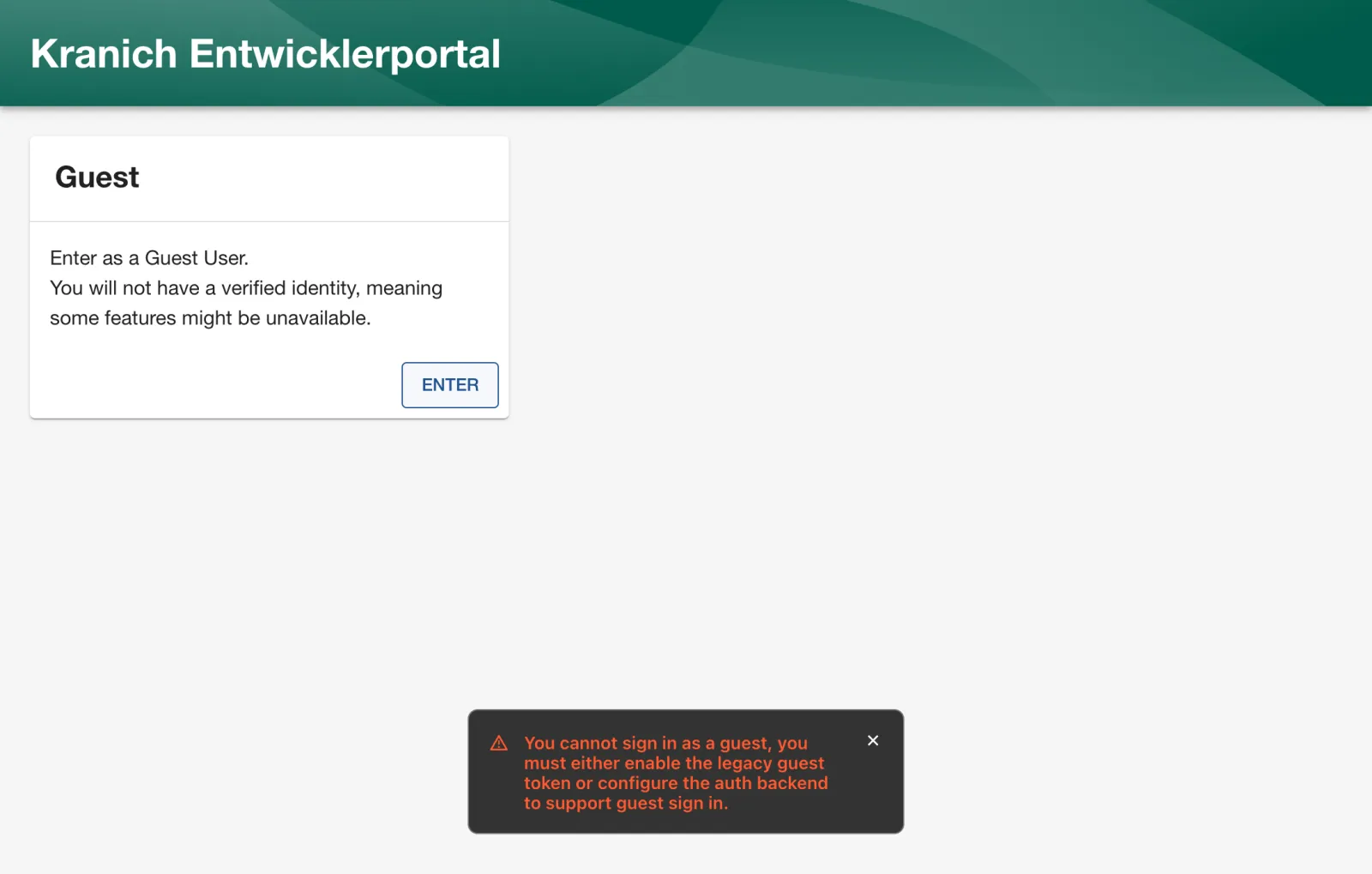
Env overrides win over all files. In the browser, Enter now fails with the message from the figure – exactly the failure you see when guest is not enabled in production.
Kubernetes and load balancers check the process via two endpoints without login:
curl -s -w ' %{http_code}\n' $BACKSTAGE/.backstage/health/v1/liveness
docker stop bs-postgres >/dev/null
curl -s -w ' %{http_code}\n' $BACKSTAGE/.backstage/health/v1/readiness
bs 'catalog/entities?limit=1' -S 2>&1 | tail -1
docker start bs-postgres >/dev/null; sleep 4
bs 'catalog/entities?limit=1' | jq length
Expected (shortened):
{"status":"ok"} 200
{"status":"ok"} 200
curl: (22) The requested URL returned error: 500
1
liveness means “the process is alive”, readiness “finished starting, accepting requests” (during startup: 503 “Backend has not started yet”). Neither of the two checks the database – if Postgres fails, the APIs respond with 500 and recover without a restart as soon as the database is back.
Finally, the normal start again (guest allowed, original title):
kill $(cat ~/backstage-lab/prod.pid); sleep 3
nohup node packages/backend --config app-config.yaml \
  --config app-config.local.yaml --config app-config.production.yaml \
  > ~/backstage-lab/prod.log 2>&1 & echo $! > ~/backstage-lab/prod.pid
Save your progress? Sign up for free
Drill 8: Logs as JSON
With NODE_ENV=production, the logger writes JSON instead
of colored text – readable for Loki, Elasticsearch or Splunk:
kill $(cat ~/backstage-lab/prod.pid); sleep 3
NODE_ENV=production nohup node packages/backend --config app-config.yaml \
  --config app-config.local.yaml --config app-config.production.yaml \
  > ~/backstage-lab/prod.log 2>&1 & echo $! > ~/backstage-lab/prod.pid
until curl -sf $BACKSTAGE/.backstage/health/v1/readiness >/dev/null; do sleep 1; done
sed -n 3p ~/backstage-lab/prod.log
grep '^{' ~/backstage-lab/prod.log | jq -r 'select(.level == "warn") | .message' \
  | cut -c1-70 | sort | uniq -c
Expected (shortened):
{"level":"info","message":"Listening on :7007","service":"rootHttpRouter"}
  13 backend.baseUrl is set to a localhost URL and NODE_ENV is 'production'
   2 Event subscribe request failed with status 404, events backend not fou
   1 Failed to initialize kubernetes backend: valid kubernetes config is mi
Two observations: the JSON lines have no timestamp field (in
Kubernetes, the log collector sets it), and Backstage itself now warns
that localhost as baseUrl can hardly be right
in production. The Kubernetes warning only appears if your
kubernetes: block from Day 10 is missing or the cluster has
been deleted.
Security: Backstage masks known secrets from the configuration in the logs (“Found 4 new secrets in config that will be redacted”). This only applies to values that are marked as
secretby schema – not to your own fields without a schema.
Save your progress? Sign up for free
Drill 9: The Docker image (read only)
yarn build-image calls
docker build ../.. -f Dockerfile --tag backstage. You don’t
build the image (base node:24-trixie-slim) here – in the
lab there isn’t enough space on the Docker disk. The steps at a
glance:
cd ~/backstage-lab/portal
grep -nE '^(FROM|USER|ENV|COPY|RUN|CMD)' packages/backend/Dockerfile | cut -c1-88
tail -1 .dockerignore
Expected:
18:FROM node:24-trixie-slim
22:RUN --mount=type=cache,target=/var/cache/apt,sharing=locked \
29:USER node
37:COPY --chown=node:node .yarn ./.yarn
38:COPY --chown=node:node .yarnrc.yml ./
39:COPY --chown=node:node backstage.json ./
42:ENV NODE_ENV=production
47:COPY --chown=node:node yarn.lock package.json packages/backend/dist/skeleton.tar.gz .
48:RUN tar xzf skeleton.tar.gz && rm skeleton.tar.gz
50:RUN --mount=type=cache,target=/home/node/.cache/yarn,sharing=locked,uid=1000,gid=1000
54:COPY --chown=node:node examples ./examples
57:COPY --chown=node:node packages/backend/dist/bundle.tar.gz app-config*.yaml ./
58:RUN tar xzf bundle.tar.gz && rm bundle.tar.gz
60:CMD ["node", "packages/backend", "--config", "app-config.yaml", "--config", "app-conf
*.local.yaml
The flow is exactly your Drill 6: skeleton, production dependencies,
bundle, start with two --config files. Important:
.dockerignore excludes *.local.yaml. So the
image lacks externalAccess, the Gitea integration and the
Gitea provider – before the first image, these belong in
app-config.production.yaml, with all secrets as
${…}. Building and starting it would look like this (not
tested live; prod.env would be a separate file with all
variables from pg.env and env.sh):
yarn tsc && yarn build:backend && yarn build-image
docker run -d --name backstage -p 127.0.0.1:7007:7007 \
  --env-file ~/backstage-lab/tag13/prod.env backstage
POSTGRES_HOST must then point to the address at which
the container reaches the database
(e.g. host.docker.internal or a shared Docker network), not
127.0.0.1. ENV NODE_ENV=production in the
image turns on JSON logs and turns off the guest provider.
Save your progress? Sign up for free
Checkpoint
The production backend from Drill 8 is running. The file is also
available at ~/backstage-lab/code/tag13/kontrolle.sh.
#!/usr/bin/env bash
# kontrolle.sh – checkpoint Day 13 (✔/✘). Exit code = number of failures.
# Expected: production backend running on :7007, Postgres in container bs-postgres.
source ~/backstage-lab/setup/env.sh
PG="${PG:-bs-postgres}"
fail=0
t() { if eval "$2" >/dev/null 2>&1; then echo "✔ $1"
  else echo "✘ $1"; fail=$((fail+1)); fi; }
sql() { docker exec "$PG" psql -U backstage -d "$1" -Atc "$2"; }

t "PostgreSQL im Container $PG bereit" \
  "docker exec $PG pg_isready -h 127.0.0.1 -U backstage"
t "Eigene Datenbank für den Katalog" \
  "sql postgres \"select 1 from pg_database where datname='backstage_plugin_catalog'\" \
     | grep -qx 1"
t "Entities liegen in Postgres" \
  "[ \$(sql backstage_plugin_catalog 'select count(*) from final_entities') -gt 0 ]"
t "Suchindex in Postgres (Tabelle documents)" \
  "[ \$(sql backstage_plugin_search 'select count(*) from documents') -gt 0 ]"
t "Backend bereit (readiness)" \
  "curl -sf $BACKSTAGE/.backstage/health/v1/readiness | jq -e '.status == \"ok\"'"
t "Backend liefert das Frontend aus" "curl -sf $BACKSTAGE/ | grep -q '<title>'"
t "Katalog-API liefert User aus Postgres" \
  "bs 'catalog/entities?filter=kind=user' | jq -e 'length > 0'"
t "Kein Klartext-Passwort in app-config.production.yaml" \
  "grep -q 'password: \${POSTGRES_PASSWORD}' $PORTAL/app-config.production.yaml"
exit "$fail"
bash ~/backstage-lab/code/tag13/kontrolle.shExpected:
✔ PostgreSQL im Container bs-postgres bereit
✔ Eigene Datenbank für den Katalog
✔ Entities liegen in Postgres
✔ Suchindex in Postgres (Tabelle documents)
✔ Backend bereit (readiness)
✔ Backend liefert das Frontend aus
✔ Katalog-API liefert User aus Postgres
✔ Kein Klartext-Passwort in app-config.production.yaml
Afterwards, switch back to development mode for Day 14:
kill $(cat ~/backstage-lab/prod.pid)
~/backstage-lab/setup/portal.sh start
After a reboot of your machine, run
docker start bs-postgres first.
Challenge
Back up the catalog database with pg_dump, delete it and
restore it from the backup. Prove via SQL that all entities are
back.
Hint: While Backstage is running, it keeps
connections open – stop the portal before dropdb, otherwise
Postgres refuses to drop the database.
Solution
cd ~/backstage-lab/tag13
sql() { docker exec bs-postgres psql -U backstage -d "$1" -Atc "$2"; }
~/backstage-lab/setup/portal.sh stop
sql backstage_plugin_catalog 'select count(*) from final_entities'
docker exec bs-postgres pg_dump -U backstage -Fc backstage_plugin_catalog \
  > catalog.dump
ls -lh catalog.dump | awk '{print $5, $9}'
docker exec bs-postgres dropdb -U backstage backstage_plugin_catalog
docker exec bs-postgres createdb -U backstage backstage_plugin_catalog
docker exec -i bs-postgres pg_restore -U backstage -d backstage_plugin_catalog \
  < catalog.dump && echo "✔ wiederhergestellt"
sql backstage_plugin_catalog 'select count(*) from final_entities'
~/backstage-lab/setup/portal.sh start
Expected (numbers depend on your catalog):
✔ gestoppt
15
66K catalog.dump
✔ wiederhergestellt
15
✔ Backstage läuft: http://localhost:3000 (Backend http://localhost:7007)
-Fc creates the compressed custom format that
pg_restore needs. For a complete backup of all plugin
databases, use pg_dumpall or back up each
backstage_plugin_* database individually. Incidentally, an
empty catalog would not be a total loss – it refills from Forgejo. What
would be lost is the scaffolder history, notifications and user
settings.
Save your progress? Sign up for free
Enterprise Note
- Postgres as a managed service (RDS, Cloud SQL, Azure, CloudNativePG
in the cluster) with TLS (
PGSSLMODE=requireorconnection.ssl.ca), backups with point-in-time recovery and a dedicated DB user withCREATEDB. If the user may not create databases:backend.database.pluginDivisionMode: schema. - Bring in secrets from Vault or Kubernetes Secrets as env variables
or via
$file:. Instead of the static lab token underbackend.auth.externalAccess, use rotatable tokens withaccessRestrictions(e.g. only the plugincatalog);backend.auth.keysis deprecated and produces a deprecation warning. - Kubernetes: the image from
yarn build-imagein your own registry, a Deployment withlivenessProbe/readinessProbeon the health endpoints, a realbaseUrlbehind an Ingress with TLS. The starting point is the Helm chartbackstage/backstagefrombackstage/charts(not tested live). - Multiple replicas are possible with Postgres (the scheduler
coordinates tasks through the DB); TechDocs then with
publisher.type: awsS3/googleGcsinstead of local storage. - Turn off the guest provider in production (no
dangerouslyAllowOutsideDevelopment), only OIDC from Day 12; collect JSON logs centrally.