Day 14: Troubleshooting and upgrades
Goal: You track down typical Backstage errors systematically via log, API and DevTools, fix them and upgrade the portal to a new version in a controlled way. · Duration: approx. 120 min · Prerequisite: Day 13
Briefing
- Errors rarely show up where they originate: an expired token becomes a red card on a location, a CORS error becomes a misleading message at login.
- Approach: assign the symptom to a layer, then pick the matching tool.
- You already know many tools (Days 2, 3, 5, 10). Today adds log
levels,
backstage-cli config:*, DevTools and Unprocessed Entities. - Starting point: the end of Day 13. You are working in development
mode again with
portal.sh(ports 3000/7007, PostgreSQL inbs-postgres, rundocker start bs-postgresfirst) and sign in as usual.
 Symptom                          Layer              Tool
 Page empty, login fails ───────► Frontend↔Backend   Browser console, curl -H Origin
 Portal doesn't start ──────────► Configuration      config:check, portal.sh logs
 Entity stale, red card ────────► Catalog            status.items, Inspect, log
 Entity missing entirely ───────► Catalog            Unprocessed, log
 401/403/"not allowed" ─────────► Integration        dry run, token against Forgejo
 Task red ──────────────────────► Scaffolder         task log, tasks/<id>/events
Drill 1: Situation report in one minute
Before you hunt an error, you check whether the basics are right: is everything running, and which warnings are normal background noise?
source ~/backstage-lab/setup/env.sh
~/backstage-lab/setup/portal.sh start
curl -s $BACKSTAGE/.backstage/health/v1/readiness | jq -c .
curl -s $BACKSTAGE/.backstage/health/v1/liveness | jq -c .
~/backstage-lab/setup/portal.sh logs 2000 | sed 's/\x1b\[[0-9;]*m//g' \
  | awk '$3=="warn" || $3=="error" {print $2, $3}' | sort | uniq -c | sort -rn
Expected (shortened, the numbers differ):
✔ Backstage läuft: http://localhost:3000 (Backend http://localhost:7007)
{"status":"ok"}
{"status":"ok"}
   7 catalog warn
   2 search warn
   1 signals warn
Column 2 of the log line is the plugin, column 3 the level. What’s behind it?
~/backstage-lab/setup/portal.sh logs 2000 | sed 's/\x1b\[[0-9;]*m//g' \
  | grep -E ' (warn|error) ' | cut -c26-110 | sort -u
Expected (shortened):
catalog warn Event subscribe request failed with status 404, events backend not f…
catalog warn Repo http://127.0.0.1:3300/kranich/katalog does not contain a catalo…
catalog warn Repo http://127.0.0.1:3300/kranich/org does not contain a catalog-in…
catalog warn Repo http://127.0.0.1:3300/kranich/templates does not contain a cata…
search warn Index for techdocs was not created: indexer received 0 documents docu…
signals warn Event subscribe request failed with status 404, events backend not f…
That is the background noise of your lab: no events backend, three
repos without catalog-info.yaml (intentional, Days 3 to 5)
and a TechDocs index that is still empty. Remember this list – anything
new that shows up is suspicious. For bug reports, the CLI provides the
versions:
cd ~/backstage-lab/portal
yarn backstage-cli info | head -6
Expected:
OS:   Darwin 24.6.0 - darwin/arm64
node: v24.21.0
yarn: 4.13.0
cli:  0.36.6 (installed)
info module: 0.1.4
backstage:   1.55.0
You already know the rest of the toolbox:
| Symptom | Tool | Introduced |
|---|---|---|
| Entity shows a stale state, red card | status.items, error card |
Day 2, Day 3 |
| Where does this entity come from? | Inspect entity → Ancestry | Day 3 |
Entity rejected (allowed kind) |
Backend log | Day 3, Day 4 |
| Orphaned or duplicated | Orphan filter, conflicting entityRef |
Day 3 |
| Task fails | Task page with log | Day 5 |
| Plugin tab reports 403/404 | Backend configuration, RBAC | Day 10 |
Save your progress? Sign up for free
Drill 2: Raising the log level selectively
The root logger from @backstage/backend-defaults reads
LOG_LEVEL from the environment (error,
warn, info, debug). For one
run:
LOG_LEVEL=debug ~/backstage-lab/setup/portal.sh restart
sleep 45
~/backstage-lab/setup/portal.sh logs 5000 | sed 's/\x1b\[[0-9;]*m//g' \
  | awk '$3=="debug" {print $2}' | sort | uniq -c | sort -rn | head -4
Expected (numbers differ):
  86 catalog
   6 backstage
   5 search
   4 scaffolder
After just 45 seconds, almost a hundred lines add up, most of them
from the catalog. It is more targeted with
backend.logger.overrides: an override applies only to log
entries whose fields match matchers (value or regex in
/…/). First restart without debug, then set the
override:
~/backstage-lab/setup/portal.sh restart
cd ~/backstage-lab/portal
yq -i '.backend.logger.overrides =
  [{"matchers": {"plugin": "catalog"}, "level": "debug"}]' app-config.local.yaml
sleep 30
~/backstage-lab/setup/portal.sh logs 300 | sed 's/\x1b\[[0-9;]*m//g' \
  | grep ' debug ' | tail -3 | cut -c26-100
Expected:
catalog debug Processing location:default/kranich-extern
catalog debug Processing user:default/chris.dietz
catalog debug Processing user:default/thomas.zachmann
Why without a restart? The logger subscribes to configuration changes
and applies overrides at runtime – in production, too, a way to turn on
debug for one plugin briefly. yq changes the file
precisely, without creating a second backend: block. Turn
it off again:
yq -i 'del(.backend.logger)' app-config.local.yamlSecurity: The logger replaces all values from the configuration that are marked as secret (tokens, passwords) with
***. Values that do not come from the configuration are not protected.
Save your progress? Sign up for free
Drill 3: Checking the configuration before you restart
backstage-cli loads the same files as the backend and
checks them against the schemas of all installed packages:
cd ~/backstage-lab/portal
yarn backstage-cli config:check && echo "✔ config ok"
yarn backstage-cli config:print 2>/dev/null | yq '.integrations.gitea'
Expected:
Loaded config from app-config.yaml, app-config.local.yaml
✔ config ok
- host: 127.0.0.1:3300
  baseUrl: http://127.0.0.1:3300
  username: <secret>
  password: <secret>
config:print masks everything a schema marks with
visibility: secret. With --with-secrets you
see plain text – never copy it into a ticket. How does the CLI know what
is secret? From the merged schema:
mkdir -p ~/backstage-lab/tag14
S=~/backstage-lab/tag14/schema.json
yarn backstage-cli config:schema --merge --format json > $S
jq '.properties.integrations.properties.gitea.items.properties.password' $S
Expected (shortened):
{
  "type": "string",
  "description": "Gitea password used to authenticate requests. This can be ...",
  "visibility": "secret"
}
Tip: Always redirect
config:schemainto a file. Written directly into a pipe, the output breaks off after 64 KiB, andjqreportsUnfinished JSON.
A missing environment variable is the quietest error of all:
env -u FORGEJO_TOKEN yarn backstage-cli config:print 2>/dev/null \
  | yq '.integrations.gitea'
env -u FORGEJO_TOKEN yarn backstage-cli config:check && echo "✔ trotzdem ok"
Expected:
- host: 127.0.0.1:3300
  baseUrl: http://127.0.0.1:3300
  username: <secret>
✔ trotzdem ok
If ${FORGEJO_TOKEN} is empty or misspelled,
password simply disappears. Backstage then continues to
read public repos anonymously, but no longer private ones. Now a YAML
error, as produced by a slipped indentation:
sed -i '' 's/^  database:/   database:/' app-config.local.yaml
yarn backstage-cli config:check; echo "exit=$?"
Expected (the line number differs):
YAMLParseError: All mapping items must start at the same column at line 18, column 1:

          subject: lab-cli
   database:
^

exit=1
Had you called portal.sh restart instead, the same error
would be in the log: yarn start exits,
portal.sh notices that after a few seconds and reports
✘ Start fehlgeschlagen – siehe: tail -50 …/portal.log
(start failed – see …). Then run portal.sh logs 30. Fix
it:
sed -i '' 's/^   database:/  database:/' app-config.local.yaml
yarn backstage-cli config:check && echo "✔ config ok"
Expected:
Loaded config from app-config.yaml, app-config.local.yaml
✔ config ok
Why? Remember the sequence change → config:check
→ portal.sh restart. config:check
finds typos in key names only with --strict
(Challenge).
Save your progress? Sign up for free
Drill 4: Integrations – 401 and a missing host
The bot token expires or is revoked in Forgejo. You simulate this with a wrong value:
sed -i '' 's/password: ${FORGEJO_TOKEN}/password: abgelaufen-0000/' \
  app-config.local.yaml
~/backstage-lab/setup/portal.sh restart
sleep 40
bs 'catalog/entities?fields=kind,metadata.name,status' \
  | jq -r '.[] | .status.items[]?.message' | grep -o '[0-9]\{3\} [A-Z][a-z]*' \
  | sort | uniq -c
~/backstage-lab/setup/portal.sh logs 600 | sed 's/\x1b\[[0-9;]*m//g' \
  | grep 'gitea-provider.*failed' | cut -c26-124
Expected:
  12 401 Unauthorized
catalog error gitea-provider:kranich refresh failed, Error: Failed to list Gitea p…
The components continue to show their last good state. The errors are
attached to the locations that read the files. In the
browser, open
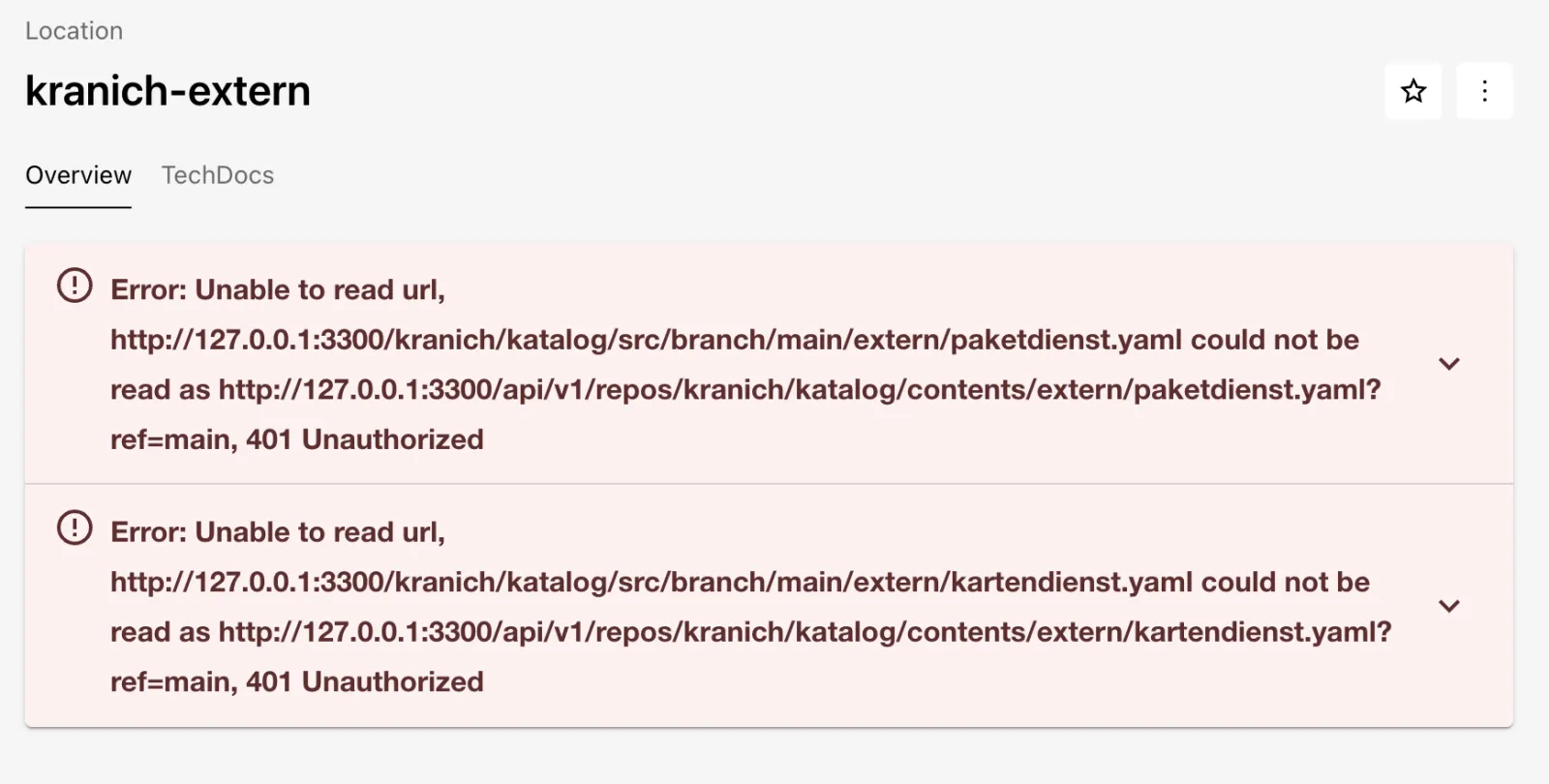
http://localhost:3000/catalog/default/location/kranich-extern.
Expected: two red cards with 401 Unauthorized, as in the
figure.
Is it the token or Forgejo? Ask Forgejo directly with both values:
for t in abgelaufen-0000 "$FORGEJO_TOKEN"; do
  curl -s -o /dev/null -w '%{http_code}\n' -H "Authorization: token $t" \
    $FORGEJO/api/v1/user
done
Expected:
401
200
Fix: restore the token, restart, wait until no entity carries errors anymore.
sed -i '' 's/password: abgelaufen-0000/password: ${FORGEJO_TOKEN}/' \
  app-config.local.yaml
~/backstage-lab/setup/portal.sh restart
until [ "$(bs 'catalog/entities?fields=status' \
  | jq '[.[] | select(.status.items)] | length')" = 0 ]; do sleep 5; done
echo "✔ keine Fehler mehr"
Expected:
✔ keine Fehler mehrSecond failure: someone registers a URL with localhost
instead of 127.0.0.1. For Backstage, that is a different
host – without an integration. The dry run shows it (directly with
curl, because bs swallows error texts):
for h in localhost:3300 127.0.0.1:3300; do
  curl -s -X POST "$BACKSTAGE/api/catalog/locations?dryRun=true" \
    -H "Authorization: Bearer $BACKSTAGE_TOKEN" \
    -H 'Content-Type: application/json' -d "{\"type\": \"url\",
    \"target\": \"http://$h/kranich/zustell-app/src/branch/main/catalog-info.yaml\"}" \
    | jq -r '.error.message // "✔ \(.entities | length) Entities"' | cut -c1-120
done
Expected:
Error: Unable to read url, Reading from 'http://localhost:3300/kranich/zustell-app/s…
✔ 2 Entities
The full message ends with “You may need to configure an integration
for the target host, or add it to the configured list of allowed hosts
at ‘backend.reading.allow’”. The host in
integrations.gitea[].host must match the URL exactly,
including the port.
Save your progress? Sign up for free
Drill 5: DevTools and unprocessed entities
An entity that was never processed successfully has no “last good
state” – it is simply missing, and there is no
status.items. Such cases are shown by the module
catalog-backend-module-unprocessed; DevTools provides the
UI for it:
~/backstage-lab/setup/portal.sh stop
cd ~/backstage-lab/portal
yarn --cwd packages/backend add @backstage/plugin-devtools-backend \
  @backstage/plugin-catalog-backend-module-unprocessed
yarn --cwd packages/app add @backstage/plugin-devtools \
  @backstage/plugin-catalog-unprocessed-entities
sed -i '' "/plugin-catalog-backend-module-gitea/a\\
backend.add(import('@backstage/plugin-catalog-backend-module-unprocessed'));\\
backend.add(import('@backstage/plugin-devtools-backend'));
" packages/backend/src/index.ts
yq -i '.devTools.scheduledTasks.plugins = ["catalog", "search"]' \
  app-config.local.yaml
grep -hE 'devtools|unprocessed' packages/*/package.json
Expected (shortened):
➤ YN0000: · Done with warnings in 12s 39ms
➤ YN0000: · Done with warnings in 5s 357ms
    "@backstage/plugin-catalog-unprocessed-entities": "^0.2.35",
    "@backstage/plugin-devtools": "^0.1.43",
    "@backstage/plugin-catalog-backend-module-unprocessed": "^0.6.16",
    "@backstage/plugin-devtools-backend": "^0.5.21",
The frontend packages need no code: app.packages: all
finds them, and plugin-catalog-unprocessed-entities
attaches itself as a tab in page:devtools. The key
devTools.scheduledTasks.plugins comes from the
config.schema.json of
@backstage/plugin-devtools.
Warning: DevTools checks permissions (
devtools.info,devtools.config,devtools.scheduler.read,catalog.entities.unprocessed.read…). If your policy from Day 12 denies unknown permissions, allow them forplattform.
Now a repo whose catalog-info.yaml has no owner:
~/backstage-lab/setup/portal.sh start
cat ~/backstage-lab/code/tag14/lieferschein/catalog-info.yaml | tail -4
~/backstage-lab/setup/mkrepo.sh kranich/lieferschein \
  ~/backstage-lab/code/tag14/lieferschein
sleep 75
bs catalog/entities/by-name/component/default/lieferschein-service \
  || echo "nicht im Katalog"
bs catalog/entities/unprocessed/pending | jq -r '.entities[]
  | "\(.unprocessed_entity.metadata.name)  \(.errors[0].cause.message)"'
Expected:
✔ Backstage läuft: http://localhost:3000 (Backend http://localhost:7007)
spec:
  type: service
  lifecycle: experimental
  system: sendungsverfolgung
✔ kranich/lieferschein angelegt (http://127.0.0.1:3300/kranich/lieferschein)
nicht im Katalog
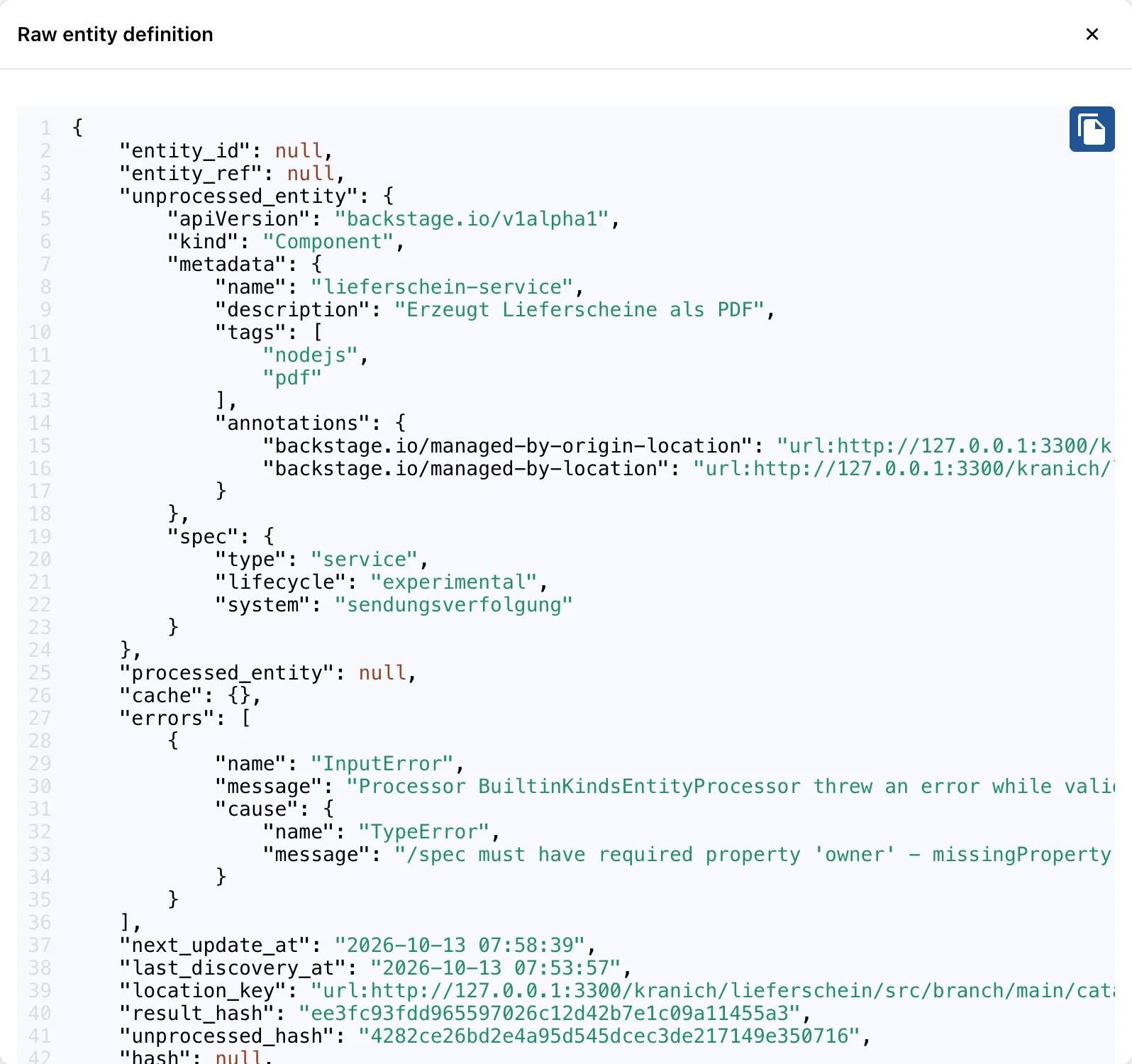
lieferschein-service  /spec must have required property 'owner' - missingProperty: …
The Gitea provider found the repo, the location exists, the component fails validation. In the browser:
- Click DevTools in the sidebar.
- Tab Unprocessed Entities, then Pending.
Expected: one row with kind Component, owner
unknown and an empty ENTITYREF.
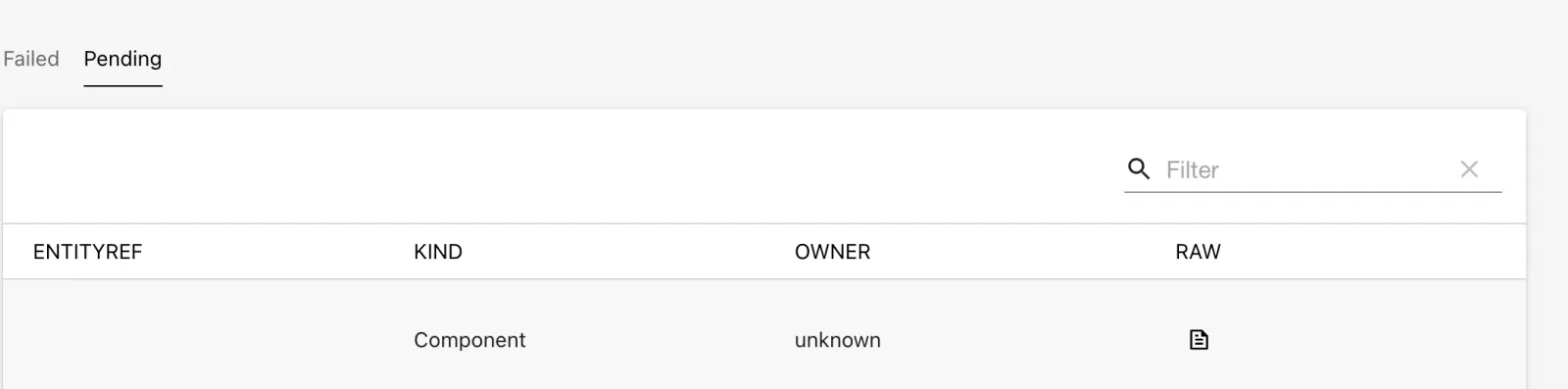
- In the RAW column, click the document icon.
Expected: raw data and error list, as in the figure.
Why Pending and not Failed? Pending means “never made it into the catalog”, Failed means “was already there, last run without a result”. Look in both tabs. Fix it:
mkdir -p ~/backstage-lab/tag14 && cd ~/backstage-lab/tag14
git clone -q http://lab-admin:[email protected]:3300/kranich/lieferschein.git
cd lieferschein
yq -i '.spec.owner = "team-sendung"' catalog-info.yaml
git -c user.name="Lab Admin" -c [email protected] \
  commit -qam "Owner ergänzt" && git push -q
s=$SECONDS; until bs catalog/entities/by-name/component/default/lieferschein-service \
  >/dev/null; do sleep 5; done; echo "nach $((SECONDS - s)) s im Katalog"
bs catalog/entities/unprocessed/pending | jq '.entities | length'
Expected:
nach 26 s im Katalog
0
The other tabs: Info shows the Node and Backstage
versions plus all @backstage/* packages,
Config the configuration with
<secret> instead of values
(bs devtools/config | jq .config.integrations returns the
same). Scheduled Tasks lists the background jobs of the
plugins from devTools.scheduledTasks.plugins.
Expected: the catalog’s tasks with Trigger and Cancel icons.
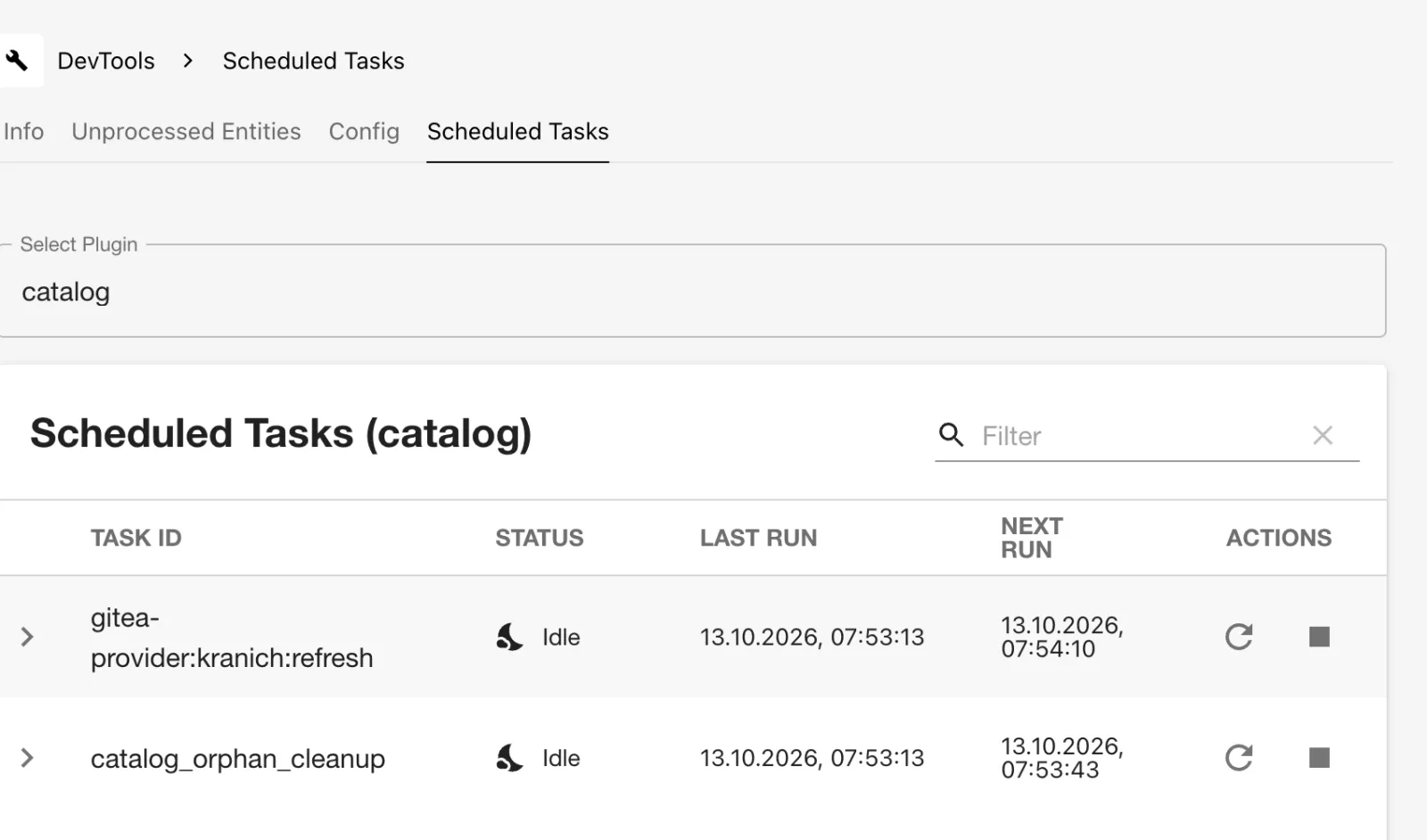
With the arrow icon you trigger the Gitea provider immediately instead of waiting a minute. Careful: even in the 401 case from Drill 4 it showed Idle here – the provider catches its errors itself. So the status does not replace a look at the log.
Save your progress? Sign up for free
Drill 6: Frontend, backend and ports in use
The frontend on :3000 calls the backend on
:7007 – a different origin. The backend allows this only
for backend.cors.origin. A typo there:
cd ~/backstage-lab/portal
yq -i '.backend.cors.origin = "http://localhost:3001"' app-config.local.yaml
~/backstage-lab/setup/portal.sh restart
curl -s -D - -o /dev/null -H "Origin: $APP" "$BACKSTAGE/api/catalog/entities" \
  | grep -i '^access-control-allow-origin' || echo "kein Access-Control-Allow-Origin"
Expected:
kein Access-Control-Allow-OriginOpen http://localhost:3000 in the browser and sign
in.
Expected: with the guest login, a misleading message appears, as in the figure. With the OIDC login (Day 12), sign-in fails as well, just with a different text.

The truth is in the browser console (F12 → Console):
Access to fetch at 'http://localhost:7007/api/auth/guest/refresh' from origin
'http://localhost:3000' has been blocked by CORS policy: Response to preflight
request doesn't pass access control check: No 'Access-Control-Allow-Origin' header
is present on the requested resource.
Fix: delete the override; then http://localhost:3000
from app-config.yaml applies again.
yq -i 'del(.backend.cors)' app-config.local.yaml
~/backstage-lab/setup/portal.sh restart
curl -s -D - -o /dev/null -H "Origin: $APP" "$BACKSTAGE/api/catalog/entities" \
  | grep -i '^access-control-allow-origin'
Expected:
Access-Control-Allow-Origin: http://localhost:3000Tip:
app.baseUrl,backend.baseUrlandbackend.cors.originbelong together. If you run the portal behind a different hostname, change all three.
Second startup problem: port 7007 is already in use, for example by a
forgotten yarn start in another terminal. You simulate
this:
~/backstage-lab/setup/portal.sh stop
node -e "require('http').createServer((q, s) => s.end('belegt')).listen(7007)" &
~/backstage-lab/setup/portal.sh start
curl -s $BACKSTAGE/.backstage/health/v1/readiness; echo
~/backstage-lab/setup/portal.sh logs 300 | sed 's/\x1b\[[0-9;]*m//g' \
  | grep EADDRINUSE | cut -c26-110
lsof -nP -iTCP:7007 -sTCP:LISTEN
Expected (shortened, PID and user differ):
✔ Backstage läuft: http://localhost:3000 (Backend http://localhost:7007)
belegt
backstage error Unhandled rejection listen EADDRINUSE: address already in use :::…
COMMAND   PID  USER   FD   TYPE  DEVICE SIZE/OFF NODE NAME
node    22395  du     12u  IPv6  0xd12e…     0t0  TCP *:7007 (LISTEN)
portal.sh reports ✔ because the foreign process answers
on the readiness URL – with belegt (“taken”) instead of
JSON. The backend itself never started. lsof names the
culprit:
kill %1
~/backstage-lab/setup/portal.sh restart
curl -s $BACKSTAGE/.backstage/health/v1/readiness | jq -c .
Expected:
{"status":"ok"}Save your progress? Sign up for free
Drill 7: Template errors in the task log
In the wizard, the RepoUrlPicker only allows
127.0.0.1:3300 (allowedHosts, Day 5). Via the
API, nobody checks that:
id=$(bs scaffolder/v2/tasks -X POST -H 'Content-Type: application/json' -d '{
  "templateRef": "template:default/node-service",
  "values": {"name": "retouren-api", "description": "Retouren erfassen",
    "owner": "group:default/team-sendung",
    "repoUrl": "localhost:3300?owner=kranich&repo=retouren-api"}}' | jq -r .id)
sleep 8
bs scaffolder/v2/tasks/$id | jq -r .status
bs scaffolder/v2/tasks/$id/events | jq -r '.[] | select(.type=="log")
  | .body.message' | grep -E '^(Beginning|Finished|Skipping|InputError)' \
  | cut -c1-100
Expected:
failed
Beginning step Skeleton füllen
Finished step Skeleton füllen
Beginning step Repo in Forgejo anlegen
InputError: No matching integration configuration for host localhost:3300, please c…
Skipping step register because a previous step failed
In the browser, open http://localhost:3000/create/tasks
and select the top task.
Expected: the first step green, the second red, the third skipped; at the top the error message, below it the log.
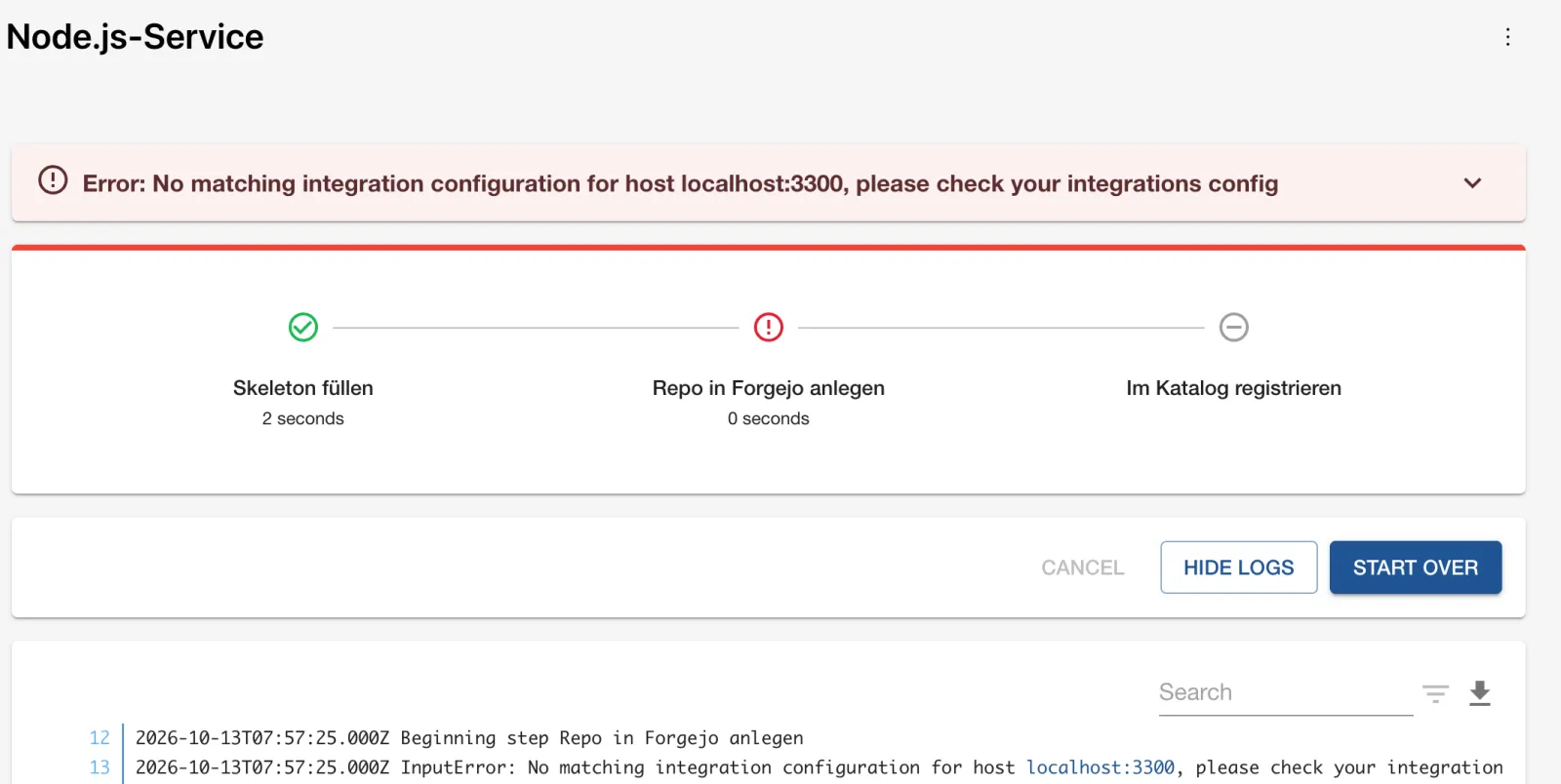
Read the task log from the top: the first error
counts; everything after it is a consequence. The message has the same
cause as in Drill 4, this time in the action publish:gitea.
If, on the other hand, the integration’s password is missing (empty
${FORGEJO_TOKEN}, Drill 3), the action, according to the
source code, literally reports
Credentials for the gitea ${host} required. – with the
placeholder in the text.
Tip: You find template errors fastest before the run: dry run in the Template Editor or via the API (Day 6). Missing actions are reported by
bs scaffolder/v2/actions | jq -r '.[].id'.
Save your progress? Sign up for free
Drill 8: Upgrading to the next patch
Backstage is released monthly (e.g. 1.55.0), with patches in between.
Which release you use is in backstage.json. First, save a
clean state:
cd ~/backstage-lab/portal
git add -A && git commit -qm "Stand vor Upgrade"; git status --short | wc -l
cat backstage.json
curl -s https://versions.backstage.io/v1/tags/main/manifest.json | jq -r .releaseVersion
Expected (the latest release differs depending on the date):
       0
{
  "version": "1.55.0"
}
1.55.3
versions:bump sets all @backstage/*
dependencies to the versions of the release manifest.
--skip-install skips yarn install – that way
you first see only the changes:
yarn backstage-cli versions:bump --release 1.55.3 --skip-install 2>&1 \
  | sed 's/\x1b\[[0-9;]*m//g' | grep -vE '^(Checking|bumping)'
git diff --stat
Expected (shortened):
Using default pattern glob @backstage/*
Some packages are outdated, updating

Upgraded from release 1.55.0 to 1.55.3, please review these template changes:

  https://backstage.github.io/upgrade-helper/?from=1.55.0&to=1.55.3

Skipping yarn install
...
Version bump complete!

 backstage.json            | 2 +-
 packages/app/package.json | 2 +-
 2 files changed, 2 insertions(+), 2 deletions(-)
Two sources tell you what has changed:
- Upgrade Helper (link from the output): diff of the
create-apptemplate between two versions – changes toindex.ts,App.tsxorapp-config.yamlthat you carry over by hand. - Changesets/CHANGELOG of each package, one entry per change:
git diff packages/app/package.json | grep '^[-+] '
sed -n '/^## 1.18.2/,/^## 1.18.1/p' \
  node_modules/@backstage/plugin-techdocs/CHANGELOG.md | head -5
Expected:
-    "@backstage/plugin-techdocs": "^1.18.1",
+    "@backstage/plugin-techdocs": "^1.18.2",
## 1.18.2

### Patch Changes

- f712f71: Fixed TechDocs addons silently not rendering in apps using the new …
For minor releases (1.55 → 1.56), also read the release notes at
https://backstage.io/docs/releases/v1.56.0/ – that’s where
breaking changes and migrations are listed. The complete flow of a real
upgrade:
yarn install                                  # downloads the new packages
yarn tsc                                      # check types across all packages
yarn --cwd packages/app lint
CI=true yarn test
yarn backstage-cli config:check
~/backstage-lab/setup/portal.sh restart
bash ~/backstage-lab/code/tag14/kontrolle.sh  # checkpoint below
Expected (shortened; for the patch step, yarn.lock
already had the new versions thanks to ^ ranges, so there
is nothing to download):
➤ YN0000: · Done with warnings in 2s 281ms
Tests:       1 passed, 1 total
Loaded config from app-config.yaml, app-config.local.yaml
✔ Backstage läuft: http://localhost:3000 (Backend http://localhost:7007)
✔ DevTools meldet dieselbe Version wie backstage.json
yarn tsc and lint print nothing when there are no
errors. The lab stays on 1.55.0 so that all outputs in the book match –
roll back the changes:
git checkout -- . && yarn install >/dev/null && cat backstage.json
~/backstage-lab/setup/portal.sh restart
Expected:
{
  "version": "1.55.0"
}
✔ gestoppt
✔ Backstage läuft: http://localhost:3000 (Backend http://localhost:7007)
Why this order? tsc finds changed APIs before the portal
starts; config:check finds renamed configuration keys; only
then does a restart cost time. One commit per upgrade turns the way back
into a git revert.
Save your progress? Sign up for free
Checkpoint
The file is at
~/backstage-lab/code/tag14/kontrolle.sh.
#!/usr/bin/env bash
# kontrolle.sh – checkpoint Day 14 (✔/✘). Exit code = number of failures.
source "${LAB:-$HOME/backstage-lab}/setup/env.sh"
fail=0
t() { if eval "$2" >/dev/null 2>&1; then echo "✔ $1"
  else echo "✘ $1"; fail=$((fail+1)); fi; }

t "config:check ohne Fehler" "cd '$PORTAL' && yarn backstage-cli config:check"
t "Backend bereit (readiness)" \
  "curl -sf $BACKSTAGE/.backstage/health/v1/readiness | jq -e '.status==\"ok\"'"
t "keine Entity mit Processing-Fehler" \
  "bs 'catalog/entities?fields=kind,metadata.name,status' \
     | jq -e '[.[] | select(.status.items)] | length == 0'"
t "keine unverarbeiteten Entities (pending/failed)" \
  "[ \$(bs catalog/entities/unprocessed/pending | jq '.entities|length') = 0 ] &&
   [ \$(bs catalog/entities/unprocessed/failed | jq '.entities|length') = 0 ]"
t "lieferschein-service im Katalog" \
  "bs catalog/entities/by-name/component/default/lieferschein-service"
t "DevTools meldet dieselbe Version wie backstage.json" \
  "[ \"\$(bs devtools/info | jq -r .backstageVersion)\" = \
     \"\$(jq -r .version '$PORTAL/backstage.json')\" ]"
t "Gitea-Provider läuft ohne 401" \
  "! '$LAB/setup/portal.sh' logs 400 | grep -q 'gitea-provider.*401'"
exit "$fail"
bash ~/backstage-lab/code/tag14/kontrolle.shExpected:
✔ config:check ohne Fehler
✔ Backend bereit (readiness)
✔ keine Entity mit Processing-Fehler
✔ keine unverarbeiteten Entities (pending/failed)
✔ lieferschein-service im Katalog
✔ DevTools meldet dieselbe Version wie backstage.json
✔ Gitea-Provider läuft ohne 401
Challenge
A colleague sends you his app-config.kaputt.yaml
(“broken”). Find all four errors without starting the portal.
Hint: backstage-cli finds three errors
(config:check, --strict,
config:print); a comparison of the hosts in
integrations and catalog.locations finds the
fourth.
Solution
With --config, the CLI loads exactly the named files;
app-config.local.yaml stays out of it:
cd ~/backstage-lab/portal
K=~/backstage-lab/code/tag14/challenge/app-config.kaputt.yaml
yarn backstage-cli config:check --config app-config.yaml --config $K
Expected:
YAMLParseError: Nested mappings are not allowed in compact mappings at line 33, colum…

      target: http://127.0.0.1:3300/kranich/org/src/branch/main/org.yaml
              ^
Error 1: rules: below it is indented one position too
far (the message points to the line before). Correct it and check
strictly:
KK=~/backstage-lab/tag14/k.yaml
cp $K $KK && sed -i '' 's/^       rules:/      rules:/' $KK
yarn backstage-cli config:check --strict --config app-config.yaml \
  --config $KK 2>&1 | grep additionalProperty
yarn backstage-cli config:print --config app-config.yaml --config $KK \
  2>/dev/null | yq -o json '{"keys": (.integrations.gitea[0] | keys),
  "hosts": [.integrations.gitea[].host], "targets": [.catalog.locations[].target]}'
Expected:
  Config must NOT have additional properties { additionalProperty=second } at /cata…
{
  "keys": [
    "host",
    "baseUrl",
    "username"
  ],
  "hosts": [
    "localhost:3300"
  ],
  "targets": [
    "http://127.0.0.1:3300/kranich/katalog/src/branch/main/locations.yaml",
    "http://127.0.0.1:3300/kranich/org/src/branch/main/org.yaml"
  ]
}
Error 2: processingInterval: { second: 20 } instead of
seconds – ignored without --strict. Error 3:
password is missing because ${FORGEJO_TOKN} is
misspelled. Error 4: integration for localhost:3300,
locations on 127.0.0.1:3300 – every location would fail
with “Reading from … is not allowed” (Drill 4). The repaired version is
right next to it:
diff $K ~/backstage-lab/code/tag14/challenge/app-config.repariert.yaml \
  | grep '^[<>] [^#]'
yarn backstage-cli config:check --strict --config app-config.yaml \
  --config ~/backstage-lab/code/tag14/challenge/app-config.repariert.yaml \
  && echo "✔ strikt ok"
Expected:
<     - host: localhost:3300
<       baseUrl: http://localhost:3300
>     - host: 127.0.0.1:3300
>       baseUrl: http://127.0.0.1:3300
<       password: ${FORGEJO_TOKN}
>       password: ${FORGEJO_TOKEN}
<        rules:
>       rules:
<   processingInterval: { second: 20 }
>   processingInterval: { seconds: 20 }
Loaded config from app-config.yaml, app-config.repariert.yaml
✔ strikt ok
Warning:
config:check --strictagainst your realapp-config.local.yamlreportsadditionalProperty=providersat/catalog: the Gitea provider does not ship a schema forcatalog.providers.gitea. That is a false alarm – so always read--strictoutput line by line.
Save your progress? Sign up for free
Enterprise Note
- Collect logs centrally: with
NODE_ENV=production, the backend writes JSON lines (Day 13); alert onlevel=errorand oncatalog warnfromcatalog-backend-module-logs, not on the background noise. config:check --strict(with known exceptions) andyarn tscas a CI gate for every change toapp-config*.yamland every upgrade.- Grant DevTools and Unprocessed Entities only to the platform team:
Config shows the entire structure, and Unprocessed
allows deletion (
catalog.entities.unprocessed.delete). - Upgrade monthly in step with the releases, one branch each with
versions:bump, Upgrade Helper and CHANGELOG review; avoid big jumps across several minor versions. - Monitor integration tokens with an expiry date and rotate them before they expire – otherwise you only notice it from the red location cards.