Day 8: Filters and View
Goal: karma shows every alert only once, sorted by severity, colored by team, split into one grid per team. With the filter language, you find what concerns you in seconds. · Duration: approx. 45 min · Prerequisite: Day 7
Briefing
- What karma shows is controlled by the file: which receivers and labels, in which order, in which color, how sorted.
- Every user can change much of this in the UI (gear icon at the top right). The file only sets the default values. The browser stores the user’s settings.
- Filters are small expressions like
team=notesor@state=active. They go in the search bar, in the URL and in the API. Multiple filters must all match. - The multi-grid splits the view by a label, for example one grid per team.
Drill 1: Get Rid of Duplicates
The archive from Day 3 doubles every group. It is of no interest to
humans, so you hide it, along with the receiver nirgendwo.
The whole file, starting from the state of Day 7:
cd ~/am-lab
cat > karma/karma.yaml <<'EOF'
karma:
  name: am-lab

alertmanager:
  interval: 30s
  servers:
    - name: prod
      uri: http://alertmanager:9093
      external_uri: http://172.16.0.61:9093
      timeout: 10s
      proxy: true

log:
  config: true

receivers:
  strip:
    - archiv
    - nirgendwo
EOF
docker compose restart karma
curl -s localhost:8000/counters.json | jq '.total'
Expected:
7Instead of 14 entries there are now 7, every alert once.
strip only affects karma. Nothing changes in Alertmanager
or at the receiver.
Save your progress? Sign up for free
Drill 2: Labels, Colors, Annotations
Append three sections:
cat >> karma/karma.yaml <<'EOF'

labels:
  order: [alertname, env, team, severity]
  strip: [job]
  color:
    unique: [team]
    custom:
      severity:
        - value: critical
          color: "#d9534f"
        - value: warning
          color: "#f0ad4e"
        - value_re: ".*"
          color: "#5bc0de"

annotations:
  order: [summary]
  actions: [runbook_url]
EOForder: these labels always come first, in this order. The rest follows alphabetically.strip: [job]:jobis in every Prometheus alert and tells humans little. karma hides it but still uses it for merging.color.unique: every value ofteamgets its own automatically chosen color.customsets fixed colors. The entries are checked in order, so the fallback.*must come last.annotations.actions: annotations whose value is a link move into the alert’s menu. Therunbook_urlofNotesApiDownthen no longer appears as long text in the tile but is one click away.
Save your progress? Sign up for free
Drill 3: Sorting and Grid
cat >> karma/karma.yaml <<'EOF'

grid:
  sorting:
    order: label
    label: severity
    reverse: false
    customValues:
      labels:
        severity:
          critical: 1
          warning: 2
          info: 3
          none: 4

ui:
  multiGridLabel: team
EOF
docker compose restart karma- The default is
order: startsAt, newest alert first. For a control room, severity matters more. - Alphabetically,
warningwould come last, afterinfoandnone.customValuesgives every value a number, and sorting is by that number. multiGridLabel: teambuilds one grid per team. Alerts withoutteamland in a separate grid at the end.
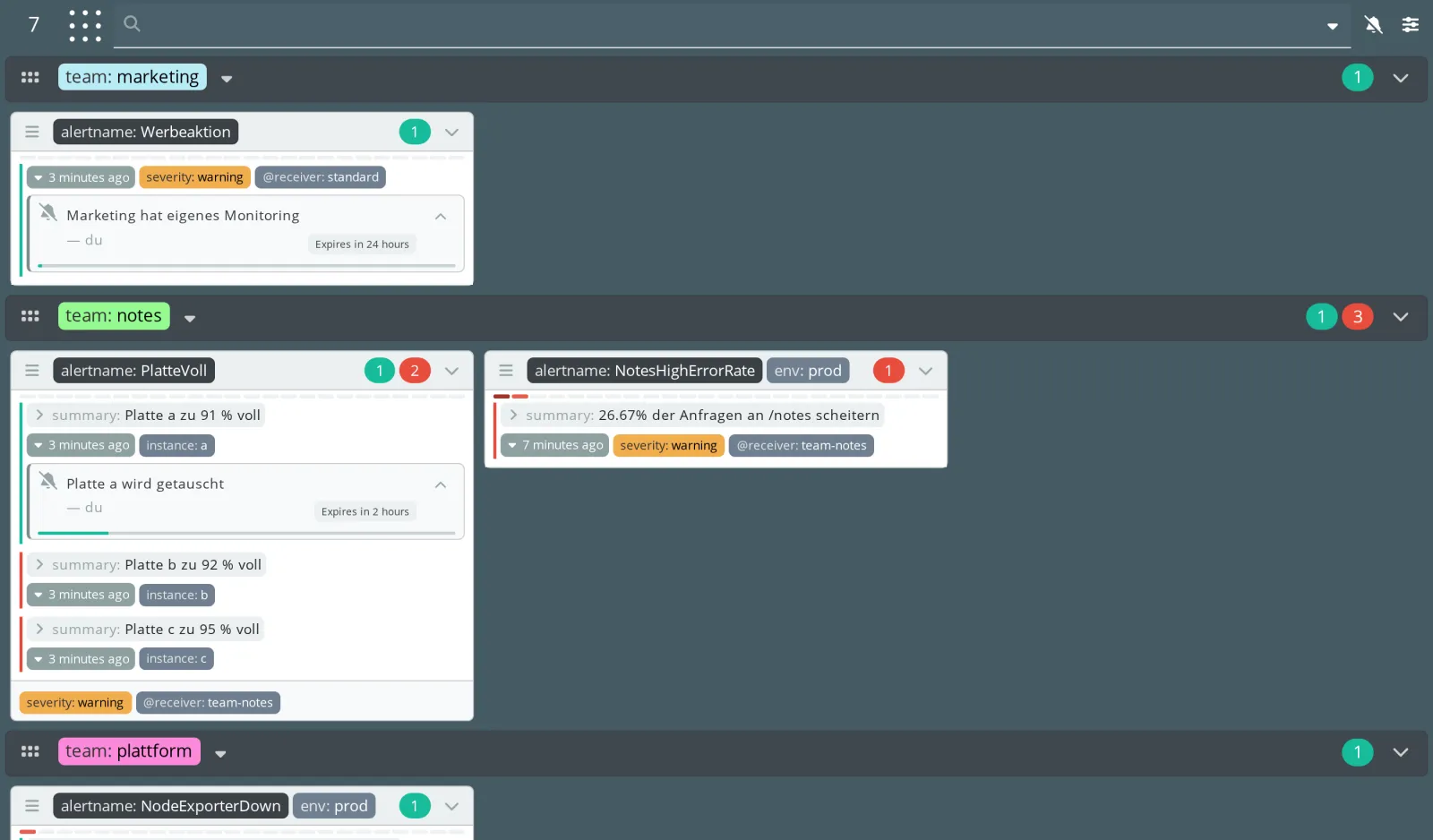
Check in the log that karma read the file without errors:
docker compose logs --no-log-prefix --since 1m karma | grep -c ERRORExpected: 0. A typo in a field name aborts the start,
and the container exits. In the test with multiGridLabl,
the log said:
level=ERROR msg="Execution failed" error="failed to parse configuration file
\"/etc/karma/karma.yaml\": yaml: unmarshal errors:\n  line 53: field multiGridLabl
not found in type config.UIConfig"
That is strict but helpful: unknown fields stand out immediately instead of being silently ignored.
Save your progress? Sign up for free
Drill 4: The Filter Language
Type @state=active into the search bar, press Enter,
then severity=warning and Enter. Every filter becomes a
chip with the number of its hits.
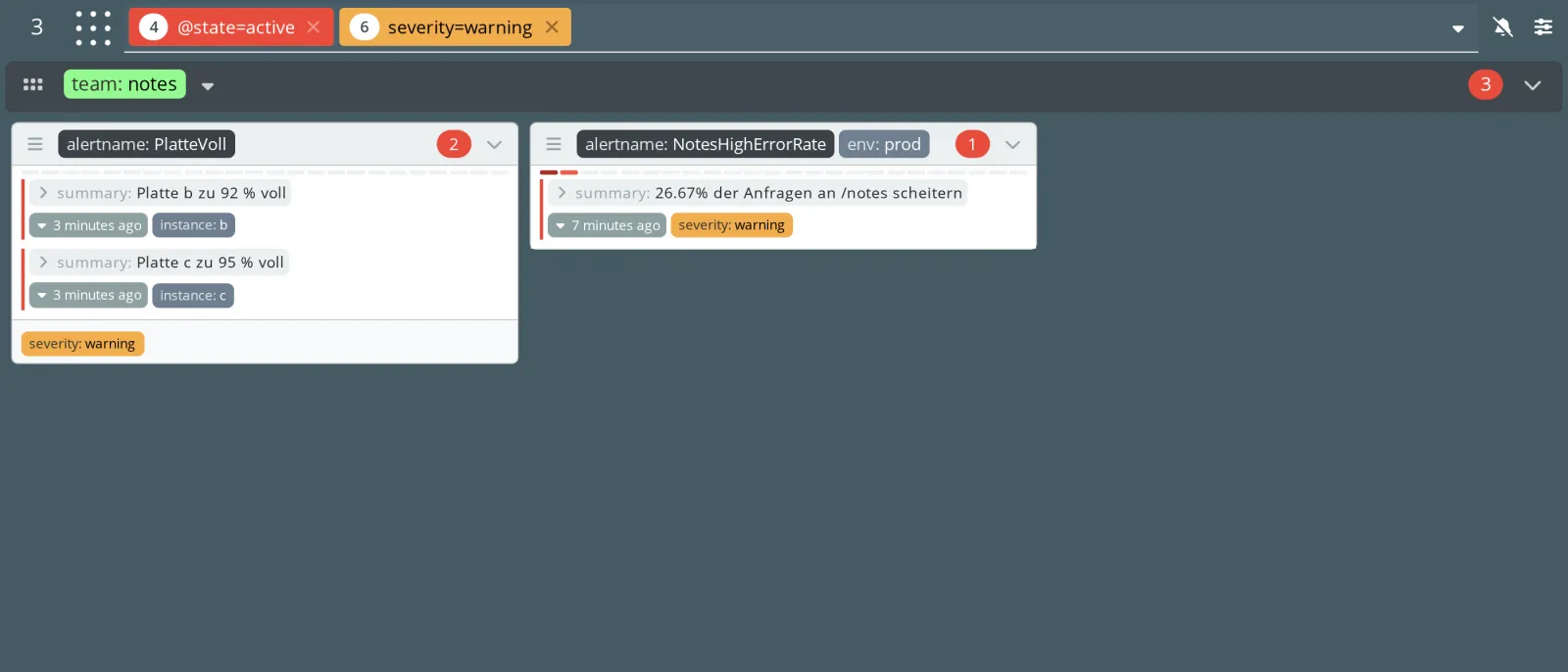
The filters are also in the URL. The address of this view is
http://172.16.0.61:8000/?q=%40state%3Dactive&q=severity%3Dwarning.
That is how you share a view with colleagues or save it as a
bookmark.
The most important filters:
| Filter | Meaning |
|---|---|
team=notes, team!=notes |
label equal or not equal |
alertname=~Notes |
regex, not anchored: contains “Notes” |
@state=active |
state: active, suppressed,
unprocessed |
@receiver=team-notes |
receiver of the group |
@age>5m, @age<1h |
alert has been firing longer or shorter than |
@silence_author=du |
muted by |
@alertmanager=prod, @cluster=… |
upstream or cluster (Day 9) |
@limit=10 |
at most this many alerts per group |
Platte |
free text in labels and annotations |
The API takes the same filters. A test for three of them:
curl -s -G localhost:8000/counters.json --data-urlencode 'q=team!=notes' | jq .total
curl -s -G localhost:8000/counters.json --data-urlencode 'q=alertname=~Notes' | jq .total
curl -s -G localhost:8000/counters.json --data-urlencode 'q=@age>5m' | jq .total
Expected (your numbers depend on how long the alerts have been running):
3
1
3team!=notesalso matches alerts withoutteam, here the Watchdog. Not equal means “not notes”, not “another team”.alertname=~NotesfindsNotesHighErrorRate. In Prometheus, the regex would be anchored and would find nothing.
Save your progress? Sign up for free
Checkpoint
curl -s localhost:8000/counters.json | jq '.total'Expected: 7, every alert once.
curl -s -G localhost:8000/counters.json --data-urlencode 'q=@receiver=archiv' | jq .totalExpected: 0; the archive is hidden.
docker compose logs --no-log-prefix karma | grep -A1 'multiGridLabel'Expected: multiGridLabel: team in the configuration
log.
Challenge
The on-call team opens karma on the phone at night. When opening it, they want to see only active alerts, without the Watchdog. Anyone who wants to see more removes the filters themselves.
Note: The section filters.default sets
filters for everyone who opens karma without their own filters in the
URL. Values starting with @ need quotes in YAML.
Solution
cat >> karma/karma.yaml <<'EOF'

filters:
  default:
    - "@state=active"
    - alertname!=Watchdog
EOF
docker compose restart karma
Open http://172.16.0.61:8000/ without parameters. karma
redirects to
/?q=%40state%3Dactive&q=alertname%21%3DWatchdog:
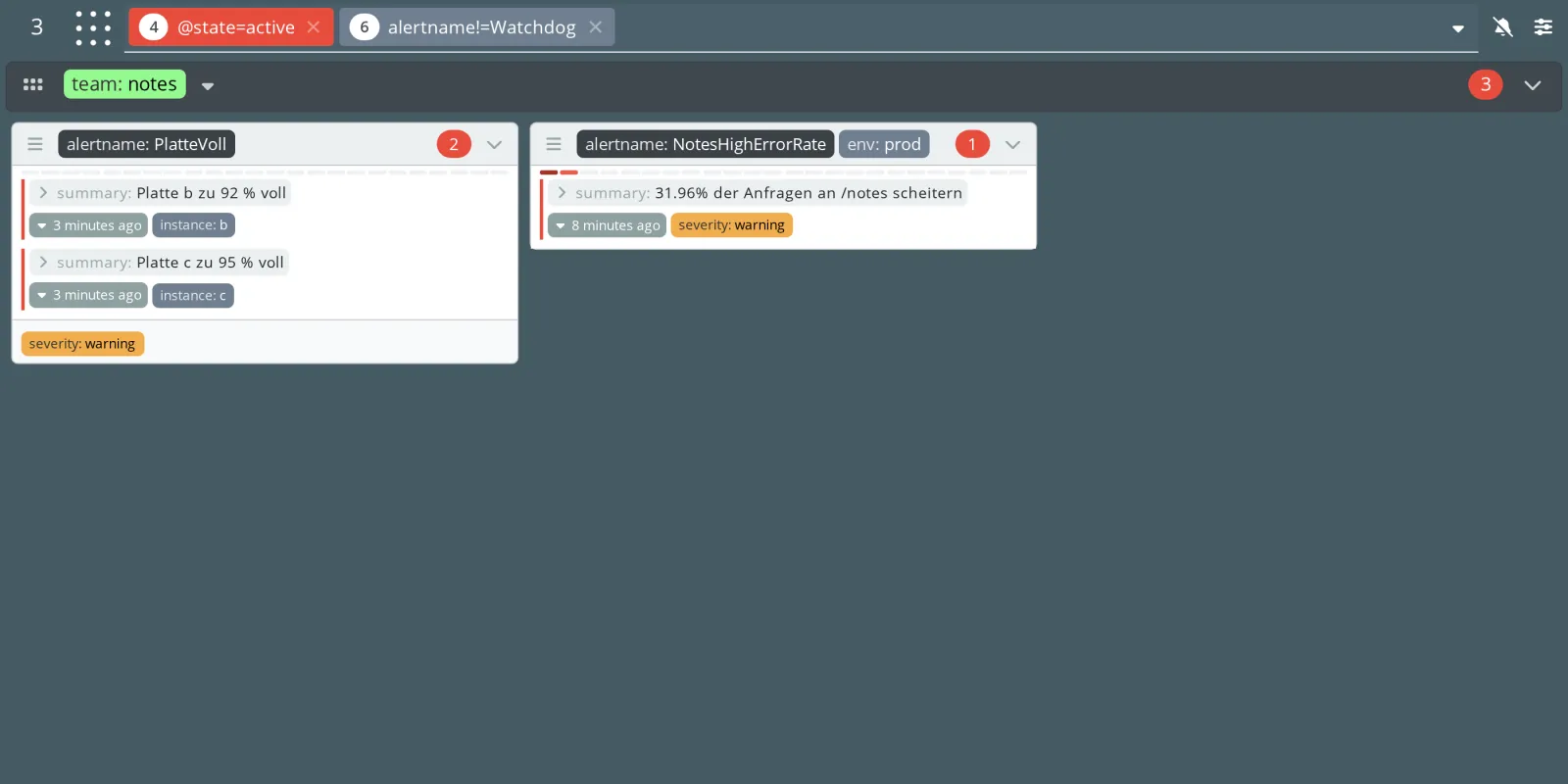
Three alerts remain, all from team notes. Werbeaktion
and PlatteVoll a are muted, and
NodeExporterDown is muted for team plattform by the
after-hours interval.
Save your progress? Sign up for free
Enterprise Note
- Consistent labels matter more than any setting in karma. Without
teamandseverityon every rule, there is nothing to sort and color. - For large control rooms, run several karma instances with their own
karma.nameand their own default filters, for example one per area. It costs almost nothing. - Filter URLs make good links for runbooks and chat channels: “everything from team notes” as a bookmark instead of an explanation.
labels.stripandreceivers.stripsave space, but they also hide. What is missing in karma, nobody will look for in Alertmanager in an emergency.