Day 5: Creating Clusters
Goal: Have Rancher build an RKE2 cluster on three empty VMs, define the roles of the nodes, get a kubeconfig through Rancher and understand how Rancher controls the nodes. · Duration: approx. 75 min · Prerequisite: Day 4
Briefing
- Rancher builds a custom cluster on machines that you provide yourself. You describe the cluster as YAML, Rancher supplies a registration command.
- Afterwards the rancher-system-agent runs on every node. It fetches a plan from Rancher (which files, which services) and carries it out. It installs RKE2 itself.
- You assign the roles per node:
etcd,controlplane,worker. In the lab,werk1has all three,werk2andwerk3are workers. - kubectl talks to the new cluster through the Rancher proxy. Rancher generates the kubeconfig for that.
 VM rancher                                      VMs werk1..3
 ┌────────────────────────────┐   fetch plan    ┌───────────────────────────────┐
 │ Cluster werk (YAML)        │◄────────────────┤ rancher-system-agent          │
 │ machines custom-…          │                 │   installs and controls RKE2  │
 │ plan Secrets custom-…-plan │ cluster-agent   │ werk1: etcd, controlplane,    │
 │ Proxy /k8s/clusters/c-m-…  │◄────────────────┤        worker                 │
 └──────────▲─────────────────┘                 │ werk2, werk3: worker          │
            │ kubectl (kube/werk.yaml)          └───────────────────────────────┘
          Mac
Drill 1: Three Empty VMs
source ~/rancher-lab/setup/env.sh
for n in 1 2 3; do
  multipass launch 24.04 --name "werk$n" --cpus 2 --memory 3G --disk 30G
done
for n in 1 2 3; do
  echo "export WERK$n=$(multipass info "werk$n" --format json \
    | jq -r ".info.werk$n.ipv4[0]")" >> "$LAB/setup/vms.env"
done
source "$LAB/setup/env.sh"
mkdir -p "$LAB/tag05" && cd "$LAB/tag05"
cp "$LAB/code/tag05/"* .
Expected (abridged, names, IPs and times differ on your machine):
Launched: werk1
Launched: werk2
Launched: werk3
With 16 GB RAM on the Mac you start only werk1.
Everything in this book also works with one node; only drain and
Longhorn (Day 10) need more.
Save your progress? Sign up for free
Drill 2: Describe the Cluster
# tag05/cluster-werk.yaml – state at end of Day 5: an RKE2 cluster that Rancher builds
apiVersion: provisioning.cattle.io/v1
kind: Cluster
metadata:
  name: werk
  namespace: fleet-default
  labels:
    lab: rancher-lab
spec:
  kubernetesVersion: v1.36.5+rke2r1
  rkeConfig:
    machineGlobalConfig:
      cni: canal
    upgradeStrategy:
      controlPlaneConcurrency: "1"
      workerConcurrency: "1"
Unlike with the import (Day 4) there is an rkeConfig.
machineGlobalConfig ends up as RKE2 configuration on every
node, upgradeStrategy defines how many nodes Rancher
touches at the same time during an upgrade (Day 12).
export KUBECONFIG="$LAB/kube/rancher.yaml"
kubectl apply --dry-run=server -f cluster-werk.yaml
kubectl apply -f cluster-werk.yaml
kubectl -n fleet-default get clusters.provisioning.cattle.io werk
ID=$(kubectl -n fleet-default get clusters.provisioning.cattle.io werk \
  -o jsonpath='{.status.clusterName}')
echo "$ID"
Expected (abridged):
cluster.provisioning.cattle.io/werk created (server dry run)
cluster.provisioning.cattle.io/werk created
NAME   VERSION          CLUSTER NAME   AGE   KUBECONFIG   READY
werk   v1.36.5+rke2r1   c-m-ct8fr7hj   4s
c-m-ct8fr7hj
Save your progress? Sign up for free
Drill 3: The Registration Command
As on Day 4, Rancher creates a default-token. This time
the command for nodes is what matters. This is what it looks like, with
the token hidden:
kubectl -n "$ID" get clusterregistrationtokens.management.cattle.io default-token \
  -o jsonpath='{.status.insecureNodeCommand}' \
  | sed -E 's/--ca-checksum [^ ]+/--ca-checksum <…>/'; echo
Expected (abridged):
 curl --insecure -fL https://rancher.….sslip.io/system-agent-install.sh | sudo  sh -s
- --server https://rancher.….sslip.io --label 'cattle.io/os=linux' --token {token}
--ca-checksum <…>
The command downloads the system agent’s installer and passes it
Rancher’s address, the token and the checksum of the Rancher CA. With
the checksum, the agent verifies that it is really talking to your
Rancher, even though curl uses --insecure. You replace
{token} as on Day 4.
Assemble the command once and append name and roles per node:
reg() {
  local c t
  c=$(kubectl -n "$ID" get clusterregistrationtokens.management.cattle.io \
    default-token -o jsonpath='{.status.insecureNodeCommand}')
  t=$(kubectl -n "$ID" get secret crt-token-default-token \
    -o jsonpath='{.data.token}' | base64 -d)
  printf '%s %s' "${c/\{token\}/$t}" "$1"
}
reg prints the finished command. Use the function only
inside $( … ); then the token never ends up on the
screen.
Save your progress? Sign up for free
Drill 4: werk1 with All Roles
multipass exec werk1 -- bash -c \
  "$(reg '--node-name werk1 --etcd --controlplane --worker')" | tail -2
Expected:
Created symlink /etc/systemd/system/multi-user.target.wants/rancher-system-agent.servi…
[INFO]  Starting/restarting rancher-system-agent.service
After a quarter of a minute the system agent is running. RKE2 doesn’t exist on the VM yet; the agent installs it itself in a moment, as soon as Rancher sends it the plan.
Save your progress? Sign up for free
Drill 5: Two Workers
multipass exec werk2 -- bash -c "$(reg '--node-name werk2 --worker')" | tail -1
multipass exec werk3 -- bash -c "$(reg '--node-name werk3 --worker')" | tail -1
kubectl -n fleet-default get machines.cluster.x-k8s.io
Expected (abridged):
[INFO]  Starting/restarting rancher-system-agent.service
[INFO]  Starting/restarting rancher-system-agent.service
NAME                  CLUSTER   NODE NAME   …   READY     AVAILABLE   …   PHASE
custom-2eca1ac97cff   werk                  …   Unknown   False       …   Provisioning
custom-431ed8f98314   werk                  …   Unknown   False       …   Provisioning
custom-8e74ab3310e6   werk                  …   Unknown   False       …   Provisioning
Every registered node becomes a machine
(custom-…), an object from Cluster API. The workers wait
until the control plane on werk1 is up.
Save your progress? Sign up for free
Drill 6: Waiting, the Right Way
kubectl -n fleet-default get clusters.provisioning.cattle.io werk
f='{range .status.conditions[?(@.type=="Ready")]}{.status} {.message}{end}'
kubectl -n fleet-default get clusters.provisioning.cattle.io werk -o jsonpath="$f"; echo
Expected (abridged, after about four minutes):
NAME   VERSION          CLUSTER NAME   AGE     KUBECONFIG        READY
werk   v1.36.5+rke2r1   c-m-ct8fr7hj   5m43s   werk-kubeconfig   true
Unknown non-ready bootstrap machine(s) custom-431ed8f98314: Waiting for Cluster
control plane to be initialized and join url to be available on bootstrap …
Warning: The
READYcolumn already showstrueonce Rancher has created the internal kubeconfig. The cluster is only finished when the conditionReadyisTrueand all machines areRunning.
kubectl -n fleet-default wait clusters.provisioning.cattle.io/werk \
  --for=condition=Ready --timeout=900s
kubectl -n fleet-default get machines.cluster.x-k8s.io
Expected (abridged):
cluster.provisioning.cattle.io/werk condition met
NAME                  CLUSTER   NODE NAME   …   READY   AVAILABLE   …   PHASE
custom-2eca1ac97cff   werk      werk3       …   True    True        …   Running
custom-431ed8f98314   werk      werk1       …   True    True        …   Running
custom-8e74ab3310e6   werk      werk2       …   True    True        …   Running
Seven to eight minutes after werk1 registered, the cluster is up. In
Cluster Management it shows up as Custom
with three machines:
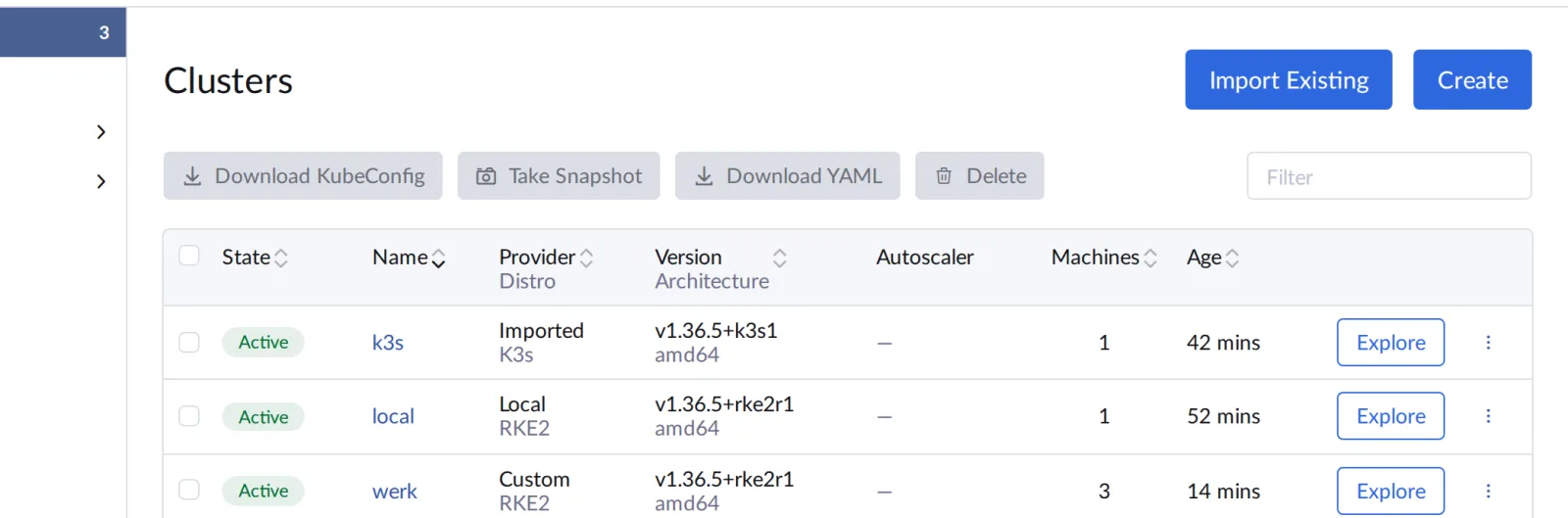
A click on werk shows the details. Expected: the
machines with their roles as in the figure.
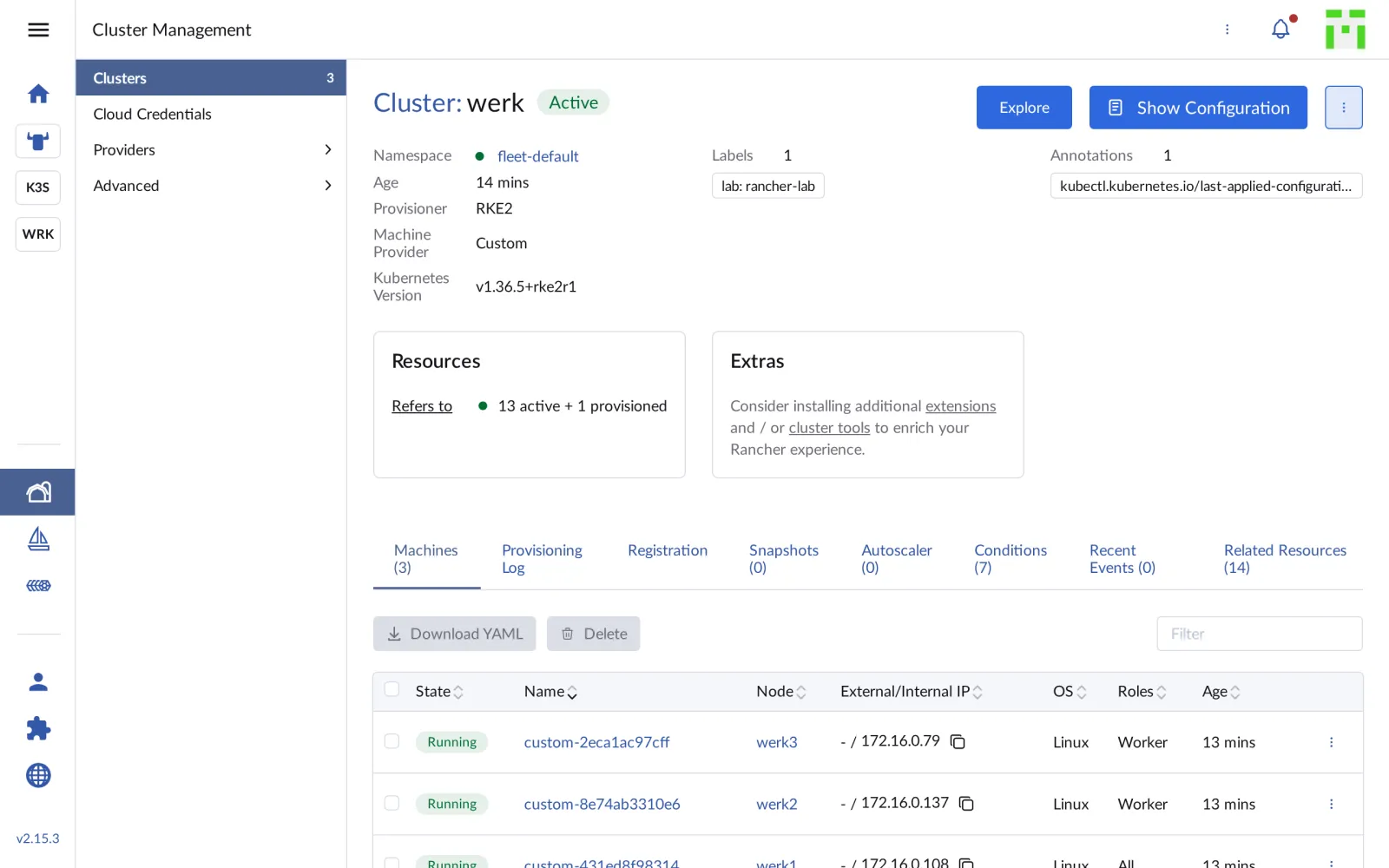
The Provisioning Log tab shows what Rancher did step by step, Registration the command from Drill 3 for copying.
Save your progress? Sign up for free
Drill 7: A kubeconfig Through Rancher
The Secret werk-kubeconfig from the output above is for
Rancher itself and points to an internal address. Rancher generates a
kubeconfig for you through its API, just like the Download
KubeConfig button. For that you need an API token; a login as
admin gets it:
R="https://rancher.$RANCHER.sslip.io"
( umask 077
  curl -sk -X POST "$R/v3-public/localProviders/local?action=login" \
    -H 'Content-Type: application/json' \
    -d '{"username":"admin","password":"lab-admin-pw-123","responseType":"json",
         "description":"rancher-lab cli"}' | jq -r .token > "$LAB/rancher-token" )
wc -c < "$LAB/rancher-token"
curl -sk -X POST -H "Authorization: Bearer $(cat "$LAB/rancher-token")" \
  "$R/v3/clusters/$ID?action=generateKubeconfig" | jq -r .config > "$LAB/kube/werk.yaml"
chmod 600 "$LAB/kube/werk.yaml"
grep -E 'server:|current-context' "$LAB/kube/werk.yaml"
kubectl --kubeconfig "$LAB/kube/werk.yaml" get nodes
Expected (abridged):
67
    server: "https://rancher.….sslip.io/k8s/clusters/c-m-ct8fr7hj"
current-context: "werk"
NAME    STATUS   ROLES                       AGE     VERSION
werk1   Ready    control-plane,etcd,worker   11m     v1.36.5+rke2r1
werk2   Ready    worker                      5m57s   v1.36.5+rke2r1
werk3   Ready    worker                      5m55s   v1.36.5+rke2r1
The server is Rancher, not werk1. Every request goes through the Rancher proxy and the cattle-cluster-agent into the cluster, and Rancher checks your permissions along the way (Day 6). If Rancher goes down, this kubeconfig is dead too (Day 14).
Security:
rancher-tokenis full admin access to Rancher and all clusters. It lives only with permissions600in~/rancher-laband never belongs in a repository.
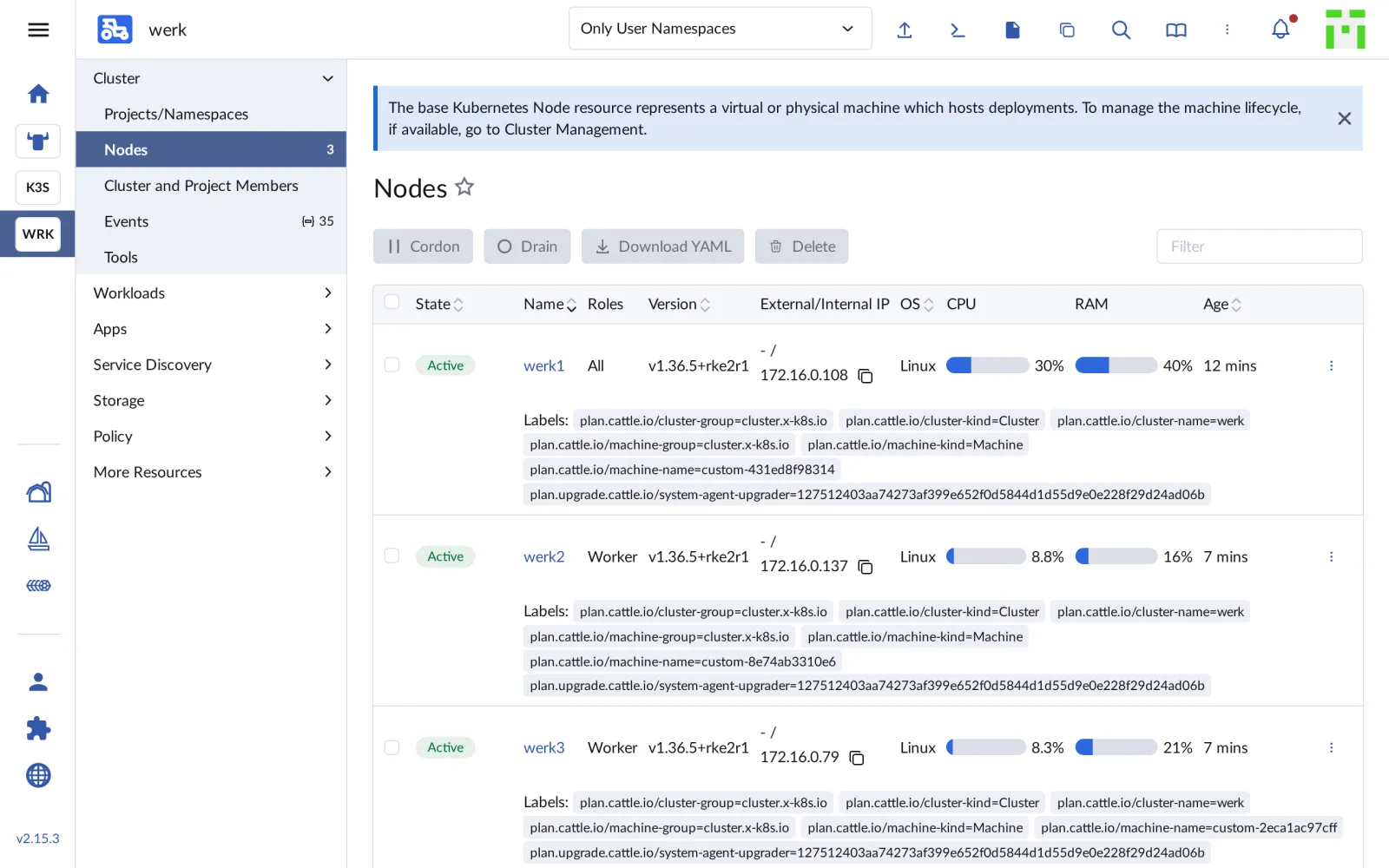
In the UI you reach the same nodes via Explore:
Save your progress? Sign up for free
Drill 8: How Rancher Controls the Nodes
On werk1 the system agent has installed RKE2 and written its own configuration file:
multipass exec werk1 -- systemctl is-active rancher-system-agent rke2-server
multipass exec werk1 -- sudo ls /etc/rancher/rke2/config.yaml.d
multipass exec werk1 -- sudo grep -v token \
  /etc/rancher/rke2/config.yaml.d/50-rancher.yaml
Expected (abridged):
active
active
50-rancher.yaml
{
  "cni": "canal",
  …
  "node-label": [
    "cattle.io/os=linux",
    "plan.cattle.io/cluster-name=werk",
    …
  ],
  "node-name": "werk1",
  "private-registry": "/etc/rancher/rke2/registries.yaml"
}
cni: canal comes from machineGlobalConfig
in Drill 2. grep -v filters out the lines with the tokens;
they don’t belong on the screen. The plans themselves live as Secrets in
the local cluster, one per machine:
kubectl -n fleet-default get secrets | grep -E 'NAME|machine-plan |rke-state'Expected (abridged):
NAME                               TYPE                          DATA   AGE
custom-431ed8f98314-machine-plan   rke.cattle.io/machine-plan    15     20m
custom-44fc6b990590-machine-plan   rke.cattle.io/machine-plan    15     4m1s
custom-8e74ab3310e6-machine-plan   rke.cattle.io/machine-plan    15     19m
werk-rke-state                     rke.cattle.io/cluster-state   2      20m
Rancher writes the desired state into the plan, the agent on the node fetches it and reports progress back. Upgrades (Day 12) and etcd snapshots (Day 13) later work the same way.
Save your progress? Sign up for free
Checkpoint
kubectl --kubeconfig "$LAB/kube/werk.yaml" get nodesExpected: three nodes, all Ready, werk1 with all
roles.
NAME    STATUS   ROLES                       AGE     VERSION
werk1   Ready    control-plane,etcd,worker   13m     v1.36.5+rke2r1
werk2   Ready    worker                      8m32s   v1.36.5+rke2r1
werk3   Ready    worker                      8m30s   v1.36.5+rke2r1
kubectl -n fleet-default get machines.cluster.x-k8s.ioExpected: three machines in phase Running.
NAME                  CLUSTER   NODE NAME   …   READY   AVAILABLE   …   PHASE
custom-2eca1ac97cff   werk      werk3       …   True    True        …   Running
custom-431ed8f98314   werk      werk1       …   True    True        …   Running
custom-8e74ab3310e6   werk      werk2       …   True    True        …   Running
kubectl -n fleet-default get clusters.provisioning.cattle.ioExpected: k3s and werk, both
READY true.
NAME   VERSION          CLUSTER NAME   AGE   KUBECONFIG        READY
k3s                     c-m-5pjkcmvg   1h    k3s-kubeconfig    true
werk   v1.36.5+rke2r1   c-m-ct8fr7hj   14m   werk-kubeconfig   true
Challenge
Remove werk3 from the cluster by deleting its machine. What stays behind on the VM? Afterwards, bring werk3 back as a worker.
Hint: Every node VM has two cleanup scripts under
/usr/local/bin.
Solution
f='{range .items[?(@.status.nodeRef.name=="werk3")]}{.metadata.name}{end}'
M=$(kubectl -n fleet-default get machines.cluster.x-k8s.io -o jsonpath="$f")
kubectl -n fleet-default delete machines.cluster.x-k8s.io "$M"
kubectl --kubeconfig "$LAB/kube/werk.yaml" get nodes
multipass exec werk3 -- systemctl is-active rancher-system-agent rke2-agent
multipass exec werk3 -- sudo rancher-system-agent-uninstall.sh > /dev/null
multipass exec werk3 -- sudo rke2-uninstall.sh > /dev/null
multipass exec werk3 -- bash -c "$(reg '--node-name werk3 --worker')" | tail -1
kubectl --kubeconfig "$LAB/kube/werk.yaml" wait --for=condition=Ready node/werk3 \
  --timeout=600s
Expected (abridged):
machine.cluster.x-k8s.io "custom-2eca1ac97cff" deleted from fleet-default namespace
NAME    STATUS   ROLES                       AGE     VERSION
werk1   Ready    control-plane,etcd,worker   13m     v1.36.5+rke2r1
werk2   Ready    worker                      8m32s   v1.36.5+rke2r1
active
active
[INFO]  Starting/restarting rancher-system-agent.service
node/werk3 condition met
Deleting the machine takes half a minute; the node disappears from the cluster. On the VM, however, RKE2 and the system agent keep running. If you want to reuse a VM, you clean it up with the two scripts. A good two minutes after the new registration, werk3 is back, as a new machine with a new name.
Save your progress? Sign up for free
Enterprise Note
- Separate roles: In production, etcd and control plane run on three dedicated nodes, applications only on workers. You assign the roles with the same flags.
- Machines from the cloud: With
machinePoolsand a node driver (vSphere, Harvester, Amazon EC2, Azure), Rancher creates the VMs itself and replaces broken ones automatically. Custom clusters suit bare metal and externally managed VMs. - Labels and taints:
--labeland--taintsin the registration command set them right when the node joins, for example for GPU or database nodes. - Templates: A cluster YAML in a Git repository,
rolled out via GitOps or the Terraform provider
rancher2, makes clusters reproducible. - Tokens: The login token has a lifetime; for automation you create your own API tokens with an expiry date and limited scope (Day 14).