Day 6: Projects, Users, Roles, Quotas
Goal: Create a project with a quota for the notes team in the cluster werk, add a user and prove that she sees exactly her project and nothing else. · Duration: approx. 60 min · Prerequisite: Day 5
Briefing
- A Project is Rancher’s group of namespaces within a cluster. Permissions, quotas and defaults apply to all namespaces of the project.
- Kubernetes itself has no projects. Rancher translates them into annotations, ResourceQuotas, LimitRanges and RBAC rules in every namespace.
- You grant permissions with Role Templates: globally
(
GlobalRoleBinding), per cluster or per project (ProjectRoleTemplateBinding). - Rancher checks every access through its proxy, including access with
kubectl.
 Cluster werk
 ┌────────────────────────────────────────────────────────────────┐
 │ Project System   kube-system, cattle-system, …                 │
 │ Project Default  default                                       │
 │ Project notes    notes          ◄── anna: project-member       │
 │   Total quota: 30 pods, per namespace: 20 pods                 │
 └────────────────────────────────────────────────────────────────┘
Drill 1: The Existing Projects
source ~/rancher-lab/setup/env.sh
mkdir -p "$LAB/tag06" && cd "$LAB/tag06"
cp "$LAB/code/tag06/"* .
export KUBECONFIG="$LAB/kube/rancher.yaml"
ID=$(kubectl -n fleet-default get clusters.provisioning.cattle.io werk \
  -o jsonpath='{.status.clusterName}')
kubectl -n "$ID" get projects.management.cattle.io \
  -o custom-columns=NAME:.metadata.name,DISPLAY:.spec.displayName
Expected (abridged, names, IPs and times differ on your machine):
NAME      DISPLAY
p-fbbgz   System
p-ntwtj   Default
Projects live in the local cluster, in the namespace named after the
cluster’s ID. Every cluster has two: System for the
namespaces of Kubernetes and Rancher, Default for
default.
Save your progress? Sign up for free
Drill 2: A Project for notes
# tag06/project.yaml – state at end of Day 6: project "notes" in the cluster werk
# Template: Drill 2 replaces WERK_ID via sed with the ID of werk (c-m-…).
apiVersion: management.cattle.io/v3
kind: Project
metadata:
  name: p-notes
  namespace: WERK_ID
spec:
  clusterName: WERK_ID
  displayName: notes
  description: Team notes – api, web, worker, db
  resourceQuota:                    # for all namespaces of the project combined
    limit:
      pods: "30"
      requestsCpu: "3000m"
      limitsMemory: "6Gi"
  namespaceDefaultResourceQuota:    # share of each individual namespace
    limit:
      pods: "20"
      requestsCpu: "2000m"
      limitsMemory: "4Gi"
  containerDefaultResourceLimit:    # becomes a LimitRange in the namespace
    requestsCpu: "50m"
    requestsMemory: "64Mi"
    limitsMemory: "128Mi"
The values match the quota and the LimitRange from “Kubernetes hands-on”, Day 6. What’s new is the second level: the project has a total budget, and each namespace gets a fixed share of it.
sed -i '' "s/WERK_ID/$ID/g" project.yaml namespace.yaml anna.yaml
kubectl apply --dry-run=server -f project.yaml
kubectl apply -f project.yaml
kubectl get ns | grep -E 'NAME|p-notes'
Expected (abridged):
project.management.cattle.io/p-notes created (server dry run)
project.management.cattle.io/p-notes created
NAME                   STATUS   AGE
c-m-ct8fr7hj-p-notes   Active   31s
For every project, Rancher creates a dedicated namespace in the local cluster. That is where the permissions for the project will land in a moment.
Save your progress? Sign up for free
Drill 3: The Namespace in the Project
# tag06/namespace.yaml – state at end of Day 6: namespace notes in project p-notes
# Template: WERK_ID as in project.yaml. Rancher creates the quota and LimitRange.
apiVersion: v1
kind: Namespace
metadata:
  name: notes
  annotations:
    field.cattle.io/projectId: WERK_ID:p-notes
  labels:
    pod-security.kubernetes.io/enforce: restricted
    pod-security.kubernetes.io/warn: restricted
---
apiVersion: v1
kind: ServiceAccount
metadata:
  name: notes
  namespace: notes
automountServiceAccountToken: false
An annotation assigns the namespace to the project. The quota and LimitRange are missing from the file; Rancher creates them. The file is applied in the cluster werk:
kubectl --kubeconfig "$LAB/kube/werk.yaml" apply -f namespace.yaml
kubectl --kubeconfig "$LAB/kube/werk.yaml" -n notes get resourcequota,limitrange
Expected (abridged):
namespace/notes created
serviceaccount/notes created
NAME                          REQUEST                         LIMIT                  …
resourcequota/default-czk5q   pods: 0/20, requests.cpu: 0/2   limits.memory: 0/4Gi   …
NAME                       CREATED AT
limitrange/default-b4zct   2026-10-31T14:35:35Z
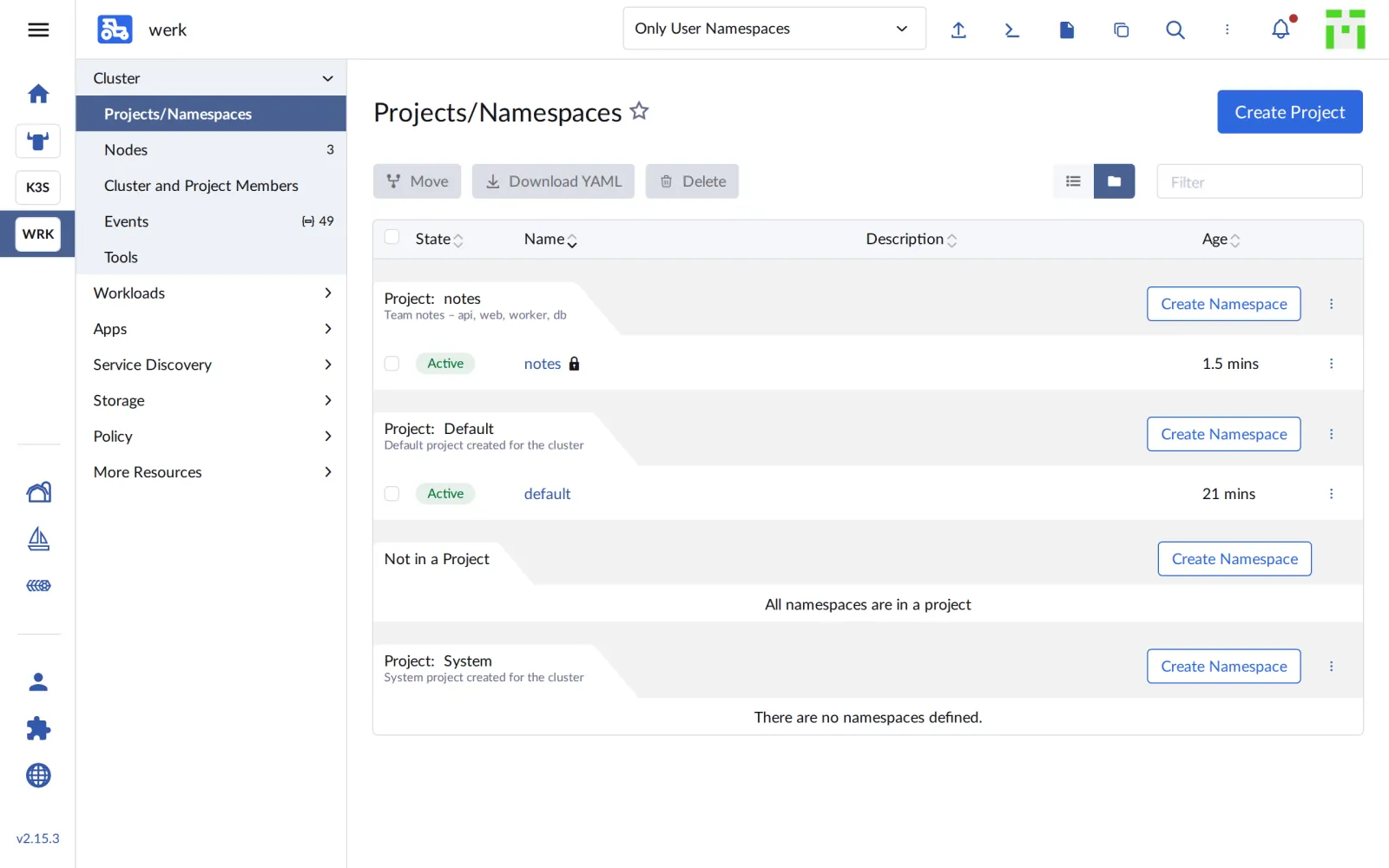
In the UI, notes now appears under Cluster › Projects/Namespaces in its project:
Save your progress? Sign up for free
Drill 4: A User
You create local users through the API, with the admin token from Day 5:
R="https://rancher.$RANCHER.sslip.io"
H="Authorization: Bearer $(cat "$LAB/rancher-token")"
curl -sk -X POST -H "$H" -H 'Content-Type: application/json' "$R/v3/users" \
  -d '{"username":"anna","name":"Anna Entwicklerin","password":"lab-user-pw-123",
       "mustChangePassword":false,"enabled":true}' \
  | jq -c '{id, username, name, enabled}'
f='{range .items[?(@.username=="anna")]}{.metadata.name}{end}'
ANNA=$(kubectl get users.management.cattle.io -o jsonpath="$f")
echo "$ANNA"
Expected (abridged):
{"id":"u-8k6lh","username":"anna","name":"Anna Entwicklerin","enabled":true}
u-8k6lh
Every user is a User object with an ID of the form
u-…. anna has no permissions yet, not even to log in.
Save your progress? Sign up for free
Drill 5: Grant Permissions
# tag06/anna.yaml – state at end of Day 6: permissions for the user anna
# Template: Drill 5 replaces ANNA_ID (u-…) and WERK_ID (c-m-…) via sed.
apiVersion: management.cattle.io/v3
kind: GlobalRoleBinding
metadata:
  name: anna-user-base
globalRoleName: user-base            # may log in, nothing else
userName: ANNA_ID
---
apiVersion: management.cattle.io/v3
kind: ProjectRoleTemplateBinding
metadata:
  name: anna-member
  namespace: WERK_ID-p-notes         # namespace of the project in the local cluster
projectName: WERK_ID:p-notes
roleTemplateName: project-member
userName: ANNA_ID
user-base is the smallest global role. The standard role
user would additionally be allowed to create its own
clusters, which anna shouldn’t. project-member allows
almost everything in the project except managing quotas and members.
sed -i '' "s/ANNA_ID/$ANNA/g" anna.yaml
kubectl apply --dry-run=server -f anna.yaml
kubectl apply -f anna.yaml
Expected:
globalrolebinding.management.cattle.io/anna-user-base created (server dry run)
projectroletemplatebinding.management.cattle.io/anna-member created (server dry run)
globalrolebinding.management.cattle.io/anna-user-base created
projectroletemplatebinding.management.cattle.io/anna-member created
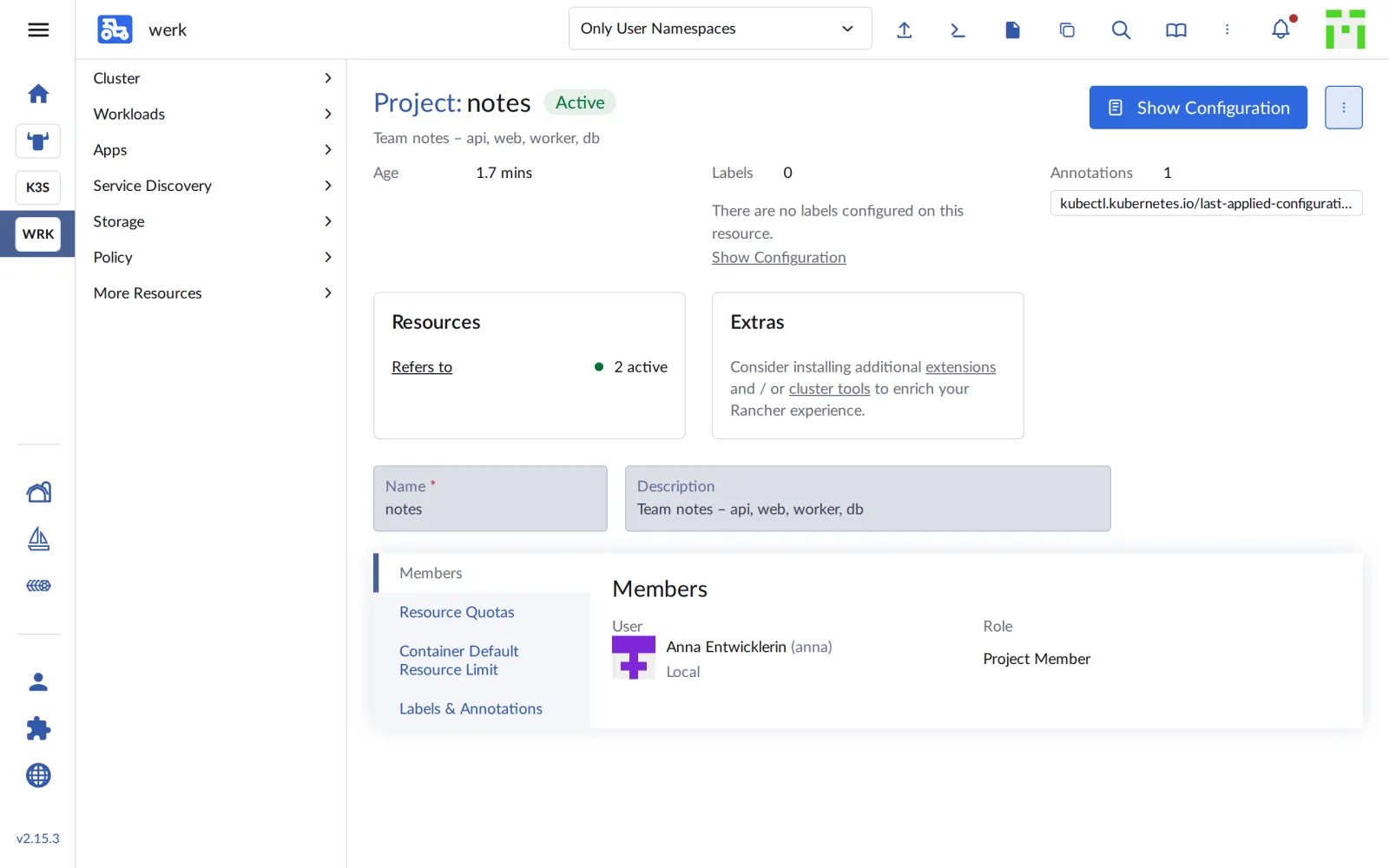
Under Project › notes › Members, anna is now listed as Project Member:
Save your progress? Sign up for free
Drill 6: Through anna’s Eyes
anna logs in and fetches her own kubeconfig for werk, just like the admin on Day 5:
( umask 077
  curl -sk -X POST "$R/v3-public/localProviders/local?action=login" \
    -H 'Content-Type: application/json' \
    -d '{"username":"anna","password":"lab-user-pw-123","responseType":"json",
         "description":"anna cli"}' | jq -r .token > "$LAB/anna-token" )
curl -sk -X POST -H "Authorization: Bearer $(cat "$LAB/anna-token")" \
  "$R/v3/clusters/$ID?action=generateKubeconfig" | jq -r .config \
  > "$LAB/kube/werk-anna.yaml"
chmod 600 "$LAB/kube/werk-anna.yaml"
export KUBECONFIG="$LAB/kube/werk-anna.yaml"
kubectl -n notes get pods
kubectl -n kube-system get pods
kubectl get nodes
kubectl get ns
Expected:
No resources found in notes namespace.
Error from server (Forbidden): pods is forbidden: User "u-8k6lh" cannot list resource
"pods" in API group "" in the namespace "kube-system"
Error from server (Forbidden): nodes is forbidden: User "u-8k6lh" cannot list resource
"nodes" in API group "" at the cluster scope
Error from server (Forbidden): namespaces is forbidden: User "u-8k6lh" cannot list
resource "namespaces" in API group "" at the cluster scope
notes is empty, but allowed. Everything else the proxy refuses with
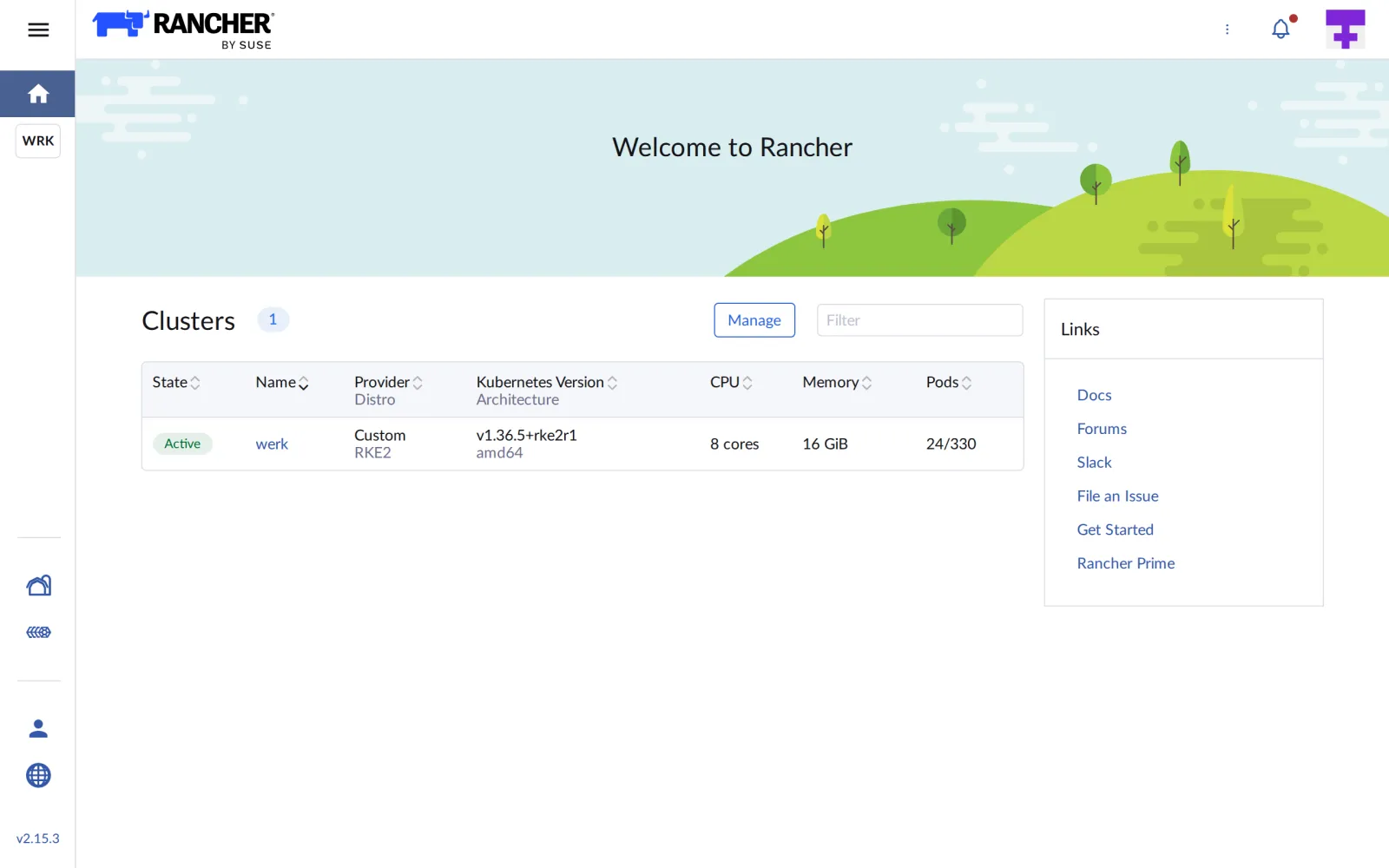
the user’s name, u-8k6lh. In the UI, anna sees only the one
cluster:
Save your progress? Sign up for free
Drill 7: What anna May Do
kubectl auth can-i queries permissions without doing
anything:
kubectl auth can-i create deployments -n notes
kubectl auth can-i delete resourcequota -n notes
kubectl auth can-i create namespaces
export KUBECONFIG="$LAB/kube/rancher.yaml"
Expected:
yes
no
Warning: resource 'namespaces' is not namespace scoped

yes
Deployments yes, deleting the quota no. Surprising: anna may create namespaces. Rancher lets project members create new namespaces in their project. What can go wrong with that is shown in the challenge.
Save your progress? Sign up for free
Checkpoint
kubectl -n "$ID" get projects.management.cattle.io p-notes \
  -o custom-columns=NAME:.metadata.name,DISPLAY:.spec.displayName
Expected: the project p-notes with the display name
notes.
NAME      DISPLAY
p-notes   notes
kubectl -n "$ID-p-notes" get projectroletemplatebindings.management.cattle.io \
-o custom-columns=NAME:.metadata.name,ROLE:.roleTemplateName,USER:.userNameExpected: anna’s binding to project-member.
NAME          ROLE             USER
anna-member   project-member   u-8k6lh
kubectl --kubeconfig "$LAB/kube/werk-anna.yaml" auth can-i list pods -n kube-systemExpected: no.
noChallenge
anna creates a namespace notes-test for experiments. Try
two ways: kubectl create namespace and a file with the
project annotation. Can anna then start pods in it? Read the explanation
that Rancher stores on the namespace.
Hint: Rancher writes states as JSON into the
annotation cattle.io/status.
Solution
export KUBECONFIG="$LAB/kube/werk-anna.yaml"
kubectl create namespace notes-test
kubectl get ns notes-test
kubectl --kubeconfig "$LAB/kube/werk.yaml" delete ns notes-test
cat > ns-test.yaml <<EOF
apiVersion: v1
kind: Namespace
metadata:
  name: notes-test
  annotations:
    field.cattle.io/projectId: $ID:p-notes
EOF
kubectl create -f ns-test.yaml
kubectl --kubeconfig "$LAB/kube/werk.yaml" -n notes-test get resourcequota
kubectl --kubeconfig "$LAB/kube/werk.yaml" get ns notes-test \
  -o jsonpath='{.metadata.annotations.cattle\.io/status}' \
  | jq -r '.Conditions[] | "\(.Type)=\(.Status) \(.Message)"'
kubectl -n notes-test run probe --image=busybox:1.37 --restart=Never -- sleep 60
kubectl --kubeconfig "$LAB/kube/werk.yaml" delete ns notes-test
export KUBECONFIG="$LAB/kube/rancher.yaml"
Expected (abridged):
namespace/notes-test created
Error from server (Forbidden): namespaces "notes-test" is forbidden: User "u-8k6lh"
cannot get resource "namespaces" in API group "" in the namespace "notes-test"
namespace "notes-test" deleted
namespace/notes-test created
NAME            REQUEST                        LIMIT                AGE
default-kd8kq   pods: 0/0, requests.cpu: 0/0   limits.memory: 0/0   11s
ResourceQuotaValidated=False Resource quota [limits.memory=8Gi,pods=40,requests.cpu=4]
exceeds project limit
ResourceQuotaInit=True
InitialRolesPopulated=True
Error from server (Forbidden): pods "probe" is forbidden: exceeded quota: default-kd8kq,
…
namespace "notes-test" deleted
Without the annotation, the namespace ends up in no project, and anna
immediately loses access to what she just created. With the annotation
it goes into the project, but gets a quota of zero: two namespaces with
20 pods each blow the project budget of 30. Rancher says so in
ResourceQuotaValidated. The fix: raise the project budget
or lower the per-namespace share.
Save your progress? Sign up for free
Enterprise Note
- External login: In companies, users come from
Active Directory, LDAP, Keycloak, Entra ID or GitHub. You then grant
permissions to groups (
groupPrincipalName), not to individuals. - Custom roles: Besides the bundled Role Templates you can create your own, such as “may deploy, but may not read Secrets”.
- One project per team: A team gets a project with quota and Pod Security; the platform manages the projects, the team its namespaces in them.
- Network: With
enableNetworkPolicyon the cluster, Rancher creates policies that separate projects from each other, in addition to the NetworkPolicies in the chart. - Make it auditable: All bindings are YAML objects; kept in a Git repository and rolled out via GitOps, they are traceable instead of scattered across clicks.