Day 7: Apps and Helm Repos
Goal: Run Gitea in the local cluster as container registry and Helm repo, teach the cluster werk about the registry through Rancher, and install and upgrade notes as an app from your own catalog. · Duration: approx. 120 min · Prerequisite: Day 6
Briefing
- Gitea is a lightweight Git server. With Packages it is also a registry for container images and a repo for Helm charts. On Day 8 it serves as the Git server for Fleet.
- Certificates come from a dedicated lab CA in cert-manager. Everyone who talks to Gitea must trust this CA: your Mac, the nodes, Rancher.
- The werk nodes don’t get credentials and CA by hand, but through
rkeConfig.registriesin the cluster object. Rancher distributes them to all nodes. - A ClusterRepo turns a Helm repo into a catalog in Rancher. Installation happens as an App: a Helm release that Rancher displays and upgrades.
 Mac                         local cluster (VM rancher)          Cluster werk
 nerdctl push ──────────────► Gitea  gitea.<IP>.sslip.io
 curl (chart) ──────────────►  ├ Container: lab/notes-*  ◄──pull── containerd
                               └ Helm: lab/notes 0.3.0   ◄──index── ClusterRepo lab
                              cert-manager: lab CA                   App notes
Drill 1: Storage and a Lab CA
Gitea needs a volume. The local cluster is a fresh RKE2 without a StorageClass; local-path helps as in “Kubernetes hands-on”, Day 12:
source ~/rancher-lab/setup/env.sh
mkdir -p "$LAB/tag07" && cd "$LAB/tag07"
cp "$LAB/code/tag07/"* .
export KUBECONFIG="$LAB/kube/rancher.yaml"
kubectl apply -f https://raw.githubusercontent.com/rancher/\
local-path-provisioner/v0.0.37/deploy/local-path-storage.yaml > /dev/null
kubectl annotate sc local-path storageclass.kubernetes.io/is-default-class=true
Expected:
storageclass.storage.k8s.io/local-path annotatedRancher keeps its own CA to itself. For Gitea you create a second one with cert-manager:
# tag07/lab-ca.yaml – state at end of Day 7: your own lab CA with cert-manager
# 1. Self-signed, only to create the CA …
apiVersion: cert-manager.io/v1
kind: ClusterIssuer
metadata:
  name: selfsigned
spec:
  selfSigned: {}
---
# 2. … the CA certificate itself (Secret lab-ca in cert-manager) …
apiVersion: cert-manager.io/v1
kind: Certificate
metadata:
  name: lab-ca
  namespace: cert-manager
spec:
  isCA: true
  commonName: rancher-lab CA
  secretName: lab-ca
  duration: 8760h
  privateKey:
    algorithm: ECDSA
    size: 256
  issuerRef:
    name: selfsigned
    kind: ClusterIssuer
---
# 3. … and the issuer that uses it to issue certificates for Gitea and friends.
apiVersion: cert-manager.io/v1
kind: ClusterIssuer
metadata:
  name: lab-ca
spec:
  ca:
    secretName: lab-ca
kubectl apply -f lab-ca.yaml
kubectl -n cert-manager wait certificate/lab-ca --for=condition=Ready --timeout=60s
kubectl get clusterissuer
kubectl -n cert-manager get secret lab-ca -o jsonpath='{.data.ca\.crt}' \
| base64 -d > lab-ca.crt
openssl x509 -in lab-ca.crt -noout -subject -enddateExpected (abridged, names, IPs and times differ on your machine):
clusterissuer.cert-manager.io/selfsigned created
certificate.cert-manager.io/lab-ca created
clusterissuer.cert-manager.io/lab-ca created
certificate.cert-manager.io/lab-ca condition met
NAME         READY   AGE
lab-ca       True    1s
selfsigned   True    1s
subject=CN = rancher-lab CA
notAfter=Oct 31 14:42:10 2027 GMT
lab-ca.crt is the public CA certificate. It comes into
play in three places today.
Save your progress? Sign up for free
Drill 2: Gitea
gitea-values.yaml keeps Gitea small: SQLite instead of a
separate database, no cache cluster, Packages on, Ingress via Traefik
with a certificate from the lab CA:
# tag07/gitea-values.yaml (excerpt) – state at end of Day 7
gitea:
  admin:
    username: lab
    password: lab-gitea-pw-123
  config:
    database:
      DB_TYPE: sqlite3            # one pod, no separate database
    packages:
      ENABLED: true               # container registry and Helm repo
postgresql-ha:
  enabled: false
valkey-cluster:
  enabled: false
ingress:
  enabled: true
  className: traefik
  annotations:
    cert-manager.io/cluster-issuer: lab-ca
The complete file is in the companion code
code/tag07/.
sed -i '' "s/RANCHER_IP/$RANCHER/g" gitea-values.yaml
helm repo add gitea-charts https://dl.gitea.com/charts/
helm install gitea gitea-charts/gitea --version 12.7.0 -n gitea --create-namespace \
  -f gitea-values.yaml --wait --timeout 10m | grep -E '^(NAME|STATUS):'
G="https://gitea.$RANCHER.sslip.io"
curl -s --cacert lab-ca.crt -u lab:lab-gitea-pw-123 "$G/api/v1/version"; echo
Expected:
"gitea-charts" has been added to your repositories
NAME: gitea
STATUS: deployed
{"version":"1.27.0"}
After just under a minute Gitea is running. This time without
-k: curl verifies the certificate against
lab-ca.crt.
Save your progress? Sign up for free
Drill 3: Images into the Registry
Rancher Desktop pushes the images from Day 1. Its containerd doesn’t
know the lab CA; for the lab, --insecure-registry skips the
check on push:
R="gitea.$RANCHER.sslip.io"
echo lab-gitea-pw-123 | nerdctl login --insecure-registry -u lab --password-stdin "$R"
for s in api:0.2.0 web:0.1.0 worker:0.1.0; do
  nerdctl --namespace k8s.io tag "notes-${s%:*}:${s#*:}" "$R/lab/notes-${s%:*}:${s#*:}"
  nerdctl --namespace k8s.io push --insecure-registry "$R/lab/notes-${s%:*}:${s#*:}"
done
curl -s --cacert lab-ca.crt -u lab:lab-gitea-pw-123 \
  "$G/api/v1/packages/lab?type=container" | jq -r '.[].name' | sort -u
Expected (abridged):
Login Succeeded
…
notes-api
notes-web
notes-worker
In Gitea a container image is named
<host>/<owner>/<name>:<tag>; the
owner is the user lab.
Security:
--insecure-registrybelongs only in the lab. For production, every client gets the CA in its trust store; the werk nodes will do it properly in a moment.
Save your progress? Sign up for free
Drill 4: The Chart into the Helm Repo
Gitea accepts charts as .tgz via HTTP upload:
helm package "$LAB/code/notes-chart/notes"
curl -s --cacert lab-ca.crt -u lab:lab-gitea-pw-123 -X POST \
  --upload-file notes-0.3.0.tgz -w '%{http_code}\n' \
  "$G/api/packages/lab/helm/api/charts"
helm repo add lab "$G/api/packages/lab/helm" --ca-file lab-ca.crt \
  --username lab --password lab-gitea-pw-123
helm search repo lab/notes
Expected:
Successfully packaged chart and saved it to: …/notes-0.3.0.tgz
201
"lab" has been added to your repositories
NAME        CHART VERSION   APP VERSION   DESCRIPTION
lab/notes   0.3.0           0.2.0         Die notes-Anwendung aus dem Trainings…
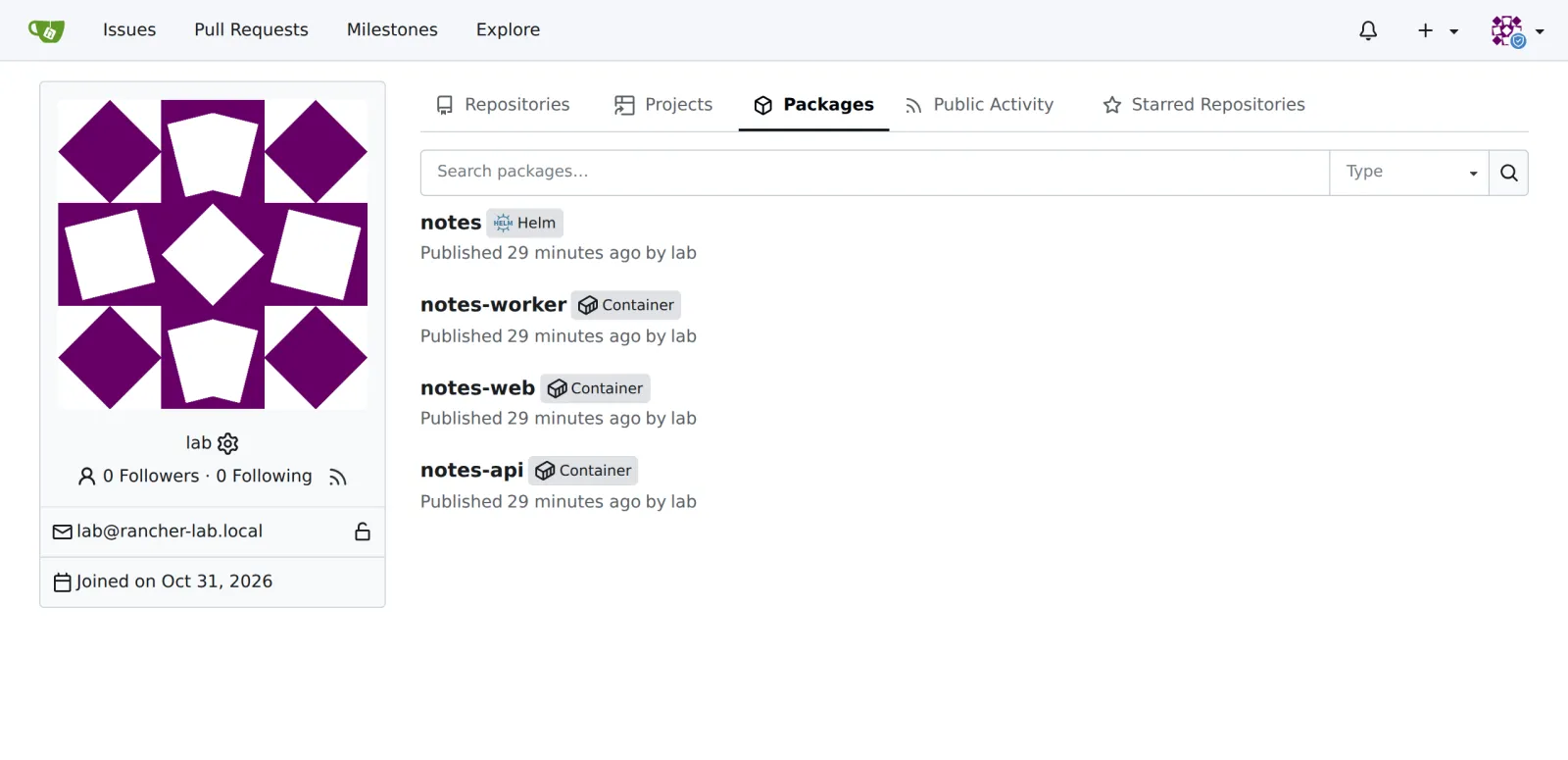
In Gitea you see both under the user lab in the
Packages tab:
Save your progress? Sign up for free
Drill 5: werk Learns About the Registry
First the credentials as a Secret in the local cluster, in the clusters’ namespace:
# tag07/gitea-pull.yaml – state at end of Day 7: pull access of the nodes to Gitea
apiVersion: v1
kind: Secret
metadata:
  name: gitea-pull
  namespace: fleet-default
type: rke.cattle.io/auth-config
stringData:
  username: lab
  password: lab-gitea-pw-123
Then the cluster YAML from Day 5 gets a new section:
# tag07/cluster-werk.yaml (excerpt) – state at end of Day 7
    registries:              # new on Day 7: becomes registries.yaml on every node
      configs:
        gitea.RANCHER_IP.sslip.io:
          authConfigSecretName: gitea-pull
          caBundle: CA_BUNDLE
caBundle expects the CA as base64-encoded PEM. Apply
both and watch how Rancher adjusts the nodes one after the other:
kubectl apply -f gitea-pull.yaml
sed -i '' -e "s|RANCHER_IP|$RANCHER|" -e "s|CA_BUNDLE|$(base64 -i lab-ca.crt)|" \
  cluster-werk.yaml
kubectl apply -f cluster-werk.yaml
kubectl -n fleet-default wait clusters.provisioning.cattle.io/werk \
  --for=condition=Updated --timeout=600s
multipass exec werk2 -- sudo grep -o '"ca_file":"[^"]*"' \
  /etc/rancher/rke2/registries.yaml
Expected (abridged):
secret/gitea-pull created
cluster.provisioning.cattle.io/werk configured
cluster.provisioning.cattle.io/werk condition met
"ca_file":"/var/lib/rancher/rke2/etc/tls/registries/gitea.….sslip.io/ca.crt"
After a minute and a half every node has its
registries.yaml, the CA sits next to it, and RKE2 has
restarted. This is the same file as in “Kubernetes hands-on”, Day 13.
There you distributed it by hand; here a plan does it (Day 5).
Save your progress? Sign up for free
Drill 6: One Catalog per Cluster
# tag07/clusterrepo-lab.yaml – state at end of Day 7: Gitea Helm repo as a catalog
# Template: Drill 6 replaces RANCHER_IP and CA_BUNDLE (base64 of the lab CA) via sed.
apiVersion: v1
kind: Secret
metadata:
  name: gitea-helm
  namespace: cattle-system
type: kubernetes.io/basic-auth
stringData:
  username: lab
  password: lab-gitea-pw-123
---
apiVersion: catalog.cattle.io/v1
kind: ClusterRepo
metadata:
  name: lab
spec:
  url: https://gitea.RANCHER_IP.sslip.io/api/packages/lab/helm
  caBundle: CA_BUNDLE
  clientSecret:
    name: gitea-helm
    namespace: cattle-system
Two pitfalls, both found live:
- A ClusterRepo applies only in the cluster it lives in. For apps in werk it belongs in werk, not in the local cluster.
- Here
caBundleexpects the CA in DER format, base64-encoded. PEM leads tox509: malformed certificate.
DER=$(openssl x509 -in lab-ca.crt -outform der | base64)
sed -i '' -e "s|RANCHER_IP|$RANCHER|" -e "s|CA_BUNDLE|$DER|" clusterrepo-lab.yaml
export KUBECONFIG="$LAB/kube/werk.yaml"
kubectl apply -f clusterrepo-lab.yaml
kubectl wait clusterrepos.catalog.cattle.io/lab --for=condition=Downloaded \
  --timeout=120s
kubectl get clusterrepos.catalog.cattle.io
Expected (abridged):
secret/gitea-helm created
clusterrepo.catalog.cattle.io/lab created
clusterrepo.catalog.cattle.io/lab condition met
NAME                     HTTP URL                                    …   DOWNLOAD TIME
lab                      https://gitea.….sslip.io/api/packages/lab…  …   …T14:58:36Z
rancher-charts                                                       …   …T14:20:29Z
rancher-partner-charts                                               …   …T14:19:21Z
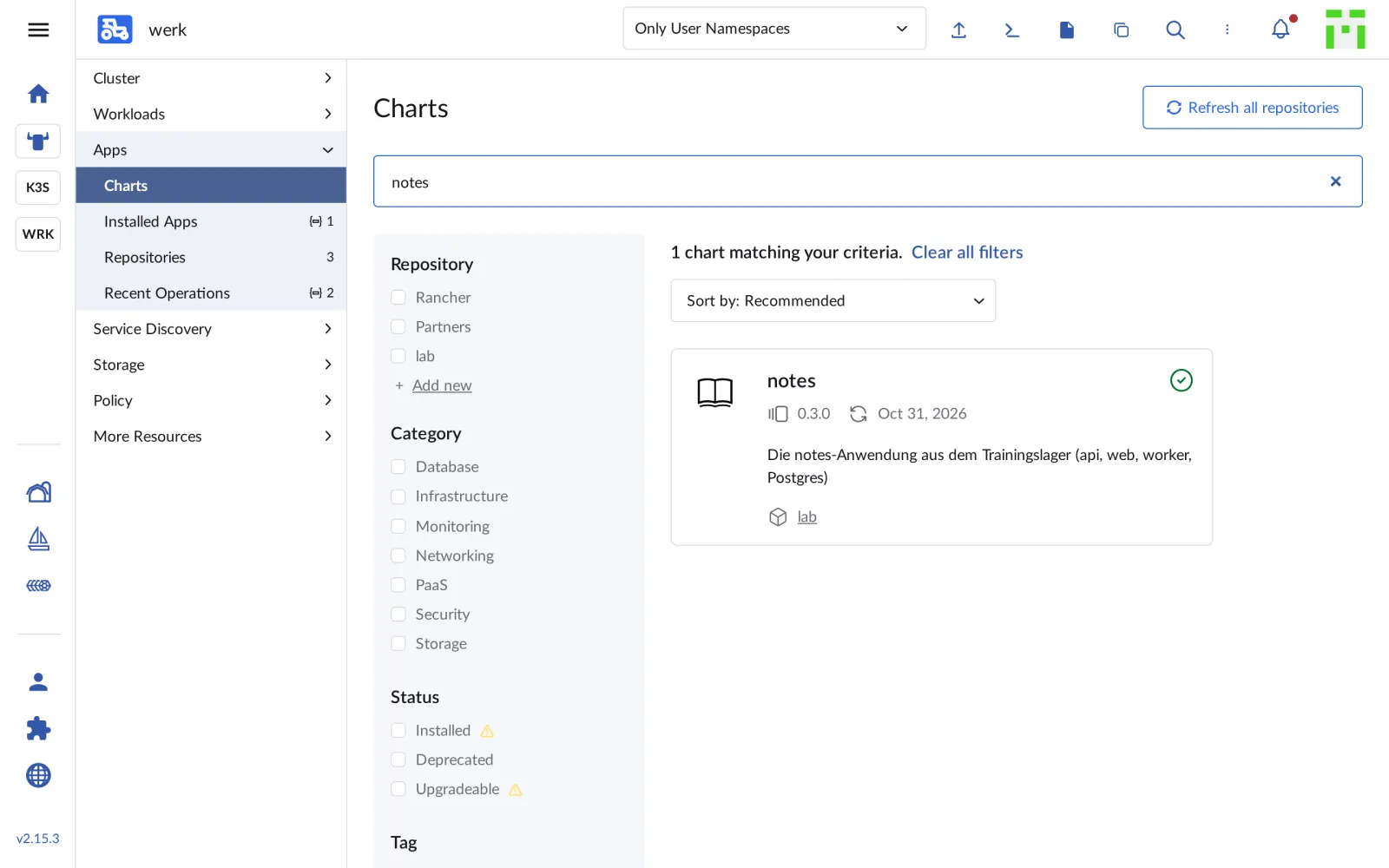
Under Apps › Charts in werk, the search now finds
notes from the repo lab:
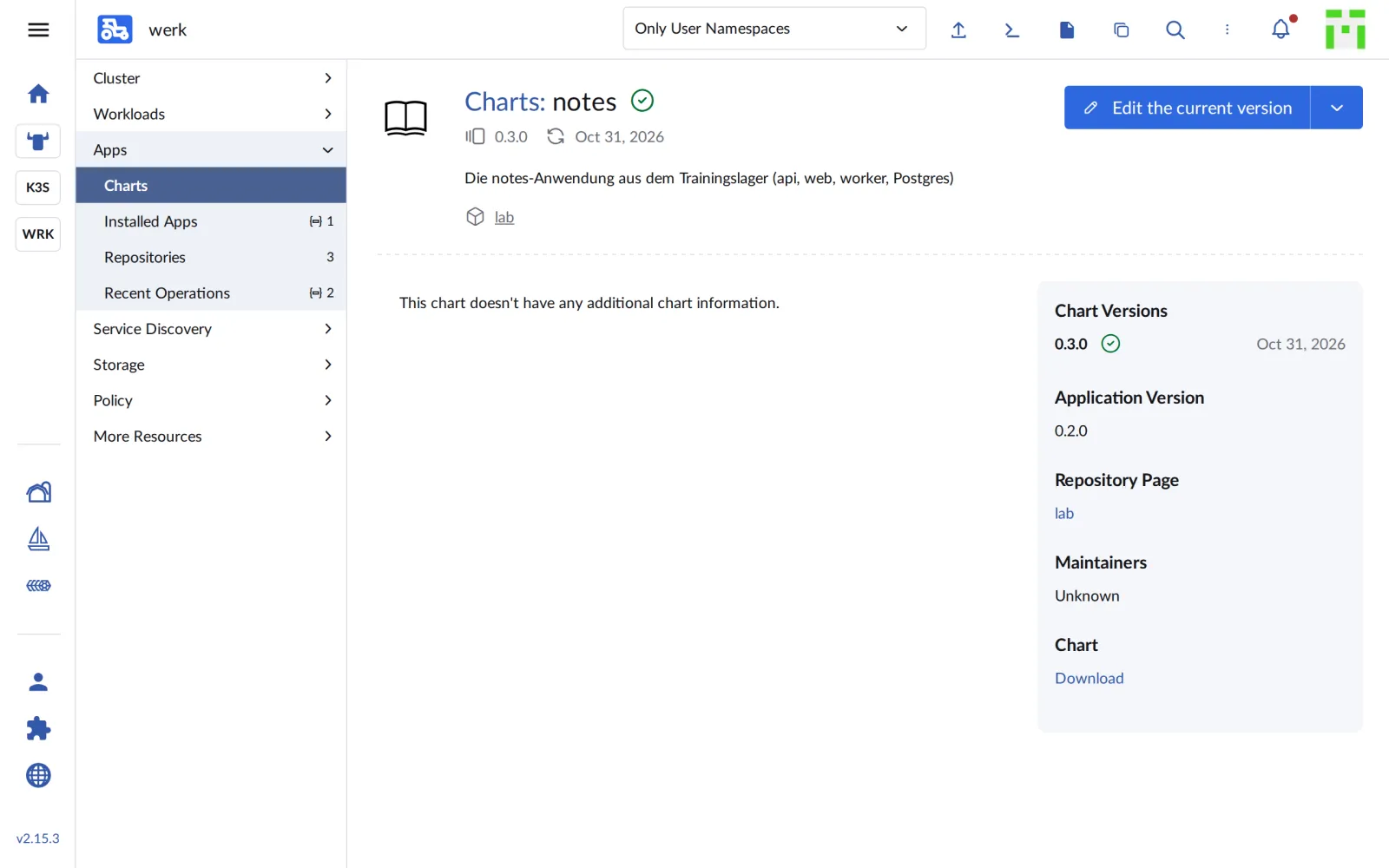
A click shows the chart page with version and app version:
Save your progress? Sign up for free
Drill 7: Install notes as an App
werk has no StorageClass either. Without one, db-0 stays
Pending, and Helm gives up after ten minutes. So first
storage and Secrets, then the app:
kubectl apply -f https://raw.githubusercontent.com/rancher/\
local-path-provisioner/v0.0.37/deploy/local-path-storage.yaml > /dev/null
kubectl annotate sc local-path storageclass.kubernetes.io/is-default-class=true
kubectl -n notes create secret generic notes-api --from-literal=api-key=lab-api-key-123
kubectl -n notes create secret generic notes-db --from-literal=password=lab-db-pw-123 \
  --from-literal=db-url='postgres://notes:lab-db-pw-123@db:5432/notes'
sed -i '' "s/RANCHER_IP/$RANCHER/g" values-werk.yaml
cat values-werk.yaml
Expected (abridged):
storageclass.storage.k8s.io/local-path annotated
secret/notes-api created
secret/notes-db created
# tag07/values-werk.yaml – Stand Ende Tag 7: notes auf werk, Images aus Gitea
api:
  image:
    repository: gitea.….sslip.io/lab/notes-api
…
gateway:
  enabled: false                   # werk hat Traefik aus RKE2, siehe ingress.yaml
networkPolicy:
  gatewayNamespace: kube-system    # dort läuft Traefik
In the UI you click Install on the chart page,
choose the namespace notes and paste the values. The same
call goes to Rancher’s API; that way it is repeatable:
H="Authorization: Bearer $(cat "$LAB/rancher-token")"
ID=$(kubectl --kubeconfig "$LAB/kube/rancher.yaml" -n fleet-default \
  get clusters.provisioning.cattle.io werk -o jsonpath='{.status.clusterName}')
V=$(yq -o=json values-werk.yaml)
API="https://rancher.$RANCHER.sslip.io/k8s/clusters/$ID/v1"
API+="/catalog.cattle.io.clusterrepos/lab"
curl -sk -X POST -H "$H" -H 'Content-Type: application/json' "$API?action=install" \
  -d "{\"charts\":[{\"chartName\":\"notes\",\"version\":\"0.3.0\",
       \"releaseName\":\"notes\",\"values\":$V}],\"namespace\":\"notes\",
       \"wait\":true,\"timeout\":\"600s\"}" \
  | jq -c '{operationName, operationNamespace}'
Expected:
{"operationName":"helm-operation-sgvx2","operationNamespace":"notes"}yq (via Homebrew) converts the values to JSON. Rancher
starts a pod helm-operation-… that runs
helm install. After a good minute:
helm -n notes list
kubectl -n notes get pods -o wide
kubectl get operations.catalog.cattle.io -n notes \
  -o custom-columns=NAME:.metadata.name,CMD:.status.command[1]
Expected (abridged):
NAME    NAMESPACE   REVISION   UPDATED   STATUS     CHART         APP VERSION
notes   notes       1          2026-…    deployed   notes-0.3.0   0.2.0
NAME                      READY   STATUS      RESTARTS   AGE   …   NODE
api-74fbdd7f6b-66wrh      1/1     Running     3          55s   …   werk2
…
db-0                      1/1     Running     0          55s   …   werk3
migrate-q292f             0/1     Completed   0          12s   …   werk2
web-9695cdc87-b8jvn       1/1     Running     0          55s   …   werk3
…
NAME                   CMD
helm-operation-sgvx2   install
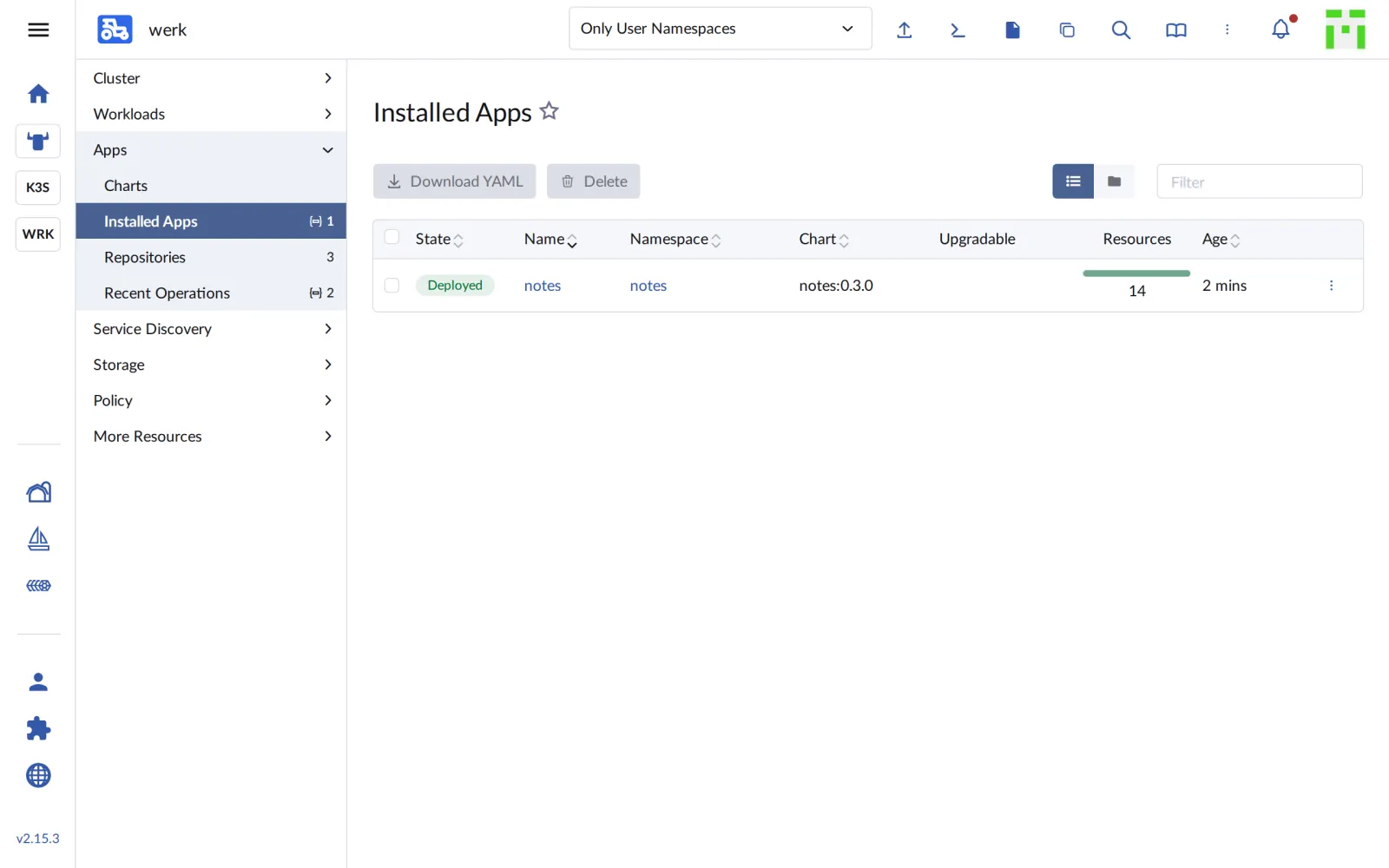
Under Apps › Installed Apps, notes is listed as
Deployed:
Save your progress? Sign up for free
Drill 8: From Outside
Like k3s, werk has Traefik as its default ingress. The Ingress file from Day 2 fits, just with the address of werk1:
sed "s/WERK1_IP/$WERK1/" ingress.yaml | kubectl apply -f -
curl -s -X POST -H 'Content-Type: application/json' \
  -d '{"text":"aus dem eigenen Katalog"}' "http://notes.$WERK1.sslip.io/api/notes"; echo
curl -s "http://notes.$WERK1.sslip.io/api/notes"; echo
Expected (abridged):
ingress.networking.k8s.io/web created
{"id":"c0c70ff3-…","text":"aus dem eigenen Katalog"}
[{"id":"c0c70ff3-…","text":"aus dem eigenen Katalog"}]
notes now runs on two clusters: on k3s from an image archive, on werk from your own catalog and your own registry.
Save your progress? Sign up for free
Checkpoint
kubectl get clusterrepos.catalog.cattle.io labExpected: the repo lab with a
DOWNLOAD TIME.
NAME   HTTP URL                                         …   DOWNLOAD TIME
lab    https://gitea.….sslip.io/api/packages/lab/helm   …   2026-10-31T14:58:36Z
helm -n notes listExpected: release notes with chart
notes-0.3.0, deployed.
NAME    NAMESPACE   REVISION   UPDATED   STATUS     CHART         APP VERSION
notes   notes       1          2026-…    deployed   notes-0.3.0   0.2.0
curl -s "http://notes.$WERK1.sslip.io/api/notes"; echoExpected: the note from Drill 8.
[{"id":"c0c70ff3-…","text":"aus dem eigenen Katalog"}]Challenge
Publish the chart as version 0.3.1, have Rancher reload the catalog and upgrade the app without losing values. How can you tell in the UI that an update is available?
Hint: A ClusterRepo only reloads every few hours;
spec.forceUpdate with a new timestamp forces it. Besides
install, the API also knows upgrade.
Solution
cp -R "$LAB/code/notes-chart/notes" chart031
sed -i '' 's/^version: 0.3.0/version: 0.3.1/' chart031/Chart.yaml
helm package chart031
curl -s --cacert lab-ca.crt -u lab:lab-gitea-pw-123 -X POST \
  --upload-file notes-0.3.1.tgz -w '%{http_code}\n' \
  "$G/api/packages/lab/helm/api/charts"
kubectl patch clusterrepos.catalog.cattle.io lab --type merge \
  -p "{\"spec\":{\"forceUpdate\":\"$(date -u +%Y-%m-%dT%H:%M:%SZ)\"}}"
curl -sk -X POST -H "$H" -H 'Content-Type: application/json' "$API?action=upgrade" \
  -d "{\"charts\":[{\"chartName\":\"notes\",\"version\":\"0.3.1\",
       \"releaseName\":\"notes\",\"values\":$V}],\"namespace\":\"notes\",
       \"wait\":true,\"timeout\":\"600s\"}" \
  | jq -c '{operationName}'
helm -n notes history notes
Expected (abridged, after a good minute):
Successfully packaged chart and saved it to: …/notes-0.3.1.tgz
201
clusterrepo.catalog.cattle.io/lab patched
{"operationName":"helm-operation-nd9xk"}
REVISION   UPDATED    STATUS       CHART         APP VERSION   DESCRIPTION
1          …          superseded   notes-0.3.0   0.2.0         Install complete
2          …          deployed     notes-0.3.1   0.2.0         Upgrade complete
Before the upgrade, Installed Apps shows the new version in the Upgradable column:
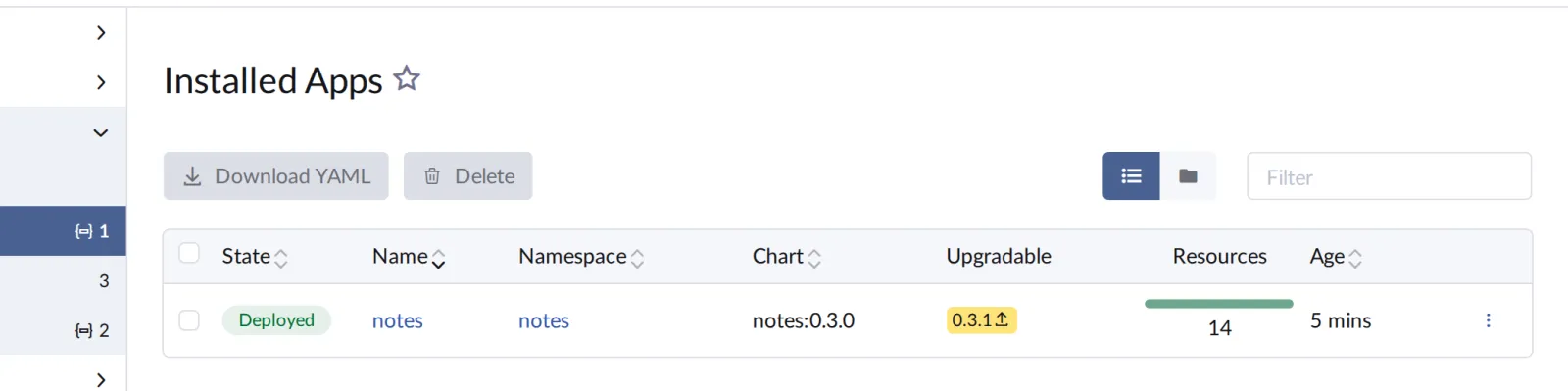
You pass the values again on upgrade; the UI carries them over on its own. The note stays, because it lives in Postgres.
Save your progress? Sign up for free
Enterprise Note
- Registry: Instead of Gitea there is usually Harbor
or the Git platform’s registry, with projects, scans and replication.
rkeConfig.registries.mirrorsadditionally redirects Docker Hub through your own mirror. - Central catalogs: A ClusterRepo per cluster can be distributed to all clusters via Fleet (Day 9) instead of creating it by hand.
- OCI charts: Rancher can also load charts directly
from OCI registries (
oci://…); then a single registry is enough for images and charts. - Trust: A corporate CA reaches all machines and
nodes through system configuration.
--insecure-registryandcurl -khave no place there. - Apps or GitOps: Clicking in Apps is convenient but leaves no history in Git. From Day 8 on, the values come from a repository.