Day 8: Fleet – GitOps with Gitea
Goal: Roll out notes on werk no longer by click but from a Git repository, apply changes by commit, and detect and revert manual changes in the cluster. · Duration: approx. 75 min · Prerequisite: Day 7
Briefing
- Fleet is Rancher’s GitOps tool and has been installed since Day 3. It watches Git repositories and rolls out what’s in them to the desired clusters.
- A GitRepo object in the local cluster says: which repo, which branch, which target clusters. Fleet turns that into Bundles and, per cluster, a BundleDeployment that the fleet-agent applies in the target.
fleet.yamlin the repo describes what gets rolled out, here: the notes chart from the Gitea Helm repo with values.- If the cluster deviates from the repo, that is drift. Fleet reports it and reverts it on request.
 Mac: git push ──► Gitea lab/notes-fleet ◄── polls every 15 s ── Fleet (local)
                                                                 GitRepo notes
                                                                 Bundle notes
                                                                      │
                                       Cluster werk: fleet-agent ◄────┘
                                         helm install/upgrade notes (namespace notes)
Drill 1: A Repository in Gitea
source ~/rancher-lab/setup/env.sh
mkdir -p "$LAB/tag08" && cd "$LAB/tag08"
cp "$LAB/code/tag08/gitrepo.yaml" "$LAB/tag07/lab-ca.crt" .
G="https://gitea.$RANCHER.sslip.io"
curl -s --cacert lab-ca.crt -u lab:lab-gitea-pw-123 -X POST \
  -H 'Content-Type: application/json' "$G/api/v1/user/repos" \
  -d '{"name":"notes-fleet","description":"notes per Fleet","private":true,
       "default_branch":"main"}' | jq -c '{full_name, private}'
Expected (abridged, names, IPs and times differ on your machine):
{"full_name":"lab/notes-fleet","private":true}The repo is private. So Fleet will need credentials in a moment, just as in any real company.
Save your progress? Sign up for free
Drill 2: fleet.yaml
# notes-fleet/fleet.yaml – first commit (Day 8, Drill 2); Drill 5 lowers replicas to 2
# Template: Day 8, Drill 2 replaces RANCHER_IP via sed with the address of the VM rancher.
defaultNamespace: notes
helm:
  releaseName: notes
  repo: https://gitea.RANCHER_IP.sslip.io/api/packages/lab/helm
  chart: notes
  version: 0.3.1
  values:
    api:
      replicas: 3
      image:
        repository: gitea.RANCHER_IP.sslip.io/lab/notes-api
    web:
      image:
        repository: gitea.RANCHER_IP.sslip.io/lab/notes-web
    worker:
      image:
        repository: gitea.RANCHER_IP.sslip.io/lab/notes-worker
    gateway:
      enabled: false
    networkPolicy:
      gatewayNamespace: kube-system
The values are the same as in values-werk.yaml from Day
7, but now in Git.
git -c http.sslCAInfo="$PWD/lab-ca.crt" clone \
  "https://lab:lab-gitea-pw-123@gitea.$RANCHER.sslip.io/lab/notes-fleet.git"
cd notes-fleet
git config http.sslCAInfo ../lab-ca.crt
git config user.name lab && git config user.email [email protected]
sed "s/RANCHER_IP/$RANCHER/g" "$LAB/code/tag08/notes-fleet/fleet.yaml" > fleet.yaml
git add fleet.yaml && git commit -qm "notes per Fleet" && git push -q origin HEAD:main
git log --oneline
cd ..
Expected:
Cloning into 'notes-fleet'...
warning: You appear to have cloned an empty repository.
101f1c6 notes per Fleet
Security: The password in the clone URL ends up in
.git/config. In the lab that is convenient; in production you use an access token with an expiry date, or SSH.
Save your progress? Sign up for free
Drill 3: From App to Git
The app from Day 7 and Fleet shouldn’t fight over the same release. Remove the app. The database volume stays in place, as in “Kubernetes hands-on”, Day 15, Round 10:
export KUBECONFIG="$LAB/kube/werk.yaml"
helm -n notes uninstall notes --wait
kubectl -n notes get pvc
export KUBECONFIG="$LAB/kube/rancher.yaml"
Expected (abridged):
release "notes" uninstalled
NAME        STATUS   VOLUME                                     CAPACITY   …
data-db-0   Bound    pvc-d529ef36-d0ad-4d66-a49d-d513f77f4e34   1Gi        …
Save your progress? Sign up for free
Drill 4: The GitRepo
# tag08/gitrepo.yaml – state at end of Day 8: Fleet watches lab/notes-fleet in Gitea
# Template: Drill 4 replaces RANCHER_IP and CA_BUNDLE (base64 of the lab CA) via sed.
# Drill 4 creates the Secret gitea-helm (Helm repo with CA) via kubectl.
apiVersion: v1
kind: Secret
metadata:
  name: gitea-git
  namespace: fleet-default
type: kubernetes.io/basic-auth
stringData:
  username: lab
  password: lab-gitea-pw-123
---
apiVersion: fleet.cattle.io/v1alpha1
kind: GitRepo
metadata:
  name: notes
  namespace: fleet-default
spec:
  repo: https://gitea.RANCHER_IP.sslip.io/lab/notes-fleet.git
  branch: main
  clientSecretName: gitea-git
  helmSecretName: gitea-helm
  caBundle: CA_BUNDLE
  pollingInterval: 15s
  correctDrift:
    enabled: true             # from Drill 7: revert manual changes in the cluster
  targets:
    - clusterName: werk
Two Secrets, two purposes: gitea-git opens the Git repo,
gitea-helm the Helm repo from which fleet.yaml
fetches the chart. caBundle (base64-encoded PEM) applies to
Git, cacerts in the Helm Secret to the Helm repo. Leave out
correctDrift for now; you switch it on in Drill 7.
kubectl -n fleet-default create secret generic gitea-helm --from-literal=username=lab \
  --from-literal=password=lab-gitea-pw-123 --from-file=cacerts=lab-ca.crt
sed -i '' -e "s|RANCHER_IP|$RANCHER|" -e "s|CA_BUNDLE|$(base64 -i lab-ca.crt)|" \
  gitrepo.yaml
grep -v -E 'correctDrift:|enabled: true' gitrepo.yaml > gitrepo-ohne-drift.yaml
kubectl apply -f gitrepo-ohne-drift.yaml
kubectl -n fleet-default wait gitrepos.fleet.cattle.io/notes --for=condition=Ready \
  --timeout=300s
kubectl -n fleet-default get gitrepos.fleet.cattle.io
Expected (abridged):
secret/gitea-helm created
secret/gitea-git created
gitrepo.fleet.cattle.io/notes created
gitrepo.fleet.cattle.io/notes condition met
NAME    REPO                                     COMMIT          BUNDLEDEPLOYMENTS-READY
notes   https://gitea.….sslip.io/lab/notes-fleet.git   101f1c6cda1c…   1/1
After a minute notes is back, this time installed by Fleet:
helm --kubeconfig "$LAB/kube/werk.yaml" -n notes list
curl -s "http://notes.$WERK1.sslip.io/api/notes"; echo
Expected (abridged):
NAME    NAMESPACE   REVISION   UPDATED   STATUS     CHART         APP VERSION
notes   notes       2          2026-…    deployed   notes-0.3.1   0.2.0
[{"id":"c0c70ff3-…","text":"aus dem eigenen Katalog"}]
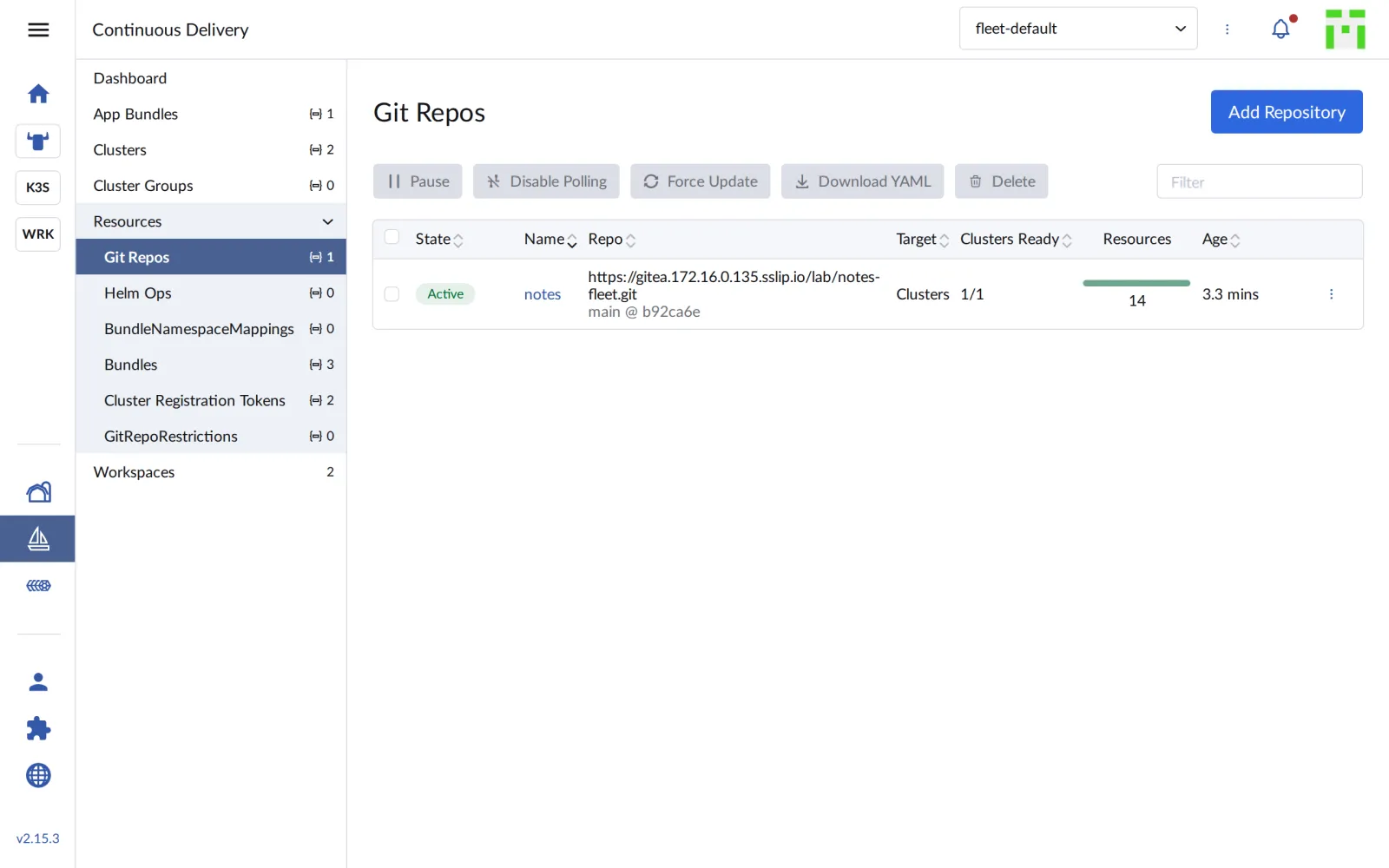
The note from Day 7 is still there: the new release took over the old volume. In the UI you find the GitRepo under Continuous Delivery › Git Repos:
Save your progress? Sign up for free
Drill 5: Change by Commit
Two api replicas are enough. The change happens only in Git:
cd notes-fleet
sed -i '' 's/      replicas: 3/      replicas: 2/' fleet.yaml
git commit -qam "api: 2 Repliken" && git push -q origin HEAD:main
git log --oneline -1
cd ..
kubectl --kubeconfig "$LAB/kube/werk.yaml" -n notes get deploy api
Expected (abridged, after about 20 seconds):
b92ca6e api: 2 Repliken
NAME   READY   UP-TO-DATE   AVAILABLE   AGE
api    2/2     2            2           3m
Fleet asks Gitea for new commits every 15 seconds
(pollingInterval). Instead of polling, Gitea can also
notify Fleet via webhook.
Save your progress? Sign up for free
Drill 6: Drift
Someone scales by hand in the cluster:
kubectl --kubeconfig "$LAB/kube/werk.yaml" -n notes scale deploy api --replicas=5
kubectl -n fleet-default get gitrepos.fleet.cattle.io notes \
  -o custom-columns=READY:.status.display.readyBundleDeployments\
,STATE:.status.display.state
kubectl -n fleet-default get bundles.fleet.cattle.io notes \
  -o jsonpath='{.status.summary.nonReadyResources[0].modifiedStatus}'; echo
Expected (abridged, after about 20 seconds):
deployment.apps/api scaled
READY   STATE
0/1     Modified
[{"apiVersion":"apps/v1","kind":"Deployment","name":"api","namespace":"notes",
"patch":"{\"spec\":{\"replicas\":2}}"}]
Fleet notices the deviation and even shows the patch that would restore the desired state. But it doesn’t intervene: without further configuration, Fleet only reports drift.
Save your progress? Sign up for free
Drill 7: Revert Drift
kubectl -n fleet-default patch gitrepos.fleet.cattle.io notes --type merge \
  -p '{"spec":{"correctDrift":{"enabled":true}}}'
kubectl --kubeconfig "$LAB/kube/werk.yaml" -n notes get deploy api
kubectl --kubeconfig "$LAB/kube/werk.yaml" -n notes scale deploy api --replicas=4
kubectl --kubeconfig "$LAB/kube/werk.yaml" -n notes get deploy api
helm --kubeconfig "$LAB/kube/werk.yaml" -n notes history notes | tail -2
Expected (abridged, a good ten seconds between each command):
gitrepo.fleet.cattle.io/notes patched
NAME   READY   UP-TO-DATE   AVAILABLE   AGE
api    2/2     2            2           4m
deployment.apps/api scaled
NAME   READY   UP-TO-DATE   AVAILABLE   AGE
api    2/2     2            2           4m
REVISION   UPDATED   STATUS       CHART         APP VERSION   DESCRIPTION
4          …         superseded   notes-0.3.1   0.2.0         Rollback to 3
5          …         deployed     notes-0.3.1   0.2.0         Rollback to 4
After a few seconds there are two replicas again. Fleet reverts drift
with a helm rollback to the last revision; the history
shows it. From now on: what isn’t in Git doesn’t stay. That’s why the
complete gitrepo.yaml in the companion code contains
correctDrift from the start.
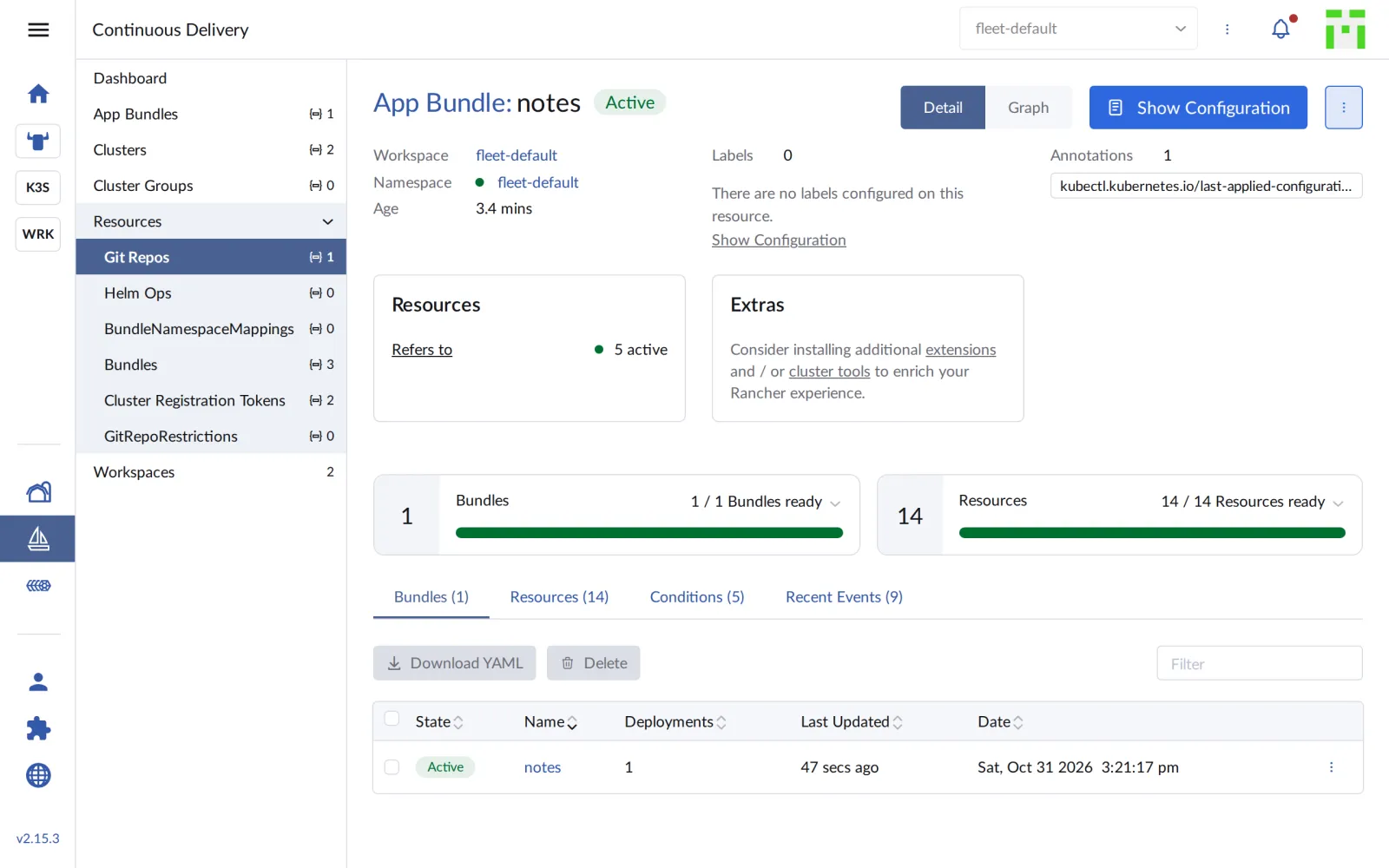
The GitRepo’s detail page shows bundles and resources:
Save your progress? Sign up for free
Checkpoint
kubectl -n fleet-default get gitrepos.fleet.cattle.io notesExpected: 1/1 BundleDeployments ready, the last commit
is known.
NAME    REPO                                     COMMIT          BUNDLEDEPLOYMENTS-READY
notes   https://gitea.….sslip.io/lab/notes-fleet.git   b92ca6ed6856…   1/1
kubectl --kubeconfig "$LAB/kube/werk.yaml" -n notes get deploy apiExpected: two replicas, as in Git.
NAME   READY   UP-TO-DATE   AVAILABLE   AGE
api    2/2     2            2           6m
kubectl -n fleet-default get gitrepos.fleet.cattle.io notes \
-o jsonpath='{.spec.correctDrift.enabled}'; echoExpected: true.
trueChallenge
A colleague wants no more changes in the cluster before the weekend,
but commits should still be possible. Pause Fleet, change the replicas
in Git to 3, check that nothing happens, and let Fleet resume.
Afterwards, undo the change with git revert.
Hint: The GitRepo knows
spec.paused.
Solution
kubectl -n fleet-default patch gitrepos.fleet.cattle.io notes --type merge \
  -p '{"spec":{"paused":true}}'
cd notes-fleet
sed -i '' 's/      replicas: 2/      replicas: 3/' fleet.yaml
git commit -qam "api: 3 Repliken" && git push -q origin HEAD:main
cd ..
kubectl -n fleet-default get bundles.fleet.cattle.io notes \
  -o jsonpath='{.status.display.state}'; echo
kubectl --kubeconfig "$LAB/kube/werk.yaml" -n notes get deploy api \
  -o jsonpath='{.spec.replicas}'; echo
kubectl -n fleet-default patch gitrepos.fleet.cattle.io notes --type merge \
  -p '{"spec":{"paused":false}}'
cd notes-fleet && git revert --no-edit HEAD && git push -q origin HEAD:main && cd ..
git -C notes-fleet log --oneline
Expected (abridged):
gitrepo.fleet.cattle.io/notes patched
WaitApplied
2
gitrepo.fleet.cattle.io/notes patched
[main 2baba8c] Revert "api: 3 Repliken"
…
2baba8c Revert "api: 3 Repliken"
b213bbf api: 3 Repliken
b92ca6e api: 2 Repliken
101f1c6 notes per Fleet
While paused, Fleet does read the new commit but doesn’t apply it
(WaitApplied). After resuming, three replicas arrive, and
half a minute after the revert it’s two again. The history in the repo
tells exactly what happened when.
Save your progress? Sign up for free
Enterprise Note
- Workspaces:
fleet-defaultis a workspace. Teams get their own workspaces with their own clusters and permissions;GitRepoRestrictionslimit which repos and namespaces are allowed. - Webhooks: Instead of polling every 15 seconds, the Git system notifies Fleet via webhook. That saves load and is faster.
- Access: Deploy keys (SSH) or read-only tokens instead of a user password. The Helm repo gets its own, equally restricted credentials.
- Argo CD or Fleet: Fleet is built into Rancher and designed for very many clusters; Argo CD has the richer UI for individual applications.
- Approvals: Changes reach the branch that Fleet watches via merge request with review. The cluster itself is no longer touched by hand.