Day 9: Fleet for Many Clusters
Goal: Roll out notes from the same repository to k3s and werk, select the target clusters by label and ClusterGroup, and give each cluster its own values. · Duration: approx. 60 min · Prerequisite: Day 8
Briefing
- Fleet is built for many clusters. Instead of naming clusters individually, you select them by labels, most conveniently through a ClusterGroup.
- One bundle, many targets: targetCustomizations in
fleet.yamloverride values for specific clusters, such as fewer replicas or different images. - Fleet knows a few labels about every cluster on its own, for example
the distribution in
provider.cattle.io. - If a cluster loses its label, Fleet takes the application away from it again.
                    Gitea lab/notes-fleet: fleet.yaml
                       values (all)  +  targetCustomizations (k3s)
                                   │
              Fleet: ClusterGroup notes  (notes=ja)
                ┌──────────────────┴──────────────────┐
     k3s (provider k3s)                       werk (provider rke2)
     api 1 replica, images imported           api 2 replicas, images from Gitea
Drill 1: What Fleet Knows About the Clusters
source ~/rancher-lab/setup/env.sh
mkdir -p "$LAB/tag09" && cd "$LAB/tag09"
cp "$LAB/code/tag09/clustergroup.yaml" .
export KUBECONFIG="$LAB/kube/rancher.yaml"
f='{range .items[*]}{.metadata.name}: '
f+='{.metadata.labels.provider\.cattle\.io}{"\n"}{end}'
kubectl -n fleet-default get clusters.fleet.cattle.io -o jsonpath="$f"
Expected:
k3s: k3s
werk: rke2
Besides Rancher clusters
(clusters.provisioning.cattle.io) there are Fleet clusters
(clusters.fleet.cattle.io). Rancher creates them and gives
them labels, among them the distribution. fleet.yaml can
use that to tell them apart right away.
Save your progress? Sign up for free
Drill 2: A Label for the Target Group
Both clusters should get notes. Mark them with notes=ja.
For an imported cluster, Rancher only passes labels on to Fleet from the
management cluster; so you set it there:
kubectl -n fleet-default label clusters.provisioning.cattle.io k3s werk notes=ja
K3S_ID=$(kubectl -n fleet-default get clusters.provisioning.cattle.io k3s \
  -o jsonpath='{.status.clusterName}')
kubectl label clusters.management.cattle.io "$K3S_ID" notes=ja
f='{range .items[*]}{.metadata.name}: notes={.metadata.labels.notes}{"\n"}{end}'
kubectl -n fleet-default get clusters.fleet.cattle.io -o jsonpath="$f"
Expected:
cluster.provisioning.cattle.io/k3s labeled
cluster.provisioning.cattle.io/werk labeled
cluster.management.cattle.io/c-m-5pjkcmvg labeled
k3s: notes=ja
werk: notes=ja
Warning: In the test, the label on the provisioning object made it through to Fleet for werk (created), but not for k3s (imported). Only the label on the management cluster took effect. So always check on the Fleet cluster what actually arrives there.
Save your progress? Sign up for free
Drill 3: The ClusterGroup
# tag09/clustergroup.yaml – state at end of Day 9: all clusters with the label notes=ja
apiVersion: fleet.cattle.io/v1alpha1
kind: ClusterGroup
metadata:
  name: notes
  namespace: fleet-default
spec:
  selector:
    matchLabels:
      notes: ja
kubectl apply -f clustergroup.yaml
kubectl -n fleet-default get clustergroups.fleet.cattle.ioExpected (abridged):
clustergroup.fleet.cattle.io/notes created
NAME    CLUSTERS-READY   BUNDLES-READY   STATUS
notes   2/2              …
A group is just a stored selector. If a new cluster with the label comes along, it belongs to the group immediately, without anyone touching the GitRepo.
Save your progress? Sign up for free
Drill 4: Values per Cluster
k3s has no access to the Gitea registry, but it has the imported
images from Day 2, and it is small. fleet.yaml gets a
targetCustomizations section:
# notes-fleet/fleet.yaml (excerpt) – state at end of Day 9
targetCustomizations:                # … except where overridden here
  - name: k3s
    clusterSelector:
      matchLabels:
        provider.cattle.io: k3s
    helm:
      values:
        api:
          replicas: 1                # small VM
          image:
            repository: notes-api    # imported images from Day 2, no registry
        web:
          image:
            repository: notes-web
        worker:
          image:
            repository: notes-worker
The values under targetCustomizations are layered over
the general values; everything else applies to k3s just as
to werk. The complete file is in the companion code
code/tag09/notes-fleet/.
On k3s, notes still runs as the Helm release from Day 2. Remove it so that Fleet can take over; the volume stays, as on Day 8:
helm --kubeconfig "$LAB/kube/k3s.yaml" -n notes uninstall notes --wait
cd "$LAB/tag08/notes-fleet"
sed "s/RANCHER_IP/$RANCHER/g" "$LAB/code/tag09/notes-fleet/fleet.yaml" > fleet.yaml
git diff --stat
git commit -qam "notes auch auf k3s" && git push -q origin HEAD:main
cd "$LAB/tag09"
Expected:
release "notes" uninstalled
 fleet.yaml | 23 ++++++++++++++++++++---
 1 file changed, 20 insertions(+), 3 deletions(-)
Save your progress? Sign up for free
Drill 5: The GitRepo Targets the Group
kubectl -n fleet-default patch gitrepos.fleet.cattle.io notes --type merge \
  -p '{"spec":{"targets":[{"clusterGroup":"notes"}]}}'
kubectl -n fleet-default get gitrepos.fleet.cattle.io notes
kubectl get bundledeployments.fleet.cattle.io -A | grep -E 'NAME|notes'
Expected (abridged, after about half a minute):
gitrepo.fleet.cattle.io/notes patched
NAME    REPO                                     COMMIT          BUNDLEDEPLOYMENTS-READY
notes   https://gitea.….sslip.io/lab/notes-fleet.git   24248b0ca91f…   2/2
NAMESPACE                                 NAME    DEPLOYED   MONITORED   STATUS
cluster-fleet-default-k3s-f32e230524ab    notes   True       True
cluster-fleet-default-werk-36fc7629803c   notes   True       True
One bundle, two BundleDeployments: one per target cluster, each with
its own values. To make it permanent, the target belongs in
gitrepo.yaml; the patch only shows the shortest path.
Save your progress? Sign up for free
Drill 6: One Bundle, Two Faces
c='NAME:.metadata.name,READY:.status.readyReplicas'
c+=',IMAGE:.spec.template.spec.containers[0].image'
for k in k3s werk; do
  echo "== $k"
  kubectl --kubeconfig "$LAB/kube/$k.yaml" -n notes get deploy -o custom-columns="$c"
done
curl -s "http://notes.$K3S.sslip.io/api/notes"; echo
Expected:
== k3s
NAME     READY   IMAGE
api      1       notes-api:0.2.0
web      2       notes-web:0.1.0
worker   1       notes-worker:0.1.0
== werk
NAME     READY   IMAGE
api      2       gitea.….sslip.io/lab/notes-api:0.2.0
web      2       gitea.….sslip.io/lab/notes-web:0.1.0
worker   1       gitea.….sslip.io/lab/notes-worker:0.1.0
[{"id":"395a46da-…","text":"läuft auf k3s"}]
On k3s one api with the imported images, on werk two from Gitea. The note from Day 2 survived the switch to Fleet.
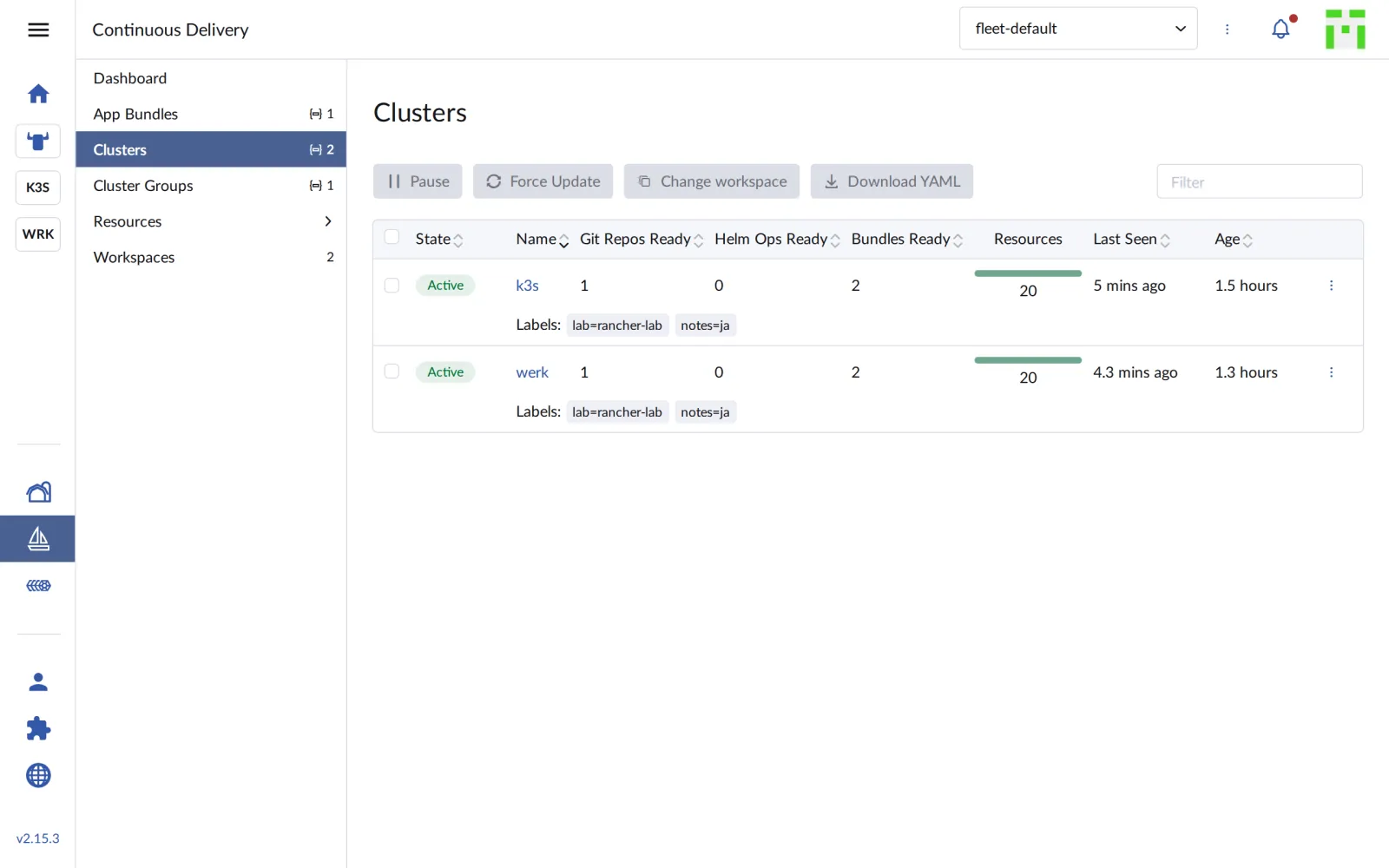
In the UI, Continuous Delivery › Clusters shows both clusters with their labels:
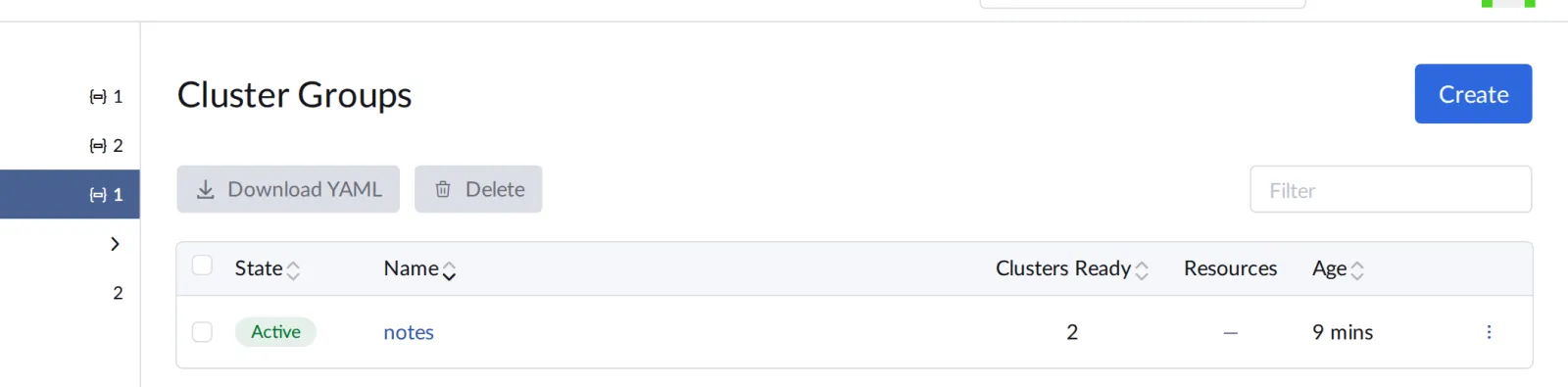
Under Cluster Groups the group is listed with two ready clusters:
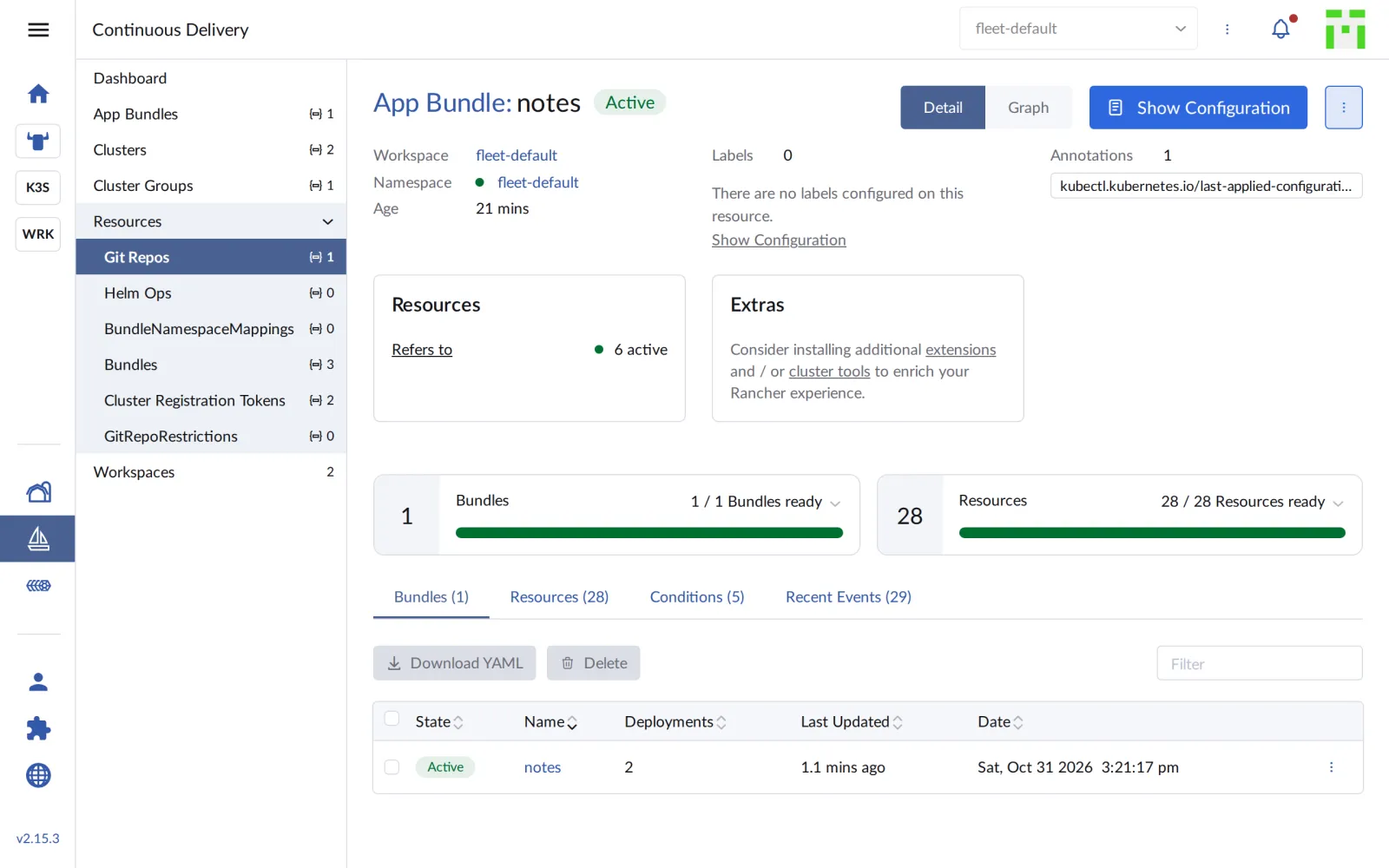
And the GitRepo now counts two deployments and twice as many resources:
Save your progress? Sign up for free
Checkpoint
kubectl -n fleet-default get clustergroups.fleet.cattle.io notesExpected: two clusters in the group.
NAME    CLUSTERS-READY   BUNDLES-READY   STATUS
notes   2/2              4/4
kubectl -n fleet-default get gitrepos.fleet.cattle.io notes \
-o jsonpath='{.status.display.readyBundleDeployments}'; echoExpected: 2/2.
2/2kubectl --kubeconfig "$LAB/kube/k3s.yaml" -n notes get deploy apiExpected: a single api replica on k3s.
NAME READY UP-TO-DATE AVAILABLE AGE
api 1/1 1 1 5mChallenge
What happens to notes on k3s when the cluster loses its label? Remove
notes=ja from k3s, watch the release and then bring k3s
back into the group.
Hint: kubectl label … notes- removes a
label.
Solution
kubectl label clusters.management.cattle.io "$K3S_ID" notes-
kubectl -n fleet-default label clusters.provisioning.cattle.io k3s notes-
helm --kubeconfig "$LAB/kube/k3s.yaml" -n notes list
kubectl --kubeconfig "$LAB/kube/k3s.yaml" -n notes get pvc
kubectl label clusters.management.cattle.io "$K3S_ID" notes=ja
kubectl -n fleet-default label clusters.provisioning.cattle.io k3s notes=ja
kubectl -n fleet-default get gitrepos.fleet.cattle.io notes \
-o jsonpath='{.status.display.readyBundleDeployments}'; echoExpected (abridged; wait half a minute before the last command):
cluster.management.cattle.io/c-m-5pjkcmvg unlabeled
cluster.provisioning.cattle.io/k3s unlabeled
NAME    NAMESPACE   REVISION   UPDATED   STATUS   CHART   APP VERSION
NAME        STATUS   VOLUME                                     CAPACITY   …
data-db-0   Bound    pvc-1cc33490-4219-4c30-9a23-96c6b5e39798   1Gi        …
cluster.management.cattle.io/c-m-5pjkcmvg labeled
cluster.provisioning.cattle.io/k3s labeled
2/2
Three seconds after the label was removed, Fleet deleted the release on k3s. That is intended: what is no longer a target, Fleet cleans up. The volume survives, and with the label, notes comes back including its data after half a minute. So a wrongly set label can switch off an application; that’s why labels belong under the same control as the code.
Save your progress? Sign up for free
Enterprise Note
- Labels as a contract: Environment
(
env=prod), region, customer, hardware: a clear label scheme decides what gets rolled out where. Rancher can set labels right when creating the cluster. - Staged rollouts: Several GitRepos or branches for
dev,stagingandprod, orrolloutStrategyinfleet.yamlwith partitions, so that an error doesn’t hit all clusters at once. - Platform bundles: Besides applications, Fleet also distributes basic equipment such as catalogs, monitoring agents or policies to every new cluster.
- Safeguard deletion:
keepResources: truein the GitRepo leaves resources in place when a cluster drops out of the target. For databases that is often the safer choice. - Many clusters: Fleet is designed for thousands of clusters, such as branch offices or edge sites with k3s.