Day 10: Longhorn
Goal: Install Longhorn from Rancher’s catalog on werk, move Postgres to a replicated volume and prove that the database can now change nodes. · Duration: approx. 90 min · Prerequisite: Day 9
Briefing
- Longhorn is Rancher’s storage: every volume lives as replicas on several nodes. If a node drops out, Longhorn attaches the volume on another one.
- In “Kubernetes hands-on”, Day 14,
db-0was stuck on local-path: draining the node meant an outage untiluncordon. That is exactly what changes today. - Longhorn uses iSCSI. The
iscsidservice must run on every node. - The StorageClass of a StatefulSet can’t be changed afterwards. The move therefore needs a backup and a reinstallation.
 Node werk1            Node werk2            Node werk3
 ┌──────────────┐      ┌──────────────┐      ┌──────────────┐
 │ Replica  ◄───┼──────┼─► Replica    │      │              │
 │   ▲          │      │              │      │ db-0 (new)   │
 └───┼──────────┘      └──────────────┘      └──────┬───────┘
     └──────── Longhorn engine attaches the volume where db-0 runs
Drill 1: Prerequisites
source ~/rancher-lab/setup/env.sh
mkdir -p "$LAB/tag10" && cd "$LAB/tag10"
for n in werk1 werk2 werk3; do
  multipass exec "$n" -- sudo systemctl enable --now iscsid
  echo "$n: $(multipass exec "$n" -- systemctl is-active iscsid)"
done
Expected:
werk1: active
werk2: active
werk3: active
open-iscsi is already installed in the Ubuntu images;
only the service is asleep. Without it, Longhorn reports its nodes as
not ready.
Save your progress? Sign up for free
Drill 2: Longhorn from the Rancher Catalog
Longhorn is listed in Apps › Charts of the cluster
werk, from the repo rancher-charts. Rancher maintains its
own tested versions there:
export KUBECONFIG="$LAB/kube/rancher.yaml"
ID=$(kubectl -n fleet-default get clusters.provisioning.cattle.io werk \
  -o jsonpath='{.status.clusterName}')
H="Authorization: Bearer $(cat "$LAB/rancher-token")"
API="https://rancher.$RANCHER.sslip.io/k8s/clusters/$ID/v1"
API+="/catalog.cattle.io.clusterrepos/rancher-charts"
curl -sk -H "$H" "$API?link=index" \
  | jq -r '.entries.longhorn[0:2][] | "\(.version) app \(.appVersion)"'
Expected:
110.1.0+up1.12.1 app v1.12.1
110.0.0+up1.11.3 app v1.11.3
The Rancher version number 110.1.0 starts with the
Rancher generation, up1.12.1 names the Longhorn version
behind it. Two charts get installed, first the CRDs, then Longhorn
itself, with two instead of three replicas per volume for the small
VMs:
curl -sk -X POST -H "$H" -H 'Content-Type: application/json' "$API?action=install" \
  -d '{"charts":[
        {"chartName":"longhorn-crd","version":"110.1.0+up1.12.1",
         "releaseName":"longhorn-crd","values":{}},
        {"chartName":"longhorn","version":"110.1.0+up1.12.1","releaseName":"longhorn",
         "values":{"persistence":{"defaultClassReplicaCount":2},
                   "defaultSettings":{"defaultReplicaCount":2}}}],
      "namespace":"longhorn-system","wait":true,"timeout":"900s"}' \
  | jq -c '{operationName}'
export KUBECONFIG="$LAB/kube/werk.yaml"
kubectl -n longhorn-system rollout status ds/longhorn-manager --timeout=600s
kubectl -n longhorn-system get nodes.longhorn.io
kubectl get sc
Expected (abridged, after two to three minutes):
{"operationName":"helm-operation-7p994"}
daemon set "longhorn-manager" successfully rolled out
NAME    READY   ALLOWSCHEDULING   SCHEDULABLE   AGE
werk1   True    true              True          16s
werk2   True    true              True          8s
werk3   True    true              True          10s
NAME                   PROVISIONER             RECLAIMPOLICY   VOLUMEBINDINGMODE   …
local-path (default)   rancher.io/local-path   Delete          WaitForFirstConsumer
longhorn (default)     driver.longhorn.io      Delete          Immediate
longhorn-static        driver.longhorn.io      Delete          Immediate
Two default StorageClasses are one too many. Take the role away from local-path:
kubectl annotate sc local-path storageclass.kubernetes.io/is-default-class=false \
  --overwrite
kubectl get sc
Expected (abridged):
storageclass.storage.k8s.io/local-path annotated
NAME                 PROVISIONER             …
local-path           rancher.io/local-path   …
longhorn (default)   driver.longhorn.io      …
longhorn-static      driver.longhorn.io      …
Save your progress? Sign up for free
Drill 3: Why Not Just Switch Over
The obvious move would be to set
db.storageClassName: longhorn in fleet.yaml.
If you try it, Fleet reports after half a minute:
server-side apply failed for object notes/db apps/v1, Kind=StatefulSet: StatefulSet.apps
"db" is invalid: spec: Forbidden: updates to statefulset spec for fields other than
'replicas', 'ordinals', 'template', 'updateStrategy', 'revisionHistoryLimit',
'persistentVolumeClaimRetentionPolicy' and 'minReadySeconds' are forbidden
The volumeClaimTemplates of a StatefulSet are immutable,
even if only an empty field turns into a value. In the test this even
hit k3s, where local-path was supposed to be entered
explicitly, which was already in use anyway. The clean solution needs no
entry at all: every cluster takes its default
StorageClass, so werk now takes Longhorn, k3s stays on
local-path. fleet.yaml stays as it is.
Save your progress? Sign up for free
Drill 4: Moving with a Backup
The existing volume is still on local-path. The path: back up, take werk out of the Fleet group (Day 9), delete the old volume, bring werk back, restore.
curl -s "http://notes.$WERK1.sslip.io/api/notes"; echo
kubectl -n notes exec db-0 -- pg_dump -U notes -d notes -Fc > notes.dump
ls -l notes.dump
W_ID="$ID"
kubectl --kubeconfig "$LAB/kube/rancher.yaml" label clusters.management.cattle.io \
  "$W_ID" notes-
kubectl --kubeconfig "$LAB/kube/rancher.yaml" -n fleet-default \
  label clusters.provisioning.cattle.io werk notes-
helm -n notes list
kubectl -n notes delete pvc data-db-0
Expected (abridged, helm list empty after a few
seconds):
[{"id":"c0c70ff3-…","text":"aus dem eigenen Katalog"}]
-rw-r--r--  1 …  1715 … notes.dump
cluster.management.cattle.io/c-m-ct8fr7hj unlabeled
cluster.provisioning.cattle.io/werk unlabeled
NAME    NAMESPACE   REVISION   UPDATED   STATUS   CHART   APP VERSION
persistentvolumeclaim "data-db-0" deleted from notes namespace
Now werk back into the group. Fleet reinstalls, the volume is created on the default StorageClass Longhorn, the migration runs against the new, empty database:
kubectl --kubeconfig "$LAB/kube/rancher.yaml" label clusters.management.cattle.io \
  "$W_ID" notes=ja
kubectl --kubeconfig "$LAB/kube/rancher.yaml" -n fleet-default \
  label clusters.provisioning.cattle.io werk notes=ja
kubectl -n notes wait --for=condition=Ready pod/db-0 --timeout=600s
kubectl -n notes get pvc
kubectl -n notes exec -i db-0 -- pg_restore -U notes -d notes --clean --if-exists \
  < notes.dump
curl -s "http://notes.$WERK1.sslip.io/api/notes"; echo
Expected (abridged):
cluster.management.cattle.io/c-m-ct8fr7hj labeled
cluster.provisioning.cattle.io/werk labeled
pod/db-0 condition met
NAME        STATUS   VOLUME                                     CAPACITY   …   STORAGEC…
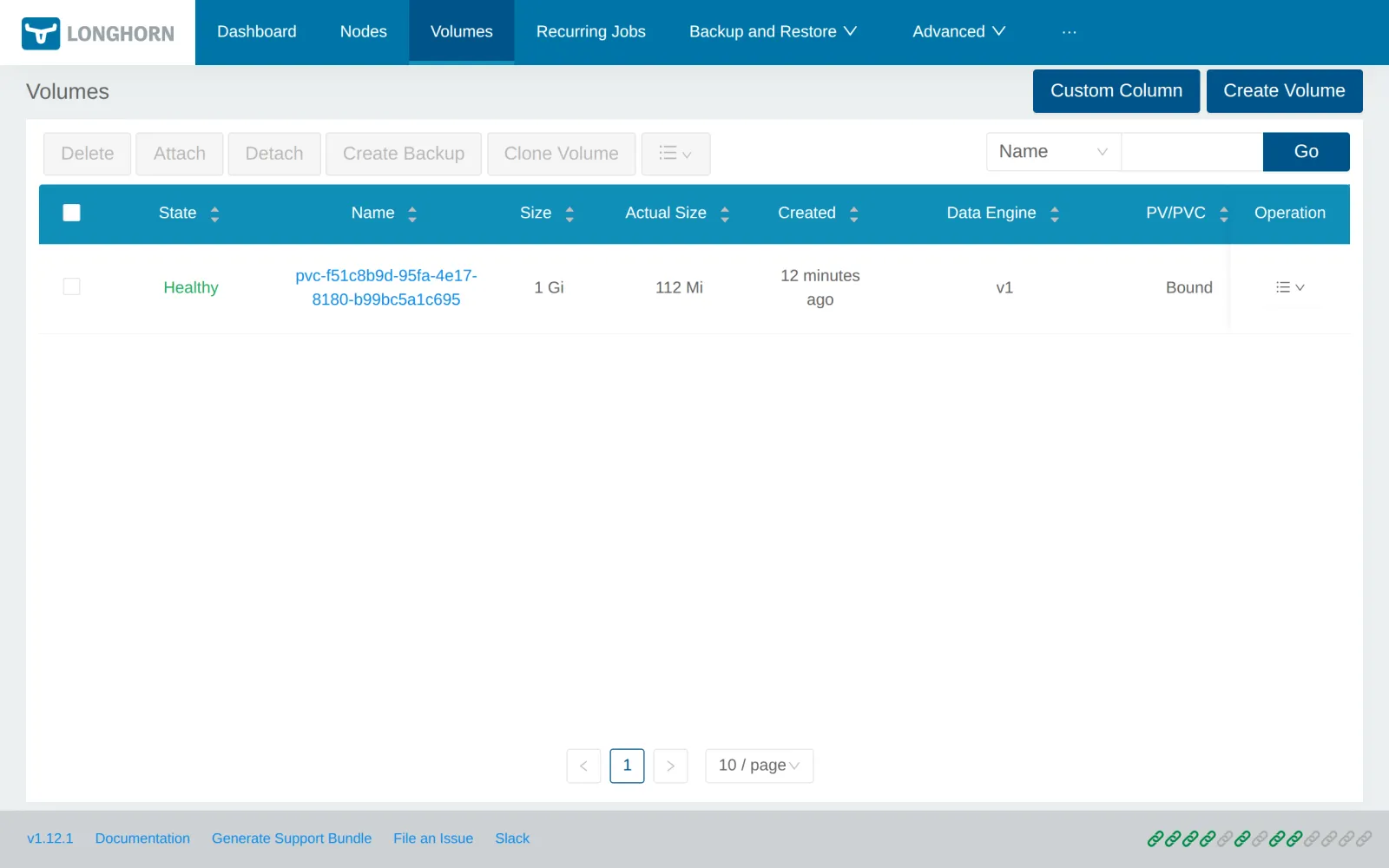
data-db-0   Bound    pvc-f51c8b9d-95fa-4e17-8180-b99bc5a1c695   1Gi        …   longhorn
[{"id":"c0c70ff3-…","text":"aus dem eigenen Katalog"}]
The note survived the move, now on Longhorn.
Save your progress? Sign up for free
Drill 5: Where the Data Lives
V=$(kubectl -n notes get pvc data-db-0 -o jsonpath='{.spec.volumeName}')
c='STATE:.status.state,ROBUST:.status.robustness,NODE:.status.currentNodeID'
c+=',REPLICAS:.spec.numberOfReplicas'
kubectl -n longhorn-system get volumes.longhorn.io "$V" -o custom-columns="$c"
kubectl -n longhorn-system get replicas.longhorn.io \
  -o custom-columns=NODE:.spec.nodeID,STATE:.status.currentState
Expected:
STATE      ROBUST    NODE    REPLICAS
attached   healthy   werk1   2
NODE    STATE
werk1   running
werk2   running
The volume is attached to werk1, where db-0 runs, and
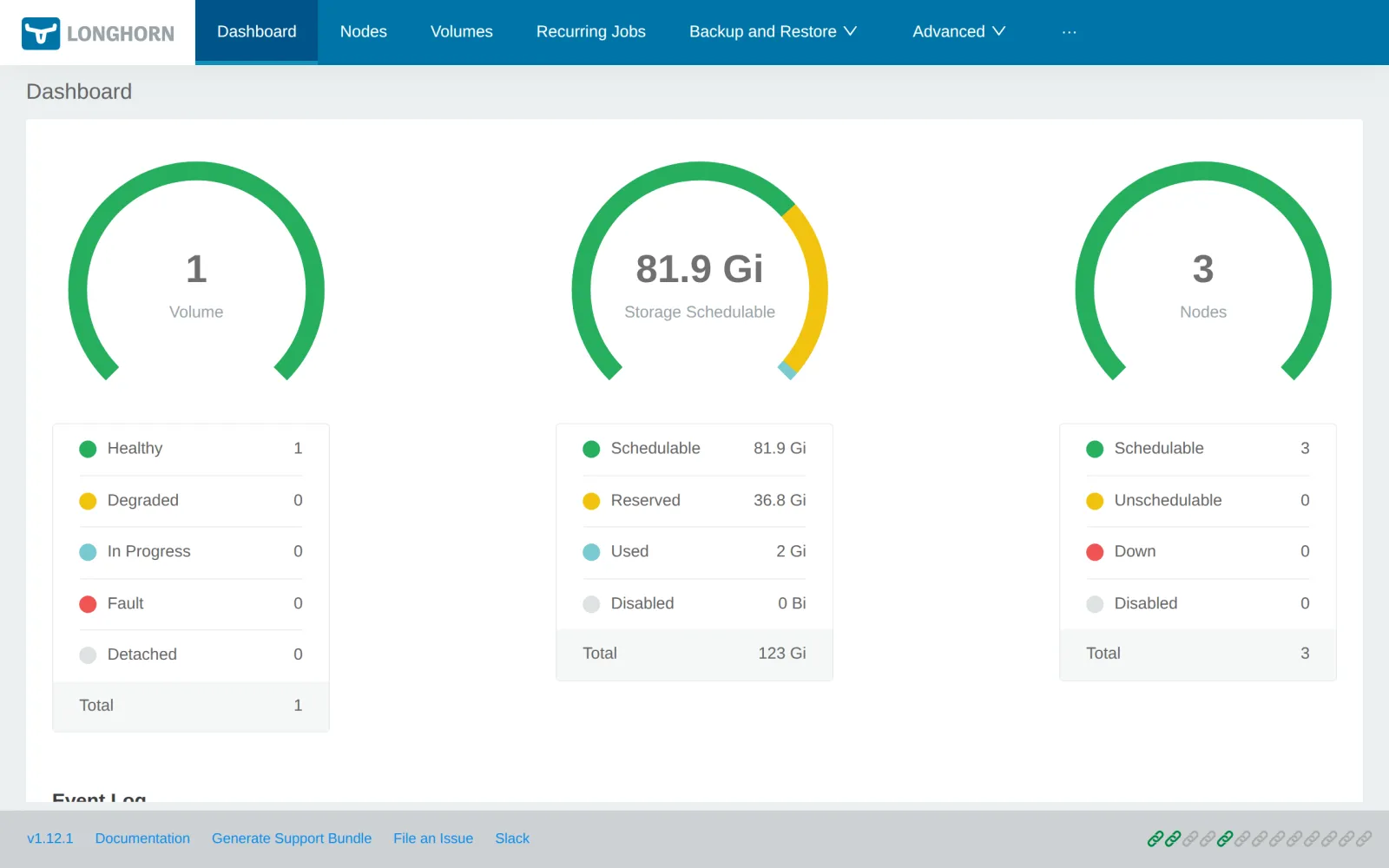
has two replicas, one on werk1, one on werk2. You reach the Longhorn UI
through Rancher, in the cluster’s menu under
Longhorn:
Under Volumes you find the Postgres volume, 1 Gi in size, a good 100 Mi used:
Save your progress? Sign up for free
Drill 6: db-0 Moves
Now the test from the sister book, with a new outcome. In a second terminal, start the measurement loop:
while true; do
  printf '%s %s\n' "$(date +%T)" "$(curl -s -o /dev/null -m 2 -w '%{http_code}' \
    "http://notes.$WERK1.sslip.io/api/notes")"
  sleep 1
done
Cordon the node of db-0 and kick the pod off:
N=$(kubectl -n notes get pod db-0 -o jsonpath='{.spec.nodeName}')
kubectl cordon "$N"
kubectl -n notes delete pod db-0
kubectl -n notes wait --for=condition=Ready pod/db-0 --timeout=300s
kubectl -n notes get pod db-0 -o wide
kubectl -n longhorn-system get volumes.longhorn.io "$V" -o custom-columns="$c"
kubectl uncordon "$N"
Expected (abridged):
node/werk1 cordoned
pod "db-0" deleted from notes namespace
pod/db-0 condition met
NAME   READY   STATUS    RESTARTS   AGE   IP   NODE    …
db-0   1/1     Running   0          50s   …    werk3   …
STATE      ROBUST    NODE    REPLICAS
attached   healthy   werk3   2
node/werk1 uncordoned
In the measurement loop:
… 200
… 500
…
… 500
… 200
db-0 now runs on werk3, a node without any replica:
Longhorn attaches the volume over the network. After just under a minute
notes answers again. The pause comes from the Postgres restart and from
the api restarting when the database is missing (“Kubernetes hands-on”,
Day 7). With local-path, db-0 would have stayed down until
uncordon.
Save your progress? Sign up for free
Checkpoint
kubectl -n notes get pvc data-db-0 \
  -o custom-columns=NAME:.metadata.name,SC:.spec.storageClassName
Expected: the Postgres volume on longhorn.
NAME        SC
data-db-0   longhorn
kubectl -n longhorn-system get volumes.longhorn.io "$V" -o custom-columns="$c"Expected: attached and healthy.
STATE      ROBUST    NODE    REPLICAS
attached   healthy   werk3   2
kubectl --kubeconfig "$LAB/kube/rancher.yaml" -n fleet-default \
get gitrepos.fleet.cattle.io notes \
-o jsonpath='{.status.display.readyBundleDeployments}'; echoExpected: Fleet is happy, 2/2.
2/2Challenge
Two replicas survive the failure of one node. Give the volume a third
one without changing anything about notes, and measure how long Longhorn
takes to reach healthy.
Hint: The number is in the volume object in
spec.numberOfReplicas.
Solution
kubectl -n longhorn-system patch volumes.longhorn.io "$V" --type merge \
  -p '{"spec":{"numberOfReplicas":3}}'
kubectl -n longhorn-system get volumes.longhorn.io "$V" -o custom-columns="$c"
kubectl -n longhorn-system wait volumes.longhorn.io/"$V" \
  --for=jsonpath='{.status.robustness}'=healthy --timeout=120s
kubectl -n longhorn-system get replicas.longhorn.io \
  -o custom-columns=NODE:.spec.nodeID,STATE:.status.currentState
Expected (abridged):
volume.longhorn.io/pvc-f51c8b9d-95fa-4e17-8180-b99bc5a1c695 patched
STATE      ROBUST     NODE    REPLICAS
attached   degraded   werk3   3
volume.longhorn.io/pvc-f51c8b9d-95fa-4e17-8180-b99bc5a1c695 condition met
NODE    STATE
werk1   running
werk3   running
werk2   running
With the new target count, the volume is briefly
degraded until Longhorn has built the third replica. With
100 Mi of data that takes a good ten seconds. The change applies only to
this volume; new volumes still get the two from the StorageClass.
Save your progress? Sign up for free
Enterprise Note
- Databases: Longhorn makes the volume resilient, not Postgres. An operator like CloudNativePG with replicas at the database level is faster and avoids the one-minute pause.
- Disks: In production, Longhorn gets dedicated disks
per node (
/var/lib/longhornon its own file system) and a fast network. - Backups: Longhorn backs up volumes via a backup target to S3 or NFS, outside the cluster, and can restore them in another cluster too.
- Node failure: For hard-crashed nodes, the setting
node-down-pod-deletion-policyapplies; without it, Kubernetes waits the five minutes from the sister book before the volume may move elsewhere. - Alternatives: Ceph via Rook, a SAN with a CSI driver or the cloud’s storage. Longhorn scores with simple operation and its integration into Rancher.