Day 12: Upgrades
Goal: Understand which Kubernetes versions Rancher allows and where this limit sits, upgrade an imported k3s through Rancher and define how Rancher drains werk during an upgrade. · Duration: approx. 60 min · Prerequisite: Day 11
Briefing
- Every Rancher version supports a fixed window of Kubernetes versions, the support matrix. Rancher 2.15.3 knows RKE2 and k3s up to v1.36.
- Upgrades of created clusters (werk) are run by Rancher through plans
for the system agent (Day 5), node by node according to
upgradeStrategy. - Rancher upgrades imported k3s and RKE2 clusters with the
system-upgrade-controller: a
Plandescribes the target version and nodes, a job per node swaps out the binary. - The right order: first Rancher, then the clusters. Otherwise an old Rancher manages clusters it doesn’t know.
 Rancher (local)                               k3s (imported)
 Cluster c-m-…: spec.k3sConfig.kubernetesVersion ─► Plan k3s-master-plan
                                                    Job apply-k3s-master-plan-on-k3s
                                                     ├ cordon
                                                     ├ swap k3s binary, restart
                                                     └ uncordon
Drill 1: Which Versions Rancher Knows
source ~/rancher-lab/setup/env.sh
mkdir -p "$LAB/tag12" && cd "$LAB/tag12"
cp "$LAB/code/tag12/"* .
export KUBECONFIG="$LAB/kube/rancher.yaml"
R="https://rancher.$RANCHER.sslip.io"
H="Authorization: Bearer $(cat "$LAB/rancher-token")"
curl -sk -H "$H" "$R/v1-rke2-release/releases" | jq -r '.data[].id' | sort -V | tail -3
curl -sk -H "$H" "$R/v1-k3s-release/releases" | jq -r '.data[].id' | sort -V | tail -3
kubectl get settings.management.cattle.io rke2-default-version k3s-default-version \
  -o custom-columns=NAME:.metadata.name,VALUE:.value
Expected (abridged, names, IPs and times differ on your machine):
v1.36.3+rke2r1
v1.36.4+rke2r1
v1.36.5+rke2r1
v1.36.3+k3s1
v1.36.4+k3s1
v1.36.5+k3s1
NAME                   VALUE
rke2-default-version   1.36.5+rke2r1
k3s-default-version    1.36.5+k3s1
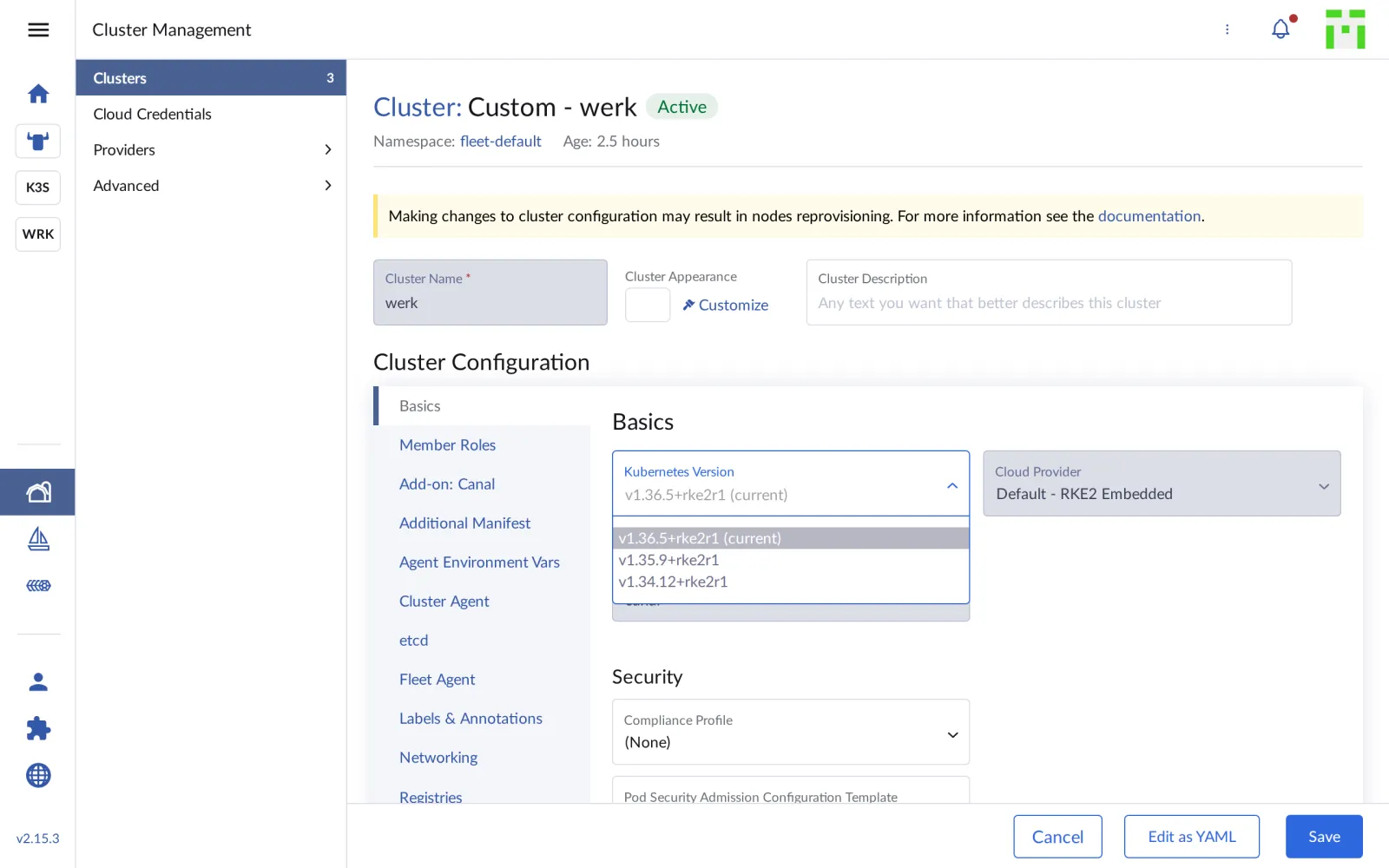
The lists come from Rancher’s metadata (KDM, “Kontainer Driver Metadata”), which Rancher updates regularly. werk and k3s are already running the highest version that Rancher 2.15.3 knows. The UI shows that too: under Edit Config of werk, only supported versions are offered.
Save your progress? Sign up for free
Drill 2: The Limit Sits in the UI
What does the API say if someone enters a version outside the list? A dry run is enough:
kubectl -n fleet-default patch clusters.provisioning.cattle.io werk --type merge \
  --dry-run=server -p '{"spec":{"kubernetesVersion":"v1.37.1+rke2r1"}}'
Expected:
cluster.provisioning.cattle.io/werk patchedWarning: Rancher doesn’t reject the version. The support matrix is enforced only by the UI; via
kubectl, Terraform or GitOps an unsupported version can be entered. Check versions against the matrix atsuse.com/suse-rancher/support-matrixbefore every upgrade.
Save your progress? Sign up for free
Drill 3: How k3s Gets Its Version
For the imported k3s, the desired version lives in the management cluster:
K3S_ID=$(kubectl -n fleet-default get clusters.provisioning.cattle.io k3s \
  -o jsonpath='{.status.clusterName}')
kubectl get clusters.management.cattle.io "$K3S_ID" -o jsonpath='{.spec.k3sConfig}'
echo
kubectl --kubeconfig "$LAB/kube/k3s.yaml" get plans.upgrade.cattle.io -A
Expected:
{"k3supgradeStrategy":{"serverConcurrency":1,"workerConcurrency":1},
"kubernetesVersion":"v1.36.5+k3s1"}
NAMESPACE       NAME                            IMAGE                  …   COMPLETE
cattle-system   system-agent-upgrader           rancher/system-agent   …   True
cattle-system   system-agent-upgrader-windows   rancher/wins           …   True
Rancher brought the system-upgrade-controller along during the import (Day 4). So far there are only plans for the system agent, none yet for k3s itself.
Save your progress? Sign up for free
Drill 4: The Upgrade
For the lab you raise k3s to v1.37.1, the current k3s version. It
lies outside the matrix of Rancher 2.15.3; the mechanics are the same as
with any supported upgrade, and k3s is the cluster whose loss hurts
least. Beforehand, start the measurement loop against
notes.$K3S.sslip.io in a second terminal (Day 10, Drill
6).
kubectl patch clusters.management.cattle.io "$K3S_ID" --type merge \
  -p '{"spec":{"k3sConfig":{"kubernetesVersion":"v1.37.1+k3s1"}}}'
kubectl --kubeconfig "$LAB/kube/k3s.yaml" get plans.upgrade.cattle.io -n cattle-system
kubectl --kubeconfig "$LAB/kube/k3s.yaml" get nodes
Expected (abridged, after about a minute):
cluster.management.cattle.io/c-m-5pjkcmvg patched
NAME              IMAGE                 …   VERSION        COMPLETE
k3s-master-plan   rancher/k3s-upgrade   …   v1.37.1+k3s1   False
k3s-worker-plan   rancher/k3s-upgrade   …   v1.37.1+k3s1   True
…
NAME   STATUS                     ROLES           AGE     VERSION
k3s    Ready,SchedulingDisabled   control-plane   3h25m   v1.36.5+k3s1
Rancher has created two plans, one for servers, one for agents. The agent plan is finished immediately because k3s has no agent. The server node is cordoned; a job swaps the binary and restarts k3s. After about five minutes:
kubectl --kubeconfig "$LAB/kube/k3s.yaml" get nodes
kubectl --kubeconfig "$LAB/kube/k3s.yaml" get plans.upgrade.cattle.io -n cattle-system \
  k3s-master-plan k3s-worker-plan
kubectl --kubeconfig "$LAB/kube/k3s.yaml" -n notes get pods
curl -s "http://notes.$K3S.sslip.io/api/notes"; echo
Expected (abridged):
NAME   STATUS   ROLES           AGE     VERSION
k3s    Ready    control-plane   3h25m   v1.37.1+k3s1
NAME              IMAGE                 …   VERSION        COMPLETE
k3s-master-plan   rancher/k3s-upgrade   …   v1.37.1+k3s1   True
k3s-worker-plan   rancher/k3s-upgrade   …   v1.37.1+k3s1   True
NAME                      READY   STATUS      RESTARTS      AGE
api-84cc5bccd7-4csjb      1/1     Running     2 (58m ago)   58m
db-0                      1/1     Running     0             58m
…
[{"id":"395a46da-…","text":"läuft auf k3s"}]
The notes pods kept running, without a restart: k3s restarts its components, the containers keep running in containerd. Rancher reports the cluster as not ready for about half a minute while the agent reestablishes the connection.
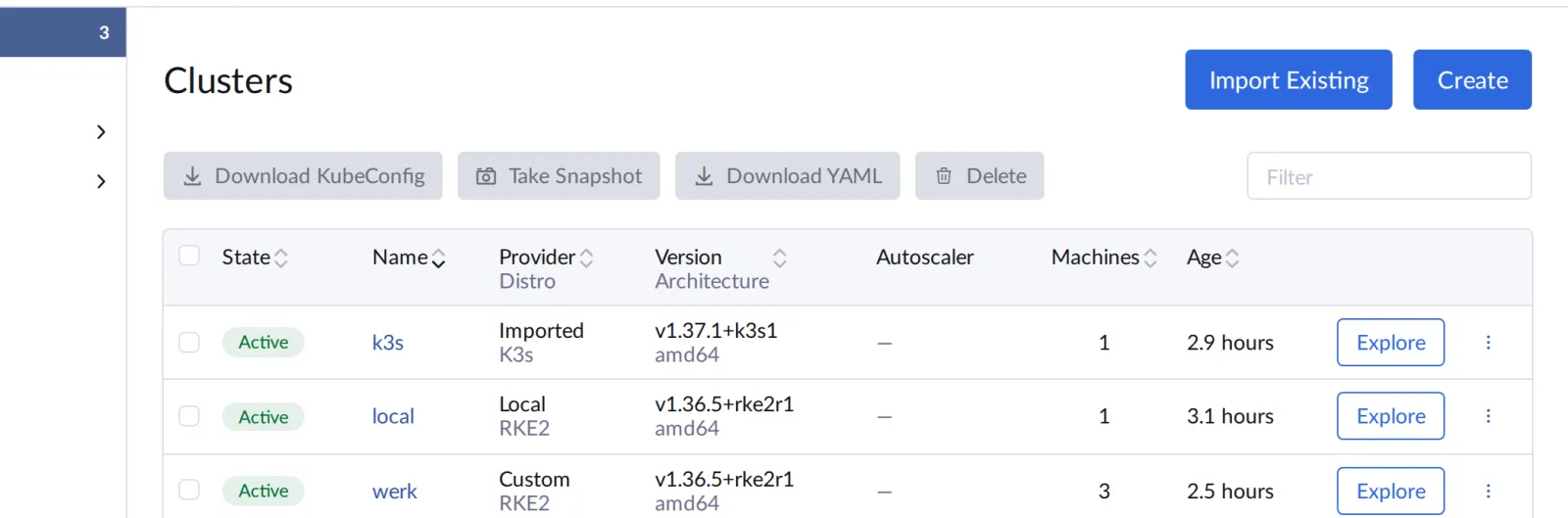
In Cluster Management, k3s is now on v1.37.1, werk and local on v1.36.5:
Save your progress? Sign up for free
Drill 5: How werk Would Be Drained
For werk you define how a future upgrade proceeds. New is the section
workerDrainOptions:
# tag12/cluster-werk.yaml (excerpt) – state at end of Day 12
    upgradeStrategy:
      controlPlaneConcurrency: "1"
      workerConcurrency: "1"
      workerDrainOptions:           # new on Day 12: drain workers before the upgrade
        enabled: true
        deleteEmptyDirData: true
        ignoreDaemonSets: true
        timeout: 300
Without drain, Rancher swaps RKE2 out from under running pods. With
drain, it clears each worker first like kubectl drain (Day
10 and “Kubernetes hands-on”, Day 14); the PodDisruptionBudgets from the
chart are respected.
sed -i '' -e "s|RANCHER_IP|$RANCHER|" \
  -e "s|CA_BUNDLE|$(base64 -i "$LAB/tag07/lab-ca.crt")|" cluster-werk.yaml
kubectl apply -f cluster-werk.yaml
kubectl -n fleet-default get machines.cluster.x-k8s.io
Expected (abridged):
cluster.provisioning.cattle.io/werk configured
NAME                  CLUSTER   NODE NAME   …   PHASE     AGE
custom-431ed8f98314   werk      werk1       …   Running   2h
custom-44fc6b990590   werk      werk3       …   Running   2h
custom-8e74ab3310e6   werk      werk2       …   Running   2h
The machines stay as they are: a changed upgrade strategy only takes effect at the next upgrade; it doesn’t rebuild any node.
Save your progress? Sign up for free
Checkpoint
kubectl --kubeconfig "$LAB/kube/k3s.yaml" get nodesExpected: k3s on v1.37.1, Ready, not cordoned.
NAME   STATUS   ROLES           AGE     VERSION
k3s    Ready    control-plane   3h30m   v1.37.1+k3s1
kubectl -n fleet-default get clusters.provisioning.cattle.io werk \
-o jsonpath='{.spec.rkeConfig.upgradeStrategy.workerDrainOptions.enabled}'; echoExpected: true.
truekubectl -n fleet-default get gitrepos.fleet.cattle.io notes \
-o jsonpath='{.status.display.readyBundleDeployments}'; echoExpected: Fleet is happy after the upgrade too.
2/2Challenge
A colleague asks whether Rancher at least protects him from a downgrade of werk. Find out without damaging werk.
Hint: --dry-run=server sends a change
through all checks of the API server and the webhooks, but doesn’t store
it.
Solution
kubectl -n fleet-default patch clusters.provisioning.cattle.io werk --type merge \
  --dry-run=server -p '{"spec":{"kubernetesVersion":"v1.36.4+rke2r1"}}'
kubectl -n fleet-default get clusters.provisioning.cattle.io werk \
  -o jsonpath='{.spec.kubernetesVersion}'; echo
Expected:
cluster.provisioning.cattle.io/werk patched
v1.36.5+rke2r1
The downgrade passes the checks too; nothing was stored, werk is still on v1.36.5. Kubernetes itself doesn’t support downgrades; a real way back would be an etcd restore from the time before the upgrade (Day 13). The answer for the colleague: no, Rancher doesn’t protect you. The change approval process has to do that.
Save your progress? Sign up for free
Enterprise Note
- Order: First raise Rancher to a version that knows the target Kubernetes version, then the clusters. Don’t skip any Rancher minor versions in between.
- Back up first: Before every upgrade, an etcd snapshot (Day 13) and a backup of Rancher itself. An upgrade can’t be undone, only restored.
- Staged: First a test cluster, then the rest, via
label groups in Fleet or with
rolloutStrategy.controlPlaneConcurrencyandworkerConcurrencyat 1 keep the risk per cluster small. - Automatic: For many k3s clusters at the edge, the
system-upgrade-controller takes over the upgrades with its own Plans and
channels (
channel: stable), entirely without Rancher. - Prime: With Rancher Prime there are extended support periods when clusters can’t keep pace with Kubernetes releases.