
Day 1: How a GPU Gets into the Container
Goal: Understand which files, devices and variables a container needs to see a GPU, and who gives them to it: NRI, CDI and the driver root · Duration: approx. 60 min · Prerequisite: Day 0
Briefing
- A container is an ordinary process with its own view of the file
system. To be able to use a GPU, it needs three things from outside: the
device files (
/dev/nvidia0,/dev/nvidiactl…), the driver’s libraries (libnvidia-ml.soand friends) and matching environment variables. - None of this is in the image. The driver belongs to the node, not to the application, and must match the kernel version exactly.
- On real servers, the NVIDIA Container Toolkit takes care of this. Today it describes devices in the standard format CDI (Container Device Interface), and the runtime (containerd) applies the description.
- Mokka does the same with an NRI plugin: it hooks into containerd when a container is created and attaches devices, mounts and variables.
  Pod spec  ──▶  kubelet  ──▶  containerd ──▶ NRI plugin (Mokka) ──▶ container
                                    │         attaches: /dev/nvidia*, driver, ENV
                                    └── CDI spec /var/run/cdi/nvidia.yaml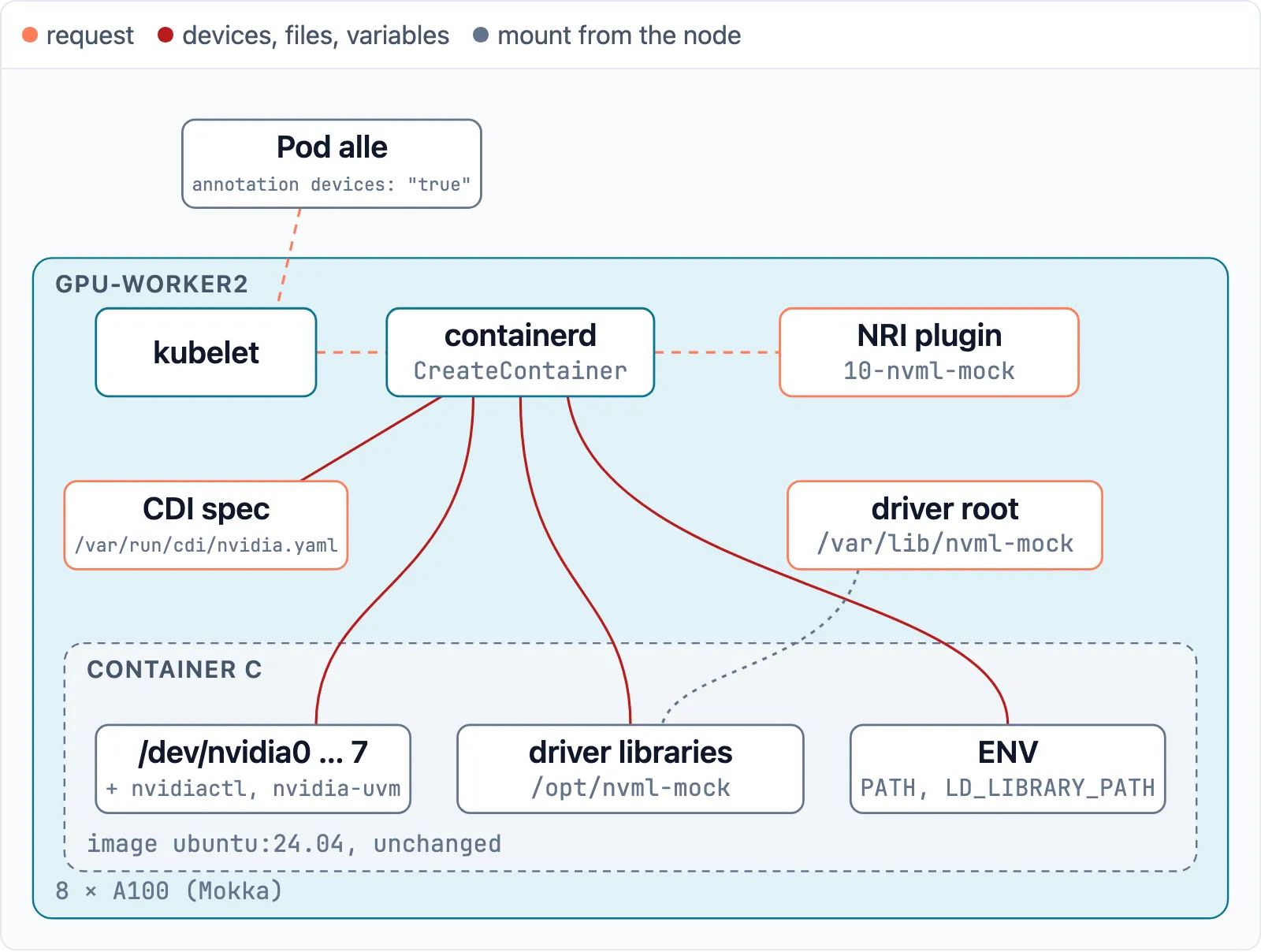
Drill 1: A Pod Without a GPU on the GPU Node
mkdir -p ~/gpu/tag01 && cd ~/gpu/tag01
kubectl create namespace tag01
cat <<EOF | kubectl apply -f -
apiVersion: v1
kind: Pod
metadata:
  name: ohne
  namespace: tag01
spec:
  nodeSelector:
    gpu: mokka
  containers:
  - name: c
    image: ubuntu:24.04
    command: [sleep, infinity]
EOF
kubectl -n tag01 wait --for=condition=Ready pod/ohne --timeout=120s
kubectl -n tag01 exec ohne -- sh -c 'which nvidia-smi || echo "kein nvidia-smi"; \
  ls /dev/nvidia* 2>&1'
Expected:
namespace/tag01 created
pod/ohne created
pod/ohne condition met
kein nvidia-smi
ls: cannot access '/dev/nvidia*': No such file or directory
command terminated with exit code 2
The Pod runs on the node with eight GPUs and does not see a single one. That is exactly how it should be: whoever does not request a GPU does not get one.
Save your progress? Sign up for free
Drill 2: A Pod That Gets All GPUs
Mokka knows an annotation with which a Pod requests all GPUs of the node. It is meant for management tools that need to see every GPU, such as a monitoring agent.
cat <<EOF | kubectl apply -f -
apiVersion: v1
kind: Pod
metadata:
  name: alle
  namespace: tag01
  annotations:
    nvml-mock.nvidia.com/devices: "true"
spec:
  nodeSelector:
    gpu: mokka
  containers:
  - name: c
    image: ubuntu:24.04
    command: [sleep, infinity]
EOF
kubectl -n tag01 wait --for=condition=Ready pod/alle --timeout=120s
kubectl -n tag01 exec alle -- nvidia-smi -L | head -3
kubectl -n tag01 exec alle -- nvidia-smi \
  --query-gpu=index,memory.used,utilization.gpu,temperature.gpu --format=csv | head -3
Expected:
pod/alle created
pod/alle condition met
GPU 0: NVIDIA A100-SXM4-40GB (UUID: GPU-12345678-1234-1234-1234-123456780000)
GPU 1: NVIDIA A100-SXM4-40GB (UUID: GPU-12345678-1234-1234-1234-123456780001)
GPU 2: NVIDIA A100-SXM4-40GB (UUID: GPU-12345678-1234-1234-1234-123456780002)
index, memory.used [MiB], utilization.gpu [%], temperature.gpu
0, 0 MiB, 12 %, 33
1, 0 MiB, 30 %, 33
The same ubuntu:24.04 image, and suddenly it contains
nvidia-smi. The image has not changed. What has changed is
what containerd put into the container at startup.
Save your progress? Sign up for free
Drill 3: What the NRI Plugin Attached
Three things: devices, variables, mounts.
kubectl -n tag01 exec alle -- sh -c 'ls /dev | grep nvidia'Expected:
nvidia-uvm
nvidia-uvm-tools
nvidia0
nvidia1
nvidia2
nvidia3
nvidia4
nvidia5
nvidia6
nvidia7
nvidiactl
kubectl -n tag01 exec alle -- sh -c 'env | grep -E "^(PATH|LD_LIBRARY_PATH|MOCK_NVML)"'
kubectl -n tag01 exec alle -- sh -c 'grep nvml /proc/self/mountinfo | cut -d" " -f5'Expected:
LD_LIBRARY_PATH=/opt/nvml-mock/driver/usr/lib64
MOCK_NVML_CONFIG=/opt/nvml-mock/driver/config/config.yaml
PATH=/opt/nvml-mock/driver/usr/bin:/usr/local/sbin:/usr/local/bin:/usr/sbin:/usr/bin:/sbin:/bin
/opt/nvml-mock
/opt/nvml-mock/driver/config
The node’s driver root (/var/lib/nvml-mock) is mounted
as /opt/nvml-mock. PATH makes
nvidia-smi findable, LD_LIBRARY_PATH lets the
linker find the simulated libnvidia-ml.so, and
MOCK_NVML_CONFIG tells it which GPUs to pretend to be.
On a real server, the result looks almost the same, except that the
libraries are mounted to /usr/lib/x86_64-linux-gnu and
there are no mock variables.
Save your progress? Sign up for free
Drill 4: The Decision in the Plugin
Who decided that ohne gets nothing and alle
gets everything? The NRI plugin in the Mokka Pod. Its startup in the
log:
kubectl -n mokka logs ds/nvml-mock -c nvml-mock-nri | grep -E "Started|configured by" \
  | cut -c1-110
Expected:
{"level":"info","time":"2026-11-22T10:50:19.971Z","msg":"configured by runtime","runtim
time="2026-11-22T10:50:19Z" level=info msg="Started plugin 10-nvml-mock..."
It registers with containerd for the CreateContainer
event and from then on gets to see every new container on this node. It
steps in when the container has a GPU allocation (from Day 2 on via the
Device Plugin) or when the Pod carries the annotation.
Save your progress? Sign up for free
Drill 5: The CDI Description
Mokka also creates the file that nvidia-ctk cdi generate
produces on real servers:
docker exec gpu-worker2 ls /var/run/cdi
docker exec gpu-worker2 grep -m1 '^kind:' /var/run/cdi/nvidia.yaml
docker exec gpu-worker2 sed -n '/^devices:/,+11p' /var/run/cdi/nvidia.yaml
Expected:
nvidia.yaml
nvml-mock-nri.yaml
kind: nvidia.com/gpu
devices:
- containerEdits:
    deviceNodes:
    - hostPath: /var/lib/nvml-mock/driver/dev/nvidia0
      path: /dev/nvidia0
  name: "0"
- containerEdits:
    deviceNodes:
    - hostPath: /var/lib/nvml-mock/driver/dev/nvidia0
      path: /dev/nvidia0
  name: GPU-12345678-1234-1234-1234-123456780000
Each GPU has two names: its index and its UUID. The full CDI name is
nvidia.com/gpu=0 or
nvidia.com/gpu=GPU-1234…0000. The Device Plugin and the DRA
driver pass exactly such names to the runtime, and containerd executes
the containerEdits: pass through devices, mount files, set
variables.
The part shared by every GPU is further up:
docker exec gpu-worker2 sed -n '/^containerEdits:/,/^ hooks:/p' /var/run/cdi/nvidia.yamlExpected:
containerEdits:
  deviceNodes:
  - hostPath: /var/lib/nvml-mock/driver/dev/nvidiactl
    path: /dev/nvidiactl
  - hostPath: /var/lib/nvml-mock/driver/dev/nvidia-uvm
    path: /dev/nvidia-uvm
  - hostPath: /var/lib/nvml-mock/driver/dev/nvidia-uvm-tools
    path: /dev/nvidia-uvm-tools
  env:
  - NVIDIA_VISIBLE_DEVICES=void
  - MOCK_NVML_CONFIG=/etc/nvml-mock/config.yaml
  - MOCK_NVML_OVERRIDES=/etc/nvml-mock/overrides.yaml
  - MOCK_FABRICMANAGER_STATE_DIR=/var/lib/nvml-mock/fabric-state
  hooks:
Every GPU container needs nvidiactl and
nvidia-uvm, no matter how many GPUs it gets.
Save your progress? Sign up for free
Drill 6: The Scheduler Knows Nothing
The Pod alle has eight GPUs. What does Kubernetes know
about it?
kubectl describe node gpu-worker2 | sed -n '/Allocated resources/,/Events/p' | head -10Expected:
Allocated resources:
  (Total limits may be over 100 percent, i.e., overcommitted.)
  Resource           Requests    Limits
  --------           --------    ------
  cpu                120m (3%)   0 (0%)
  memory             114Mi (1%)  0 (0%)
  ephemeral-storage  0 (0%)      0 (0%)
  hugepages-1Gi      0 (0%)      0 (0%)
  hugepages-2Mi      0 (0%)      0 (0%)
Events:
Nothing. The annotation bypasses the scheduler. A second Pod with the same annotation would get the same eight GPUs again. That is why such an annotation is a security hole in production, and Mokka explicitly describes it as part of its test environment. Clean allocation, in which each GPU is handed out exactly once, comes via the Device Plugin (Day 2) or DRA (Day 8).
Save your progress? Sign up for free
Exercise: Speed Drills
- Show all device files that the Pod
allesees. Target time: 30 s - Show where the driver root is mounted in the container. Target time: 1 min
- Show the CDI names of all GPUs on
gpu-worker2. Target time: 2 min
Solution
kubectl -n tag01 exec alle -- sh -c 'ls /dev | grep nvidia'
kubectl -n tag01 exec alle -- sh -c 'grep nvml /proc/self/mountinfo | cut -d" " -f5'
docker exec gpu-worker2 grep '  name:' /var/run/cdi/nvidia.yaml
The third command shows 17 names: each GPU by index and UUID, plus
all for all eight at once.
Save your progress? Sign up for free
Checkpoint
kubectl -n tag01 exec alle -- nvidia-smi -L | wc -lExpected: 8
kubectl -n tag01 exec ohne -- sh -c 'ls /dev/nvidia* 2>/dev/null | wc -l'Expected: 0
Challenge
Explain to a colleague why you don’t simply pack the NVIDIA driver into the container image, and back it up with a command in the lab.
Hint: Who owns the device files, and what has to match what?
Solution
The driver consists of a kernel module on the node and libraries in user space. Both must have exactly the same version. If the library were in the image, every image would have to match every node, and a driver update on the node would break all images. That is why the libraries come from the node, matching its driver:
kubectl -n tag01 exec alle -- nvidia-smi --query-gpu=driver_version --format=csv,noheader \
  | head -1
docker exec gpu-worker2 ls /var/lib/nvml-mock/driver/usr/lib64/ | grep 580
Expected:
580.65.06
libcuda.so.580.65.06
libnvidia-ml.so.580.65.06
The version in the container is the node’s version.
libcuda.so is there too, the library CUDA programs run
against. With Mokka, it is a dummy.
Save your progress? Sign up for free
Clean-up
kubectl delete namespace tag01Interview Note
- What is CDI? The Container Device Interface, an open format in which a vendor describes which devices, mounts, variables and hooks a container needs for a device. containerd and CRI-O implement it; the NVIDIA Container Toolkit generates it.
- What is NRI? The Node Resource Interface of containerd and CRI-O. Plugins can modify containers at creation without changing the runtime itself.
- Why does a GPU container need
/dev/nvidiactl? It is the driver’s control file. Without it, no application can talk to a GPU, even if/dev/nvidia0is present.
Enterprise Note
- The GPU Operator installs the Container Toolkit on every GPU node and writes the CDI specifications. If they are missing after a driver update, GPU Pods start with errors like “unresolvable CDI devices”.
- Mechanisms that hand out GPUs while bypassing the scheduler should
be disabled in production. With the Container Toolkit, this concerns the
variable
NVIDIA_VISIBLE_DEVICESin Pods without an allocation. Policies (Kyverno, ValidatingAdmissionPolicy) forbid it. - Driver updates on GPU nodes are maintenance windows: drain nodes, upgrade driver and toolkit, regenerate CDI, bring nodes back. Day 13 practices this.