
Day 8: Dynamic Resource Allocation I
Goal: Stop handing out GPUs as the counter
nvidia.com/gpuand use Dynamic Resource Allocation instead: the driver describes each device in a ResourceSlice, a workload requests what it needs through a ResourceClaim, and the scheduler finds the matching device · Duration: approx. 75 min · Prerequisite: Day 7
Briefing
- The device plugin from Day 2 only knows a number: a node has 8
nvidia.com/gpu, a Pod wants- Which GPU, with how much memory, which architecture, is decided by the kubelet, without the scheduler knowing anything about it.
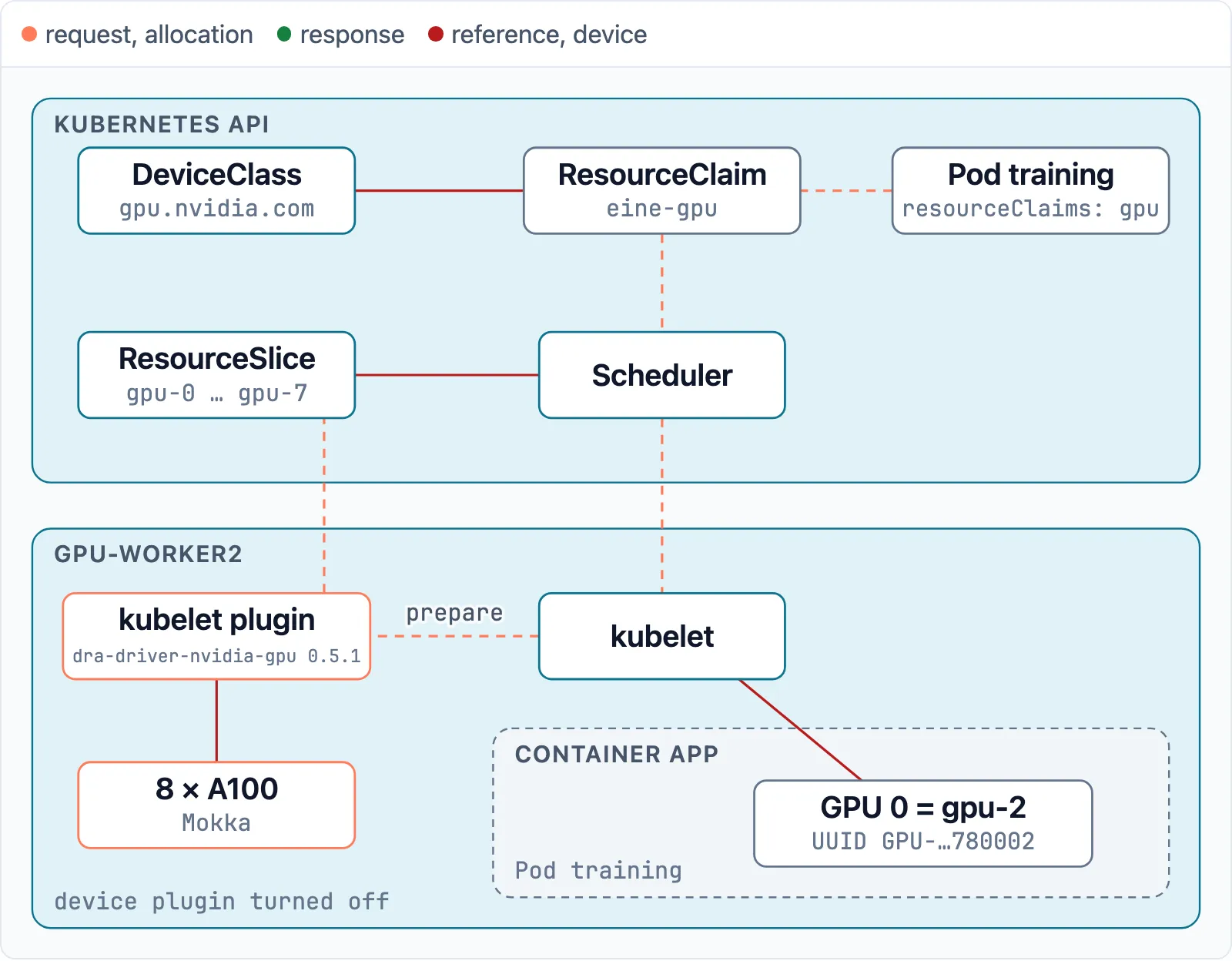
- Dynamic Resource Allocation (DRA, stable since Kubernetes 1.34) turns this around. A DRA driver publishes each device with all its properties as a ResourceSlice. A DeviceClass describes a kind of device (“whole NVIDIA GPU”). A ResourceClaim requests devices of a class. The scheduler picks matching devices and writes them into the claim; only then does the driver on the node prepare them.
- Today NVIDIA’s real DRA driver (
dra-driver-nvidia-gpu0.5.1) runs against Mokka’s simulated GPUs. DeviceClasses, ResourceSlices, claims and the scheduler’s decision are real. As always, the GPUs themselves are simulated.
  DRA driver ──ResourceSlice (gpu-0 … gpu-7, attributes)──▶ API
  Pod ──resourceClaims──▶ ResourceClaim (DeviceClass gpu.nvidia.com, count)
                              │
Scheduler: does a device fit? ──▶ writes gpu-2 into the claim ──▶ Kubelet ──▶ driver prepares| Term | Meaning |
|---|---|
| ResourceSlice | list of a driver’s devices on one node, with attributes and capacity |
| DeviceClass | kind of device with a selection rule (CEL), shipped by the driver |
| ResourceClaim | request: which class, how many, which conditions |
| Allocation | the devices the scheduler has allocated to a claim |
| reservedFor | the Pods currently using the claim |
Drill 1: Turn Off the Device Plugin
The device plugin and the DRA driver would hand out the same GPUs twice. The device plugin goes; the ClusterPolicy from Day 7 takes care of that:
mkdir -p ~/gpu/tag08 && cd ~/gpu/tag08
kubectl patch clusterpolicy cluster-policy --type=merge -p '{"spec":{"devicePlugin":{"enabled":false}}}'
sleep 20
kubectl -n gpu-operator get ds
kubectl get node gpu-worker2 -o jsonpath='{.status.capacity.nvidia\.com/gpu} {.status.allocatable.nvidia\.com/gpu}{"\n"}'
Expected:
clusterpolicy.nvidia.com/cluster-policy patched
NAME                        DESIRED   CURRENT   READY   UP-TO-DATE   AVAILABLE   NODE SELECTOR                                      AGE
gpu-feature-discovery       1         1         1       1            1           nvidia.com/gpu.deploy.gpu-feature-discovery=true   36h
nvidia-dcgm-exporter        1         1         1       1            1           nvidia.com/gpu.deploy.dcgm-exporter=true           36h
nvidia-operator-validator   1         1         1       0            1           nvidia.com/gpu.deploy.operator-validator=true      36h
and 8 0. The device plugin’s DaemonSet is gone. The
capacity of 8 remains in the node object (Day 2, Drill 6), but none of
it is handed out anymore. GFD, DCGM Exporter and validator keep running;
they do not need a device plugin.
Save your progress? Sign up for free
Drill 2: Install the DRA Driver
As with the device plugin, nvidiaDriverRoot points to
Mokka’s driver root. The other two values are only needed for the
simulation: gpuResourcesEnabledOverride skips checks that a
simulated node does not pass, and ComputeDomains
(joining several nodes over NVLink into one unit) do not exist without
real NVLink hardware.
cd ~/gpu/tag08
cat > dra-werte.yaml <<'EOF'
nvidiaDriverRoot: /var/lib/nvml-mock/driver
gpuResourcesEnabledOverride: true
resources:
  computeDomains:
    enabled: false
EOF
helm install dra-gpu nvidia/dra-driver-nvidia-gpu --version 0.5.1 -n nvidia-dra --create-namespace -f dra-werte.yaml --wait --timeout 180s | tail -4
kubectl -n nvidia-dra get pods -o wide
Expected:
STATUS: deployed
REVISION: 1
DESCRIPTION: Install complete
TEST SUITE: None
NAME                                         READY   STATUS    RESTARTS   AGE   IP            NODE          NOMINATED NODE   READINESS GATES
dra-driver-nvidia-gpu-kubelet-plugin-8btd5   1/1     Running   0          26s   10.244.2.98   gpu-worker2   <none>           <none>
A kubelet plugin on the GPU node, nothing else. It
runs only there because it requires the label
nvidia.com/gpu.present=true (from GFD since Day 3), and it
tolerates the taint from Day 4 out of the box. You know the Helm
repository nvidia from Day 7.
Save your progress? Sign up for free
Drill 3: DeviceClasses and ResourceSlices
kubectl get deviceclass
kubectl get resourceslice
kubectl get resourceslice -o json | jq '[.items[].spec.devices[]] | length'
Expected:
NAME                  AGE
gpu.nvidia.com        26s
mig.nvidia.com        26s
vfio.gpu.nvidia.com   26s
NAME                                     NODE          DRIVER           POOL          AGE
00000-gpu.nvidia.com-gpu-worker2-hfzh5   gpu-worker2   gpu.nvidia.com   gpu-worker2   1s
8
Three classes: whole GPUs, MIG instances (Day 6) and GPUs passed through entirely to a virtual machine via VFIO. One ResourceSlice for the node with 8 devices. This is what one looks like:
kubectl get resourceslice -o json | jq -c '.items[0].spec.devices[0]'Expected:
{"attributes":{"addressingMode":{"string":"HMM"},"architecture":{"string":"Ampere"},"brand":{"string":"Nvidia"},"cudaComputeCapability":{"version":"8.0.0"},"cudaDriverVersion":{"version":"13.0.0"},"driverVersion":{"version":"580.65.6"},"productName":{"string":"NVIDIA A100-SXM4-40GB"},"resource.kubernetes.io/pciBusID":{"string":"0000:47:00.0"},"type":{"string":"gpu"},"uuid":{"string":"GPU-12345678-1234-1234-1234-123456780002"}},"capacity":{"memory":{"value":"40Gi"}},"name":"gpu-2"}Everything GFD wrote as node labels on Day 3 is here per device: model, architecture, compute capability, driver version, PCI address, UUID, memory. This lets the scheduler later select by the properties of individual GPUs (Day 9). All devices with name and UUID:
kubectl get resourceslice -o json | jq -r '.items[].spec.devices[] | .name + " " + .attributes.uuid.string' | sort -VExpected:
gpu-0 GPU-12345678-1234-1234-1234-123456780000
gpu-1 GPU-12345678-1234-1234-1234-123456780001
gpu-2 GPU-12345678-1234-1234-1234-123456780002
gpu-3 GPU-12345678-1234-1234-1234-123456780003
gpu-4 GPU-12345678-1234-1234-1234-123456780004
gpu-5 GPU-12345678-1234-1234-1234-123456780005
gpu-6 GPU-12345678-1234-1234-1234-123456780006
gpu-7 GPU-12345678-1234-1234-1234-123456780007
The DeviceClass for whole GPUs:
kubectl get deviceclass gpu.nvidia.com -o yaml | sed -n '/spec:/,$p'Expected:
spec:
  extendedResourceName: nvidia.com/gpu
  selectors:
  - cel:
      expression: device.driver == 'gpu.nvidia.com' && device.attributes['gpu.nvidia.com'].type
        == 'gpu'
The selector is a CEL expression (Common Expression
Language): devices of this driver with the attribute
type == gpu. extendedResourceName comes up in
Drill 6.
Save your progress? Sign up for free
Drill 4: The First ResourceClaim
A claim for one GPU, and a Pod that uses it. The Pod names the claim
under resourceClaims and gives it to its container under
resources.claims:
cd ~/gpu/tag08
kubectl create ns tag08
cat > claim-eine.yaml <<'EOF'
apiVersion: resource.k8s.io/v1
kind: ResourceClaim
metadata:
  name: eine-gpu
  namespace: tag08
spec:
  devices:
    requests:
    - name: gpu
      exactly:
        deviceClassName: gpu.nvidia.com
EOF
kubectl apply -f claim-eine.yaml
kubectl -n tag08 get resourceclaim
cat > pod-eine.yaml <<'EOF'
apiVersion: v1
kind: Pod
metadata:
  name: training
  namespace: tag08
spec:
  restartPolicy: Never
  tolerations:
  - key: nvidia.com/gpu
    operator: Exists
    effect: NoSchedule
  containers:
  - name: app
    image: ubuntu:24.04
    command: ["sleep", "infinity"]
    resources:
      claims:
      - name: gpu
  resourceClaims:
  - name: gpu
    resourceClaimName: eine-gpu
EOF
kubectl apply -f pod-eine.yaml
kubectl -n tag08 wait --for=condition=Ready pod/training --timeout=120s
kubectl -n tag08 get resourceclaim
Expected:
namespace/tag08 created
resourceclaim.resource.k8s.io/eine-gpu created
NAME       STATE     AGE
eine-gpu   pending   0s
pod/training created
pod/training condition met
NAME       STATE                AGE
eine-gpu   allocated,reserved   4s
The claim was pending as long as no Pod needed it. With
the Pod, the scheduler allocated a device (allocated) and
registered the Pod as a consumer (reserved). Which
device:
kubectl -n tag08 get resourceclaim eine-gpu -o jsonpath='{.status.allocation.devices.results}{"\n"}{.status.reservedFor}{"\n"}'
kubectl -n tag08 exec training -- nvidia-smi -L
Expected:
[{"device":"gpu-2","driver":"gpu.nvidia.com","pool":"gpu-worker2","request":"gpu"}]
[{"name":"training","resource":"pods","uid":"8f8f8441-9044-4faa-bf99-9422159bc23e"}]
GPU 0: NVIDIA A100-SXM4-40GB (UUID: GPU-12345678-1234-1234-1234-123456780002)
gpu-2 with the UUID …780002, exactly the
device from the ResourceSlice. The container sees only this one GPU.
Unlike with the device plugin, the allocation is now in the API, not
just in the kubelet: anyone with read access can see which Pod has which
GPU.
Save your progress? Sign up for free
Drill 5: Several GPUs, and Too Many
allocationMode: ExactCount with count
requests a specific number. A claim for 2 GPUs and one for 9, each with
a Pod from the same template:
cd ~/gpu/tag08
for n in 2 9; do
cat > claim-$n.yaml <<EOF
apiVersion: resource.k8s.io/v1
kind: ResourceClaim
metadata:
  name: gpus-$n
  namespace: tag08
spec:
  devices:
    requests:
    - name: gpus
      exactly:
        deviceClassName: gpu.nvidia.com
        allocationMode: ExactCount
        count: $n
EOF
sed -e "s/name: training/name: job-$n/" -e "s/resourceClaimName: eine-gpu/resourceClaimName: gpus-$n/" pod-eine.yaml > pod-$n.yaml
kubectl apply -f claim-$n.yaml -f pod-$n.yaml
done
sleep 10
kubectl -n tag08 get pods,resourceclaim
Expected:
resourceclaim.resource.k8s.io/gpus-2 created
pod/job-2 created
resourceclaim.resource.k8s.io/gpus-9 created
pod/job-9 created
NAME           READY   STATUS    RESTARTS   AGE
pod/job-2      1/1     Running   0          11s
pod/job-9      0/1     Pending   0          10s
pod/training   1/1     Running   0          29s

NAME                                     STATE                AGE
resourceclaim.resource.k8s.io/eine-gpu   allocated,reserved   29s
resourceclaim.resource.k8s.io/gpus-2     allocated,reserved   11s
resourceclaim.resource.k8s.io/gpus-9     pending              10s
kubectl -n tag08 get resourceclaim gpus-2 -o jsonpath='{range .status.allocation.devices.results[*]}{.device} {end}{"\n"}'
kubectl -n tag08 exec job-2 -- nvidia-smi -L
kubectl -n tag08 describe pod job-9 | grep FailedScheduling | sed 's/.*default-scheduler //'Expected:
gpu-3 gpu-4
GPU 0: NVIDIA A100-SXM4-40GB (UUID: GPU-12345678-1234-1234-1234-123456780003)
GPU 1: NVIDIA A100-SXM4-40GB (UUID: GPU-12345678-1234-1234-1234-123456780004)
0/3 nodes are available: 1 node(s) had untolerated taint(s), 2 cannot allocate all claims. preemption: 0/3 nodes are available: 3 Preemption is not helpful for scheduling.
job-2 has two devices, job-9 waits:
cannot allocate all claims. No node has nine GPUs, and a
claim is never spread across several nodes. The Pod stays
Pending until someone changes the claim or enough devices
become free. Clean up:
kubectl -n tag08 delete pod job-9 --wait=false
kubectl -n tag08 delete resourceclaim gpus-9
Save your progress? Sign up for free
Drill 6: The Old Way via DRA
What happens to manifests that still say
limits: nvidia.com/gpu: 1? The device plugin is gone,
allocatable is 0. Such a Pod:
cd ~/gpu/tag08
cat > pod-alt.yaml <<'EOF'
apiVersion: v1
kind: Pod
metadata:
  name: alt
  namespace: tag08
spec:
  restartPolicy: Never
  tolerations:
  - key: nvidia.com/gpu
    operator: Exists
    effect: NoSchedule
  containers:
  - name: app
    image: ubuntu:24.04
    command: ["sleep", "infinity"]
    resources:
      limits:
        nvidia.com/gpu: 1
EOF
kubectl apply -f pod-alt.yaml
sleep 10
kubectl -n tag08 get pod alt -o wide
kubectl -n tag08 get resourceclaim
kubectl -n tag08 exec alt -- nvidia-smi -L
Expected:
pod/alt created
NAME   READY   STATUS    RESTARTS   AGE   IP             NODE          NOMINATED NODE   READINESS GATES
alt    1/1     Running   0          11s   10.244.2.101   gpu-worker2   <none>           <none>
NAME                           STATE                AGE
alt-extended-resources-z57tk   allocated,reserved   11s
eine-gpu                       allocated,reserved   51s
gpus-2                         allocated,reserved   33s
GPU 0: NVIDIA A100-SXM4-40GB (UUID: GPU-12345678-1234-1234-1234-123456780005)
The Pod runs, and there is a claim nobody created:
alt-extended-resources-…. That is
extendedResourceName: nvidia.com/gpu from the DeviceClass.
The scheduler translates the old request into a claim for a device of
this class. This way clusters can switch to DRA without touching every
manifest. The feature is enabled in Kubernetes 1.37, but was an alpha
feature for a long time. On older clusters such a Pod stays
Pending.
Save your progress? Sign up for free
Drill 7: What Remains After the Pod
kubectl -n tag08 delete pod training alt
sleep 3
kubectl -n tag08 get resourceclaim
kubectl -n tag08 get resourceclaim eine-gpu -o jsonpath='{.status}{"\n"}'
Expected:
pod "training" deleted from tag08 namespace
pod "alt" deleted from tag08 namespace
NAME       STATE                AGE
eine-gpu   pending              99s
gpus-2     allocated,reserved   81s
{}- The self-created claim
eine-gpuremains, but ispendingagain, with an empty status: without a consumer, Kubernetes releases the device. The next Pod with this claim may get a different GPU. - The automatically created claim of
altdisappeared with its Pod. It belonged to the Pod.
So a self-created claim is not a reservation ticket for a specific device, but a reusable request. Anyone who wants a separate claim per Pod without creating it by hand uses a claim template (Day 9).
Save your progress? Sign up for free
Exercise: Speed Drills
- How many devices does the DRA driver publish? Just the number. Target time: 30 s
- Which devices does the claim
gpus-2have? Target time: 30 s - What is the name of the DeviceClass for whole GPUs? Target time: 15 s
Solution
kubectl get resourceslice -o json | jq '[.items[].spec.devices[]] | length'
kubectl -n tag08 get resourceclaim gpus-2 -o jsonpath='{range .status.allocation.devices.results[*]}{.device} {end}{"\n"}'
kubectl get deviceclass -o name | head -1
Expected:
8
gpu-3 gpu-4
deviceclass.resource.k8s.io/gpu.nvidia.com
Save your progress? Sign up for free
Challenge
A colleague creates a claim and a Pod:
cd ~/gpu/tag08
sed -e 's/name: eine-gpu/name: tippfehler/' -e 's/gpu.nvidia.com/gpu.nvidia.de/' claim-eine.yaml | kubectl apply -f -
sed -e 's/name: training/name: tippfehler/' -e 's/resourceClaimName: eine-gpu/resourceClaimName: tippfehler/' pod-eine.yaml | kubectl apply -f -
sleep 8
kubectl -n tag08 get pod tippfehler
Expected:
resourceclaim.resource.k8s.io/tippfehler created
pod/tippfehler created
NAME         READY   STATUS    RESTARTS   AGE
tippfehler   0/1     Pending   0          8s
Find out why the Pod is waiting, and get it running without deleting the Pod.
Hint: The scheduler tells you. And some fields cannot be changed after creation.
Solution
kubectl -n tag08 describe pod tippfehler | grep FailedScheduling | sed 's/.*default-scheduler  //'
kubectl -n tag08 get resourceclaim tippfehler -o jsonpath='{.spec.devices.requests[0].exactly.deviceClassName}{"\n"}'
kubectl -n tag08 patch resourceclaim tippfehler --type=json -p '[{"op":"replace","path":"/spec/devices/requests/0/exactly/deviceClassName","value":"gpu.nvidia.com"}]'
Expected:
0/3 nodes are available: request gpu: device class gpu.nvidia.de does not exist. preemption: 0/3 nodes are available: 3 Preemption is not helpful for scheduling.
gpu.nvidia.de
The ResourceClaim "tippfehler" is invalid: spec: Invalid value: null: field is immutable
A typo in the DeviceClass name, and the spec of a ResourceClaim is immutable. So delete the claim and create it again correctly. The Pod waits patiently until there is a claim with its name that can be allocated:
kubectl -n tag08 delete resourceclaim tippfehler
sed -e 's/name: eine-gpu/name: tippfehler/' claim-eine.yaml | kubectl apply -f -
sleep 10
kubectl -n tag08 get pod tippfehler
kubectl -n tag08 get resourceclaim tippfehler
Expected:
resourceclaim.resource.k8s.io "tippfehler" deleted from tag08 namespace
resourceclaim.resource.k8s.io/tippfehler created
NAME         READY   STATUS    RESTARTS   AGE
tippfehler   1/1     Running   0          29s
NAME         STATE                AGE
tippfehler   allocated,reserved   11s
Save your progress? Sign up for free
Checkpoint
kubectl get clusterpolicy cluster-policy -o jsonpath='{.spec.devicePlugin.enabled}{"\n"}'
kubectl -n nvidia-dra get ds -o custom-columns=NAME:.metadata.name,READY:.status.numberReady
kubectl get node gpu-worker2 -o jsonpath='{.status.allocatable.nvidia\.com/gpu}{"\n"}'
Expected:
false
NAME                                   READY
dra-driver-nvidia-gpu-kubelet-plugin   1
0
Clean-up
The namespace goes, and with it all claims. The DRA driver stays for Day 9:
kubectl delete ns tag08
kubectl get resourceclaim -A
helm list -n nvidia-dra
Expected:
namespace "tag08" deleted
No resources found
NAME    NAMESPACE   REVISION    UPDATED                                 STATUS      CHART                       APP VERSION
dra-gpu nvidia-dra  1           2026-11-24 01:50:53.378944377 +0000 UTC deployed    dra-driver-nvidia-gpu-0.5.1 0.5.1
Interview Note
- What is the difference between the device plugin and DRA? The device plugin reports a number; the kubelet picks the device. With DRA, the driver describes each device with attributes, the scheduler selects to match the claim, and the allocation is in the API.
- What are ResourceSlice, DeviceClass and ResourceClaim? The supply (devices per node), the category (which devices belong to a kind) and the demand (what a workload needs).
- Do you have to rewrite all manifests for DRA?
No. With
extendedResourceNamein the DeviceClass, the scheduler translatesnvidia.com/gpurequests into claims.
Enterprise Note
- Running the device plugin and the DRA driver for the same kind of GPU at the same time hands out devices twice. The switch happens node by node: turn off the device plugin via a node label, start the DRA driver there.
- DRA is the foundation for everything a counter cannot do: selection by model and memory, shared devices, topology (GPU and network card on the same PCIe switch) and ComputeDomains across several nodes. On real hardware the switch pays off as soon as teams have different GPU models in the same cluster.
- Claims are namespaced objects and can be limited with RBAC and
ResourceQuota, per DeviceClass with the key
gpu.nvidia.com.deviceclass.resource.k8s.io/devices. For fair sharing between teams, Kueue joins from Day 10.