
Day 2: The Device Plugin
Goal: Install the NVIDIA Device Plugin, schedule GPUs as the resource
nvidia.com/gpu, and understand how the kubelet hands out each GPU exactly once · Duration: approx. 60 min · Prerequisite: Day 1
Briefing
- Out of the box, the kubelet knows CPU, memory and ephemeral storage.
Everything else is reported to it by a Device Plugin
via a gRPC interface under
/var/lib/kubelet/device-plugins/. - The NVIDIA Device Plugin counts the GPUs via NVML, reports them as
nvidia.com/gpu, and tells the kubelet at every Pod start which devices, variables and mounts the container gets. - GPUs are whole units. There is no half GPU and no overcommitting. Whoever wants to share needs time-slicing (Day 5), MIG (Day 6) or DRA (Day 8).
- Today, the real Device Plugin v0.18.2 from NVIDIA runs. Mokka only provides the GPUs that it finds via NVML.
  Device Plugin ──Register──▶ kubelet ──status.allocatable──▶ API ──▶ Scheduler
        ▲                       │ Pod with nvidia.com/gpu: 1
        └──── Allocate(GPU-…6) ─┘  → container gets /dev/nvidia6 + NVIDIA_VISIBLE_DEVICES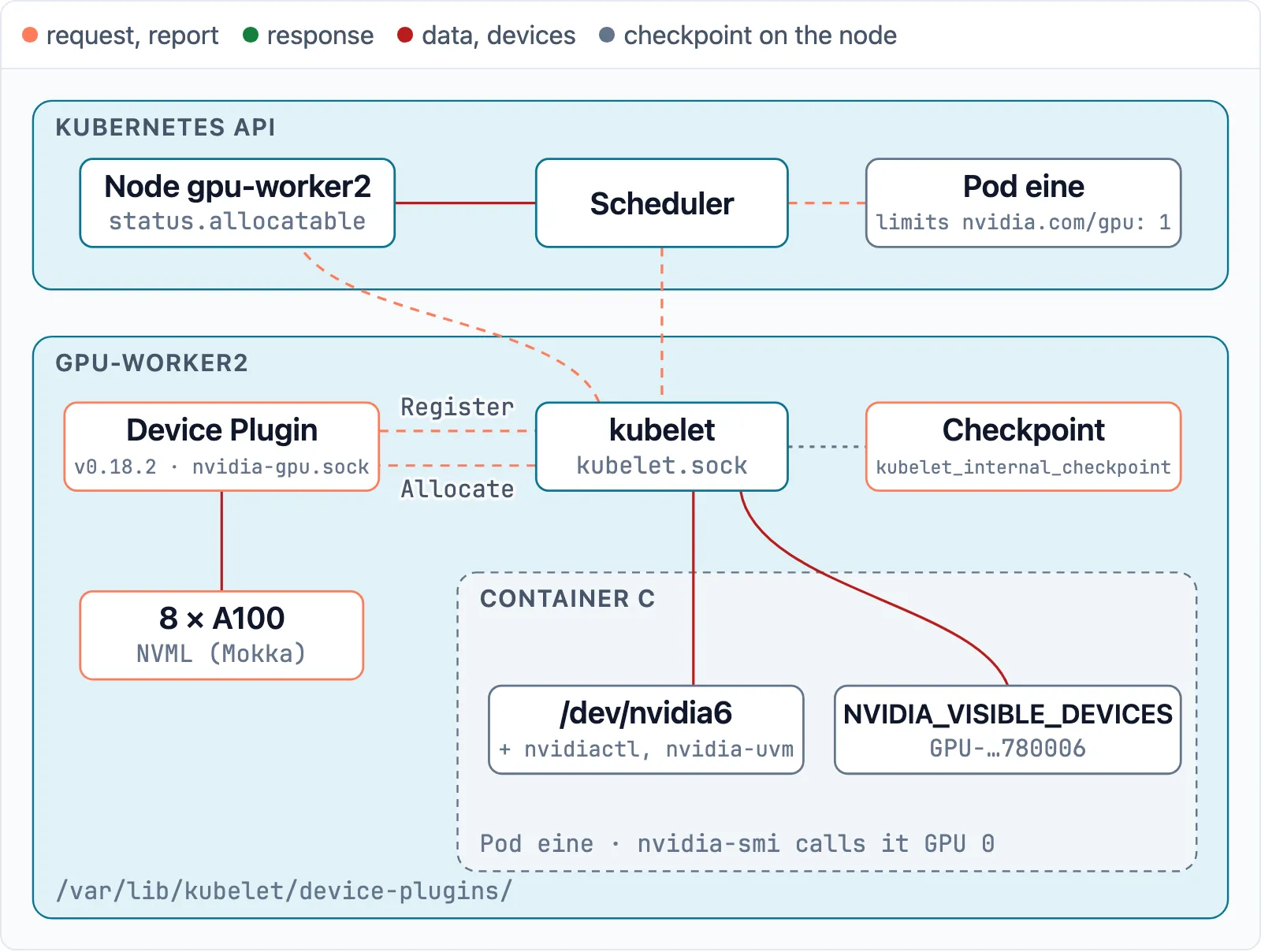
Drill 1: Read the Manifest
For Mokka, there is a ready-made DaemonSet from the project. Before applying it, take a look inside:
mkdir -p ~/gpu/tag02 && cd ~/gpu/tag02
curl -sLO https://raw.githubusercontent.com/NVIDIA/k8s-test-infra/v0.7.0/\
tests/e2e/device-plugin-mock.yaml
grep -nE 'image:|nodeSelector|mokka.nvidia.com|- "--' device-plugin-mock.yaml
Expected:
23:      nodeSelector:
24:        mokka.nvidia.com/type: sgpu
29:          image: nvcr.io/nvidia/k8s-device-plugin:v0.18.2
31:            - "--nvidia-driver-root=/var/lib/nvml-mock/driver"
32:            - "--driver-root-ctr-path=/var/lib/nvml-mock/driver"
33:            - "--device-discovery-strategy=nvml"
40: - "--pass-device-specs=true"--nvidia-driver-root: the driver root from Day 0. On real servers/or/run/nvidia/driver.--device-discovery-strategy=nvml: count GPUs via NVML.--pass-device-specs=true: the plugin passes the device files to the kubelet itself. On real servers, the runtime handles this via the Container Toolkit; a kind node does not have that.- And a
nodeSelector, which is about to become important.
Save your progress? Sign up for free
Drill 2: A DaemonSet That Does Nothing
kubectl apply -f device-plugin-mock.yaml
sleep 5
kubectl -n kube-system get ds nvidia-device-plugin-mock
Expected:
daemonset.apps/nvidia-device-plugin-mock created
NAME                        DESIRED   CURRENT   READY   UP-TO-DATE   AVAILABLE   NODE SELECTOR                AGE
nvidia-device-plugin-mock   0         0         0       0            0           mokka.nvidia.com/type=sgpu   5s
DESIRED 0. No error, no event, simply nothing. The
nodeSelector matches no node. This trap exists in real life
too: the GPU Operator starts its components only on nodes with the label
nvidia.com/gpu.present=true. If it is missing, everything
stays silent.
Save your progress? Sign up for free
Drill 3: Set the Label, the Plugin Registers
kubectl label node gpu-worker2 mokka.nvidia.com/type=sgpu
kubectl -n kube-system rollout status ds/nvidia-device-plugin-mock --timeout=180s
kubectl -n kube-system logs ds/nvidia-device-plugin-mock \
  | grep -E "Starting to serve|Registered" | cut -c1-110
Expected:
node/gpu-worker2 labeled
Waiting for daemon set "nvidia-device-plugin-mock" rollout to finish: 0 of 1 updated pods are available...
daemon set "nvidia-device-plugin-mock" successfully rolled out
I1122 10:56:33.705429       1 server.go:141] Starting to serve 'nvidia.com/gpu' on /var/lib/kubelet/device-plu
I1122 10:56:33.725423       1 server.go:148] Registered device plugin for 'nvidia.com/gpu' with Kubelet
The plugin opens a socket and registers with the kubelet:
docker exec gpu-worker2 ls /var/lib/kubelet/device-plugins/
kubectl get nodes -o custom-columns='NAME:.metadata.name,CAPACITY:.status.capacity.nvidia\.com/gpu,ALLOCATABLE:.status.allocatable.nvidia\.com/gpu'
Expected:
kubelet.sock
kubelet_internal_checkpoint
nvidia-gpu.sock
NAME                CAPACITY   ALLOCATABLE
gpu-control-plane   <none>     <none>
gpu-worker          <none>     <none>
gpu-worker2         8          8
kubelet.sock is the kubelet,
nvidia-gpu.sock the plugin, and in
kubelet_internal_checkpoint the kubelet remembers who has
which GPU.
Save your progress? Sign up for free
Drill 4: One GPU for a Pod
kubectl create namespace tag02
cat <<EOF | kubectl apply -f -
apiVersion: v1
kind: Pod
metadata:
  name: eine
  namespace: tag02
spec:
  containers:
  - name: c
    image: ubuntu:24.04
    command: [sleep, infinity]
    resources:
      limits:
        nvidia.com/gpu: 1
EOF
kubectl -n tag02 wait --for=condition=Ready pod/eine --timeout=120s
kubectl -n tag02 get pod eine -o wide | cut -c1-80
kubectl -n tag02 exec eine -- nvidia-smi -L
kubectl -n tag02 exec eine -- sh -c 'ls /dev | grep nvidia; env | grep NVIDIA'
Expected:
namespace/tag02 created
pod/eine created
pod/eine condition met
NAME   READY   STATUS    RESTARTS   AGE   IP           NODE          NOMINATED N
eine   1/1     Running   0          1s    10.244.2.7   gpu-worker2   <none>
GPU 0: NVIDIA A100-SXM4-40GB (UUID: GPU-12345678-1234-1234-1234-123456780006)
nvidia-uvm
nvidia-uvm-tools
nvidia6
nvidiactl
NVIDIA_VISIBLE_DEVICES=GPU-12345678-1234-1234-1234-123456780006
Without a nodeSelector, the scheduler placed the Pod on
gpu-worker2, the only node with free GPUs. The kubelet
handed out GPU 6. Inside the container, it is still called
GPU 0: nvidia-smi always numbers only what it
sees. Only the UUID is unique.
Save your progress? Sign up for free
Drill 5: The Bookkeeping
A second Pod with three GPUs:
cat <<EOF | kubectl apply -f -
apiVersion: v1
kind: Pod
metadata:
  name: drei
  namespace: tag02
spec:
  containers:
  - name: c
    image: ubuntu:24.04
    command: [sleep, infinity]
    resources:
      limits:
        nvidia.com/gpu: 3
EOF
kubectl -n tag02 wait --for=condition=Ready pod/drei --timeout=120s
kubectl -n tag02 exec drei -- nvidia-smi -L
kubectl describe node gpu-worker2 | grep -E '^  nvidia.com/gpu|Resource  '
Expected:
pod/drei created
pod/drei condition met
GPU 0: NVIDIA A100-SXM4-40GB (UUID: GPU-12345678-1234-1234-1234-123456780004)
GPU 1: NVIDIA A100-SXM4-40GB (UUID: GPU-12345678-1234-1234-1234-123456780005)
GPU 2: NVIDIA A100-SXM4-40GB (UUID: GPU-12345678-1234-1234-1234-123456780007)
  nvidia.com/gpu:     8
  nvidia.com/gpu:     8
  Resource           Requests    Limits
  nvidia.com/gpu     4           4
Capacity 8, allocatable 8, allocated 4. Which GPU belongs to which Pod is recorded in the kubelet’s checkpoint:
docker exec gpu-worker2 cat /var/lib/kubelet/device-plugins/kubelet_internal_checkpoint \
  | jq -r '.Data.PodDeviceEntries[] | "\(.PodUID[0:8]) \(.DeviceIDs[] | join(","))"' \
  | cut -c1-88
Expected:
c858bd66 GPU-12345678-1234-1234-1234-123456780006
fb8773a3 GPU-12345678-1234-1234-1234-123456780004,GPU-12345678-1234-1234-1234-12345678
Each UUID appears exactly once. That is the difference from the annotation on Day 1.
Save your progress? Sign up for free
Drill 6: The Rules for GPUs
Four GPUs are free. A Pod wants five:
cat <<EOF | kubectl apply -f -
apiVersion: v1
kind: Pod
metadata:
  name: fuenf
  namespace: tag02
spec:
  containers:
  - name: c
    image: ubuntu:24.04
    command: [sleep, infinity]
    resources:
      limits:
        nvidia.com/gpu: 5
EOF
sleep 4
kubectl -n tag02 get pod fuenf
kubectl -n tag02 get events --field-selector involvedObject.name=fuenf \
  -o jsonpath='{.items[0].message}{"\n"}'
Expected:
pod/fuenf created
NAME    READY   STATUS    RESTARTS   AGE
fuenf   0/1     Pending   0          4s
0/3 nodes are available: 1 node(s) had untolerated taint(s), 2 Insufficient
nvidia.com/gpu. preemption: 0/3 nodes are available: 1 No preemption victims found for
incoming pod, 2 Preemption is not helpful for scheduling.
GPUs are not pooled across nodes. You only get five GPUs if one node has five free.
Two mistakes that the API already rejects:
cat <<EOF | kubectl apply -f -
apiVersion: v1
kind: Pod
metadata:
  name: nur-requests
  namespace: tag02
spec:
  containers:
  - name: c
    image: ubuntu:24.04
    command: [sleep, infinity]
    resources:
      requests:
        nvidia.com/gpu: 1
EOF
Expected:
The Pod "nur-requests" is invalid: spec.containers[0].resources.limits: Required value:
Limit must be set for non overcommitable resources
cat <<EOF | kubectl apply -f -
apiVersion: v1
kind: Pod
metadata:
name: halbe
namespace: tag02
spec:
containers:
- name: c
image: ubuntu:24.04
command: [sleep, infinity]
resources:
limits:
nvidia.com/gpu: 500m
EOFExpected:
The Pod "halbe" is invalid:
* spec.containers[0].resources.limits[nvidia.com/gpu]: Invalid value: "500m": must be an integer
* spec.containers[0].resources.requests[nvidia.com/gpu]: Invalid value: "500m": must be an integer| Rule | Consequence |
|---|---|
GPUs go under limits |
requests alone is rejected; requests takes
the value of limits |
| whole numbers only | no half GPUs via the Device Plugin |
| no overcommitting | requests = limits; you cannot get more than exists |
Save your progress? Sign up for free
Drill 7: When the Plugin Fails
Caution: Without the Device Plugin, no new GPU Pod starts on the node. Intended in the lab, an outage in production.
kubectl delete -f device-plugin-mock.yaml
sleep 45
kubectl get node gpu-worker2 -o custom-columns='CAPACITY:.status.capacity.nvidia\.com/gpu,ALLOCATABLE:.status.allocatable.nvidia\.com/gpu'
kubectl -n tag02 get pods
kubectl -n tag02 exec eine -- nvidia-smi -L
Expected:
daemonset.apps "nvidia-device-plugin-mock" deleted from kube-system namespace
CAPACITY   ALLOCATABLE
8          0
NAME    READY   STATUS    RESTARTS   AGE
drei    1/1     Running   0          75s
eine    1/1     Running   0          87s
fuenf   0/1     Pending   0          62s
GPU 0: NVIDIA A100-SXM4-40GB (UUID: GPU-12345678-1234-1234-1234-123456780006)
Capacity stays at 8, but allocatable drops to 0. Running
Pods keep their GPUs; the plugin is only needed when a container starts.
Bring the plugin back and free three GPUs:
kubectl apply -f device-plugin-mock.yaml
kubectl -n kube-system rollout status ds/nvidia-device-plugin-mock --timeout=120s
kubectl -n tag02 delete pod drei
kubectl -n tag02 wait --for=condition=Ready pod/fuenf --timeout=60s
kubectl -n tag02 exec fuenf -- nvidia-smi -L | cut -c1-30
Expected:
daemonset.apps/nvidia-device-plugin-mock created
daemon set "nvidia-device-plugin-mock" successfully rolled out
pod "drei" deleted from tag02 namespace
pod/fuenf condition met
GPU 0: NVIDIA A100-SXM4-40GB (
GPU 1: NVIDIA A100-SXM4-40GB (
GPU 2: NVIDIA A100-SXM4-40GB (
GPU 3: NVIDIA A100-SXM4-40GB (
GPU 4: NVIDIA A100-SXM4-40GB (
As soon as three GPUs are free, the scheduler places the waiting Pod.
Save your progress? Sign up for free
Exercise: Speed Drills
- Show capacity and allocatable of
nvidia.com/gpufor all nodes. Target time: 1 min - Show how many GPUs are allocated on
gpu-worker2. Target time: 30 s - Show the UUID of the GPU in the Pod
eine, withoutnvidia-smi. Target time: 1 min
Solution
kubectl get nodes -o custom-columns='NAME:.metadata.name,CAP:.status.capacity.nvidia\.com/gpu,ALLOC:.status.allocatable.nvidia\.com/gpu'
kubectl describe node gpu-worker2 | sed -n '/Allocated resources/,/Events/p' | grep nvidia
kubectl -n tag02 exec eine -- printenv NVIDIA_VISIBLE_DEVICES
Save your progress? Sign up for free
Checkpoint
kubectl -n kube-system get ds nvidia-device-plugin-mockExpected: DESIRED 1,
READY 1.
kubectl get node gpu-worker2 -o jsonpath='{.status.allocatable.nvidia\.com/gpu}{"\n"}'Expected: 8
Challenge
Find out which GPUs the Pod fuenf has without going into
the container. Use only the API and the node.
Hint: The checkpoint knows Pods only by their UID.
Solution
UID_F=$(kubectl -n tag02 get pod fuenf -o jsonpath='{.metadata.uid}')
docker exec gpu-worker2 cat /var/lib/kubelet/device-plugins/kubelet_internal_checkpoint \
  | jq -r --arg u "$UID_F" '.Data.PodDeviceEntries[] | select(.PodUID==$u) | .DeviceIDs[][]'
Expected:
GPU-12345678-1234-1234-1234-123456780000
GPU-12345678-1234-1234-1234-123456780001
GPU-12345678-1234-1234-1234-123456780002
GPU-12345678-1234-1234-1234-123456780003
GPU-12345678-1234-1234-1234-123456780004
Until a moment ago, GPU 4 belonged to drei. The kubelet
reassigned it immediately after the deletion. In the checkpoint, the
GPUs are grouped by NUMA node: GPUs 0–3 are attached to the first CPU,
GPUs 4–7 to the second. That is why fuenf appears there in
two groups.
Save your progress? Sign up for free
Clean-up
kubectl delete namespace tag02The Device Plugin and the label stay; the next days need them.
Interview Note
- How does
nvidia.com/gpuget into a node’sallocatable? A Device Plugin registers with the kubelet via/var/lib/kubelet/device-plugins/kubelet.sockand reports its devices. The kubelet enters them into the node status. - Why can’t you request half a GPU? Extended resources via Device Plugins are integers and cannot be overcommitted. Sharing only works via time-slicing, MIG or DRA.
- What happens to running Pods when the Device Plugin crashes? Nothing. The plugin is needed for allocation, not during operation. New GPU Pods stay Pending, though.
Enterprise Note
- In production, the GPU Operator installs the Device Plugin including
its configuration. Whoever runs it as a DaemonSet themselves must set
the driver root, the toleration for GPU taints and the priority
(
system-node-critical) correctly on their own. - An alert on “capacity > 0, allocatable = 0” catches a failed plugin before the teams complain about Pending Pods.
- The kubelet’s checkpoint is the only place that links Pod and GPU UUID. For per-team chargeback, it is better to read this from the DCGM Exporter (Day 12).