
Day 0: The Training Ground
Goal: Build a kind cluster with three nodes and Cilium, and install the sample app “Werkzeugladen” (tool shop), on which you will try out every tool over the next days · Duration: approx. 60 min · Prerequisite: a Linux VM with Docker
Briefing
- This course is sorted by problems, not by tools. Each day starts with a question from everyday operations (“Who is actually allowed to read Secrets here?”, “Why is the Pod gone?”) and ends with the tool that answers it fastest.
- The ground: a kind cluster with one control plane and two workers. The network is Cilium instead of the kind default, because Day 8 makes network traffic visible with Hubble.
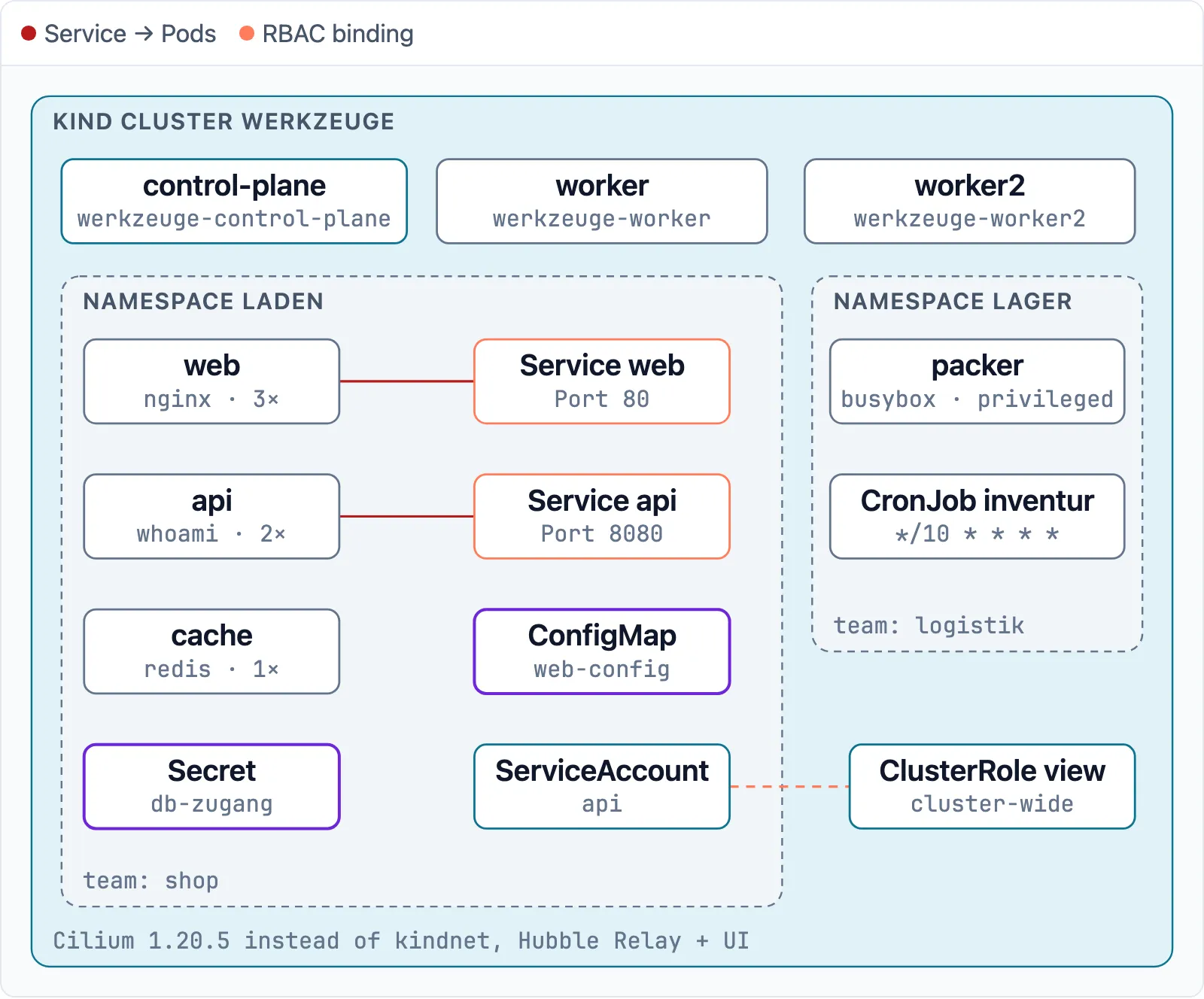
- On top of it runs the Werkzeugladen: a small shop with a frontend, an API, a cache and a warehouse service. It works, but it has weaknesses of the kind found in real clusters: missing resource limits, a privileged container, a ServiceAccount with too many permissions, a password in a Secret. The tools of the later days find them.
  Namespace laden                                  Namespace lager
  ┌───────────────────────────────────────┐        ┌───────────────────────────┐
  │ web (nginx, 3×) ──▶ Service web:80    │        │ packer (busybox, privileged)│
  │ api (whoami, 2×) ─▶ Service api:8080  │        │ CronJob inventur (10 min)  │
  │ cache (redis)                         │        └───────────────────────────┘
  │ ConfigMap web-config · Secret db-zugang│
  │ ServiceAccount api ─▶ ClusterRole view │
  └───────────────────────────────────────┘
Drill 1: The Tools on the VM
Everything runs on a VM with Docker. In this course’s lab, that is an Ubuntu VM with 4 vCPU and 8 GB RAM.
docker version --format "Docker {{.Server.Version}}"
nproc
free -h | sed -n 2p
Expected:
Docker 29.10.0
4
Mem:           7.8Gi       2.9Gi       178Mi       120Mi       5.1Gi       4.9Gi
You install kind, kubectl and Helm as single files. ARCH
makes sure the same commands work on amd64 and arm64:
ARCH=$(dpkg --print-architecture)
curl -sLo /tmp/kind https://kind.sigs.k8s.io/dl/v0.33.0/kind-linux-$ARCH
sudo install /tmp/kind /usr/local/bin/kind
curl -sLo /tmp/kubectl https://dl.k8s.io/release/v1.37.2/bin/linux/$ARCH/kubectl
sudo install /tmp/kubectl /usr/local/bin/kubectl
curl -sL https://get.helm.sh/helm-v4.3.2-linux-$ARCH.tar.gz | tar xz -C /tmp
sudo install /tmp/linux-$ARCH/helm /usr/local/bin/helm
curl -sLO https://github.com/cilium/cilium-cli/releases/download/v0.20.3/cilium-linux-$ARCH.tar.gz
sudo tar -xzf cilium-linux-$ARCH.tar.gz -C /usr/local/bin cilium && rm cilium-linux-$ARCH.tar.gz
kind version
kubectl version --client | head -1
helm version --short
cilium version --client | head -1
Expected:
kind v0.33.0 go1.26.7 linux/amd64
Client Version: v1.37.2
v4.3.2+g8346aaa
cilium-cli: v0.20.3 compiled with go1.27.3 on linux/amd64
Save your progress? Sign up for free
Drill 2: The Cluster
Three nodes, and no default network: disableDefaultCNI
makes kind leave out its own CNI (kindnet), so that Cilium gets the
slot.
mkdir -p ~/werkzeuge/tag00 && cd ~/werkzeuge/tag00
cat > kind.yaml <<'EOF'
kind: Cluster
apiVersion: kind.x-k8s.io/v1alpha4
name: werkzeuge
networking:
  disableDefaultCNI: true
nodes:
- role: control-plane
- role: worker
- role: worker
EOF
time kind create cluster --config kind.yaml 2>&1 | tail -4
kubectl get nodes
Expected (shortened):
kubectl cluster-info --context kind-werkzeuge

Not sure what to do next? 😅  Check out https://kind.sigs.k8s.io/docs/user/quick-start/

real    1m30.601s
NAME                      STATUS     ROLES           AGE   VERSION
werkzeuge-control-plane   NotReady   control-plane   17s   v1.37.0
werkzeuge-worker          NotReady   <none>          2s    v1.37.0
werkzeuge-worker2         NotReady   <none>          2s    v1.37.0
NotReady is correct here; the Challenge explains why.
kind v0.33 ships Kubernetes v1.37.0 as the default image and has added
and activated the context kind-werkzeuge.
Save your progress? Sign up for free
Drill 3: Cilium
The Cilium CLI installs Cilium via Helm and detects kind on its own. You switch on Hubble Relay and the Hubble UI right away:
cilium install --version 1.20.5 --set hubble.relay.enabled=true --set hubble.ui.enabled=true
cilium status --wait --wait-duration 5m | head -12
kubectl get nodes
Expected (shortened):
ℹ️  Using Cilium version 1.20.5
🔮 Auto-detected cluster name: kind-werkzeuge
🔮 Auto-detected kube-proxy has been installed
    /¯¯\
 /¯¯\__/¯¯\    Cilium:             OK
 \__/¯¯\__/    Operator:           OK
 /¯¯\__/¯¯\    Envoy DaemonSet:    OK
 \__/¯¯\__/    Hubble Relay:       OK
    \__/       ClusterMesh:        disabled

DaemonSet              cilium                   Desired: 3, Ready: 3/3, Available: 3/3
DaemonSet              cilium-envoy             Desired: 3, Ready: 3/3, Available: 3/3
Deployment             cilium-operator          Desired: 1, Ready: 1/1, Available: 1/1
NAME                      STATUS   ROLES           AGE     VERSION
werkzeuge-control-plane   Ready    control-plane   3m47s   v1.37.0
werkzeuge-worker          Ready    <none>          3m32s   v1.37.0
werkzeuge-worker2         Ready    <none>          3m32s   v1.37.0
Now all nodes are Ready. Cilium runs as a DaemonSet on
every node. How to operate it is shown in the course “Cilium hands-on”;
here it is just the network the tools work on.
Save your progress? Sign up for free
Drill 4: The Werkzeugladen
One manifest for everything. It is long, but every line is needed on a later day:
cd ~/werkzeuge/tag00
cat > laden.yaml <<'EOF'
apiVersion: v1
kind: Namespace
metadata:
  name: laden
  labels: {team: shop}
---
apiVersion: v1
kind: Namespace
metadata:
  name: lager
  labels: {team: logistik}
---
apiVersion: v1
kind: ConfigMap
metadata:
  name: web-config
  namespace: laden
data:
  SHOP_NAME: "Werkzeugladen"
  API_URL: "http://api.laden.svc:8080"
---
apiVersion: v1
kind: Secret
metadata:
  name: db-zugang
  namespace: laden
type: Opaque
stringData:
  DB_USER: laden
  DB_PASSWORD: lab-geheim-123
---
apiVersion: apps/v1
kind: Deployment
metadata:
  name: web
  namespace: laden
  labels: {app: web, tier: frontend}
spec:
  replicas: 3
  selector:
    matchLabels: {app: web}
  template:
    metadata:
      labels: {app: web, tier: frontend}
    spec:
      containers:
      - name: nginx
        image: nginx:1.30.7-alpine
        ports:
        - containerPort: 80
        envFrom:
        - configMapRef: {name: web-config}
        resources:
          requests: {cpu: 50m, memory: 32Mi}
          limits: {memory: 64Mi}
        readinessProbe:
          httpGet: {path: /, port: 80}
---
apiVersion: v1
kind: Service
metadata:
  name: web
  namespace: laden
spec:
  selector: {app: web}
  ports:
  - port: 80
---
apiVersion: apps/v1
kind: Deployment
metadata:
  name: api
  namespace: laden
  labels: {app: api, tier: backend}
spec:
  replicas: 2
  selector:
    matchLabels: {app: api}
  template:
    metadata:
      labels: {app: api, tier: backend}
    spec:
      serviceAccountName: api
      containers:
      - name: whoami
        image: traefik/whoami:v1.11.0
        args: ["--port", "8080"]
        ports:
        - containerPort: 8080
        env:
        - name: DB_PASSWORD
          valueFrom:
            secretKeyRef: {name: db-zugang, key: DB_PASSWORD}
---
apiVersion: v1
kind: Service
metadata:
  name: api
  namespace: laden
spec:
  selector: {app: api}
  ports:
  - port: 8080
---
apiVersion: v1
kind: ServiceAccount
metadata:
  name: api
  namespace: laden
---
apiVersion: rbac.authorization.k8s.io/v1
kind: ClusterRoleBinding
metadata:
  name: api-alles-lesen
subjects:
- kind: ServiceAccount
  name: api
  namespace: laden
roleRef:
  kind: ClusterRole
  name: view
  apiGroup: rbac.authorization.k8s.io
---
apiVersion: apps/v1
kind: Deployment
metadata:
  name: cache
  namespace: laden
  labels: {app: cache}
spec:
  replicas: 1
  selector:
    matchLabels: {app: cache}
  template:
    metadata:
      labels: {app: cache}
    spec:
      containers:
      - name: redis
        image: redis:8.2.3-alpine
        ports:
        - containerPort: 6379
---
apiVersion: apps/v1
kind: Deployment
metadata:
  name: packer
  namespace: lager
  labels: {app: packer}
spec:
  replicas: 1
  selector:
    matchLabels: {app: packer}
  template:
    metadata:
      labels: {app: packer}
    spec:
      containers:
      - name: packer
        image: busybox:1.37.0
        command: ["sh", "-c", "while true; do echo \"$(date +%T) Paket gepackt: $RANDOM\"; sleep 5; done"]
        securityContext:
          privileged: true
---
apiVersion: batch/v1
kind: CronJob
metadata:
  name: inventur
  namespace: lager
spec:
  schedule: "*/10 * * * *"
  jobTemplate:
    spec:
      template:
        spec:
          restartPolicy: OnFailure
          containers:
          - name: inventur
            image: busybox:1.37.0
            command: ["sh", "-c", "echo Inventur: $(date +%T) alles gezählt"]
EOF
kubectl apply -f laden.yaml
kubectl -n laden rollout status deploy/web deploy/api deploy/cache --timeout=180s | tail -2
kubectl -n lager rollout status deploy/packer --timeout=120s | tail -1
kubectl get deploy -A -l 'app in (web,api,cache,packer)'
Expected:
namespace/laden created
namespace/lager created
configmap/web-config created
secret/db-zugang created
deployment.apps/web created
service/web created
deployment.apps/api created
service/api created
serviceaccount/api created
clusterrolebinding.rbac.authorization.k8s.io/api-alles-lesen created
deployment.apps/cache created
deployment.apps/packer created
cronjob.batch/inventur created
deployment "api" successfully rolled out
deployment "cache" successfully rolled out
deployment "packer" successfully rolled out
NAMESPACE   NAME     READY   UP-TO-DATE   AVAILABLE   AGE
laden       api      2/2     2            2           63s
laden       cache    1/1     1            1           63s
laden       web      3/3     3            3           63s
lager       packer   1/1     1            1           63s
What is deliberately wrong here, without fixing it now:
| Location | Weakness | Who finds it |
|---|---|---|
api, cache, packer |
no requests and limits | Day 9 (Popeye, kube-capacity), Day 10 (kube-linter) |
packer |
privileged: true |
Day 10, Day 11 (Trivy, Kubescape) |
ServiceAccount api |
may read everything cluster-wide (view) |
Day 4 (who-can, rakkess), Day 11 (rbac-tool) |
Secret db-zugang |
plaintext password, in an environment variable | Day 4 (view-secret), Day 11 |
cache |
redis:8.2.3-alpine without a probe |
Day 9, Day 10 |
Save your progress? Sign up for free
Drill 5: The Workbench
A helper Pod with shell tools, from which you talk to services in the cluster. It stays in place for all days:
kubectl -n laden run werkbank --image=busybox:1.37.0 --command -- sleep infinity
kubectl -n laden wait --for=condition=Ready pod/werkbank --timeout=60s
kubectl -n laden exec werkbank -- wget -qO- http://web | grep -o "<title>.*</title>"
kubectl -n laden exec werkbank -- wget -qO- http://api:8080 | head -1
kubectl -n lager logs deploy/packer --tail=2
Expected (Pod name and numbers will differ for you):
pod/werkbank created
pod/werkbank condition met
<title>Welcome to nginx!</title>
Hostname: api-7d5f77c79b-725kc
11:23:08 Paket gepackt: 28917
11:23:13 Paket gepackt: 9091
Frontend and API answer through their Services, and the warehouse service writes a line every five seconds. The shop is open.
Save your progress? Sign up for free
Exercise: Speed Drills
- What is the name of the current kubectl context? Target time: 10 s
- How many Pods run in the namespace
laden? Target time: 15 s - Which label does the namespace
lagercarry? Target time: 15 s
Solution
kubectl config current-context
kubectl -n laden get pods --no-headers | wc -l
kubectl get ns lager --show-labels
Expected:
kind-werkzeuge
7
NAME    STATUS   AGE   LABELS
lager   Active   2m22s   kubernetes.io/metadata.name=lager,team=logistik
Seven Pods: three web, two api, one
cache and the werkbank.
Save your progress? Sign up for free
Challenge
After kind create cluster, all three nodes were
NotReady (Drill 2), and after Cilium they were
Ready. What exactly was missing, and where would the node
have told you?
Hint: A node reports its state in its
conditions. Which condition is responsible for
Ready, and what does its message say?
Solution
A CNI plugin was missing: without a network, the kubelet cannot start
Pods with networking and does not report the node as ready. The
Ready condition says so literally:
kubectl get node werkzeuge-worker -o jsonpath='{.status.conditions[?(@.type=="Ready")].message}{"\n"}'Expected (before Cilium, from a test cluster with the same configuration):
container runtime network not ready: NetworkReady=false reason:NetworkPluginNotReady message:Network plugin returns error: cni plugin not initializedWith Cilium, the same command reports:
kubelet is posting ready statusTested:
kind create clusterswitches the current context to the new cluster. If you build a test cluster on the side, your next command lands there.kubectl config use-context kind-werkzeugebrings you back; Day 3 shows more convenient ways.
That is the first lesson of this course: the answer is almost always already in the cluster. You just have to know where, and which tool finds it fastest. Day 1 starts with JSONPath.
Save your progress? Sign up for free
Checkpoint
kubectl get nodes
kubectl -n laden get deploy
Expected:
NAME                      STATUS   ROLES           AGE   VERSION
werkzeuge-control-plane   Ready    control-plane   48m   v1.37.0
werkzeuge-worker          Ready    <none>          48m   v1.37.0
werkzeuge-worker2         Ready    <none>          48m   v1.37.0
NAME    READY   UP-TO-DATE   AVAILABLE   AGE
api     2/2     2            2           63s
cache   1/1     1            1           63s
web     3/3     3            3           63s
No clean-up: the cluster and the shop stay in place for the whole book.
Interview Note
- Why is a fresh node
NotReady? The most common reason: no CNI. TheReadycondition and its message tell you, andkubectl describe nodeshows them under “Conditions”. - What is the difference between kind and a real cluster? The nodes are Docker containers, while the control plane and kubelet are real. For tools that talk to the API, that makes no difference; for tools that check the node itself (kube-bench, Day 11), it does.
Enterprise Note
- If you select tools for a team, you need a practice ground that can be thrown away. One kind cluster per person or per CI run is cheaper than any shared test cluster on which someone tries something out “just for a moment”.
- Pin versions: kind, kubectl, Helm and CLI tools in exactly the versions that match the cluster. A kubectl that differs from the API server by more than one minor version is not supported.