
Day 11: Checking Security
Goal: Check images and workloads for vulnerabilities and misconfigurations with Trivy, measure nodes against the CIS Benchmark with kube-bench, assess the namespace against a framework with Kubescape, examine permissions with rbac-tool, and actually close a gap you found · Duration: approx. 90 min · Prerequisite: Day 10
Briefing
- Security in Kubernetes has several layers, and each of today’s tools looks at a different one:
| Layer | Question | Tool |
|---|---|---|
| Image | Which known vulnerabilities are in the packages? | Trivy (image, k8s) |
| Workload | Is the Pod spec configured dangerously? | Trivy, Kubescape (and Day 10) |
| Node and control plane | Are file permissions and parameters set according to CIS? | kube-bench |
| Permissions | Who may do what, and by which detour? | rbac-tool, Trivy rbac |
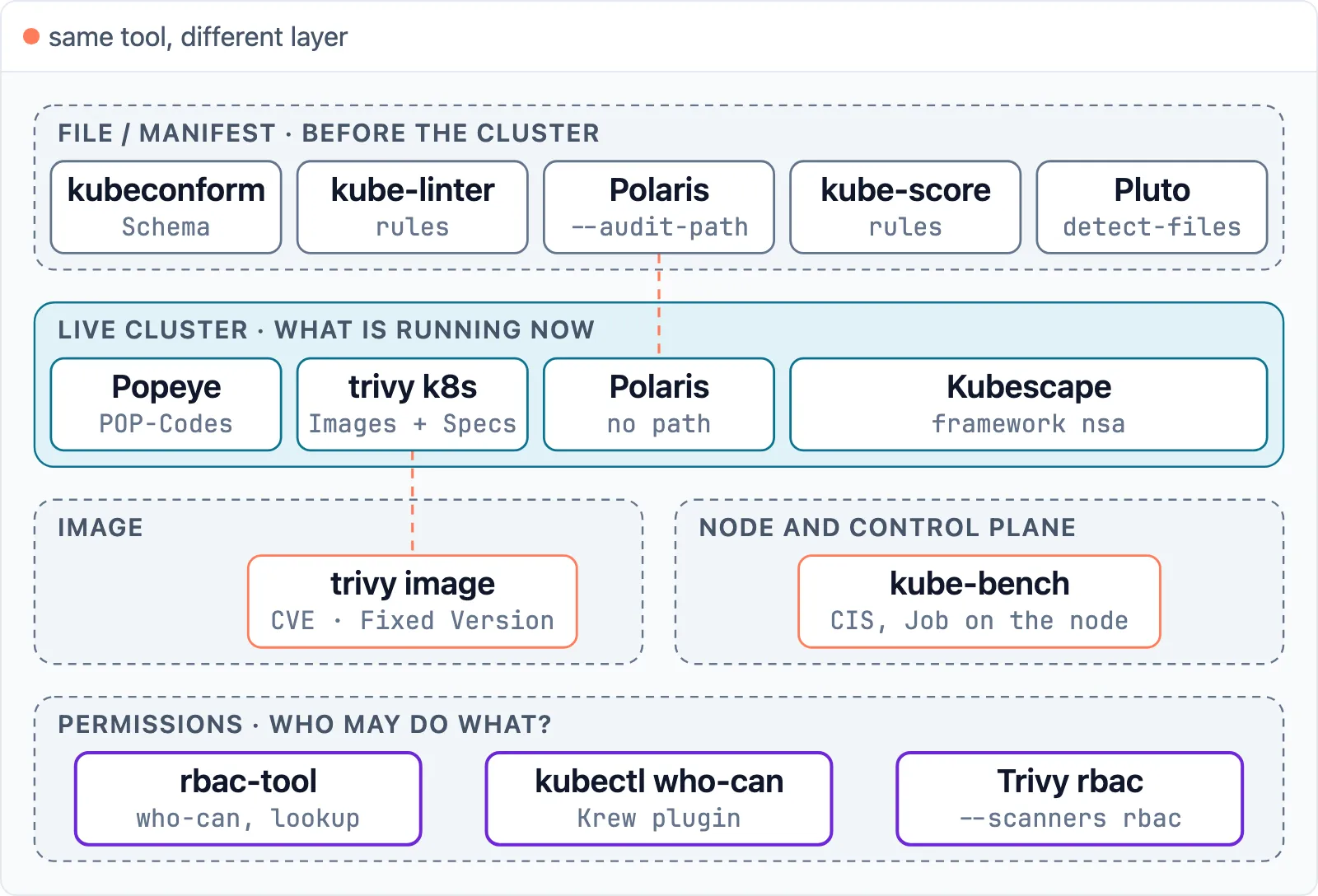
- Trivy (Aqua Security) scans images, file systems, repos and running clusters. For vulnerabilities, it downloads a database that it matches locally; the images do not leave your machine.
- kube-bench checks a node against the CIS Kubernetes Benchmark: file permissions, parameters of the API server, kubelet, etcd. It runs as a Job on the node it checks.
- Kubescape (CNCF) assesses clusters and manifests
against frameworks such as NSA-CISA or MITRE ATT&CK. Results stay
local as long as you do not specify
--submit;--keep-localmakes this explicit. - rbac-tool answers permission questions from the
other side than
kubectl auth can-i: not “may X do this?”, but “who may do this?” and “what may X do?”.
| Tool | Version | Status |
|---|---|---|
| Trivy | v0.76.2 | active |
| kube-bench | v0.16.0 | active |
| Kubescape | v4.0.21 | active |
| rbac-tool | v1.20.0 | last release October 2024 |
Drill 1: Installing Trivy, the Right Way
A security scanner is itself a rewarding target for supply chain attacks: it runs in every pipeline, often with access to the registry and cluster. That is why you check the checksum before installing it.
mkdir -p ~/werkzeuge/tag11 && cd ~/werkzeuge/tag11
A=$(uname -m | sed "s/x86_64/64bit/; s/aarch64/ARM64/")
V=0.76.2
curl -sLO https://github.com/aquasecurity/trivy/releases/download/v$V/trivy_${V}_Linux-$A.tar.gz
curl -sLO https://github.com/aquasecurity/trivy/releases/download/v$V/trivy_${V}_checksums.txt
grep " trivy_${V}_Linux-$A.tar.gz$" trivy_${V}_checksums.txt | sha256sum -c
tar xzf trivy_${V}_Linux-$A.tar.gz trivy
sudo install trivy /usr/local/bin/
trivy --version | head -1
Expected:
trivy_0.76.2_Linux-64bit.tar.gz: OK
Version: 0.76.2
Trivy names architectures differently from most (64bit,
ARM64), hence the sed line. A checksum from
the same release protects against broken downloads, not against a
compromised release. Signatures help against that (Trivy signs with
Cosign), as do fixed versions instead of latest; more on
this in the Enterprise Note.
Save your progress? Sign up for free
Drill 2: Scanning an Image
trivy image --quiet --severity HIGH,CRITICAL nginx:1.30.7-alpineTrivy answers with a wide table: package, CVE, severity, status, installed and fixed version, title. For the book (and for scripts), JSON with jq is handier:
trivy image --quiet --severity HIGH,CRITICAL --format json nginx:1.30.7-alpine \
  | jq -r '.Results[].Vulnerabilities[]? | [.PkgName, .VulnerabilityID, .Severity, .InstalledVersion, .FixedVersion] | @tsv'
Expected:
libxml2 CVE-2026-86144 HIGH 2.13.9-r2 2.13.9-r3The first run takes about half a minute because Trivy loads its database; after that it is faster. The most important column is the last one, Fixed Version: if there is one, you can act. If it is empty, you can only weigh the risk.
Save your progress? Sign up for free
Drill 3: Scanning the Whole Namespace
trivy k8s reads the workloads from the cluster, scans
each image and checks the Pod specs. The summary
(--report summary) is a table with 17 columns, too wide for
any book page. So here, too, JSON, and jq counts critical and high
vulnerabilities as well as misconfigurations per resource:
trivy k8s --include-namespaces laden --report summary --format json --quiet --disable-node-collector > laden-trivy.json
jq -r '.Findings[] | [.Kind+"/"+.Name,
  ([.Results[]?.Vulnerabilities[]? | select(.Severity=="CRITICAL")] | length),
  ([.Results[]?.Vulnerabilities[]? | select(.Severity=="HIGH")] | length),
  ([.Results[]?.Misconfigurations[]? | select(.Status=="FAIL")] | length)] | @tsv' laden-trivy.json \
  | sort -k2,2nr | column -t
Expected (columns: resource, CRITICAL, HIGH, misconfigurations; numbers will differ if the database is newer):
Pod/netshoot            17  213  22
Deployment/lieferung    5   15   1
Deployment/cache        2   24   16
Deployment/api          1   26   17
Deployment/kasse        0   0    12
Deployment/web          0   1    14
Pod/werkbank            0   0    17
RoleBinding/kasse-edit  0   0    1
The run takes a good minute. Three findings stand out:
lieferung(delivery) has 5 critical vulnerabilities, but almost no misconfigurations. That is the Deployment you hardened yesterday. Hardened configuration and a secure image are two different things; Day 10 only checked the first.- netshoot brings 17 critical vulnerabilities along. A debug image with hundreds of packages is a large attack surface. It does not belong permanently in a production namespace.
- busybox (
kasse,werkbank) has not a single known vulnerability: fewer packages, fewer hits.
--disable-node-collector saves a Job that collects
information on every node; kube-bench takes over the node part in a
moment. What is behind lieferung?
trivy image --quiet --severity CRITICAL --format json nginxinc/nginx-unprivileged:1.30.6-alpine \
  | jq -r '.Results[] | .Vulnerabilities[]? | [.PkgName, .VulnerabilityID, .InstalledVersion, .FixedVersion] | @tsv'
Expected:
brotli-libs CVE-2026-111497 1.2.0-r1    1.2.1-r0
nginx   CVE-2026-113425 1.30.6-r1   1.30.7-r0
nginx   CVE-2026-121810 1.30.6-r1   1.30.7-r0
nginx   CVE-2026-123007 1.30.6-r1   1.30.7-r0
nginx   CVE-2026-123633 1.30.6-r1   1.30.7-r0
Four of them are in nginx itself, fixed in 1.30.7. You come back to this in the Challenge.
And the last line, the RoleBinding:
trivy k8s --include-namespaces laden --report all --scanners rbac --quiet --disable-node-collector | grep -A3 "KSV-0111"Expected:
KSV-0111 (MEDIUM): RoleBinding 'kasse-edit' should not bind to roles ["cluster-admin", "admin", "edit"]
════════════════════════════════════════
Either cluster-admin or those granted powerful permissions.
The RoleBinding from the Challenge of Day 6. You already found out
yourself there that edit is too much; Trivy comes to the
same conclusion.
Save your progress? Sign up for free
Drill 4: kube-bench
kube-bench has to read the node’s files. For this, the project
provides Job manifests with hostPID and read-only
hostPath mounts. Fetch them with a fixed version and
replace latest:
curl -sLO https://raw.githubusercontent.com/aquasecurity/kube-bench/v0.16.0/job-master.yaml
curl -sLO https://raw.githubusercontent.com/aquasecurity/kube-bench/v0.16.0/job.yaml
sed -i "s#aquasec/kube-bench:latest#aquasec/kube-bench:v0.16.0#" job-master.yaml job.yaml
grep image: job-master.yaml
Expected:
image: docker.io/aquasec/kube-bench:v0.16.0Read the file before applying it: among other things, it mounts
/etc/kubernetes and /var/lib/etcd of the node.
A tool with these mounts sees the cluster’s keys. That is necessary for
the check, but it is exactly why you pin the version.
kubectl apply -f job-master.yaml
kubectl wait --for=condition=complete job/kube-bench-master --timeout=240s
kubectl logs job/kube-bench-master > bench-master.txt
grep -E "checks (PASS|FAIL|WARN)" bench-master.txt | head -3
grep "^\[FAIL\]" bench-master.txt
Expected:
job.batch/kube-bench-master created
Warning: spec.template.spec.affinity.nodeAffinity.requiredDuringSchedulingIgnoredDuringExecution.nodeSelectorTerms[1].matchExpressions[0].key: node-role.kubernetes.io/master is use "node-role.kubernetes.io/control-plane" instead
job.batch/kube-bench-master condition met
39 checks PASS
10 checks FAIL
11 checks WARN
[FAIL] 1.1.12 Ensure that the etcd data directory ownership is set to etcd:etcd (Automated)
[FAIL] 1.2.5 Ensure that the --kubelet-certificate-authority argument is set as appropriate (Automated)
[FAIL] 1.2.15 Ensure that the --profiling argument is set to false (Automated)
[FAIL] 1.2.16 Ensure that the --audit-log-path argument is set (Automated)
[FAIL] 1.2.17 Ensure that the --audit-log-maxage argument is set to 30 or as appropriate (Automated)
[FAIL] 1.2.18 Ensure that the --audit-log-maxbackup argument is set to 10 or as appropriate (Automated)
[FAIL] 1.2.19 Ensure that the --audit-log-maxsize argument is set to 100 or as appropriate (Automated)
[FAIL] 1.2.30 Ensure that the --service-account-extend-token-expiration parameter is set to false (Automated)
[FAIL] 1.3.2 Ensure that the --profiling argument is set to false (Automated)
[FAIL] 1.4.1 Ensure that the --profiling argument is set to false (Automated)
The warning comes from the project’s own manifest, which still
carries the old label master. The findings are typical of a
kubeadm cluster with default settings, and kind is exactly that:
no audit log, profiling on, kubelet certificates not
verified. For each finding, the remedy is listed at the bottom of the
report:
grep -A3 "^1.2.16 " bench-master.txtExpected:
1.2.16 Edit the API server pod specification file /etc/kubernetes/manifests/kube-apiserver.yaml
on the control plane node and set the --audit-log-path parameter to a suitable path and
file where you would like audit logs to be written, for example,
--audit-log-path=/var/log/apiserver/audit.log
Now a worker:
kubectl apply -f job.yaml
kubectl wait --for=condition=complete job/kube-bench --timeout=240s
kubectl logs job/kube-bench > bench-node.txt
grep -E "checks (PASS|FAIL|WARN)" bench-node.txt | head -3
grep "^\[FAIL\]" bench-node.txt
Expected:
job.batch/kube-bench created
job.batch/kube-bench condition met
17 checks PASS
2 checks FAIL
6 checks WARN
[FAIL] 4.1.1 Ensure that the kubelet service file permissions are set to 600 or more restrictive (Automated)
[FAIL] 4.1.9 If the kubelet config.yaml configuration file is being used validate permissions set to 600 or more restrictive (Automated)
The Job runs on an arbitrary worker;
kubectl get pod -l job-name=kube-bench -o wide shows which
one. Clean up:
kubectl delete job kube-bench kube-bench-masterWhat kube-bench means with kind: The nodes are containers. Findings such as file permissions apply to the file system of the node container, not to the VM. The method is the same as on real nodes; fixing them in kind is not worth it, because the cluster is disposable.
Save your progress? Sign up for free
Drill 5: Kubescape
ARCH=$(dpkg --print-architecture)
curl -sLo /tmp/kubescape https://github.com/kubescape/kubescape/releases/download/v4.0.21/kubescape_4.0.21_linux_${ARCH}
sudo install /tmp/kubescape /usr/local/bin/
kubescape version 2>&1 | head -1
Expected:
Your current version is: v4.0.21kubescape scan framework nsa --include-namespaces laden --keep-local 2>/dev/null | grep -E '(Controls|Passed|Failed|Action Required) │|coverage'Expected:
│        Controls │ 26 │
│          Passed │ 11 │
│          Failed │ 10 │
│ Action Required │ 5  │
Scan coverage score: 83% (24/26 controls evaluated)
The detailed table has six wide columns. Here, too, the JSON report is more readable:
kubescape scan framework nsa --include-namespaces laden --keep-local --format json --output ks-nsa.json >/dev/null 2>&1
jq -r '.summaryDetails.controls[] | select(.status != "passed") | [.controlID, .ResourceCounters.failedResources,
  (.ResourceCounters.failedResources+.ResourceCounters.passedResources+.ResourceCounters.skippedResources),
  .status, .name] | @tsv' ks-nsa.json | sort -k2,2nr | column -t -s $'\t'
Expected (columns: control, failed, checked, status, name):
C-0013  6  7   failed   Non-root containers
C-0016  6  7   failed   Allow privilege escalation
C-0017  6  7   failed   Immutable container filesystem
C-0034  6  10  failed   Automatic mapping of service account
C-0055  6  7   failed   Linux hardening
C-0270  5  7   failed   Ensure CPU limits are set
C-0030  4  10  failed   Ingress and Egress blocked
C-0271  4  7   failed   Ensure memory limits are set
C-0002  3  20  failed   Prevent containers from allowing command execution
C-0035  2  20  failed   Administrative Roles
C-0066  0  0   skipped  Secret/etcd encryption enabled
C-0067  0  0   skipped  Audit logs enabled
C-0068  0  0   skipped  PSP enabled
C-0069  0  0   skipped  Disable anonymous access to Kubelet service
C-0070  0  0   skipped  Enforce Kubelet client TLS authentication
The scan takes a few seconds because Kubescape does not scan images but assesses configuration. Read the table with the lessons of the last days:
- “skipped” with 0 resources is not a pass (in the
table output, this is called “Action Required”). The kubelet checks need
the Kubescape operator in the cluster, and Kubescape queries encryption
and audit log from a cloud provider, which does not exist in kind. Hence
Scan coverage score: 83%. (You know from Drill 4 that the audit log is missing.) - “PSP enabled” checks PodSecurityPolicies, which have been removed since Kubernetes 1.25. The framework is older than your cluster.
- “Prevent containers from allowing command
execution”: who may use
pods/exec? The same JSON report shows you the three hits:
jq -r '.results[] | select(.controls[]? | select(.controlID=="C-0002" and .status.status=="failed")) | .resourceID' ks-nsa.jsonExpected:
/laden/ServiceAccount/kasse/rbac.authorization.k8s.io/v1//ClusterRole/edit/rbac.authorization.k8s.io/v1/laden/RoleBinding/kasse-edit
rbac.authorization.k8s.io//Group/kubeadm:cluster-admins/rbac.authorization.k8s.io/v1//ClusterRole/cluster-admin/rbac.authorization.k8s.io/v1//ClusterRoleBinding/kubeadm:cluster-admins
rbac.authorization.k8s.io//Group/system:masters/rbac.authorization.k8s.io/v1//ClusterRole/cluster-admin/rbac.authorization.k8s.io/v1//ClusterRoleBinding/cluster-admin
The checkout (kasse) again. Three tools, one finding:
edit is too much for this team.
Save your progress? Sign up for free
Drill 6: rbac-tool
curl -sL https://github.com/alcideio/rbac-tool/releases/download/v1.20.0/rbac-tool_v1.20.0_linux_${ARCH}.tar.gz | tar xz -C /tmp rbac-tool
sudo install /tmp/rbac-tool /usr/local/bin/
rbac-tool version | head -1
Expected:
Version: 1.20.0Who is bound to which role? lookup takes a regular
expression on the name:
rbac-tool lookup -e "kasse|api|betrachter"Expected (spaces shortened):
  SUBJECT                                             | SUBJECT TYPE   | SCOPE       | NAMESPACE | ROLE                                    | BINDING
------------------------------------------------------+----------------+-------------+-----------+-----------------------------------------+------------------------
  api                                                 | ServiceAccount | ClusterRole |           | view                                    | api-alles-lesen
  betrachter                                          | ServiceAccount | ClusterRole |           | view                                    | betrachter-view
  kasse                                               | ServiceAccount | ClusterRole | laden     | edit                                    | kasse-edit
  kube-apiserver-kubelet-client                       | User           | ClusterRole |           | system:kubelet-api-admin                | kubeadm:apiserver-kubelet-client
  kube-apiserver-serving-clustertrustbundle-publisher | ServiceAccount | ClusterRole |           | system:controller:kube-apiserver-serving-clustertrustbundle-publisher | …
The expression also matches system accounts whose names contain
api. -e "^kasse$" would be more precise.
Who may read Secrets, in the whole cluster?
rbac-tool who-can get secretsExpected (columns squeezed together):
  TYPE|SUBJECT|NAMESPACE
-----------------+--------------------------------+--------------
  Group|kubeadm:cluster-admins|
  Group|system:masters|
  ServiceAccount|bootstrap-signer|kube-system
  ServiceAccount|cilium|kube-system
  ServiceAccount|cilium-operator|kube-system
  ServiceAccount|generic-garbage-collector|kube-system
  ServiceAccount|kasse|laden
  ServiceAccount|namespace-controller|kube-system
  ServiceAccount|token-cleaner|kube-system
  User|system:kube-controller-manager|
You know cilium-operator from Day 4
(kubectl who-can). And right in the middle:
kasse. What exactly may it do?
rbac-tool policy-rules -e "kasse" | grep -E "secrets|pods/exec" | head -4Expected (columns shortened):
  ServiceAccount | laden/kasse | create           | laden     | core                | pods/exec                       | … | ClusterRoles>>edit
  ServiceAccount | laden/kasse | create           | laden     | core                | secrets                         | … | ClusterRoles>>edit
  ServiceAccount | laden/kasse | delete           | laden     | core                | pods/exec                       | … | ClusterRoles>>edit
  ServiceAccount | laden/kasse | delete           | laden     | core                | secrets                         | … | ClusterRoles>>edit
Each line shows where the permission comes from
(ClusterRoles>>edit). pods/exec plus
Secrets means: the checkout can jump into any Pod in laden
(shop) and read every password.
rbac-tool has been dormant since late 2024. It works against Kubernetes 1.37 because RBAC hardly changes.
kubectl who-can(Day 4) andkubectl auth can-i --list --as=…also cover the essentials.
Save your progress? Sign up for free
Exercise: The Right Layer
Which tool, which command?
- Is there a critical vulnerability with a fix in the image
redis:8.2.3-alpine? - Does the API server run with an audit log?
- Which subjects in the cluster may delete Pods?
- Does the namespace
lager(warehouse) meet the NSA recommendations?
Solution
trivy image --quiet --severity CRITICAL --ignore-unfixed redis:8.2.3-alpine
grep "1.2.16" bench-master.txt
rbac-tool who-can delete pods
kubescape scan framework nsa --include-namespaces lager --keep-local
--ignore-unfixed hides vulnerabilities without a fix.
This is common for pipelines: they should fail on something that can be
fixed.
Save your progress? Sign up for free
Challenge
lieferung runs with five critical vulnerabilities. Fix
as many as possible without giving up the hardening
from Day 10 (no root). At the time of testing, there is no newer version
of nginx-unprivileged with nginx 1.30.7 yet. What can you
do yourself, and what not?
Solution
First the situation: which alternatives are there, and how do they fare?
for i in nginxinc/nginx-unprivileged:1.30.6-alpine nginxinc/nginx-unprivileged:1.31.7-alpine nginx:1.30.7-alpine; do
  echo "$i $(trivy image --quiet --format json --severity CRITICAL,HIGH $i | jq -c '[.Results[].Vulnerabilities[]?] | group_by(.Severity) | map({(.[0].Severity): length}) | add')"
done
Expected (indented JSON output condensed):
nginxinc/nginx-unprivileged:1.30.6-alpine {"CRITICAL":5,"HIGH":15}
nginxinc/nginx-unprivileged:1.31.7-alpine {"CRITICAL":1,"HIGH":13}
nginx:1.30.7-alpine {"HIGH":1}
The official nginx:1.30.7-alpine is the cleanest, but
runs as root and listens on port 80. The mainline branch 1.31 is a
version jump. The third way: update the base packages yourself.
mkdir -p ~/werkzeuge/tag11/lieferung-image && cd ~/werkzeuge/tag11/lieferung-image
cat > Dockerfile <<'EOF'
FROM nginxinc/nginx-unprivileged:1.30.6-alpine
USER root
RUN apk upgrade --no-cache
USER 101
EOF
docker build -q -t laden/lieferung:1.30.6-gepatcht .
trivy image --quiet --severity HIGH,CRITICAL --format json laden/lieferung:1.30.6-gepatcht \
  | jq -r '.Results[].Vulnerabilities[]? | [.PkgName, .VulnerabilityID, .Severity, .InstalledVersion, .FixedVersion] | @tsv'
Expected:
sha256:3d419cbd3d7288de2b8f2a15dd70163df0363bab0caa9f6dab043bbd24c2b23d
nginx   CVE-2026-113425 CRITICAL    1.30.6-r1   1.30.7-r0
nginx   CVE-2026-121810 CRITICAL    1.30.6-r1   1.30.7-r0
nginx   CVE-2026-123007 CRITICAL    1.30.6-r1   1.30.7-r0
nginx   CVE-2026-123633 CRITICAL    1.30.6-r1   1.30.7-r0
nginx   CVE-2026-118899 HIGH    1.30.6-r1   1.30.7-r0
nginx   CVE-2026-123634 HIGH    1.30.6-r1   1.30.7-r0
From 20 HIGH and CRITICAL down to 6. apk upgrade updated
all Alpine packages, brotli-libs included. Not
nginx itself: in the image, it comes from the nginx.org package
archive, and there is no 1.30.7 for this base there yet. The application
has to come from the vendor; the foundation you can patch yourself.
Rolling out in kind, without a registry:
kind load docker-image laden/lieferung:1.30.6-gepatcht --name werkzeuge
kubectl -n laden patch deploy lieferung -p '{"spec":{"template":{"spec":{"containers":[{"name":"lieferung","image":"laden/lieferung:1.30.6-gepatcht","imagePullPolicy":"IfNotPresent"}]}}}}'
kubectl -n laden rollout status deploy/lieferung --timeout=120s
imagePullPolicy: IfNotPresent is mandatory here: with
Always from Day 10, the kubelet would try to fetch
laden/lieferung from Docker Hub and fail. (kube-score from
Day 10 will complain about this. For a locally loaded image, it is still
correct.)
What remains is the trade-off for the six remaining findings in
nginx: wait for nginx-unprivileged:1.30.7 and keep an eye
on it, or run the official image with your own configuration without
root. Both are defensible if documented; “do nothing, because the
scanner already knows about it” is not.
Save your progress? Sign up for free
Checkpoint
trivy --version | head -1
kubescape version 2>&1 | head -1
kubectl -n laden get deploy lieferung -o jsonpath='{.spec.template.spec.containers[0].image} {.spec.template.spec.containers[0].imagePullPolicy}{"\n"}'
kubectl get jobs -A --no-headers 2>/dev/null | grep -c kube-bench
Expected (the last line is 0, and
grep -c exits with exit code 1):
Version: 0.76.2
Your current version is: v4.0.21
laden/lieferung:1.30.6-gepatcht IfNotPresent
0
Interview Note
- Image scan in the pipeline, how strict? Fail on
CRITICAL with a fix
(
--severity CRITICAL --ignore-unfixed --exit-code 1), report everything else. Otherwise you block releases on things nobody can fix. - What does the CIS Benchmark check, and what not? Configuration of nodes and control plane (file permissions, parameters). Not the workloads and not the images.
- Why checksums and fixed versions for security tools? They run with far-reaching permissions in pipelines and on nodes. A tampered release would be a master key.
Enterprise Note
- In the cluster, the same checks run continuously: the Trivy Operator writes VulnerabilityReports as CRDs, the Kubescape operator adds runtime data (and closes the “Action Required” gaps from Drill 5).
- Secure the supply chain tools themselves: pin releases, verify
signatures (
cosign verify-blobwith the certificate from the release), pin pipeline actions to commit SHAs instead of tags. Attacks on popular scanners and their CI actions have happened; a tag can be moved, a SHA cannot. - Your own base images, rebuilt regularly (like the
apk upgradein the Challenge, but automated), reduce the number of findings more than any exception list.