
Day 3: The Script
Goal: The tracking snippet sits in every page, a browser in a container generates visits with source, campaign, download, form and outbound link – and you know why Plausible filters out automated browsers twice. · Duration: approx. 75 min · Prerequisite: Day 2
Briefing
- The snippet from Day 1 loads
pa-<id>.jsfrom Plausible and callsplausible.init(). From then on the script sends an event on every pageview – and, depending on the settings, on downloads, forms and clicks on external links. - Plausible does not want to count bots. The script itself stays
silent in automated browsers (
navigator.webdriver); the server drops bots by their user agent – including “HeadlessChrome”. - The source (referrer,
utm_…parameters) belongs to the session, not to the individual pageview: it comes from the first pageview of a visit. - Plausible determines browser and operating system from the user agent – with a time limit of 200 ms. On slow servers they are therefore sometimes missing.
 Page itdrills.com:8080 ── <script src=plausible.lab:8000/js/pa-….js> ──► script
   webdriver?  yes → no event                     (check in the browser)
   localhost? / plausible_ignore? → no event
   otherwise POST /api/event ──► Plausible: bot user agent? → dropped   (server)
                                            otherwise → counted
Drill 1: Embed the snippet
The script ID is in PostgreSQL (Day 1). The snippet goes in front of
every </head>.
# on argo
cd ~/plausible/ce
ID=$(docker compose exec -T plausible_db psql -U postgres -d plausible_db \
  -tAc "select id from tracker_script_configuration")
cd ~/plausible/site
cat > snippet.html <<EOF
<script async src="http://plausible.lab:8000/js/$ID.js"></script>
<script>
  window.plausible=window.plausible||function(){(plausible.q=plausible.q||[]).push(\
arguments)},plausible.init=plausible.init||function(i){plausible.o=i||{}};
  plausible.init()
</script>
EOF
for f in $(find . -name index.html); do
  sed -i '/^<\/head>$/e cat snippet.html' "$f"
done
grep -c 'plausible.init()' $(find . -name index.html | sort)
sed -n 2,4p books/sops/index.html | cut -c1-70
Expected:
./books/index.html:1
./books/sops/index.html:1
./coming-soon/index.html:1
./index.html:1
<html lang="en"><head><meta charset="utf-8"><title>SOPS hands-on</title>
<script async src="http://plausible.lab:8000/js/pa--JsuJYgBCST1JOUHGfKkS.js"></s
<script>
The \ at the end of the line in the heredoc joins two
lines – the original is one long line. sed … e runs the
command before every </head> line and inserts its
output. nginx serves the changed files immediately (they are only
mounted).
Save your progress? Sign up for free
Drill 2: The first visit – and nothing happens
The visit script opens addresses, clicks on request and shows every
request to /api/event with its result. Four environment
variables switch on things you will need shortly: ECHT
(“real”), UA, IP (sets
X-Forwarded-For directly on the request – as an ordinary
header it would trigger a CORS preflight, which Plausible rejects) and
REFERER.
# on argo
cd ~/plausible/pw
cat > besuch.js <<'EOF'
// Tag 3: besucht Adressen, klickt, und zeigt jede Anfrage an Plausible
const { chromium } = require('playwright');
(async () => {
  const args = process.env.ECHT
    ? ['--disable-blink-features=AutomationControlled'] : [];
  const b = await chromium.launch({ args });
  const opt = process.env.UA ? { userAgent: process.env.UA } : {};
  const p = await (await b.newContext(opt)).newPage();
  if (process.env.IP) await p.route('**/api/event', r => r.continue(
    { headers: { ...r.request().headers(), 'x-forwarded-for': process.env.IP } }));
  p.on('request', r => {
    if (r.url().endsWith('/api/event')) console.log('->', r.postData());
  });
  p.on('response', r => {
    if (!r.url().endsWith('/api/event')) return;
    const weg = r.headers()['x-plausible-dropped'];
    console.log('<-', r.status(), weg ? 'verworfen' : 'gezählt');
  });
  p.on('console', m => { if (m.text().startsWith('Ignoring')) console.log(m.text()); });
  for (const a of process.argv.slice(2)) {
    if (a.startsWith('klick:')) await p.click(a.slice(6));
    else if (a === 'ignorieren')
      await p.evaluate(() => localStorage.plausible_ignore = 'true');
    else await p.goto(a, { referer: process.env.REFERER });
    await p.waitForTimeout(1500);
  }
  await b.close();
})();
EOF
docker run --rm --network host --user "$(id -u):$(id -g)" -e HOME=/tmp \
  -v ~/plausible/pw:/pw -w /pw mcr.microsoft.com/playwright:v1.65.0-noble \
  node besuch.js http://itdrills.com:8080/
echo "Ende"
Expected:
EndeA quick glossary for besuch.js (“visit”): the comment
says “visits addresses, clicks, and shows every request to Plausible”;
the script prints gezählt (counted) or
verworfen (dropped) for each response; the arguments
klick:<selector> (click) and ignorieren
(ignore) trigger a click or set the opt-out flag. Ende
means “end”.
Symptom: Not a single request to Plausible – the page loads, the script runs, but it reports nothing.
Investigate: What does the script check before it sends?
# on argo
cd ~/plausible/ce
ID=$(docker compose exec -T plausible_db psql -U postgres -d plausible_db \
  -tAc "select id from tracker_script_configuration")
curl -s http://plausible.lab:8000/js/$ID.js | grep -o 'window._phantom[^)]*)'
Expected:
window._phantom||window.__nightmare||window.navigator.webdriver||window.Cypress)Cause: Playwright sets
navigator.webdriver = true, like every automated browser.
The script detects that and stays silent.
Fix: Start Chromium with
--disable-blink-features=AutomationControlled
(ECHT=1).
# on argo
cd ~/plausible/pw
docker run --rm --network host --user "$(id -u):$(id -g)" -e HOME=/tmp -e ECHT=1 \
  -v ~/plausible/pw:/pw -w /pw mcr.microsoft.com/playwright:v1.65.0-noble \
  node besuch.js http://itdrills.com:8080/
Expected:
-> {"n":"pageview","v":33,"u":"http://itdrills.com:8080/","d":"itdrills.com","r":null}
<- 202 verworfen
Now the script sends – and the server drops. The container’s user
agent contains HeadlessChrome, and Plausible explicitly
treats that as a bot. (On slow CPUs you sometimes see
gezählt here: the user agent detection only has 200 ms, and
anything not detected in time is not considered a bot either – Drill 6.)
The second fix: an ordinary Chrome user agent.
# on argo
cd ~/plausible/pw
UA="Mozilla/5.0 (X11; Linux x86_64) AppleWebKit/537.36 (KHTML, like Gecko)"
UA="$UA Chrome/140.0.0.0 Safari/537.36"
docker run --rm --network host --user "$(id -u):$(id -g)" -e HOME=/tmp -e ECHT=1 \
  -e UA="$UA" -v ~/plausible/pw:/pw -w /pw mcr.microsoft.com/playwright:v1.65.0-noble \
  node besuch.js http://itdrills.com:8080/ http://itdrills.com:8080/books/
Expected:
-> {"n":"pageview","v":33,"u":"http://itdrills.com:8080/","d":"itdrills.com","r":null}
<- 202 gezählt
-> {"n":"pageview","v":33,"u":"http://itdrills.com:8080/books/","d":"itdrills.com","r…
<- 202 gezählt
(abridged)
The script sends the short form: n name, u
URL, d domain, r referrer. For you this means:
monitoring with real browsers does not get counted – unless you disguise
it on purpose, as here.
Save your progress? Sign up for free
Drill 3: Where does the visit come from?
A new visitor (their own IP via X-Forwarded-For) coming
from a news site, and a second one from a newsletter with UTM
parameters.
# on argo
cd ~/plausible/pw
UA="Mozilla/5.0 (X11; Linux x86_64) AppleWebKit/537.36 (KHTML, like Gecko)"
UA="$UA Chrome/140.0.0.0 Safari/537.36"
I=mcr.microsoft.com/playwright:v1.65.0-noble
Q="utm_source=newsletter&utm_medium=email&utm_campaign=sops"
docker run --rm --network host --user "$(id -u):$(id -g)" -e HOME=/tmp -e ECHT=1 \
  -e UA="$UA" -e IP=203.0.113.20 -e REFERER=https://news.ycombinator.com/ \
  -v ~/plausible/pw:/pw -w /pw $I node besuch.js http://itdrills.com:8080/books/sops/ \
  | grep -c gezählt
docker run --rm --network host --user "$(id -u):$(id -g)" -e HOME=/tmp -e ECHT=1 \
  -e UA="$UA" -e IP=203.0.113.21 -v ~/plausible/pw:/pw -w /pw $I node besuch.js \
  "http://itdrills.com:8080/books/?$Q" | grep -c gezählt
sleep 5
cd ~/plausible/ce
docker compose exec -T plausible_events_db clickhouse-client -d plausible_events_db \
  --query "select entry_page, source, referrer_source, utm_source, utm_campaign
           from sessions_v2 final order by start format TSV"
Expected:
1
1
/
/
/books/sops/    Hacker News Hacker News
/books/ newsletter  newsletter  newsletter  sops
The first rows are the visits from Drill 2: without a referrer, so
“Direct / None” (one or two, depending on whether the HeadlessChrome
visit got through). Plausible turns news.ycombinator.com
into “Hacker News” (a built-in list of known sources), and
utm_source wins over the referrer. If the same visitor
comes back later in the same session via a newsletter link, that no
longer changes the source.
Save your progress? Sign up for free
Drill 4: Downloads, forms, external links
The three checkboxes for the snippet (Day 1) are switched on. A download, a submitted form and a click on an external link each produce an event of their own with the target URL as a property.
# on argo
cd ~/plausible/pw
UA="Mozilla/5.0 (X11; Linux x86_64) AppleWebKit/537.36 (KHTML, like Gecko)"
UA="$UA Chrome/140.0.0.0 Safari/537.36"
docker run --rm --network host --user "$(id -u):$(id -g)" -e HOME=/tmp -e ECHT=1 \
  -e UA="$UA" -e IP=203.0.113.22 -v ~/plausible/pw:/pw -w /pw \
  mcr.microsoft.com/playwright:v1.65.0-noble node besuch.js \
  http://itdrills.com:8080/books/sops/ 'klick:text=Download sample' \
  'klick:button[type=submit]' http://itdrills.com:8080/ 'klick:text=SOPS on GitHub' \
  | grep -- '->' | cut -c1-36
sleep 5
cd ~/plausible/ce
docker compose exec -T plausible_events_db clickhouse-client -d plausible_events_db \
  --query "select name, meta.value from events_v2
           where name not in ('pageview', 'engagement') order by timestamp format TSV"
Expected:
-> {"n":"pageview","v":33,"u":"http:
-> {"n":"File Download","v":33,"u":"
-> {"n":"Form: Submission","v":33,"u
-> {"n":"pageview","v":33,"u":"http:
-> {"n":"pageview","v":33,"u":"http:
-> {"n":"Outbound Link: Click","v":3
File Download   ['http://itdrills.com:8080/files/sops-sample.pdf']
Form: Submission    ['/books/sops/']
Outbound Link: Click    ['https://github.com/getsops/sops']
On top of that there are events named engagement: in
v3.2.1 the script reports, when you leave a page, how long it was
visible and how far it was scrolled. The click on “SOPS on GitHub”
really leads to GitHub – the script reports it before
the browser leaves the page. The form submits via GET to itself, which
is why another pageview follows. These events only show up in the
dashboard once they are set up as a goal (Day 5); but they are already
stored now.
Save your progress? Sign up for free
Drill 5: What the script does not even send
Two cases without any request at all: pageviews via
localhost and visitors who have excluded themselves.
# on argo
cd ~/plausible/pw
UA="Mozilla/5.0 (X11; Linux x86_64) AppleWebKit/537.36 (KHTML, like Gecko)"
UA="$UA Chrome/140.0.0.0 Safari/537.36"
I=mcr.microsoft.com/playwright:v1.65.0-noble
docker run --rm --network host --user "$(id -u):$(id -g)" -e HOME=/tmp -e ECHT=1 \
  -e UA="$UA" -v ~/plausible/pw:/pw -w /pw $I node besuch.js http://localhost:8080/
docker run --rm --network host --user "$(id -u):$(id -g)" -e HOME=/tmp -e ECHT=1 \
  -e UA="$UA" -v ~/plausible/pw:/pw -w /pw $I node besuch.js \
  http://itdrills.com:8080/coming-soon/ ignorieren http://itdrills.com:8080/books/
Expected:
Ignoring Event: localhost
-> {"n":"pageview","v":33,"u":"http://itdrills.com:8080/coming-soon/","d":"itdrills…
<- 202 gezählt
Ignoring Event: localStorage flag
(abridged)
So developers testing locally do not skew the numbers. And if you do
not want your own visits counted, set
localStorage.plausible_ignore = 'true' once in the browser
console – per browser, per domain.
Save your progress? Sign up for free
Drill 6: Browser “(not set)”
The dashboard often shows “(not set)” for the browser, even though a perfectly normal Chrome was used. A look at the data:
# on argo
cd ~/plausible/ce
docker compose exec -T plausible_events_db clickhouse-client -d plausible_events_db \
  --query "select pathname, browser, operating_system from events_v2
           where name = 'pageview' order by timestamp format TSV"
Expected (which rows are empty differs for you):
/
/
/books/
/books/sops/    Chrome  GNU/Linux
/books/ Chrome  GNU/Linux
/books/sops/    Chrome  GNU/Linux
/books/sops/    Chrome  GNU/Linux
/   Chrome  GNU/Linux
/coming-soon/
Investigate: How long does detection take? Plausible
ships a console that runs Elixir code in the running system
(rpc).
# on argo
cd ~/plausible/ce
grep -m1 'model name' /proc/cpuinfo
docker compose exec -T plausible bin/plausible rpc '
  ua = "Mozilla/5.0 (Windows NT 10.0; Win64; x64) Chrome/139.0.0.0 Safari/537.36"
  {t, _} = :timer.tc(fn -> UAInspector.parse(ua) end)
  IO.puts("#{div(t, 1000)} ms")'
Expected (the value varies):
model name  : Intel(R) Xeon(R) CPU E5-2620 v4 @ 2.10GHz
223 ms
Cause: Plausible gives detection at most 200 ms per new user agent (hard-coded, not configurable). If it takes longer, the event is stored without browser and operating system. Only a successful result lands in the cache; after that it is fast. On older or overcommitted CPUs this mostly hits the first visits with a new browser. More CPU is the only fix; in the lab we accept it – Day 9 measures again.
Save your progress? Sign up for free
Exercise: Speed Drills
- Show which event names have been stored so far and how often. Target time: 30 s
- Trigger a visit to
/books/that comes back asgezählt. Target time: 60 s
Solution
# on argo
cd ~/plausible/ce
docker compose exec -T plausible_events_db clickhouse-client -d plausible_events_db \
  --query "select name, count() from events_v2 group by name order by name format TSV"
cd ~/plausible/pw
UA="Mozilla/5.0 (X11; Linux x86_64) AppleWebKit/537.36 (KHTML, like Gecko)"
UA="$UA Chrome/140.0.0.0 Safari/537.36"
docker run --rm --network host --user "$(id -u):$(id -g)" -e HOME=/tmp -e ECHT=1 \
  -e UA="$UA" -v ~/plausible/pw:/pw -w /pw mcr.microsoft.com/playwright:v1.65.0-noble \
  node besuch.js http://itdrills.com:8080/books/ | tail -1
Expected:
File Download   1
Form: Submission    1
Outbound Link: Click    1
engagement  5
pageview    9
<- 202 gezählt
Save your progress? Sign up for free
Checkpoint
# on argo
grep -l 'plausible.init()' $(find ~/plausible/site -name index.html) | wc -l
cd ~/plausible/ce
docker compose exec -T plausible_events_db clickhouse-client -d plausible_events_db \
  --query "select count() from events_v2
           where name not in ('pageview', 'engagement')"
Expected:
4
3
Four pages with the snippet, three click events (download, form, outbound link).
Challenge
Get Plausible’s dashboard shown to you without opening the web UI:
log in with Playwright and save a screenshot of
/itdrills.com.
Hint: The login form has the fields
email and password.
Solution
# on argo
cd ~/plausible/pw
cat > dashboard.js <<'EOF'
// Tag 3: meldet sich an und speichert einen Screenshot des Dashboards
const { chromium } = require('playwright');
(async () => {
  const b = await chromium.launch();
  const p = await b.newPage({ viewport: { width: 1280, height: 1100 } });
  await p.goto('http://plausible.lab:8000/login');
  await p.fill('input[name=email]', '[email protected]');
  await p.fill('input[name=password]', 'lab-plausible-123');
  await p.click('button[type=submit]');
  await p.goto('http://plausible.lab:8000/itdrills.com');
  await p.waitForTimeout(4000);
  await p.screenshot({ path: 'dashboard.png' });
  await b.close();
})();
EOF
docker run --rm --network host --user "$(id -u):$(id -g)" -e HOME=/tmp \
  -v ~/plausible/pw:/pw -w /pw mcr.microsoft.com/playwright:v1.65.0-noble \
  node dashboard.js
file dashboard.png | cut -d, -f1-2
Expected:
dashboard.png: PNG image data, 1280 x 1100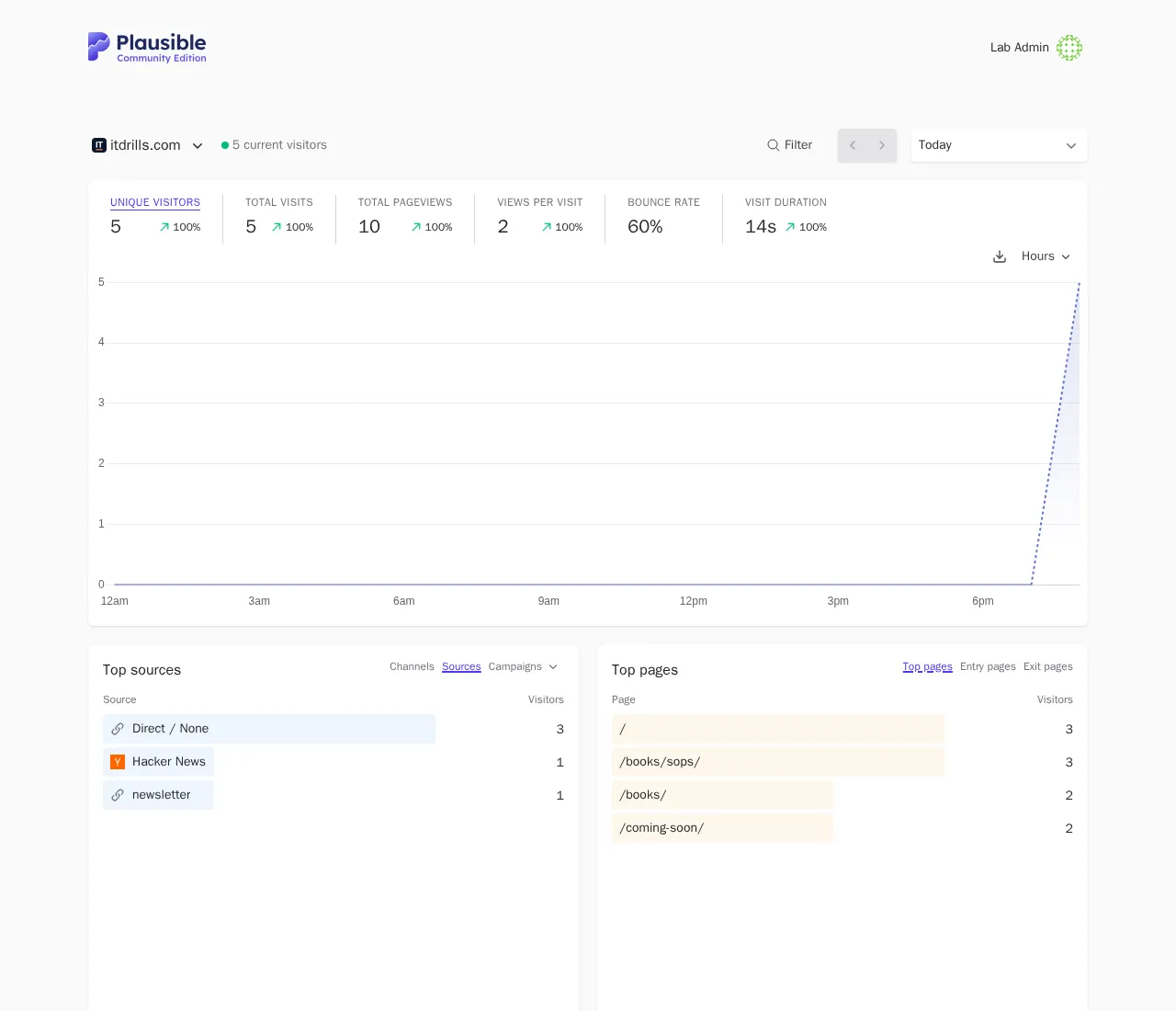
The dashboard needs no tricks – only the tracking script blocks automated browsers.
Save your progress? Sign up for free
Cleanup
Nothing. Snippet, visit script and events stay; Day 4 builds on them.
Interview Note
- Why does your Selenium/Playwright monitoring not count in
Plausible? The script stays silent when
navigator.webdriveris set, and the server drops HeadlessChrome as a bot. - How does Plausible know where a visitor comes from? The
referrer and
utm_…parameters of the first pageview of a session. - Why is the browser “(not set)”? An unknown user agent or one detected too slowly – detection has 200 ms.
Enterprise Note
- The snippet belongs in the central layout template, not in individual pages; in single-page apps the script counts navigations via the History API automatically.
- Extend the Content Security Policy:
script-srcandconnect-srcfor the Plausible host (or your own domain with a proxy, Day 4). - Define UTM conventions (lowercase, fixed sources), otherwise the
analysis frays into
Newsletter,newsletterandNL. - For the detection time limit, single-core performance is what counts: put Plausible on one fast core rather than many slow ones.