
Day 5: Goals, Events, Properties
Goal: You create the three kinds of goals – pageview with wildcard, custom event with a property, scroll depth –, trigger them on purpose and prove every conversion in ClickHouse. · Duration: approx. 75 min · Prerequisite: Day 4
Briefing
- A goal is a rule that Plausible lays over the stored events. The event is always stored; the goal only decides whether it shows up in the dashboard as a conversion – retroactively, too.
- Three kinds: Pageview (path,
*as a wildcard), Custom event (name fromplausible('Name')), Scroll depth (how far a page was scrolled). - Custom properties attach values to an event
(
props: {plan: 'pro'}). They only appear in the dashboard once the name has been enabled. - In CE you create goals, properties and sites in the UI – there is no Sites API. Funnels and revenue goals are missing in CE; you analyze sequences with SQL on Day 6.
 plausible('Signup', {props: {plan: 'pro'}}) ──► events_v2: name=Signup, meta plan=pro
 pageview /books/sops/                       ──► events_v2: name=pageview
 leaving the page after scrolling          ──► events_v2: name=engagement, scroll_depth
              goals (PostgreSQL) ─── laid over the events at query time ──► dashboard
Drill 1: What is already there
# on argo
cd ~/plausible/ce
docker compose exec -T plausible_db psql -U postgres -d plausible_db \
  -tAc "select id, event_name, page_path, scroll_threshold from goals order by id"
date -u '+%F %T' > ~/plausible/tag05-start
Expected:
1|404||-1
2|Outbound Link: Click||-1
3|File Download||-1
4|Form: Submission||-1
Plausible created four goals itself when the site was set up –
404 and three matching the checkboxes for the snippet (Day
1). The start time in tag05-start limits this day’s
analyses.
Save your progress? Sign up for free
Drill 2: A pageview goal with a wildcard
Every visit to a book page should count – /books/,
/books/sops/ and all future ones.
In the browser:
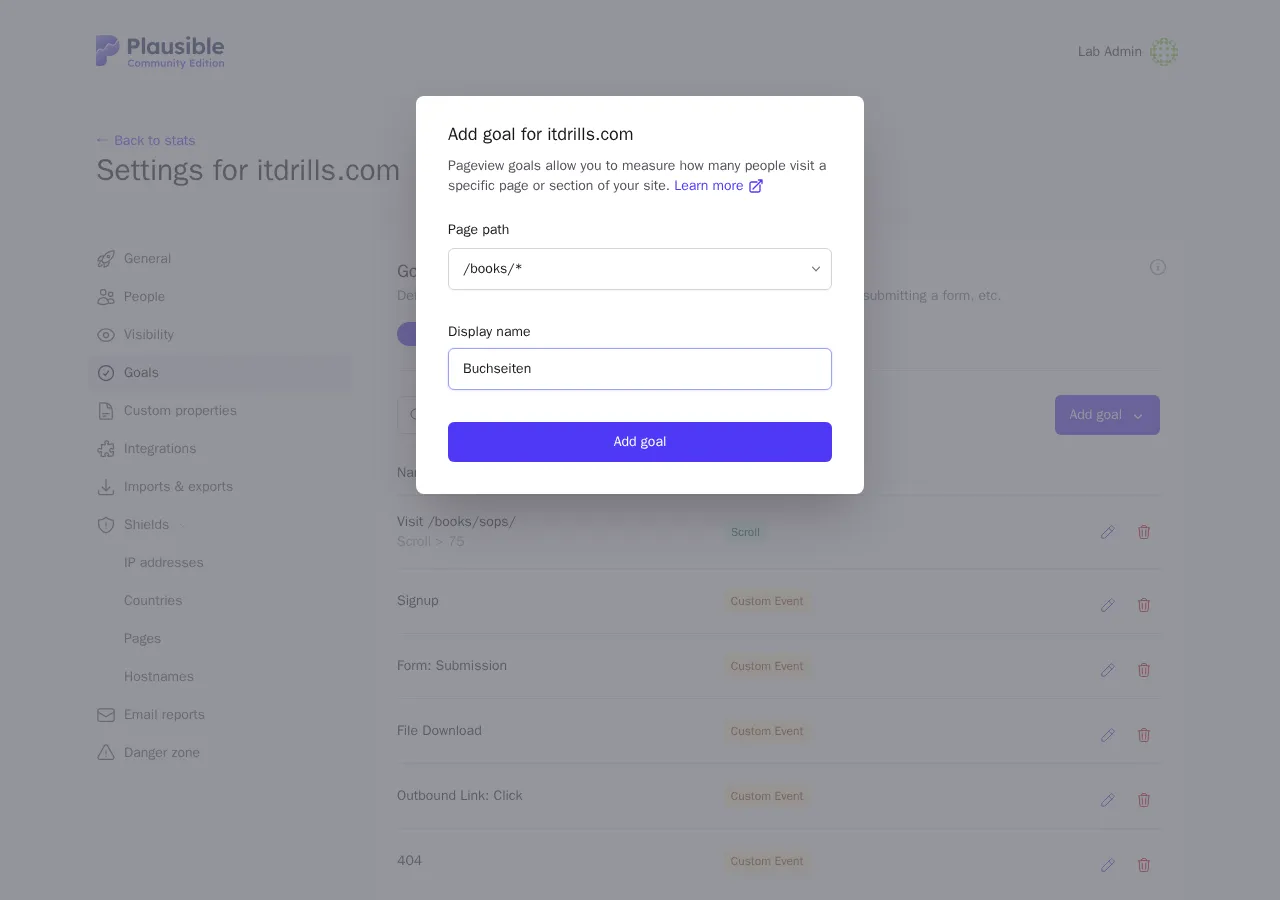
https://plausible.lab/itdrills.com/settings/goals →
Add goal → Pageview. Type
/books/* into the “Page path” field and pick the suggestion
**Create “/books/*“** – not /books/ from the list below it,
that would only be the one page. Display name Buchseiten
(”book pages”), Add goal.
Verify:
# on argo
cd ~/plausible/ce
docker compose exec -T plausible_db psql -U postgres -d plausible_db \
  -tAc "select page_path, display_name from goals where page_path is not null"
Expected:
/books/*|Buchseiten* stands for any number of characters within one path
segment, ** also across /. So
/books/* matches /books/sops/ but not
/books/sops/kapitel/1.
Save your progress? Sign up for free
Drill 3: A custom event with a property
The SOPS page gets two buttons that report Signup with
the chosen plan – and lots of text, so that there is something to scroll
in Drill 4.
# on argo
cd ~/plausible/site/books/sops
sed -i '/^<\/body><\/html>$/i <section style="height:3000px">Tag 0 bis 16.</section>' \
  index.html
sed -i "/^<\/body><\/html>\$/i <button id=\"pro\" onclick=\"plausible('Signup', \
{props: {plan: 'pro'}})\">Sign up (Pro)</button>" index.html
sed -i "/^<\/body><\/html>\$/i <button id=\"free\" onclick=\"plausible('Signup', \
{props: {plan: 'free'}})\">Sign up (Free)</button>" index.html
tail -4 index.html | cut -c1-80
Expected:
<section style="height:3000px">Tag 0 bis 16.</section>
<button id="pro" onclick="plausible('Signup', {props: {plan: 'pro'}})">Sign up (Pro)</
<button id="free" onclick="plausible('Signup', {props: {plan: 'free'}})">Sign up (Free
</body></html>
The filler text Tag 0 bis 16. means “Day 0 to 16.” In
the browser: Add goal → Custom event,
event name Signup (spelled exactly as in the code),
Add goal. Then Custom properties →
Add property, type plan and pick
Create “plan”, Add property.
Two visitors click – one on Pro, one on Free:
# on argo
cd ~/plausible/pw
UA="Mozilla/5.0 (X11; Linux x86_64) AppleWebKit/537.36 (KHTML, like Gecko)"
UA="$UA Chrome/140.0.0.0 Safari/537.36"
I=mcr.microsoft.com/playwright:v1.65.0-noble
for b in pro free; do
  docker run --rm --network host --user "$(id -u):$(id -g)" -e HOME=/tmp -e ECHT=1 \
    -e UA="$UA" -e IP=203.0.113.4$((${#b})) -v ~/plausible/pw:/pw -w /pw $I \
    node besuch.js https://itdrills.com/books/sops/ "klick:#$b" | grep Signup \
    | cut -c1-34
done
sleep 5
cd ~/plausible/ce
docker compose exec -T plausible_db psql -U postgres -d plausible_db \
  -tAc "select allowed_event_props from sites"
docker compose exec -T plausible_events_db clickhouse-client -d plausible_events_db \
  --query "select name, meta.key, meta.value from events_v2 where name = 'Signup'
           and timestamp >= '$(cat ~/plausible/tag05-start)' format TSV"
Expected:
-> {"n":"Signup","v":33,"u":"http
-> {"n":"Signup","v":33,"u":"http
{plan}
Signup  ['plan']    ['pro']
Signup  ['plan']    ['free']
${#b} is the length of the plan name (3 or 4) – that way
each visitor gets their own IP (203.0.113.43,
.44). The property is stored in the columns
meta.key and meta.value – even without
enabling it. allowed_event_props only determines what the
dashboard shows.
Save your progress? Sign up for free
Drill 4: How far was the page scrolled?
In the browser: Add goal → Scroll
depth, threshold 75, page path
/books/sops/, Add goal.
Scroll depth arrives with the engagement event, and the
script only sends that when the page becomes hidden – on a tab switch or
when leaving. For this, the visit script gets two commands:
scrollen (“scroll”) to the bottom and
wegklicken (“click away”, simulates a tab switch).
# on argo
cd ~/plausible/pw
sed -i "/else if (a === 'ignorieren')/i\\    else if (a === 'scrollen')\\
      await p.evaluate(() => window.scrollTo(0, document.body.scrollHeight));\\
    else if (a === 'wegklicken') await p.evaluate(() => {\\
      Object.defineProperty(document, 'visibilityState', { value: 'hidden' });\\
      document.dispatchEvent(new Event('visibilitychange'));\\
    });" besuch.js
grep -c "scrollen\|wegklicken" besuch.js
UA="Mozilla/5.0 (X11; Linux x86_64) AppleWebKit/537.36 (KHTML, like Gecko)"
UA="$UA Chrome/140.0.0.0 Safari/537.36"
docker run --rm --network host --user "$(id -u):$(id -g)" -e HOME=/tmp -e ECHT=1 \
  -e UA="$UA" -e IP=203.0.113.45 -v ~/plausible/pw:/pw -w /pw \
  mcr.microsoft.com/playwright:v1.65.0-noble \
  node besuch.js https://itdrills.com/books/sops/ scrollen wegklicken \
  | grep engagement | cut -c1-80
Expected:
2
-> {"n":"engagement","sd":100,"d":"itdrills.com","u":"https://itdrills.com/books/sops/"
sd is the scroll depth in percent, e (cut
off) the time the page was visible and in focus. The script only sends
engagement if the page was scrolled further than before or
at least three seconds have added up – visitors who just click through
generate none.
Save your progress? Sign up for free
Drill 5: The conversions
One more visitor who only looks at the book list, then the analysis – first the way the dashboard shows it, then in SQL.
# on argo
cd ~/plausible/pw
UA="Mozilla/5.0 (X11; Linux x86_64) AppleWebKit/537.36 (KHTML, like Gecko)"
UA="$UA Chrome/140.0.0.0 Safari/537.36"
docker run --rm --network host --user "$(id -u):$(id -g)" -e HOME=/tmp -e ECHT=1 \
  -e UA="$UA" -e IP=203.0.113.46 -v ~/plausible/pw:/pw -w /pw \
  mcr.microsoft.com/playwright:v1.65.0-noble \
  node besuch.js https://itdrills.com/books/ https://itdrills.com/coming-soon/ \
  >/dev/null
sleep 5
cd ~/plausible/ce
T=$(cat ~/plausible/tag05-start)
docker compose exec -T plausible_events_db clickhouse-client -d plausible_events_db \
  --query "select
    uniqExactIf(user_id, name = 'pageview' and match(pathname, '^/books/[^/]*/?\$'))
      as buchseiten,
    uniqExactIf(user_id, name = 'Signup') as signup,
    uniqExactIf(user_id, name = 'engagement' and pathname = '/books/sops/'
      and scroll_depth >= 75) as scroll75
    from events_v2 where timestamp >= '$T' format Vertical"
Expected:
Row 1:
──────
buchseiten: 4
signup:     2
scroll75:   1
The dashboard shows the same numbers for today under “Goal conversions” (there for the whole day, so possibly higher):
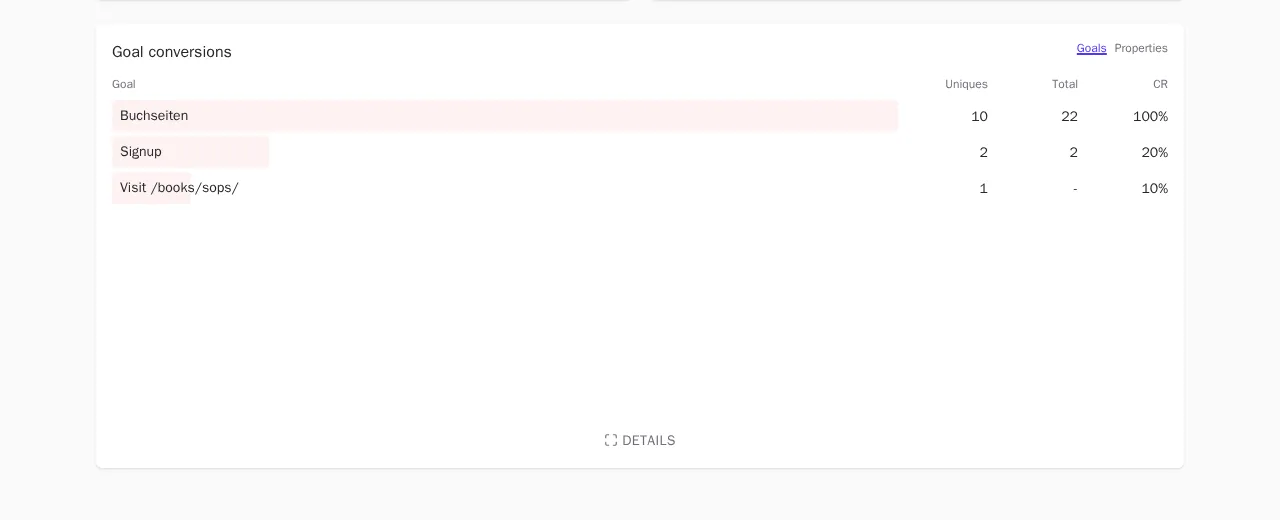
The SQL query is exactly what a goal does: a condition over events, counted by unique visitors. The conversion rate divides by all visitors in the period.
Save your progress? Sign up for free
Drill 6: The goal that never counts
Break it: A colleague adds a third button – with a lowercase event name.
# on argo
cd ~/plausible/site/books/sops
sed -i "/^<\/body><\/html>\$/i <button id=\"team\" onclick=\"plausible('signup', \
{props: {plan: 'team'}})\">Sign up (Team)</button>" index.html
cd ~/plausible/pw
UA="Mozilla/5.0 (X11; Linux x86_64) AppleWebKit/537.36 (KHTML, like Gecko)"
UA="$UA Chrome/140.0.0.0 Safari/537.36"
docker run --rm --network host --user "$(id -u):$(id -g)" -e HOME=/tmp -e ECHT=1 \
  -e UA="$UA" -e IP=203.0.113.47 -v ~/plausible/pw:/pw -w /pw \
  mcr.microsoft.com/playwright:v1.65.0-noble \
  node besuch.js https://itdrills.com/books/sops/ 'klick:#team' | grep -A1 signup \
  | cut -c1-34
Expected:
-> {"n":"signup","v":33,"u":"http
<- 202 gezählt
Symptom: gezählt (counted) – but under
“Goal conversions”, Signup stays at 2.
Investigate:
# on argo
cd ~/plausible/ce
docker compose exec -T plausible_events_db clickhouse-client -d plausible_events_db \
  --query "select name, count() from events_v2 where lower(name) = 'signup'
           and timestamp >= '$(cat ~/plausible/tag05-start)' group by name
           order by name format TSV"
Expected:
Signup  2
signup  1
Cause: Event names are case-sensitive. The event is
stored, but under a name no goal knows. Plausible points this out
itself: if you now choose Add goal → Custom
event, you get the dialog “We detected 1 custom event … Add 1
event” – and it lists signup. Helpful for finding the
problem, but not for fixing it.
Fix: Correct the code – do not create a second goal
signup, otherwise the analysis splits into two halves.
# on argo
cd ~/plausible/site/books/sops
sed -i "s/plausible('signup'/plausible('Signup'/" index.html
grep -c "plausible('Signup'" index.html
Expected:
3The misnamed event from before stays signup; a goal does
work retroactively, but only on the name it knows.
Save your progress? Sign up for free
Exercise: Speed Drills
- Show all goals with their type in one list. Target time: 20 s
- Show which
planvalues occurred today and how often. Target time: 40 s
Solution
# on argo
cd ~/plausible/ce
docker compose exec -T plausible_db psql -U postgres -d plausible_db -tAc "select
  coalesce(event_name, page_path), case when scroll_threshold > 0 then 'scroll'
  when page_path is not null then 'pageview' else 'event' end from goals order by id"
docker compose exec -T plausible_events_db clickhouse-client -d plausible_events_db \
  --query "select meta.value[indexOf(meta.key, 'plan')] as plan, count()
           from events_v2 where has(meta.key, 'plan')
           and timestamp >= '$(cat ~/plausible/tag05-start)'
           group by plan order by plan format TSV"
Expected:
404|event
Outbound Link: Click|event
File Download|event
Form: Submission|event
/books/*|pageview
Signup|event
/books/sops/|scroll
free    1
pro 1
team    1
Save your progress? Sign up for free
Checkpoint
# on argo
cd ~/plausible/ce
docker compose exec -T plausible_db psql -U postgres -d plausible_db \
  -tAc "select count(*) from goals"
docker compose exec -T plausible_db psql -U postgres -d plausible_db \
  -tAc "select allowed_event_props from sites"
grep -c "scrollen" ~/plausible/pw/besuch.js
Expected:
7
{plan}
1
Challenge
What share of the visitors who came via the newsletter campaign today signed up? Generate two campaign visitors (one clicks Pro, one does not) and calculate the rate in SQL.
Hint: utm_campaign is stored as a
session attribute on every event of the session.
Solution
# on argo
cd ~/plausible/pw
UA="Mozilla/5.0 (X11; Linux x86_64) AppleWebKit/537.36 (KHTML, like Gecko)"
UA="$UA Chrome/140.0.0.0 Safari/537.36"
U="https://itdrills.com/books/sops/?utm_source=newsletter&utm_campaign=november"
I=mcr.microsoft.com/playwright:v1.65.0-noble
docker run --rm --network host --user "$(id -u):$(id -g)" -e HOME=/tmp -e ECHT=1 \
  -e UA="$UA" -e IP=203.0.113.48 -v ~/plausible/pw:/pw -w /pw $I \
  node besuch.js "$U" 'klick:#pro' >/dev/null
docker run --rm --network host --user "$(id -u):$(id -g)" -e HOME=/tmp -e ECHT=1 \
  -e UA="$UA" -e IP=203.0.113.49 -v ~/plausible/pw:/pw -w /pw $I \
  node besuch.js "$U" >/dev/null
sleep 5
cd ~/plausible/ce
docker compose exec -T plausible_events_db clickhouse-client -d plausible_events_db \
  --query "select uniqExact(user_id) as besucher,
    uniqExactIf(user_id, name = 'Signup') as signups,
    round(signups / besucher * 100) as quote
    from events_v2 where utm_campaign = 'november' format TSV"
Expected:
2 1 50(besucher means “visitors”, quote “rate”.)
In the dashboard: set the filter “Campaign is november”, and “Goal
conversions” shows the same rate.
Save your progress? Sign up for free
Cleanup
Nothing. Goals, property and buttons stay; Day 6 analyzes them via the API.
Interview Note
- What is the difference between an event and a goal in Plausible? Events are always stored; a goal is a rule on top of them and works retroactively.
- Why does a custom property not show up in the dashboard? It has not been enabled (Custom properties) – but it is stored anyway.
- How does Plausible measure scroll depth? Via the
engagementevent when the page is left or hidden.
Enterprise Note
- An event catalog (name, trigger, properties, owner) prevents
Signup/signup/sign_up– and belongs in the website’s repo. - No personal data in properties: no email addresses, no IDs that can be linked to a person.
- Revenue goals and funnels only exist in the cloud version. In CE, funnel-like sequences can be analyzed with SQL on ClickHouse (Day 6); revenue you would have to send yourself as a property – or you switch deliberately.
- Creating goals retroactively works – but events that were never sent cannot be recovered. Better send events generously and define goals later.